Most indicators tell you what the market is doing right now. The Alligator indicator tells you what the market is about to do. Developed by legendary trader Bill Williams, this indicator uses three smoothed moving averages to visualize the market as a living creature – one that sleeps during boring ranges, wakes up when volatility returns, and feeds aggressively during strong trends. It’s a brilliantly intuitive way to answer the question every trader struggles with: is this market worth trading right now, or should I sit on my hands?
In this guide, we’ll cover how the alligator indicator MT4 setup works, what each line represents, the four market phases it identifies, and a practical strategy for trading only when conditions are in your favor.
What is the Alligator Indicator?
The Alligator indicator was created by Bill Williams and introduced in his 1995 book “Trading Chaos.” Williams was a trader and psychologist who developed a full suite of indicators based on his chaos theory approach to markets. The Alligator became arguably his most popular creation because of its elegant simplicity.
At its core, the indicator consists of three smoothed moving averages, each with a different period and a forward shift:
- Jaw (Blue Line): 13-period SMMA shifted 8 bars forward – the slowest line, representing the Alligator’s jaw
- Teeth (Red Line): 8-period SMMA shifted 5 bars forward – the medium line
- Lips (Green Line): 5-period SMMA shifted 3 bars forward – the fastest line, closest to current price
Williams chose these specific parameters based on his research into fractal geometry and market structure. The forward shifts are what make this indicator unique among moving average systems – they create a deliberate offset that helps filter whipsaws and makes the phase transitions more visually distinct.
The Alligator works on the same principle as any multi-moving-average system, but the biological metaphor makes it far easier to read at a glance. Rather than trying to interpret three abstract lines, you’re watching an animal cycle through natural states – and that makes the decision process almost instinctive once you’ve spent time with it.
How the Alligator Indicator Works on MT4
When you apply the Bill Williams Alligator to a chart in MT4, you’ll see three colored lines weaving through the price action. The relationship between these lines tells you which of four market phases the instrument is currently in:
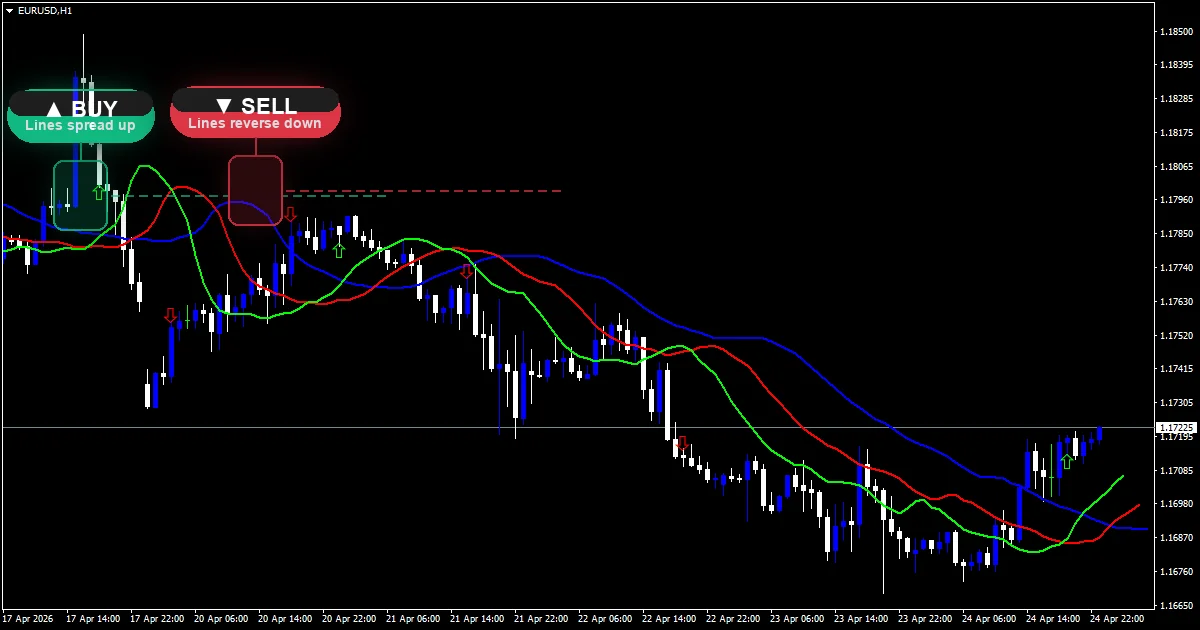
Sleeping (Lines Intertwined): When the Jaw, Teeth, and Lips are twisted together, crossing back and forth with no clear separation, the Alligator is sleeping. This means the market is in a range with no directional momentum. This is your signal to stay out. Williams estimated the market ranges 70-85% of the time, and the sleeping Alligator keeps you from bleeding capital during those dead zones.
Awakening (Lines Start Separating): After a period of sleep, the lines begin to untangle and spread apart. The Lips move first, followed by the Teeth, then the Jaw. This is an early warning that a trend may be forming. Experienced traders start watching for entry signals during this phase.
Eating (Lines Spread Wide and Ordered): When all three lines are running in parallel with clear separation – Lips on top, then Teeth, then Jaw for an uptrend (reversed for a downtrend) – the Alligator is eating. This is the high-probability trading phase. The wider the separation between the lines, the stronger the trend. You want to be in a position during this phase and riding the move.
Sated (Lines Start Converging): After feeding, the lines begin to converge again. The Lips slow down first, then the Teeth catch up. This signals that the trend is losing steam and the Alligator is getting full. This is your cue to tighten stops or take profits rather than opening new positions.
The beauty of this system is its filtering power. By only trading during the eating phase, you naturally avoid the choppy, sideways markets that destroy accounts using simpler moving average crossover systems.
Key Features
- Non-repainting: all three lines lock in their values once each candle closes
- Built into MT4 under the Bill Williams indicator category – no custom file needed
- Clearly identifies four distinct market phases through line arrangement
- Default settings work out of the box with no optimization required
- Effective across all major and minor currency pairs
- Lightweight – adds minimal load even when applied to multiple charts simultaneously
Best Settings for Alligator Indicator
Bill Williams was adamant that the default settings should not be changed, and for good reason – the parameters were derived from his fractal geometry research and work together as a system. That said, here’s how different trading styles can adapt:
| Parameter | Default (Recommended) | Aggressive Scalping | Conservative Swing |
|---|---|---|---|
| Jaw Period | 13 (shift 8) | 13 (shift 8) | 13 (shift 8) |
| Teeth Period | 8 (shift 5) | 8 (shift 5) | 8 (shift 5) |
| Lips Period | 5 (shift 3) | 5 (shift 3) | 5 (shift 3) |
| Best Timeframe | H1 – H4 | M15 – M30 | H4 – D1 |
| MA Method | Smoothed | Smoothed | Smoothed |
Notice that the period and shift values stay the same across all styles. The adaptation happens through timeframe selection, not parameter tweaking. This is unusual among indicators and is one of the Alligator’s strengths – you don’t need to waste hours optimizing settings for each pair or timeframe.
Recommended starting point: Apply the default settings on the H1 chart. This gives you enough trades to stay engaged while filtering out most of the noise that plagues lower timeframes.
Pros and Cons
| Pros | Cons |
|---|---|
| Intuitive visual metaphor makes trend phases easy to identify instantly | Lagging by design – the forward shifts mean it confirms trends rather than predicting them |
| Excellent at keeping you out of ranging, choppy markets | Misses the very beginning of trends due to the smoothing and shift |
| Default settings work across all pairs and timeframes without optimization | Can produce late signals on lower timeframes where moves are shorter |
| Pairs naturally with other Bill Williams indicators (Fractals, AO, AC) | Not effective as a standalone system – needs confirmation for entries |
How to Install Alligator Indicator on MT4
The Alligator is built into MetaTrader 4. No download or custom file installation is required.
Step 1: Open your MT4 terminal and select the chart you want to analyze.
Step 2: Click Insert in the top menu bar, then navigate to Indicators > Bill Williams > Alligator.
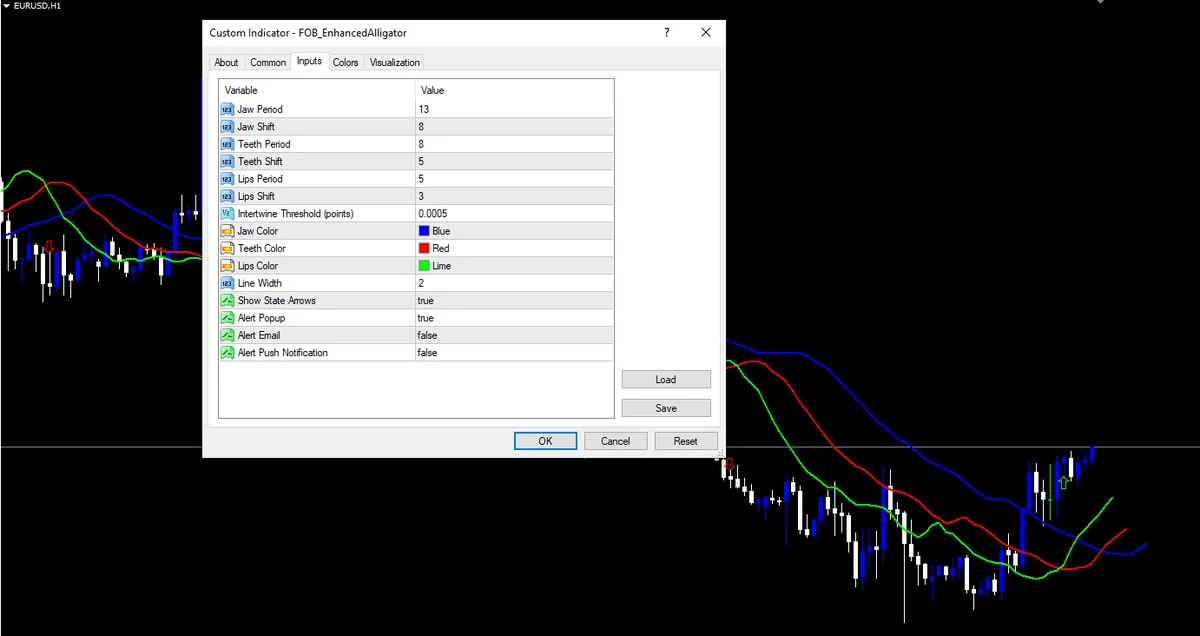
Step 3: In the parameters window, you’ll see the default values already populated: Jaw period 13 with shift 8, Teeth period 8 with shift 5, Lips period 5 with shift 3. Leave these at their defaults.
Step 4: On the Colors tab, confirm Jaw is set to blue, Teeth to red, and Lips to green. Increase line width to 2 for better visibility on your chart.
Step 5: Click OK. The three Alligator lines now appear on your chart, immediately showing you the current market phase.
Tip: Right-click the chart and go to Template > Save Template to preserve this setup. Name it something like “Alligator Setup” so you can apply it to any chart with one click.
Trading Strategy Using Alligator Indicator
Here’s a proven trend-following strategy that trades only when the Alligator is eating – the highest-probability phase. This works best on H1 and H4 timeframes.
Setup: Apply the Alligator indicator with default settings. Optionally add the MACD indicator (12, 26, 9) as a momentum confirmation filter.
Buy Signal:
1. Wait for the Alligator to wake up from a sleeping phase – the lines begin to separate
2. Confirm the eating phase: Lips (green) is above Teeth (red), and Teeth is above Jaw (blue) – all three lines are in proper bullish order
3. Price is trading above all three lines
4. Enter long when a bullish candle closes above the Lips line after the lines have clearly separated
5. Optional confirmation: MACD histogram is positive and rising
Sell Signal:
1. Wait for the Alligator to wake up from a sleeping phase
2. Confirm the eating phase: Lips (green) is below Teeth (red), and Teeth is below Jaw (blue) – all three lines in proper bearish order
3. Price is trading below all three lines
4. Enter short when a bearish candle closes below the Lips line after clear separation
5. Optional confirmation: MACD histogram is negative and falling
Stop Loss: Place the stop on the opposite side of the Jaw (blue) line. The Jaw is the slowest line and acts as the last line of defense for the trend.
Take Profit: Trail your stop along the Teeth (red) line. Exit the trade when a candle closes beyond the Teeth line against your position. This keeps you in strong trends while getting you out quickly when momentum fades.
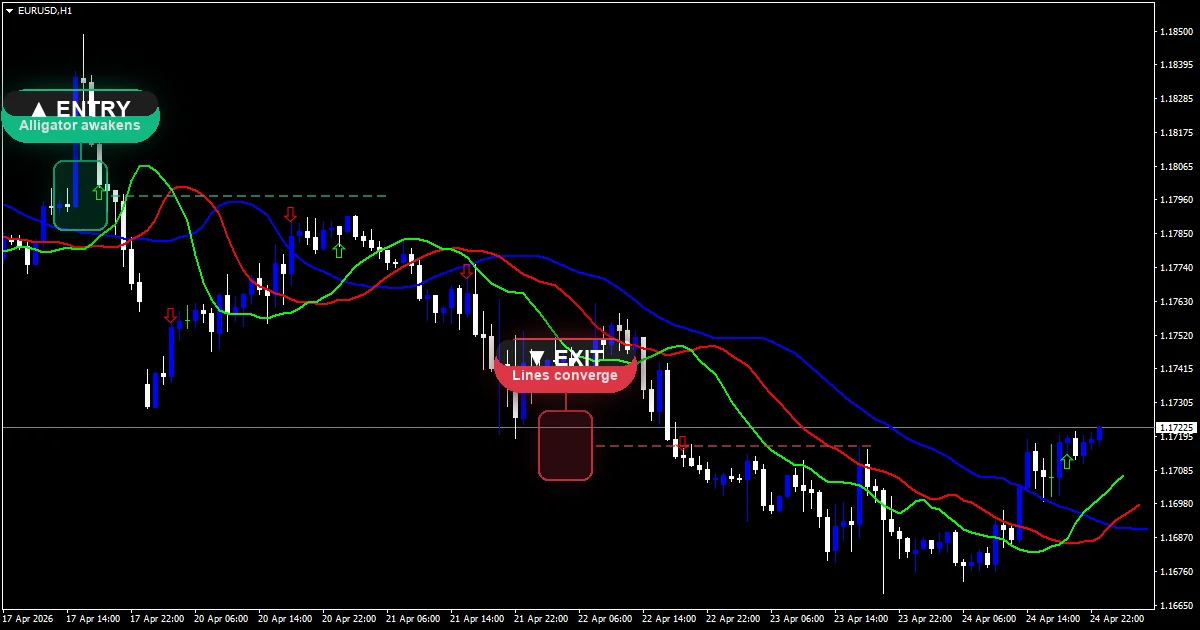
Critical rule: Never trade when the Alligator is sleeping. If the lines are intertwined and crossing each other, close your charts and wait. This single rule will save you from the majority of losing trades that come from trying to trade directionless markets.
Alligator Indicator vs Ichimoku Cloud
Both the Alligator and Ichimoku Cloud use multiple lines to analyze trend direction, but they approach the problem very differently:
| Feature | Alligator Indicator | Ichimoku Cloud |
|---|---|---|
| Lines | 3 smoothed moving averages | 5 lines including 2 that form a cloud |
| Primary Use | Trend phase identification and filtering | Comprehensive trend, momentum, and support/resistance analysis |
| Forward Projection | Lines shifted forward by fixed bars | Cloud (Kumo) projected 26 periods ahead |
| Ranging Market Filter | Excellent – sleeping phase clearly signals no-trade zones | Moderate – flat cloud suggests ranging but less visually obvious |
| Learning Curve | Low – the biological metaphor is intuitive | High – five lines with Japanese names takes time to master |
| Best For | Traders who want a clear go/no-go signal | Traders who want a complete analysis system in one indicator |
| Repainting | No | No |
Verdict: The Alligator is the better choice if your primary goal is knowing when to trade and when to stay out. Its ranging market filter is superior to Ichimoku’s, and it’s far simpler to learn. Choose Ichimoku if you want a more comprehensive tool that also provides support/resistance levels and forward-looking analysis. Some traders use both – the Alligator for phase filtering and Ichimoku for target identification on trades that pass the Alligator’s filter.
Frequently Asked Questions
Is the Alligator indicator free on MT4?
Yes. The Alligator is built into every copy of MetaTrader 4 under the Bill Williams indicator category. No download or purchase is needed. Enhanced versions with phase transition alerts and trend strength coloring are available as free downloads here on ForexOBroker.
Does the Alligator indicator repaint?
No. The Jaw, Teeth, and Lips values are locked in once each candle closes. The forward shifts are applied at calculation time, so historical lines never move. This makes the Alligator fully reliable for backtesting.
What timeframe works best with the Alligator indicator?
Bill Williams designed the Alligator for the daily chart, but H1 and H4 work well for active traders. Avoid M1 and M5 – the smoothing and forward shifts need room to develop meaningful phases. Most traders find H1 to be the sweet spot between signal quality and trade frequency.
Can I use the Alligator indicator on MT5?
Yes. The Alligator is built into MT5 under the same Bill Williams indicator category with identical default settings and behavior. No adjustments are needed.
What is the difference between Alligator and Ichimoku Cloud?
The Alligator uses three smoothed moving averages to identify four market phases (sleeping, awakening, eating, sated), while Ichimoku uses five lines including a forward-projected cloud for comprehensive trend and support/resistance analysis. The Alligator is simpler and better at filtering ranging markets. Ichimoku provides more depth but has a steeper learning curve.
Download Enhanced Alligator Indicator for MT4 – Free
While the standard Alligator is built into MT4, our enhanced version adds features that the default lacks:
- Phase transition alerts – popup, email, and push notifications when the Alligator shifts between sleeping, awakening, eating, and sated phases
- Trend strength coloring – lines change intensity based on separation distance
- Multi-timeframe display – see the H4 Alligator phase on your H1 chart
Platform: MT4 (Build 1000+)
File type: .ex4
File size: 14 KB
Version: 1.8
Last updated: March 2026
Download the Alligator Indicator – Free Instant Access
No payment. No catch. Enter your email below and the Alligator Indicator file lands in your inbox within 60 seconds. Here’s everything you get:
- The non-repainting Alligator Indicator file (.ex4) – install in 30 seconds
- Step-by-step installation guide with chart screenshots
- Best-performing settings for scalping, day trading, and swing trading
- The exact entry and exit rules Dom uses in live trading
- Weekly trading insights from a developer with 16+ years of market experience
100% free forever. Your email is safe – we never sell, share, or spam. Unsubscribe with one click anytime.
By downloading, you agree to receive trading tips and indicator updates from ForexOBroker. Unsubscribe anytime.
Overall Rating: 4.4/5
| Category | Rating |
|---|---|
| Accuracy | 4.3/5 |
| Ease of Use | 4.8/5 |
| Features | 4.2/5 |
| Value | 4.5/5 |
Related Indicators
- Moving Average Indicator MT4 – The foundational trend indicator that the Alligator builds upon with its three smoothed MAs
- Ichimoku Cloud Indicator MT4 – A more comprehensive multi-line trend system with forward-projected support and resistance
- ADX Indicator MT4 – Measures trend strength to confirm when the Alligator’s eating phase has real momentum
- MACD Indicator MT4 – Pairs well with the Alligator for momentum confirmation on entries
- See all Trend Indicators – Browse our complete trend indicator collection
Trading forex involves significant risk of loss and is not suitable for all investors. Past performance is not indicative of future results. The indicators provided on ForexOBroker are for educational purposes only. Always use proper risk management and never trade with money you cannot afford to lose.
