An Ichimoku cloud that adapts to volatility, with every setup scored and its plan drawn.
Kumo Forge Pro stretches and shortens the Tenkan, Kijun and Span B periods as volatility changes, scores every setup out of 100 on eight factors (RSI can be added as a ninth), and prints five kinds of signal on closed bars: TK crosses, Kijun bounces, cloud-edge bounces, Kumo breakouts and their retests. Each one comes with an entry, a stop and three targets, and a 28-row dashboard reads the market and three higher timeframes for you. One purchase includes both the .ex4 and the .ex5.
- Decided on closed bars. Once a plate or a marker prints, it stays where it is.
- Measured, not promised: on the 16 MetaTrader 5 charts we captured, 70 to 124 signals per 1,000 bars at the default settings, 4 to 20 of them TK crosses.
- MetaTrader 4 and 5 builds and a PDF manual for each, one-time $47.
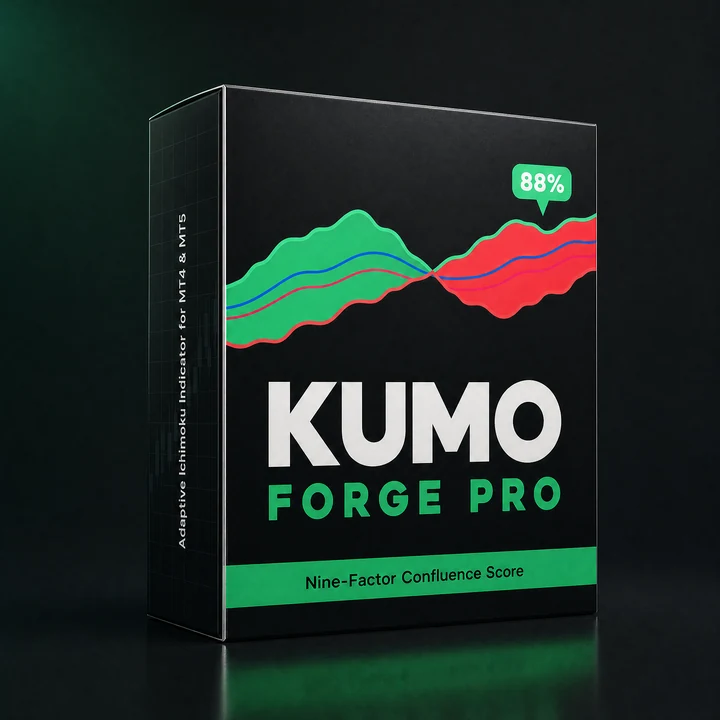
Schematic of the rule with an example score, not a capture: the periods move with volatility, the factors give the score, and the plate prints on the closed bar with the entry, the stop and targets at 1.5, 2.5 and 4.0 times the risk (the defaults). The real charts are further down the page.
Measured on these markets
Runs on
 MetaTrader 4
 MetaTrader 5
The cloud shows you a lot. It does not tell you how much of it agrees, or where you are wrong.
Ichimoku is one of the few indicators that gives you trend, momentum, support and resistance in one picture, and one of the hardest to read quickly. A Tenkan and Kijun cross looks the same whether price is above a thick, rising cloud with the Chikou clear of old price, or inside a thin, flat cloud on a quiet afternoon. The fixed 9, 26 and 52 periods react the same way to a calm session and to a fast one. And once you are in, the cloud says nothing about where to take profit.
Kumo Forge Pro keeps the Ichimoku you know and adds three things. In Adaptive mode the periods follow volatility: shorter when the market is moving fast, longer when it is quiet. Every setup is scored out of 100 on eight factors (RSI is an optional ninth), so a TK cross with everything behind it and one with nothing behind it no longer look alike, and Min Confluence Score decides how much a signal needs. And every signal comes with its own plan: the entry, a stop at the cloud edge, the Kijun or two ATRs, and three targets at multiples of that risk, drawn the moment it prints.
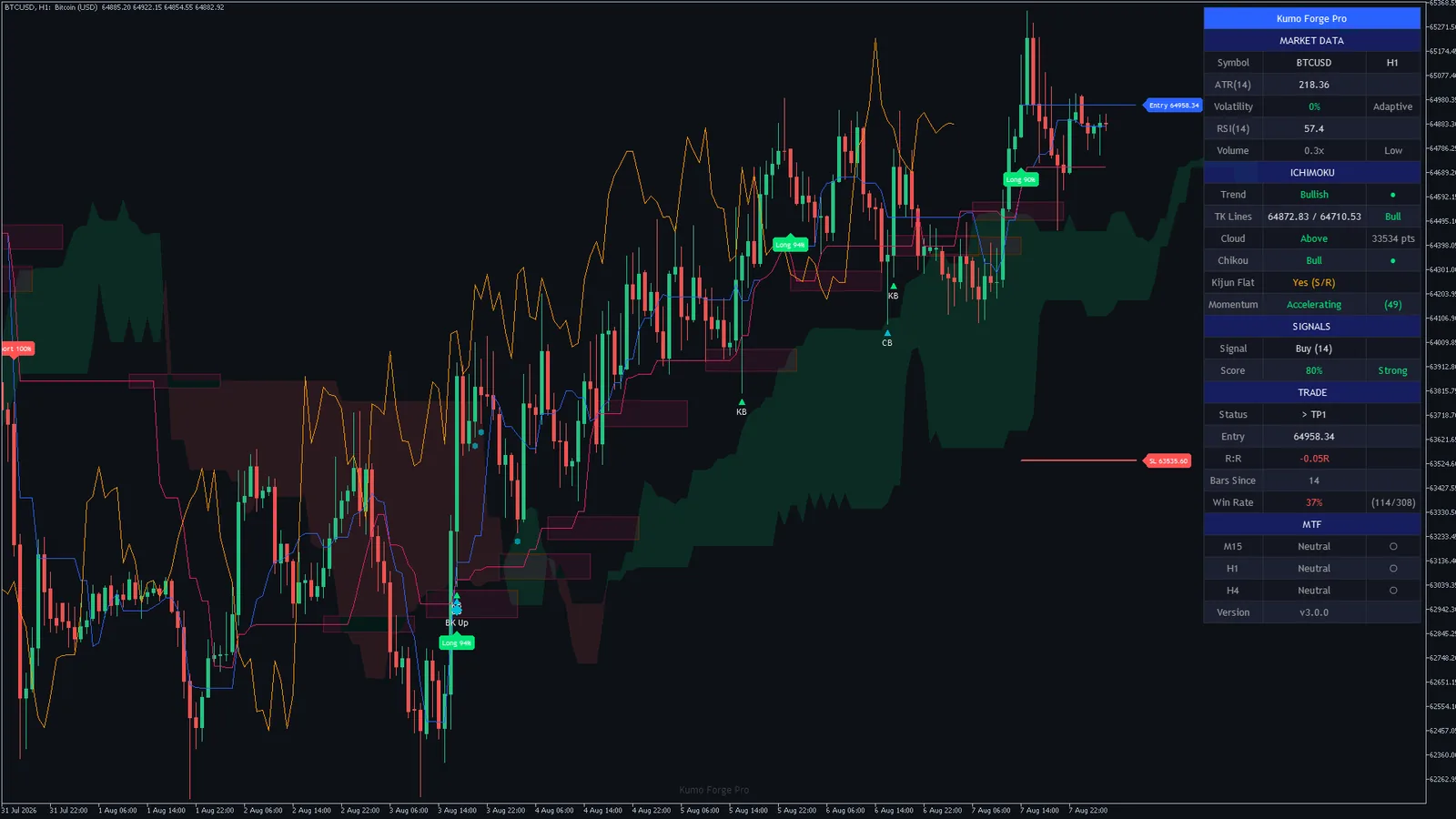
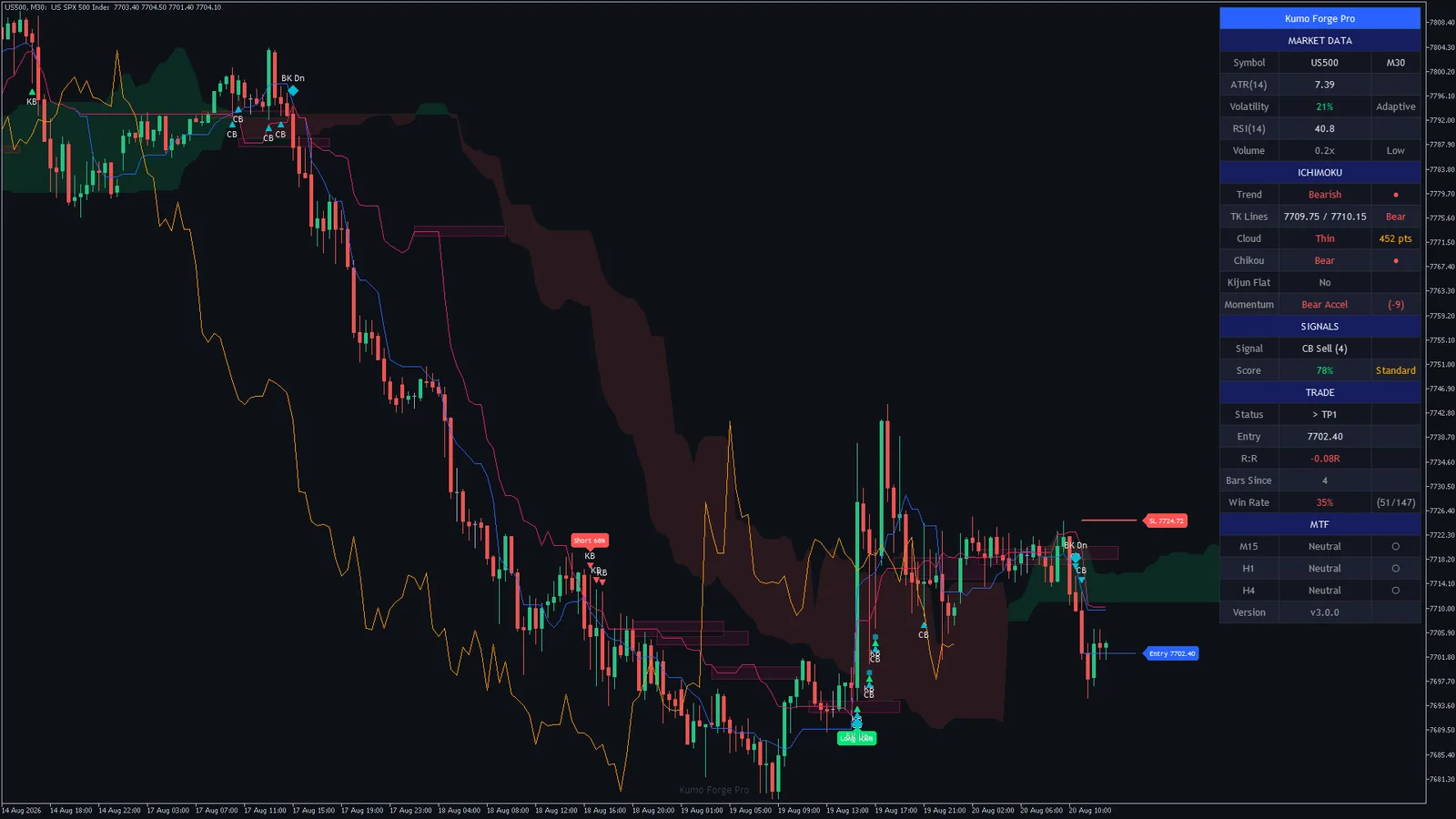
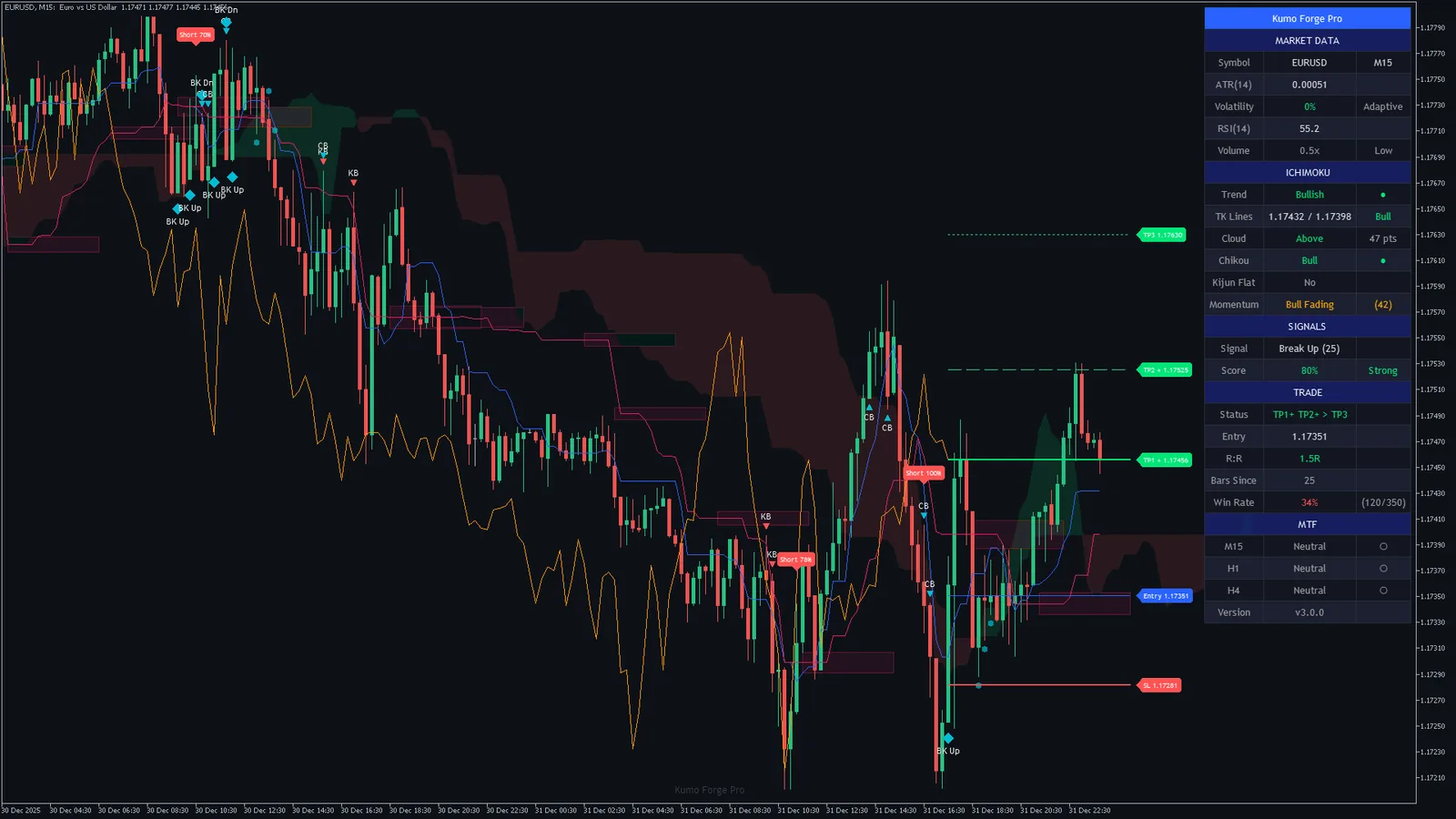
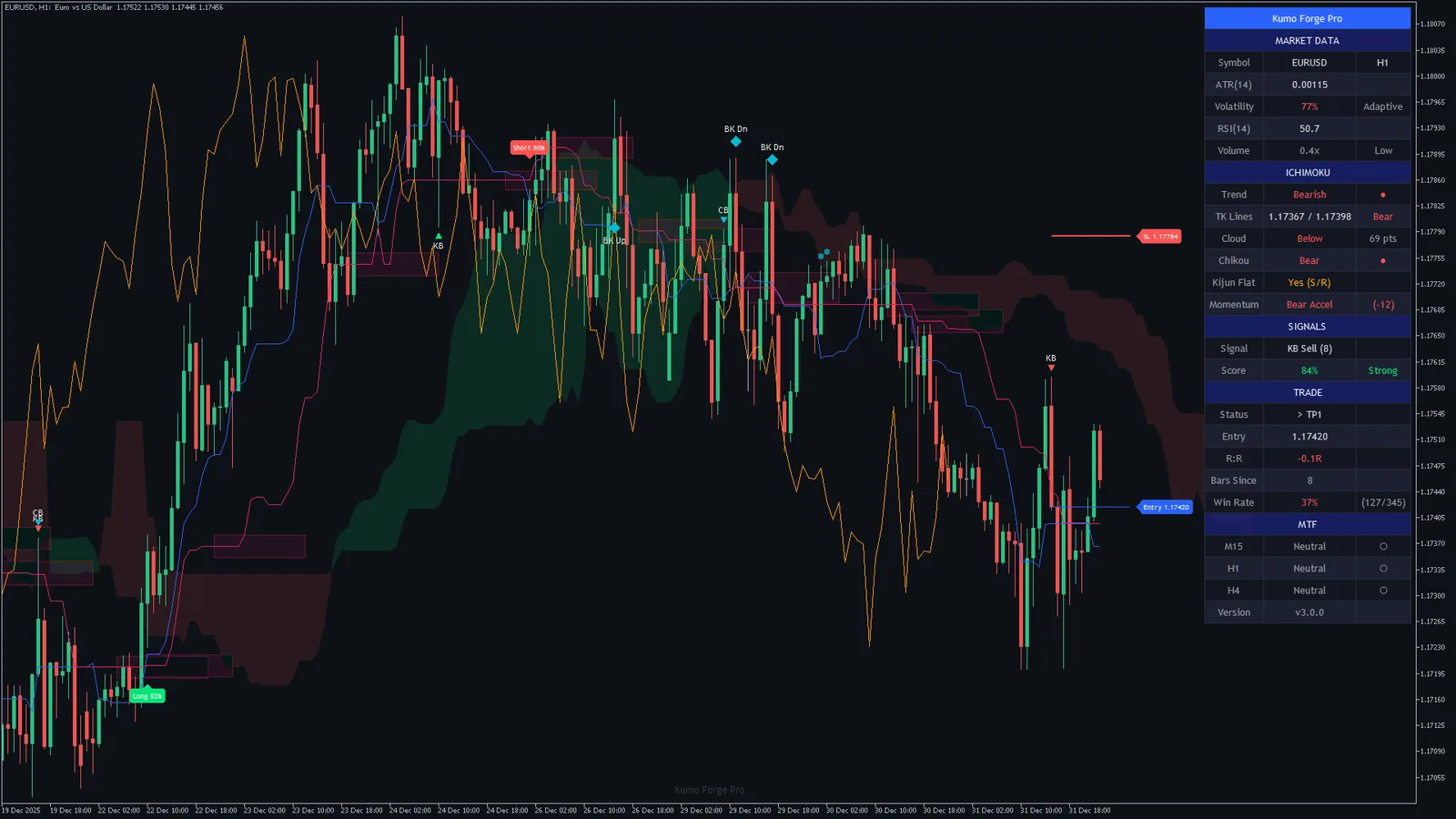
Read the charts, not the promise. Every chart on this page is a real MetaTrader capture of the shipped build at its default settings, and every number in the frequency tables was counted on those charts. Nothing is drawn in by hand. Click any chart to open it full size.
Signals per 1,000 bars on 16 MetaTrader 5 charts, by type and by Min Confluence Score
Signals on the last 1,000 closed bars of each chart. The first table uses the default inputs; the second shows what raising Min Confluence Score does to the signal types that use it. These tell you how busy a chart will be, not how many signals work out.
| Market | Chart | TK cross | Kijun bounce | Cloud-edge bounce | Kumo breakout | Retest |
|---|---|---|---|---|---|---|
| EURUSD | M1516 Dec to 31 Dec 2025 | |||||
| EURUSD | H13 Nov to 31 Dec 2025 | |||||
| GBPUSD | M302 Dec to 31 Dec 2025 | |||||
| USDJPY | H110 Jul to 8 Sep 2026 | |||||
| AUDUSD | H110 Jul to 8 Sep 2026 | |||||
| USDCAD | M3010 Aug to 8 Sep 2026 | |||||
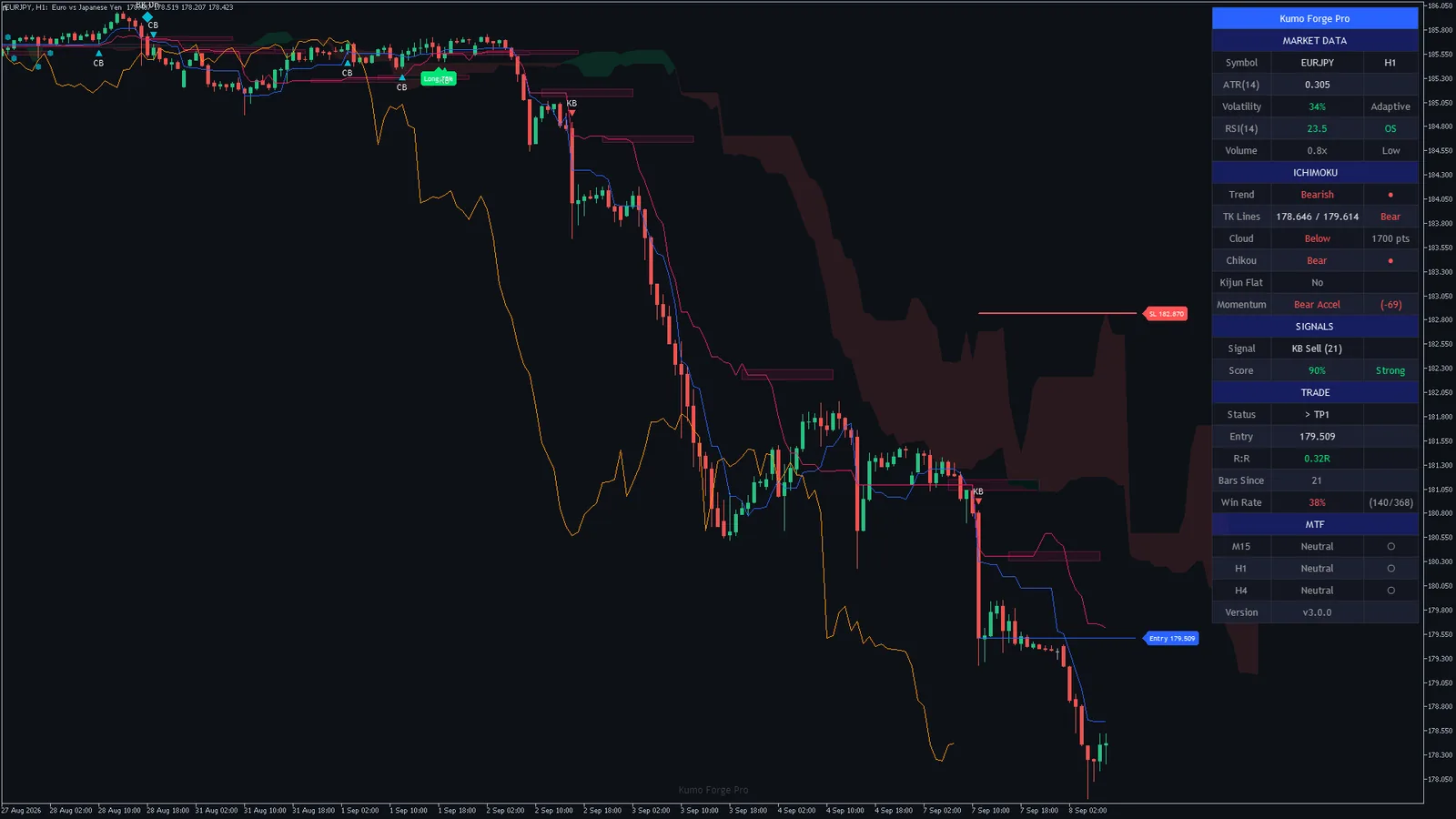
| EURJPY | H110 Jul to 8 Sep 2026 | |||||
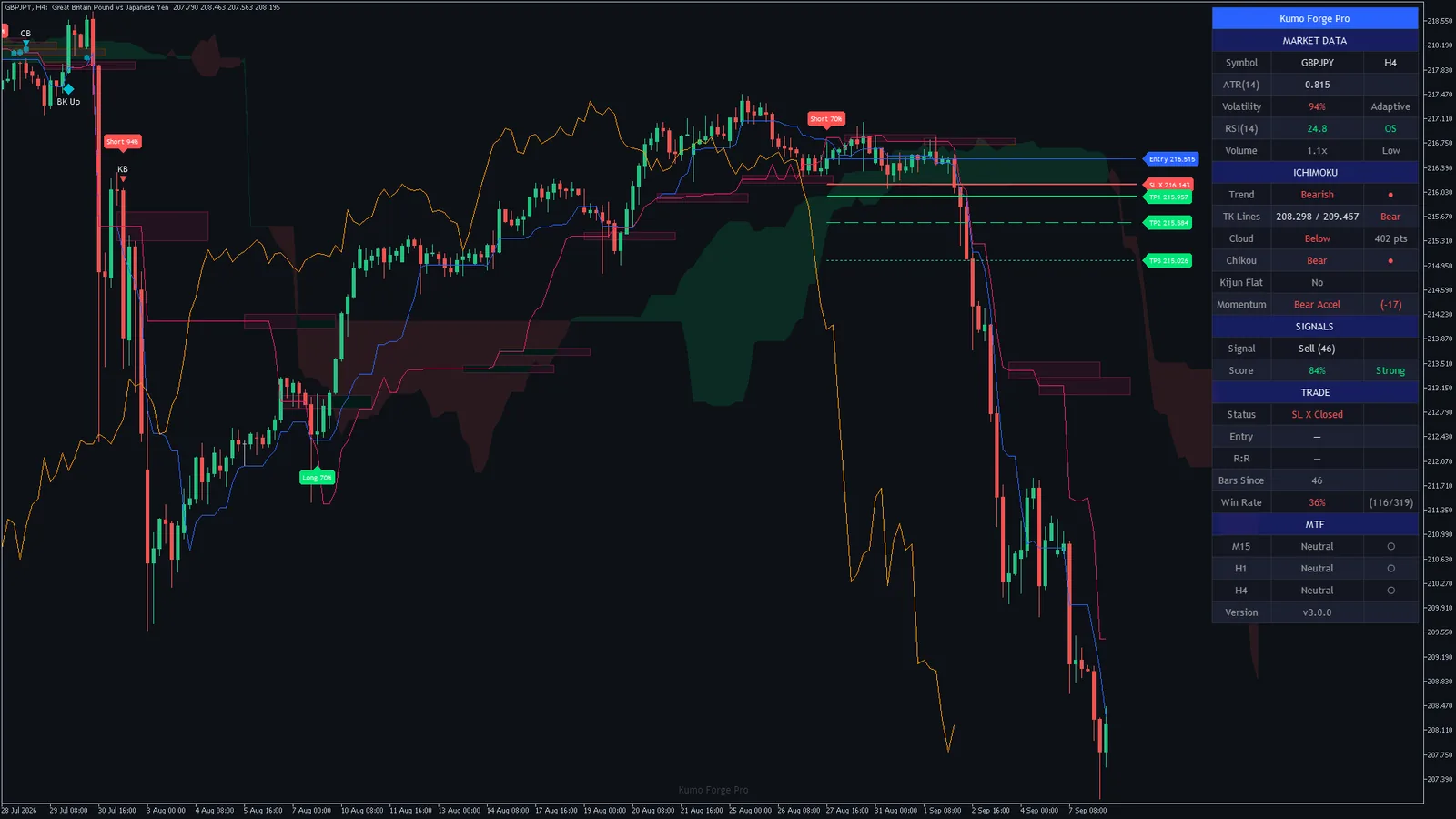
| GBPJPY | H416 Jan to 8 Sep 2026 | |||||
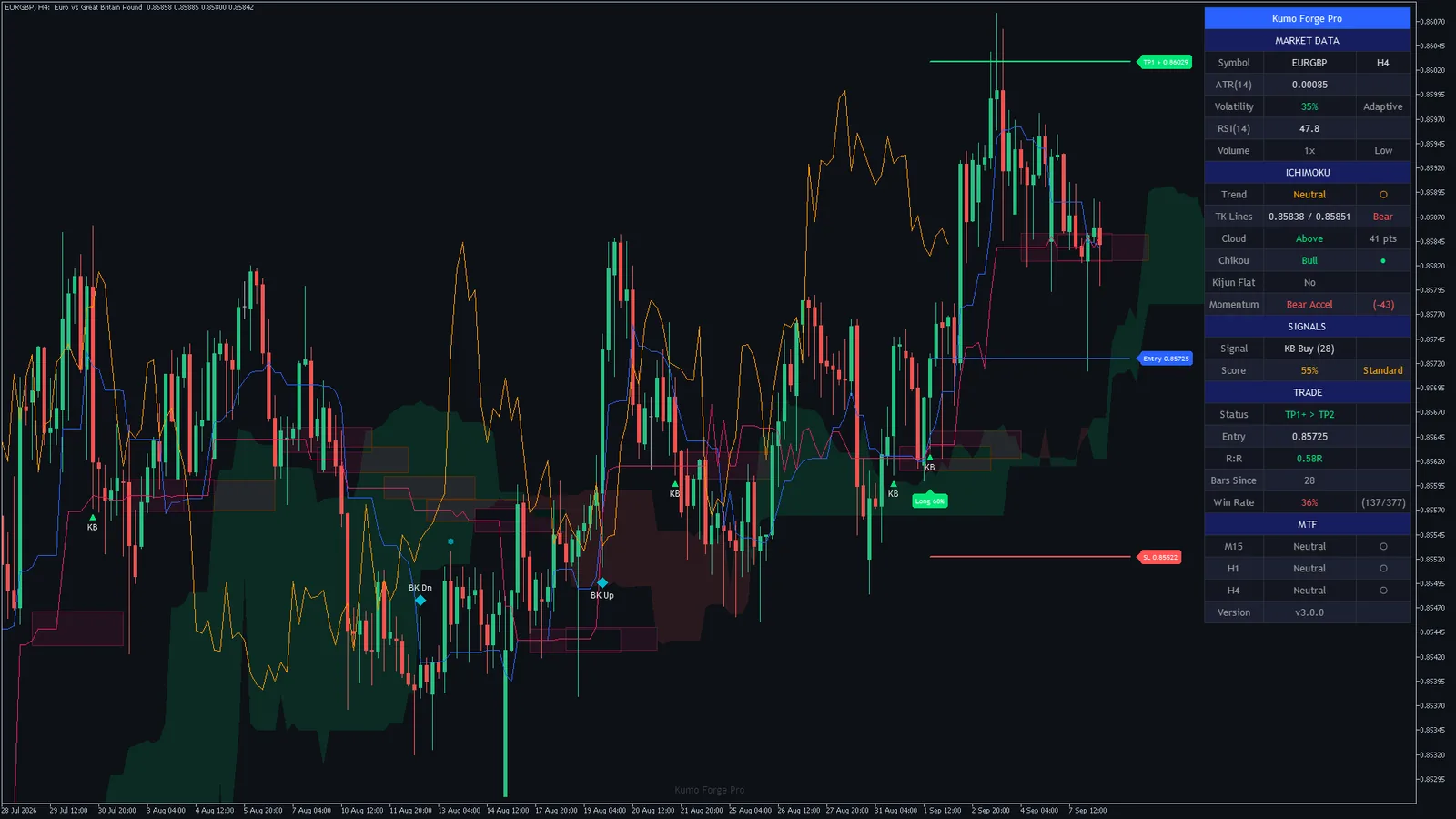
| EURGBP | H416 Jan to 8 Sep 2026 | |||||
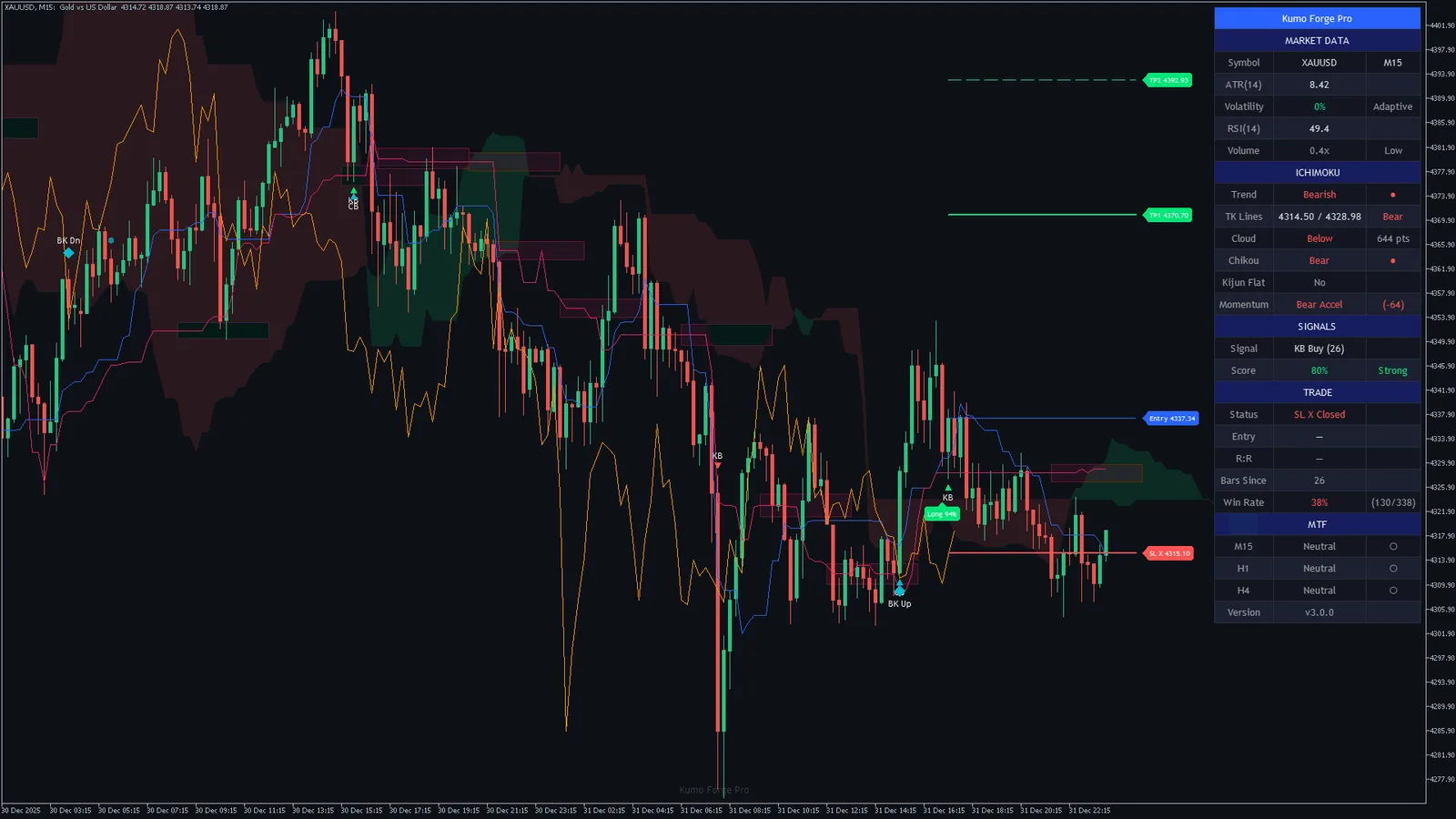
| Gold (XAUUSD) | M1515 Dec to 31 Dec 2025 | |||||
| Gold (XAUUSD) | H130 Oct to 31 Dec 2025 | |||||
| Gold (XAUUSD) | H412 May to 31 Dec 2025 | |||||
| Bitcoin (BTCUSD) | H126 Jun to 8 Aug 2026 | |||||
| Bitcoin (BTCUSD) | H422 Feb to 8 Aug 2026 | |||||
| S&P 500 (US500) | M3021 Jul to 20 Aug 2026 | |||||
| S&P 500 (US500) | H119 Jun to 20 Aug 2026 |
| Market | Chart | Min Score 40 | Min Score 50 | Min Score 60 | Min Score 80 |
|---|---|---|---|---|---|
| EURUSD | M15 | ||||
| EURUSD | H1 | ||||
| GBPUSD | M30 | ||||
| USDJPY | H1 | ||||
| AUDUSD | H1 | ||||
| USDCAD | M30 | ||||
| EURJPY | H1 | ||||
| GBPJPY | H4 | ||||
| EURGBP | H4 | ||||
| Gold (XAUUSD) | M15 | ||||
| Gold (XAUUSD) | H1 | ||||
| Gold (XAUUSD) | H4 | ||||
| Bitcoin (BTCUSD) | H1 | ||||
| Bitcoin (BTCUSD) | H4 | ||||
| S&P 500 (US500) | M30 | ||||
| S&P 500 (US500) | H1 |
What these tables admit: across all 16 MetaTrader 5 charts the default settings gave, per 1,000 bars, TK cross 4 to 20; Kijun bounce 16 to 34; Cloud-edge bounce 12 to 38; Kumo breakout 11 to 31; Retest 4 to 26. The scored signal types gave Min Score 40: 41 to 87; Min Score 50: 41 to 87; Min Score 60: 39 to 81; Min Score 80: 26 to 54. Between 38 and 80 percent of the TK crosses scored 80 or more, which is what the Strong alert reports. Fewer signals is not the same as better signals: a score says how much agreed at that bar, not whether the move that followed was worth taking, and the charts below show both kinds.
26 real MetaTrader charts at default settings
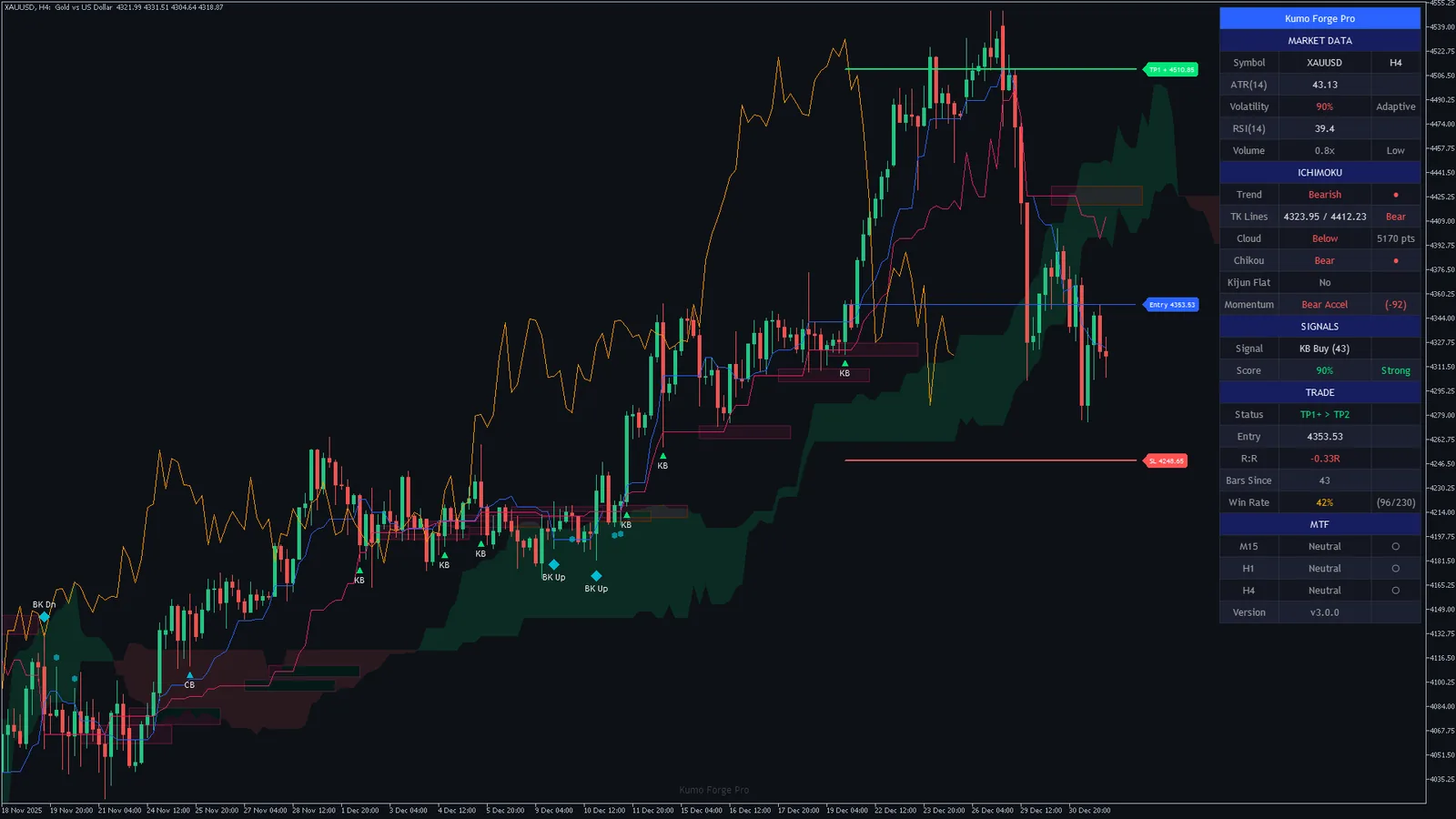
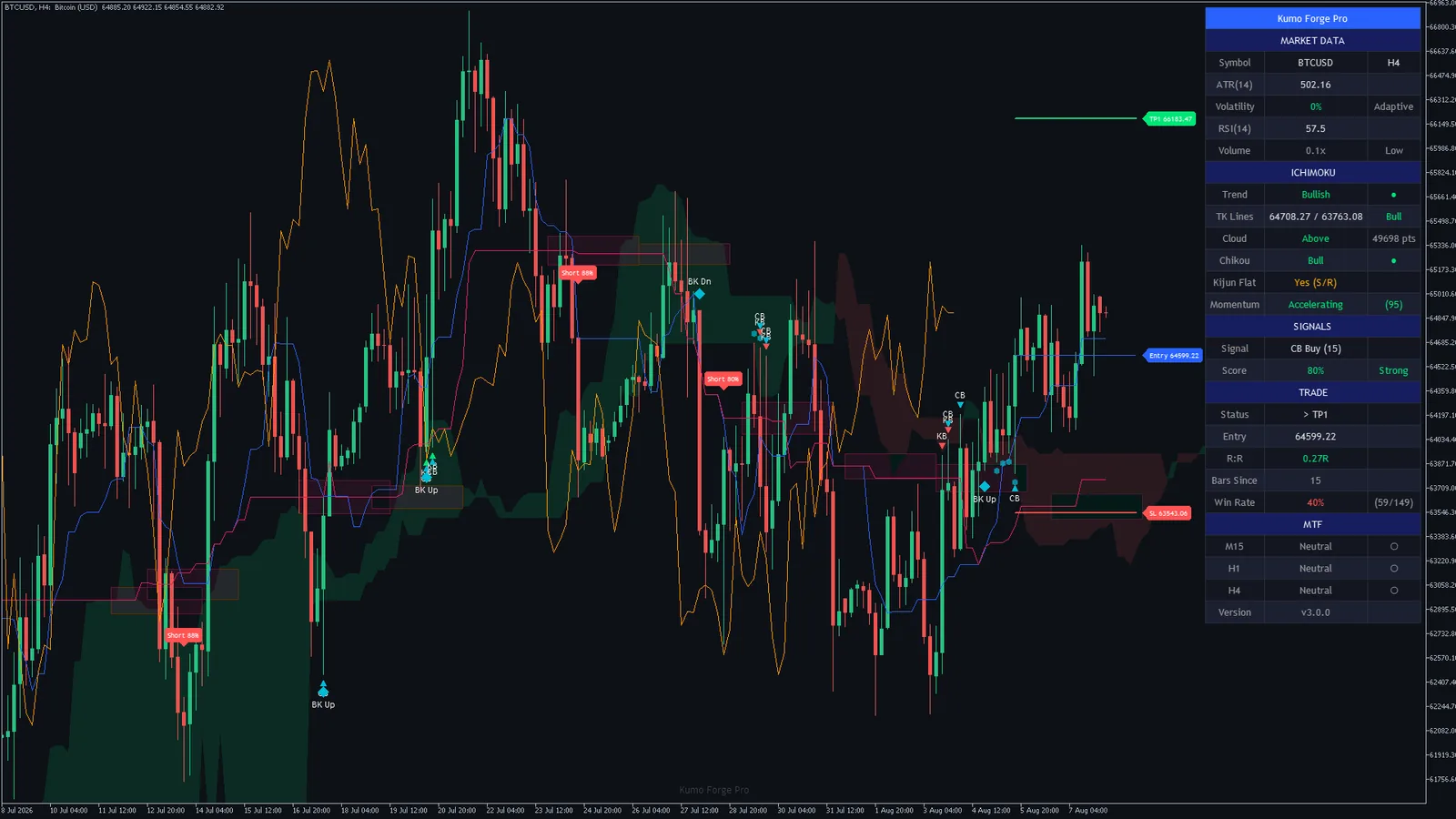
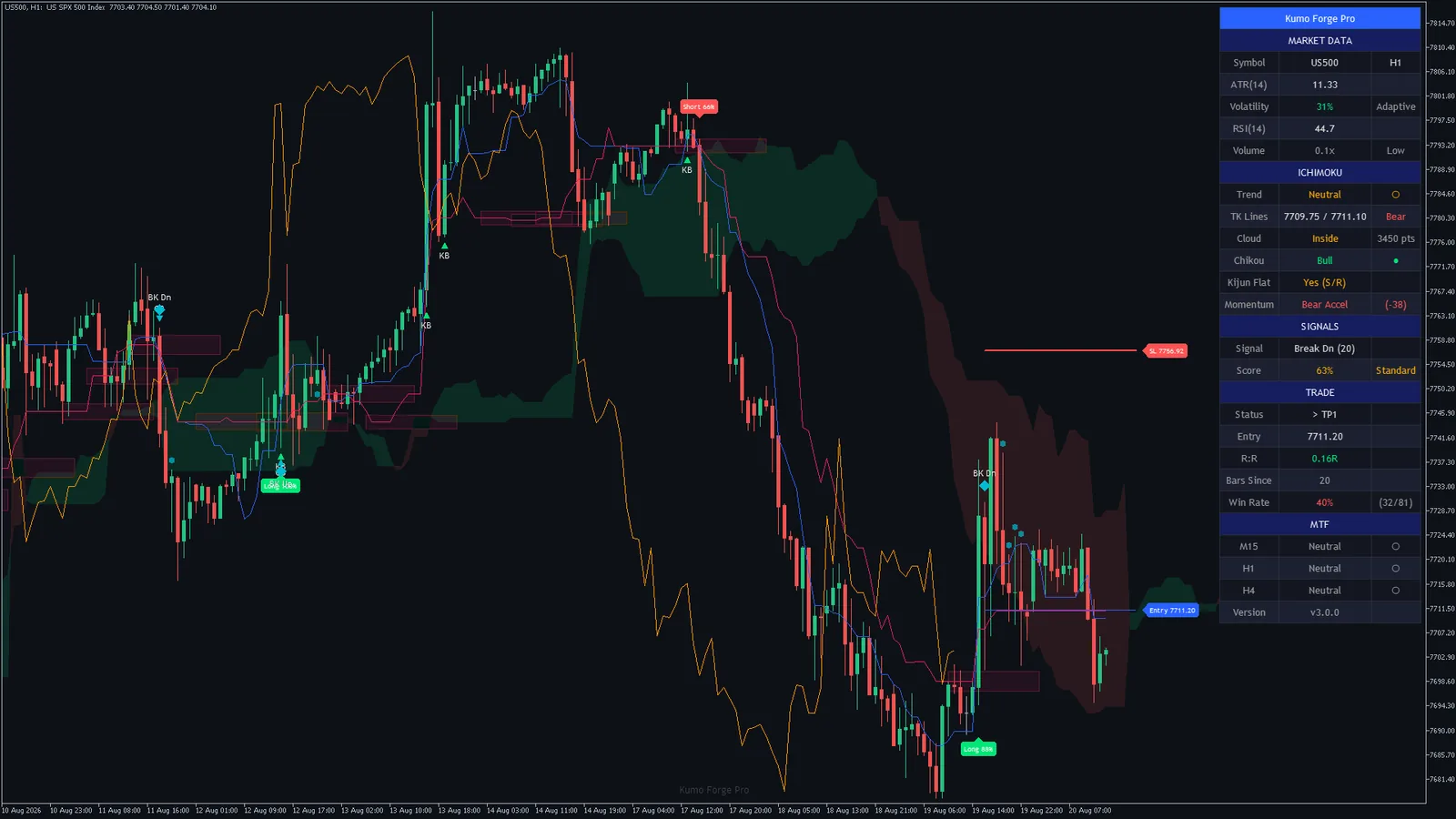
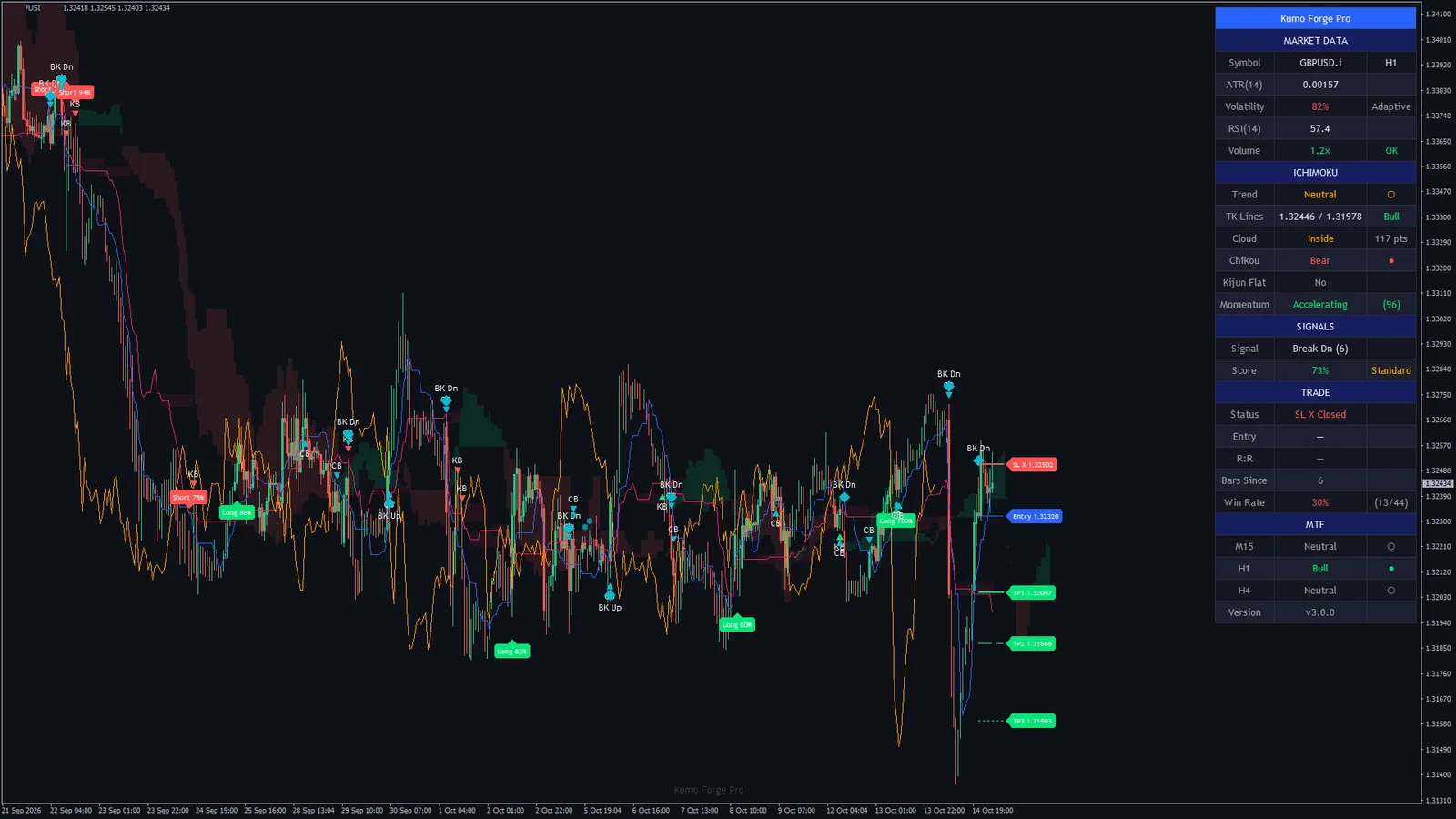
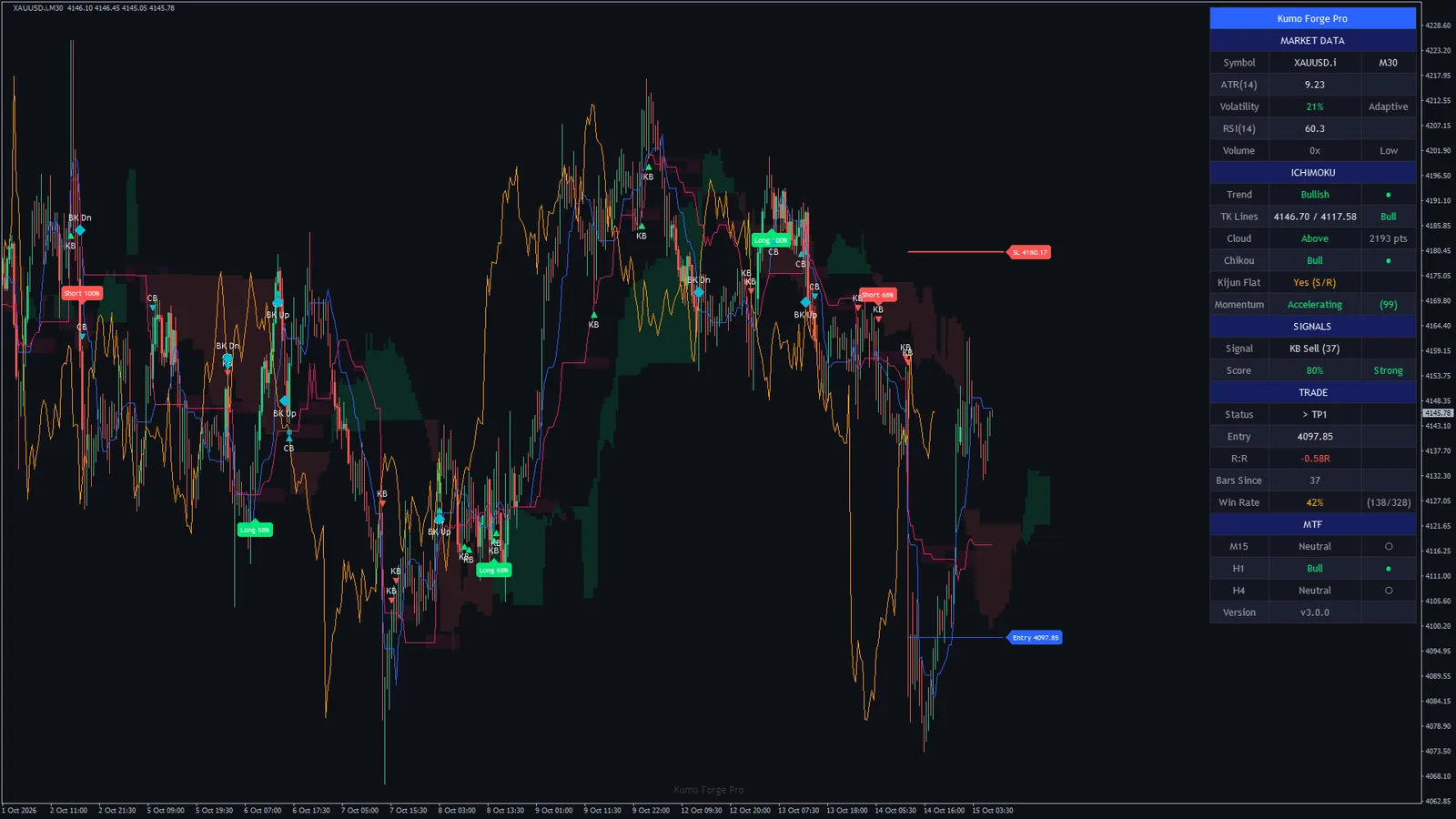
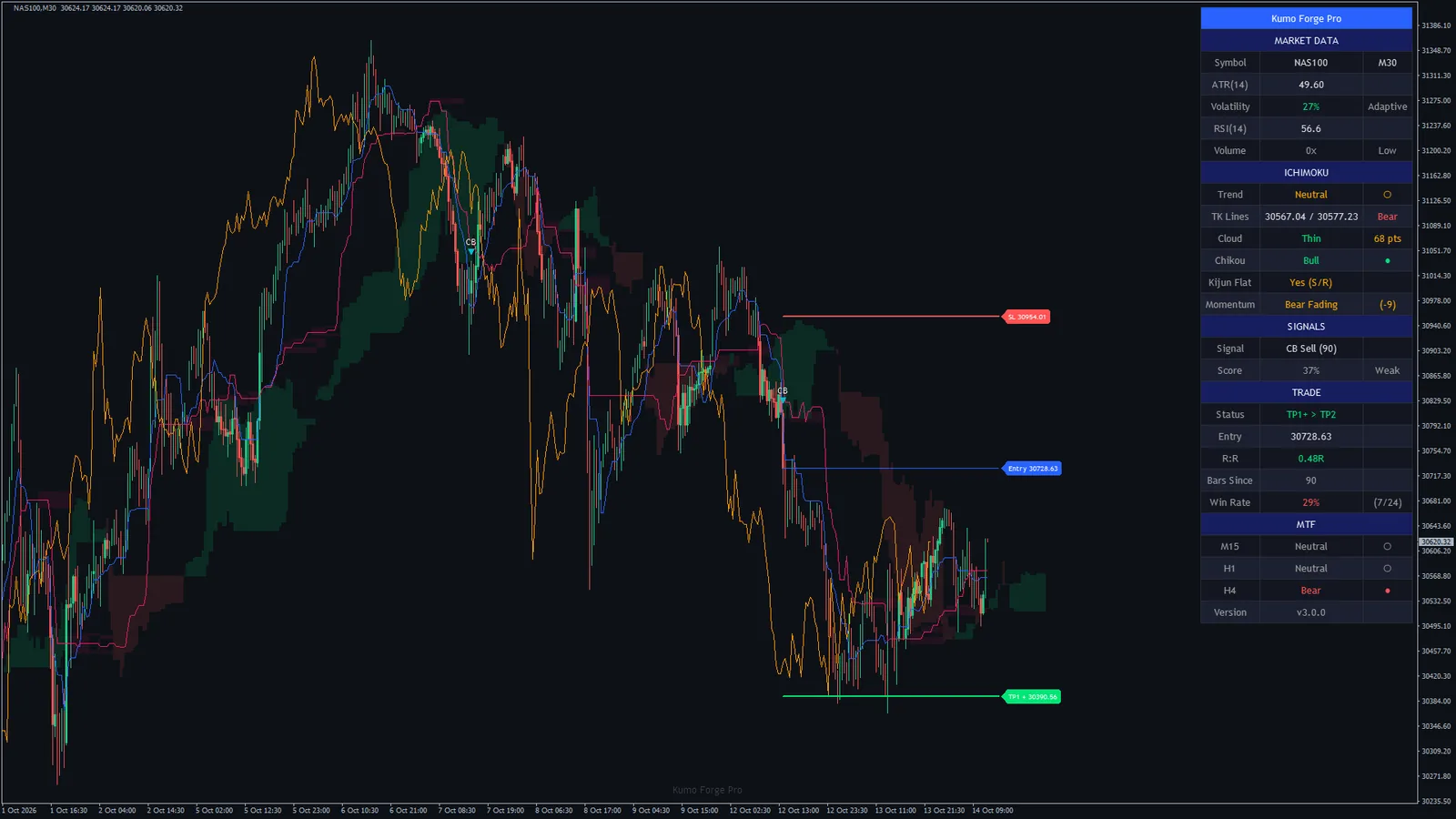
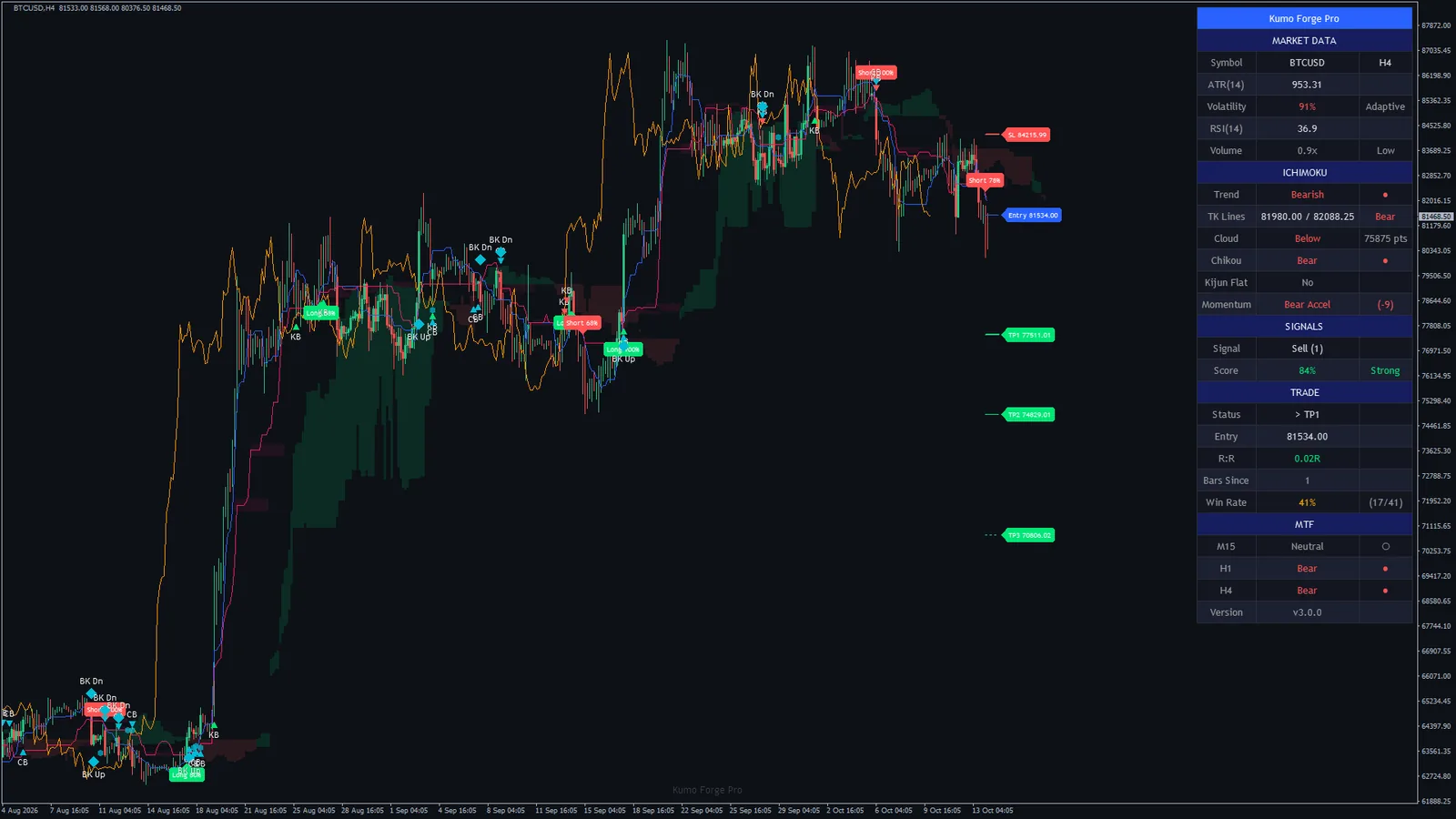
Each one was saved by MetaTrader itself from a chart of the shipped build, with the indicator attached exactly as you would attach it: the cloud and its projection, the Tenkan, Kijun and Chikou lines, the signal plates and markers, the support and resistance boxes, the levels of the newest trade and the dashboard. The charts were picked by market and timeframe, not by how the last signal turned out. Click any chart to open it full size.
Page updated 22 October 2026 · charts captured 14 October 2026 (MetaTrader 5) and 15 October 2026 (MetaTrader 4) · MetaTrader 5 build 6230 on the Capital Point Trading demo server, MetaTrader 4 build 1479 on the Blueberry Markets demo server · default inputs
MetaTrader 4 chartEURUSD H1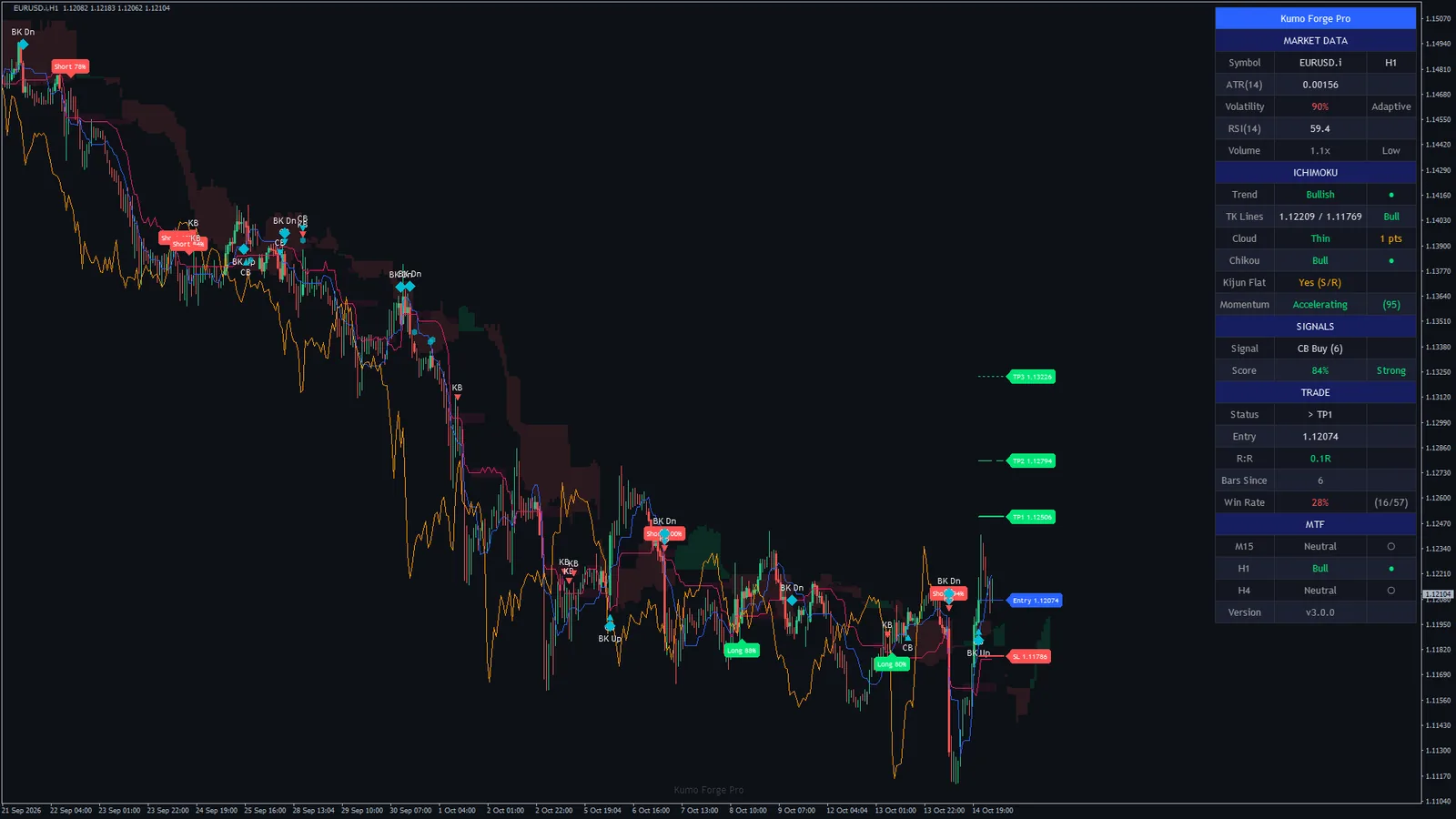 MetaTrader 5 chartGold H1
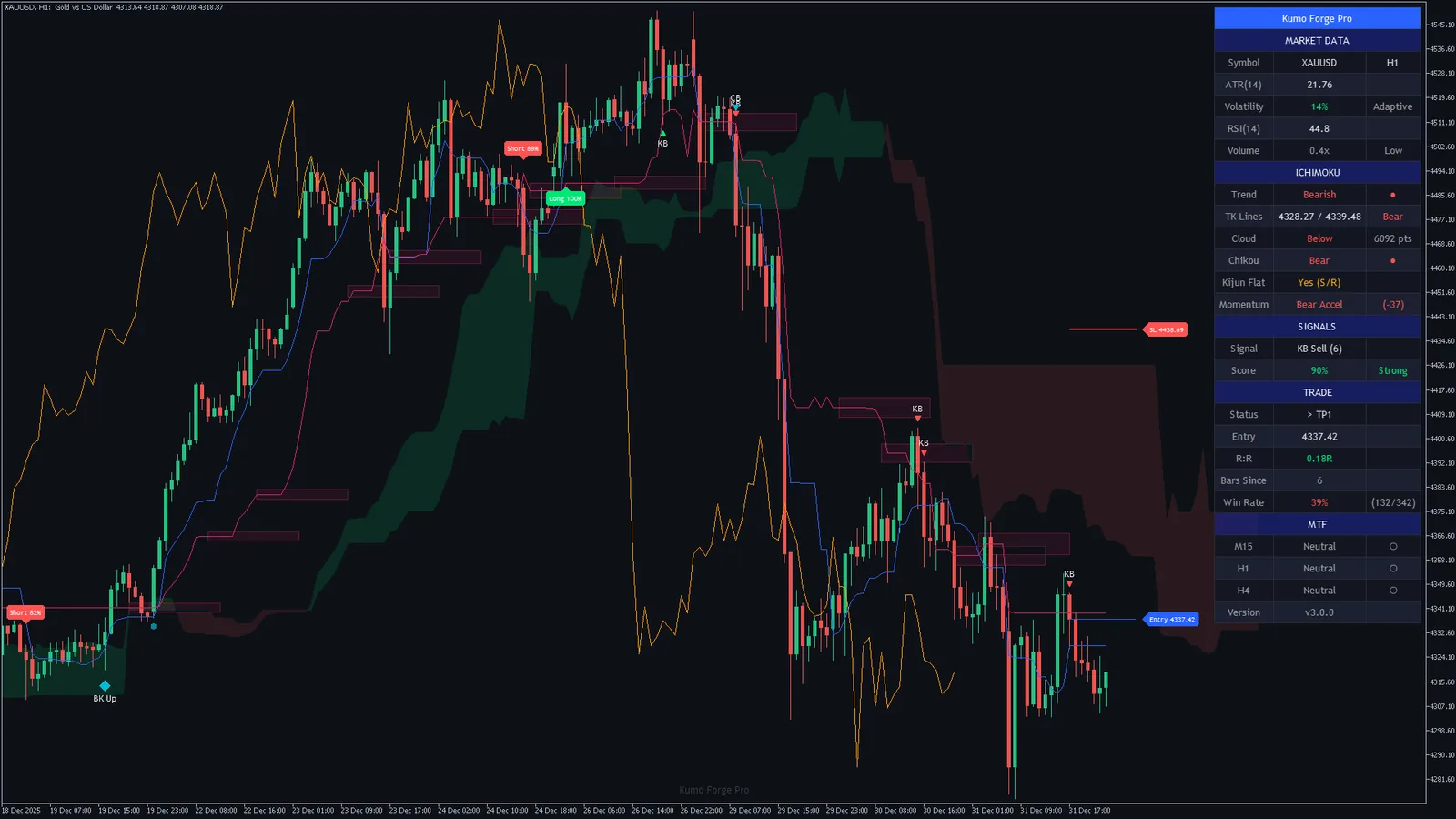 MetaTrader 5 chartBitcoin H1
 MetaTrader 5 chartS&P 500 M30
 MetaTrader 4 chartDAX 40 H1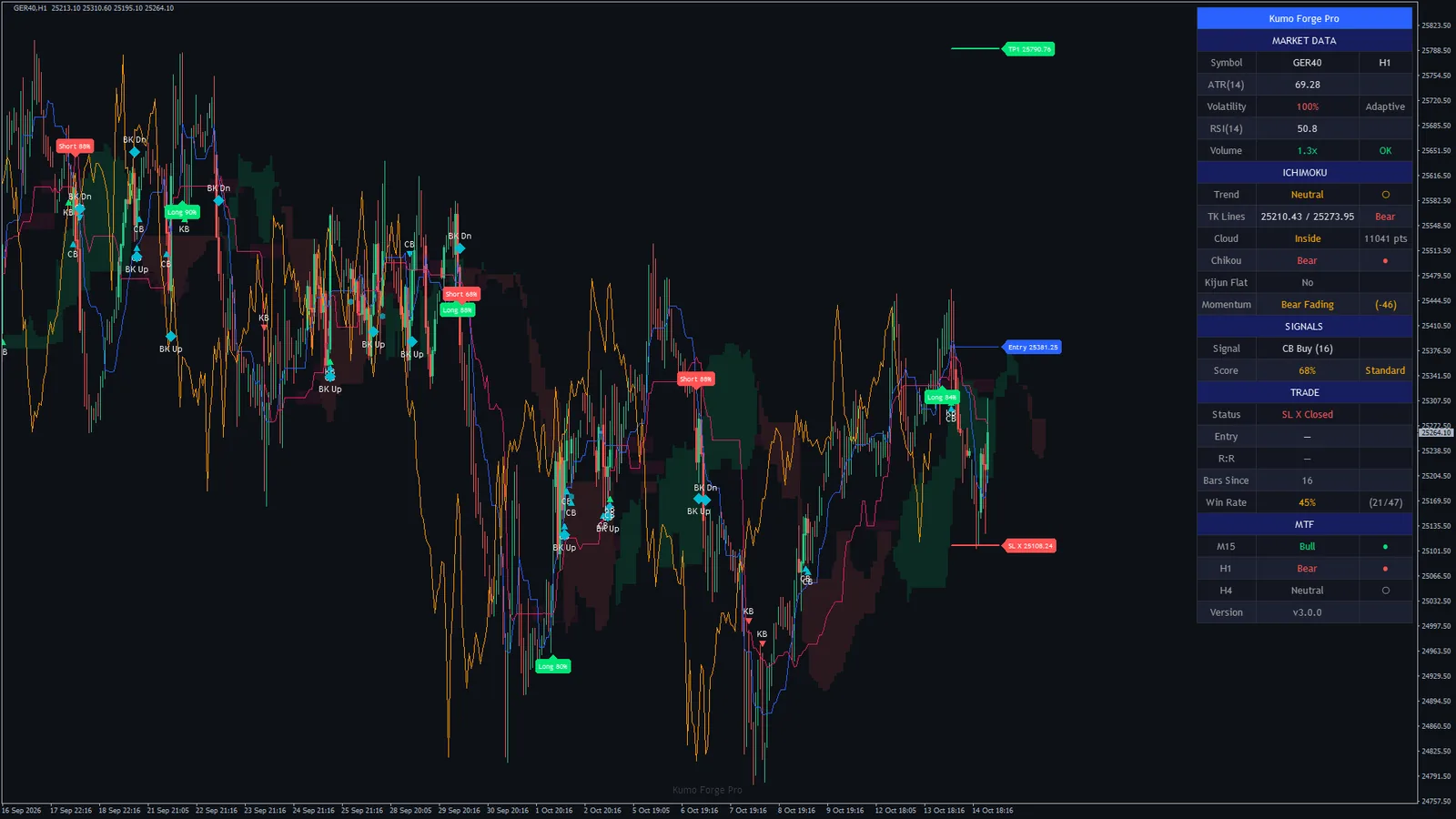
Every chart we captured, by market
Forex9 charts
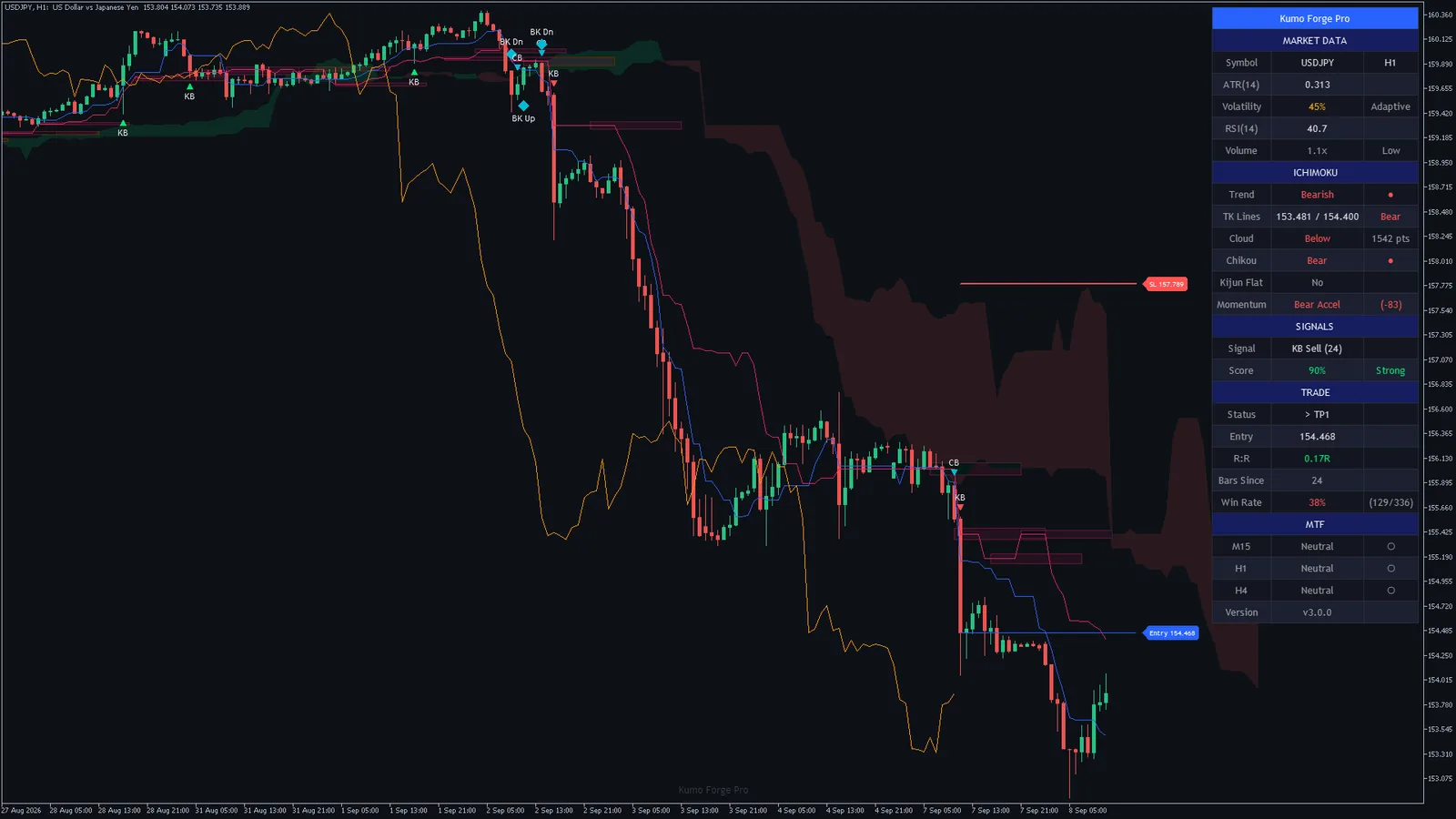
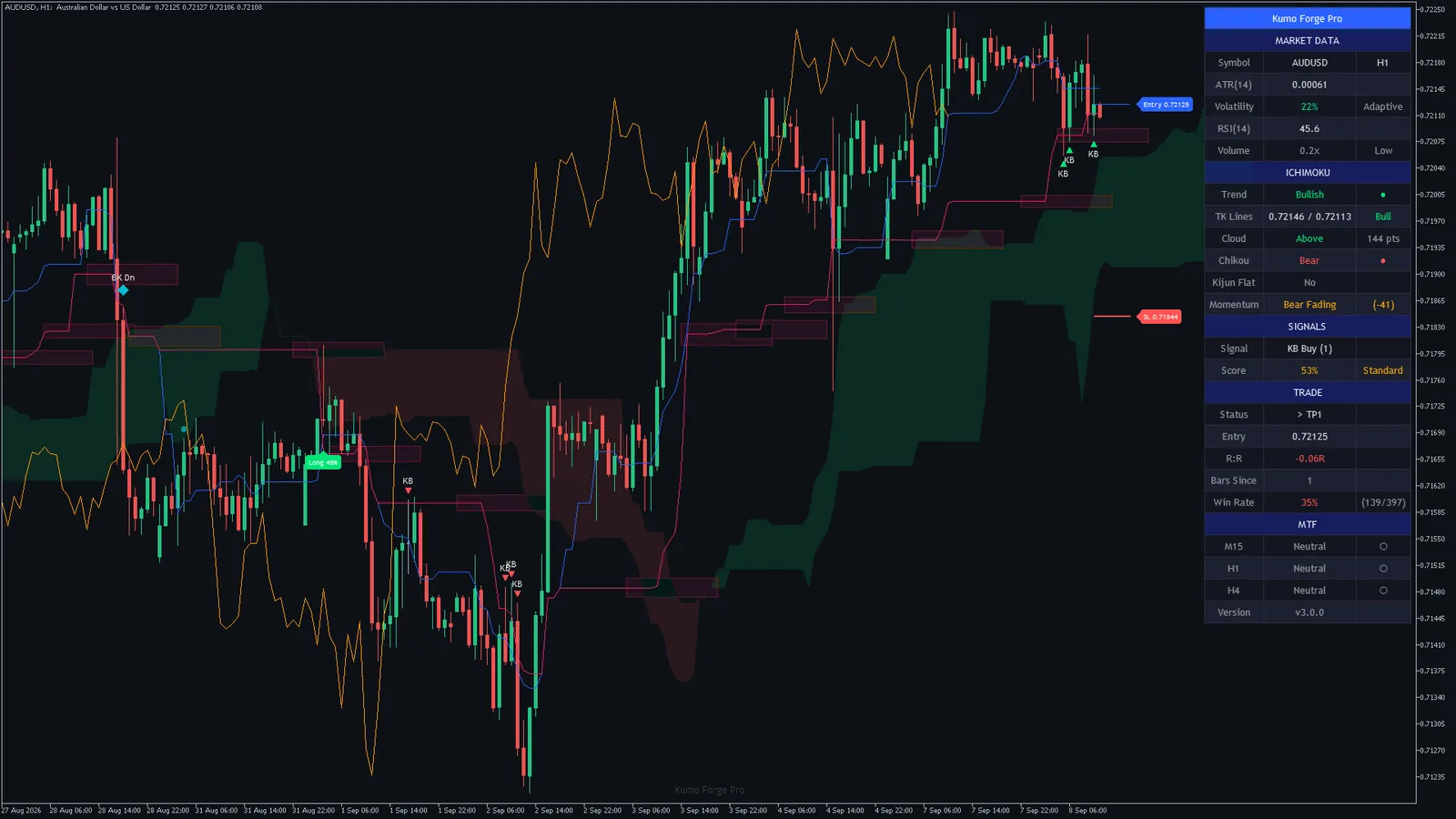
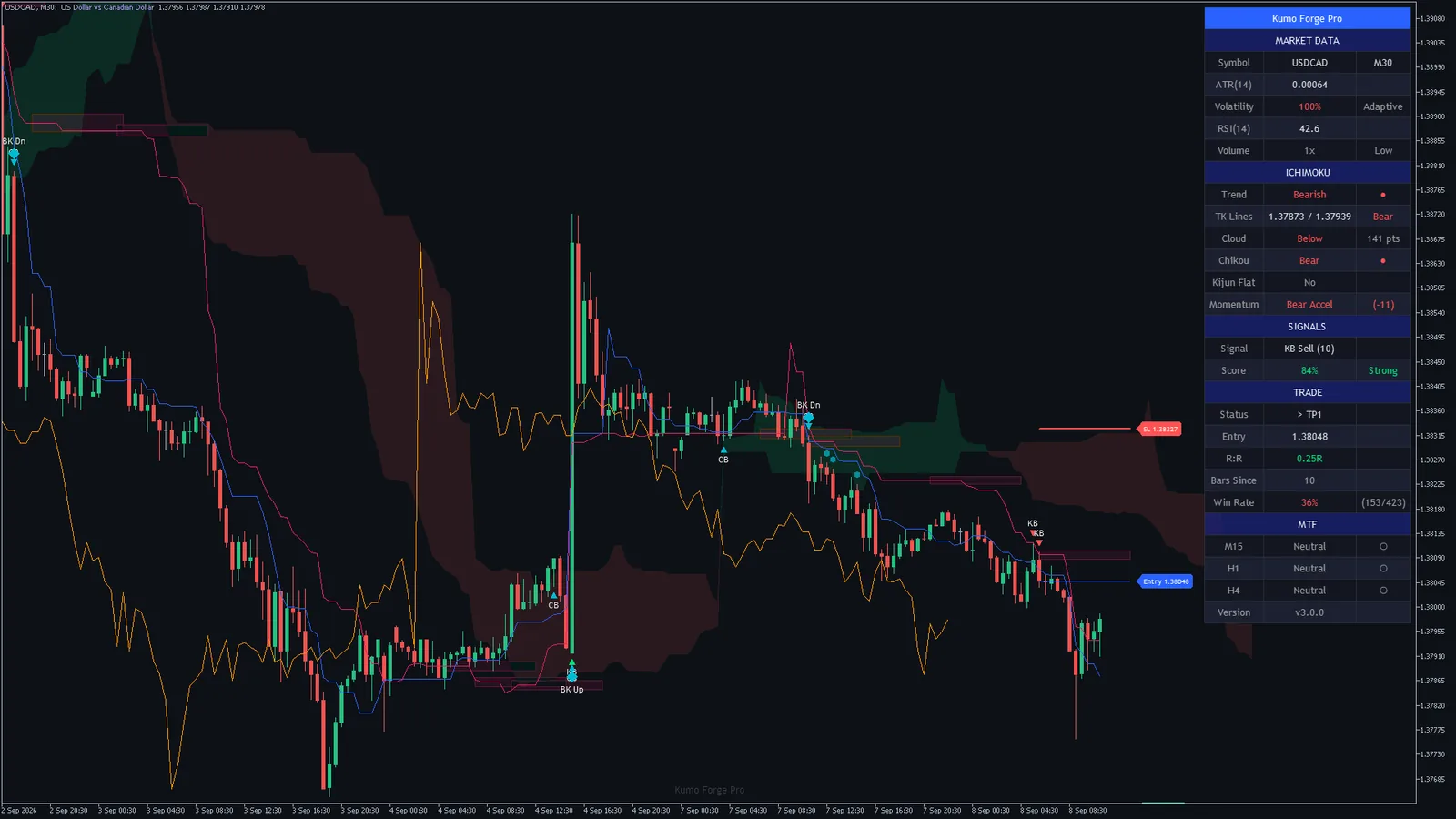
Gold, crypto and indices7 charts
MetaTrader 410 charts
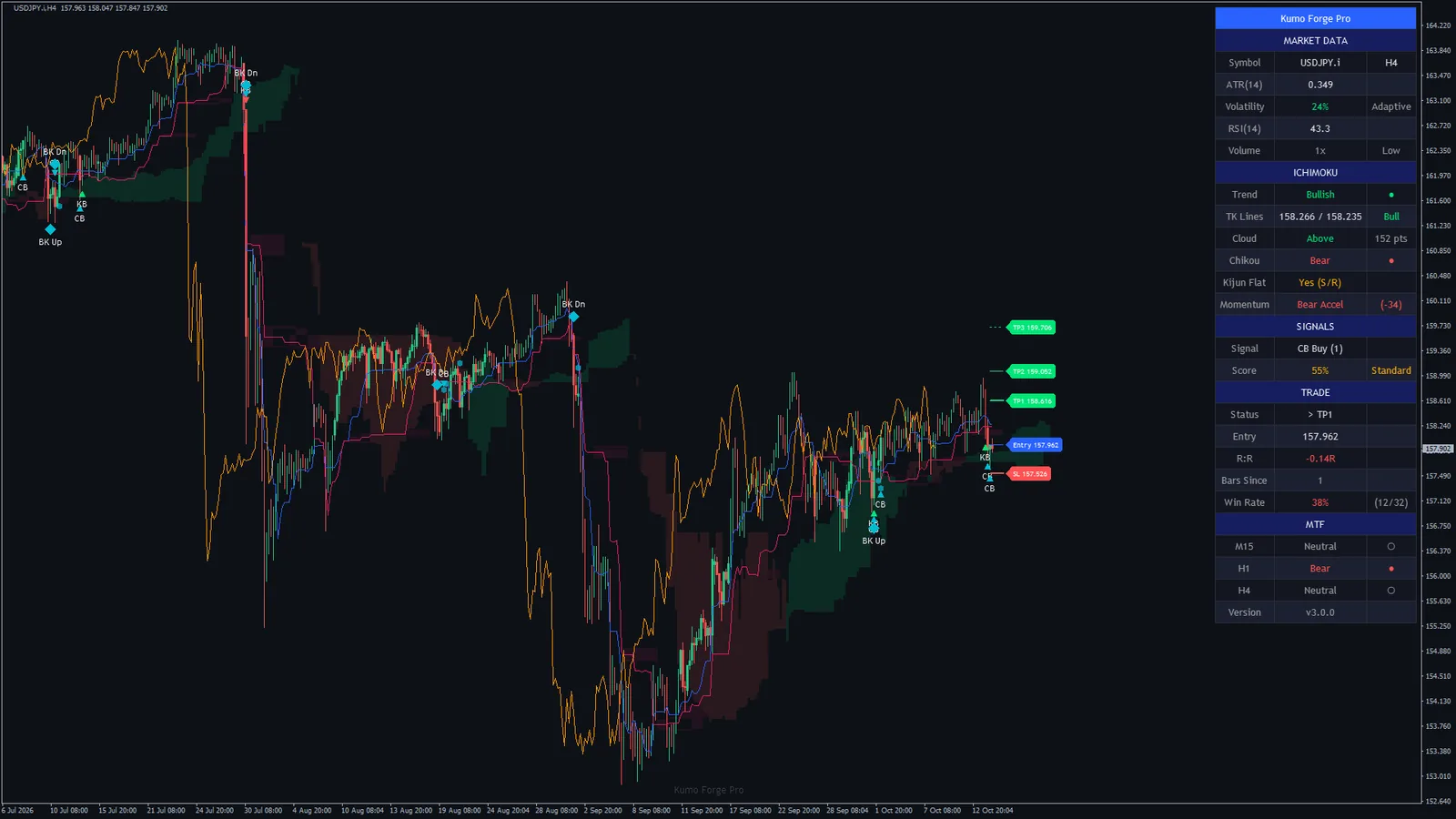
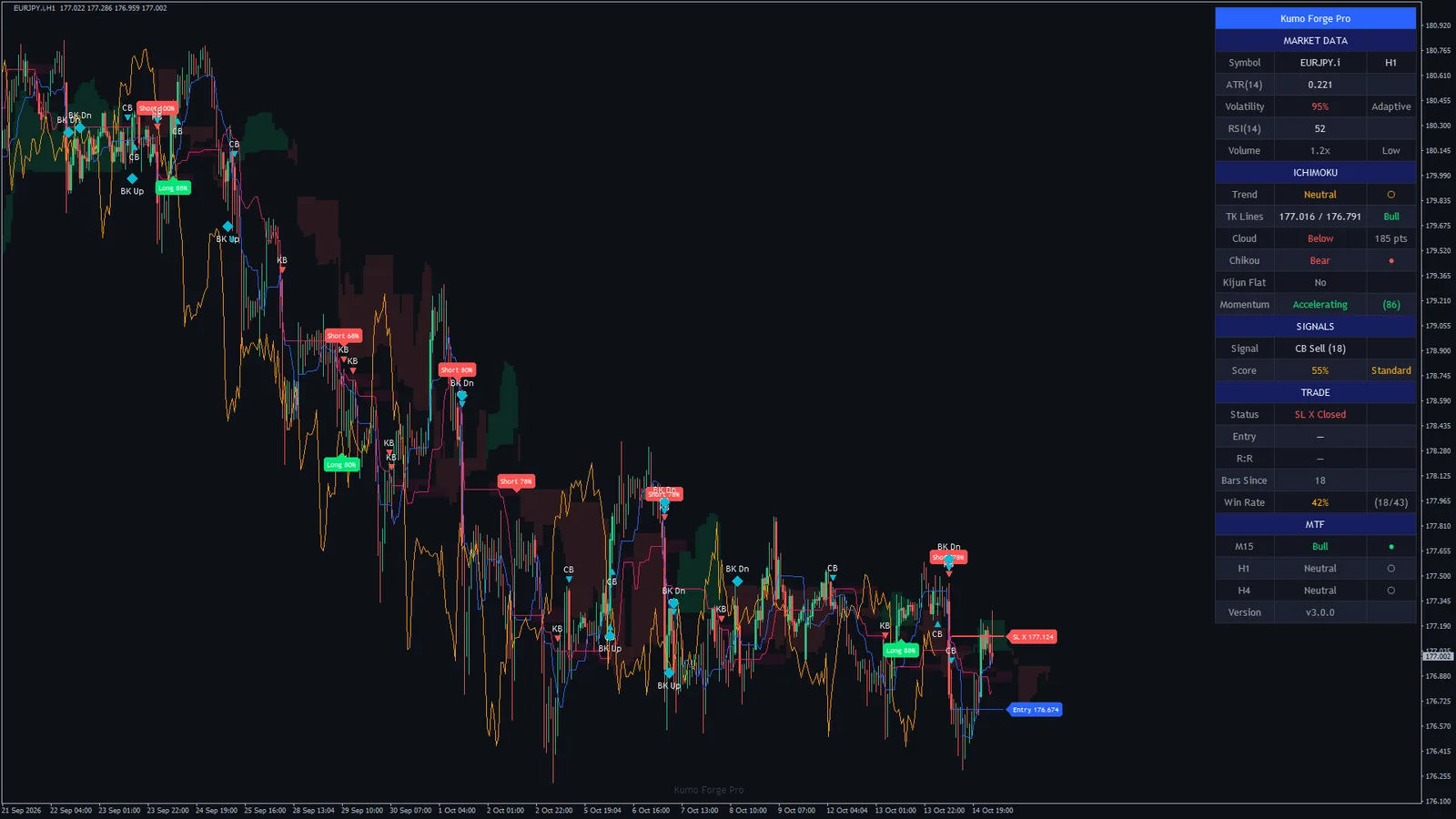
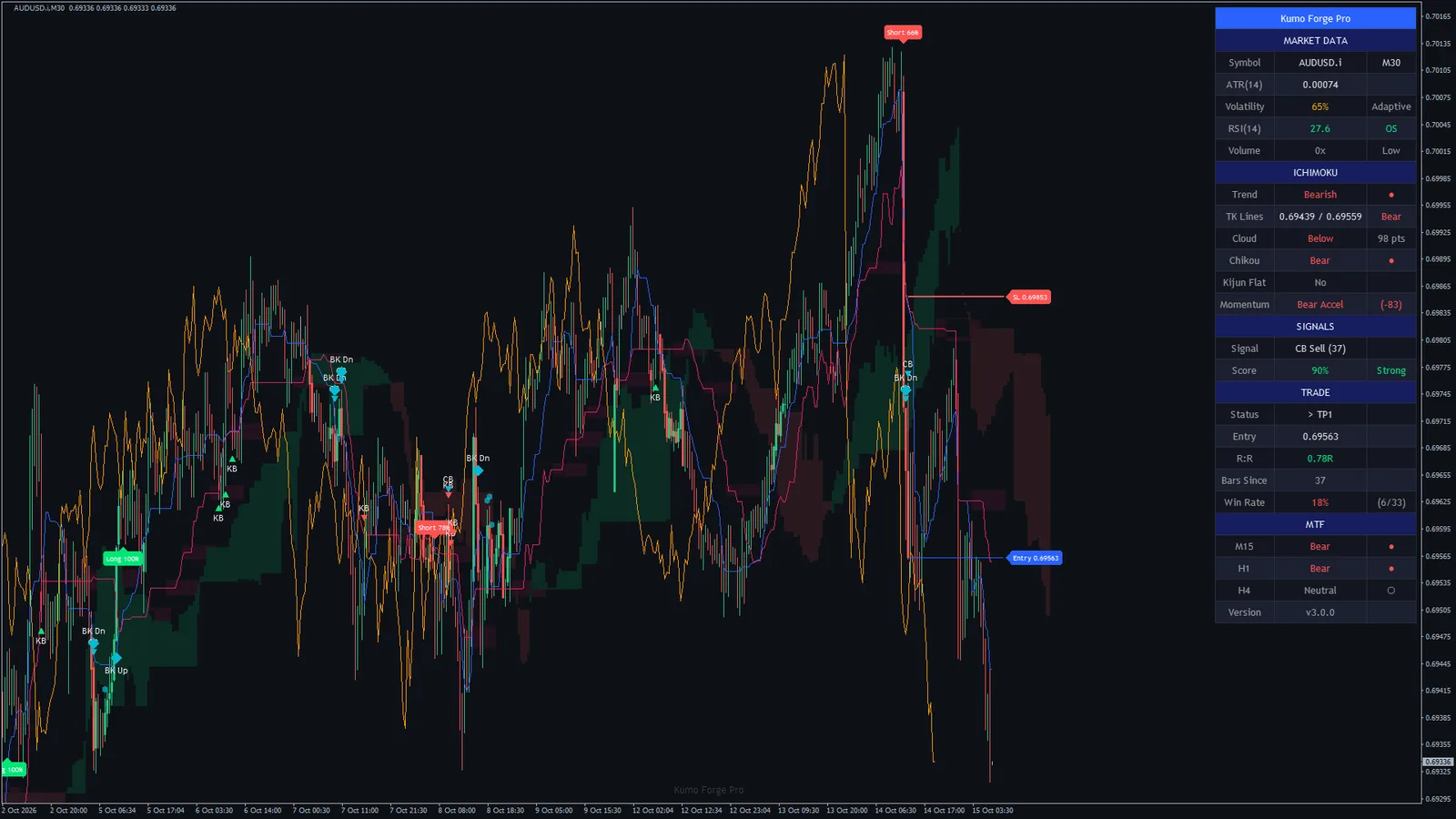
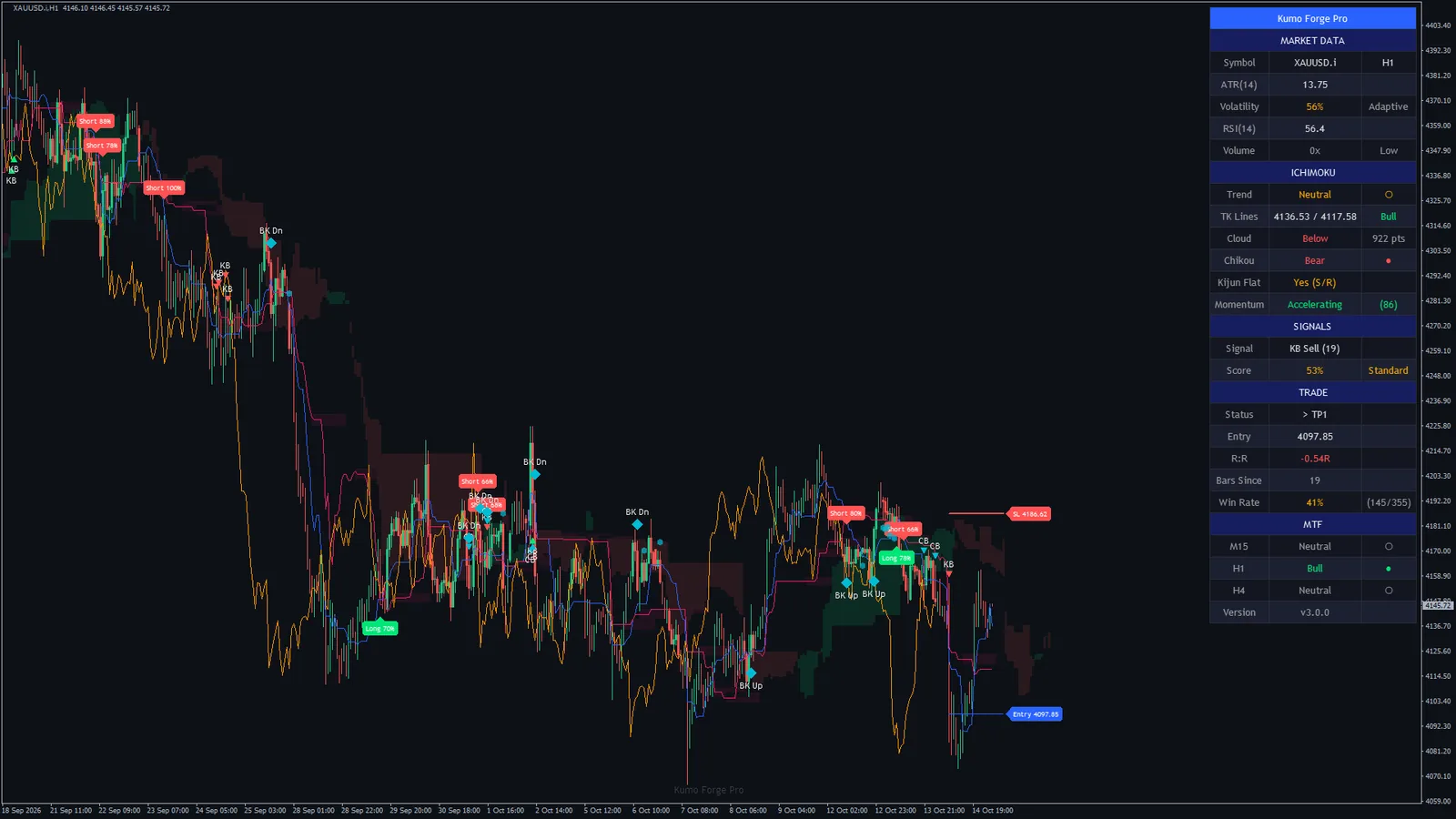
How these charts were captured. So you can repeat them, not just look at them.
- MetaTrader 5 build 6230 on the Capital Point Trading demo server (CapitalPointTrading-Demo) and MetaTrader 4 build 1479 on the Blueberry Markets demo server (BlueberryMarkets-Demo), 14 October 2026 (MetaTrader 5) and 15 October 2026 (MetaTrader 4). The terminals ran unattended: a helper script opened each chart, attached the shipped indicator with its default inputs, waited until the dashboard, the cloud and the signal plates were drawn and had stopped changing, and saved the chart with MetaTrader's own screenshot function. No chart was edited afterwards.
- The MetaTrader 5 charts show the history stored in that terminal, whose last bars fall between 31 Dec 2025 and 8 Sep 2026 depending on the symbol (each chart's last bar is in its caption); the MetaTrader 4 charts were live up to 15 Oct 2026.
- That MetaTrader 5 terminal could not reach its server, so on its charts the three timeframe rows of the dashboard read Neutral: the indicator reads a higher timeframe only once the terminal holds the server's copy of it. The MetaTrader 4 terminal was connected; on 10 of its 10 charts at least one of the three rows read Bull or Bear.
- The dashboard values, the newest signal and the signal counts on this page were computed from each chart's own bars at the moment of capture, by the same engine the indicator runs, and stored next to the screenshot, so every figure traces to a file. On every chart the counts were checked against the plates and markers the chart itself drew. Times are the broker's server time. Forex symbols on the MetaTrader 4 server carry a .i suffix.
- Every value the engine computes was compared with the original design's own output, bar by bar, on both builds: 15,026,434 values per platform, no differences in anything the indicator shows or alerts. The plates, markers, levels and dashboard text were compared the same way.
An adaptive cloud, a score and a plan
Three parts, each one visible on the chart or the dashboard, which is what makes a signal easy to check.
The adaptive cloud
The indicator places ATR(14) between its lowest and highest value over the last 50 bars. At the volatile end the Tenkan, Kijun and Span B periods shorten by up to 40 percent (5, 16 and 31 instead of 9, 26 and 52), at the quiet end they lengthen by as much (13, 36 and 73). Classic mode keeps them fixed. The cloud is projected 25 bars ahead, as usual.
The score
Eight factors add up to a score out of 100: price against the cloud, Tenkan against Kijun, the Chikou, the cloud's direction and thickness, volume, momentum and its acceleration; RSI is a ninth if you switch it on (out of 110 then). 80 and above is graded Strong, 50 Standard. Min Confluence Score (40) sets what a signal needs.
The plan
The signal bar's close is the entry. The stop goes beyond the far edge of the cloud plus 0.5 ATR by default (or the Kijun, or two ATRs), and the three targets sit at 1.5, 2.5 and 4.0 times that risk. Each target is ticked on the dashboard when price trades through it; the stop or the third target ends the trade, and the next signal starts a new one.
Install the file for your platform
Copy the .ex4 into MQL4/Indicators or the .ex5 into MQL5/Indicators, refresh the Navigator and drag Kumo Forge Pro onto any chart.
Choose how selective it is
Min Confluence Score 40 shows every setup worth a look. Raise it towards 80 when you want only the setups with most of the factors behind them; turn signal types on or off in Signal Types.
Read the dashboard
Market data, the Ichimoku state, the newest signal and its score, the tracked trade and three higher timeframes, 28 rows in the corner of your choice.
Let the alerts call you
22 alert events in 13 switches, all on by default: every signal type, each target, the stop, the trend and the timeframe alignment, by popup, sound, push to the MetaTrader app or e-mail, on closed bars only.
The market, read for you, and every signal's plan on the chart
A signal you can check is a signal you can judge. The panel reads the market on this chart and three higher timeframes; the levels show where the newest signal is right and where it is wrong.
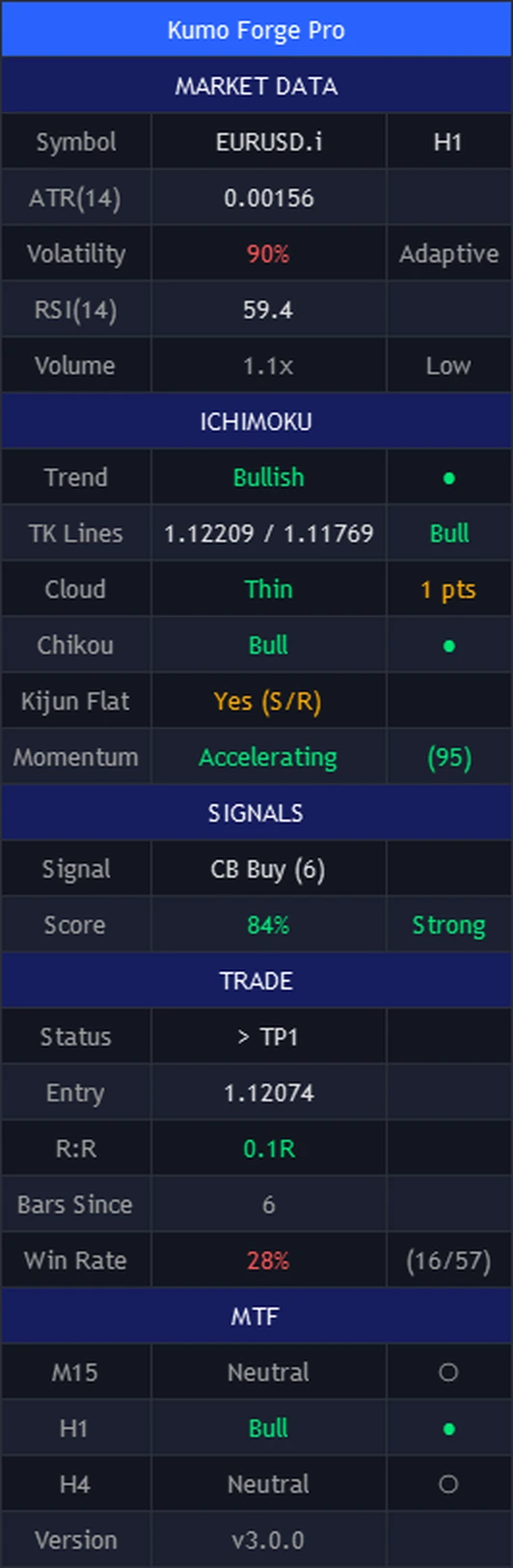
| Row | What it shows |
|---|---|
| Header | The product name |
| MARKET DATA | Section header |
| Symbol | The symbol and the chart's timeframe |
| ATR(14) | The 14-bar average true range, in price |
| Volatility | Where ATR(14) sits between its lowest and highest value over the Volatility Lookback, from 0 to 100 percent, with Adaptive or Fixed beside it |
| RSI(14) | RSI(14) of the Source, with OB above 70 and OS below 30 |
| Volume | The bar's volume as a multiple of its 20-bar average, OK above 1.2 times, Low otherwise |
| ICHIMOKU | Section header |
| Trend | Bullish while price is above the cloud with Tenkan above Kijun, Bearish mirrored, otherwise Neutral |
| TK Lines | The Tenkan and Kijun values, and Bull, Bear or Flat |
| Cloud | Above, Below or Inside, or Thin when the cloud is thinner than 30 percent of its 50-bar average (Thin wins over the side), with the thickness in points |
| Chikou | Bull when the Chikou span is above the Source one displacement earlier, Bear below it |
| Kijun Flat | Yes (S/R) when the Kijun has not moved for four bars, the condition behind the support and resistance boxes |
| Momentum | The momentum state (Accelerating, Bull Fading, Bear Accel, Bear Fading, Bullish, Bearish, Neutral) with its value from -100 to +100 |
| SIGNALS | Section header |
| Signal | BUY or SELL on the bar a signal prints; otherwise the last signal and how many bars ago, or Wait |
| Score | The score of the signal on this bar, or the higher of the buy and sell scores when nothing fired, with the grade: Strong at 80, Standard at 50, Weak below |
| TRADE | Section header |
| Status | The tracked trade: > TP1, TP1+ > TP2, TP1+ TP2+ > TP3, TP3 + Closed, SL X Closed, or No Active |
| Entry | The entry price of the tracked trade |
| R:R | The open trade's distance from the entry on the last close, in multiples of its risk |
| Bars Since | Bars since the last signal |
| Win Rate | First targets reached against first targets plus stops, counted on this chart's calculated bars |
| MTF | Section header |
| M15 | Bull, Bear or Neutral for the first timeframe (M15 by default) |
| H1 | The same for the second timeframe (H1) |
| H4 | The same for the third timeframe (H4) |
| Version | The version, v3.0.0 |
About the Win Rate row. It counts what the drawing did on this chart: first targets reached, against first targets plus stops, over the bars the indicator has calculated (Bars to calculate, 20,000 by default). A trade that reaches its first target and then its stop counts on both sides; a trade that runs on to the third target counts once. There is no spread, commission or slippage in it, and every signal is counted whether or not you would have taken it. It describes the drawing on that history, it is not a trading record, and this page does not quote it.
A tick next to a target is a reading of the chart: price traded through that level on the loaded history. It is not a filled order. The Score row shows the score of a signal on the bar it prints, and otherwise the higher of the buy and sell scores, so a high number there means conditions are lining up, not that a signal has printed.
The same engine, drawn two ways
Both builds run the same engine on the same inputs and produce the same signals, scores, levels, alerts and dashboard values; we checked that value by value. The plates, markers, price tags and the dashboard are drawn the same way on both. What differs is how each platform draws the cloud. Here is Gold H1 on both. The two charts show different dates: the MetaTrader 5 history on this computer ends on 31 Dec 2025 for this symbol, the MetaTrader 4 chart ran live to 15 Oct 2026.
| MetaTrader 4 | MetaTrader 5 | |
|---|---|---|
| Signals, scores, levels and alerts | Identical | Identical |
| Dashboard values | Identical | Identical |
| Plates, markers, price tags and dashboard | Drawn as images, identical | Drawn as images, identical |
| The cloud | Histogram bars, projected ahead | Filled, projected ahead; the colour changes exactly where the spans cross |
| Candles inside the cloud | Drawn again over the cloud | Drawn again over the cloud |
| Support and resistance boxes | Filled box | Filled box with a border |
| Alerts | 22 events, popup, sound, push, e-mail | 22 events, popup, sound, push, e-mail |
Three things an Ichimoku indicator should do, done properly
Setups you can rank
Every signal carries its score, so you can see at a glance which crosses and bounces had the cloud, the Chikou, momentum and volume behind them, and set the minimum you are willing to act on.
A plan with every signal
The entry, the stop and three targets are drawn the moment a signal prints, with their prices on the chart. You know where you are wrong before you are in.
Both platforms, one purchase
The .ex4 and the .ex5 come in the same download with a manual for each, so moving between MetaTrader 4 and 5 costs nothing.
Kumo Forge Pro next to the usual options
Where it wins, and where it does not. A tool that claims to win everywhere is the one to distrust.
| Kumo Forge Pro | A standard Ichimoku | A plain moving-average cross | |
|---|---|---|---|
| Signal stays where it printed | Decided on the closed bar | A cross on the forming bar can come and go | On the closed bar, if you wait for it |
| Periods follow volatility | Adaptive mode, up to 40 percent either way | Fixed 9, 26, 52 | Fixed |
| Scores each signal | 0 to 100 from eight factors, 110 with RSI | No | No |
| Entries beyond the TK cross | Kijun bounce, cloud-edge bounce, Kumo breakout and retest | You read them yourself | No |
| Stop and targets drawn for you | Entry, stop and three targets on every signal | No | No |
| Stop at market structure | No. The stop is the cloud edge, the Kijun or two ATRs, plus a buffer, not a swing high or low | You place it | No |
| Sizes and places the trade | No. You choose the size and place the order | No | No |
Honest about who this fits
A good fit if you
- Trade with the Ichimoku, or want to, and want each setup scored and its entry, stop and targets on the chart.
- Want several kinds of entry, a first cross and the bounces and breakouts after it, from one set of rules.
- Trade forex, gold, stock indices or crypto on MetaTrader 4 or 5, on anything from M15 to H4.
Not for you if you
- Want an Expert Advisor that places trades for you. This is an indicator: it scores, draws and alerts, and you place the orders.
- Want stops at swing highs and lows. These stops are the cloud edge, the Kijun or two ATRs, plus a buffer.
- Expect a win rate printed on the box. This page shows what the indicator does, not a promise of profit.
72 inputs, each one explained
The names are the ones you see in the MetaTrader inputs dialog. The defaults are what every chart on this page uses.
| Input | Default | What it does |
|---|---|---|
| Main Settings | ||
| Calculation Mode | Adaptive | Adaptive scales the three Ichimoku periods with volatility: shorter when the market is volatile, longer when it is quiet. Classic keeps them fixed at the three periods below. |
| Conversion Period | 93 to 50 | The Tenkan-Sen (conversion line) period: the midpoint of the highest high and lowest low over this many bars. |
| Base Period | 2610 to 100 | The Kijun-Sen (base line) period, worked out the same way. |
| Span B Period | 5220 to 200 | The Senkou Span B period, the slow edge of the cloud. Longer makes a thicker, slower cloud. |
| Displacement | 261 to 100 | How far the cloud is projected forward and the Chikou span shifted back. The Chikou check compares the Source with its value this many bars earlier. |
| Source | Close | The price the Chikou span, its check and the RSI(14) use. The three Ichimoku lines always use highs and lows. |
| Adaptive Engine | ||
| Volatility Lookback | 5010 to 200 | The window that places the current ATR(14) between its lowest and highest value: 0 percent is the quietest bar of the window, 100 percent the most volatile (the Volatility row). |
| Adapt Strength | 0.40.1 to 0.8 | How far Adaptive mode may move the three periods: 0.4 means up to 40 percent shorter at the top of the volatility range and up to 40 percent longer at the bottom. |
| Signal Types | ||
| Kijun Bounce Signals | On | Kijun bounce markers (KB): the bar's low touches the Kijun and it closes back above it, with price above the cloud and Tenkan above Kijun (mirrored for a sell). Needs the Kumo thickness filter, the volume filter and the Min Confluence Score. |
| Cloud Edge Bounce Signals | On | Cloud-edge bounce markers (CB): price above the cloud dips to within one hundredth of an ATR of the cloud top and closes above it, with Tenkan above Kijun (mirrored for a sell). Needs the volume filter and the Min Confluence Score. |
| Chikou Breakout Signals | Off | Chikou breakout markers (a small cross): the Chikou span crosses the Source from one Displacement earlier while price is above the cloud (below it for a sell) and the score passes. Off by default, because it is the latest of the confirmations. |
| RSI Confluence Filter (adds up to 10 points) | Off | Adds RSI(14) as the ninth score factor: 10 points when RSI is above 50 for a buy (below 50 for a sell), so the score can reach 110. It never blocks a signal by itself. |
| Filters | ||
| Min Confluence Score | 400 to 110 | The lowest confluence score a TK cross, a Kijun bounce, a cloud-edge bounce or a Chikou breakout needs. Kumo breakouts and retests do not use it. |
| Kumo Thickness Filter | On | Skips TK crosses and Kijun bounces while the cloud is thin: thinner than 30 percent of its own 50-bar average thickness. |
| Volume Filter (tick volume) | On | Skips TK crosses, Kijun bounces and cloud-edge bounces unless the bar's volume is more than 1.2 times its 20-bar average. MetaTrader's tick volume is used, so the filter works on forex too. |
| Chikou Confirmation | On | TK crosses only: the Chikou span must agree, with the Source above its value one Displacement earlier for a buy (below it for a sell). |
| Smart TP/SL | ||
| Show TP/SL Lines | On | Tracks a trade from every signal and draws its entry, stop and three targets. Off stops the tracking itself: the TRADE rows read No Active and the target and stop alerts stay silent. |
| SL Mode | Kumo Edge | Where the stop goes. Kumo Edge: beyond the far side of the cloud (its bottom for a buy, its top for a sell) plus the buffer. Kijun: beyond the Kijun plus the buffer. ATR: two ATRs from the entry. |
| SL ATR Buffer | 0.50.1 to 3.0 | The buffer beyond the cloud edge or the Kijun, in ATR(14). The ATR mode does not use it. |
| TP1 R:R | 1.50.5 to 5.0 | The first target as a multiple of the risk, the distance from the entry to the stop. The risk is never taken as less than half an ATR. |
| TP2 R:R | 2.51.0 to 8.0 | The second target as a multiple of the risk. |
| TP3 R:R | 4.01.5 to 12.0 | The third target as a multiple of the risk. Reaching it, or the stop, ends the tracked trade. |
| Kumo Breakout | ||
| Show Kumo Breakouts | On | Kumo breakouts and retests. Off hides their markers, keeps them from starting a tracked trade and silences their alerts. |
| Breakout Vol Mult | 1.31.0 to 3.0 | A Kumo breakout needs the bar's volume above its 20-bar average times this. |
| Show Retest Signals | On | Retest markers (small circles): 2 to 10 bars after a breakout, price comes back to the broken cloud edge and closes on the breakout side again. |
| Multi-Timeframe | ||
| Show MTF Panel | On | The three timeframe rows of the dashboard and the alignment alert. Off also stops the indicator from requesting the other timeframes at all. |
| TF 1 | M15 | The timeframe of the first MTF row. Each row reads the last CLOSED bar of its timeframe with the classic Ichimoku on the three periods above: Bull when that bar closed above its cloud with Tenkan above Kijun, Bear mirrored, otherwise Neutral. |
| TF 2 | H1 | The timeframe of the second MTF row. |
| TF 3 | H4 | The timeframe of the third MTF row. |
| Visual Settings | ||
| Theme | Auto | Dark or Light colours for the dashboard and the plate text. Auto follows the chart background. |
| Show Cloud | On | Draws the cloud, projected ahead of the last bar by the displacement. It is calculated either way. |
| Show TK Lines | On | Draws the Tenkan-Sen and Kijun-Sen lines. |
| Show Chikou Span | On | Draws the Chikou span, the Source plotted back by the displacement. |
| Show TK Signal Labels | On | Draws the Long and Short plates on TK crosses. With it off the crosses still count, start tracked trades and send alerts. |
| Show Score on Signals | On | Prints the score on the plate: Long 72% instead of Long. The percent sign is only how the label is written; the number is points out of 100 (110 with RSI), not a chance of success. |
| Show Breakout Labels | On | Draws the breakout markers (BK Up, BK Dn) and the retest circles. |
| Show TP/SL Labels | On | The price tags next to the entry, stop and target lines. |
| Show S/R Zones | On | Draws a support and resistance box where a flat Kijun ends: 0.15 ATR either side of the flat level, from 5 bars before to 10 bars after. |
| Show Trend Background | Off | Tints the chart background green while price is above the cloud with Tenkan above Kijun, red while it is below with Tenkan below Kijun. Off by default. |
| Signal Label Size | Small | The size of the Long and Short plates. |
| Show Watermark | On | The faint product name on the chart. |
| Dashboard | ||
| Show Dashboard | On | Shows the dashboard. Hiding it changes nothing that is calculated or alerted. |
| Position | Top Right | The corner the dashboard sits in. |
| Font Size | Normal | The dashboard's text size. |
| Alerts | ||
| Webhook JSON Format (message text only) | Off | Writes every alert as one JSON object instead of a sentence, for tools that read JSON. The indicator sends nothing anywhere by itself. |
| Colors | ||
| Bull | #00E676 | Everything bullish: Long plates, Kijun bounce buy markers, the target lines, the bullish cloud and the dashboard's bullish readings. |
| Bear | #FF5252 | Everything bearish: Short plates, Kijun bounce sell markers, the stop line, the bearish cloud and the dashboard's bearish readings. |
| Tenkan | #2962FF | The Tenkan-Sen line. |
| Kijun | #E91E63 | The Kijun-Sen line and the support and resistance boxes. |
| Chikou | #FF9800 | The Chikou span and the Chikou breakout markers. |
| Breakout | #00BCD4 | The breakout markers, the retest circles and the cloud-edge bounce markers. |
| MetaTrader | ||
| Signal Label Cap | 45010 to 500 | How many plates and price tags stay on the chart. When the cap is reached the oldest goes first. |
| S/R Box Cap | 18010 to 200 | How many support and resistance boxes stay on the chart. When the cap is reached the oldest goes first. |
| Bars to calculate (0 = all) | 200000 or more | How many recent bars are calculated, never fewer than the warm-up plus 500. 0 means the whole history. Earlier bars are left empty, which keeps loading fast; the Win Rate row counts only this window. |
| Alert Events | ||
| Alert: TK Cross | On | A TK cross signal, buy or sell, with price, score, stop and the three targets in the message. |
| Alert: Kumo Breakout | On | A Kumo breakout, up or down. |
| Alert: Retest | On | A retest of a broken cloud edge, bull or bear. |
| Alert: Kijun Bounce | On | A Kijun bounce, buy or sell, with its score. |
| Alert: Cloud Bounce | On | A cloud-edge bounce, buy or sell, with its score. |
| Alert: Chikou Breakout | On | A Chikou breakout, buy or sell (the signal itself is off by default). |
| Alert: TP1 Hit | On | Price reaching the first target of the tracked trade, once. |
| Alert: TP2 Hit | On | Price reaching the second target, once. |
| Alert: TP3 Hit | On | Price reaching the third target, which also ends the tracked trade. |
| Alert: SL Hit | On | Price reaching the stop of the tracked trade, once. |
| Alert: MTF Alignment | On | All three timeframe rows turning Bull, or all three turning Bear. |
| Alert: Trend Change | On | The Trend row turning Bullish or Bearish. |
| Alert: Strong Signal (80+) | On | A TK cross scoring 80 or more, sent in addition to the TK cross alert. |
| Alert Channels | ||
| Pop-up alert | On | MetaTrader's alert window, with its own sound. |
| Sound | Off | Plays the sound file below on each alert. |
| Sound file | alert.wav | A .wav file in the terminal's Sounds folder. |
| Push notification | Off | Push notification to the MetaTrader app on your phone (set up under Tools, Options, Notifications). |
| Off | E-mail through the terminal's own mail settings (Tools, Options, Email). | |
22 alert events, four ways to hear about them
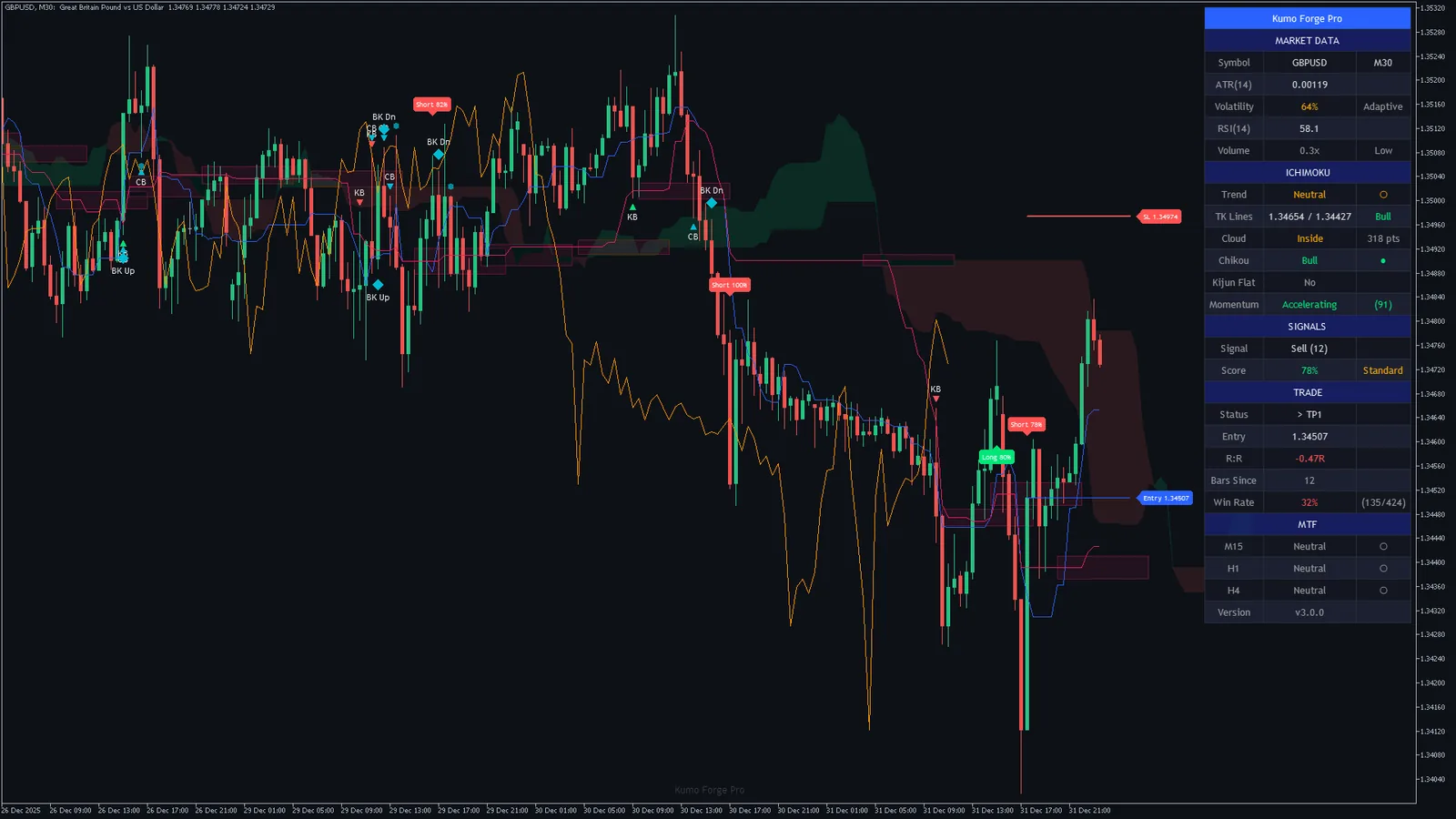
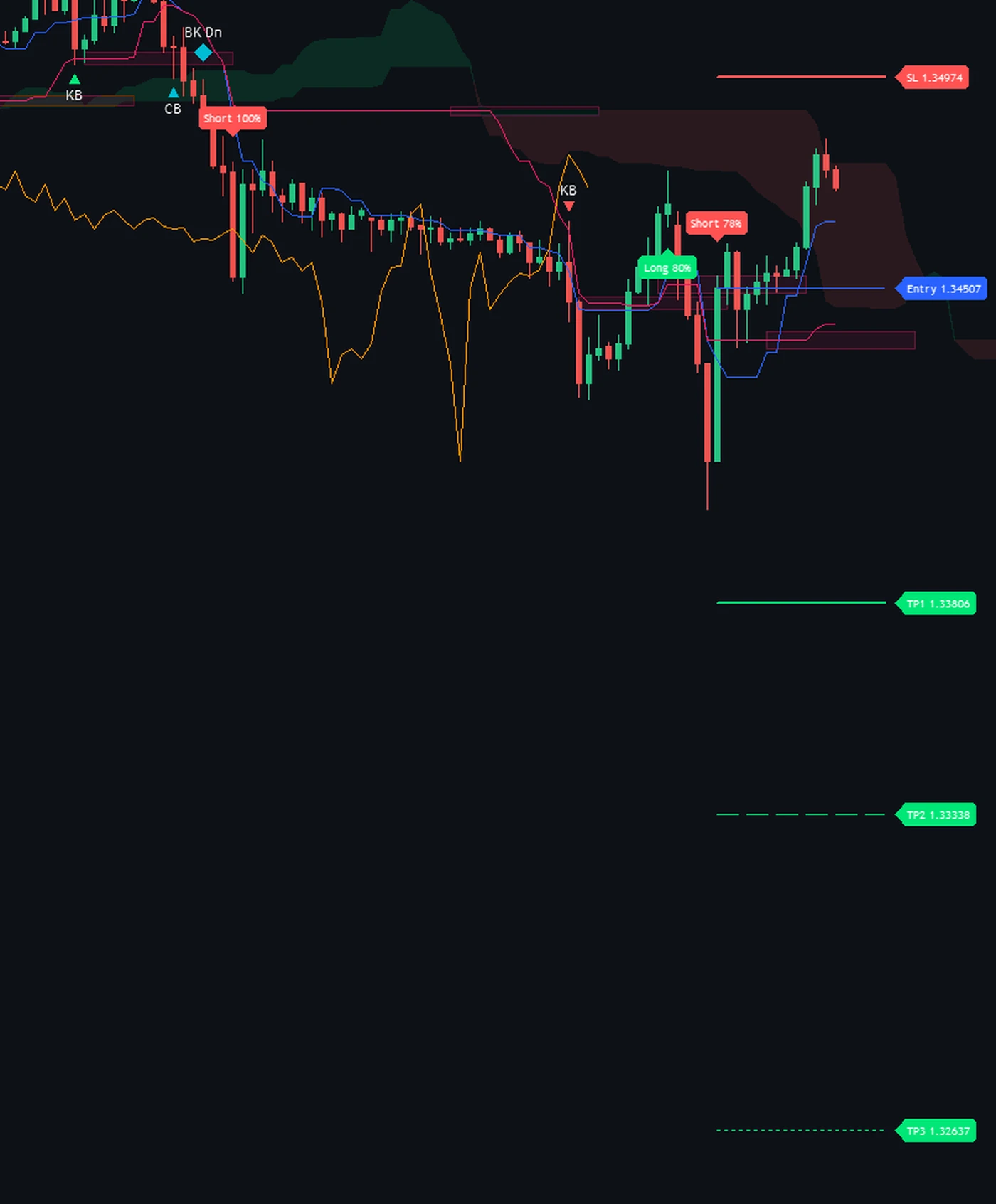
Every alert is decided on a closed bar, fires once per event for that bar, and never fires for the history the indicator calculates when it loads or in the Strategy Tester. A TK cross carries the whole plan in one line; the other events name the event, the symbol and the timeframe, and the bounces add their score. Filled with the newest TK cross on the GBPUSD M30 chart above:
- SELL | GBPUSD | TF: M30 | Price: 1.34507 | Score: 78% | SL: 1.34974 | TP1: 1.33806 | TP2: 1.33338 | TP3: 1.32637
- TP1 HIT | GBPUSD | 1.33806
- TREND > BEARISH | GBPUSD | TF: M30
Switch on Webhook JSON Format and every alert arrives as one JSON object instead, for tools that read JSON; the indicator itself sends nothing anywhere:
- {"action":"sell","ticker":"GBPUSD","price":1.34507,"tf":"M30","score":78,"sl":1.34974,"tp1":1.33806,"tp2":1.33338,"tp3":1.32637}
Each event can reach you as a MetaTrader popup, a sound of your choice, a push notification to the MetaTrader app on your phone or an e-mail, with one switch per channel. The 13 switches on the right cover the 22 events, a buy and a sell each where there are two.
- TK Cross TK Cross Buy, TK Cross Sell, on by default
- Kumo Breakout Kumo Break Up, Kumo Break Down, on by default
- Retest Retest Bull, Retest Bear, on by default
- TP1 Hit TP1 Hit, on by default
- TP2 Hit TP2 Hit, on by default
- TP3 Hit TP3 Hit, on by default
- SL Hit SL Hit, on by default
- Kijun Bounce Kijun Bounce Buy, Kijun Bounce Sell, on by default
- Cloud Bounce Cloud Bounce Buy, Cloud Bounce Sell, on by default
- Chikou Breakout Chikou Break Buy, Chikou Break Sell, on by default
- MTF Alignment MTF All Bullish, MTF All Bearish, on by default
- Trend Change Trend to Bullish, Trend to Bearish, on by default
- Strong Signal (80+) Strong Buy (80+), Strong Sell (80+), on by default
Two builds, two manuals, nothing left to configure
- 2Indicator builds, version 3.00Kumo_Forge_Pro.ex4 for MetaTrader 4 and Kumo_Forge_Pro.ex5 for MetaTrader 5, in one 4.1 MB download.
- 2PDF manualsOne per platform, 28 pages each: install, the adaptive cloud, the score, the five signal types, the levels, every dashboard row, every input, alerts and troubleshooting.
- 5Signal typesTK cross, Kijun bounce, Cloud-edge bounce, Kumo breakout, Retest, each one decided on closed bars.
- 72InputsEvery one explained, with the original design's defaults.
- 22Alert eventsBy popup, sound, push or e-mail, on closed bars only.
- 60Day money-back guaranteeIf it is not for you, e-mail within 60 days of purchase for a full refund.

Dominic Walsh
Founder, forexobroker.com
I have traded forex since 2014 and started writing about it the same year. forexobroker.com now reaches over 40,000 readers a month, and every indicator, Expert Advisor and tutorial on it is something I have built, tested or used in my own trading.
Kumo Forge Pro is the Ichimoku I reach for when I want the cloud to tell me more than its colour: how much agrees with a setup, and where I am wrong, drawn before I place anything. The charts on this page were captured from the shipped build at its default settings and are shown unedited.
No get-rich claims and no quoted win rates. Every trade is uncertain, and no indicator changes that. If you want to know whether it suits the way you trade before you buy, e-mail me at [email protected] and I will tell you straight.
One price, both platforms
- Both builds: .ex4 for MetaTrader 4 and .ex5 for MetaTrader 5
- Two PDF manuals, one per platform
- Scored signals with entry, stop and three targets, 72 inputs, 22 alert events
- Instant download and a 60-day money-back guarantee
60-day money-back guarantee. Install it, run it on your own markets and read the manual. If Kumo Forge Pro is not for you within 60 days of purchase, e-mail [email protected] for a full refund, no questions asked. Files are delivered instantly on a secure download page after checkout. This is a software tool, not financial advice.
Answered straight
The things people actually e-mail about before buying. If yours is not here, ask before you buy at [email protected].
How it works
Does it repaint?
A signal is decided on a closed bar: once a plate or a marker has printed it stays where it is, and every alert fires once for a closed bar. It appears once its bar is complete, which in practice is when the next bar opens. What moves is what is meant to move: the lines, the cloud and the dashboard on the bar that is still forming, and the entry, stop and target lines, which always belong to the newest signal.
What is adaptive about it?
In Adaptive mode the Tenkan, Kijun and Span B periods follow volatility. The indicator places ATR(14) between its lowest and highest value over the last 50 bars; at the volatile end the periods shorten by up to 40 percent (5, 16 and 31 instead of 9, 26 and 52), at the quiet end they lengthen by as much (13, 36 and 73), and in between they move smoothly. Classic mode keeps the three periods fixed. The Volatility row of the dashboard shows where ATR sits.
How is the score worked out?
Nine factors, each worth a fixed number of points: Price against the cloud: 20 above the cloud, 8 inside it, 0 below for a buy; Tenkan against Kijun: 15 when Tenkan is above Kijun for a buy; Chikou agreement: 15 when the Chikou span is above the Source one displacement earlier for a buy; Cloud direction: 10 when Span A is rising faster than Span B over 3 bars for a buy; Cloud thickness: 8 when the cloud is not thin, 2 when it is for a buy; Volume: 10 when volume is above 1.2 times its 20-bar average for a buy; Momentum: 12 above +20, 6 above 0 for a buy; Momentum acceleration: 10 when momentum is positive and rising for a buy; RSI (optional): 10 when RSI(14) is above 50, only with the RSI Confluence Filter on for a buy. The thickness and volume factors do not depend on direction, so they lift or lower the buy and sell scores together. The total is out of 100, or 110 with the RSI factor on, and is graded Strong at 80 and Standard at 50. It counts how much agrees at that bar; it is not a forecast of what happens next.
What are the five signal types?
A TK cross is Tenkan crossing Kijun, with the cloud not thin, volume above 1.2 times its average, the Chikou agreeing and the score at Min Confluence Score; it prints the Long or Short plate. A Kijun bounce (KB) is a wick to the Kijun that closes back on the trend side, above the cloud with Tenkan above Kijun for a buy. A cloud-edge bounce (CB) is the same against the cloud top or bottom. A Kumo breakout (BK Up or BK Dn) is a close through the cloud with volume above 1.3 times its average, and a retest (a small circle) is a return to the broken edge 2 to 10 bars later. A Chikou breakout is available too, off by default.
What does Min Confluence Score change?
It is the lowest score a TK cross, a Kijun bounce, a cloud-edge bounce or a Chikou breakout needs. Kumo breakouts and retests do not use it. On the 16 MetaTrader 5 charts we measured, the score-gated signals per 1,000 bars came to 41 to 87 at 40, 41 to 87 at 50, 39 to 81 at 60 and 26 to 54 at 80. Start at the default 40 to see every setup worth a look, then raise it once you know which scores you want to act on.
How are the stop and the targets set?
The signal bar's close is the entry. SL Mode decides the stop: Kumo Edge puts it beyond the far side of the cloud plus the ATR buffer; Kijun puts it beyond the Kijun plus the ATR buffer; ATR puts it two ATRs from the entry. The buffer is 0.5 ATR by default, and the risk is never taken as less than half an ATR. The targets sit at 1.5, 2.5 and 4.0 times the risk. Targets and stop are checked on closed bars; the stop or the third target ends the tracked trade, and every new signal starts a new one with its own levels.
What are the boxes on the chart?
Support and resistance zones. When the Kijun has stayed flat for four bars and then moves, the flat level is marked with a box 0.15 ATR either side of it, from 5 bars before to 10 bars after. A flat Kijun is where the market spent time, which is why these levels are worth watching. Show S/R Zones turns them off.
What do the three timeframe rows show?
The classic Ichimoku on the last closed bar of M15, H1 and H4 (you can choose others): Bull when that bar closed above its cloud with Tenkan above Kijun, Bear in the mirror case, Neutral otherwise. On the bar that is still forming they keep the last closed reading, so they do not flicker. When all three agree, the alignment alert fires.
What is the Win Rate row?
A count, not a promise. It shows first targets reached against first targets plus stops, for every signal the indicator drew on this chart since its first calculated bar, with no spread, commission or slippage. A trade that touches its first target and then its stop counts on both sides. It describes the drawing on that history, and we do not quote it anywhere on this page.
The proof
Are the charts on this page real?
Yes. Each one was saved by MetaTrader itself on 14 October 2026 (MetaTrader 5) and 15 October 2026 (MetaTrader 4), with the shipped indicator attached at its default inputs, and none was edited. The MetaTrader 5 charts show the history stored in that terminal, which ends between 31 Dec 2025 and 8 Sep 2026 depending on the symbol; the MetaTrader 4 charts were live. The dashboard values and signal counts printed next to them were computed from the same charts' bars at the same moment, by the same engine.
Do you publish a win rate?
No, on purpose. Any single number depends on the market, the timeframe, the period, the settings and on how you manage the trade, so it would flatter some charts and hide others. The frequency tables tell you how often it fires and the charts show signals that reached their targets and signals that hit the stop. Test it on a demo account on your own markets before you trade it.
How do I know the MetaTrader version calculates what it should?
Every value the engine computes was compared with the original design's own output, bar by bar, on both builds: 15,026,434 values per platform, with no differences in anything the indicator shows or alerts, and the plates, markers, levels and dashboard text were compared the same way. On the charts on this page, the signal counts each chart drew were also recomputed independently and matched on all 26 charts.
Does it work on gold, indices and crypto?
Yes. It reads price and volume only, so it runs on any symbol your broker quotes. We captured it on 13 markets across forex, gold, stock indices and crypto, from M15 to H4. On most MetaTrader symbols the volume is tick volume, which is what the volume factor and the volume filter use.
Using it
MetaTrader 4 or 5: which should I use?
Whichever your broker offers; the signals, scores, levels and dashboard values are the same. MetaTrader 5 draws a filled cloud; MetaTrader 4 draws it with histogram bars. Both builds are in the download.
Which timeframes work best?
M15 to H4 is where it is most at home, and every chart on this page was taken between M15 and H4. The timeframe rows default to M15, H1 and H4, so on a daily chart they look at lower timeframes; change them under Multi-Timeframe.
The chart is busy. What can I turn off?
Anything you do not use, without changing a single signal: Show Score on Signals shortens the plates, Show Breakout Labels hides the breakout markers, Show S/R Zones the boxes, Show TP/SL Labels the price tags, and Signal Label Size shrinks the plates. Turning a signal type off in Signal Types removes it completely. Signal Label Cap (450 by default) limits how many plates stay on the chart.
Can I run it on several charts?
Yes. Each chart runs its own copy with its own dashboard, levels and alerts, and every alert names its symbol and timeframe. Two copies on the same chart, with different settings, keep their drawings apart.
Will it trade for me?
No. It is an indicator, not an Expert Advisor: it scores, draws the cloud and the levels, shows the dashboard and raises the alerts. You place and manage the orders, with whatever position size and risk your account allows.
After you buy
How do I get it after paying?
Checkout takes you straight to a private download page with one zip holding both builds and both manuals. Bookmark that page for re-downloads.
Do I get updates?
Yes. Free updates to the current version are posted on the same download page.
Do I get the source code?
No. The download holds the compiled .ex4 and .ex5 files and the two manuals.
What is the refund policy?
A 60-day money-back guarantee. If Kumo Forge Pro is not for you within 60 days of purchase, e-mail [email protected] for a full refund, no questions asked.
Know how much backs a setup, and where it is wrong, before you take it.
Both builds, two manuals and every input explained. Instant download for $47 at the launch price.
Get instant access