Scored BUY and SELL signals with a stop and five take profit levels in percent of price
Wolf Blackout Trader prints a BUY or SELL on your TradingView chart when its range filter flips and enough of four confirmations agree: RSI side, EMA 144 side, the 1 hour EMA and a volume burst.
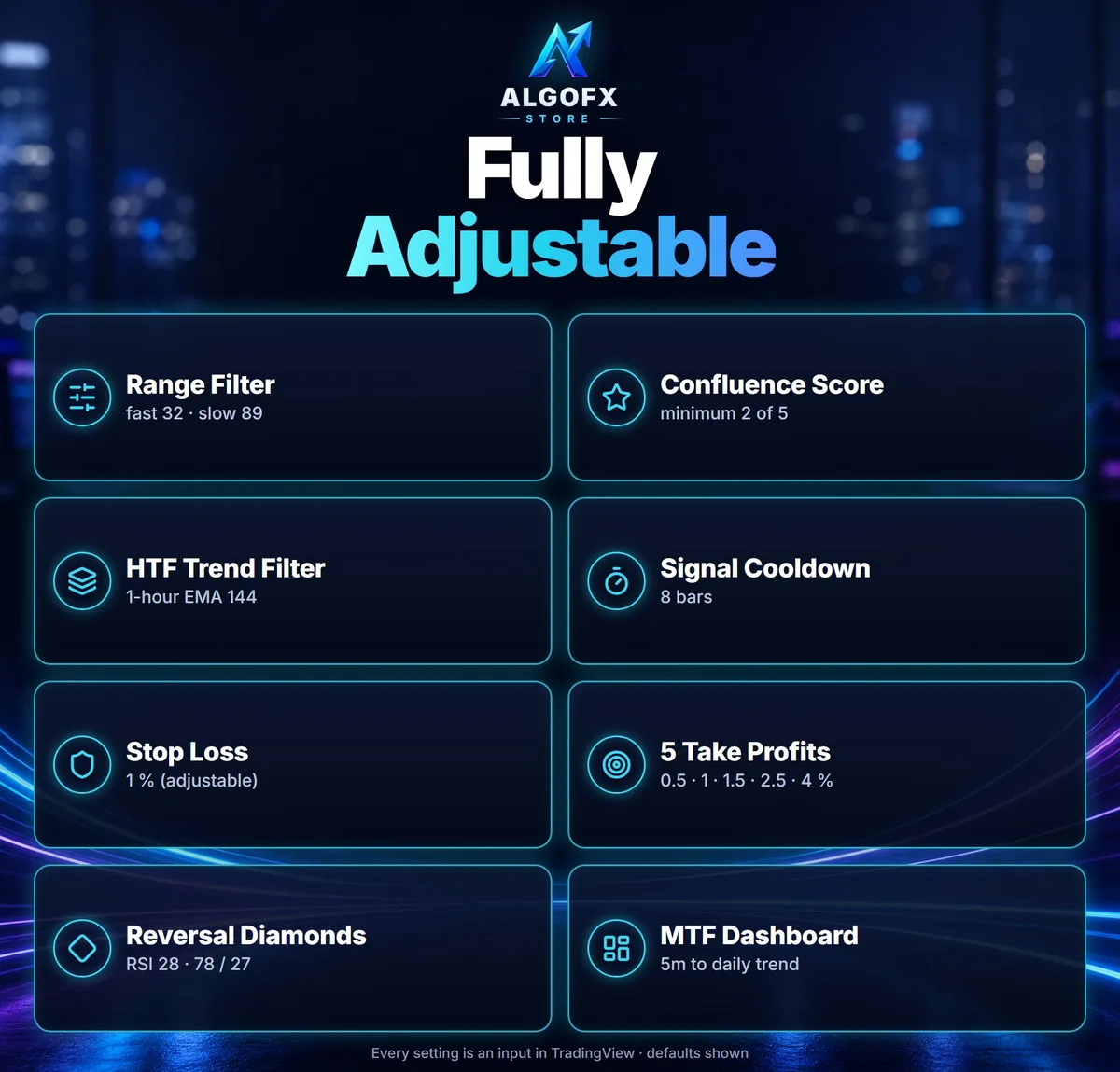
- Range filter flip plus a confluence score from 1 to 5, minimum 2 by default
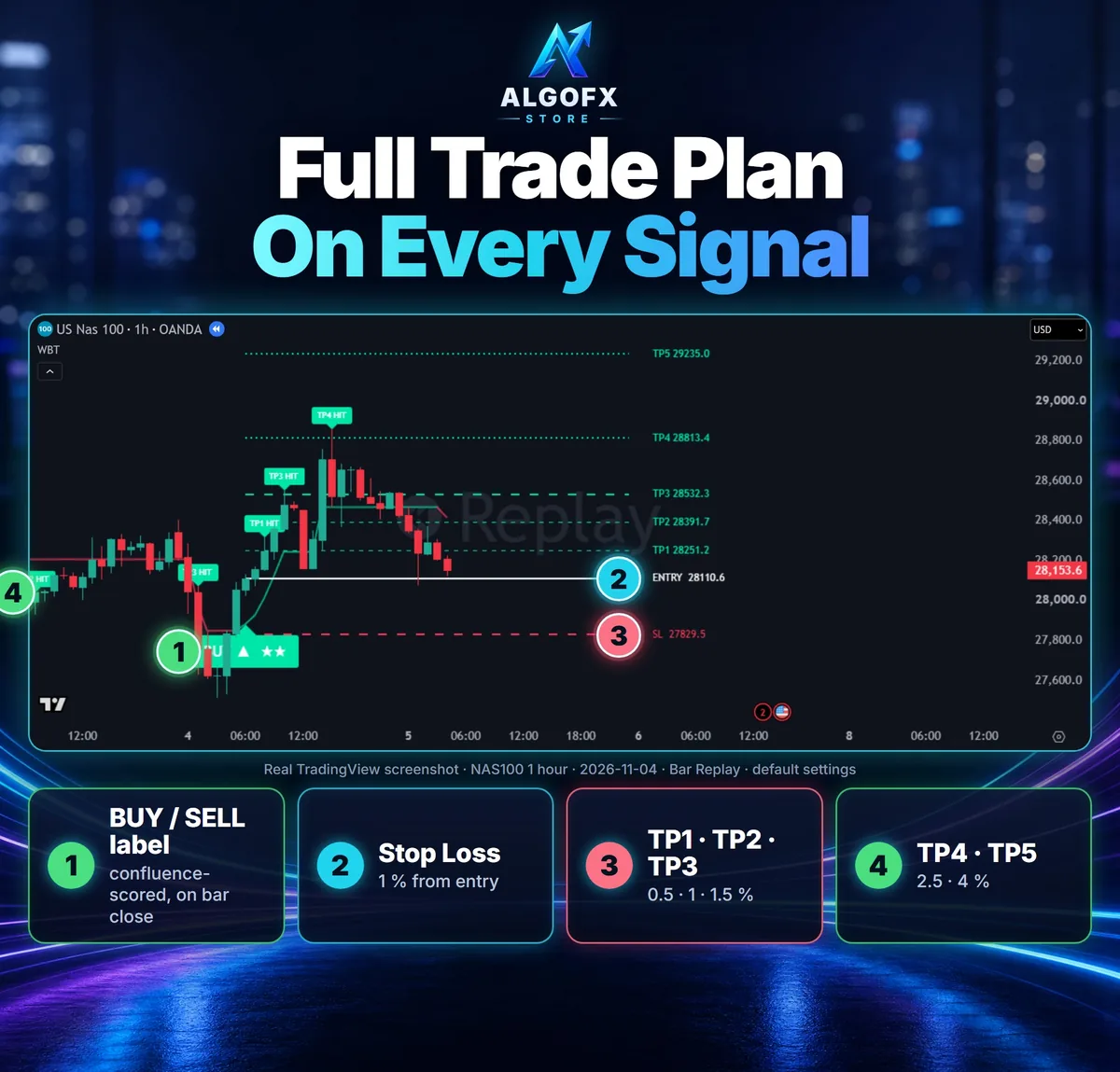
- Stop 1 % from the entry and five targets at 0.5, 1, 1.5, 2.5 and 4 %, all adjustable
- TP and SL HIT labels on the chart and an EMA 144 trend row from 5 minutes to daily
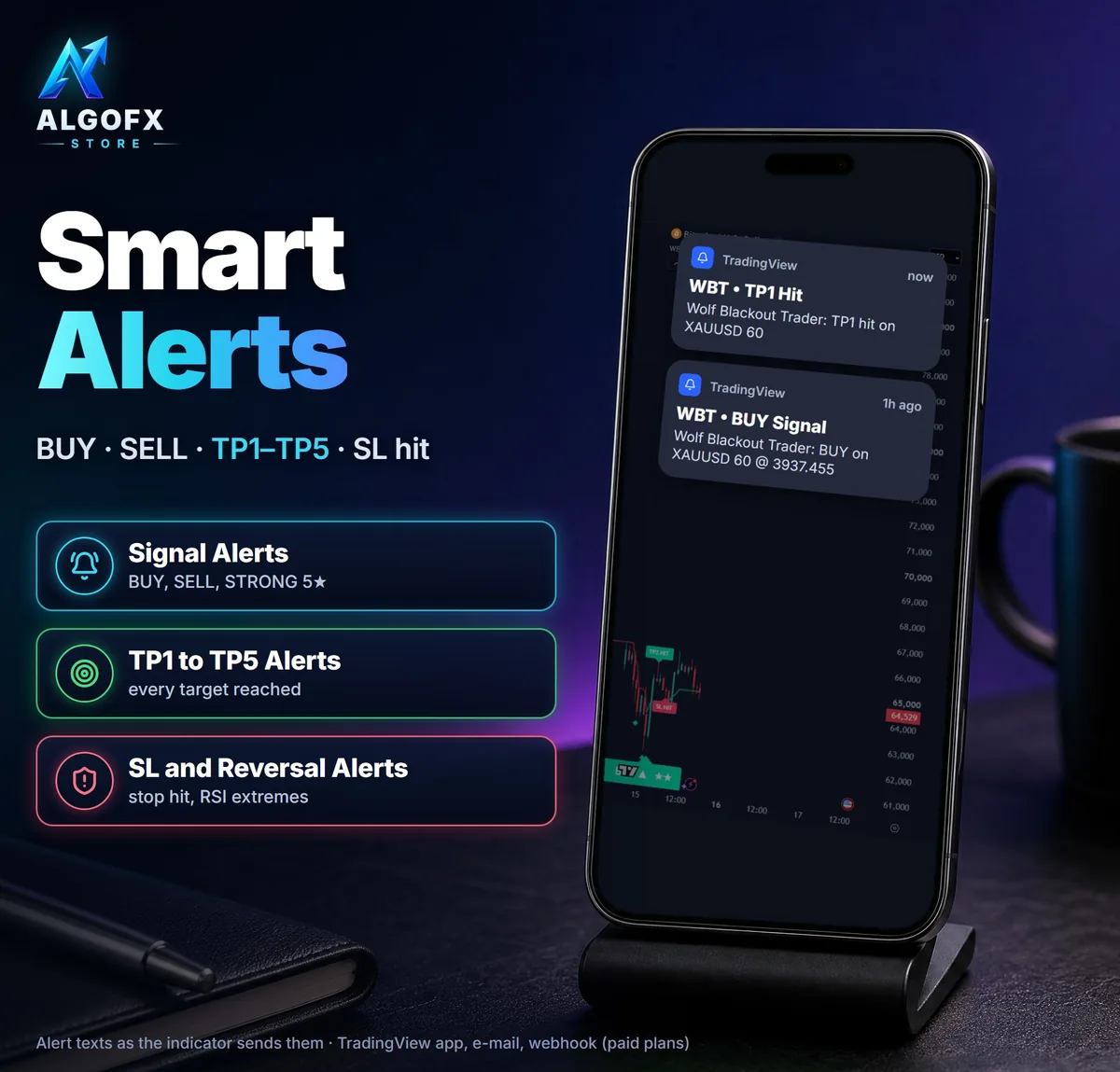
- Alerts for signals, strong signals with a full score of 5, RSI reversal markers, each target and the stop
- The full Pine Script source code. Paste it into the Pine Editor, save, and add “Wolf Blackout Trader [AlgoFXStore]” to your chart.
- A 5-page PDF guide with installation, every setting and how to read the chart. One-time €47.

See Wolf Blackout Trader on a real chart
Press play; use the full-screen button to see every detail.
A filter flip alone tells you direction, not whether the move has support
Trend filters are good at one thing: telling you that price has changed direction by more than its usual noise. They say nothing about whether momentum, the bigger trend or volume agree with the flip. Taken alone, every flip looks equally convincing, and the weak ones cost the same as the strong ones.
Traders usually patch this with a pile of extra indicators: an RSI pane, a long EMA, a higher timeframe chart in another tab, a volume average. Checking all of them on each flip takes time, and the checks are rarely done the same way twice. Then the stop and targets still have to be worked out.
Wolf Blackout Trader scores each flip on the spot. The flip counts 1, and RSI side, EMA 144 side, the 1 hour EMA and a volume burst each add 1. Only flips that reach the minimum score print, and each one arrives with a stop and five targets already drawn.
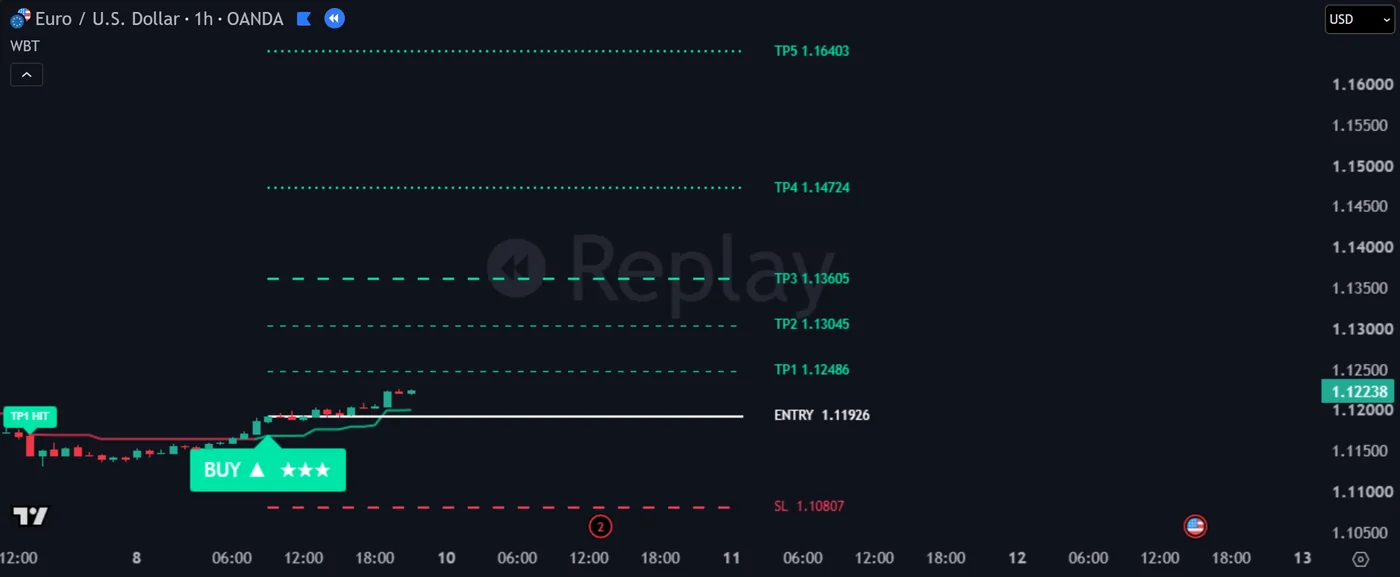
What Wolf Blackout Trader draws, and what each mark means
Read from the shipped TradingView edition.
| What you see | What it means |
|---|---|
| "BUY up (3 stars) " / "SELL down (2 stars) " label | A new signal on a closed bar. Stars = confluence score (1-5). |
| Range filter line (green / red / grey) | Filter direction; the candles are tinted the same way. |
| White "ENTRY <price>" | Entry: the close of the signal bar. |
| Red dashed "SL <price>" | Stop loss, 1 % from the entry by default. |
| Green "TP1 <price>" … "TP5 <price>" | Five targets at 0.5, 1, 1.5, 2.5 and 4 % from the entry. |
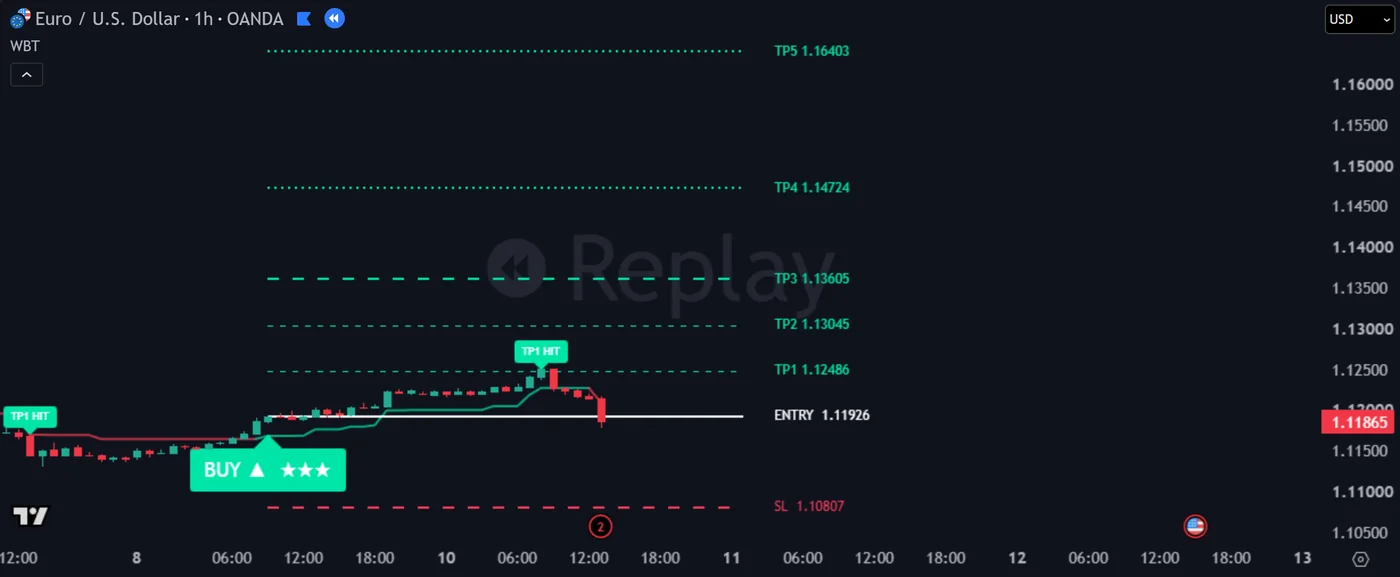
| "TP1 HIT" … "TP5 HIT tick " / "SL HIT" | A target or the stop was reached. TP5 or the stop removes the level lines. |
| Small green / red diamonds | RSI(28) below 27 or above 78 and still moving that way: a stretched market (context, not a signal). |
| Dashboard MTF TREND | Close vs EMA 144 on 5m, 15m, 30m, 1h, 4h and daily. |
How Wolf Blackout Trader decides what to draw
This is the logic of the shipped Pine Script v6 code. It reads the chart's symbol, plus a 1 hour EMA check and the multi-timeframe dashboard row.
- 1
One range filter from two ranges
A fast smoothed range (length 32, sensitivity 1.67) and a slow one (length 89, sensitivity 6.0) are averaged into one range filter. The filter line holds still while price moves inside that range and steps when price leaves it. A flip from a bearish to a bullish state is a bull trigger, the opposite a bear trigger. Candles are tinted by the filter direction.
- 2
The confluence score
The flip itself counts 1 point. One point each comes from RSI(14) on the right side of 50, the close on the right side of EMA 144, the previous 1 hour candle closing on the right side of its EMA 144, and volume at or above its 20-bar average. A confirmation that you switch off gives its point to every flip. The label shows the score as stars.
- 3
When a signal prints
A BUY needs a bull trigger, a score of at least 2 (Minimum Confluence Score) and at least 8 bars since the last BUY (Signal Cooldown). A SELL mirrors it. If both appear on one bar, the higher score wins. With the close-confirmed mode on, the default, signals are only decided on a closed bar.
- 4
Stop and five targets in percent
The entry is the signal bar's close. The stop is 1.0 % away; TP1 to TP5 sit at 0.5, 1.0, 1.5, 2.5 and 4.0 % from the entry. The stop is a red dashed line, the targets green lines, the entry white, each with its price and extended 40 bars to the right. Because the levels are percentages, they read the same on every timeframe.
- 5
Following the trade
TP1 to TP4 are milestones: a TP HIT label appears and the trade stays open. TP5 closes it, and a touch of the stop closes it with an SL HIT label; then the level lines are removed. A new BUY or SELL replaces an open trade. The dashboard ticks each target reached.
- 6
Reversal markers and the dashboard
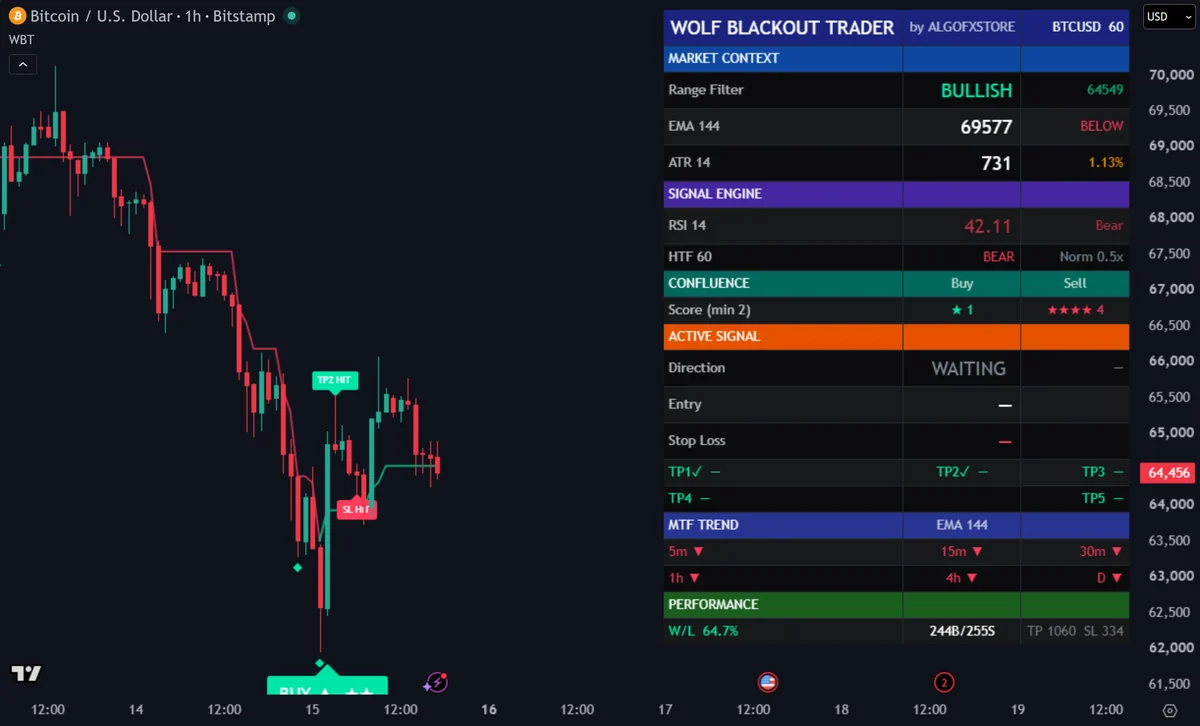
Small diamonds mark a stretched market: RSI(28) below 27 or above 78 and still moving that way. They are context, not signals. The dashboard shows the filter, EMA 144, ATR, RSI, the 1 hour bias, the confluence for buys and sells, the active signal with all levels, and an EMA 144 trend row on 5m, 15m, 30m, 1h, 4h and daily.
Wolf Blackout Trader on 12 different markets
Every chart below is a screenshot of TradingView itself with the shipped Wolf Blackout Trader [AlgoFXStore] attached at its default settings. Forex, metals, indices, energy and crypto, so you can see how it reads each kind of market. They show what the indicator draws; they are not trading results. Tap or click any chart to open it full size.
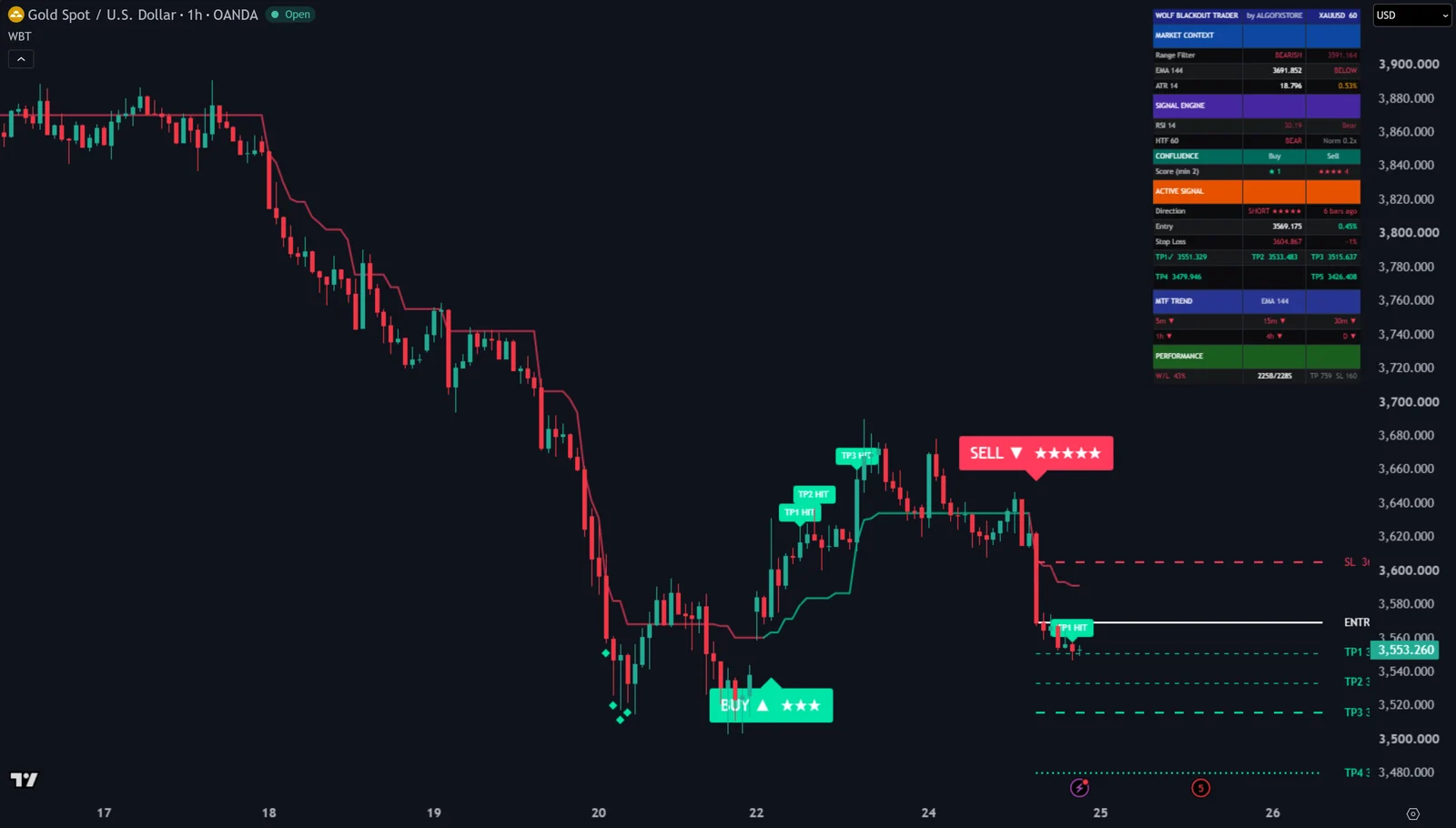
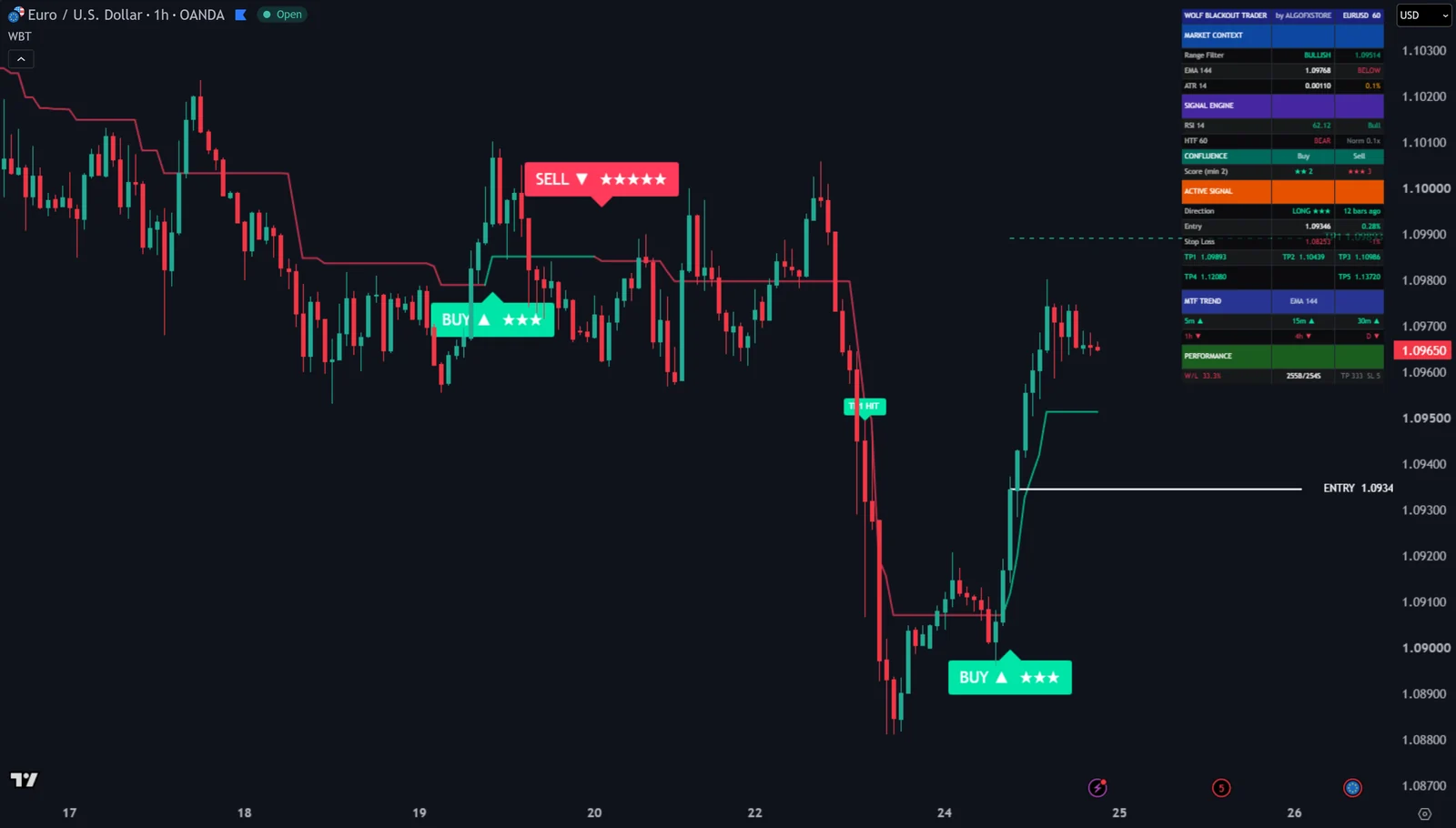
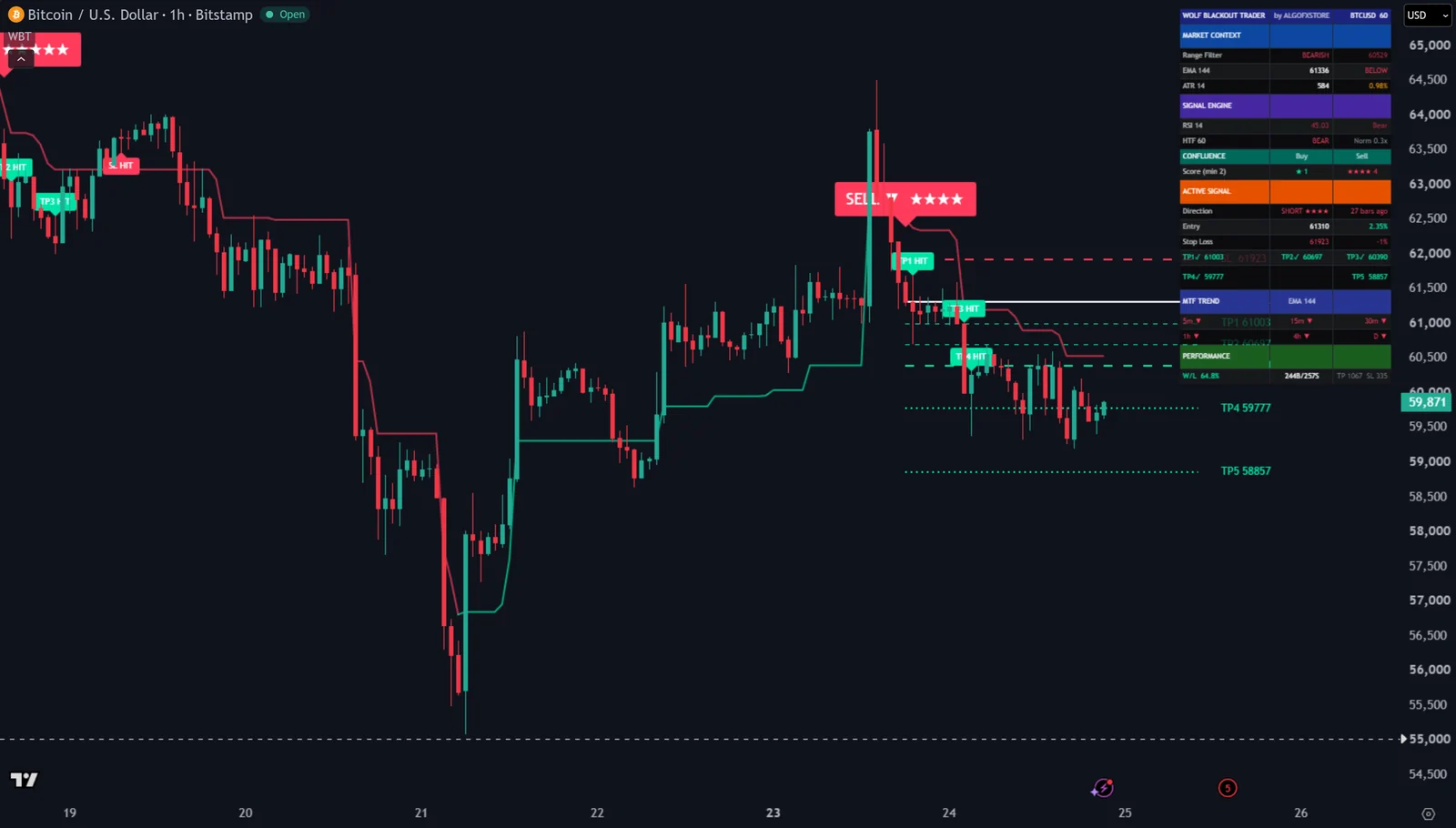
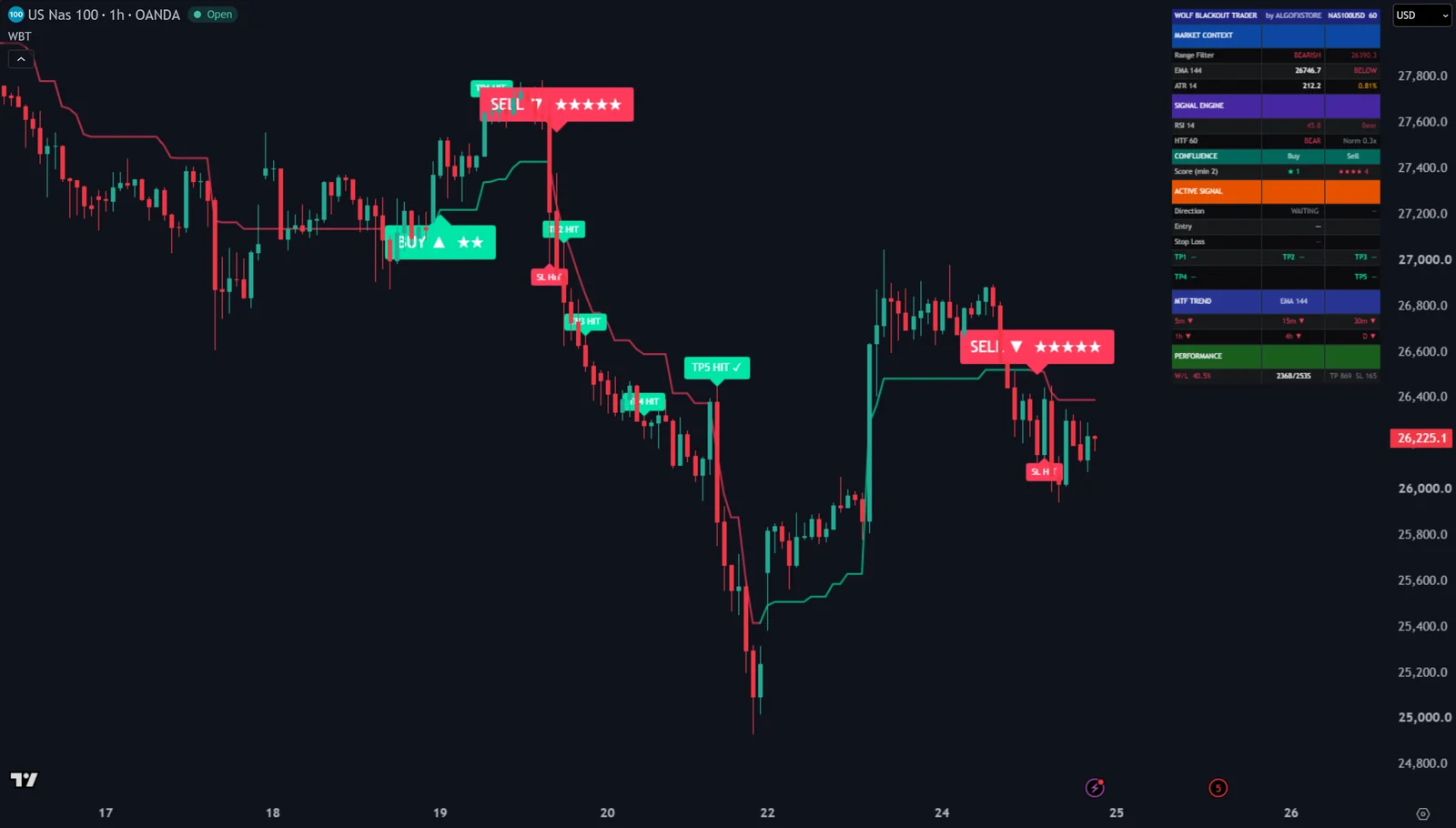
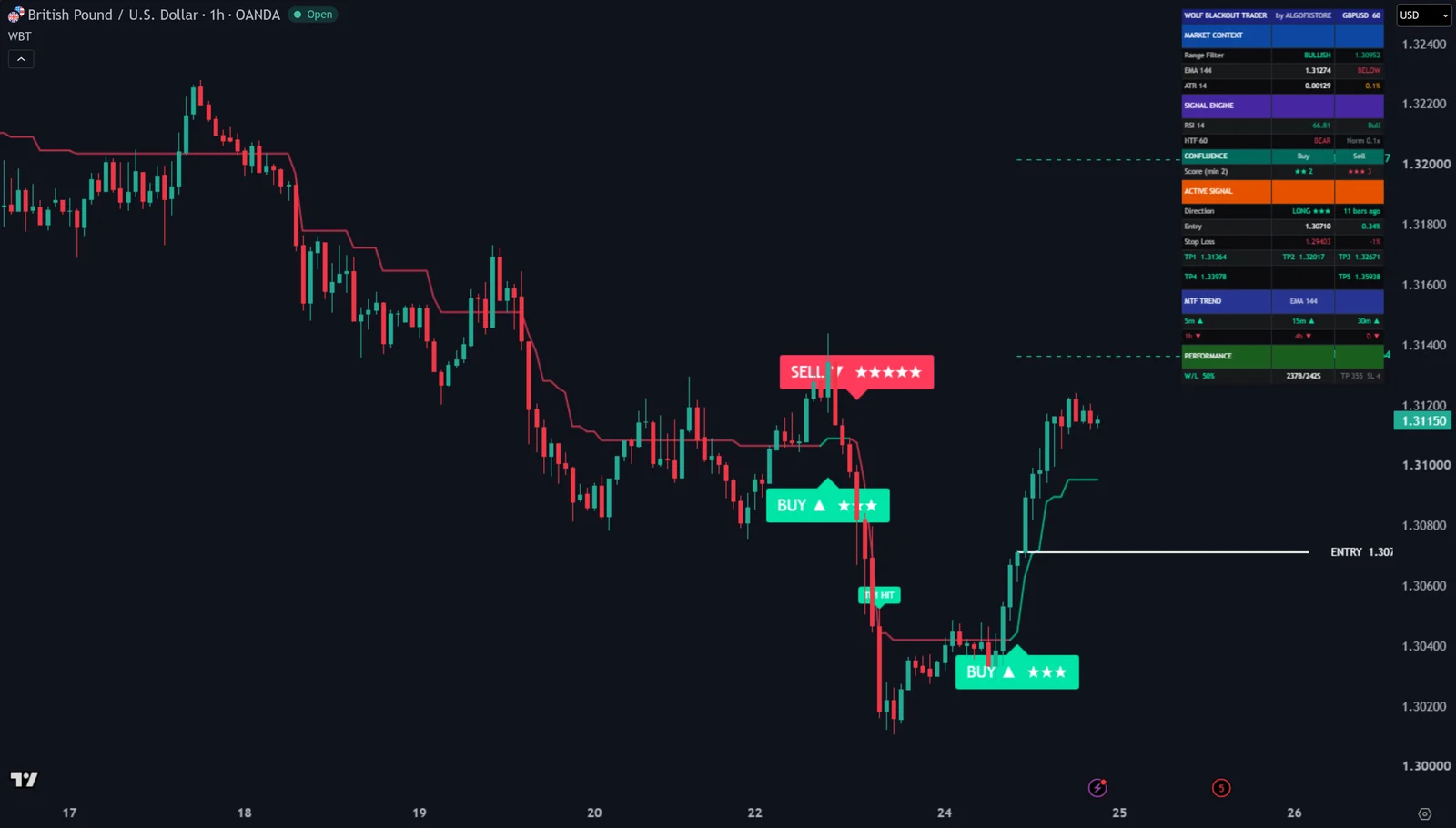
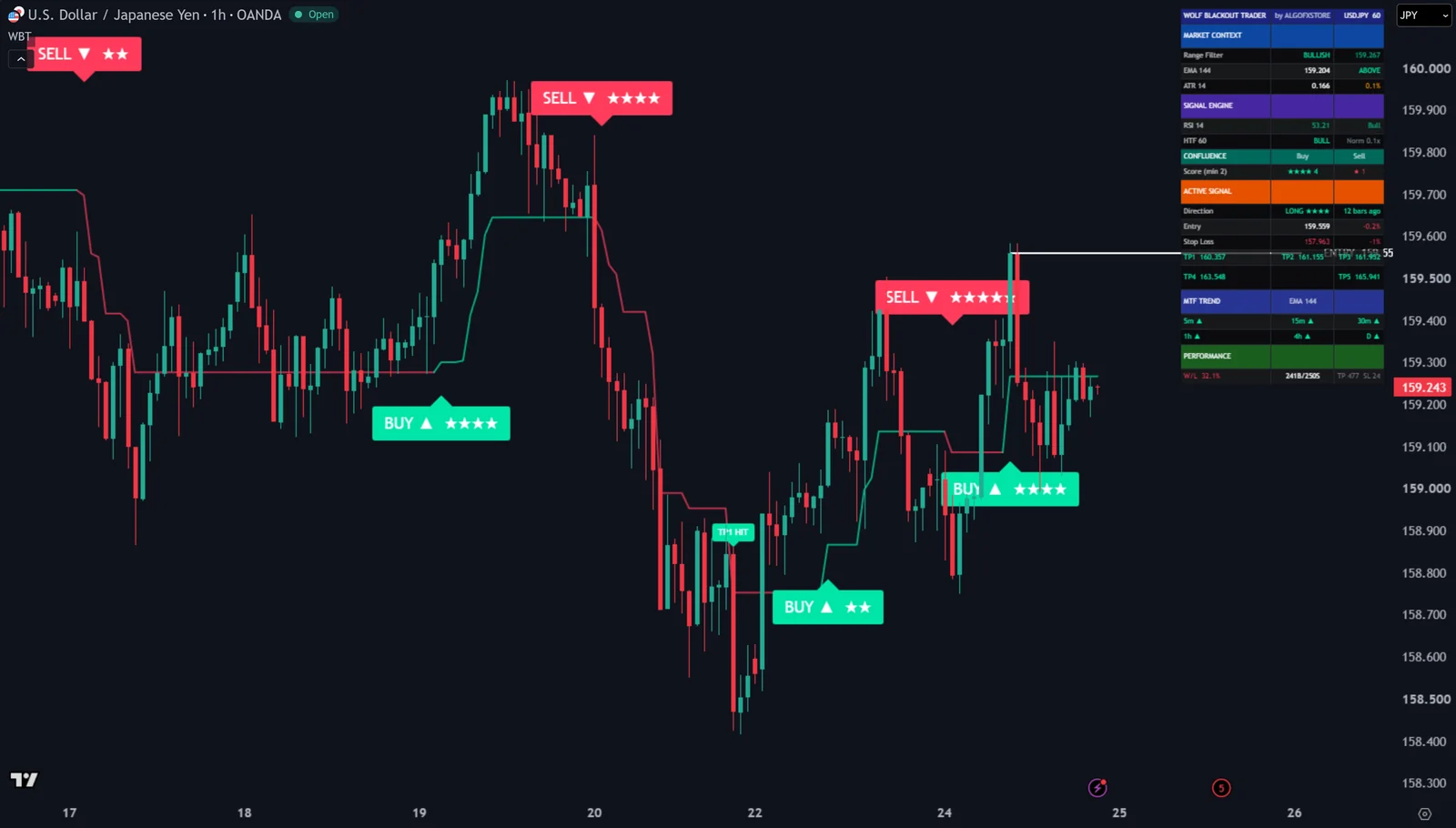
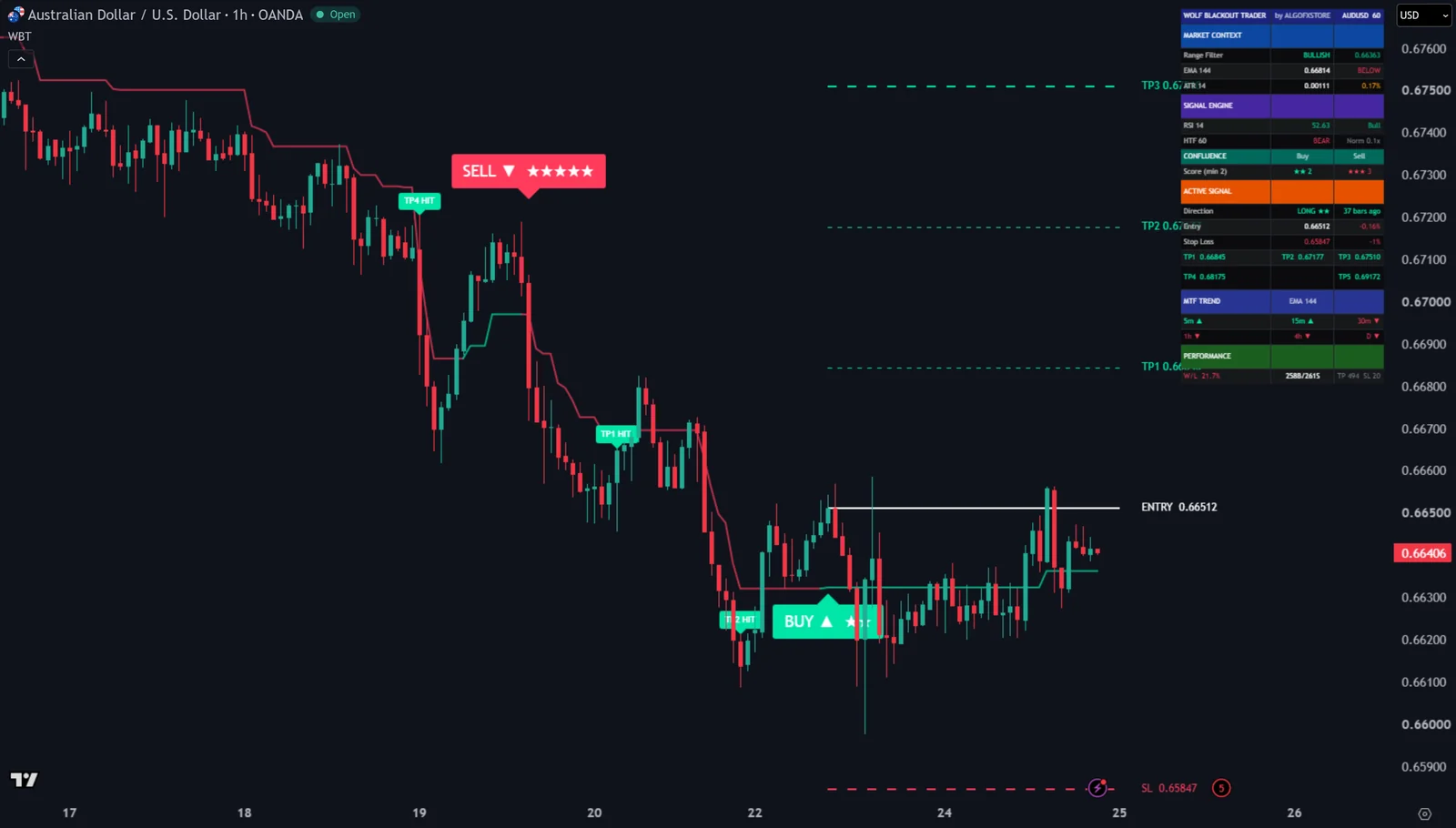
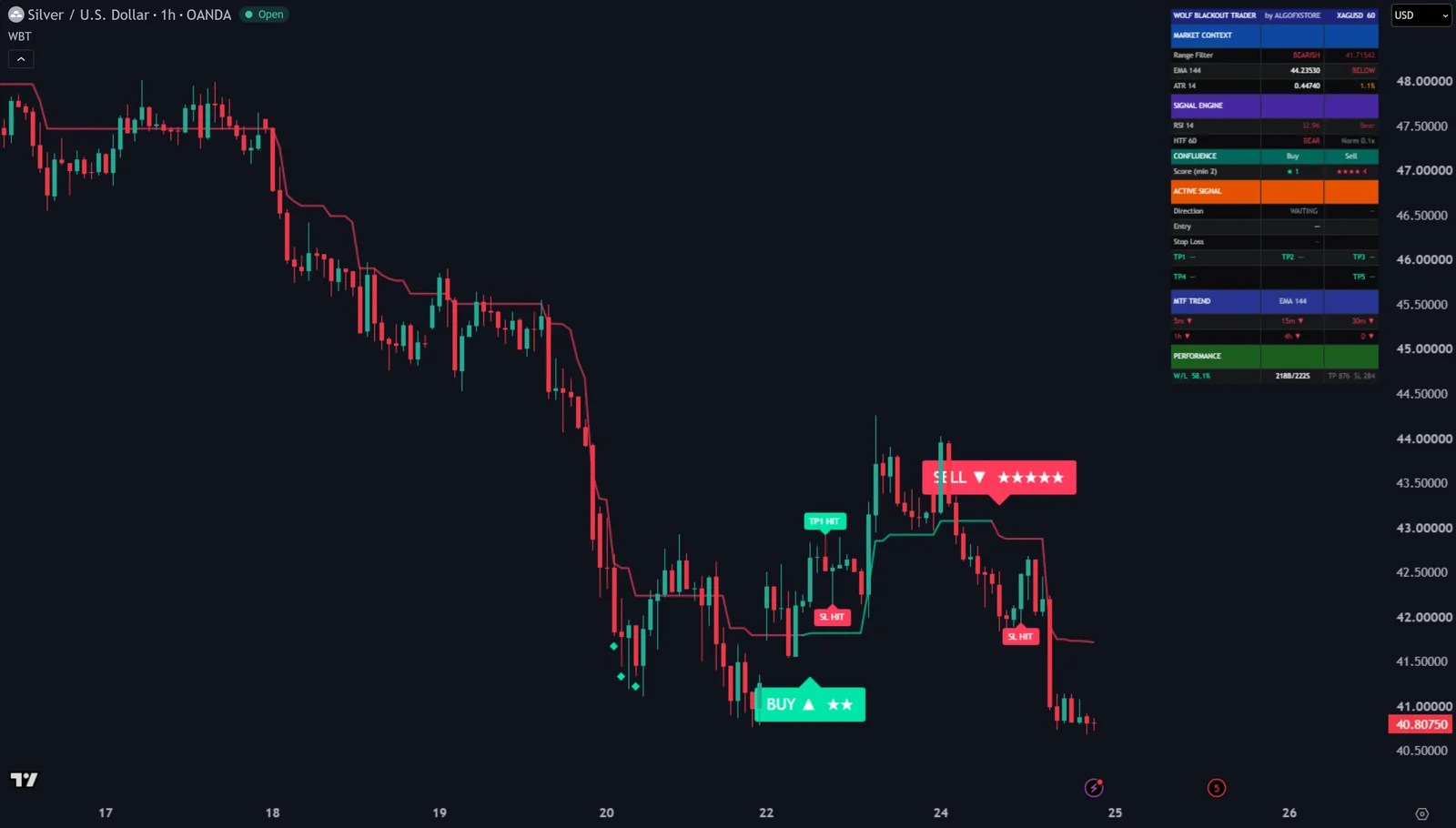
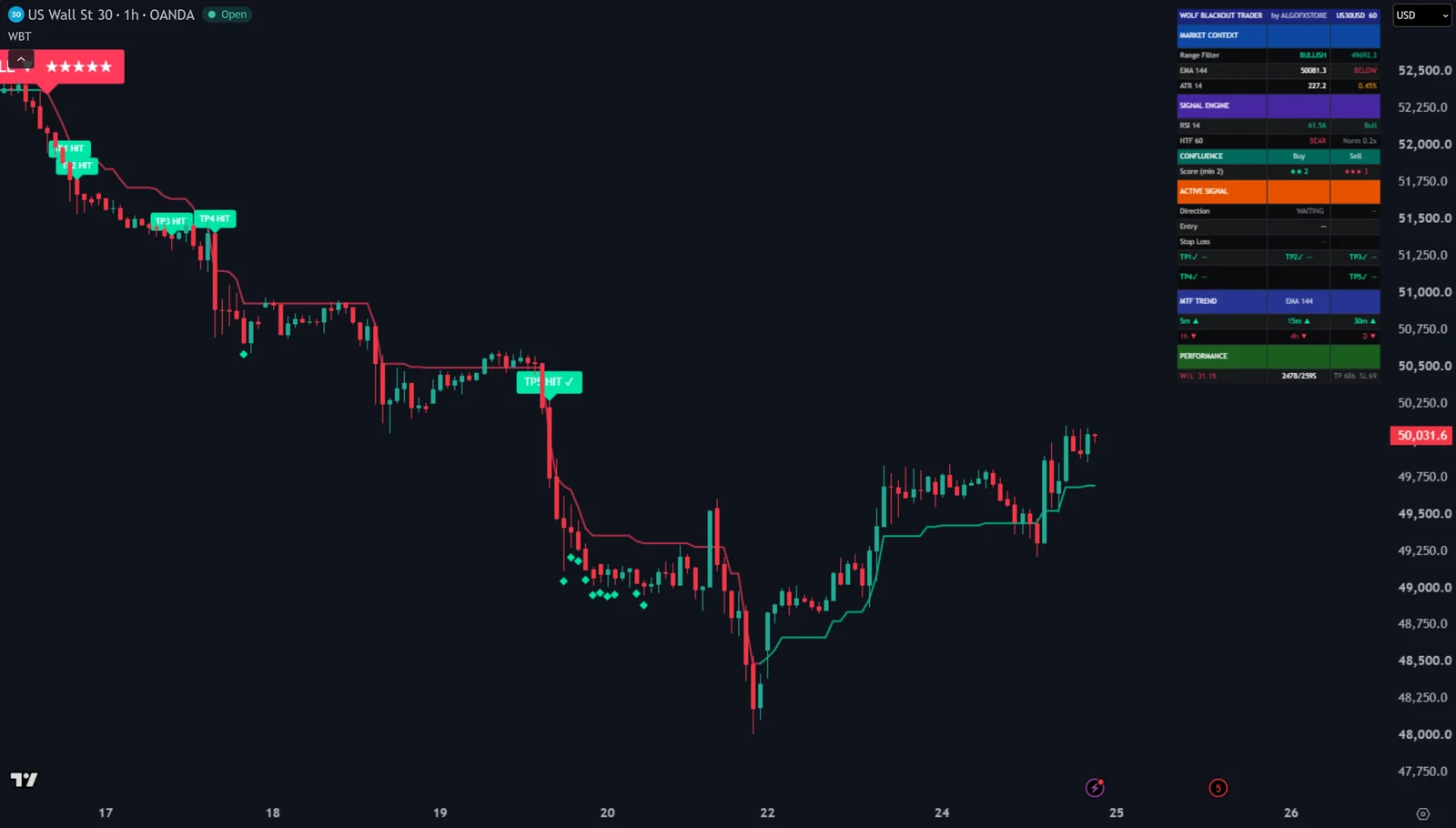
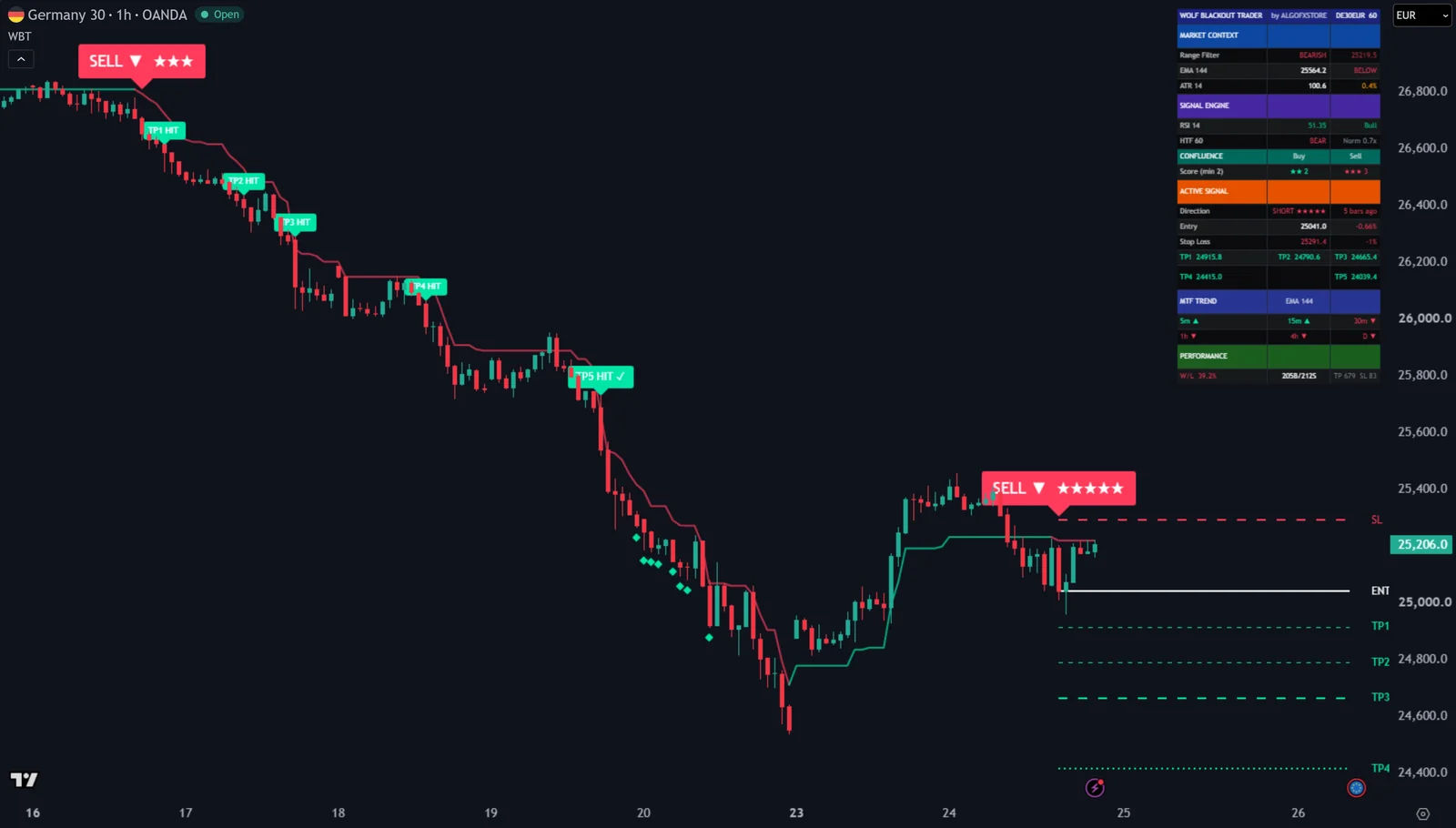
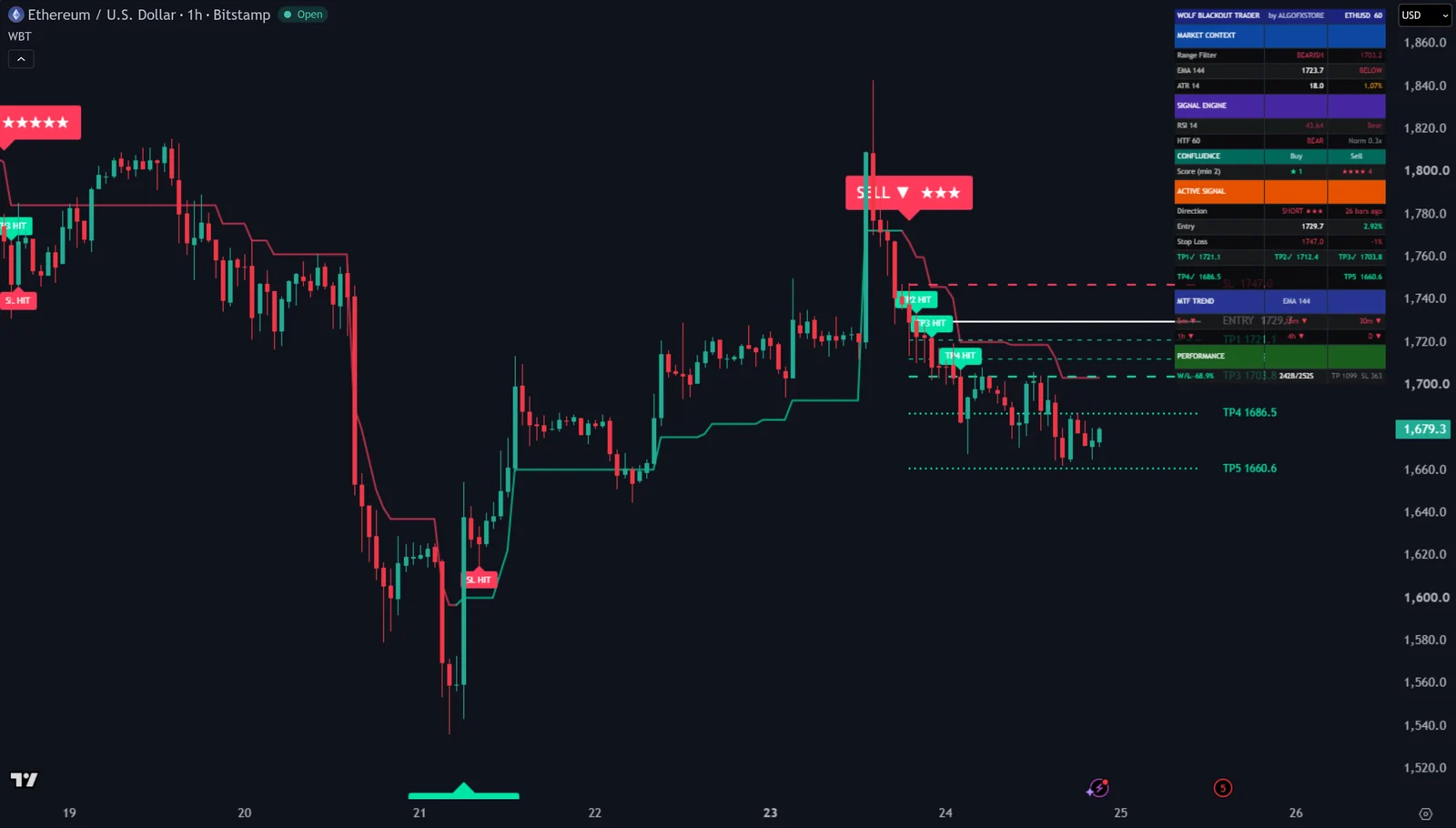
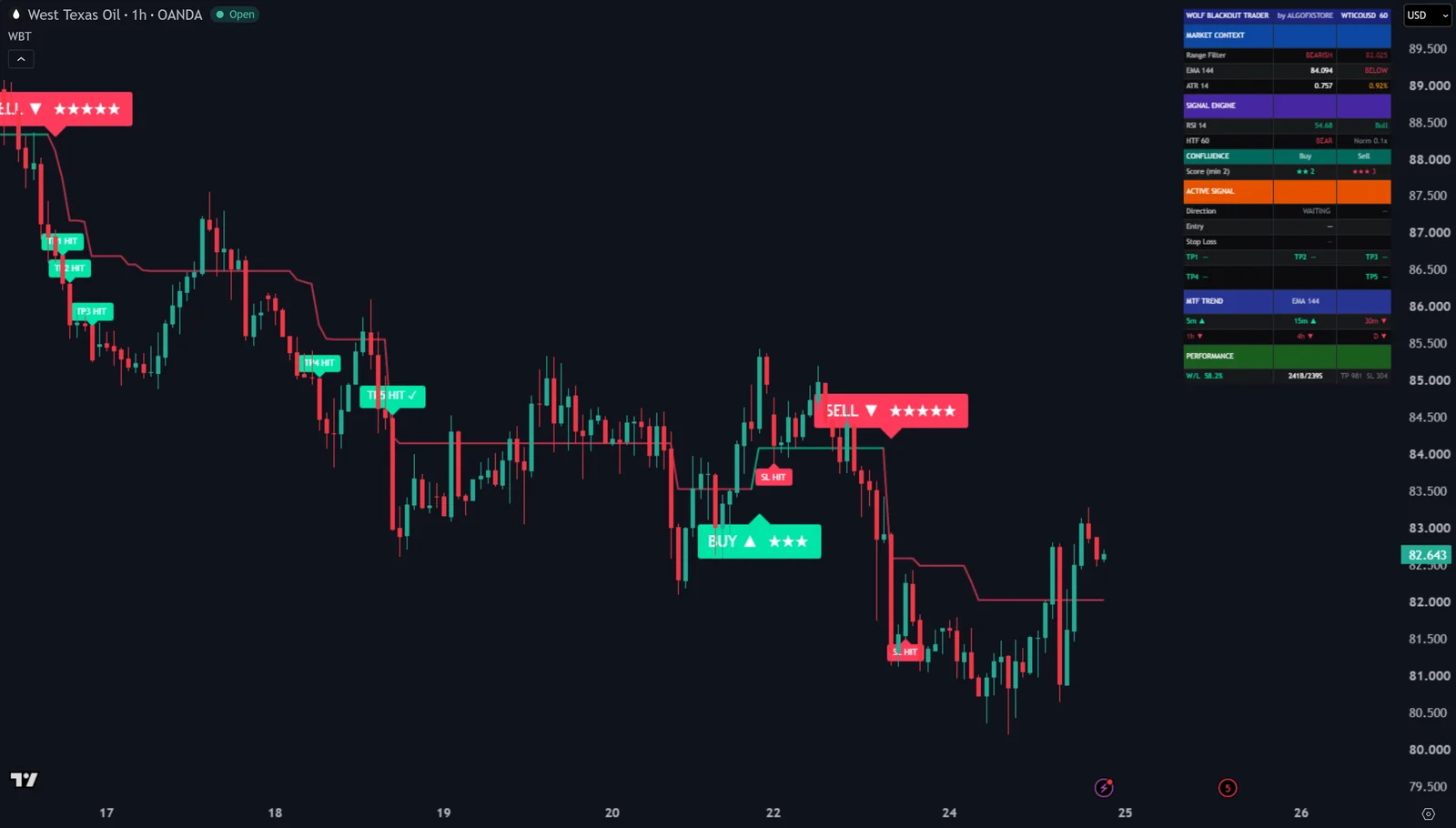
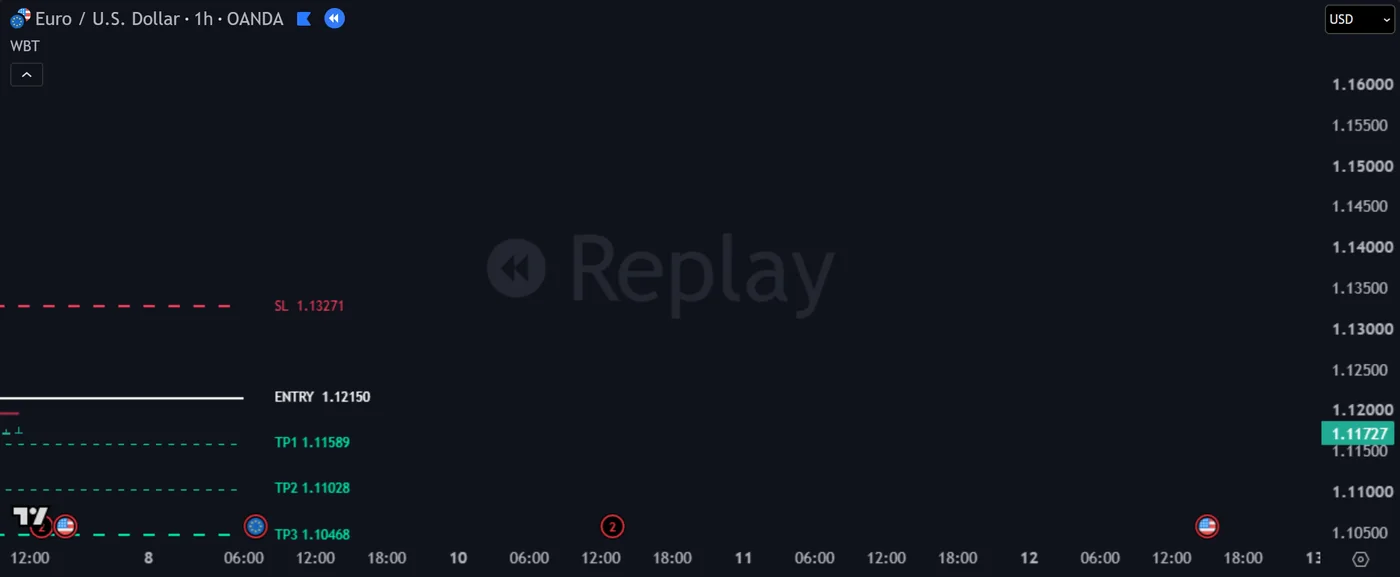
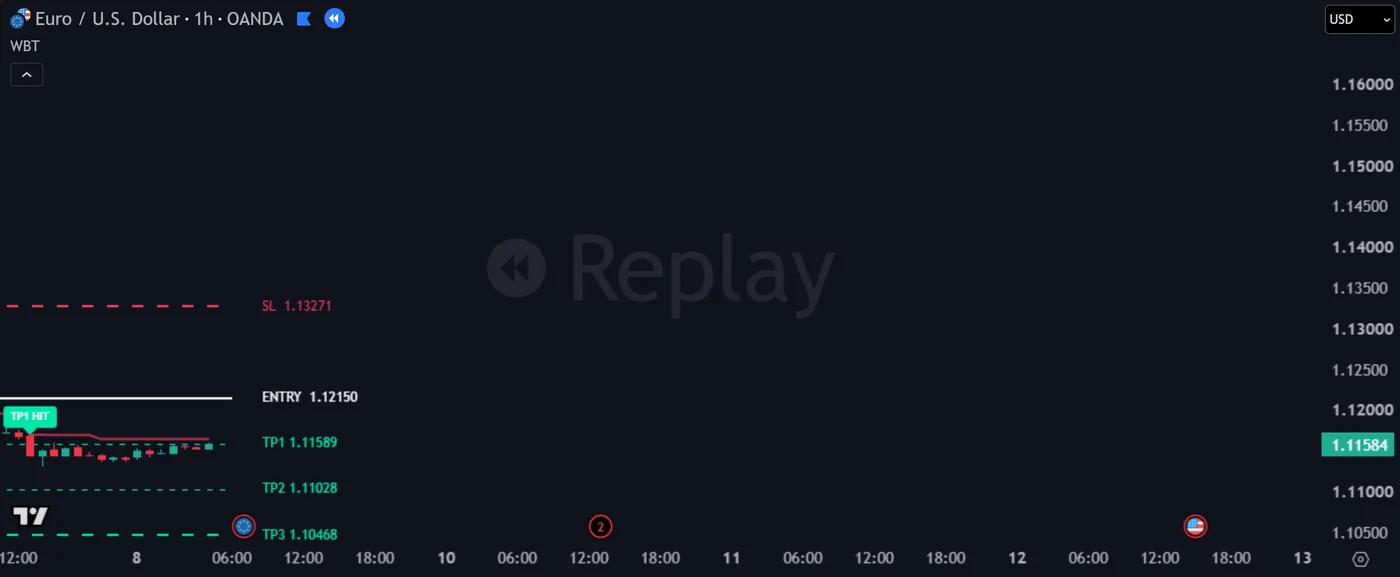
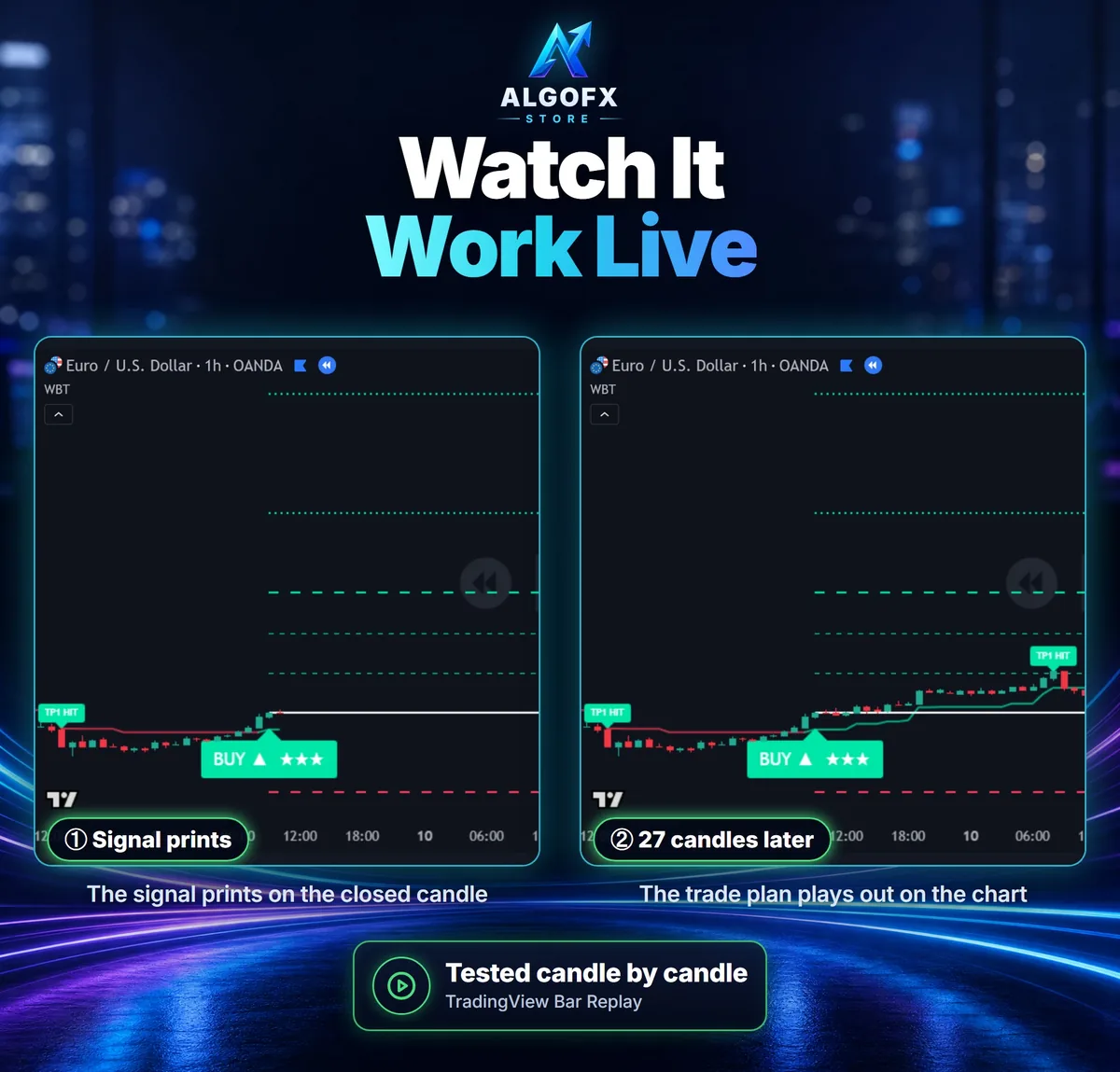
Wolf Blackout Trader on a real TradingView chart, frame by frame
Frames of a screen recording of the shipped indicator at its default settings, as the chart updates. Nothing is edited into the chart.
How to use it, step by step
The indicator scores the flips and draws the levels. These steps cover choosing signals, sizing and handling the five targets.
- 1
Fit the percentages to your market
The default 1 % stop and 4 % TP5 suit 1 hour to 4 hour charts and volatile markets such as gold, crypto and indices. On forex intraday a 1 % stop is very wide, so shrink the stop and target percentages to the moves your pair makes. Check the levels on a few recent signals before trading with them.
- 2
Read the stars on the label
The score tells you how many of the five parts agreed. A BUY with two stars passed the minimum; a BUY with all five stars had RSI, EMA 144, the 1 hour EMA and volume all agreeing, and it also fires the STRONG BUY alert. If you only want the fuller agreement, raise Minimum Confluence Score to 3 or 4.
- 3
Check the timeframe stack
The MTF TREND rows show price against EMA 144 on six timeframes. A BUY with most of them up agrees with the larger picture; a BUY with most of them down is a counter-trend trade. Neither is blocked by the indicator, so decide in advance which ones you take.
- 4
Size from the stop
The stop is a fixed percentage of price, not a swing. Convert the distance to your position size so the stop is a loss you accept. If a fixed percentage does not fit the structure on your chart, for example a swing low just beyond it, decide whether you still take the signal.
- 5
Plan the five targets
With five targets you can scale out: for example part at TP1 or TP2, more at TP3 or TP4, the rest at TP5. The indicator keeps the original stop and never moves it; any breakeven or trailing rule is yours. A new signal in either direction replaces the open trade on the chart.
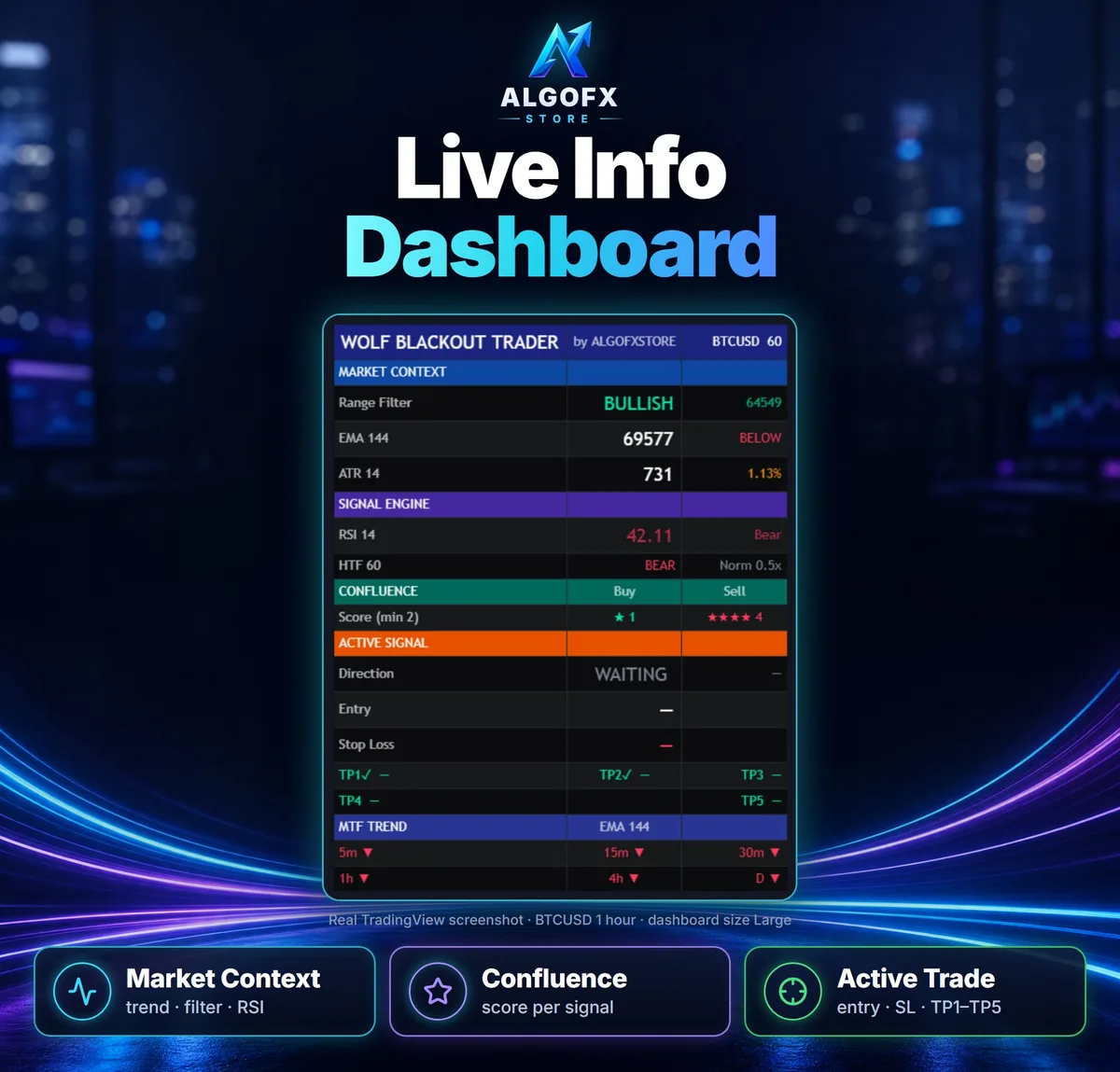
The dashboard, row by row
- WOLF BLACKOUT TRADER | by ALGOFXSTORE | <TICKER> <TF>
- MARKET CONTEXT
- Range Filter | BULLISH / BEARISH / NEUTRAL | <filter price>
- EMA 144 | <ema> | ABOVE / BELOW
- ATR 14 | <atr> | <atr %>
- SIGNAL ENGINE
- RSI 14 | <rsi> | OB / OS / Bull / Bear / Neut
- HTF 60 | BULL / BEAR | HIGH / Norm <x.x>x
- CONFLUENCE | Buy | Sell
- Score (min 2) | (3 stars) 3 | (2 stars) 2
- ACTIVE SIGNAL
- Direction | LONG / SHORT / WAITING (+ stars) | <n> bars ago
- Entry | <entry price> | <live % gain/loss of the open trade>
- Stop Loss | <SL price> | -1%
- TP1[ tick ] <price> | TP2[ tick ] <price> | TP3[ tick ] <price>
- TP4[ tick ] <price> | | TP5[ tick ] <price>
- MTF TREND | EMA 144
- 5m up / down | 15m up / down | 30m up / down
- 1h up / down | 4h up / down | D up / down
- PERFORMANCE
Everything Wolf Blackout Trader does for you
Scored signals
Every flip is scored from 1 to 5 from the filter flip, RSI side, EMA 144 side, the 1 hour EMA and volume. Only flips at or above the minimum score print, with the score as stars on the label.
Five targets and a stop
Stop at 1 % and TP1 to TP5 at 0.5, 1, 1.5, 2.5 and 4 % of the entry by default, each a separate input, drawn with prices and extended 40 bars to the right.
Hit labels on the chart
TP1 HIT to TP5 HIT labels appear when targets are reached, SL HIT when the stop is touched, so you can see on the chart how the current trade developed.
Signal cooldown
At least 8 bars between two signals in the same direction by default, adjustable from 1 to 200, so a choppy stretch does not print a signal on every bar.
Multi-timeframe trend row
Close against EMA 144 on 5 minutes, 15 minutes, 30 minutes, 1 hour, 4 hours and daily, in two dashboard rows that can be switched off.
RSI reversal markers
Diamonds where RSI(28) is beyond 78 or 27 and still moving that way, to warn of a stretched market. Length and levels are inputs, and the markers can be hidden.
Alerts for every event
alertcondition alerts for BUY, SELL, Any Signal, STRONG BUY and STRONG SELL, Reversal Buy and Sell, TP1 to TP5 and SL. alert() messages carry the entry, stop, five targets and the score.
Adjustable look
Bullish, Bearish and Neutral colours, bar colouring, the filter line, four label styles from arrows to LONG and SHORT, and a dashboard in six positions and four sizes.
Wolf Blackout Trader, feature by feature
Each picture is built from real platform screenshots of the shipped indicator at its default settings, labelled so you can see what every part does. Tap any picture to open it full size.

How traders put it to work
Gold on 1 hour to 4 hours
On XAUUSD the default percentages fit hourly and 4 hour charts, where a 1 % stop sits outside normal bar noise and the 4 % TP5 is a swing target. On 1 hour and above the 1 hour EMA check is consistent between live bars and reloaded history.
Crypto and indices
Bitcoin and index charts move in percentages similar to the defaults. Raise Minimum Confluence Score if you want fewer, better-supported signals, and use the volume check only where the symbol has a volume feed.
Forex intraday
On EURUSD or GBPUSD at 15 minutes, shrink Stop Loss % and the TP percentages to fit the pair's daily range. On charts below 1 hour consider switching Require HTF EMA Agreement off, so the score does not depend on the 1 hour check described in the FAQ.
Trend following with the MTF row
If you trade only with the larger trend, take signals where most of the six EMA 144 rows agree with the direction and the 1 hour bias matches. The STRONG BUY and STRONG SELL alerts let you be notified only when all five parts agree.
Every setting, with its default
The names are the ones in the script's Settings dialog in TradingView (Inputs tab); the defaults are what every chart on this page uses.
| Setting | Default | What it does |
|---|---|---|
| Range Filter Fast Length / Range Filter Fast Sens | 32 / 1.67 | Fast half of the range filter. |
| Range Filter Slow Length / Range Filter Slow Sens | 89 / 6.0 | Slow half; both ranges are averaged into one filter. |
| Signal Cooldown (bars) | 8 | Minimum bars between two signals in the same direction. |
| Minimum Confluence Score | 2 | 1-5: the filter flip plus RSI side, EMA side, higher-timeframe EMA and volume burst. |
| RSI Length / EMA Length | 14 / 144 | RSI side of 50 and price side of the EMA. |
| Require HTF EMA Agreement / HTF Timeframe | On / 60 | Previous 1-hour candle's close vs its EMA 144. |
| Stop Loss % | 1.0 | Stop distance from the entry, in percent. |
| TP1 % / TP2 % / TP3 % / TP4 % / TP5 % | 0.5 / 1.0 / 1.5 / 2.5 / 4.0 | Five targets in percent of the entry; TP5 closes the trade. |
| Show Reversal Markers (RSI extremes) / Reversal RSI Length / Reversal Overbought / Reversal Oversold | On / 28 / 78 / 27 | Diamond markers at RSI extremes. |
| Dashboard Position / Dashboard Size | Top Right / Tiny | 6 positions, 4 sizes; the MTF row can be switched off. |
The alert events, one by one
In TradingView: Create alert, choose “Wolf Blackout Trader [AlgoFXStore]” as the condition and pick the event. TradingView then notifies you the way you set in that dialog: a pop-up in TradingView, a sound, the TradingView app on your phone or an e-mail.
- WBT • BUY Signal
- WBT • SELL Signal
- WBT • Any Signal
- WBT • STRONG BUY (5 stars)
- WBT • STRONG SELL (5 stars)
- WBT • Reversal Buy
- WBT • Reversal Sell
- WBT • TP1 Hit
- WBT • TP2 Hit
- WBT • TP3 Hit
- WBT • TP4 Hit
- WBT • TP5 Hit
- WBT • SL Hit
Wolf Blackout Trader next to the usual options
Where it wins, and where it does not.
| Wolf Blackout Trader | Typical free buy sell indicator | Reading it by hand | |
|---|---|---|---|
| What makes a signal | Range filter flip with a score from five parts | One condition | Your checklist |
| Stop and targets | Stop and five targets in percent, drawn with prices | None or one target | Calculated each time |
| Trend context | EMA 144 row from 5 minutes to daily on the dashboard | None | Several charts open |
| Alerts | Signals, strong signals, reversals, five targets and the stop | One alert | Only while you watch |
| Stop placement | A fixed percentage, not tied to chart structure | Varies | Wherever you judge |
| Simplicity | 43 inputs and a 21-row dashboard | A few inputs | Nothing to install |
| Cost | A one-time purchase | Free | Free |
Honest about who this fits
A good fit if you
- Traders on TradingView who want each trend flip scored by momentum, trend, the higher timeframe and volume before it prints.
- Traders who like to scale out over several targets and want five levels drawn on every signal.
- Swing and intraday traders on gold, crypto and indices, where percent-based levels match the market's moves.
- Traders who want a multi-timeframe trend view in the same dashboard as the signal.
- Traders who want alerts for every step, including strong signals with a full score of 5 only.
Not for you if you
- Traders who want stops placed at chart structure: the stop is a fixed percentage of price.
- Forex scalpers who do not want to adjust settings: the default 1 % stop is far too wide for intraday pairs.
- Traders who need signals on charts below 1 hour to match exactly after a reload while the 1 hour EMA check is on, as the FAQ explains.
- Anyone who wants orders placed automatically: it draws and alerts and never places a trade.
The full code, one guide, installed in two minutes
- 1Pine Script source codeWolf_Blackout_Trader_TradingView_Code.txt (48 KB): the full code. Paste it into the Pine Editor and it appears as “Wolf Blackout Trader [AlgoFXStore]”.
- 5Page PDF guideInstallation, every setting with its default and how to read the chart.
- ✓Every main setting explainedThe table above lists the main settings with the defaults the charts use.
- ✓Alert eventsYou choose which ones are on in the settings.
- 60Day money-back guaranteeIf it is not for you, request a full refund within 60 days through your Digistore24 order e-mail.
Install in five steps
- Download the zip from the page Digistore24 sends you to after checkout and unzip it.
- Open Wolf_Blackout_Trader_TradingView_Code.txt in a text editor, select all and copy the whole code.
- In TradingView, open the Pine Editor, paste the code over everything that is there and click Save.
- Click Add to chart: “Wolf Blackout Trader [AlgoFXStore]” appears on your chart.
- Read the PDF guide; the defaults are the settings shown on this page.

Kestutis Balciunas
AlgoFXStore · chart indicators
Kestutis Balciunas builds and publishes chart indicators under the AlgoFXStore name. Every product page shows what the indicator draws on real charts, and every number on it comes from the shipped build.
The charts on this page were captured in TradingView from the shipped Wolf Blackout Trader [AlgoFXStore] at its default settings and are shown unedited.
No get-rich claims and no quoted win rates. Every trade is uncertain, and no indicator changes that. If you want to know whether it suits the way you trade before you buy, e-mail [email protected] and you will get a straight answer.
One price, one payment
- The full Pine Script source code of Wolf Blackout Trader and the 5-page PDF guide
- Delivered as a digital download: one zip with the code file and the PDF guide on your download page
- Return period: 60 days, with a full refund if it is not for you
- Free updates to the current version on the same download page
60-day money-back guarantee. Install it, run it on your own charts and read the guide. If Wolf Blackout Trader is not for you within 60 days of purchase, request a full refund from Digistore24, no questions asked: use the refund link in your Digistore24 order e-mail or Digistore24's order page digistore24.com/en/cancel-revoke-contract. Digistore24 refunds to your original payment method. It is a digital download: right after checkout you land on your download page, and the link to it is also in your Digistore24 order e-mail.
Also by Kestutis Balciunas: Wolf Blackout Trader for MT4 and MT5 and cTrader and NinjaTrader 8.
About the signals
Does it repaint?
With the close-confirmed mode on, the default, signals are only decided on a closed bar. One part can still differ: the 1 hour EMA check reads the previous hour in a way that differs between live bars and reloaded history on charts below 1 hour. There a score can change by one point after a reload, so a signal seen live can vanish or a new one appear. On 1 hour charts and above it is consistent. Switching Require HTF EMA Agreement off removes the difference.
What do the stars on the label mean?
They are the confluence score from 1 to 5: the filter flip counts 1, and RSI side, EMA 144 side, the 1 hour EMA and the volume burst add 1 each. A confirmation that is switched off gives its point to every flip. Five stars also fire the STRONG BUY or STRONG SELL alert.
What are the small diamonds?
Reversal markers: RSI(28) below 27 or above 78 and still moving further. They print on every bar while that holds, can flicker on the live bar and are context, not signals. Their alerts are not tied to the bar close.
Why does a new signal sometimes show no levels?
If the previous trade hits TP5 or its stop on the same bar that a new signal prints, the cleanup of the old trade runs after the new trade is drawn and removes the new lines too. The BUY or SELL label and its alerts remain, and the dashboard still shows the new levels.
What happens when a new signal comes while a trade is open?
The new BUY or SELL replaces the open trade on the chart and on the dashboard, whatever its direction. The old trade is not counted in the dashboard tally.
Settings and the dashboard
Should I keep the defaults?
Start with them on 1 hour to 4 hour charts of gold, crypto or indices: filter 32 and 1.67 with 89 and 6.0, cooldown 8, minimum score 2, stop 1 %, targets 0.5 to 4 %. On forex intraday reduce the percentages first. The filter, cooldown and confirmation inputs change the signals; the percentages change only the levels.
What does the dashboard show?
MARKET CONTEXT with the filter state, EMA 144 and ATR 14; SIGNAL ENGINE with RSI and the 1 hour bias with volume; CONFLUENCE with the buy and sell scores; ACTIVE SIGNAL with direction, entry, stop and TP1 to TP5 ticked when reached; the MTF TREND rows; and a PERFORMANCE row.
What does the PERFORMANCE row count?
A hindsight tally of the trades drawn on the loaded chart: buys and sells, target and stop hits. It counts a trade as a win once TP1 is reached before the stop, and trades replaced by a new signal are not counted. It is a record of the chart, not a forecast.
Which timeframes and markets suit it?
Any symbol and timeframe on TradingView. The levels are percent of price, the same on every timeframe, so the defaults suit 1 hour to 4 hour charts and volatile markets. The 1 hour EMA check is a higher timeframe only on charts below 1 hour; set HTF Timeframe above your chart if you want it as a true higher timeframe.
Alerts and running it
Which alerts can I set?
In Create alert: BUY, SELL and Any Signal, STRONG BUY and STRONG SELL for signals scoring 5 of 5, Reversal Buy and Reversal Sell, TP1 to TP5 Hit and SL Hit. With Enable Master alert() Pushes on, an Any alert() function call alert sends messages with the entry, stop, five targets and score, once per bar close.
Does it use a lot of data requests?
Seven requests of the same symbol: one for the 1 hour EMA check and six for the MTF trend row. That is well inside the limits of every TradingView plan. Sending alerts to a webhook URL needs a paid plan.
Can I combine it with other indicators?
Yes. It is a price overlay; turn off bar colouring or the filter line if another tool uses them. RSI, EMA 144, a 1 hour bias and volume are already part of the score, so separate panes for those are optional.
How it works
Will it place trades for me?
No. Wolf Blackout Trader is an indicator: it draws on the chart and can alert you. It never sends an order.
After you buy
How do I get it after paying?
Digistore24 runs the checkout. Right after payment it takes you to your download page with one zip holding the Pine Script source code file and the PDF guide; the link to that page is also in your Digistore24 order e-mail, so you can download again at any time.
How do I install it?
Open the code file, open the Pine Editor in TradingView, paste the whole code, click Save and then Add to chart: “Wolf Blackout Trader [AlgoFXStore]” appears on your chart. The guide walks through it step by step.
Who is Digistore24?
Digistore24 is the reseller that sells Wolf Blackout Trader for Kestutis Balciunas (AlgoFXStore): it runs the checkout, charges your card or PayPal, collects the VAT for your country and delivers the download. Its name is the one on your statement, and its order e-mail holds your download link and the refund link.
What is the refund policy?
A 60-day money-back guarantee, handled by Digistore24. If Wolf Blackout Trader is not for you within 60 days of purchase, use the refund link in your Digistore24 order e-mail or Digistore24's order page (digistore24.com/en/cancel-revoke-contract) for a full refund, no questions asked. Digistore24 makes the refund to your original payment method.
Do I get the source code?
Yes. You get the full Pine Script source code as a text file for your own use; the licence line at the top of the code does not allow resale, sharing or republishing.
Wolf Blackout Trader for TradingView.
Put scored range filter signals, five targets and a multi-timeframe trend view on your own TradingView charts and decide which signals are worth your risk. The full code, the guide and every setting explained. Instant download for €47, one payment.
Get instant access