A SuperTrend that tightens in clean trends and steps back in choppy markets
Trend Quorum draws an adaptive SuperTrend line on your MetaTrader 4 or MetaTrader 5 chart, prints a BUY or SELL arrow when the trend flips and lays out an entry, a stop and three targets for the newest signal.
- Adaptive SuperTrend whose band width follows a 0 to 1 Trend Quality Index, not a fixed ATR multiple
- Every signal gets ENTRY, SL and TP1, TP2, TP3 lines with prices, at 1, 2 and 3 times the risk
- Dashboard with trend age, TQI, regime (Trending, Mixed, Choppy), volatility state, RSI, support and resistance
- Auto preset picks Scalping, Default or Swing engine settings from your chart timeframe, M1 to MN1
- MetaTrader 4 and 5. Both builds in one download; it appears as “Trend_Quorum” in the Navigator.
- A 4-page PDF guide with installation, every setting and how to read the chart. One-time €47.

See Trend Quorum on a real chart
Press play; use the full-screen button to see every detail.
One fixed band width cannot fit a clean trend and a choppy range
A classic SuperTrend uses one ATR multiple for every market condition. Set it tight and it follows a clean trend well, then flips back and forth the moment price starts to range. Set it wide and it survives the chop, but it gives back a large part of every clean move before it turns. Most traders end up switching the multiplier by hand, chart by chart, and still get caught when the market changes character.
The second gap is the plan. A flip arrow tells you the direction, not where the stop belongs or how far the targets are. So you measure the last swing, add a buffer, work out 1R, 2R and 3R and draw the lines yourself, on every signal, while the candle you wanted to act on is already moving.
Trend Quorum puts both jobs into the indicator. The band width is steered by a Trend Quality Index computed on every candle, and each new signal comes with its stop and three targets already drawn and priced, so you spend the time deciding instead of measuring.
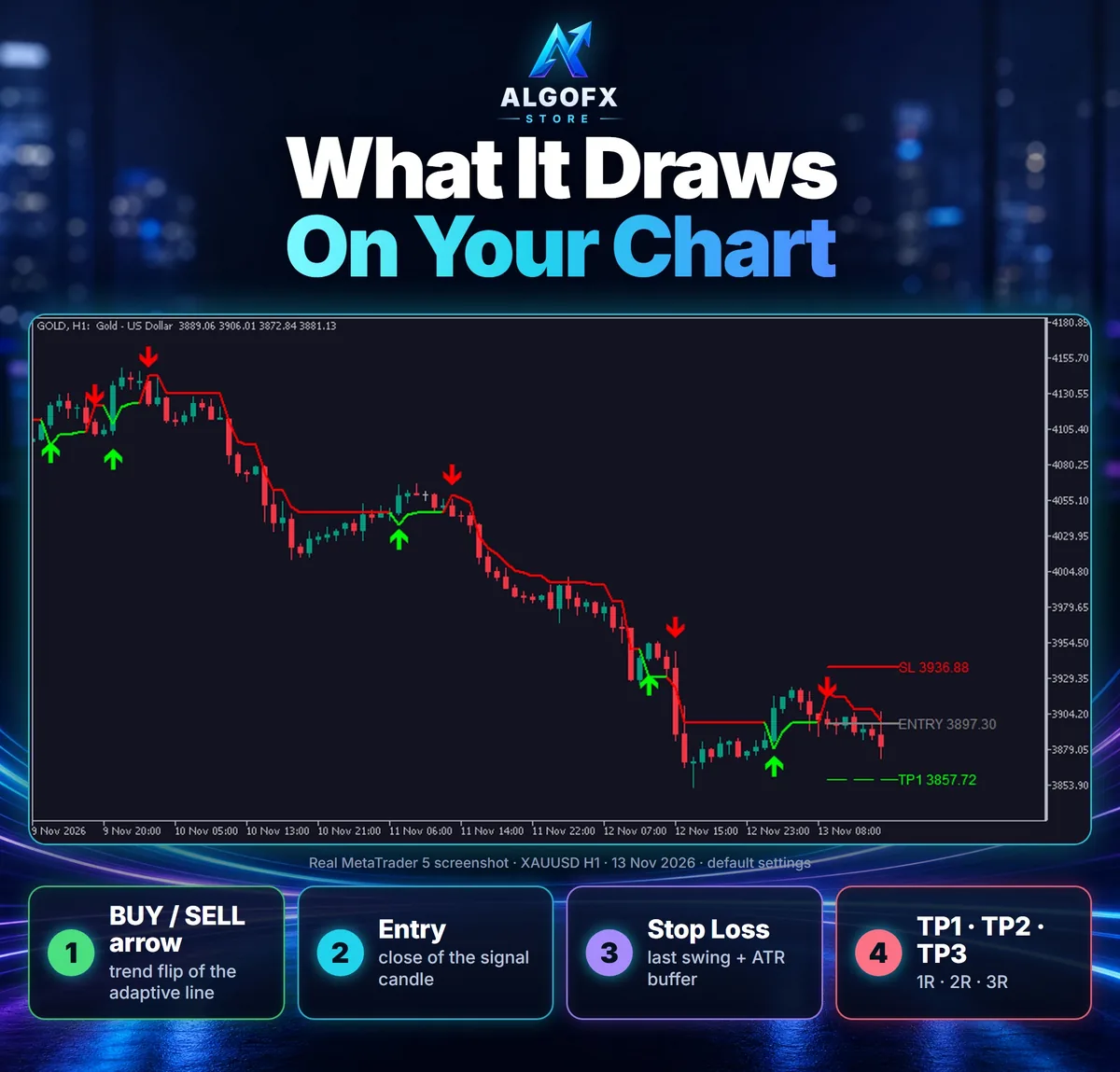
What Trend Quorum draws, and what each mark means
Read from the shipped MetaTrader edition.
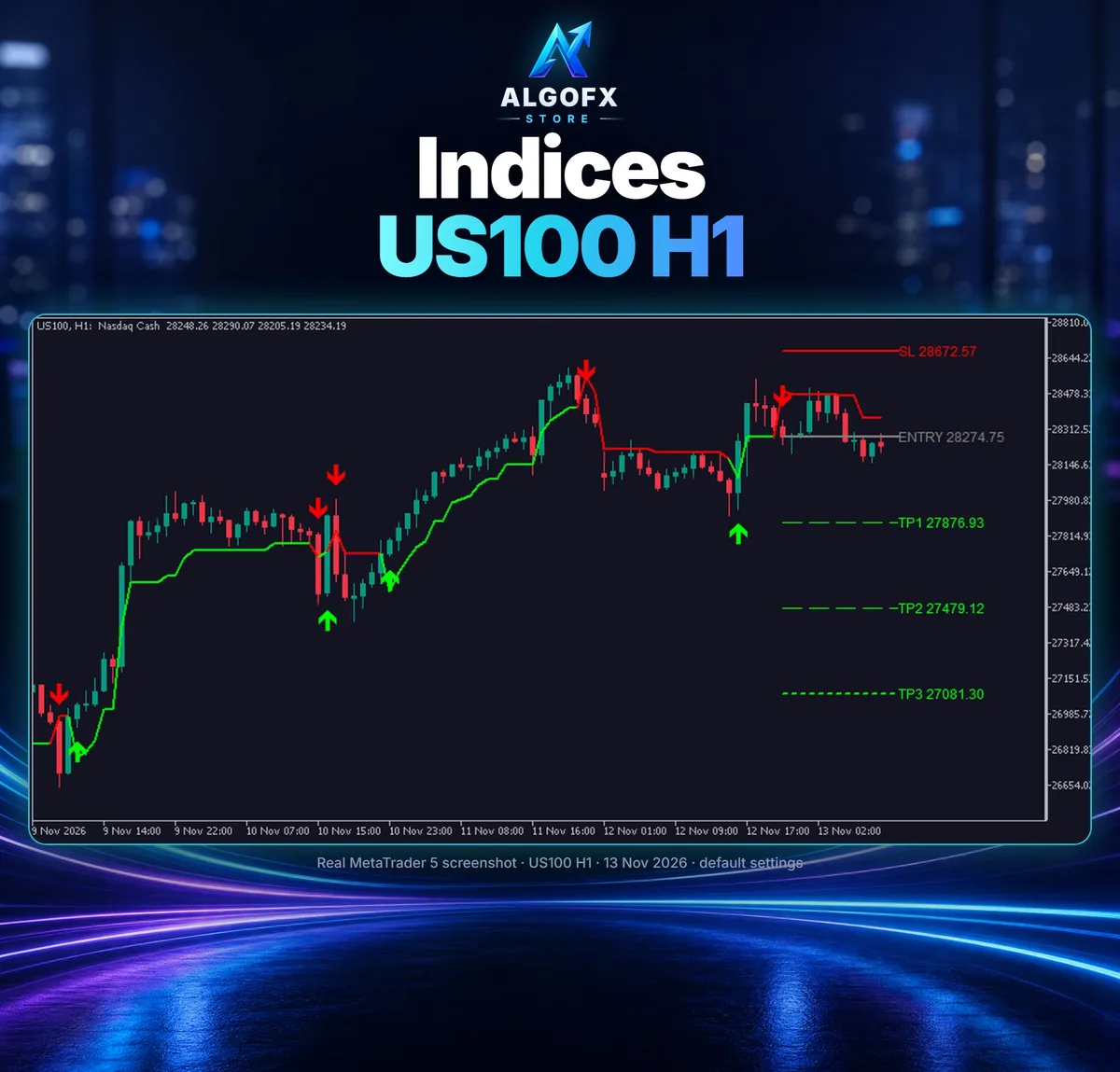
| What you see | What it means |
|---|---|
| Green line under the candles | Adaptive SuperTrend in an uptrend. |
| Red line above the candles | Adaptive SuperTrend in a downtrend. |
| Green arrow under a candle | BUY: the trend flipped up on that candle. |
| Red arrow above a candle | SELL: the trend flipped down on that candle. |
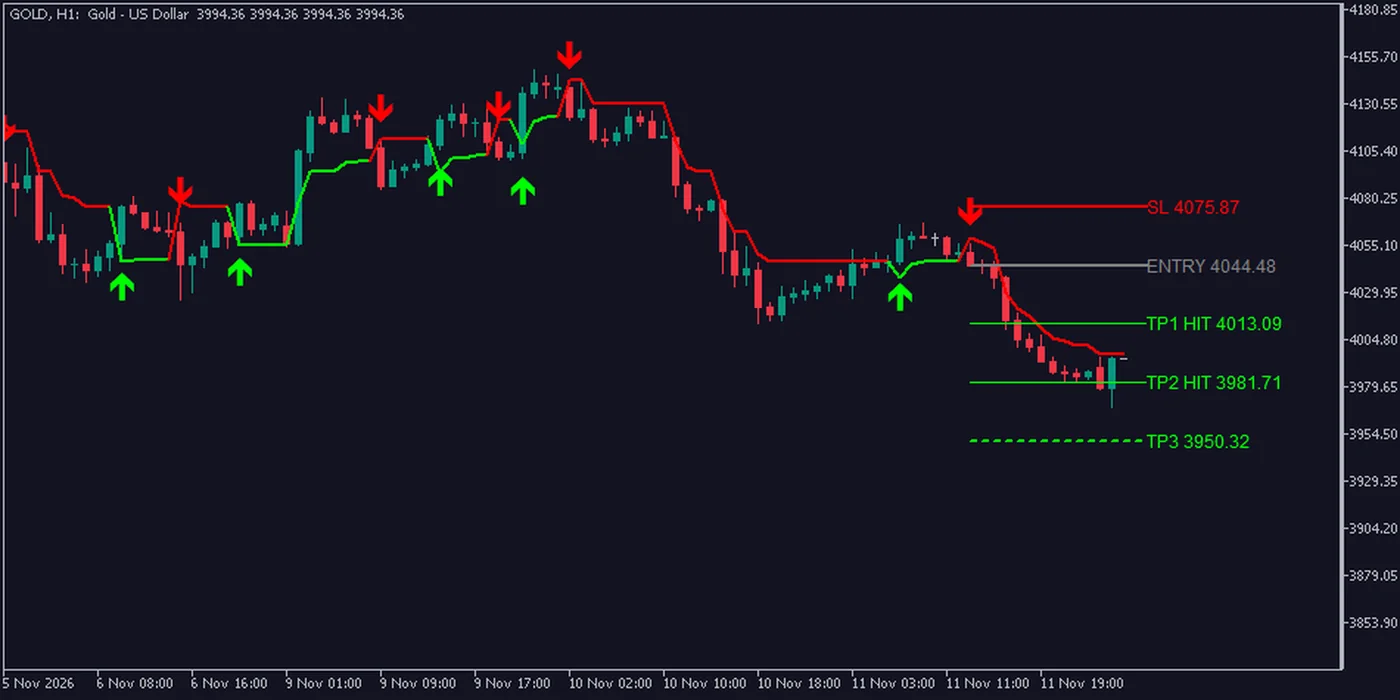
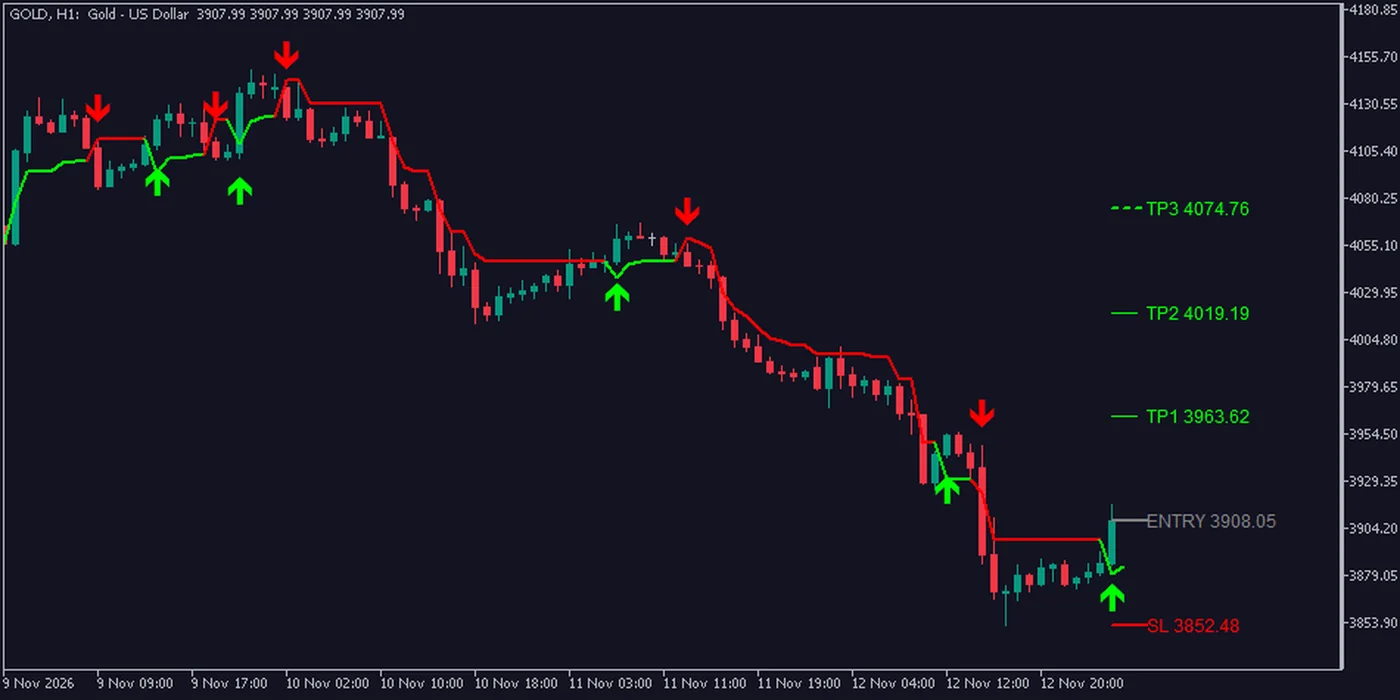
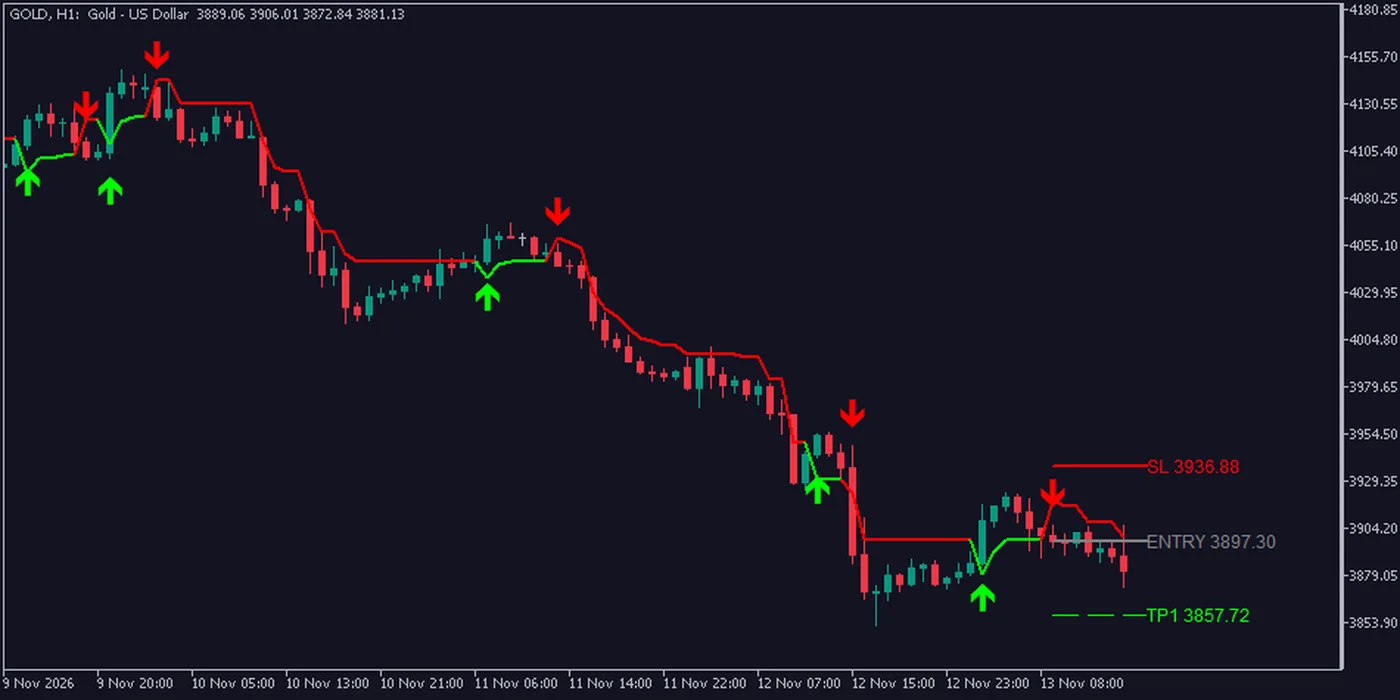
| Grey line 'ENTRY <price>' | Entry: the close of the signal candle (the label is white on MT4). |
| Red line 'SL <price>' | Stop loss beyond the last swing low (high for a sell) plus an ATR buffer. |
| Green dashed lines 'TP1' 'TP2' 'TP3' | Targets at 1, 2 and 3 times the risk; a reached target turns into a solid green line and its label reads 'TP1 HIT', 'TP2 HIT' or 'TP3 HIT'. |
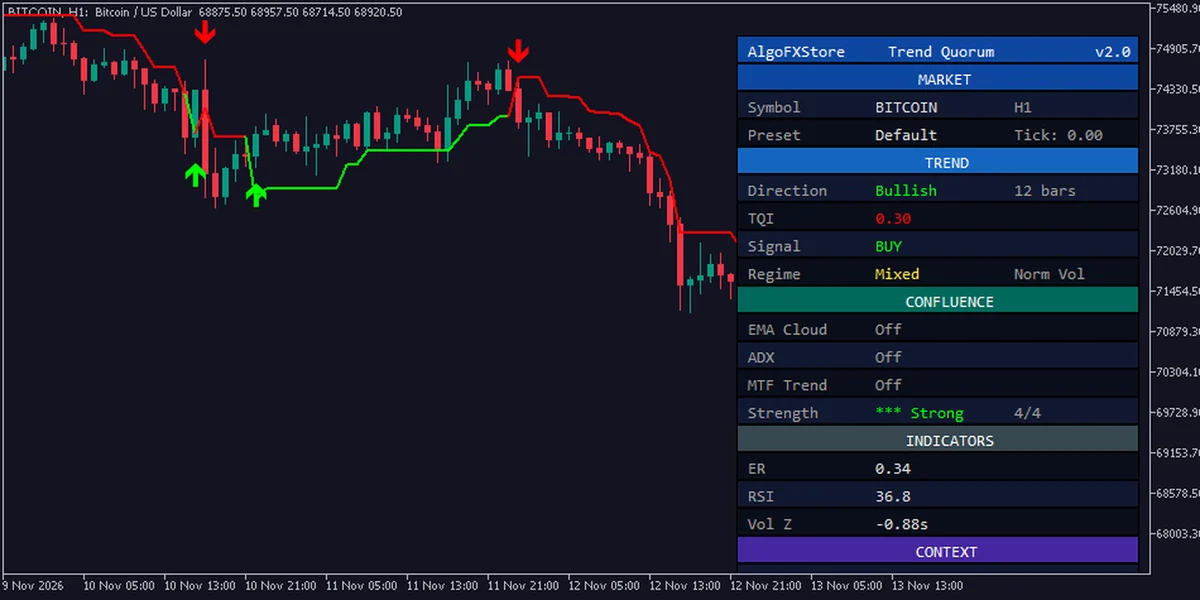
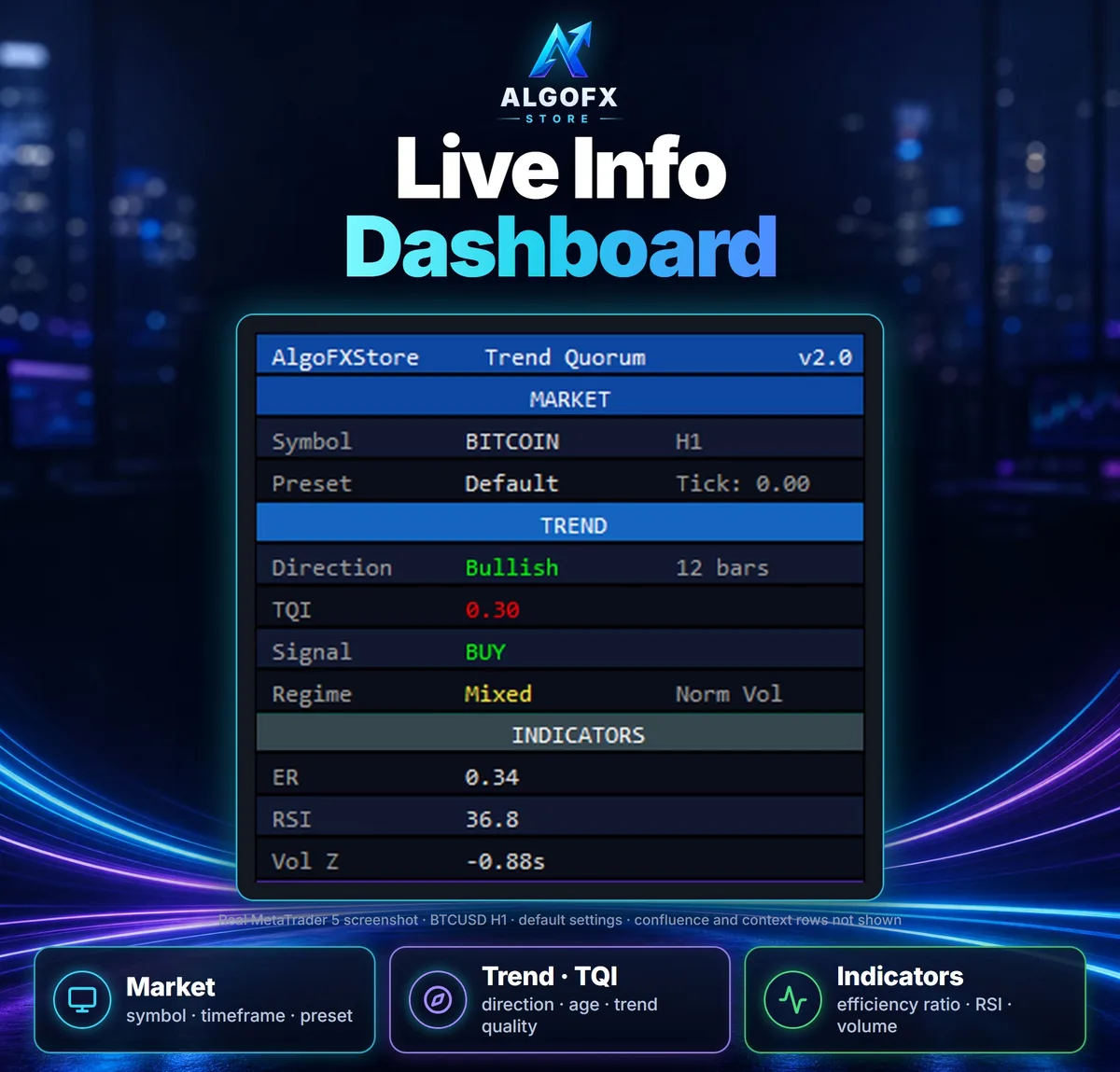
| Dashboard top right | Trend direction and age, TQI, last signal, regime, filter status, RSI, today's high and low, recent support and resistance, and the open plan. |
How Trend Quorum decides what to draw
This is the logic in the shipped MetaTrader 5 file; where the MetaTrader 4 build differs it is named. Everything is computed from the chart's own candles.
- 1
The preset sets the engine
On the default Auto preset the indicator reads your timeframe. M1 to M5 uses Scalping (ATR 10, band width 1.5, efficiency window 14, RSI 9, stop buffer 1.0 ATR). M15 to H4 uses Default (14, 2.0, 20, 14, 1.5). Above H4 it uses Swing (21, 2.5, 30, 21, 2.0). Crypto 24/7 (14, 2.8, 20, 14, 2.5) and Custom are chosen by hand. Your own ATR Length, Band Width and SL Buffer inputs only apply with Preset set to Custom.
- 2
Trend Quality Index scores the candle
TQI blends four readings into one 0 to 1 number. Efficiency ratio, how directly price travelled, weighs 0.35. Volume activity, a 20-candle tick volume z-score, weighs 0.20 (ATR against its 100-candle average stands in when a symbol has no volume). Structure, how far the close sits from the middle of the 20-candle range, weighs 0.25. Momentum persistence, the share of the last 10 candle moves that went the trend's way, weighs 0.20.
- 3
The bands breathe with quality
The band multiple is the preset width, widened when the efficiency ratio is low and when TQI is low. With Asymmetric Bands on, the band on the trend side tightens by up to 15 percent and the far band widens by up to 20 percent as TQI rises toward 1, then both are smoothed. On MT5 the ATR itself is weighted by efficiency (0.5 + 0.5 x ER). A band only moves toward price while price stays on its side, like a classic SuperTrend.
- 4
A close through the band flips the trend
The trend turns up when a candle closes above the previous upper band during a downtrend, and down when it closes below the previous lower band during an uptrend. The line changes from green under price to red above it. The arrow prints on that flip candle once the 110-candle warm-up has passed and any optional filter you switched on (EMA 9/21, ADX 14 at 20 or more, higher timeframe) agrees.
- 5
The plan is drawn on the newest signal
Entry is the close of the signal candle. The stop for a BUY is the lower of two levels: the last confirmed 3-bar swing low minus the preset buffer times ATR, or the entry minus that buffer. A SELL mirrors it above the swing high. TP1, TP2 and TP3 sit at 1, 2 and 3 times that risk. A new signal replaces the old plan; only one plan is ever on the chart.
- 6
The plan tracks itself until it ends
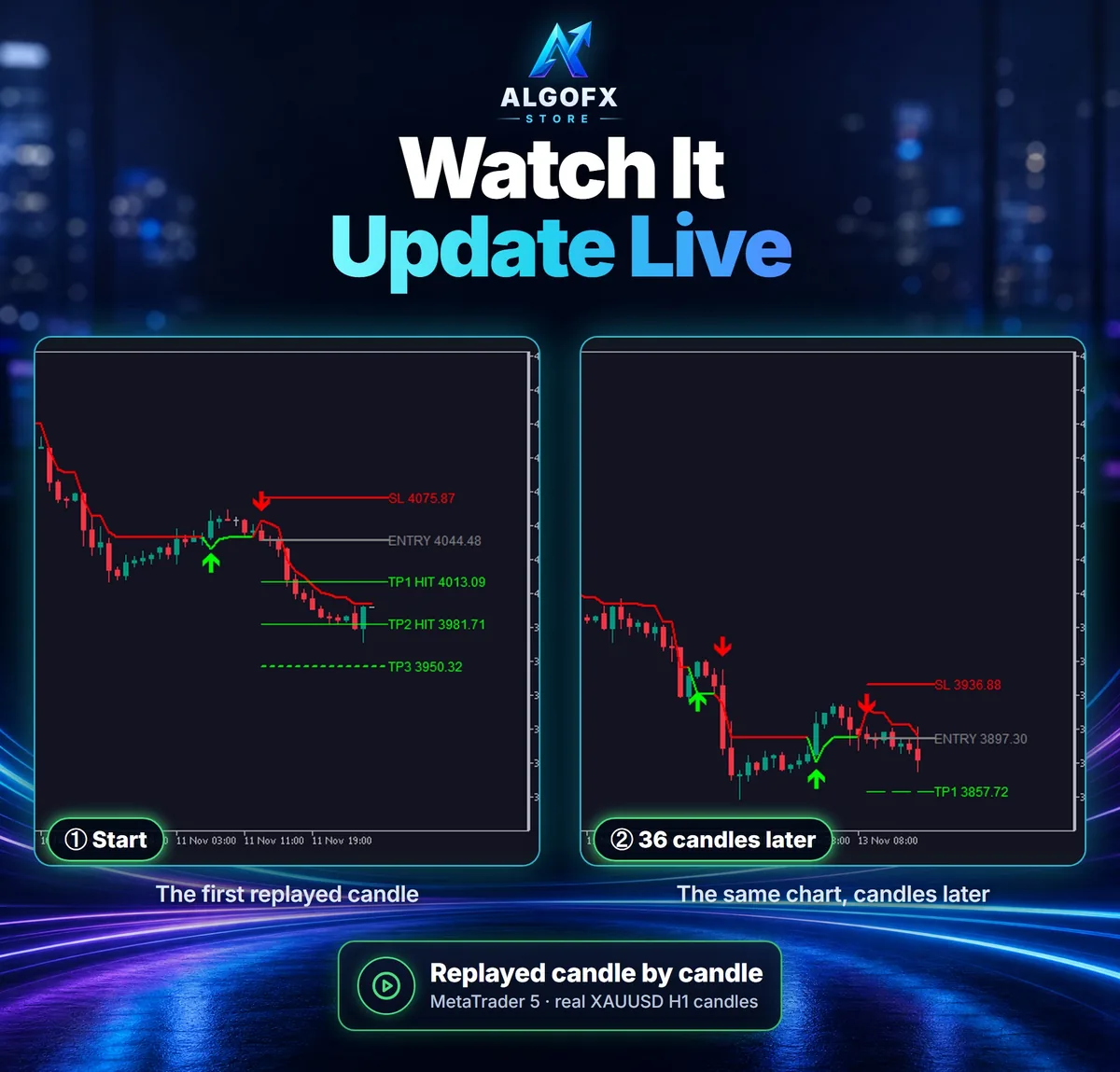
When a candle reaches a target, its line turns solid and the label changes to TP1 HIT with the price. The plan ends at TP3, when a candle touches the stop, or after 100 candles. TP1 and TP2 do not end it, and nothing moves the stop: there is no breakeven or trailing. A stop hit leaves no chart mark, only an alert. An ended plan stays frozen on the chart until the next signal.
Trend Quorum on 12 different markets
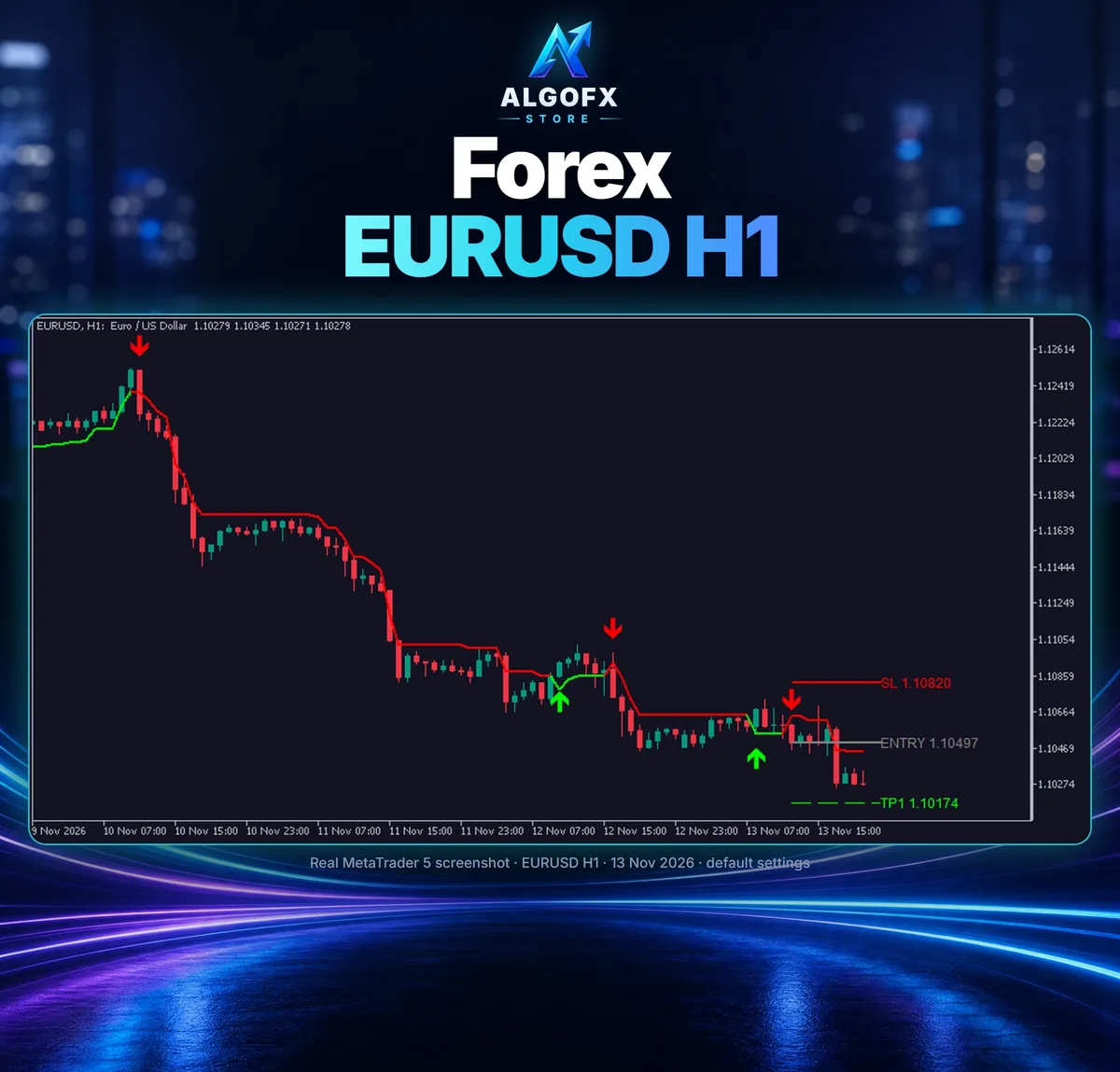
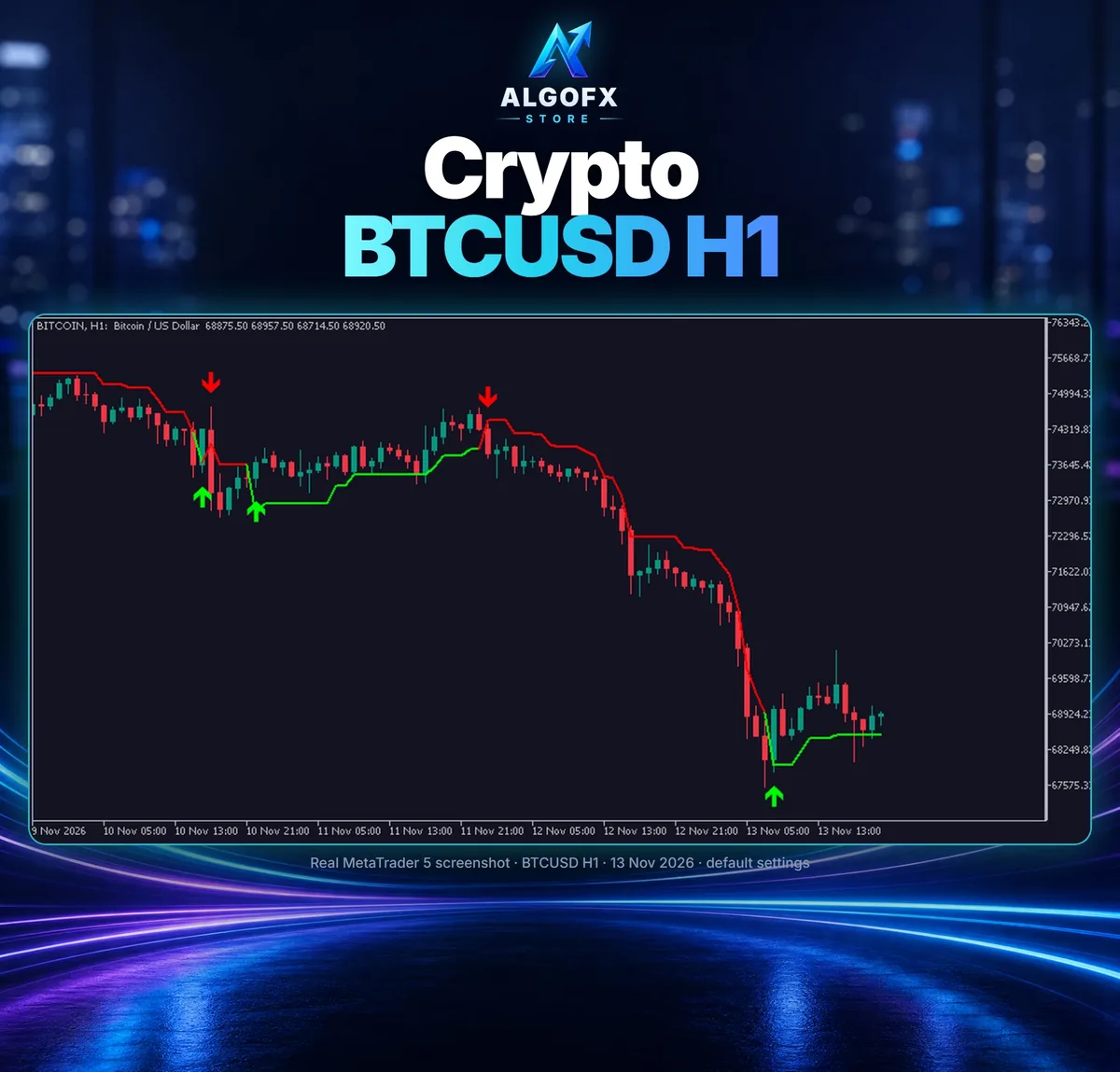
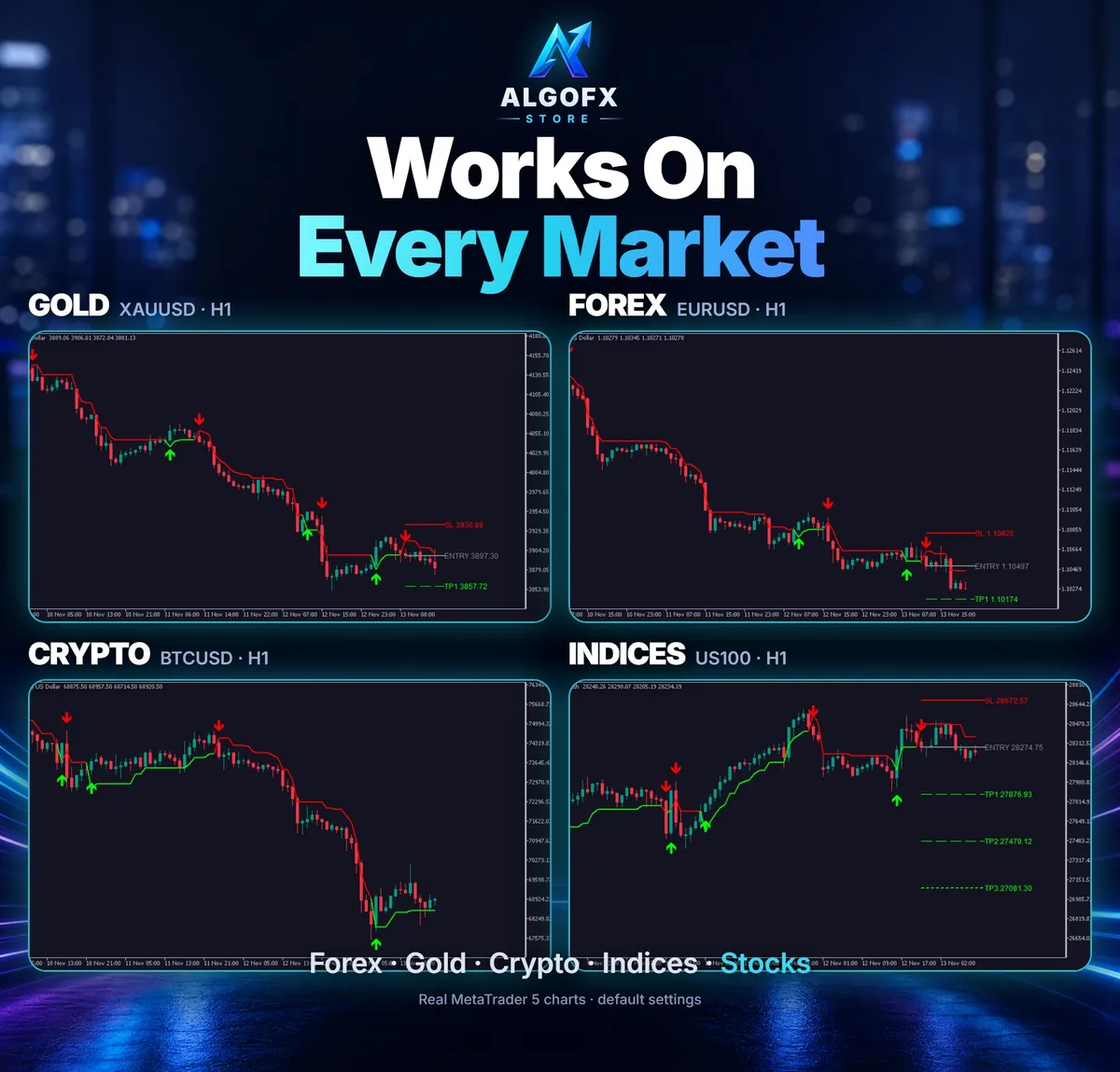
Every chart below is a screenshot of MetaTrader itself with the shipped Trend_Quorum attached at its default settings. Forex, metals, indices, energy and crypto, so you can see how it reads each kind of market. They show what the indicator draws; they are not trading results. Tap or click any chart to open it full size.
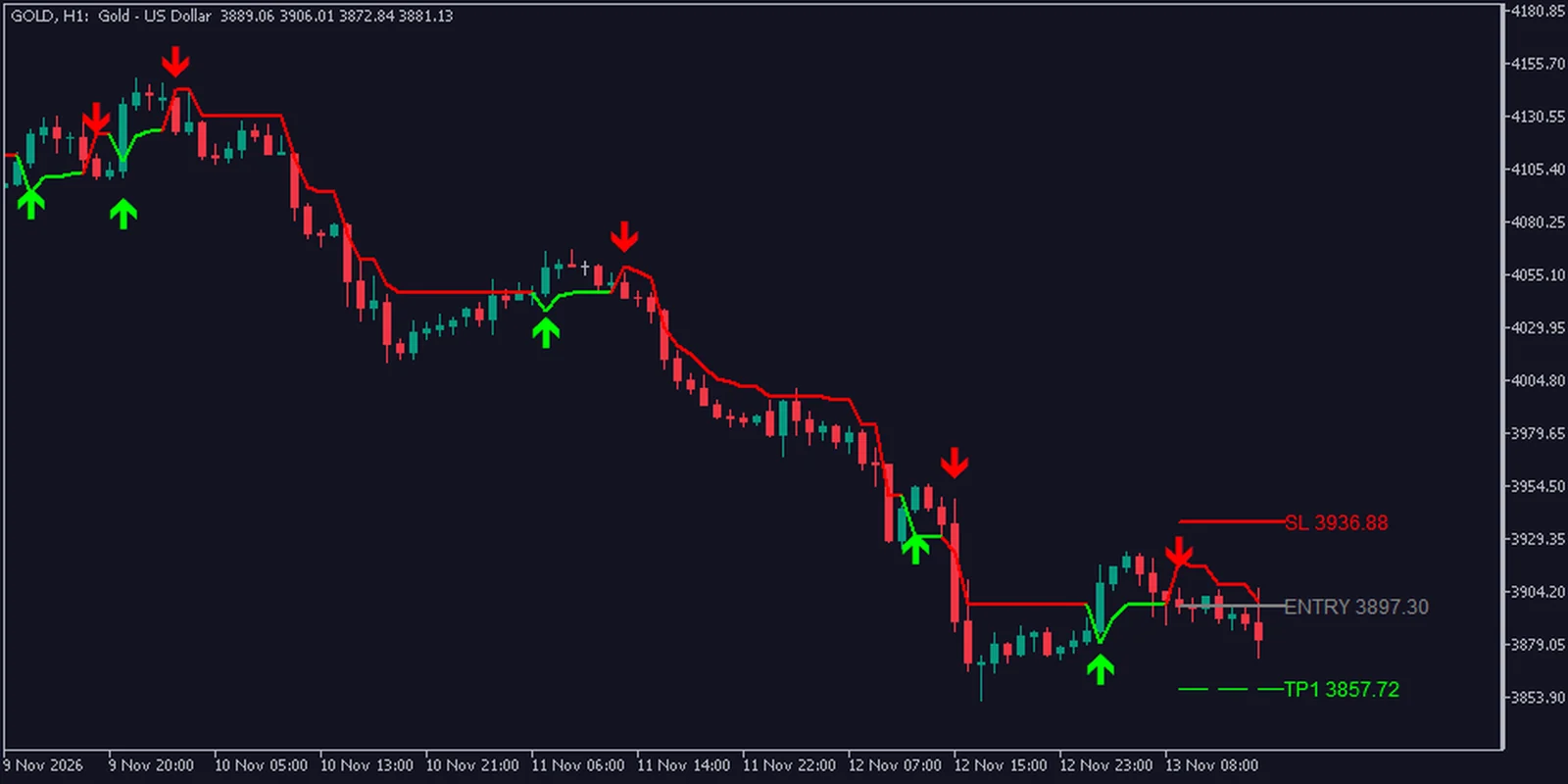
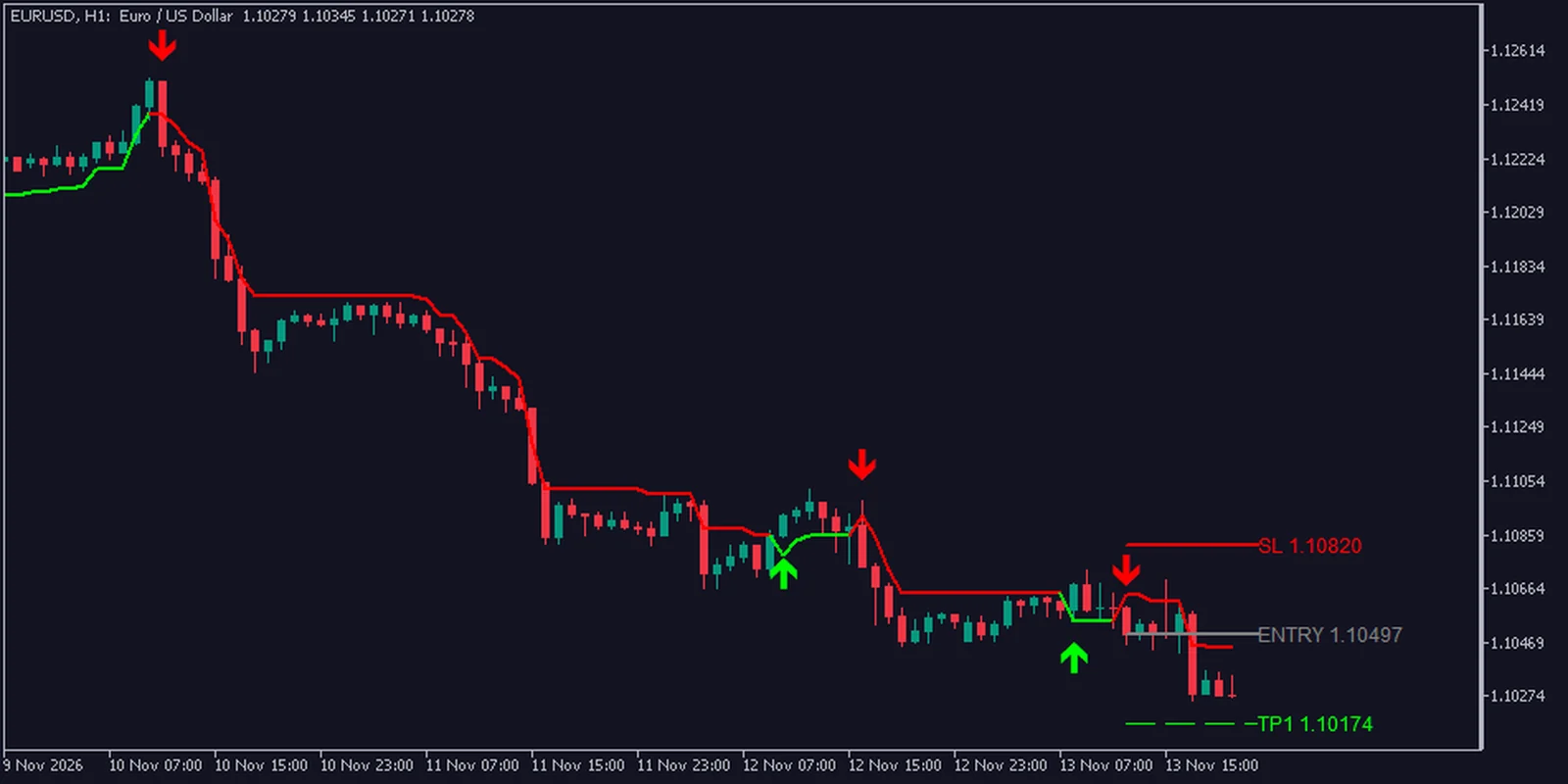
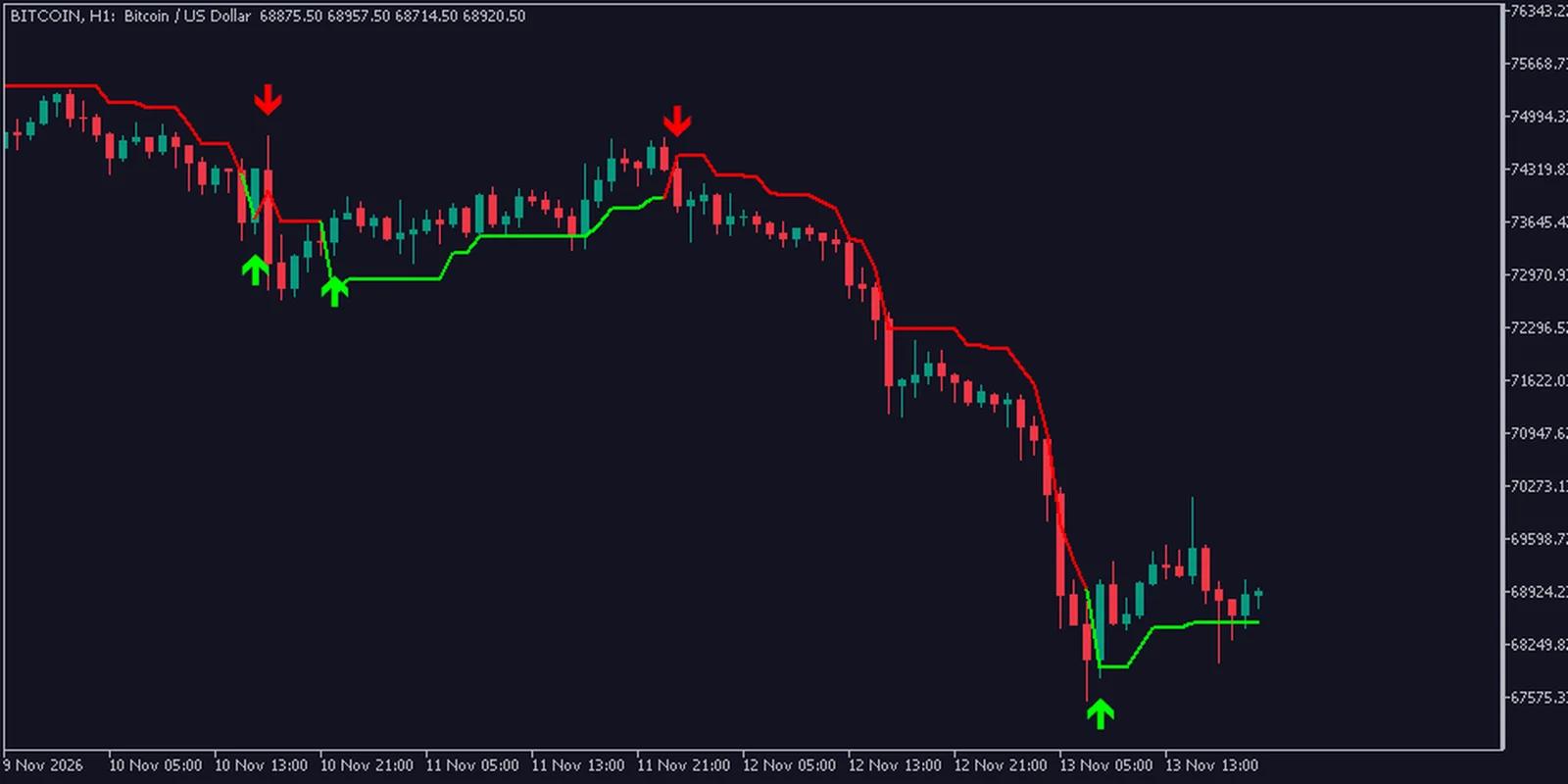
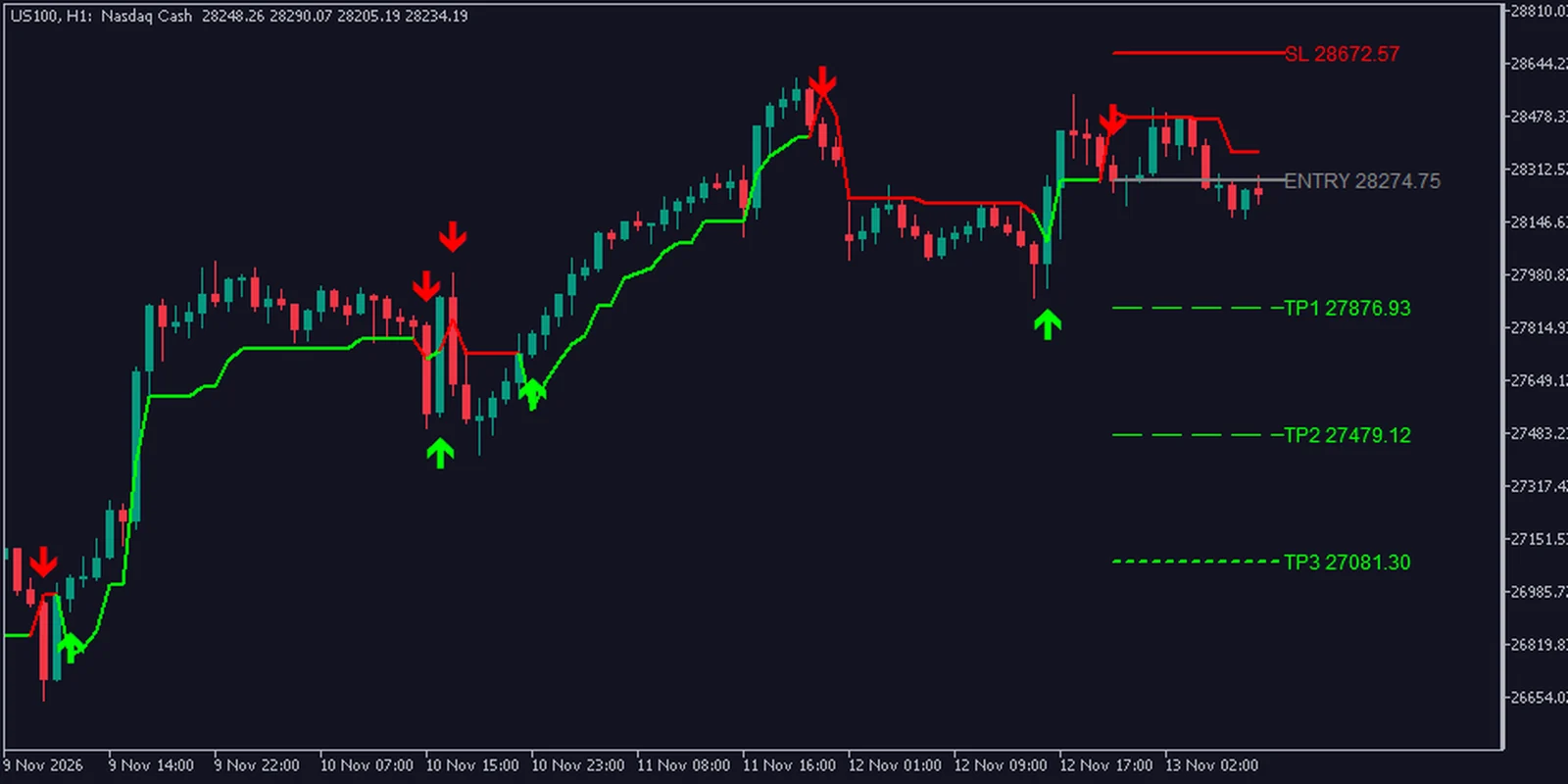
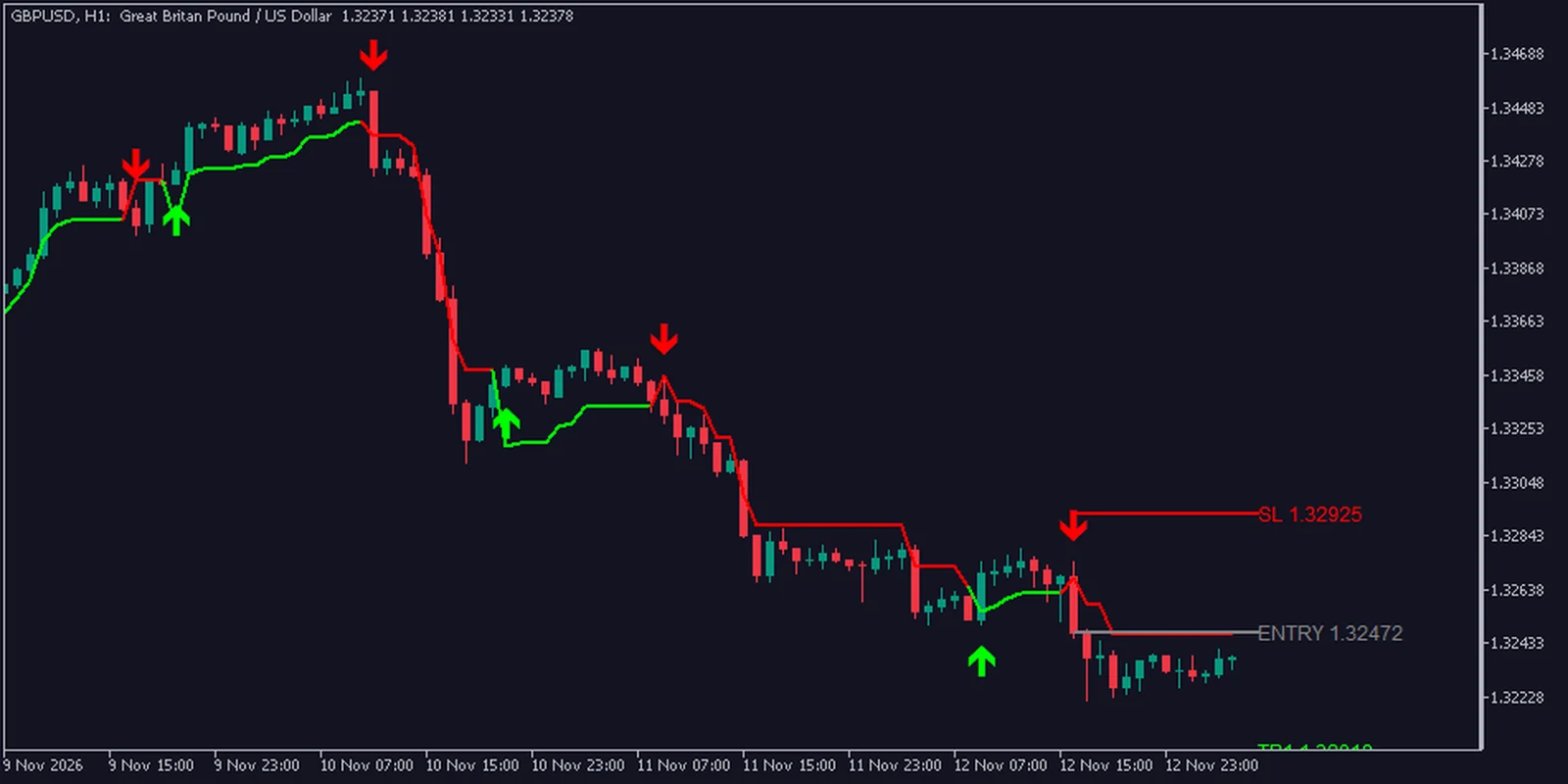
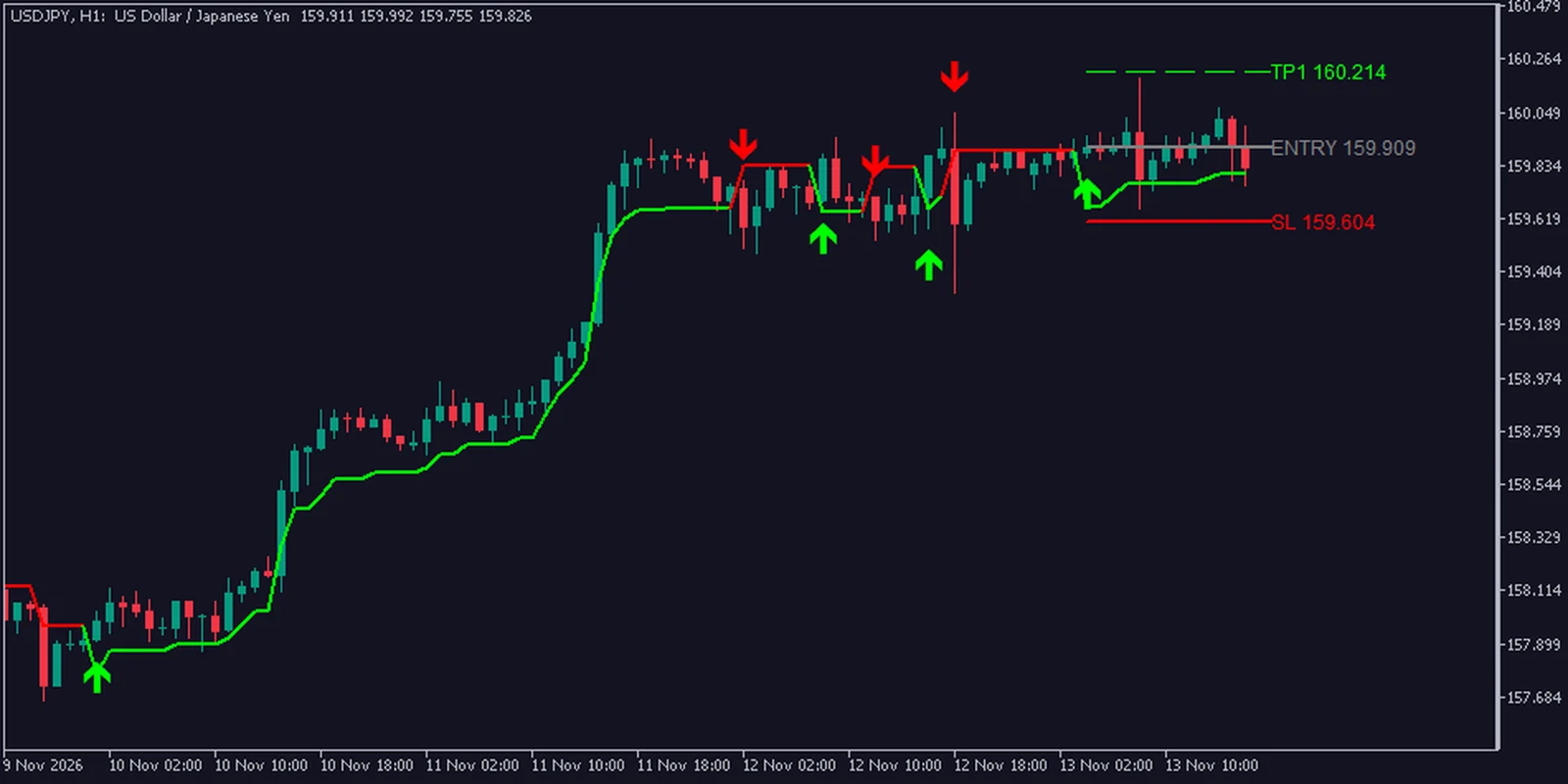
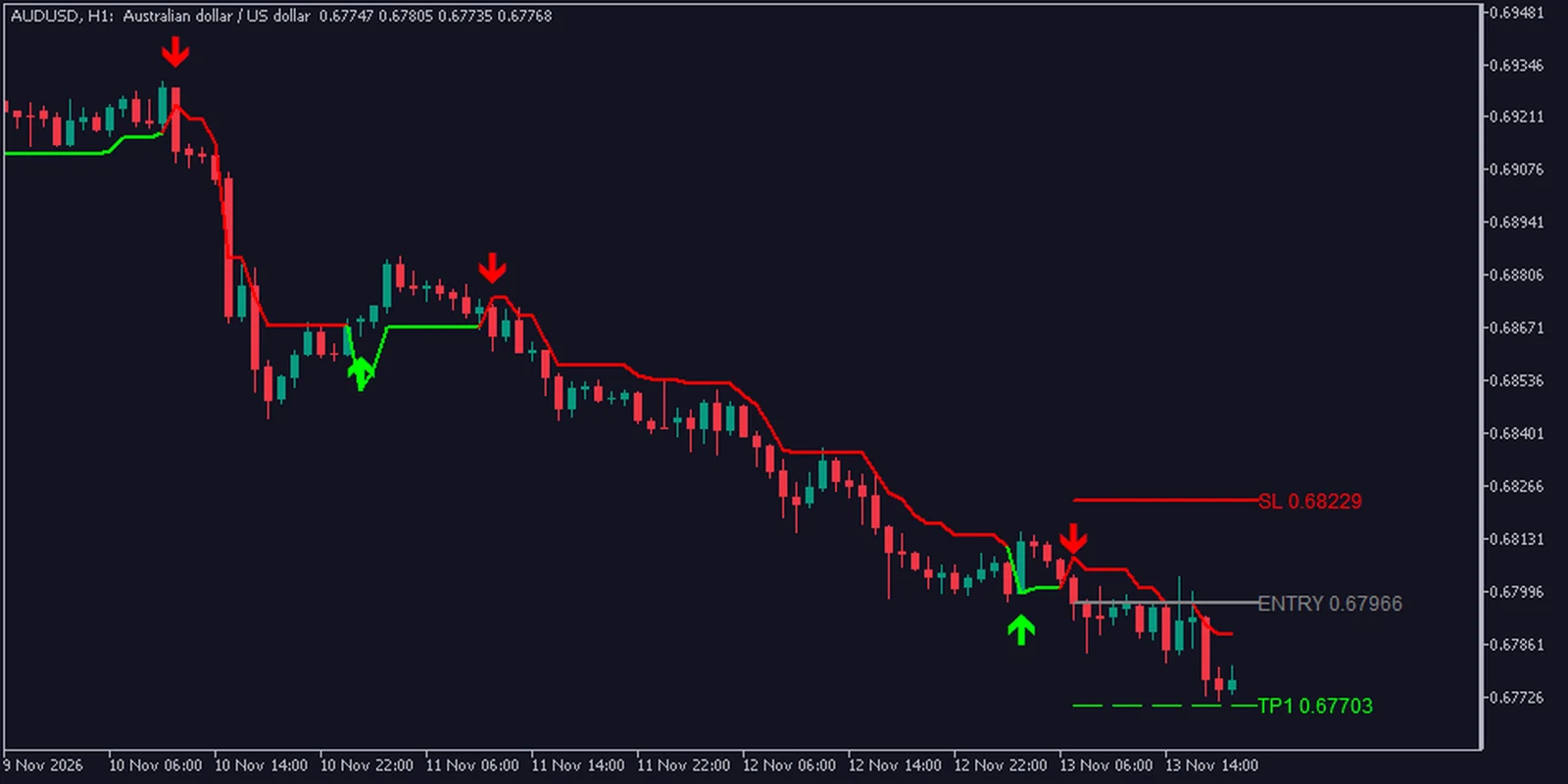
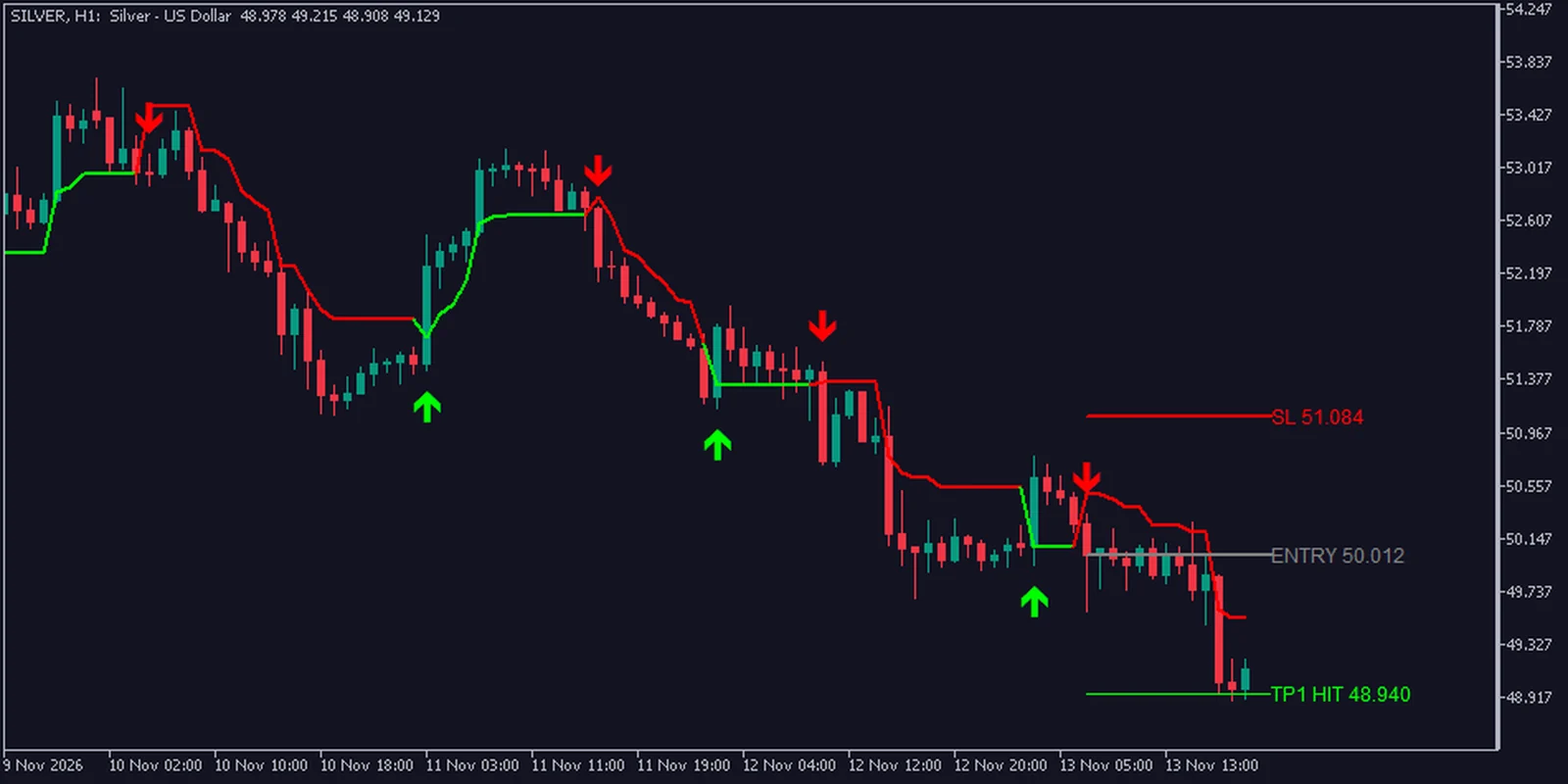
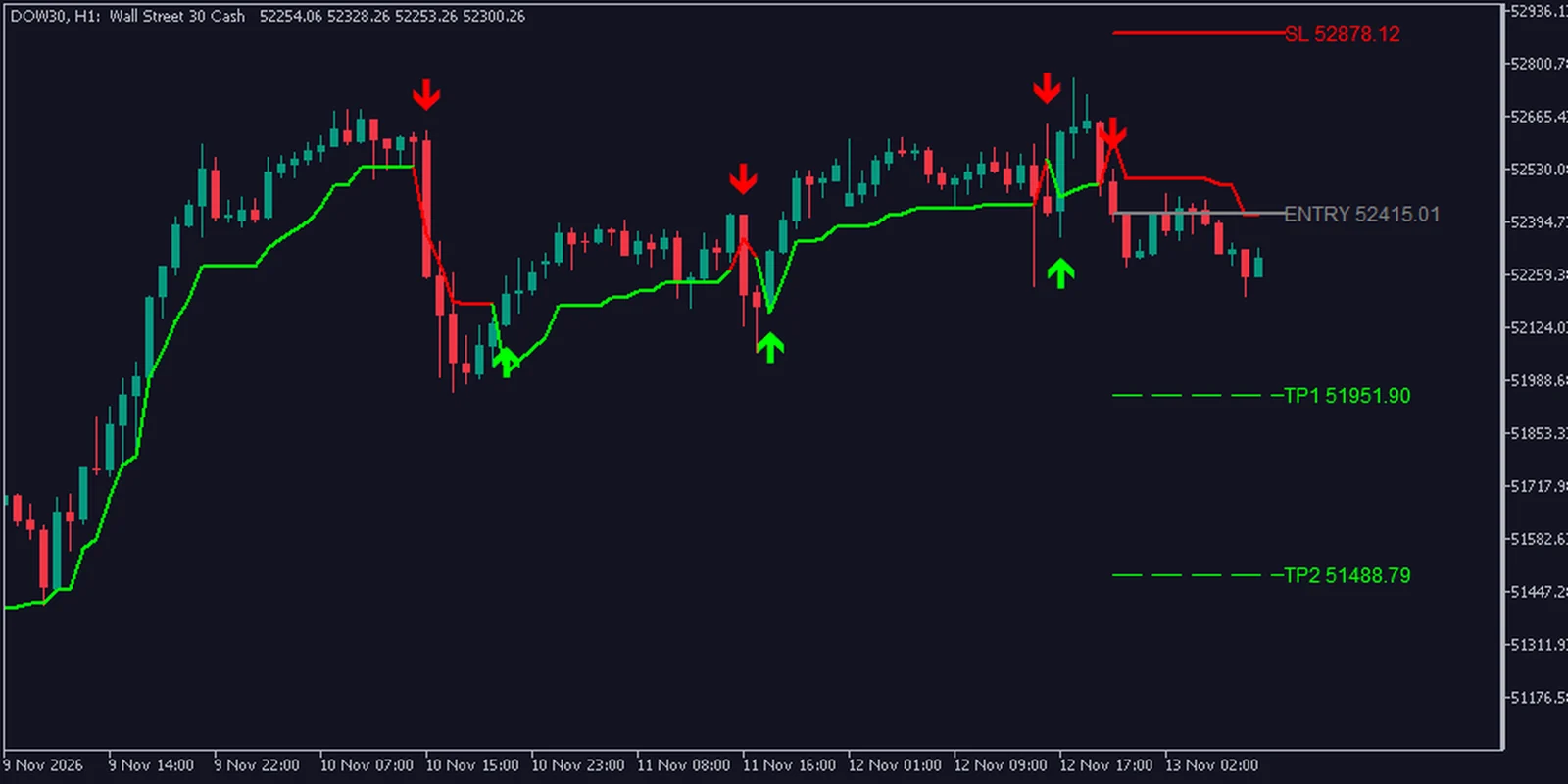
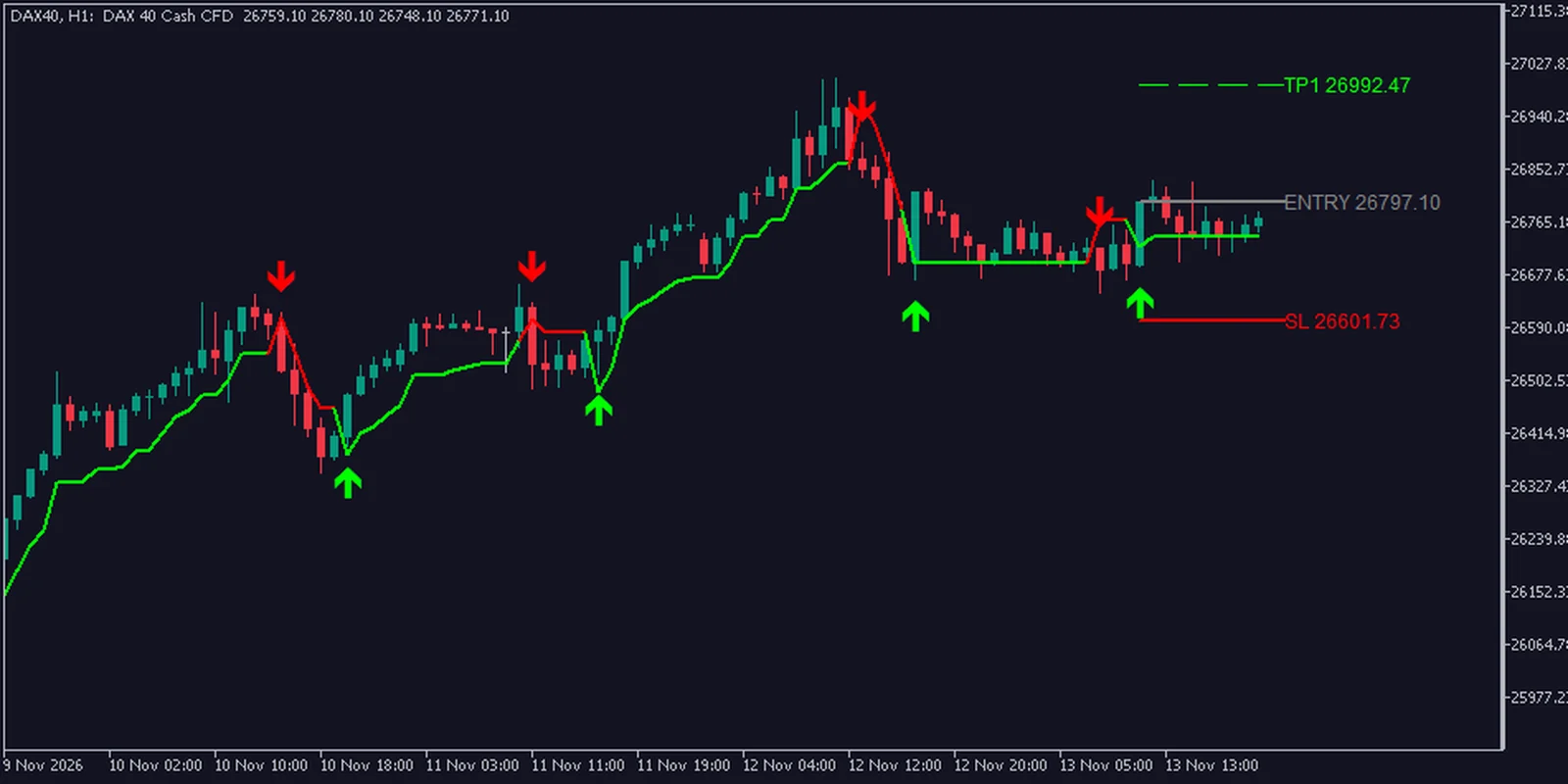
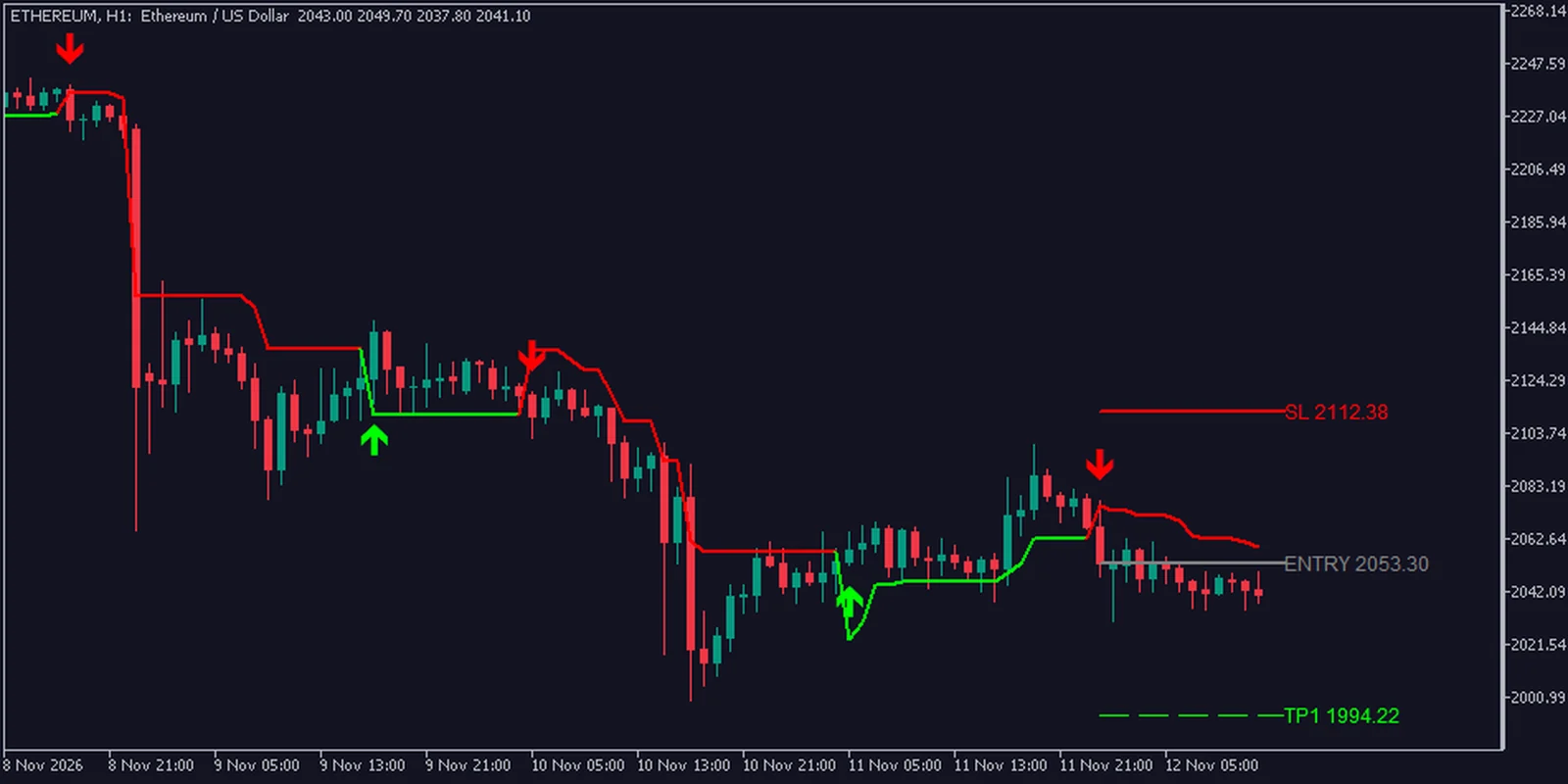
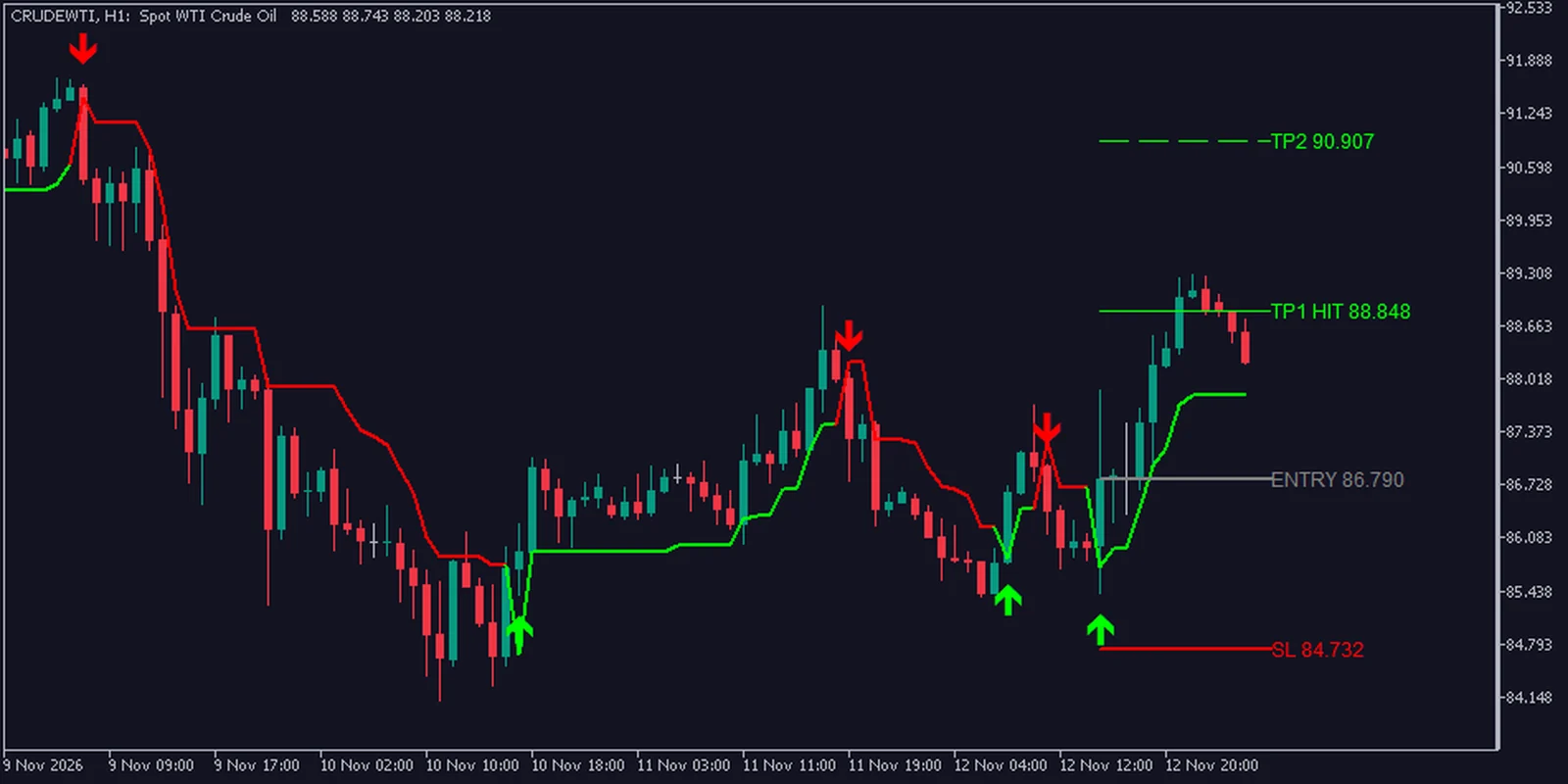
Watch Trend Quorum work on a real MetaTrader 5 chart
A screen recording and frames from the shipped indicator at its default settings, as the chart updates. Nothing is edited into the chart.
How to use it, step by step
Trend Quorum gives you the direction, the regime and a ready plan. These steps turn that into a routine, including the moments to let a signal go.
- 1
Read the regime before the arrow
Look at the dashboard first. The Regime row reads Trending (efficiency ratio 0.50 or more), Mixed (0.25 or more) or Choppy, followed by Low, Norm or High Vol. The TQI value is green above 0.6, yellow above 0.35 and red below. A flip in a Trending regime with a green TQI is the situation the engine was built for; a flip in Choppy with a red TQI is the one most likely to reverse.
- 2
Let the signal candle close
On MetaTrader 5 the indicator works on the forming candle, so an arrow and its alert can appear while the candle is still open and disappear if price falls back through the line before the close. Wait for the close. If the arrow is still there on the closed candle, the signal stands; if it vanished, ignore the alert you received. On MT4 arrows and BUY/SELL alerts only come after the candle has closed.
- 3
Check the stop distance first
Read the SL label and compare it with the entry. The stop sits beyond the last swing plus an ATR buffer, so after a long impulse candle it can be far away. Size the position from that distance and your own risk per trade. If the stop is wider than you are willing to carry, skip the signal rather than moving the stop closer: the targets are built on that exact risk.
- 4
Add filters when the market is noisy
All three filters are off by default. Switch on the EMA filter to accept a BUY only with EMA 9 above EMA 21 and a SELL only below; the two EMA lines then appear on the chart. The ADX filter blocks signals while ADX 14 is under 20. The higher-timeframe check asks the larger trend to agree. A blocked flip still turns the line's colour, it just prints no arrow.
- 5
Manage the trade at the targets
TP1 at 1R, TP2 at 2R and TP3 at 3R are reference points, not orders. Decide in advance what you do at each one: take part, move your stop or hold for TP3. The indicator will not do it for you, and it keeps the original stop on the chart. The dashboard's TRADE block shows the open plan, which targets were reached and how many candles it has been open.
- 6
Know when to stand aside
Skip a signal when the Regime row says Choppy and TQI is red, when a new arrow appears only a few candles after an opposite one, when the stop is far wider than your normal risk, or when the arrow is on a candle that has not closed. If a plan ended at the stop or after 100 candles, its lines stay frozen until the next signal: do not read them as an open trade.
25 rows that read the market for you
- MT5 (the images are MT5): 0 AlgoFXStore | Trend Quorum | v2.0
- MARKET (section bar)
- Symbol | <symbol> | <TF>
- Preset | Default / Scalping / Swing / Crypto 24/7 / Custom | Tick: <tick size>
- TREND (section bar)
- Direction | Bullish / Bearish | <N> bars
- TQI | 0.00-1.00 (green > 0.6, yellow > 0.35, else red) or 'off
- Signal | BUY / SELL / --- (last signal)
- Regime | Trending (ER >= 0.50) / Mixed (>= 0.25) / Choppy | Low Vol / Norm Vol / High Vol (ATR vs its 100-bar SMA: < 0.7 / < 1.3 / above)
- CONFLUENCE (section bar)
- EMA Cloud | Off / Bullish / Bearish | 9/21
- ADX | Off / <value> | Strong / Weak
- MTF Trend | Off / Bullish / Bearish | <HTF>
- Strength | *** Strong / ** Medium / * Weak | n/4
- INDICATORS (section bar)
- ER | <efficiency ratio>
- RSI | <RSI>
- Vol Z | <volume z-score>s / n/a
- CONTEXT (section bar)
- Session H | <today's high>
- Session L | <today's low> | Range: <N> pts
- Resistance | <last 3-bar pivot high>
- Support | <last 3-bar pivot low>
- only while a plan is open: TRADE (section bar) / Entry | <price> | BUY/SELL / SL | <price> / TP 1/2/3 | HIT or --- each / P&L | <N> pts | <x.xx>R / Trade Age | <N> bars
- last: Status | Ready (or bars left in warm-up) | Sig: <N>b ago
Everything Trend Quorum does for you
Band width set by trend quality
The line's distance from price follows a Trend Quality Index built from efficiency ratio, volume z-score, range position and momentum persistence, with input weights 0.35, 0.20, 0.25 and 0.20 that you can change.
Tighter on the trend side
Asymmetric Bands tighten the band that trails the trend and widen the opposite band as TQI rises, so a strong trend is followed closely while a reversal needs a clear close through the line.
Stop and three targets on every signal
ENTRY, SL, TP1, TP2 and TP3 lines with price labels in your symbol's digits. Stop beyond the last 3-bar swing plus an ATR buffer, targets at 1, 2 and 3 times the risk by default, each R value adjustable.
Reached targets marked on the chart
A target that a candle reaches changes to a solid line and the label reads TP1 HIT, TP2 HIT or TP3 HIT with the price, so you can see at a glance how far the newest plan has travelled.
Presets by timeframe
Auto chooses Scalping on M1 to M5, Default on M15 to H4 and Swing above H4. Crypto 24/7 uses a wider band (2.8) and a 2.5 ATR stop buffer. Custom hands every engine length to you.
Trend dashboard in sections
MARKET, TREND, CONFLUENCE, INDICATORS and CONTEXT sections: symbol and preset, direction and trend age in bars, TQI, last signal, regime and volatility, filter states, efficiency ratio, RSI, volume z-score, today's high and low with range, and the last swing resistance and support.
Three optional confirmation filters
EMA 9/21 alignment, ADX 14 of at least 20 and a higher-timeframe trend check, each with its own switch and lengths. Auto higher timeframe: H1 for M1 to M5, H4 for M15, D1 up to H1, W1 up to H4, MN1 above.
Alerts with the full plan
BUY and SELL alerts carry the price, the stop and TP1 to TP3. Further alerts for trend change, TP1, TP2, TP3, stop loss hit and TQI crossing above 0.7 or below 0.3, as a pop-up, a push notification and, on MetaTrader 5, e-mail.
Both MetaTrader builds
One download holds the .ex4 for MetaTrader 4 and the .ex5 for MetaTrader 5. Every drawing can be switched off on its own: the line, the arrows, the plan levels and the dashboard.
Trend Quorum, feature by feature
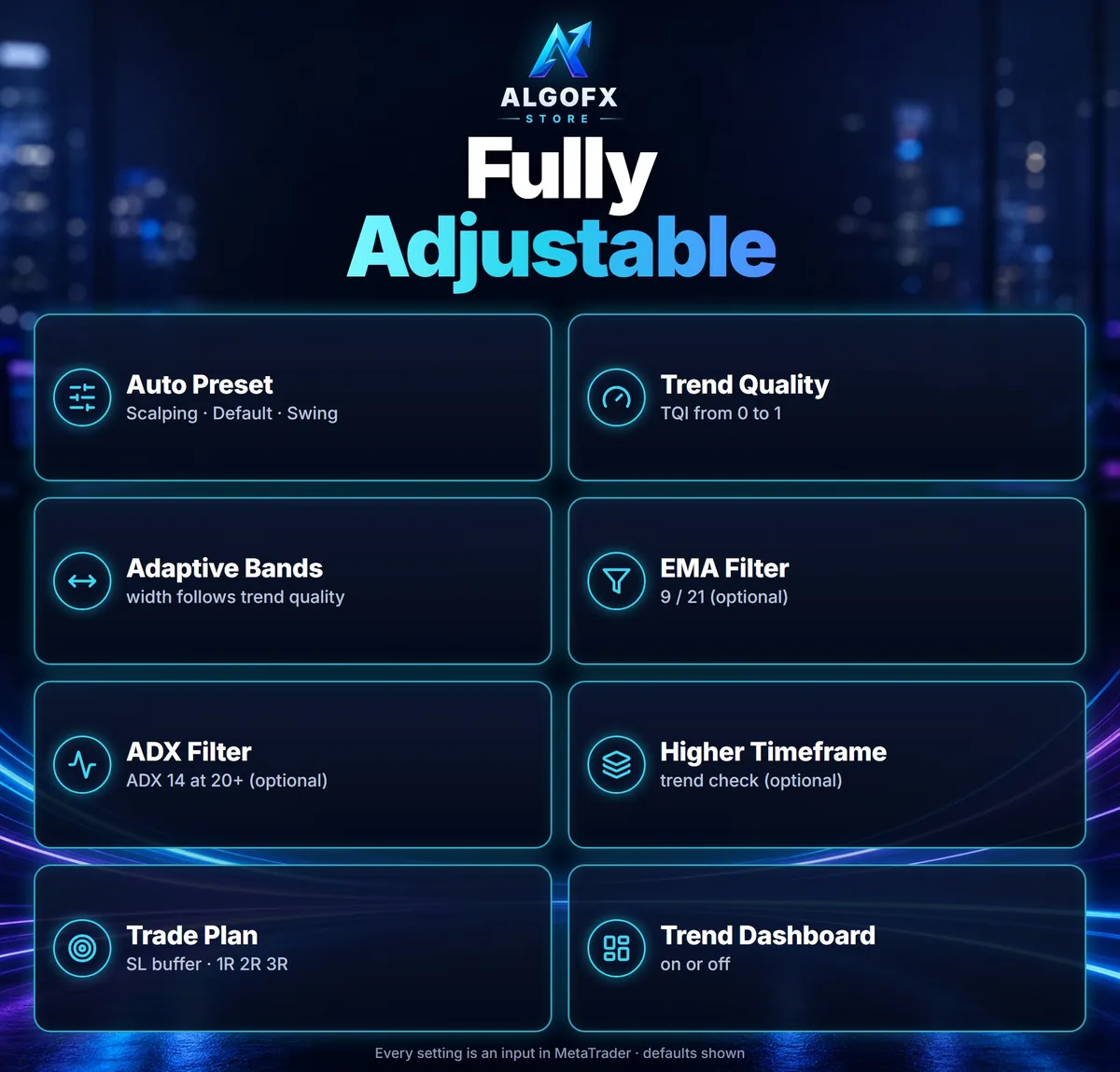
Each picture is built from real platform screenshots of the shipped indicator at its default settings, labelled so you can see what every part does. Tap any picture to open it full size.

How traders put it to work
Scalping on M1 to M5
On these charts Auto switches to the Scalping preset: ATR 10, band width 1.5, a 14-candle efficiency window and a 1.0 ATR stop buffer, so the line sits closer and stops are tighter. Expect more flips; the ADX filter or the higher-timeframe check (Auto reads H1 here) cuts the ones against the larger trend.
Day trading on M15 to H4
The Default preset runs here: ATR 14, width 2.0, efficiency window 20 and a 1.5 ATR stop buffer. The charts on this page are H1 on gold, EURUSD, BTCUSD and NAS100 at these settings. The Session H and Session L rows give today's range next to the signal.
Swing trading above H4
On D1 and higher, Auto selects Swing: ATR 21, width 2.5, a 30-candle efficiency window and a 2.0 ATR stop buffer. The line gives more room, flips are rarer and the stop is wider, so position size has to come down for the same risk. The 100-candle timeout covers a long stretch of time on these charts.
Crypto around the clock
Pick Crypto 24/7 by hand for coins that trade without a session break. It keeps ATR 14 and the 20-candle efficiency window but widens the band to 2.8 and the stop buffer to 2.5 ATR, which suits the larger candle-to-candle swings of crypto pairs.
Every setting, with its default
The names are the ones in the MetaTrader inputs dialog; the defaults are what every chart on this page uses.
| Setting | Default | What it does |
|---|---|---|
| Preset | Auto | Auto uses Scalping on M1-M5, Default on M15-H4 and Swing above H4; Crypto 24/7 and Custom can be chosen. A preset sets ATR length, band width, efficiency window, RSI length and the stop buffer (Default: 14 / 2.0 / 20 / 14 / 1.5). |
| ATR Length / Base Band Width / Efficiency Window | 13 / 2.0 / 20 | Used only when Preset = Custom. |
| Enable Vol-Adaptive Bands / Enable Trend Quality Engine | on / on | Band width follows the efficiency ratio and the TQI score (weights 0.35 efficiency, 0.20 volume, 0.25 structure, 0.20 momentum). |
| Asymmetric Bands / Character-Flip Detection | on / on | The band on the trend side tightens and the far side widens; a sharp TQI drop can flip a trend early. |
| Enable EMA Cloud Filter / Fast / Slow EMA Length | off / 9 / 21 | Optional: BUY only with EMA 9 above EMA 21, SELL below; the two EMA lines show while it is on. |
| Enable ADX Filter / ADX Length / Minimum | off / 14 / 20 | Optional: signals only while ADX is at least 20. |
| Enable MTF Confirmation / Higher Timeframe | off / Current (Auto) | Optional higher-timeframe trend check; Auto picks H1 for M1-M5, H4 for M15, D1 up to H1, W1 up to H4, MN1 above. |
| Show TP/SL Levels / SL Buffer (xATR) | on / 1.5 | Stop beyond the last swing low (high) plus buffer x ATR; the 1.5 input is used with Custom, the presets bring their own (1.0 to 2.5). |
| TP1 / TP2 / TP3 (R-multiple) / Trade Timeout (bars) | 1 / 2 / 3 / 100 | Targets as multiples of the risk; a plan ends at TP3, the stop or after 100 candles. |
| Show SuperTrend Line / Show Signal Arrows / Show Dashboard | on / on / on | Each drawing on or off. |
| Bull / Bear / SL / TP Color | Lime / Red / OrangeRed / Lime | Arrow, level and dashboard colours. |
| Enable Alerts / Push / Email | on / on / off | Pop-up, push to the MetaTrader phone app, e-mail (e-mail on MetaTrader 5 only). |
Trend Quorum next to the usual options
Where it wins, and where it does not.
| Trend Quorum | Typical free SuperTrend indicator | Reading it by hand | |
|---|---|---|---|
| Band width | Set on every candle by efficiency and the Trend Quality Index | One fixed ATR multiple | Your judgement, changed by hand |
| Stop and targets | Drawn with prices on every signal: swing plus ATR stop, 1R, 2R, 3R | None, only the line | Measured and drawn by you each time |
| Market condition | Regime, TQI and volatility state on the dashboard | Not shown | Read from the candles by eye |
| Confirmation filters | EMA 9/21, ADX and higher timeframe, each switchable | Usually none | Separate indicators you combine yourself |
| Alerts | Signal with stop and targets, target hits, trend change, TQI crosses | Often a flip alert only | Only if you are watching |
| Simplicity | Over 60 inputs on MetaTrader 5 and a full dashboard to learn | Two inputs, nothing to learn | Nothing to install |
| Cost | A one-time purchase | Free | Free, paid in screen time |
Honest about who this fits
A good fit if you
- Trend followers on MetaTrader 4 or 5 who like the SuperTrend idea but are tired of one band width that never fits both trends and ranges.
- Traders who want the stop and the 1R, 2R and 3R targets drawn the moment a signal appears instead of measuring them by hand.
- Anyone who checks the market condition before acting and wants regime, trend quality and volatility in one panel next to the signal.
- Traders who switch between scalping, day and swing charts and want engine settings that follow the timeframe automatically.
- Traders who work from alerts and want the full plan in the message, on screen or on the MetaTrader phone app.
Not for you if you
- Traders who want arrows that cannot change while the candle is open: on MetaTrader 5 an arrow and its alert can appear and vanish on the forming candle.
- Anyone looking for an indicator that manages trades: it never moves the stop to breakeven, never trails and never places an order.
- Range and mean-reversion traders: it is a trend-flip tool, and in a sideways market it will flip more often than you want.
- Traders who want a two-input indicator with nothing to read: the dashboard and the settings take some time to learn.
Both builds, one guide, installed in a minute
- 2Indicator buildsTrend_Quorum.ex4 for MetaTrader 4 and Trend_Quorum.ex5 for MetaTrader 5, in one 0.6 MB zip.
- 4Page PDF guideInstallation, every setting with its default and how to read the chart.
- 12Setting groupsEvery one explained above, with the defaults the charts use.
- 60Day money-back guaranteeIf it is not for you, request a full refund within 60 days through your Digistore24 order e-mail.
Install in four steps
- Download the zip from the page Digistore24 sends you to after checkout and unzip it.
- MetaTrader: File, Open Data Folder, then MQL4\Indicators (MetaTrader 4) or MQL5\Indicators (MetaTrader 5).
- Copy the .ex4 (MetaTrader 4) or the .ex5 (MetaTrader 5) there, refresh the Navigator and drag “Trend_Quorum” onto a chart.
- Read the guide; the defaults are the settings shown on this page.

Kestutis Balciunas
AlgoFXStore · chart indicators for MetaTrader, TradingView, cTrader and NinjaTrader
Kestutis Balciunas builds and publishes chart indicators under the AlgoFXStore name for MetaTrader 4 and 5, TradingView, cTrader and NinjaTrader 8. Every product page shows what the indicator draws on real charts, and every number on it comes from the shipped build.
The charts on this page were captured in MetaTrader from the shipped Trend_Quorum at its default settings and are shown unedited.
No get-rich claims and no quoted win rates. Every trade is uncertain, and no indicator changes that. If you want to know whether it suits the way you trade before you buy, e-mail [email protected] and you will get a straight answer.
One price, both platforms
- Both builds: .ex4 for MetaTrader 4 and .ex5 for MetaTrader 5, plus the 4-page PDF guide
- Delivered as a digital download: one zip with both builds and the PDF guide on your download page
- Return period: 60 days, with a full refund if it is not for you
- Free updates to the current version on the same download page
60-day money-back guarantee. Install it, run it on your own charts and read the guide. If Trend Quorum is not for you within 60 days of purchase, request a full refund from Digistore24, no questions asked: use the refund link in your Digistore24 order e-mail or Digistore24's order page digistore24.com/en/cancel-revoke-contract. Digistore24 refunds to your original payment method. It is a digital download: right after checkout you land on your download page, and the link to it is also in your Digistore24 order e-mail.
About the signals
Does it repaint?
Be precise about it. On MetaTrader 5 the forming candle is evaluated on every tick, so an arrow can print and disappear before that candle closes, and the alert comes from the live candle too. Once a candle has closed, it is recomputed with its final close and its arrow stays. A candle-by-candle replay on gold against the same candles loaded as history matched all 16 closed-candle signals. On MT4 arrows appear on closed candles only.
What do the colours and marks mean?
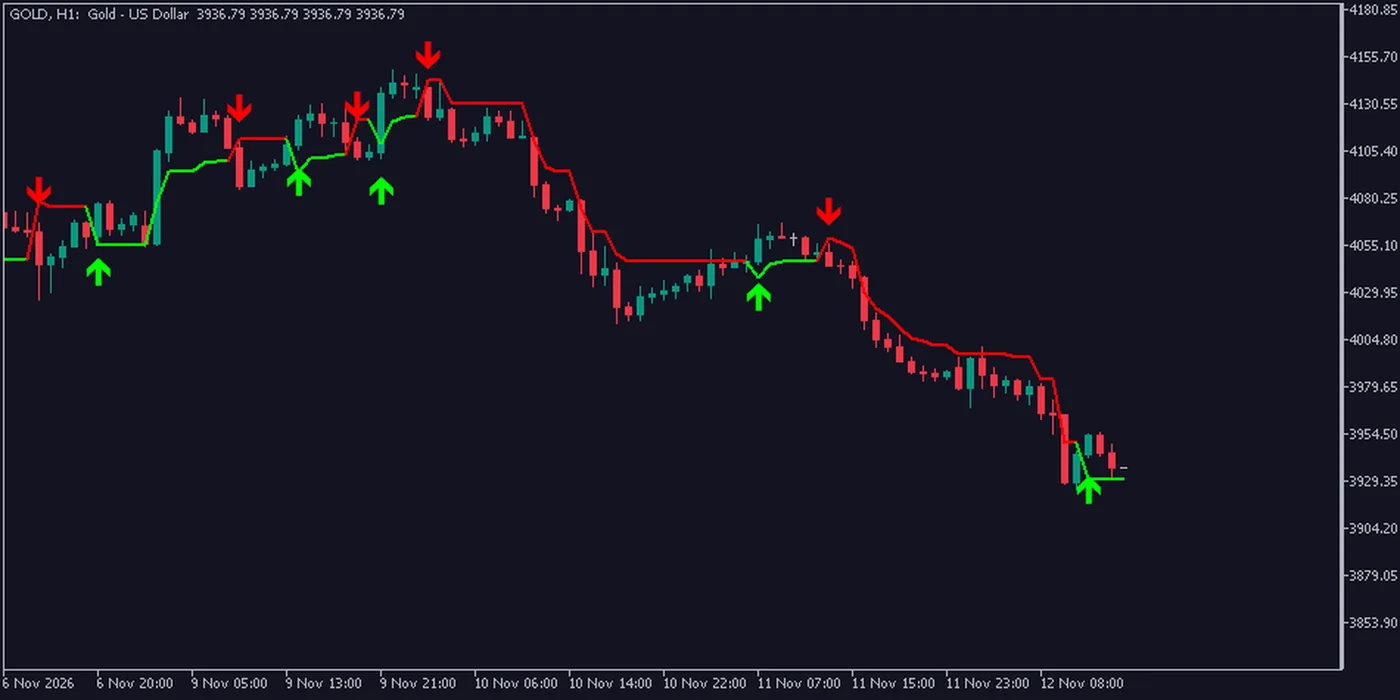
The line is green under price in an uptrend and red above price in a downtrend. A green up arrow under a candle is a BUY flip, a red down arrow above a candle a SELL flip. The grey ENTRY line marks the signal close, the red SL line the stop, the green dashed TP1, TP2 and TP3 lines the targets. A reached target turns solid and reads HIT.
Why did the line change colour without an arrow?
The trend flipped, but a filter you switched on (EMA, ADX or higher timeframe) did not agree, or the 110-candle warm-up was not over. The line always shows the trend; the arrow appears only when every active filter passes. With all filters off, the default, every flip after the warm-up gets an arrow.
What happens to the plan when a new signal comes?
The new signal deletes the previous plan and draws its own. Only the newest plan is ever on the chart. If the old plan had already ended at TP3, at the stop or after 100 candles, its lines were frozen until that moment. On MetaTrader 5 even an intrabar flip that later disappears replaces the plan, so reload the chart if a plan looks out of place.
What should I do when the arrow and the dashboard disagree?
Treat it as a lower-quality signal. A BUY arrow with the Regime row on Choppy and a red TQI, or with the EMA Cloud row reading Bearish, means the flip happened against the other readings. Either wait for the next signal or switch on the filter that matches your rule so such flips stop printing arrows.
Settings and tuning
Should I keep the defaults?
Start with them. Auto picks the preset from your timeframe, all filters are off and the targets are 1R, 2R and 3R. Your own ATR Length, Base Band Width, Efficiency Window, RSI Length and SL Buffer only take effect when Preset is set to Custom. On MetaTrader 5 the Label Offset and Mark TP Hits inputs have no effect: labels sit at the right end of the lines and reached targets are always marked.
Which settings change the signals?
Preset (or the Custom lengths), the TQI weights, Quality Influence and Curve, Asymmetric Bands and Efficiency-Weighted ATR change the band and so the flips. The EMA, ADX and higher-timeframe filters decide which flips get an arrow. SL Buffer (in Custom), the three R inputs and Trade Timeout change only the plan, not the signals.
How does the higher-timeframe filter behave on history?
It reads the higher timeframe's direction once per calculation and applies it to every candle. On a fresh load, every historical signal is therefore filtered by the higher timeframe's direction now, not at the time of that candle. Use it for live signals and do not judge it from how history looks with it switched on.
What does the Strength row tell me?
Strength counts how many of four checks agree: the flip itself plus the EMA, ADX and higher-timeframe filters. An inactive filter counts as a pass, so with the default settings it always reads 4/4 Strong. It only becomes informative once you switch filters on.
Dashboard and alerts
What is on the dashboard?
The panel sits top right. MARKET shows symbol, timeframe, preset and tick size. TREND shows direction with its age in bars, TQI, the last signal and the regime with volatility. CONFLUENCE shows each filter. INDICATORS shows efficiency ratio, RSI and volume z-score. CONTEXT shows today's high, low and range plus the last swing resistance and support. While a plan is open a TRADE block adds entry, stop, target status, points, R and age.
How many alerts will I get per signal?
On MetaTrader 5 one flip with the default settings sends three messages: the detailed BUY or SELL with price, stop and targets, a short Signal on message and a Trend Change message, each as a pop-up and a push. Target hits, a stop hit and TQI crossing 0.7 or 0.3 come separately. Pop-up and push are on by default, e-mail off. MT4 sends at most one alert per candle.
How do push notifications reach my phone?
Enter your MetaQuotes ID from the MetaTrader phone app under Tools, Options, Notifications in the desktop terminal. The indicator runs in MetaTrader on your computer or a VPS; the phone receives the alert text. The phone app cannot run the indicator itself, so the terminal must stay open for alerts to arrive.
MT4, MT5 and running it
Are the MT4 and MT5 builds the same?
Same idea, two implementations, with real differences. The MT5 stop uses the efficiency-weighted ATR, MT4 the raw ATR, so stop distances differ. MT5 works on the live candle; MT4 prints arrows and sends BUY/SELL alerts after the close, sends one alert per candle at most and has no e-mail option. The MT4 panel adds a TQI DETAIL block. On MT4, type the Preset name exactly: a typo becomes Custom.
Can it drift during a long MT4 session?
Yes. The MT4 build advances its trend state on every tick, so after many hours live the line and arrows can differ from what a fresh load of the same chart draws. Re-attach the indicator or reload the chart and it recomputes everything from history. The MT5 build stores its state per candle and does not have this issue.
Which markets and timeframes does it work on?
Any symbol in your Market Watch and any timeframe from M1 to MN1: forex pairs, gold, indices, oil, stocks and crypto. Everything is calculated from the chart's own candles. The chart needs about 110 candles of history before the first line and signal appear.
Can I run it on several charts or twice on one chart?
Run it on as many charts as you like, each with its own settings. Do not attach two copies to the same chart: both use the same object names, so their plan lines and dashboards overwrite each other. On MetaTrader 5 the dashboard refreshes once per new candle, on MT4 on every tick.
How it works
Will it place trades for me?
No. Trend Quorum is an indicator: it draws on the chart. It never sends an order.
Do I get both MetaTrader 4 and MetaTrader 5?
Yes. The download holds the .ex4 for MetaTrader 4 and the .ex5 for MetaTrader 5.
After you buy
How do I get it after paying?
Digistore24 runs the checkout. Right after payment it takes you to your download page with one zip holding both builds and the PDF guide; the link to that page is also in your Digistore24 order e-mail, so you can download again at any time.
How do I install it?
In MetaTrader: File, Open Data Folder, then MQL4\Indicators (MetaTrader 4) or MQL5\Indicators (MetaTrader 5); copy the matching file there, refresh the Navigator and drag “Trend_Quorum” onto a chart. The guide walks through it step by step.
Who is Digistore24?
Digistore24 is the reseller that sells Trend Quorum for Kestutis Balciunas (AlgoFXStore): it runs the checkout, charges your card or PayPal, collects the VAT for your country and delivers the download. Its name is the one on your statement, and its order e-mail holds your download link and the refund link.
What is the refund policy?
A 60-day money-back guarantee, handled by Digistore24. If Trend Quorum is not for you within 60 days of purchase, use the refund link in your Digistore24 order e-mail or Digistore24's order page (digistore24.com/en/cancel-revoke-contract) for a full refund, no questions asked. Digistore24 makes the refund to your original payment method.
Do I get the source code?
No. The download holds the compiled .ex4 and .ex5 files and the PDF guide.
Trend Quorum for MetaTrader 4 and 5.
Put the adaptive line, the stop and the three targets on your own MetaTrader charts and judge every signal against the regime it appeared in. Both builds, the guide and every setting explained. Instant download for €47, one payment.
Get instant access