Trade anchored VWAP pullbacks with the stop and three targets already drawn
Supreme VWAP And Targets anchors a volume-weighted average price at the latest confirmed swing, opens a value band around it once price has moved away, and prints BUY or SELL when a pullback into that band is reclaimed on a closed candle.
- VWAP anchored automatically at a confirmed 10-candle swing, so you stop guessing where the line should start
- BUY or SELL only after a pullback into the value band and a reclaim close, checked on the closed candle
- Entry, a stop beyond the pullback plus 0.20 x ATR, and TP1 to TP3 at 1R, 2R and 3R
- Seven filter profiles, a top-right dashboard and seven alerts to pop-up, sound, push and e-mail
- MetaTrader 4 and 5. Both builds in one download; it appears as “Supreme_VWAP_And_Targets” in the Navigator.
- A 4-page PDF guide with installation, every setting and how to read the chart. One-time €47.
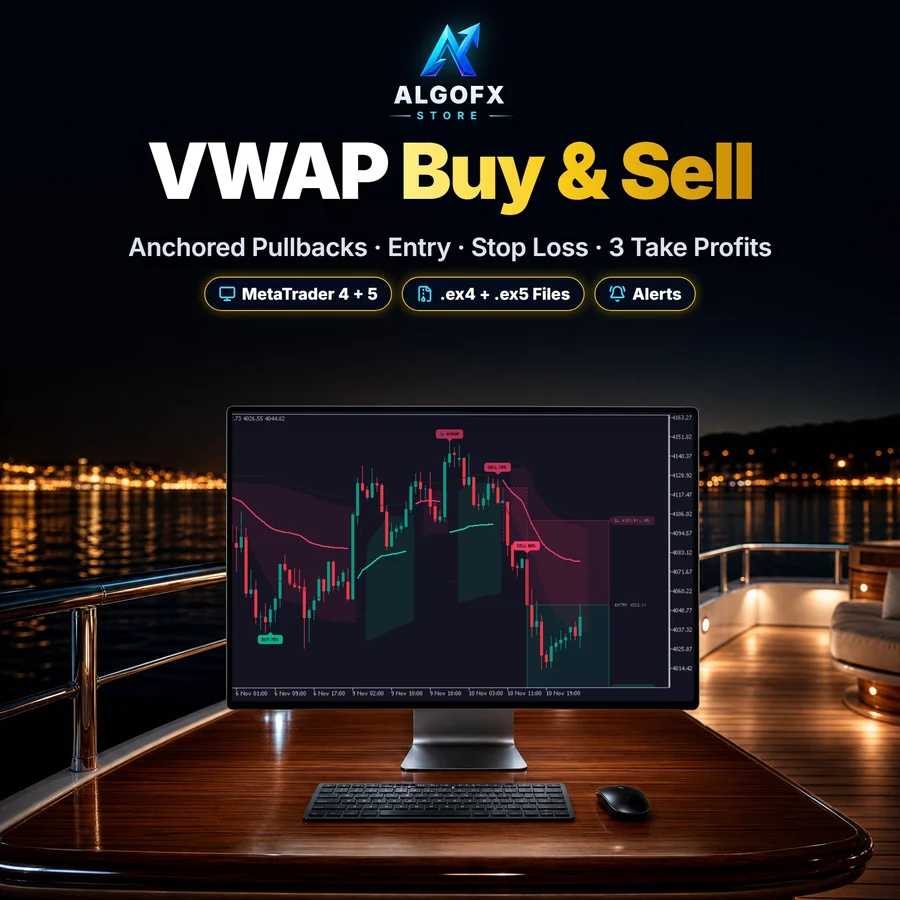
See Supreme VWAP And Targets on a real chart
Press play; use the full-screen button to see every detail.
Recorded on MetaTrader with Supreme VWAP And Targets on real charts. · 2:44 · Plays from YouTube when you press play (YouTube then sets its own cookies; see Privacy).
Anchored VWAP works only when the anchor, the wait and the stop are right
Traders who use an anchored VWAP do the same three jobs by hand on every chart. They pick the bar to anchor from, they wait for price to come back to the line, and they work out where the stop and the targets go. The anchor is a judgement call that changes the line completely, the wait can take hours, and the stop is where most mistakes happen: a stop inside the noise, or a target never measured against the risk.
The second mistake is treating a touch of the VWAP as the trade. A touch only means a pullback has started. Price can slice straight through the average and keep going, and a buy taken on the touch is then a buy into a falling market. What matters is whether buyers step back in: a candle that closes back above the line in the direction of the leg, after the pullback stayed inside a sensible distance from the average.
The third is letting the chart size the position. Two pullbacks on the same symbol can have very different stops, because the stop has to sit beyond the pullback and beyond the band, and that depends on how deep the pullback went and how far price has strayed from its average. Supreme VWAP And Targets does the anchoring, the waiting and the stop arithmetic on closed candles and draws the result, so your job is the decision and the position size.
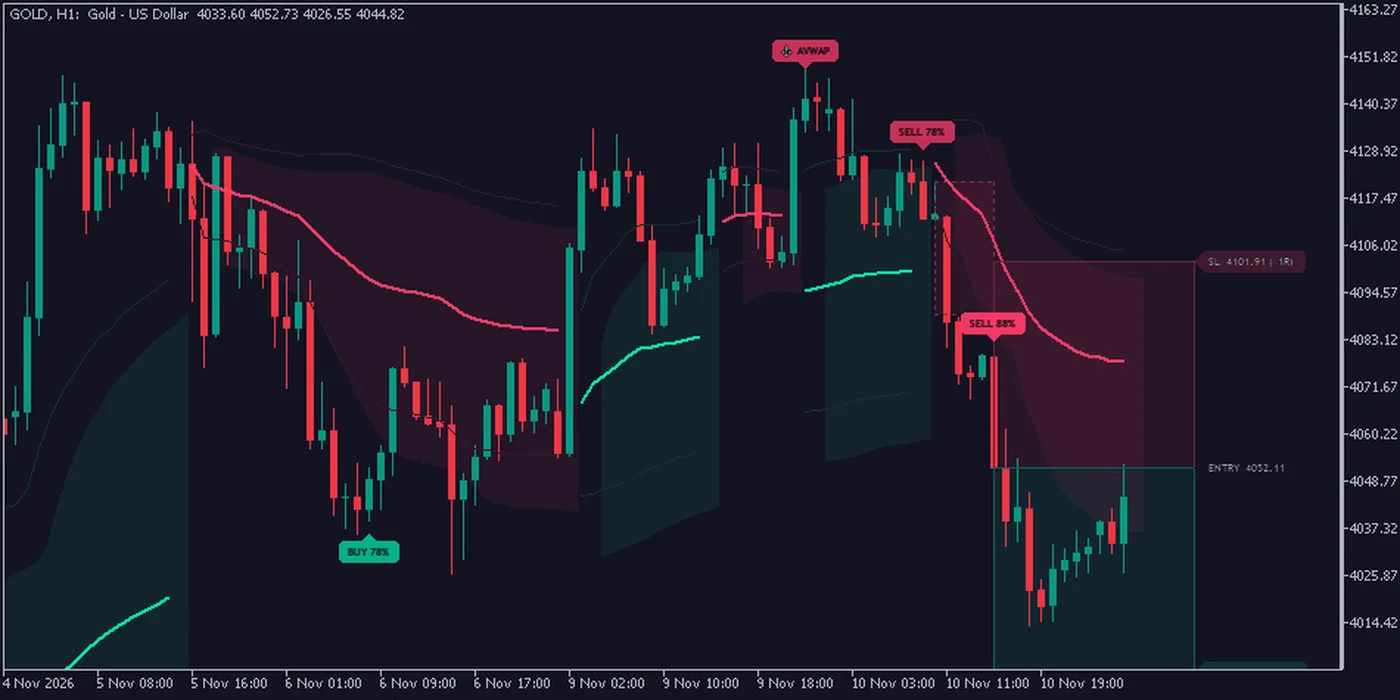
What Supreme VWAP And Targets draws, and what each mark means
Read from the shipped MetaTrader edition.
| What you see | What it means |
|---|---|
| Mint or red line with a soft band around it | The anchored VWAP from the latest confirmed swing and its value band; mint = bullish anchor, red = bearish anchor. |
| '⚓ AVWAP' badge | The swing where the VWAP starts. |
| Dotted box before the signal | The pullback zone price traded in before the reclaim. |
| 'BUY 73%' / 'SELL 68%' badge | A pullback reclaimed on a closed candle; the number is the setup quality score. |
| Grey line, 'ENTRY' plate | Entry: the close of the signal candle. |
| Red box and line, 'SL... (-1R)' plate | Stop loss beyond the pullback plus an ATR buffer; '(BE)' after TP1 when breakeven is on. |
| Green box and lines, 'TP1 (1R)', 'TP2 (2R)', 'TP3 (3R)' plates | Take profit levels; 'MAG' = the impulse high or low used as a target; ✓ = reached. |
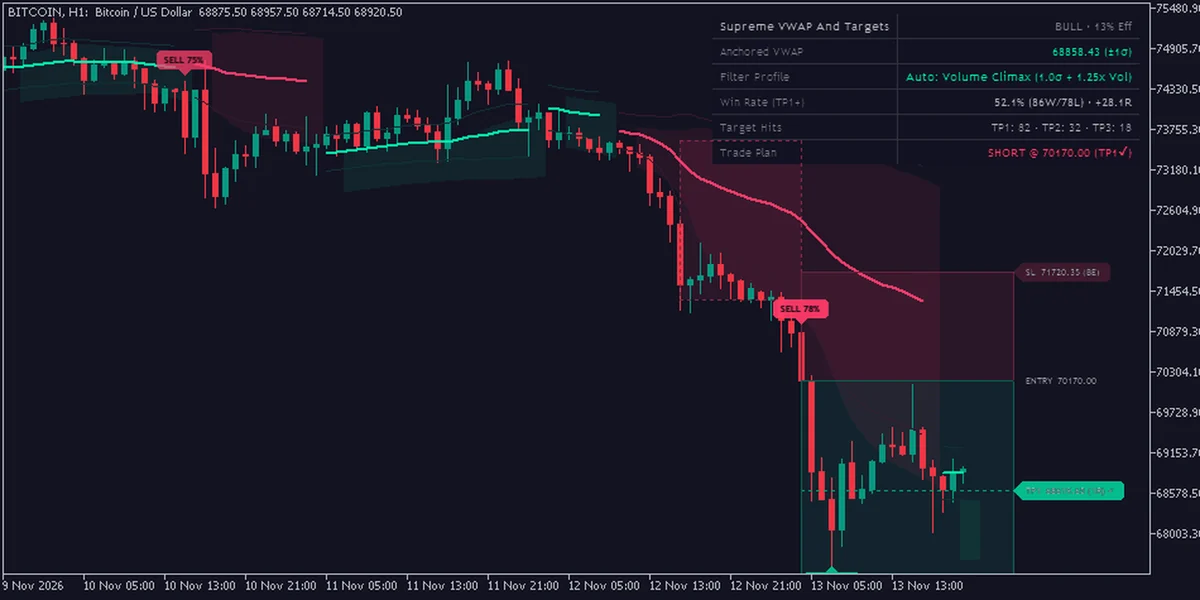
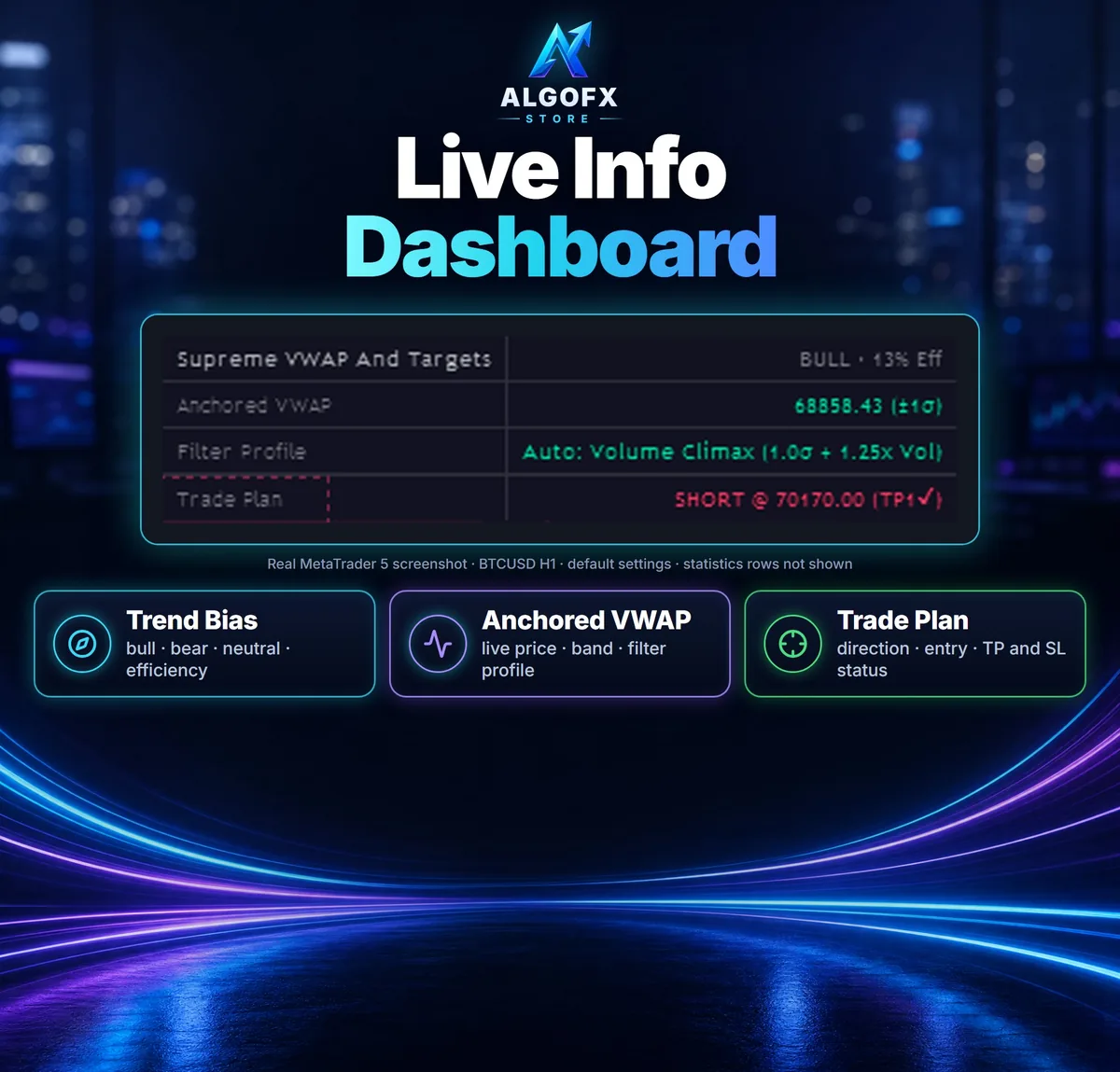
| Dashboard | Trend regime and efficiency, the VWAP price and band width, the active filter profile and the current plan's state. |
How a swing becomes an anchored VWAP, and a pullback becomes a signal
Every step below is the shipped logic, the same in the MT4 and the MT5 build. The state machine that sets anchors, pullbacks, signals and plans runs only on closed candles.
- 1
The swing anchor is found for you
A swing low is a low that no candle within 10 candles on either side goes below (Structural Anchor Swing Lookback). Because the 10 candles on its right must exist first, a swing is confirmed 10 candles late. It becomes the bullish anchor when the confirming candle closes above it and there is no anchor yet, the new low is lower, the current anchor has used its pullbacks, or a new impulse has started from it. Swing highs do the same for the bearish anchor.
- 2
The VWAP and its value band
From the anchor on, each candle's typical price, (high + low + close) / 3, is weighted by its tick volume, or by its range in ATR on a symbol without volume. Sigma is the volume-weighted standard deviation, never below a quarter of ATR(14). The value band is the VWAP plus and minus the profile's width times sigma (1.0 sigma on Balanced). A defence line further out, 2.0 sigma on Balanced, is not drawn but cancels a pullback that goes too deep.
- 3
The leg has to arm first
An anchor alone gives no signal. The leg is armed once its impulse, the highest high since a bullish anchor or the lowest low since a bearish one, is at least Min Impulse Expansion (1.40) x ATR(14) away from the anchor. A bullish anchor ends on a close below the anchor price or more than 2.6 sigma below the VWAP, mirrored for a bearish one. With no active anchor the dashboard reads Scanning... and there is no band.
- 4
Pullback, then a reclaim close
On an armed bullish leg, a closed candle starts or continues a pullback when its low reaches the band's upper edge, it closes at or above the defence line and above the anchor, and its high stays below the impulse high. The reclaim is a bullish candle that closes above the VWAP and no lower than the previous candle's high minus 0.2 ATR. A SELL mirrors every rule on an armed bearish leg.
- 5
The profile's gates decide BUY or SKIP
A reclaim becomes a signal only when the profile agrees on trend efficiency (net move of the last 10 closes as a share of the path, 26 percent minimum on Balanced), setup quality (0 to 100, 52 minimum on Balanced), and a pullback depth of 12 to 85 percent of the impulse leg. Volume Climax also wants 1.25 times the 20-candle average tick volume. A refused reclaim is a SKIP and the next pullback starts fresh.
- 6
The plan is drawn and followed
Entry is the signal candle's close. The stop sits beyond the lower of the pullback low and the band's lower edge by 0.20 x ATR, scaled by the profile, and is held between the profile's minimum and 3 ATR. That distance is R. From the next candle on, each closed candle checks the stop first, then TP1, TP2 and TP3. A plan ends at TP3, at the stop, after 60 candles or at the profile's next signal.
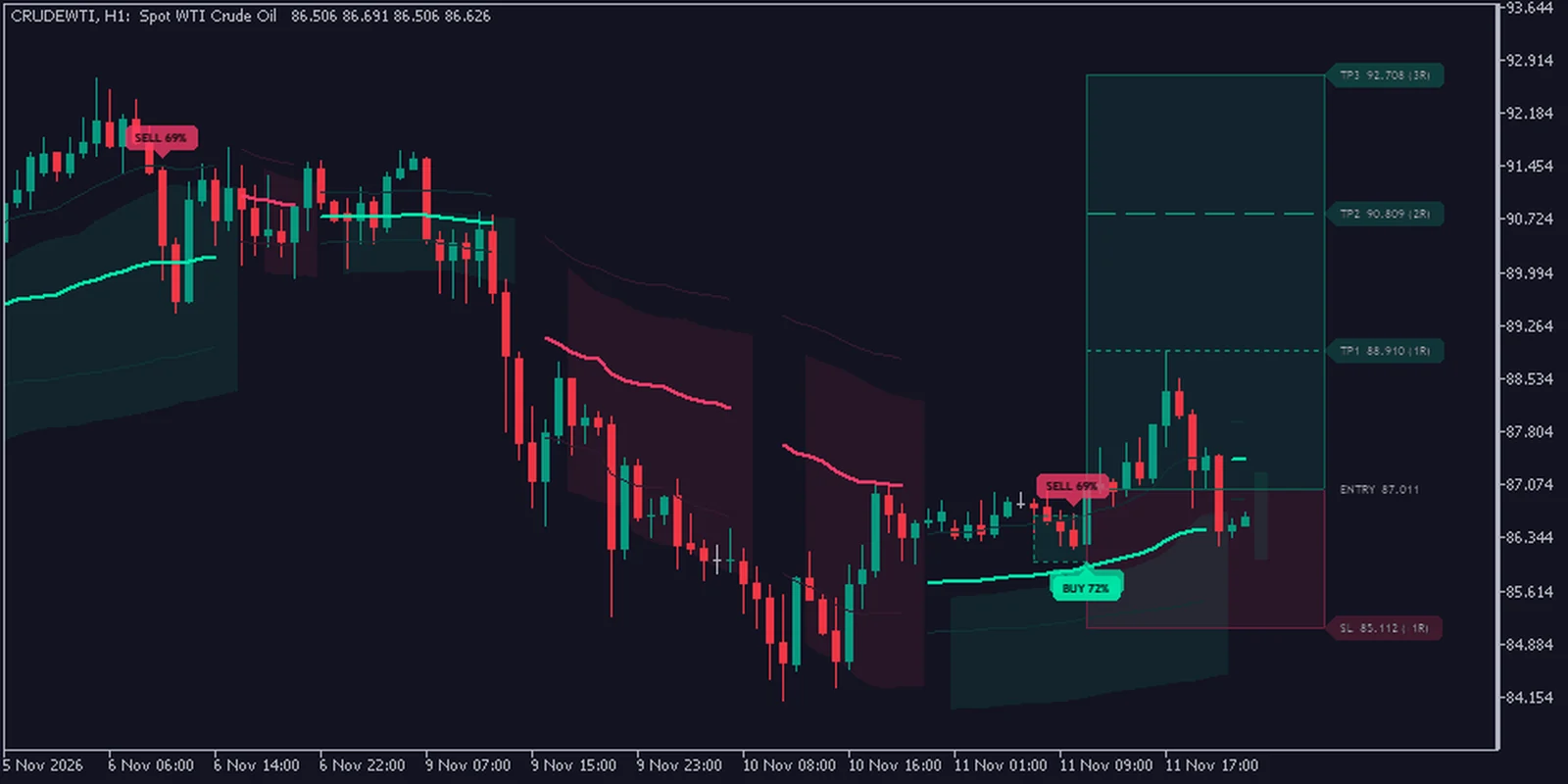
Supreme VWAP And Targets on 12 different markets
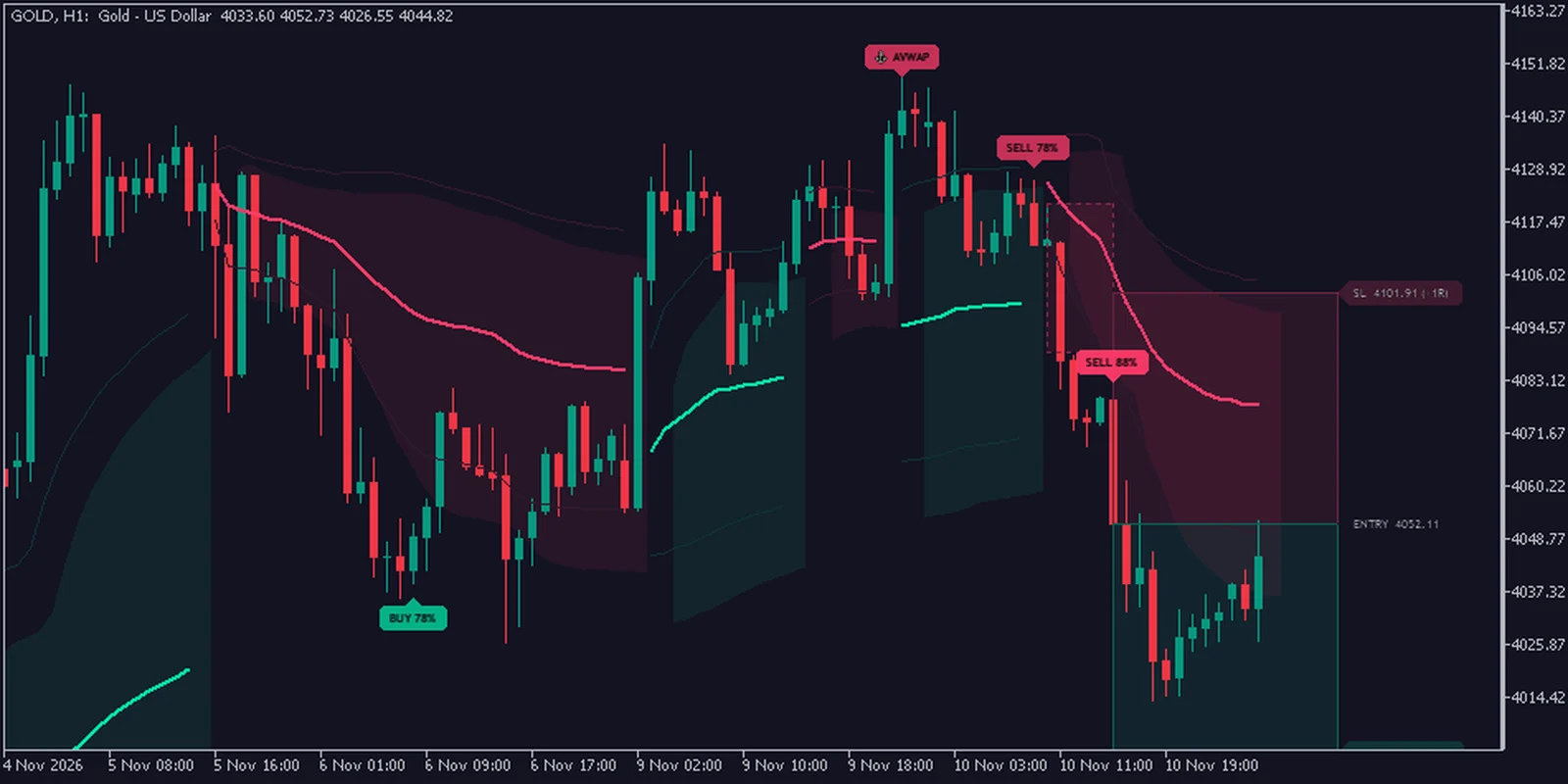
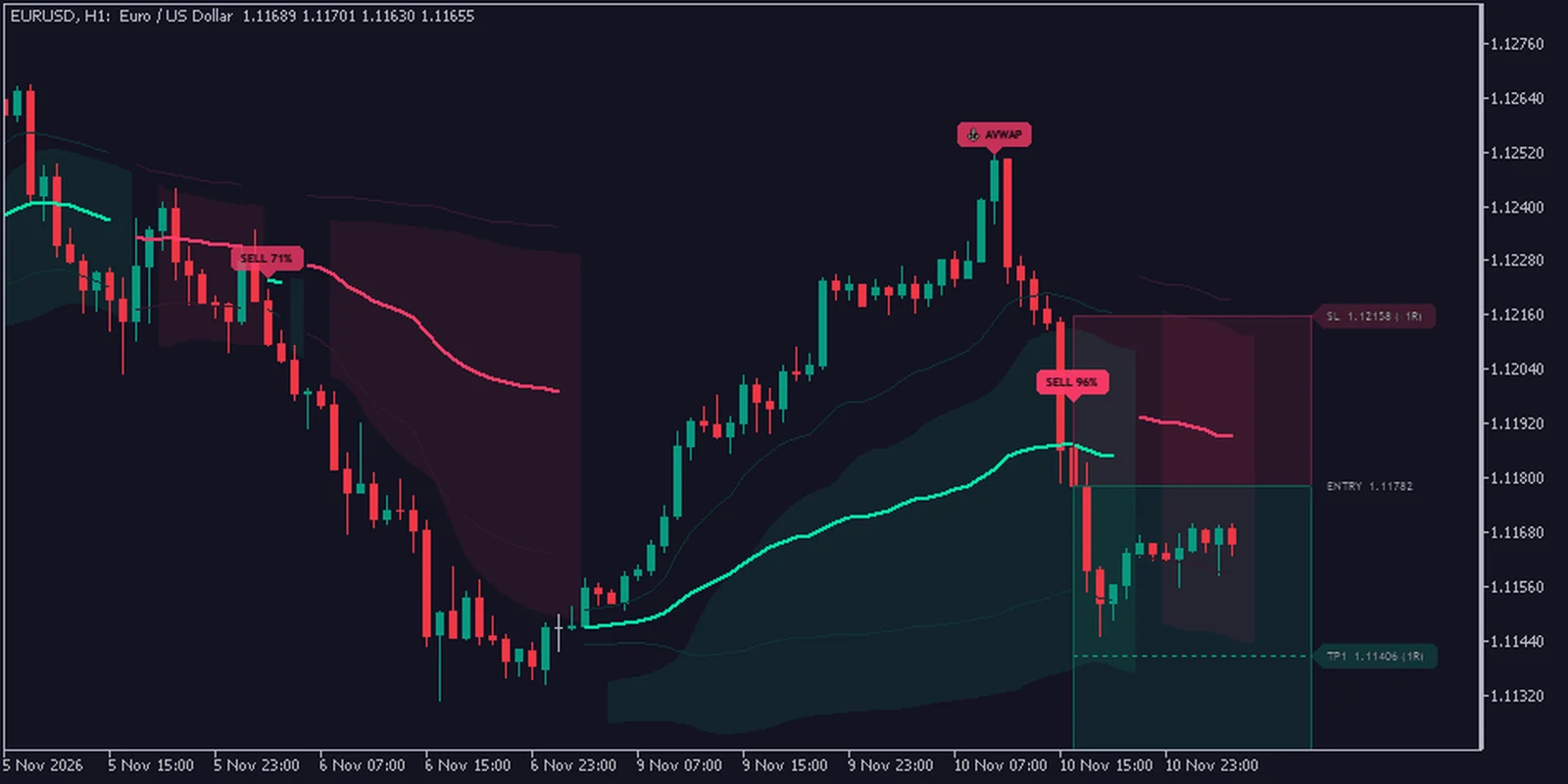
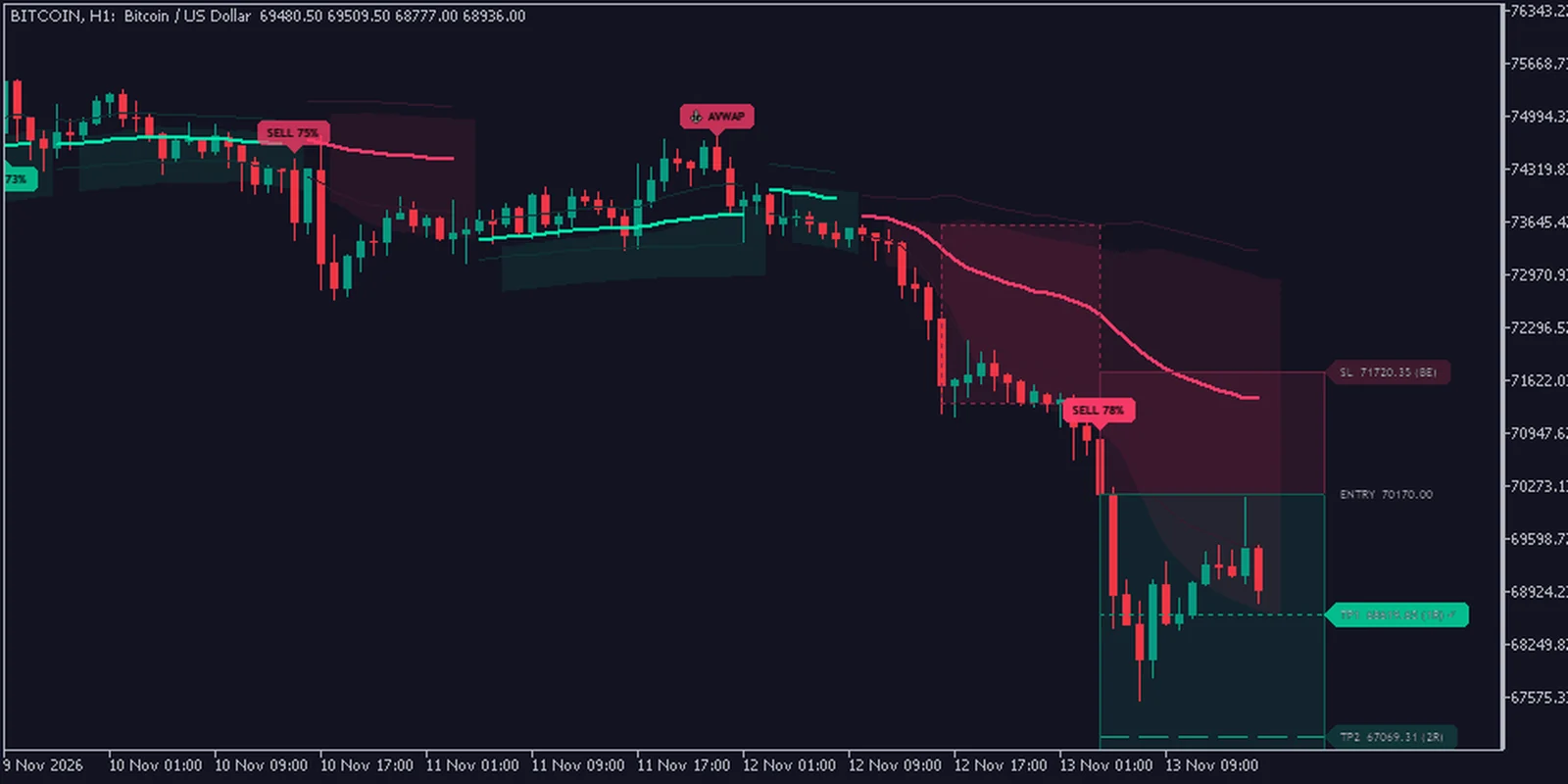
Every chart below is a screenshot of MetaTrader itself with the shipped Supreme_VWAP_And_Targets attached at its default settings. Forex, metals, indices, energy and crypto, so you can see how it reads each kind of market. They show what the indicator draws; they are not trading results. Tap or click any chart to open it full size.
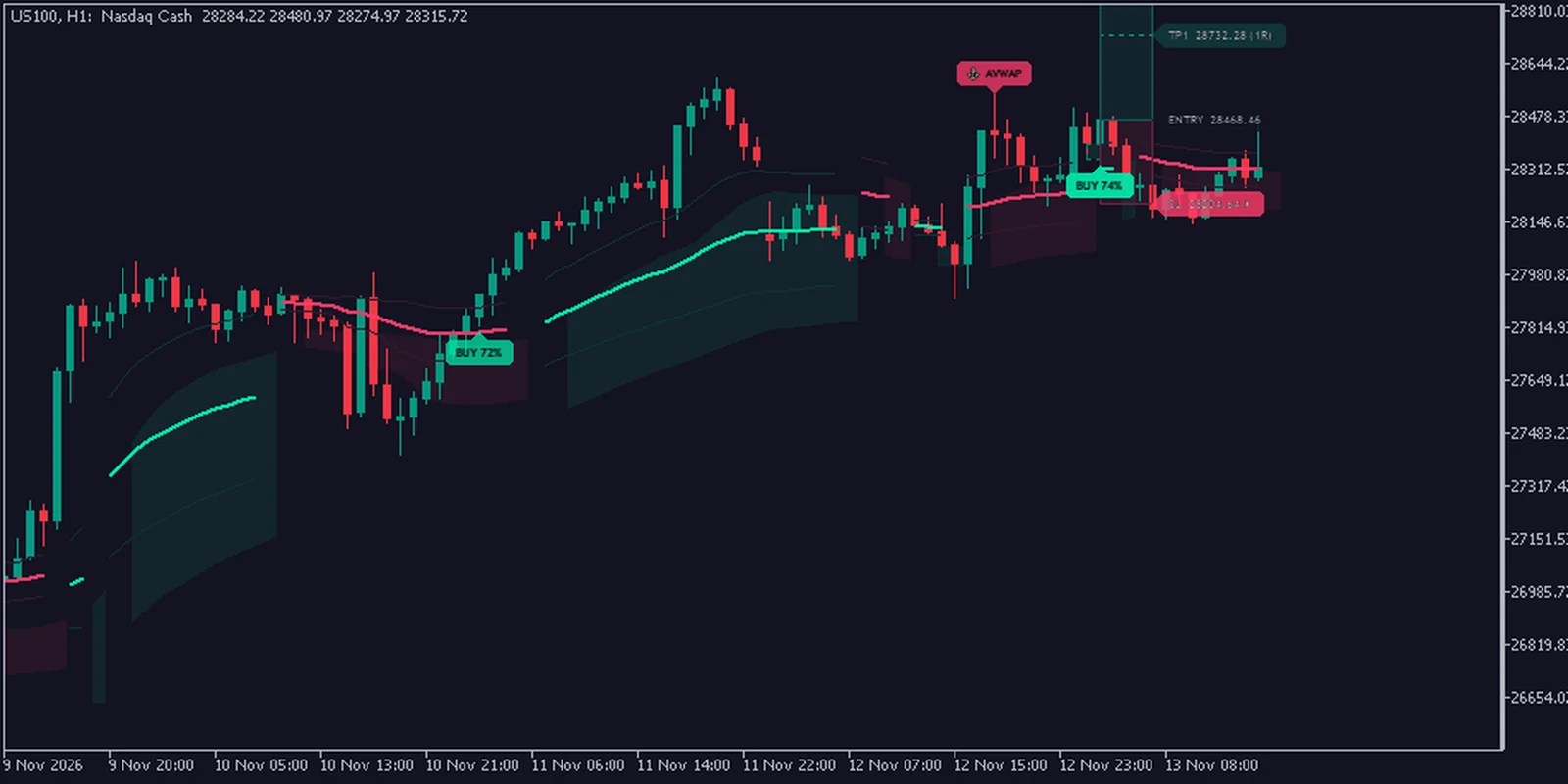
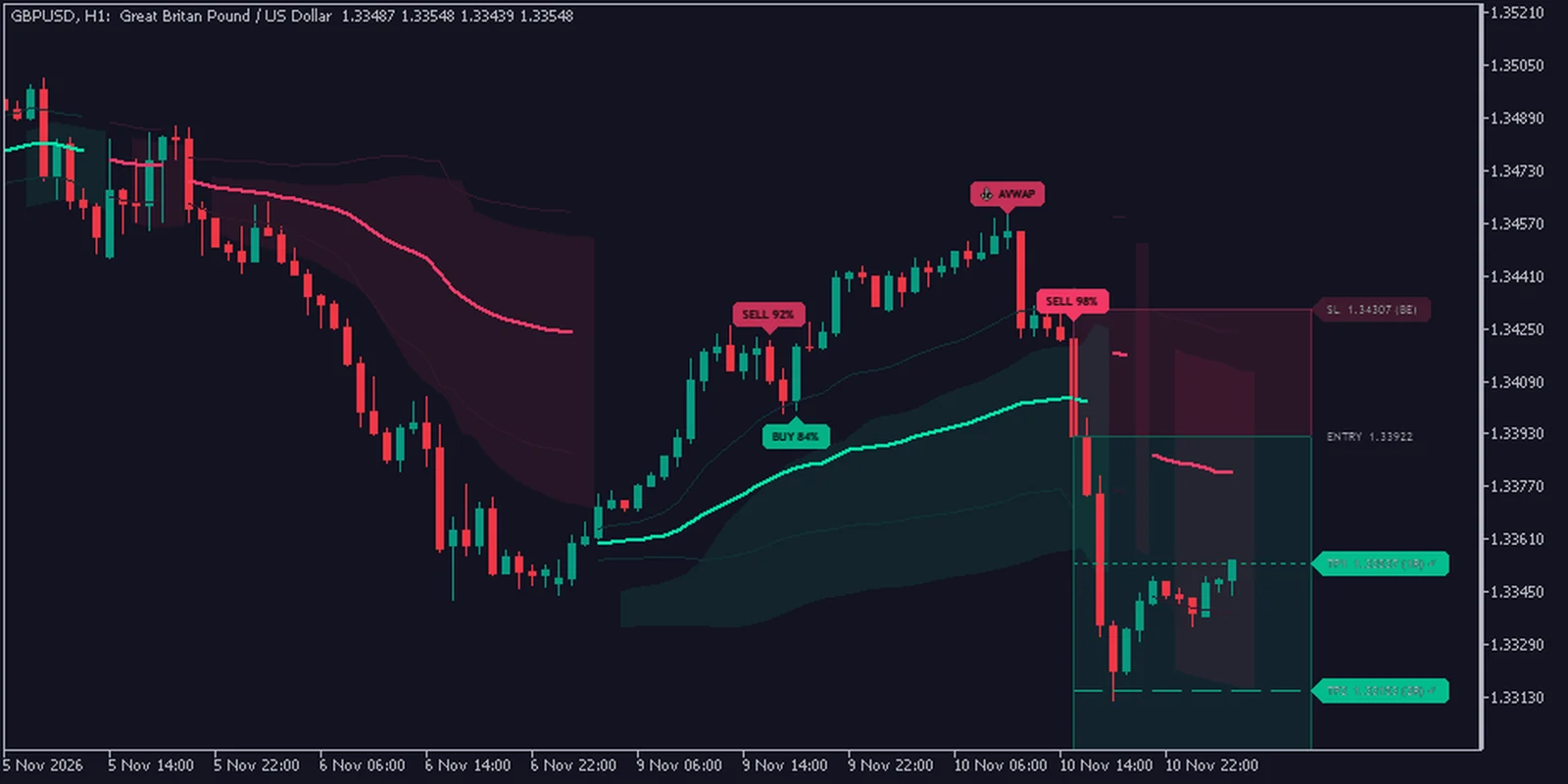
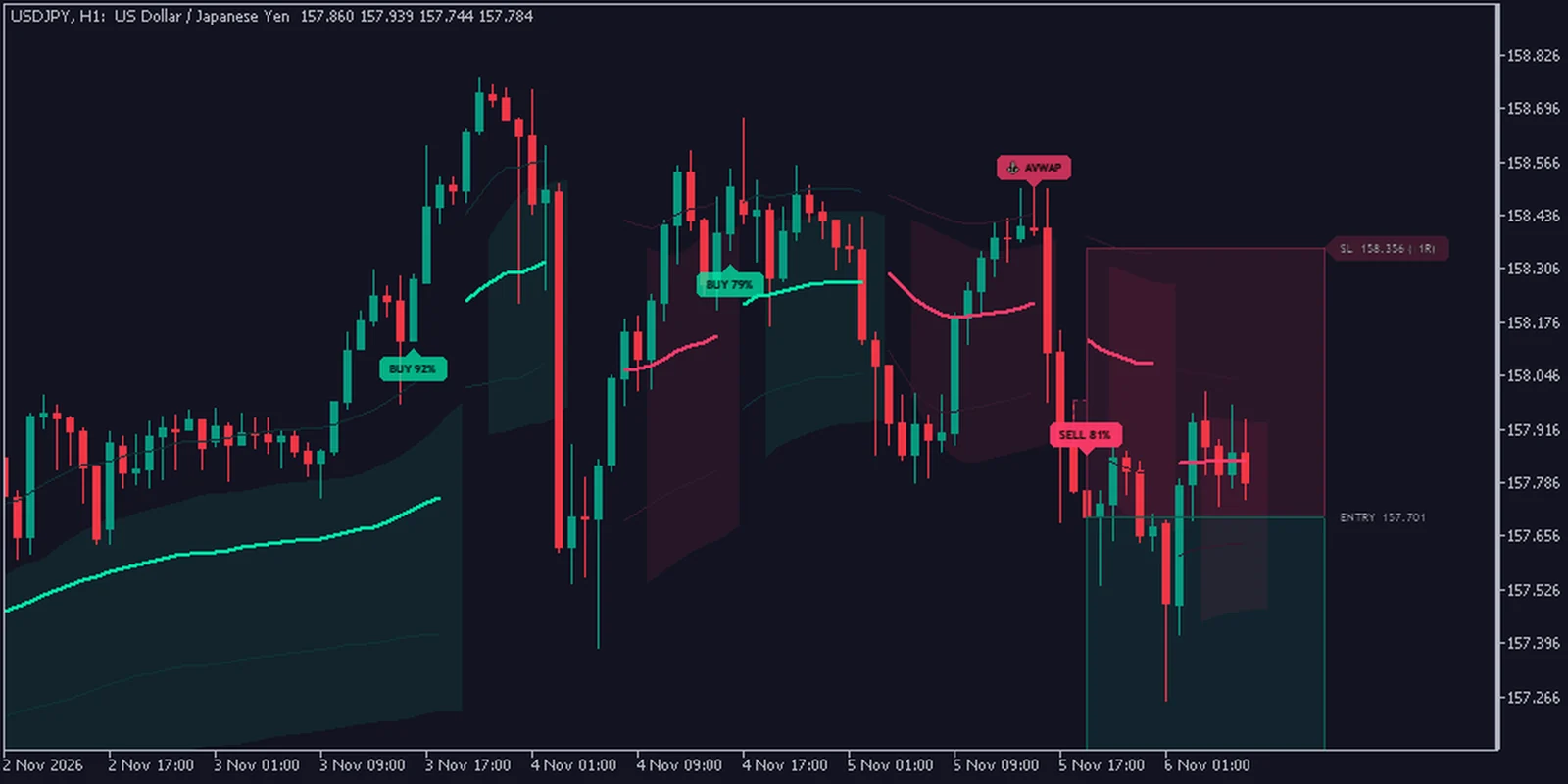
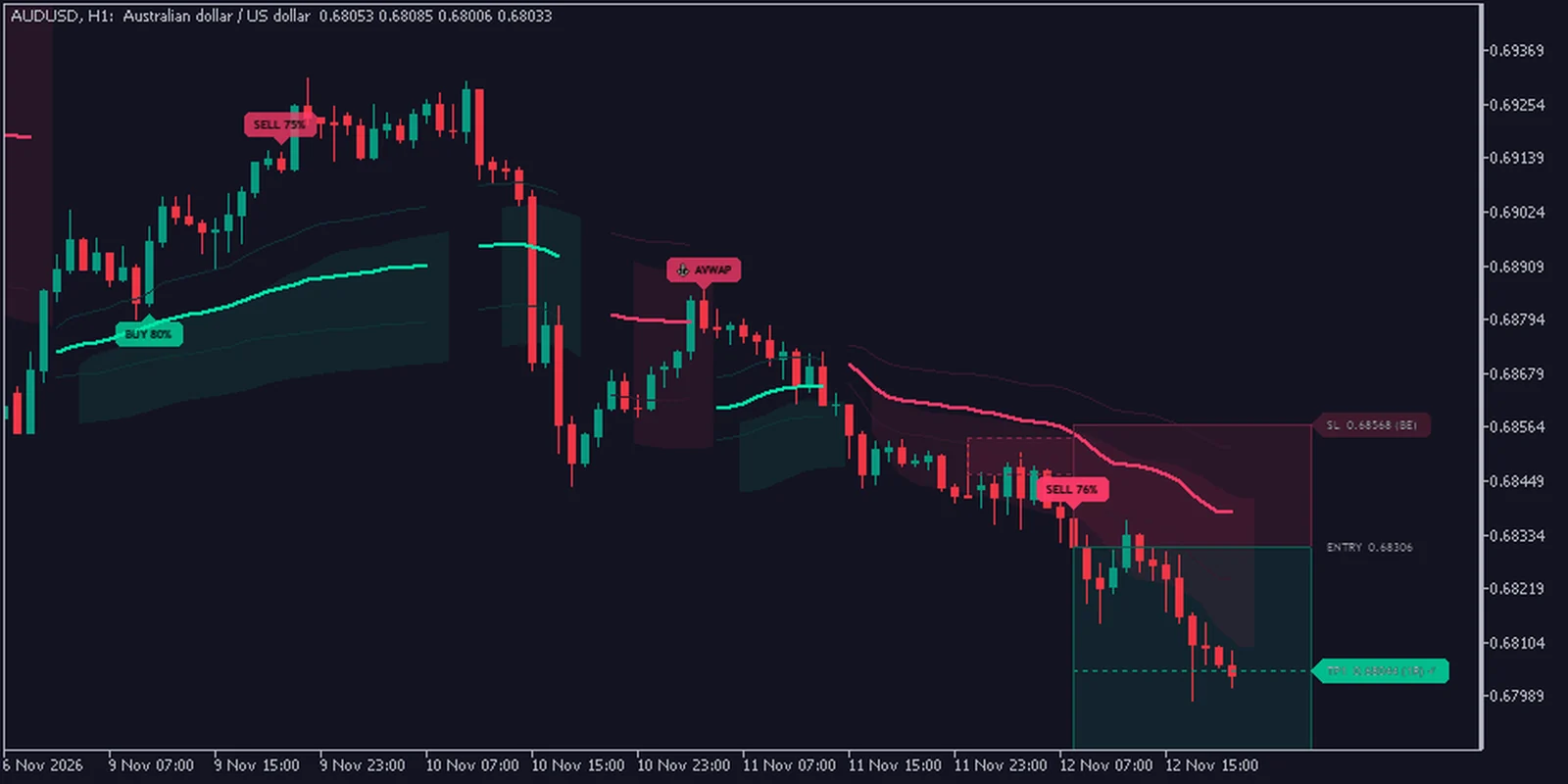
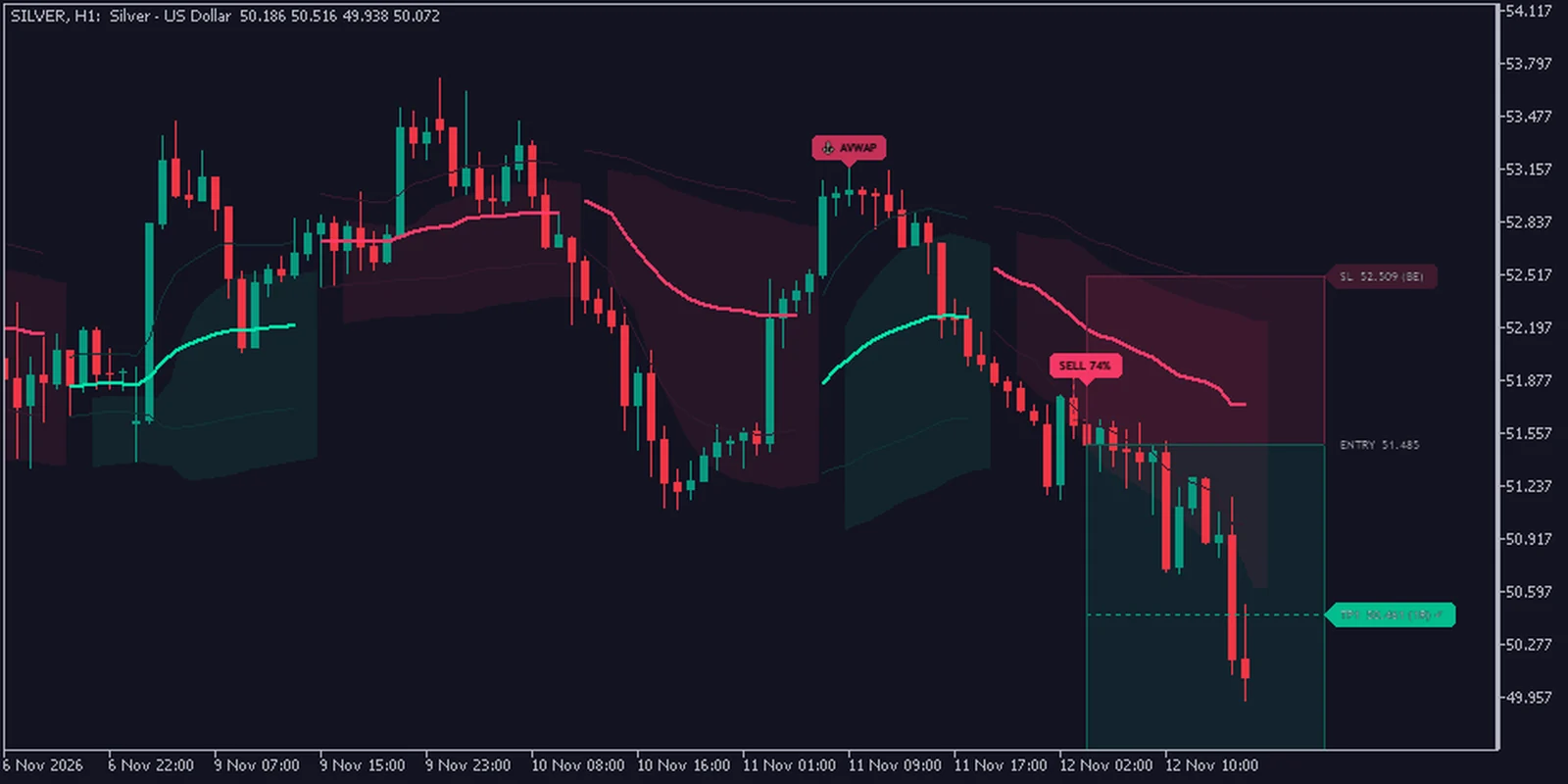
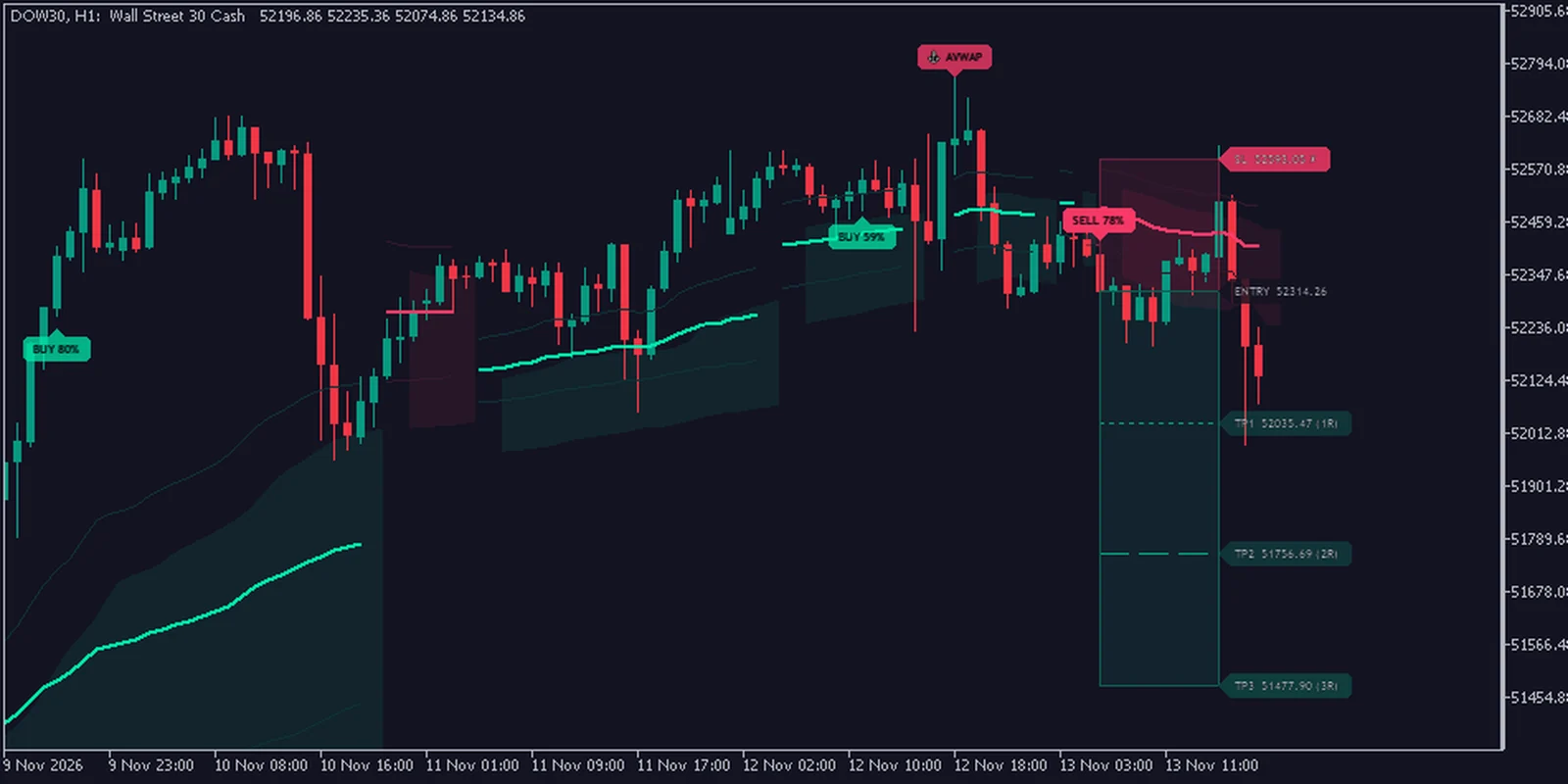
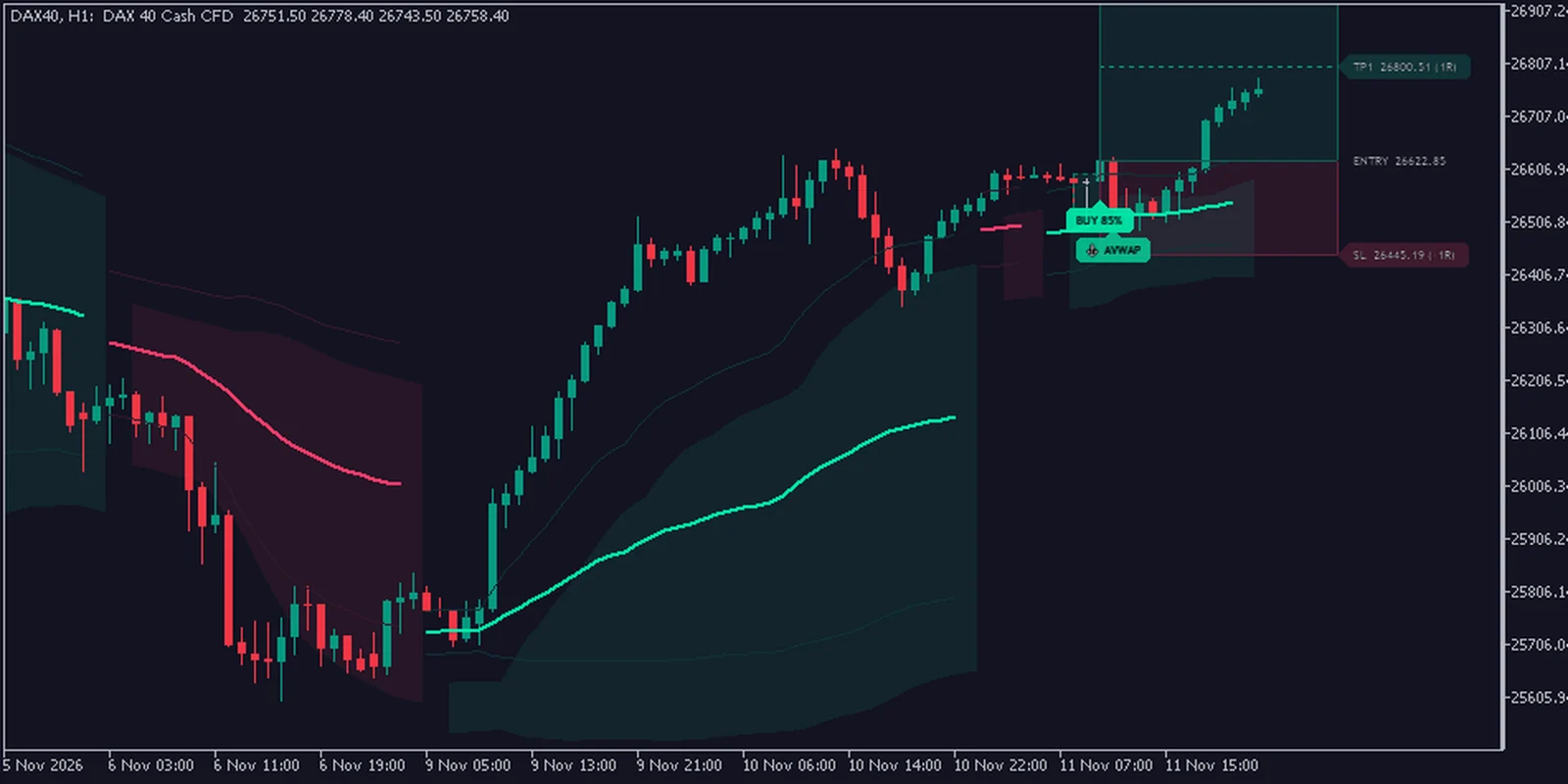
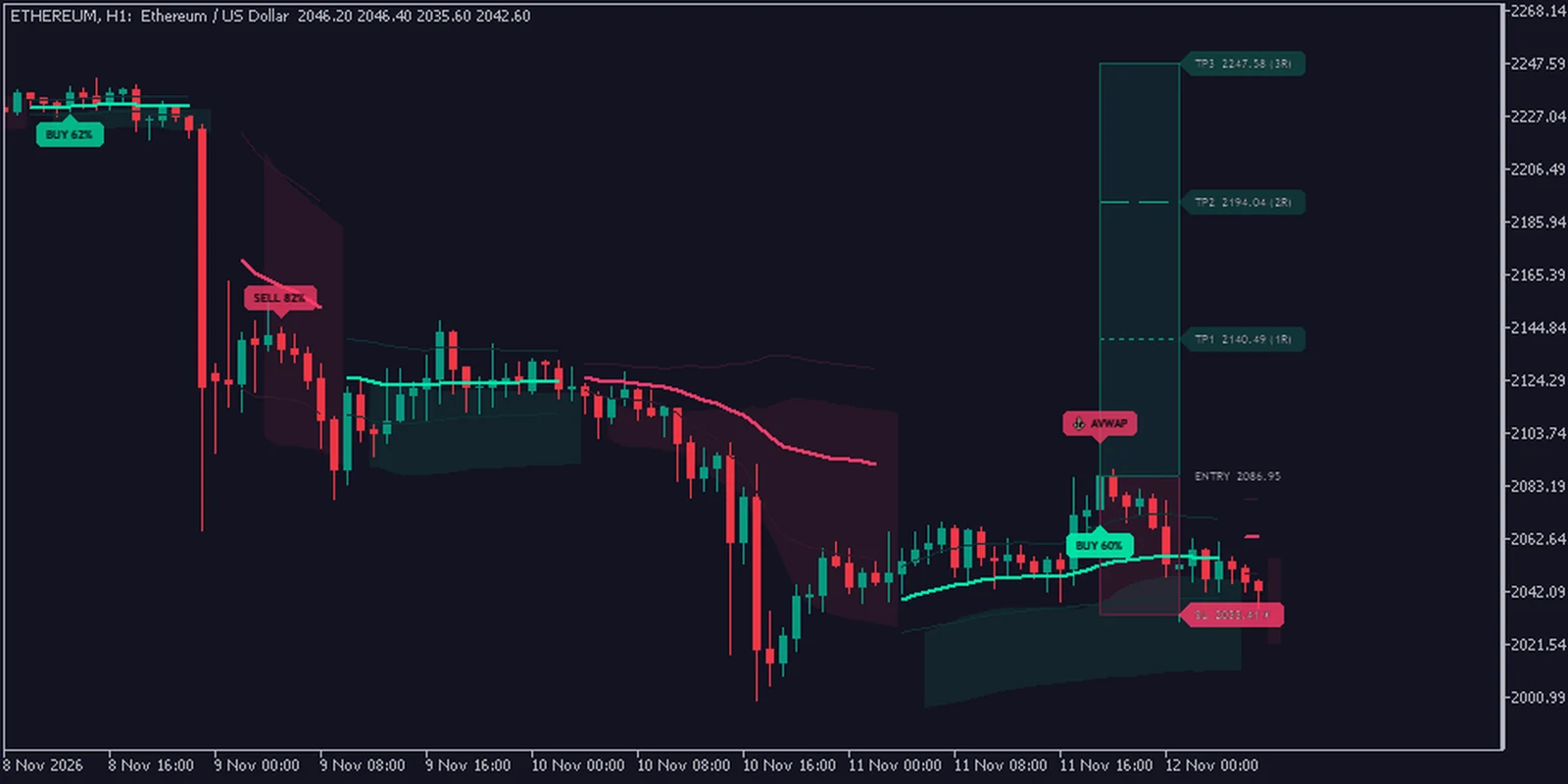
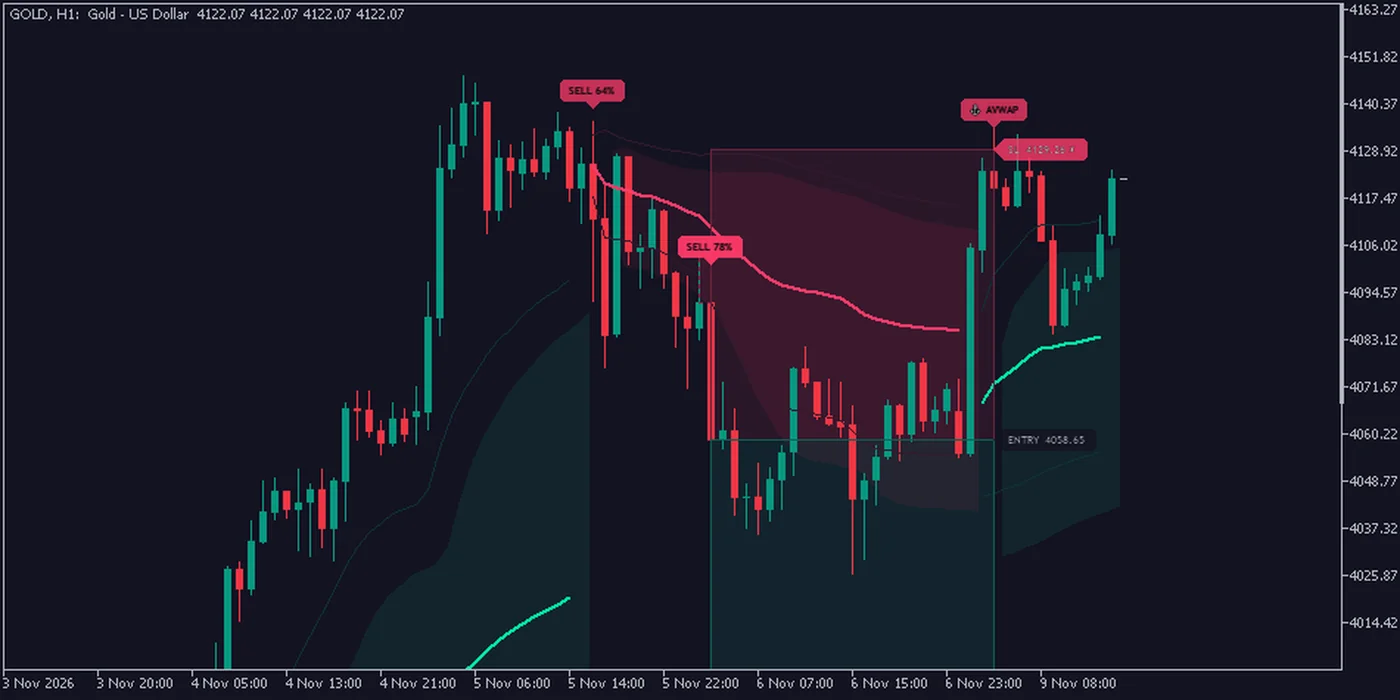
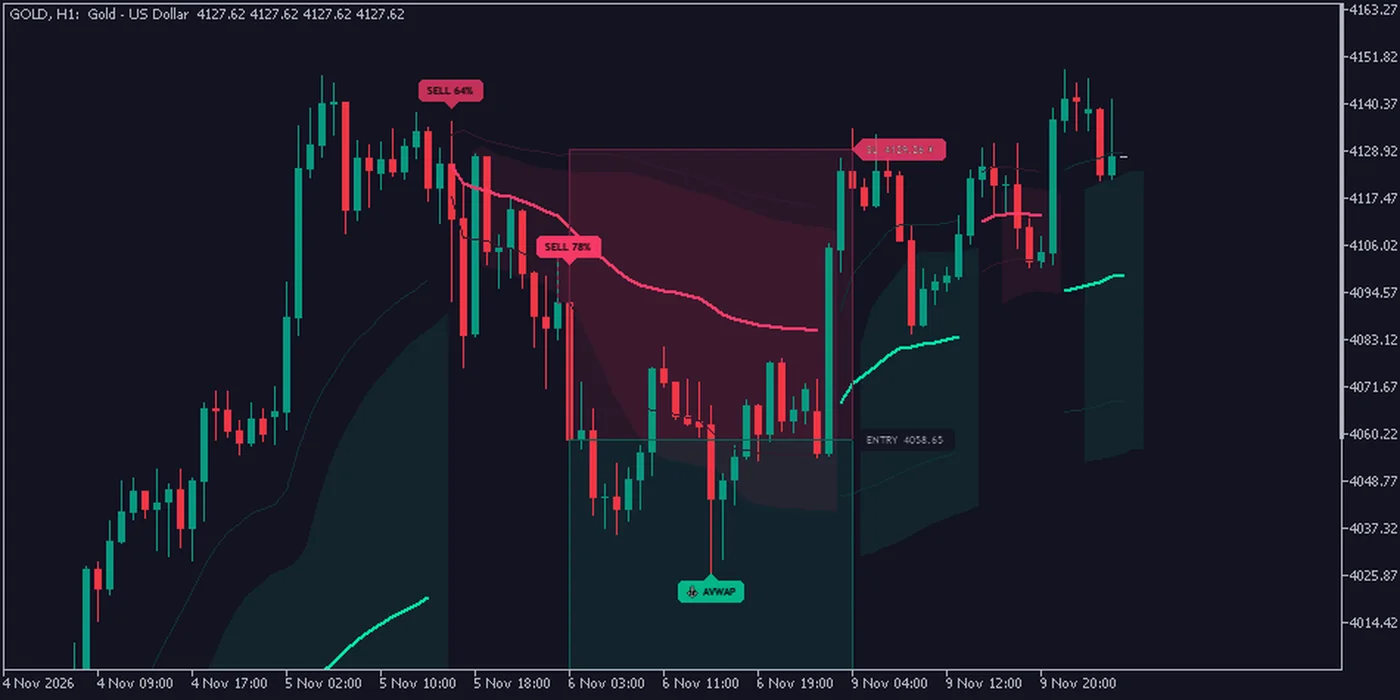
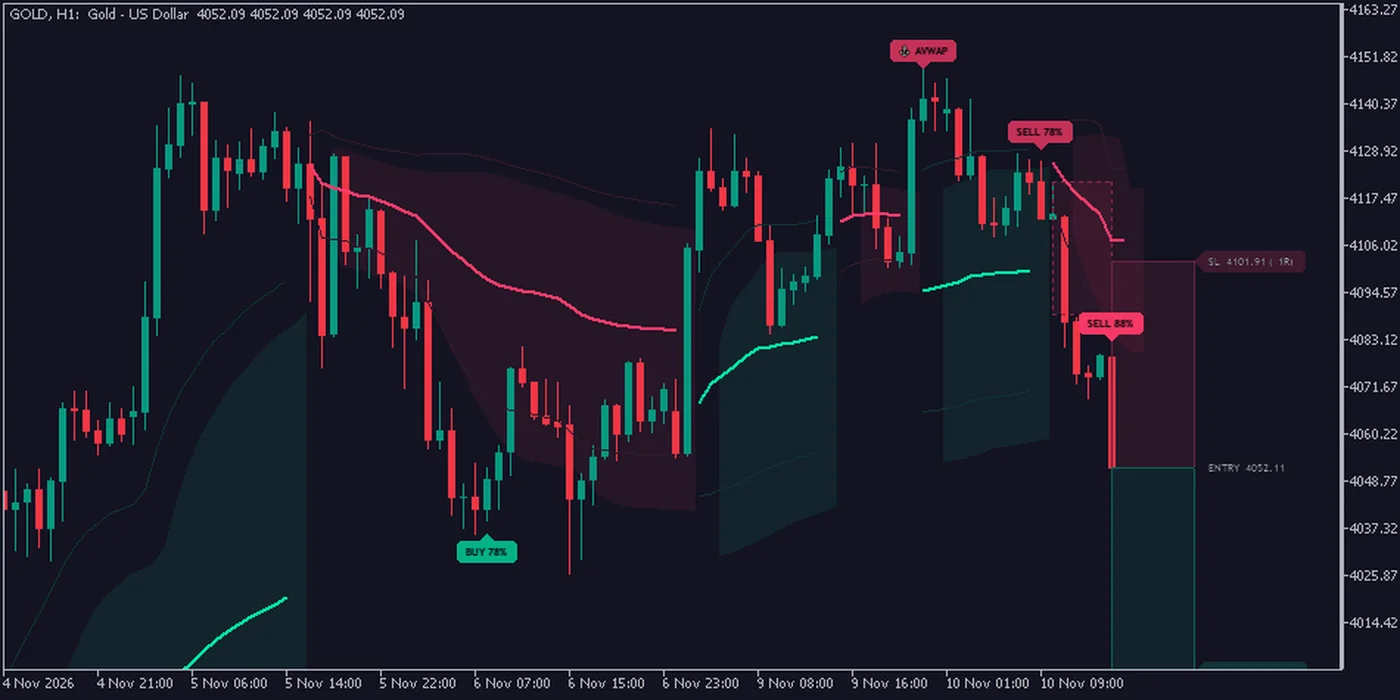
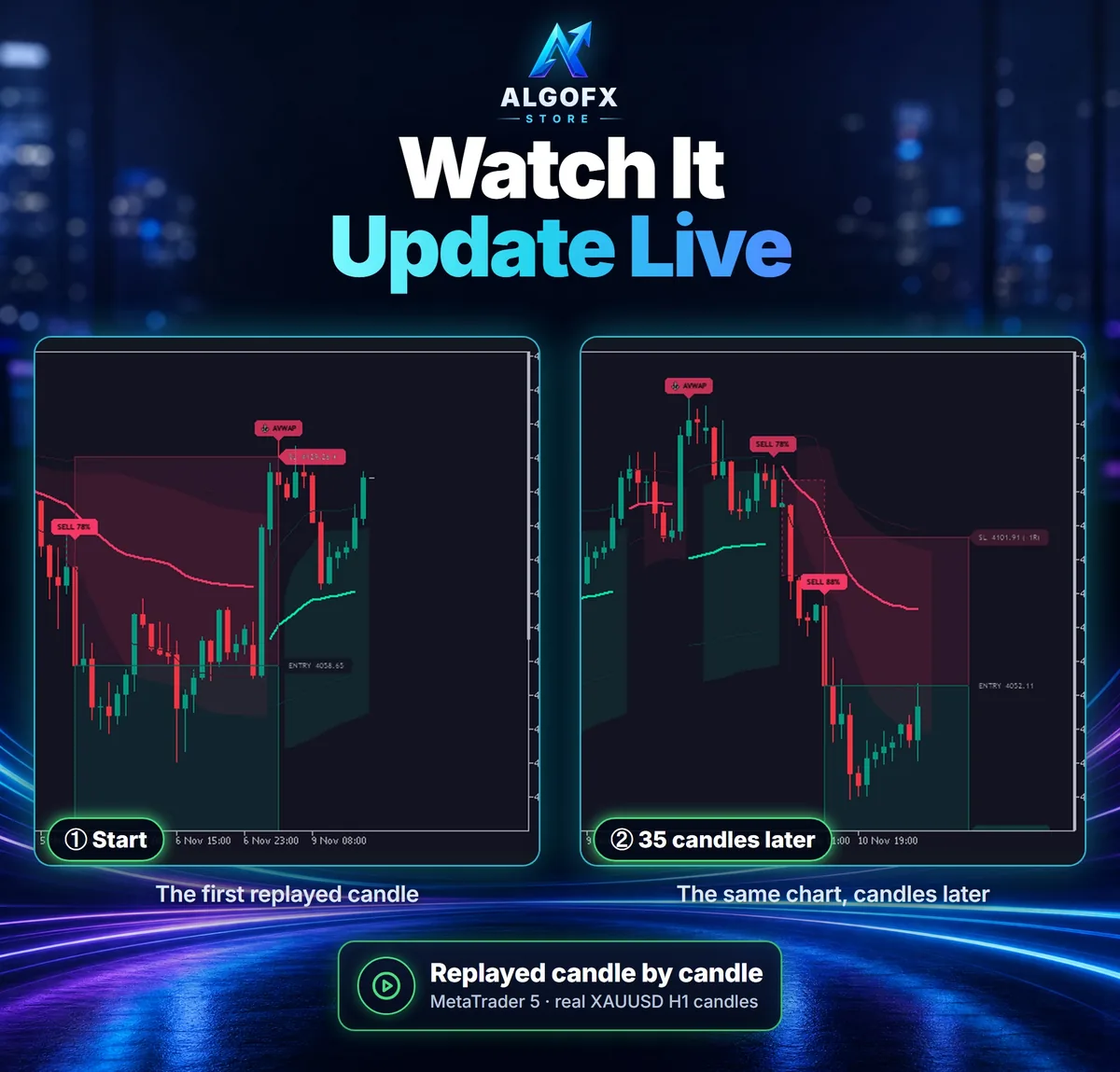
Watch Supreme VWAP And Targets work on a real MetaTrader 5 chart
A screen recording and frames from the shipped indicator at its default settings, as the chart updates. Nothing is edited into the chart.
A step-by-step way to trade the value band reclaim
The indicator lays out the evidence; the read, the size and the order are yours. This routine follows the order the chart is built in.
- 1
Set up the chart and the profile
Attach it with the defaults; H1 is a good first chart, with room between signals and plans that run at most 60 candles. Give it 1,000 or more candles of history so the profiles have finished plans to be ranked on. Decide whether you want Auto-Optimize, which can change the profile shown, or a fixed profile such as Balanced or Conservative, which keeps one set of rules on the chart all day.
- 2
Read the bias before anything else
The dashboard header reads BULL, BEAR or NEUTRAL with the trend efficiency, for example BULL · 34% Eff. In the bias colour the efficiency clears the profile's minimum; muted, it does not. A BUY while the header is in the bullish colour is a different trade from a BUY while it is muted. The anchor badge shows which swing the line starts from.
- 3
Wait for the pullback, not the touch
When price trades into the band a pullback is running, and the reclaim close is the next thing to watch. A close beyond the defence line ends it. Switch on alert 1 and 2 (on by default) so you do not have to sit through the pullback. A touch of the band is never the entry; the signal is the closed reclaim candle with every gate passed.
- 4
Read the signal in ten seconds
When a badge prints, check five things in order: which side is armed, where price sits against the band, what the badge says (BUY or SELL and the quality score), whether the stop distance makes sense against the entry, and which profile produced it. Note whether TP2 or TP3 reads MAG. A SELL under a bullish band comes from the other armed leg; trade it only if your plan allows counter-bias signals.
- 5
Size from the stop, or skip
Read the SL plate against the ENTRY plate. Size the position so that this distance costs the amount you accept to lose on one trade. After a fast impulse the band-based stop can be wide; if even your minimum position risks too much, skip the signal and wait for the next one. Skip as well when SKIP marks cluster around the VWAP: that says price is chopping around its average.
- 6
Manage by the plan you set before
Decide before entering what you do at TP1: take part off, move your own stop to the entry, or hold for TP2 and TP3. The breakeven move is drawn, not executed: the SL plate reads (BE), the stop line stays at the initial stop, and your own order needs moving. A plan expires after 60 candles. Keep a journal of the profile, the quality score and the outcome of every plan you take.
5 rows that read the market for you
- Header: Supreme VWAP And Targets | BULL, BEAR or NEUTRAL with the 10-candle trend efficiency, for example BULL · 34% Eff (in the bias colour when the efficiency clears the profile's minimum, muted when not)
- Anchored VWAP | the live VWAP price with the band width in sigma, for example (±1σ), or Scanning... when no anchor is active
- Filter Profile | the profile in use, for example Auto: Balanced (1.0σ · 26% Eff); no 'Auto:' in front with a fixed profile
- Two record rows | how the shown profile's finished plans on this chart's loaded history ended (count of plans that reached TP1 or ended without a loss, losses, net R, and how often TP1, TP2 and TP3 were reached), with no spread or costs; a record of this chart, not a forecast
- Trade Plan | LONG @ or SHORT @ the entry with its state (OPEN, TP1, TP2, TP3, BE or SL), or the last signal text such as BUY (AVWAP · 73%), SKIP (CHOP · 18%) or NONE
Everything Supreme VWAP And Targets does for you
No hand-picked anchor
The VWAP starts at a pivot confirmed by 10 candles each side and re-anchors by fixed rules: a lower low, used-up pullbacks or a fresh impulse. The anchor badge reading AVWAP sits on the swing candle at the swing's price.
A band measured in sigma
Volume-weighted standard deviation around the VWAP, never below 0.25 x ATR(14), so a young anchor cannot draw a band too thin to touch. Width follows the profile: 0.65 sigma on Shallow Pullback up to 1.45 sigma on Deep Value Reclaim.
Seven profiles judge every reclaim
Balanced, Conservative, Aggressive, Shallow Pullback, Deep Value Reclaim, Volume Climax and Custom Thresholds run side by side on every closed candle, each with its own band, defence line, efficiency and quality minimum, stop factor and minimum stop.
A quality score you can read
The number on the badge, for example BUY 73%, is 40 percent close location in the candle's range, 35 percent trend efficiency (full at 55 percent) and 25 percent activity (full at twice the 20-candle average tick volume). It is a setup score, not a probability.
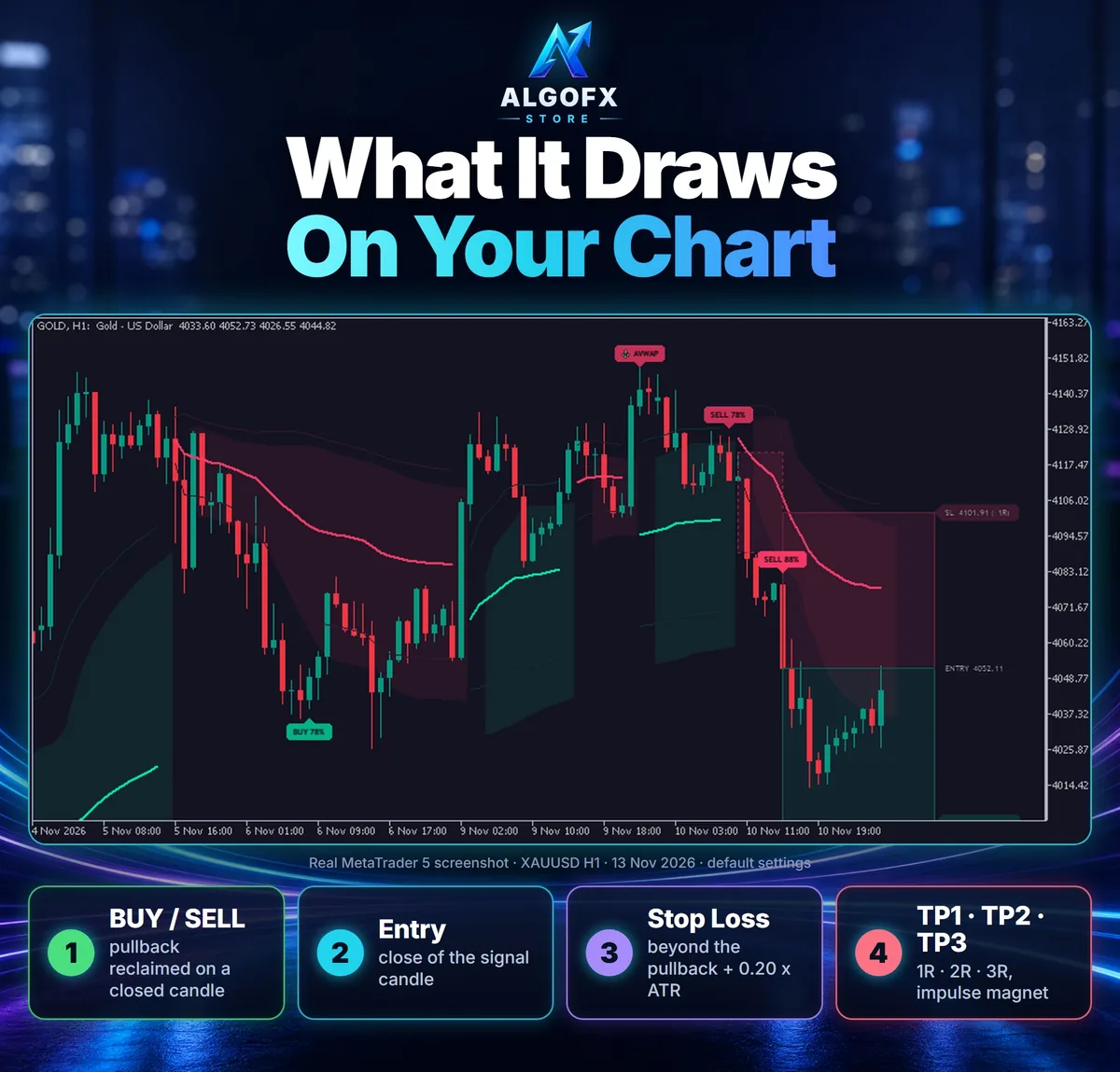
Stop and three targets on the chart
ENTRY, SL and TP1, TP2, TP3 plates with prices at the symbol's tick size and the R multiple, a red risk box from entry to stop and a green reward box from entry to TP3, drawn before you act.
Targets that respect the impulse
In the default R Ladder + Impulse High/Low Magnet mode, TP2 moves onto the impulse extreme when it lies 1.3 to 2.4R away and TP3 when it lies beyond 2.4 and up to 4.5R, tagged MAG with its own R. Fixed R Ladder keeps 1R, 2R and 3R.
Breakeven and outcomes marked
After TP1 the SL plate reads (BE) with Move Stop to Breakeven After TP1 on. A reached target gets a tick mark, a stop hit before TP1 a cross, and the dashboard's Trade Plan row shows OPEN, TP1, TP2, TP3, BE or SL.
Refused reclaims on request
Show Filtered (SKIP) Pullbacks, off by default, puts a small SKIP circle under a refused BUY or over a refused SELL, so you can see how much the gates hold back on your symbol.
Alerts once, on the closed candle
Seven events, each switchable, to pop-up, sound, push to the MetaTrader phone app and e-mail. Each fires once per closed candle, never for history and never in the Strategy Tester. Texts carry the symbol and timeframe.
Supreme VWAP And Targets, feature by feature
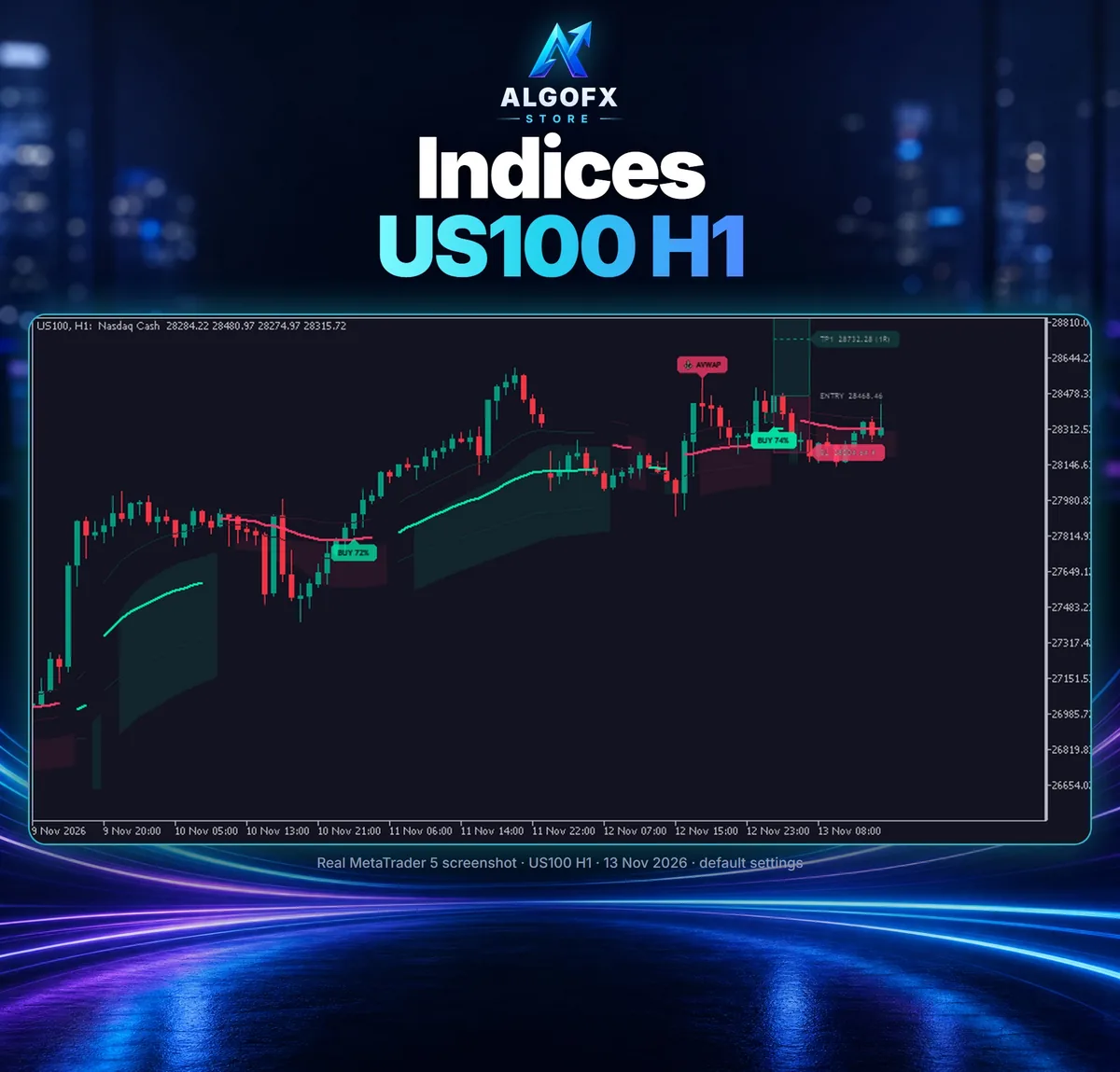
Each picture is built from real platform screenshots of the shipped indicator at its default settings, labelled so you can see what every part does. Tap any picture to open it full size.




How traders put it to work
Forex on H1
The H1 chart is the suggested start: swings 10 candles wide give clean legs on pairs such as EURUSD, and a plan runs at most 60 candles, 60 trading hours. Tick volume differs by broker, so another feed can give other anchors, other signals and another Auto pick.
Gold
Gold moves far in a session, and the stop follows that: it sits beyond the pullback and the band and is held between the profile's minimum (0.30 to 0.40 ATR) and 3 ATR, so R grows with volatility. Read the stop distance before sizing; Deep Value Reclaim gives the most room, Shallow Pullback the least.
Indices
On index CFDs such as NAS100 or a DAX 40 chart the same rules run unchanged and R is measured in index points. The 3 ATR cap keeps a stop after a violent impulse inside a fixed multiple of the current volatility, whatever the price level.
Crypto through the weekend
Crypto symbols trade seven days, so anchors and plans run without weekend gaps. The 60-candle plan limit counts candles, not days. A symbol whose feed carries no volume still works: the candle's range against the ATR stands in for tick volume.
Intraday on M5
On M5 the same rules run on smaller swings and plans close sooner: 60 candles is five hours. Expect more signals and smaller stops. Raising Min Impulse Expansion toward 1.8 to 2.0 waits for stronger legs, and Max Pullbacks Per Trend Anchor = 1 takes only the first pullback of each swing.
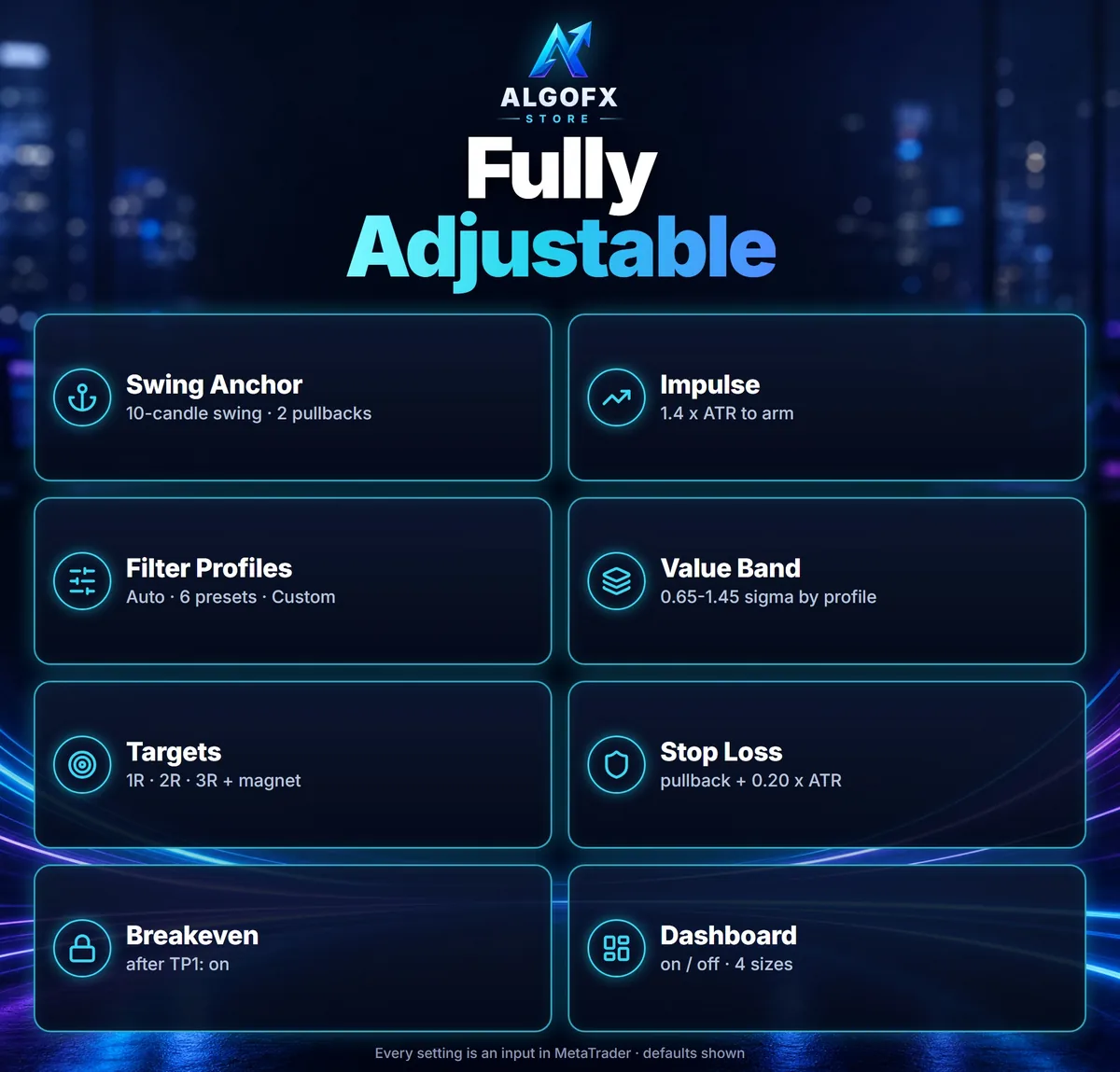
Every setting, with its default
The names are the ones in the MetaTrader inputs dialog; the defaults are what every chart on this page uses.
| Setting | Default | What it does |
|---|---|---|
| Structural Anchor Swing Lookback (3-40) | 10 | InpSwingLen: candles each side of the swing that anchors the VWAP. |
| Max Pullbacks Per Trend Anchor (1-4) | 2 | InpMaxPb: signals allowed per anchor. |
| Min Impulse Expansion (ATR, 0.6-3.5) | 1.40 | InpMinImpulse: how far price must run from the swing before pullbacks count. |
| Pullback Filter Mode | Auto-Optimize | InpFilter: Auto, Balanced, Conservative, Aggressive, Shallow Pullback, Deep Value Reclaim, Volume Climax Reclaim, Custom Thresholds. |
| Custom Min Trend Efficiency (%) / Custom Value Band Width (Sigma) | 26 / 1.00 | InpCustomMinEr / InpCustomBandSig: the Custom profile. |
| Target Projection Mode | R Ladder + Impulse High/Low Magnet | InpTarget: or Fixed R Ladder (1R / 2R / 3R). |
| Stop Loss Buffer Beyond Pullback (ATR) | 0.20 | InpSlBuffer: extra room beyond the pullback extreme (x the profile's stop scale). |
| Move Stop to Breakeven After TP1 | on | InpBeRatchet. |
| Keep Historical Trade Plans (Last 5) / Show Filtered (SKIP) Pullbacks | off / off | InpPastPlans (last 5 badges, 3 plans) / InpSkipped. |
| Show Summary Dashboard / Table Size / Bars to calculate | on / Small / 20000 | InpDash, InpDashSize (4 sizes), InpBarsToCalc. |
7 alert events
You choose which alerts are on in the inputs. Alerts can go to a pop-up in MetaTrader's Alert window, a sound, a push notification to the MetaTrader app on your phone and an e-mail (MetaTrader's e-mail settings must be filled in).
- 1. Bullish AVWAP Pullback Entry (BUY)
- 2. Bearish AVWAP Pullback Entry (SELL)
- 3. Any Confirmed AVWAP Pullback Entry
- 4. Trade Plan TP1 Reached
- 5. Trade Plan TP2 Reached
- 6. Trade Plan TP3 Reached
- 7. Trade Plan Stop Loss Hit
Supreme VWAP And Targets next to the usual options
Where it wins, and where it does not.
| Supreme VWAP And Targets | Typical free VWAP indicator | Reading it by hand | |
|---|---|---|---|
| Where the VWAP starts | At a swing confirmed 10 candles each side, re-anchored by fixed rules | Usually a session or a fixed start date | Wherever you choose, a judgement call each time |
| What counts as a pullback | Low into the band, close inside the defence line, no new high | A line and bands; the rule is up to you | Eyeballed |
| When a signal is decided | On the closed reclaim candle, after every gate of the profile | Usually no signal at all | When you decide it, often on the touch |
| Stop and targets | Drawn with each signal: stop beyond pullback and band, 1R to 3R, magnet | Not included | Worked out by hand per trade |
| Filtering chop | Trend efficiency, quality score, depth 12 to 85 percent, optional volume gate | None | Your own discipline |
| Choosing the anchor yourself | Not possible: the swing rule picks it | Often possible with a date input | Full control |
| Cost and learning time | A one-time purchase, seven profiles to understand | Free and simple | Free, but slow on every chart |
Honest about who this fits
A good fit if you
- You already trade pullbacks and want the anchor, the band and the stop arithmetic done the same way on every chart.
- You prefer to wait for a closed candle and a defined reclaim rather than buy the first touch of a line.
- You size every trade from the stop and want the stop distance in front of you before you decide.
- You trade forex, gold, indices or crypto on MetaTrader 4 or MetaTrader 5, from M5 up to H4 or higher.
- You like to see why a setup was refused, with SKIP marks and a named filter profile, instead of a black box.
- You want alerts on your phone so you can step away while a pullback develops.
Not for you if you
- Traders who want a signal on every swing: one anchor gives at most two signals per profile by default, and quiet or choppy legs give none.
- Anyone who wants to anchor the VWAP on a bar of their own choosing; this indicator picks the anchor by its swing rule.
- Traders who want the badges on old candles to stay identical while running Auto-Optimize; fix a profile if that matters to you.
- Anyone expecting the indicator to trade, size or move stops for them: it draws and alerts, and you place and manage every order.
Both builds, one guide, installed in a minute
- 2Indicator buildsSupreme_VWAP_And_Targets.ex4 for MetaTrader 4 and Supreme_VWAP_And_Targets.ex5 for MetaTrader 5, in one 1.0 MB zip.
- 4Page PDF guideInstallation, every setting with its default and how to read the chart.
- 10Setting groupsEvery one explained above, with the defaults the charts use.
- 7Alert eventsYou choose which ones are on in the settings.
- 60Day money-back guaranteeIf it is not for you, request a full refund within 60 days through your Digistore24 order e-mail.
Install in four steps
- Download the zip from the page Digistore24 sends you to after checkout and unzip it.
- MetaTrader: File, Open Data Folder, then MQL4\Indicators (MetaTrader 4) or MQL5\Indicators (MetaTrader 5).
- Copy the .ex4 (MetaTrader 4) or the .ex5 (MetaTrader 5) there, refresh the Navigator and drag “Supreme_VWAP_And_Targets” onto a chart.
- Read the guide; the defaults are the settings shown on this page.

Kestutis Balciunas
AlgoFXStore · chart indicators for MetaTrader, TradingView, cTrader and NinjaTrader
Kestutis Balciunas builds and publishes chart indicators under the AlgoFXStore name for MetaTrader 4 and 5, TradingView, cTrader and NinjaTrader 8. Every product page shows what the indicator draws on real charts, and every number on it comes from the shipped build.
The charts on this page were captured in MetaTrader from the shipped Supreme_VWAP_And_Targets at its default settings and are shown unedited.
No get-rich claims and no quoted win rates. Every trade is uncertain, and no indicator changes that. If you want to know whether it suits the way you trade before you buy, e-mail [email protected] and you will get a straight answer.
One price, both platforms
- Both builds: .ex4 for MetaTrader 4 and .ex5 for MetaTrader 5, plus the 4-page PDF guide
- Delivered as a digital download: one zip with both builds and the PDF guide on your download page
- Return period: 60 days, with a full refund if it is not for you
- Free updates to the current version on the same download page
60-day money-back guarantee. Install it, run it on your own charts and read the guide. If Supreme VWAP And Targets is not for you within 60 days of purchase, request a full refund from Digistore24, no questions asked: use the refund link in your Digistore24 order e-mail or Digistore24's order page digistore24.com/en/cancel-revoke-contract. Digistore24 refunds to your original payment method. It is a digital download: right after checkout you land on your download page, and the link to it is also in your Digistore24 order e-mail.
Also by Kestutis Balciunas: Supreme VWAP And Targets for NinjaTrader 8.
About the signals
Does it repaint?
Every BUY and SELL, plan and alert is decided on a closed candle; the forming candle decides nothing. Two things can still change what you see. With the default Auto-Optimize the chart shows whichever profile currently leads, and when the pick changes, the badges on past candles switch to that profile's signals. Only the newest three badges and the newest plan are drawn, so older ones roll off. Fix a profile and the switching stops.
Should I use Auto-Optimize or a fixed profile?
Auto-Optimize re-picks on every candle from the six built-in profiles, by the share of their finished plans on this chart that reached TP1 or ended without a loss (three finished plans needed; Balanced, Conservative and Aggressive compete from their first). Until a plan finishes, Balanced is shown; Custom is never picked. It follows this chart's past, not the future. A fixed profile keeps one rule set and stable badges.
What does the percentage on the badge mean?
It is the setup quality of that reclaim, 0 to 100: where the close sits in the candle's range, the 10-candle trend efficiency and the candle's tick volume against its 20-candle average. It is not a probability. The badge's tooltip shows the same score in a format that adds a literal .1, so 73.1% in the tooltip means 73.
Why did a SELL print while the band is bullish?
Both legs are watched for pullbacks at the same time. The band, its fill and the anchor badge belong to the bias side; when both legs are armed, the newer anchor sets the bias. A SELL can therefore come from an armed bearish leg while a bullish band is on screen. Read the badge and its plan, not only the band colour, and decide in advance whether you take counter-bias signals.
Price came back into the band, so why no signal?
A signal needs an armed leg, a pullback that stays inside the defence line, a bullish reclaim close above the VWAP (bearish below for a SELL) and every gate of the profile. None prints while that profile already has an open plan in the same direction, and an anchor gives at most two. Switch on SKIP marks to see the reclaims the gates refused.
Levels, colours and the dashboard
What do the colours and plates mean?
Mint green #00E6A8 marks a bullish anchor and band, BUY badges, targets and the reward box; red #FF3B69 a bearish anchor and band, SELL badges, the stop and the risk box. The stop is always red and every target green, for buys and sells alike. The entry line uses the chart's own foreground colour. On a light chart the plates look paler, because MetaTrader blends them over the background.
Why does TP2 or TP3 say MAG and not 2R or 3R?
With the default target mode the impulse extreme, the high of the leg for a BUY or the low for a SELL, becomes a target when it lies within reach: TP2 when it is 1.3 to 2.4R away, TP3 when it is beyond 2.4 and up to 4.5R. The plate then shows its own R, rounded to 0.1. TP1 always stays at 1R. Choose Fixed R Ladder for exactly 1R, 2R and 3R.
What does the dashboard show?
One table at the top right, in four sizes or switched off: the bias with the trend efficiency, the anchored VWAP price with the band width or Scanning..., the filter profile in use, two record rows with how that profile's past plans on this chart ended, and the latest plan's state. The record rows count drawn plans without spread or costs and are not a forecast.
After TP1 the SL plate says BE, but the line did not move. Why?
With Move Stop to Breakeven After TP1 on, the plan's working stop moves to the entry and the plate text changes to (BE). The drawn stop line stays at the initial stop so you can still read the original risk. The indicator places no orders, so move your own stop if your plan uses breakeven.
MetaTrader 4, MetaTrader 5 and your setup
Is there any difference between the MT4 and MT5 builds?
The rules, levels and alerts are the same engine. The drawing differs: MetaTrader 5 paints the band fill as one image behind the candles; MetaTrader 4 draws it as one column per candle sized to the chart zoom and redraws the candles inside the band on top. On MetaTrader 5 a quiet candle is also closed by a one-second timer 10 seconds after its period ends with no tick; on MetaTrader 4 it closes with the next tick.
Which timeframes and symbols does it work on?
Any symbol in your Market Watch and any timeframe from M1 to monthly, on its own chart data only. Expect the first signal after roughly 50 to 100 candles of warm-up and give Auto-Optimize 1,000 or more candles. Bars to calculate is 20,000 by default (0 = all). On a fresh load the band is drawn for the newest 181 candles.
Why does my chart differ from a friend's on the same symbol?
Anchors and gates use your broker's candles and tick volume, and the profiles are ranked over the candles loaded. Another feed, another history depth or another Bars to calculate can give other anchors, other signals and a different Auto pick. Compare charts with the same broker, timeframe and settings.
Will it slow down MetaTrader or need a VPS?
The seven profiles run in one pass over up to 20,000 candles, then one step per new candle. It does not need a VPS, but alerts arrive only while MetaTrader runs with the chart open, so traders who want push alerts around the clock keep the terminal on a VPS or an always-on computer.
Can I combine it with other tools or read it from an EA?
Yes. It draws in the main window with its own object prefix, so other indicators can sit on the same chart. The Data Window lists Signal (+1 Buy, -1 Sell), Pullback Quality Score %, Trend Efficiency % and Active Trade Plan. An EA can read the signal through iCustom: buffer 6 on MT5, buffer 12 on MT4, read on closed candles only, with Enable alerts set to false in the call so the copy sends no alerts of its own.
How it works
Will it place trades for me?
No. Supreme VWAP And Targets is an indicator: it draws on the chart and can alert you. It never sends an order.
Do I get both MetaTrader 4 and MetaTrader 5?
Yes. The download holds the .ex4 for MetaTrader 4 and the .ex5 for MetaTrader 5.
After you buy
How do I get it after paying?
Digistore24 runs the checkout. Right after payment it takes you to your download page with one zip holding both builds and the PDF guide; the link to that page is also in your Digistore24 order e-mail, so you can download again at any time.
How do I install it?
In MetaTrader: File, Open Data Folder, then MQL4\Indicators (MetaTrader 4) or MQL5\Indicators (MetaTrader 5); copy the matching file there, refresh the Navigator and drag “Supreme_VWAP_And_Targets” onto a chart. The guide walks through it step by step.
Who is Digistore24?
Digistore24 is the reseller that sells Supreme VWAP And Targets for Kestutis Balciunas (AlgoFXStore): it runs the checkout, charges your card or PayPal, collects the VAT for your country and delivers the download. Its name is the one on your statement, and its order e-mail holds your download link and the refund link.
What is the refund policy?
A 60-day money-back guarantee, handled by Digistore24. If Supreme VWAP And Targets is not for you within 60 days of purchase, use the refund link in your Digistore24 order e-mail or Digistore24's order page (digistore24.com/en/cancel-revoke-contract) for a full refund, no questions asked. Digistore24 makes the refund to your original payment method.
Do I get the source code?
No. The download holds the compiled .ex4 and .ex5 files and the PDF guide.
Supreme VWAP And Targets for MetaTrader 4 and 5.
Let the chart anchor the VWAP, wait for the reclaim and draw the stop and targets, so you only make the decision. Both builds, the guide and every setting explained. Instant download for €47, one payment.
Get instant access