Reversal signals when a price burst beyond its ATR band runs out of fuel
Supreme Pressure Signals measures how far each candle reaches beyond a band of 2 ATR around a 20-period EMA on your MetaTrader 4 or MetaTrader 5 chart, and prints a LONG or SHORT on the closed candle after a burst peaks, pointing back towards the average.
- LONG or SHORT on the closed candle after a burst at least 1 ATR beyond its band peaks
- Each signal scored 0 to 10 from nine readings and ranked from MINIMAL to ELITE
- Stop beyond the burst extreme plus 0.30 ATR, held between 0.5 and 3 ATR, three targets
- Targets can sit at the nearest opposite pressure clusters, marked with a bolt on the label
- MetaTrader 4 and 5. Both builds in one download; it appears as “Supreme_Pressure_Signals” in the Navigator.
- A 4-page PDF guide with installation, every setting and how to read the chart. One-time €47.
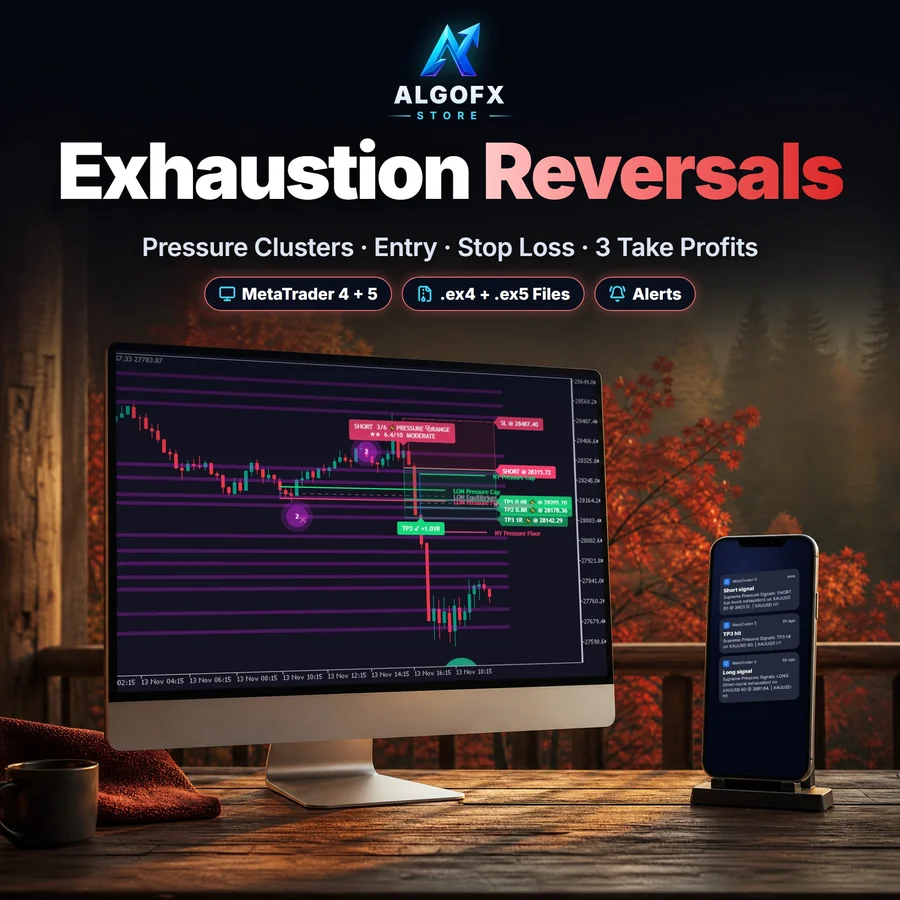
See Supreme Pressure Signals on a real chart
Press play; use the full-screen button to see every detail.
Recorded on MetaTrader with Supreme Pressure Signals on real charts. · 2:27 · Plays from YouTube when you press play (YouTube then sets its own cookies; see Privacy).
Fading a stretched move usually means guessing where it stops
Mean reversion traders know that price which runs far from its average tends to come back, but the hard part is timing. Selling into an up move because it looks stretched often means selling one or two candles before it stretches further, with a stop that gets taken on the next spike.
The second problem is measuring. How far beyond normal is this move, really? Is it further than the last one? Has it actually stopped expanding, or only paused for a candle? Without a fixed yardstick, every chart gets a different answer, and so does every mood.
Supreme Pressure Signals uses a fixed yardstick: the distance beyond a 2 ATR band around the 20-period EMA, counted in 0.5 ATR steps. It does not trade the burst while it is growing. It waits for the first closed candle that reaches less far than the peak, then marks a signal against the move, with a stop placed beyond the burst's own extreme.
What Supreme Pressure Signals draws, and what each mark means
Read from the shipped MetaTrader edition.
| What you see | What it means |
|---|---|
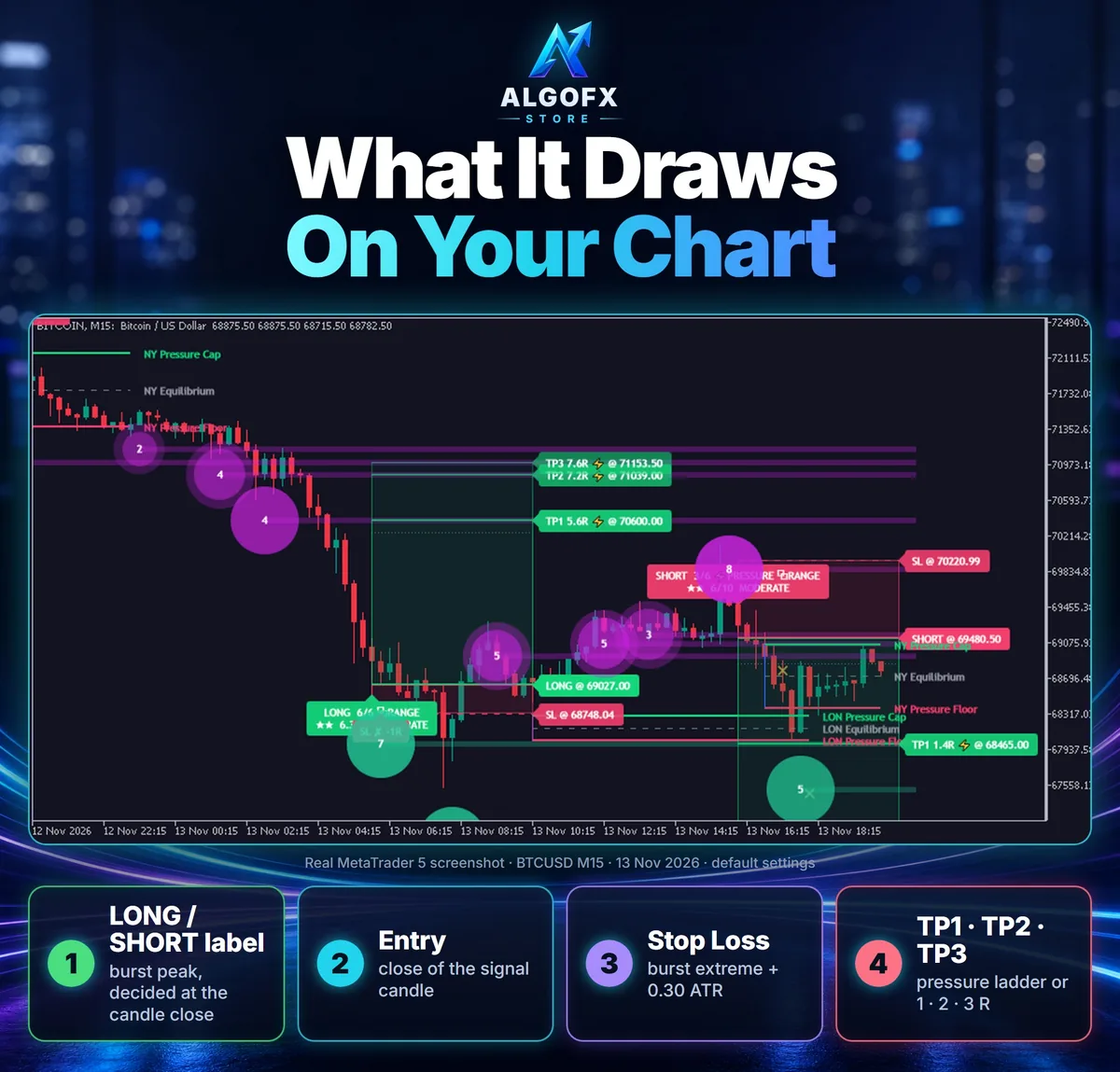
| Green 'LONG 4/6' plate under a candle / red 'SHORT 5/6' plate above | A signal on a closed candle: the burst before it peaked; 4/6 = its stack height. |
| Second line '★★★ 6.8/10 STRONG' | The 0-10 score from nine readings and its grade (MINIMAL, WEAK, MODERATE, STRONG, ELITE). Hover the plate for the breakdown. |
| '⚡PRESSURE' / '⧉RANGE' tags | The burst hit or swept a pressure cluster / went beyond the session range. |
| 'LONG @ price' / 'SHORT @ price' line | Entry: the close of the signal candle. |
| Red dashed line and red zone, 'SL @ price' | Stop loss beyond the burst's extreme plus 0.30 x ATR (0.5-3 x ATR from the entry). |
| Green lines and zones, 'TP1 1.4R ⚡ @ price', 'TP2', 'TP3' | Take profits; ⚡ = the target is a pressure cluster level (ladder), otherwise 1R / 2R / 3R. |
| Dotted grey line from the entry | The basis (EMA 20) at the signal: the average price snaps back toward. |
| Result plate 'TP2 ✔ +2R' / 'SL ✘ -1R' / 'TIME' | How the ticket ended and its R. |
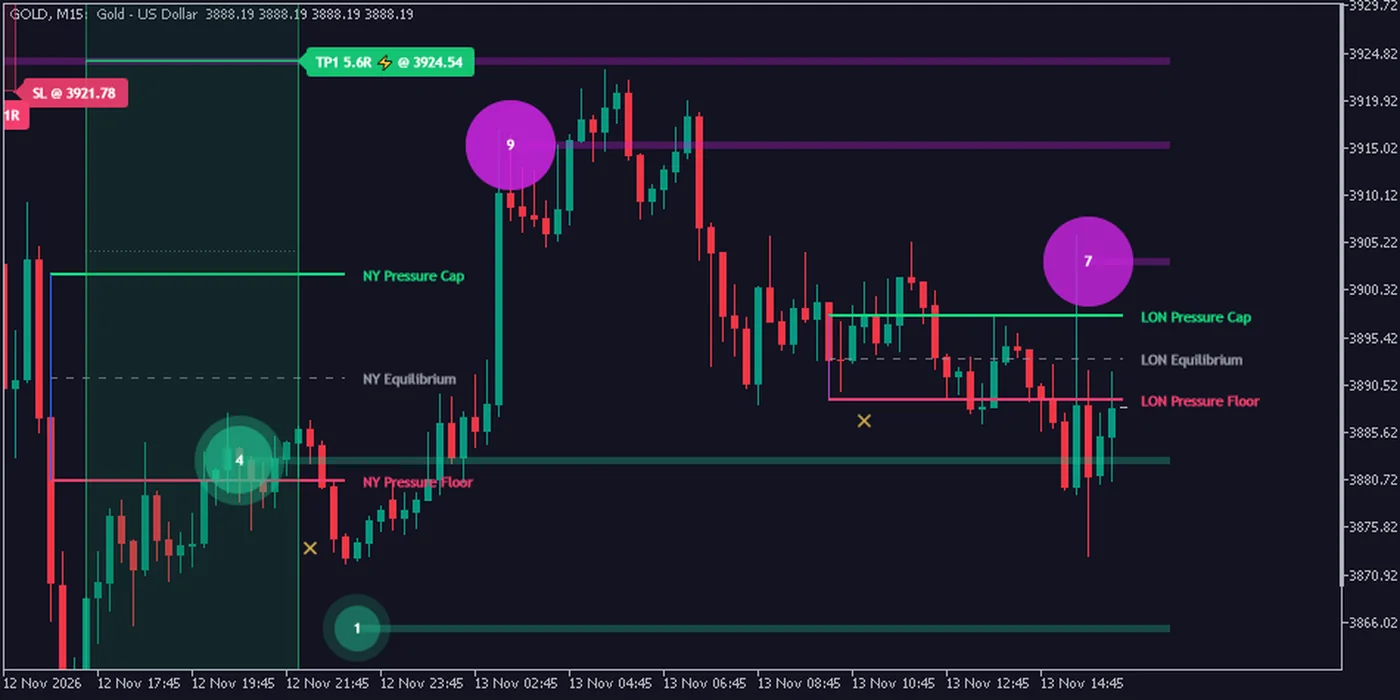
| Coloured bubbles with a number, thick faint lines | Pressure clusters (tick-volume-weighted swing pivots): green support, magenta resistance, number = strength 1-10. |
| Blue box, 'NY Pressure Cap / Floor / Equilibrium' | The session's opening range and its levels through the session; a small yellow cross marks a breakout that failed back inside. |
From a burst to a scored signal and a ticket
With Confirm on bar close on, the default, the peak is tested only when a candle closes, and nothing is drawn for a signal on the forming candle.
- 1
Basis, band and burst
The basis is a 20-bar EMA of the close and the band sits 2.0 ATR(14) on each side of it. A candle bursts when its high reaches above the upper band or its low below the lower band; the close does not matter unless you switch on Require closing burst. Because the band is in ATR, the same settings fit a quiet pair and a fast index.
- 2
The stack measures the stretch
A burst starts at level 1 and each further 0.5 ATR beyond the band adds a level, up to 6. At the defaults level 3, the minimum to signal, starts 1.0 ATR beyond the band. The stack is a distance, not a count of candles. A burst that peaks at level 6 is an extreme burst.
- 3
The signal comes after the peak
A burst has peaked when the previous candle reached beyond the band at least as far as the candle before it and further than the current one. The signal prints on that first candle that reaches less far: SHORT after an up burst, LONG after a down burst. No ticket may be open and 20 candles must have passed since the last signal.
- 4
Nine readings, one score
Each signal is scored 0 to 10 from weighted pillars: Burst Extension, Stack Height, Momentum Exhaustion (RSI), Rejection Wick, Trend Fit, Volatility Regime, Reversion Room, Pressure Cluster and Session Range. 7.5 and up is ELITE with four stars, 6.5 STRONG, 5.5 MODERATE, 4.5 WEAK, below that MINIMAL. Minimum stars to take is 0, so every qualifying peak prints.
- 5
Pressure clusters and session ranges
Swing highs and lows with 12 bars left and 4 right start clusters, weighted by tick volume times the swing bar's range and drawn as numbered bubbles, green support and magenta resistance. Price can touch, sweep, reclaim or break them, and a broken one flips side. Opening ranges for New York (0930-0945) and London draw a box with Pressure Cap, Floor and Equilibrium.
- 6
The ticket and how it ends
Entry is the signal candle's close. The stop sits beyond the burst's extreme plus 0.30 ATR, held between 0.5 and 3.0 ATR; that is 1R. With the Pressure Ladder, TP1 to TP3 are the nearest opposite clusters at least 0.6R away, else 1R, 2R and 3R. One ticket at a time; it ends at TP3, the stop, or after 200 candles.
Supreme Pressure Signals on 12 different markets
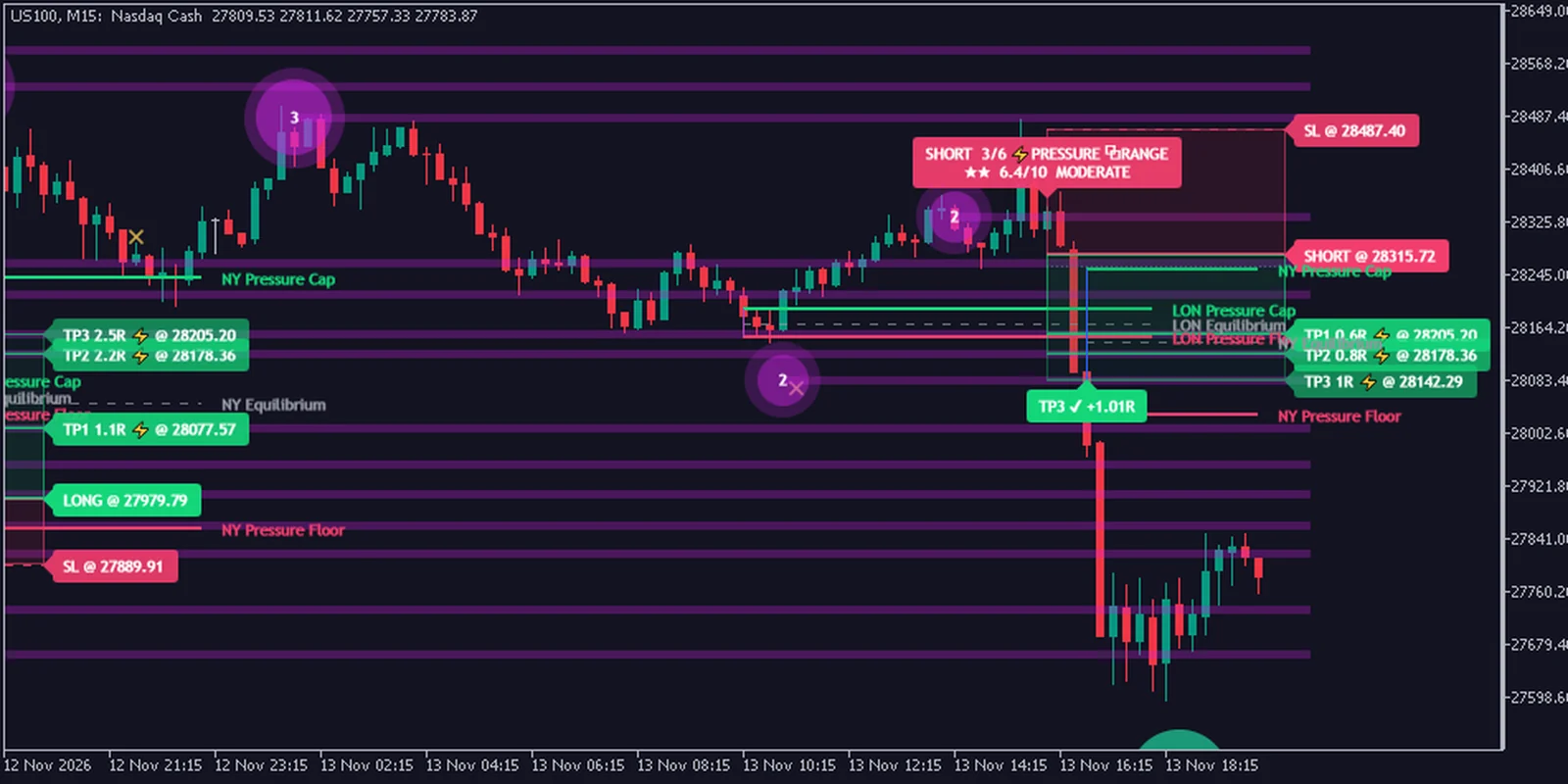
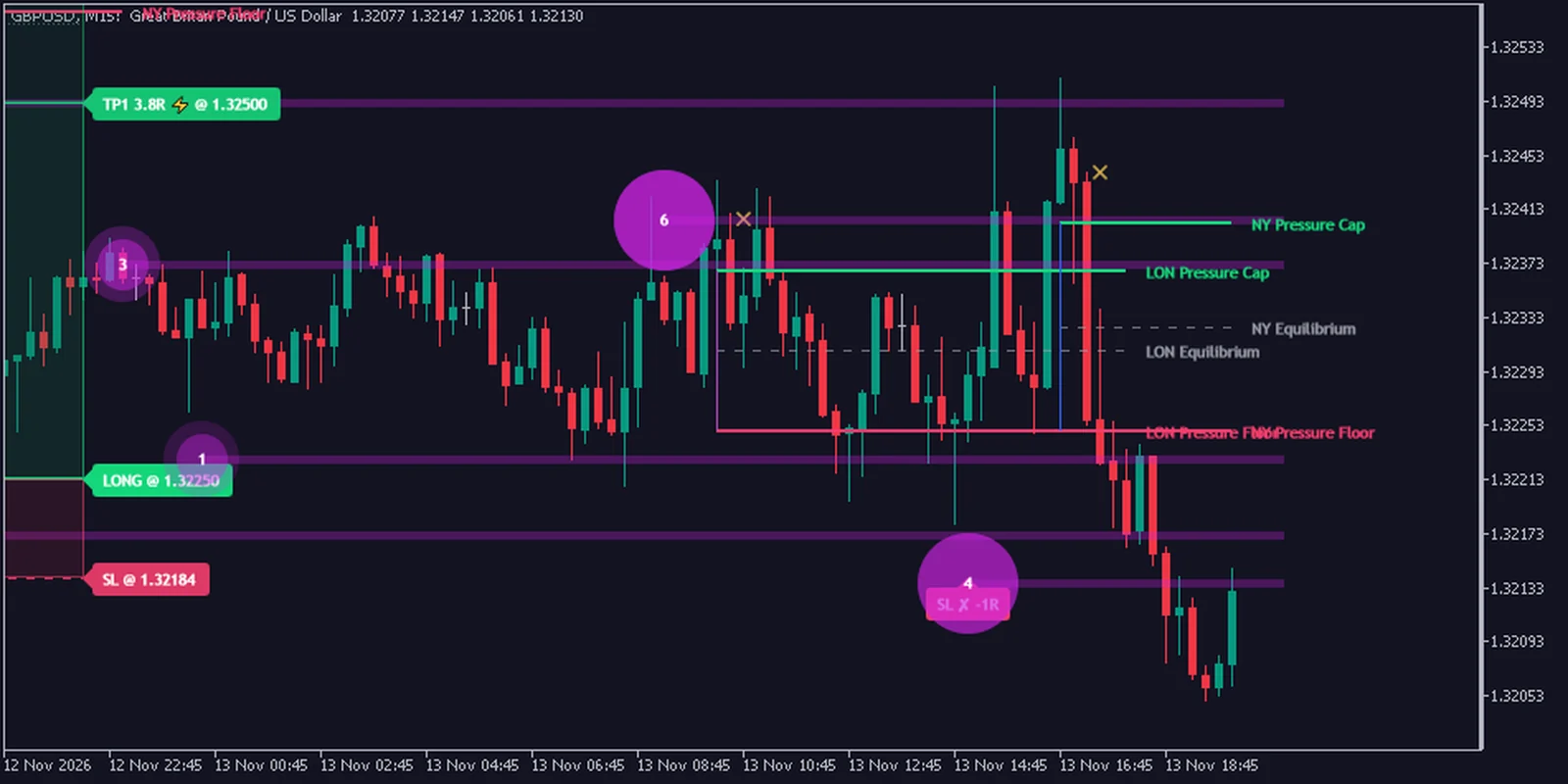
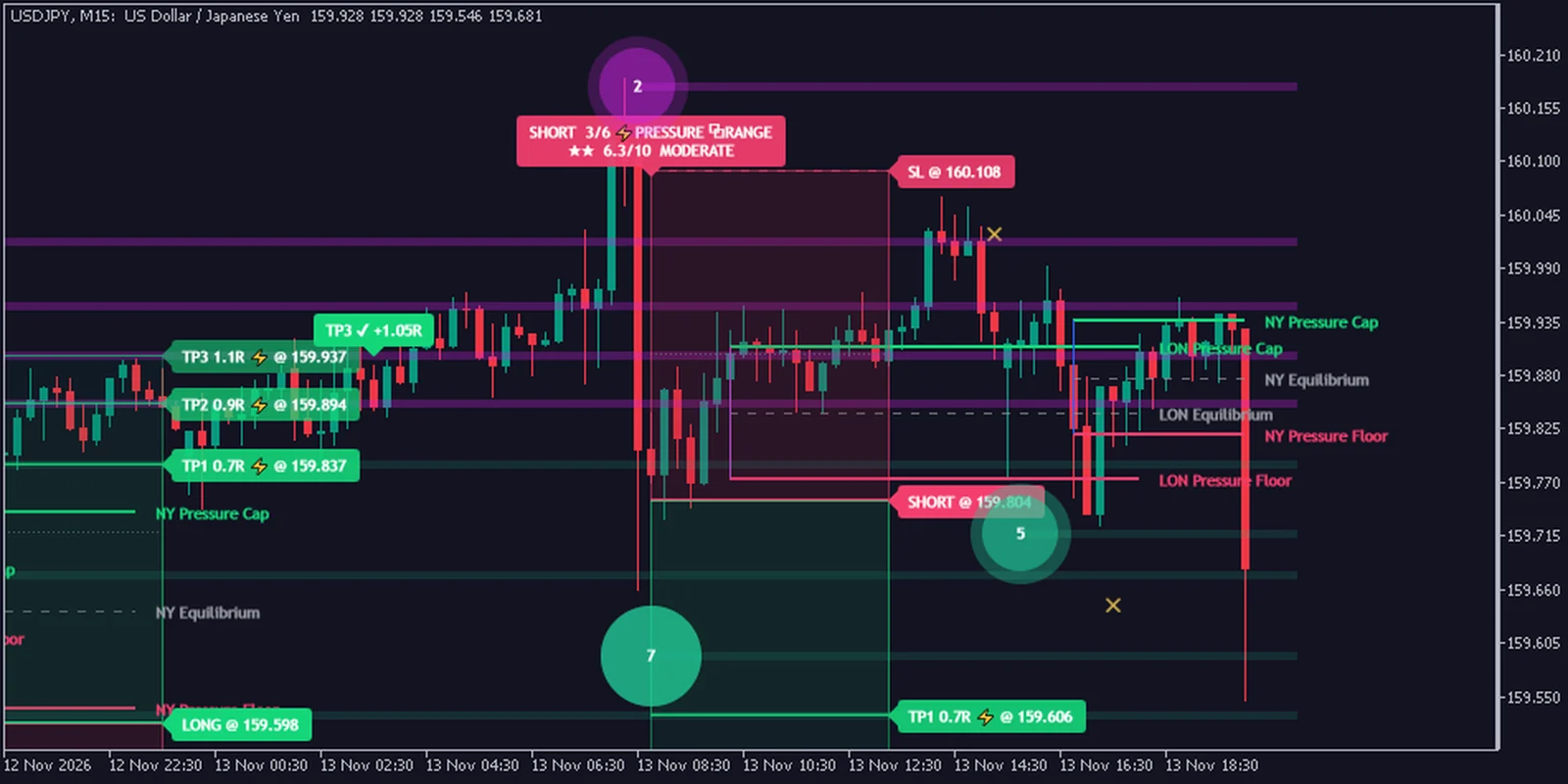
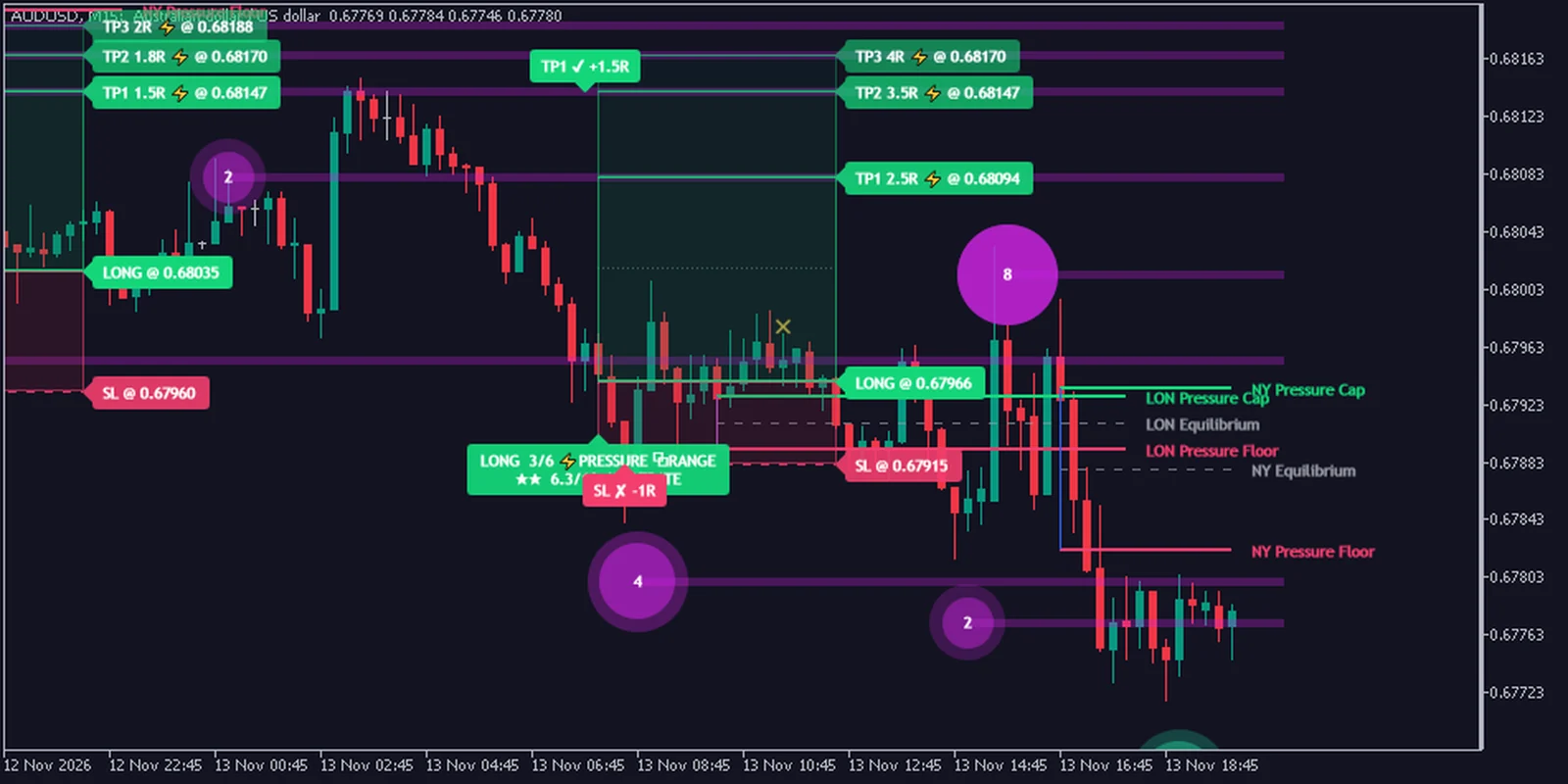
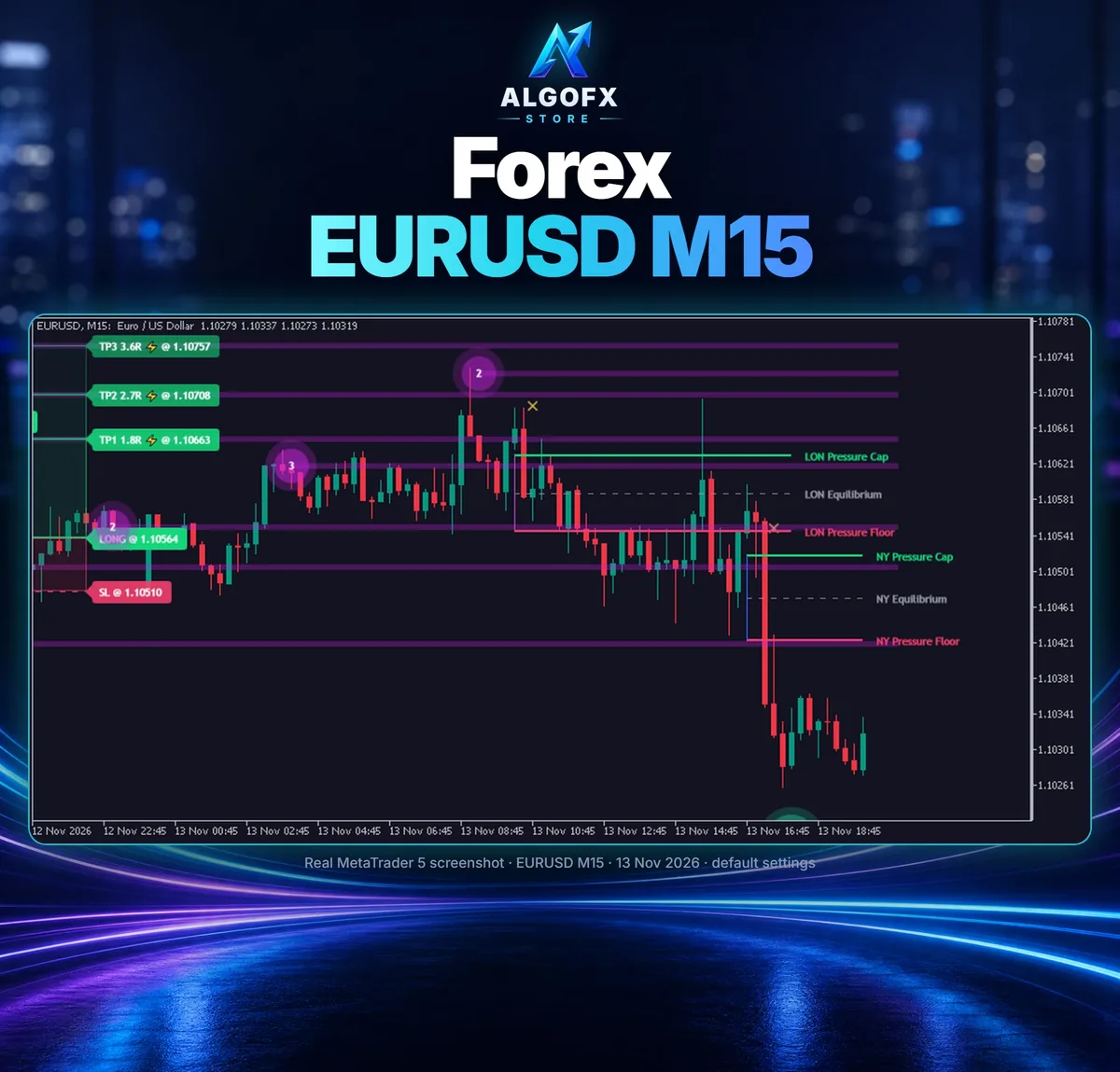
Every chart below is a screenshot of MetaTrader itself with the shipped Supreme_Pressure_Signals attached at its default settings. Forex, metals, indices, energy and crypto, so you can see how it reads each kind of market. They show what the indicator draws; they are not trading results. Tap or click any chart to open it full size.
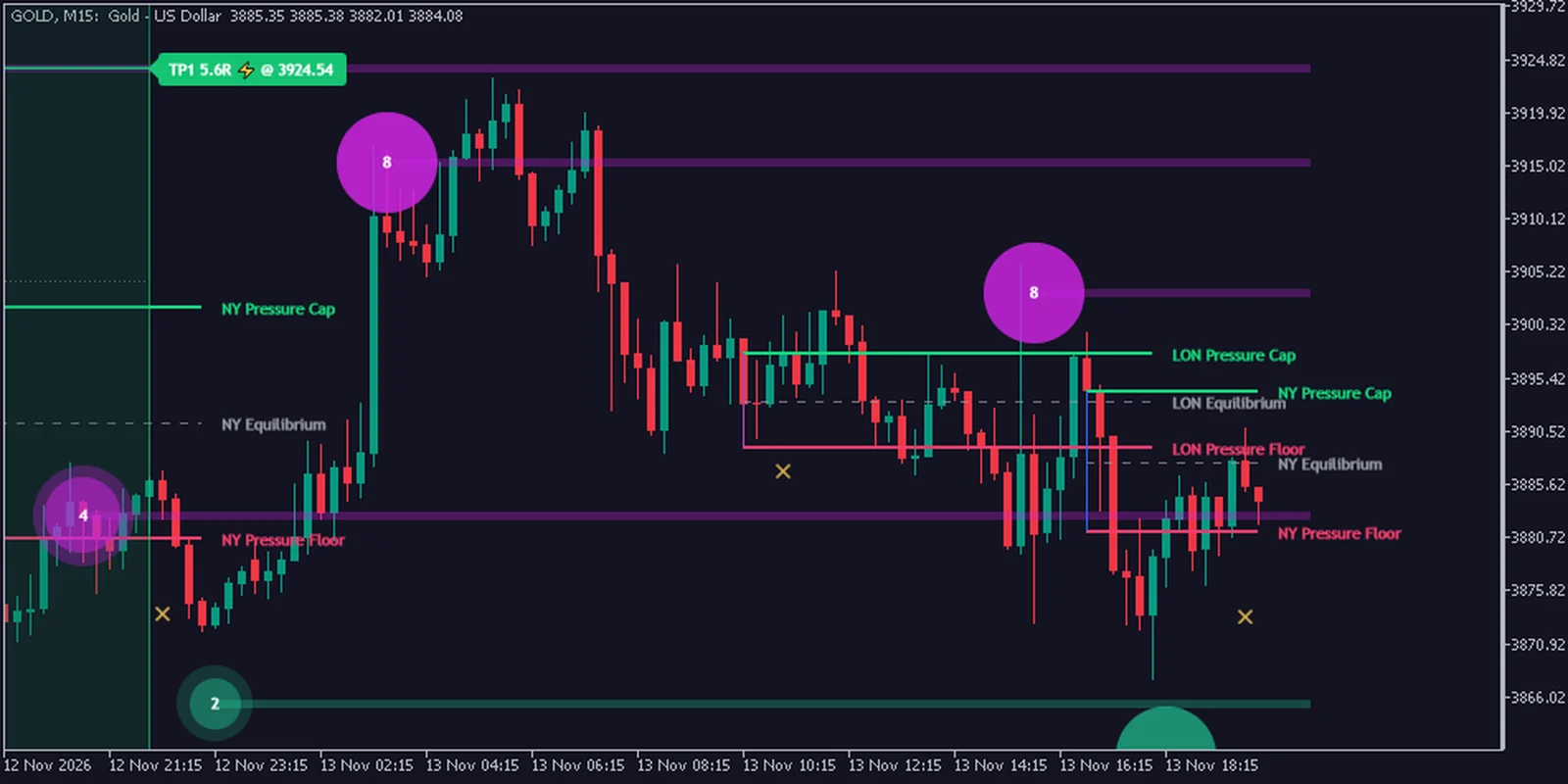
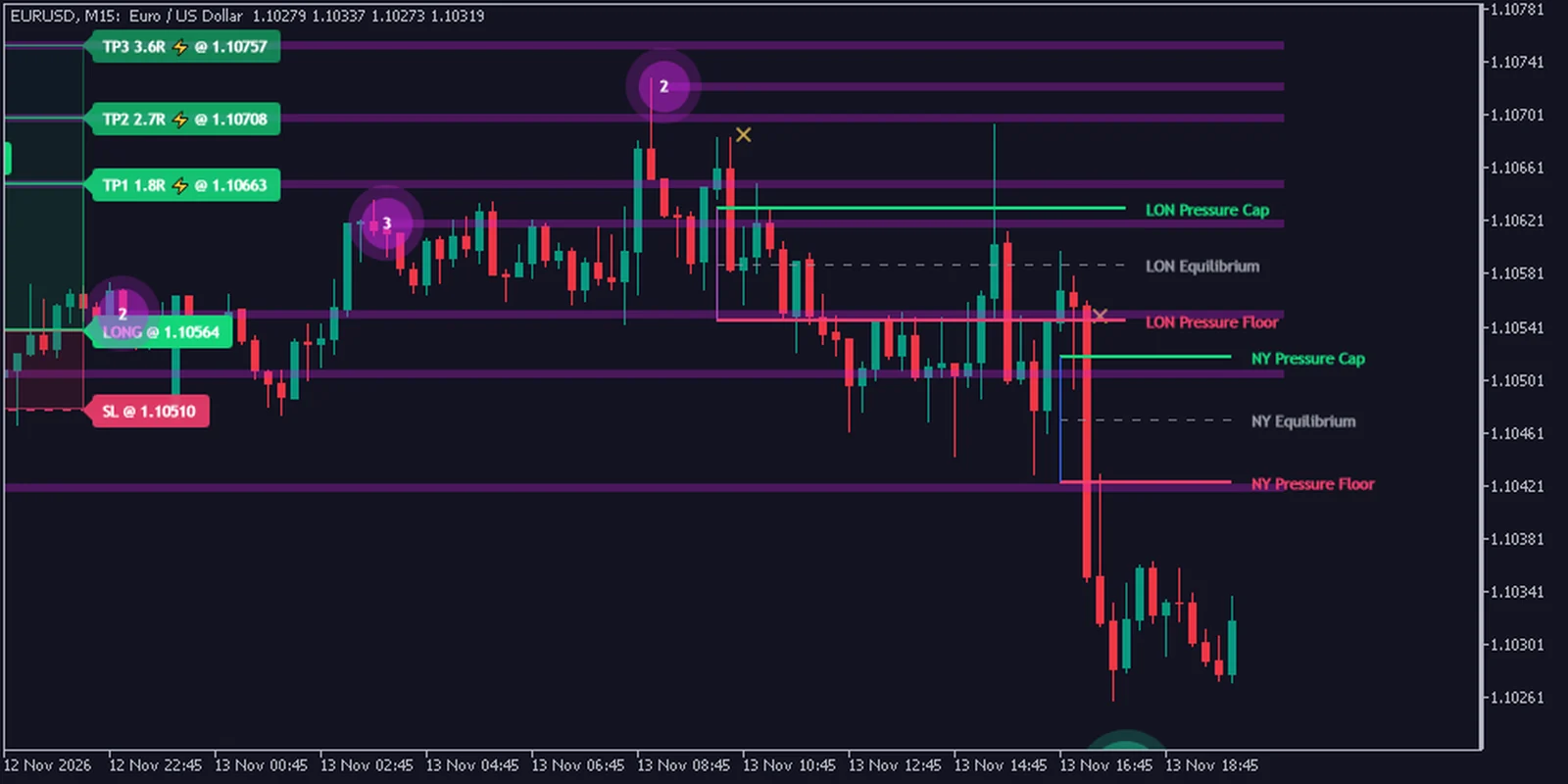
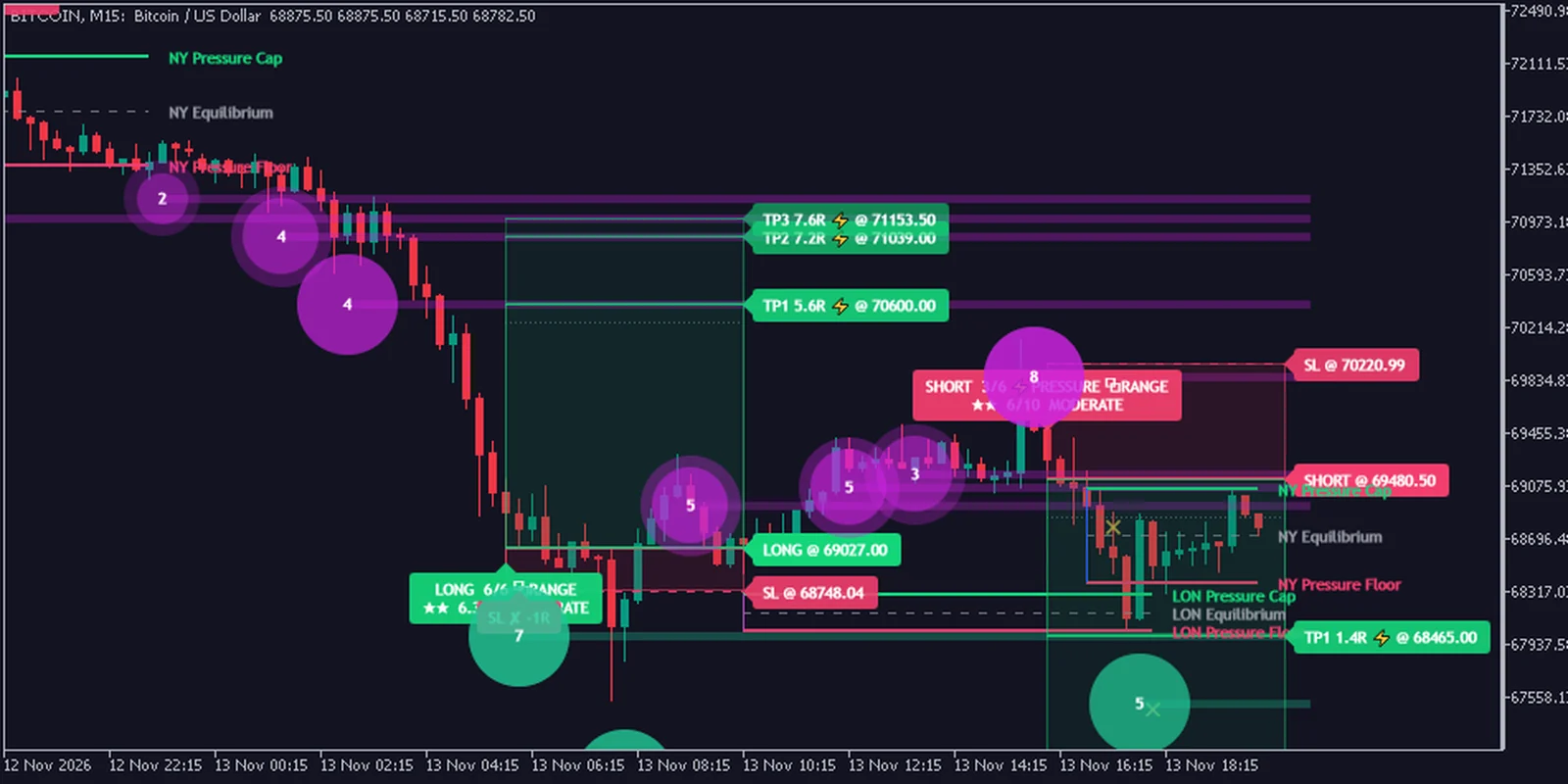
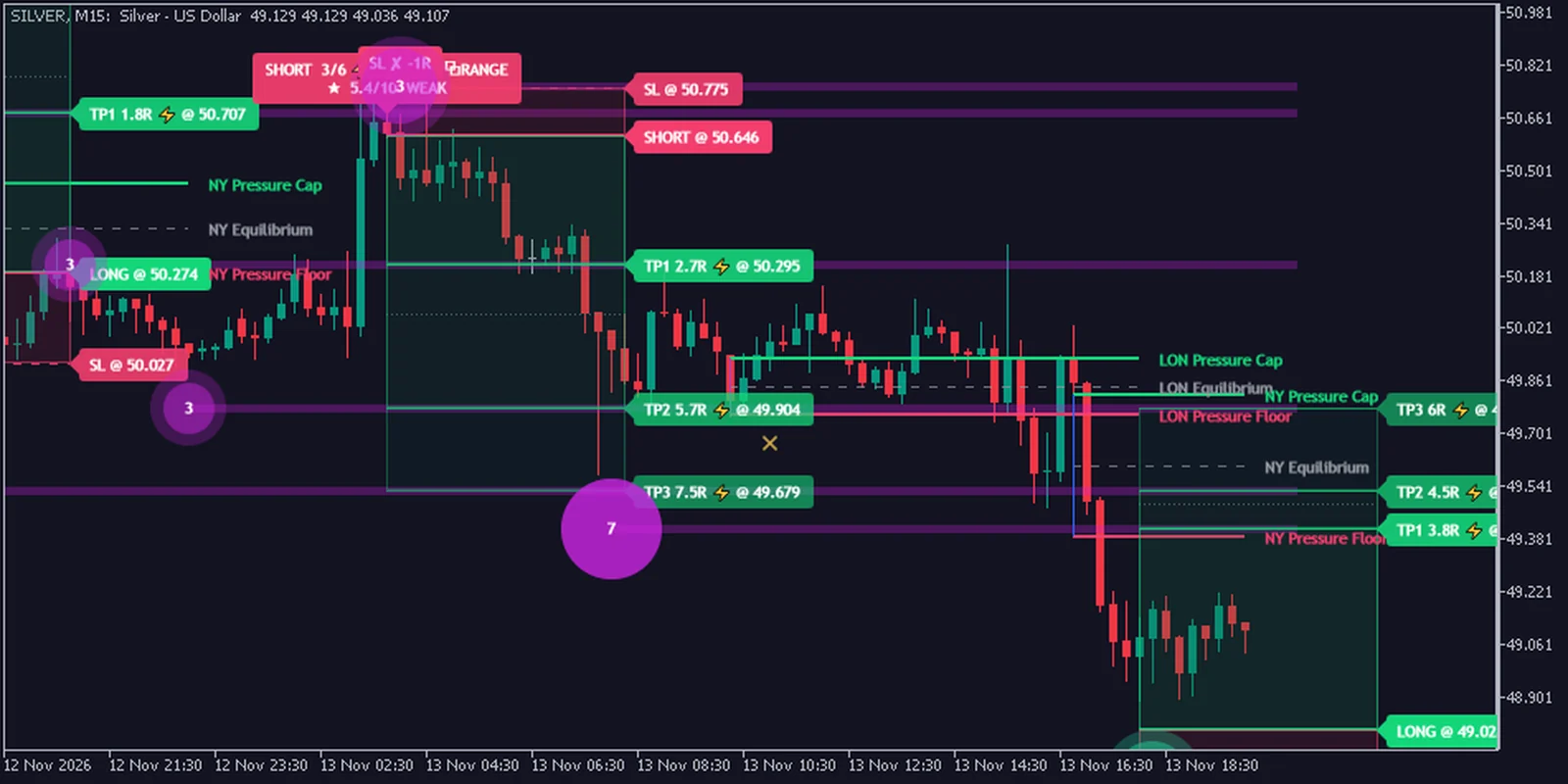
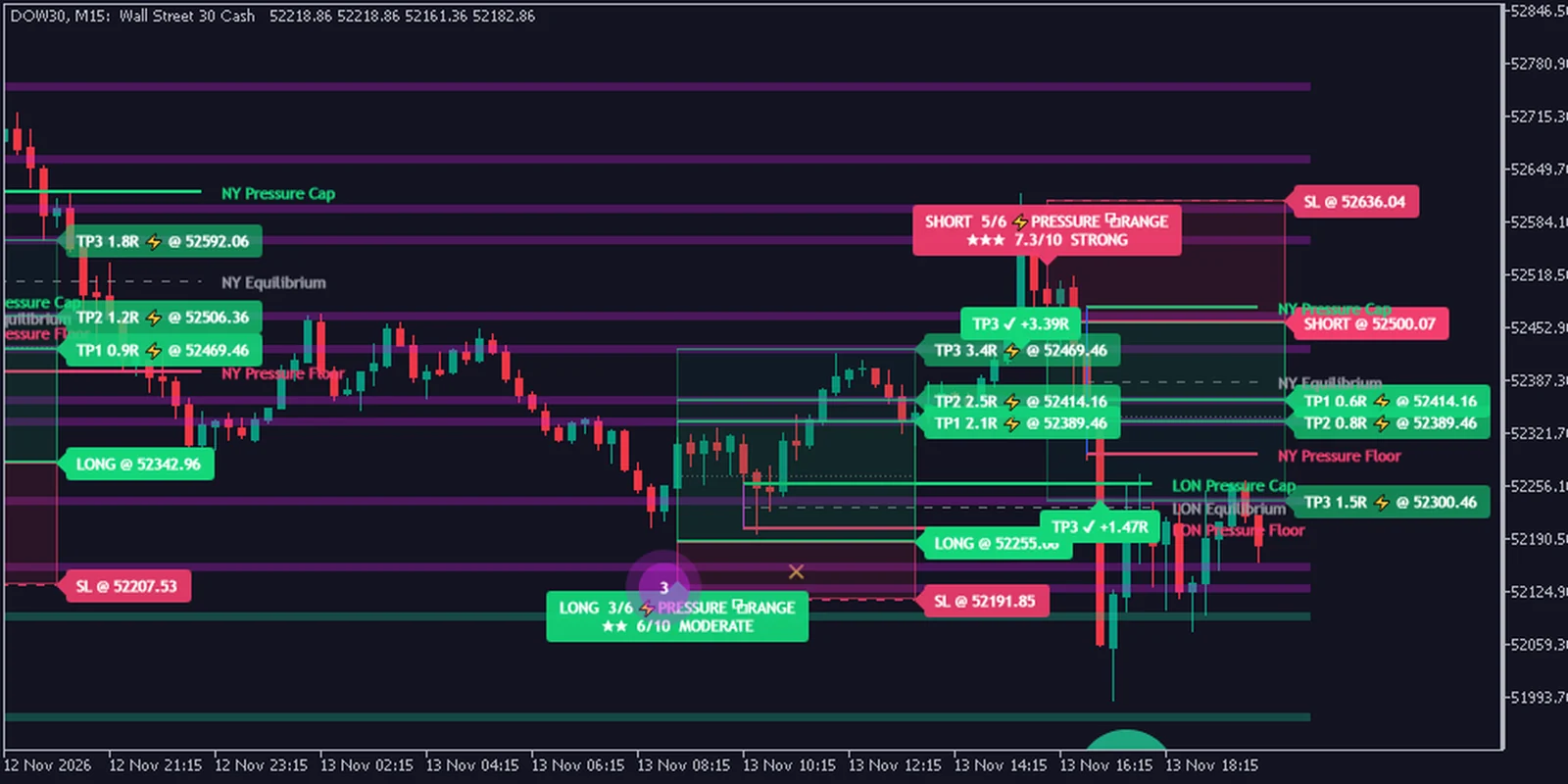
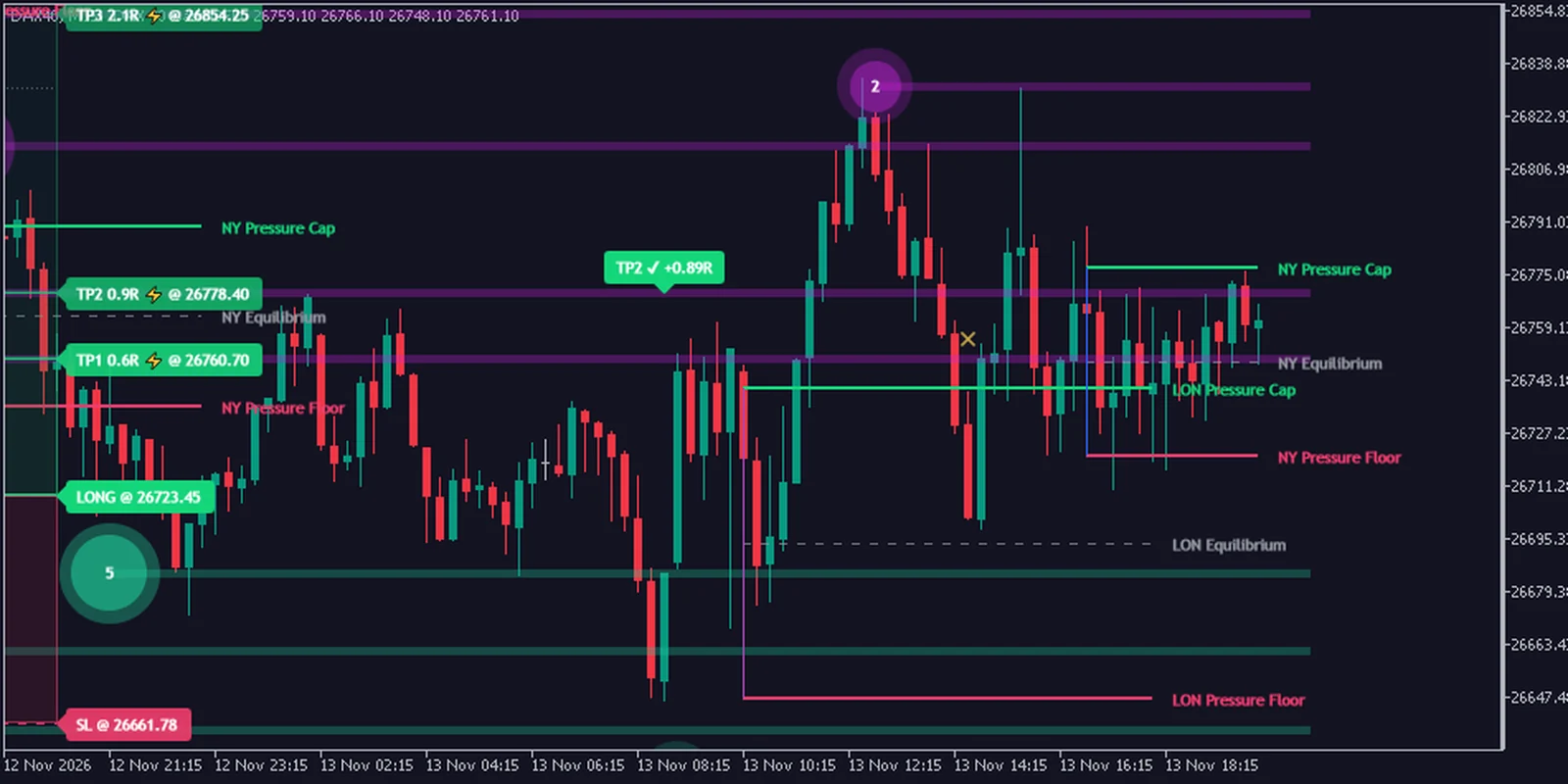
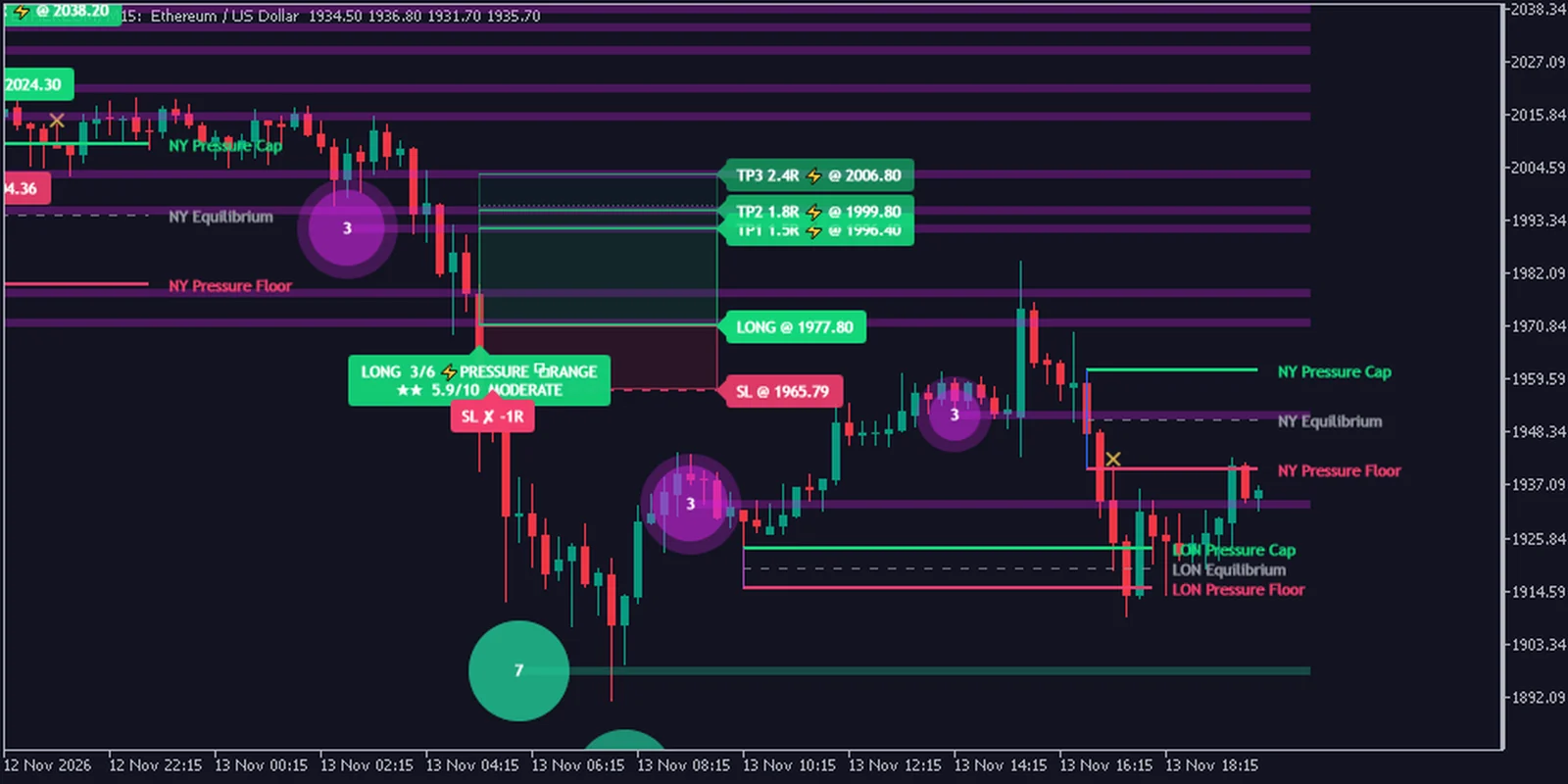
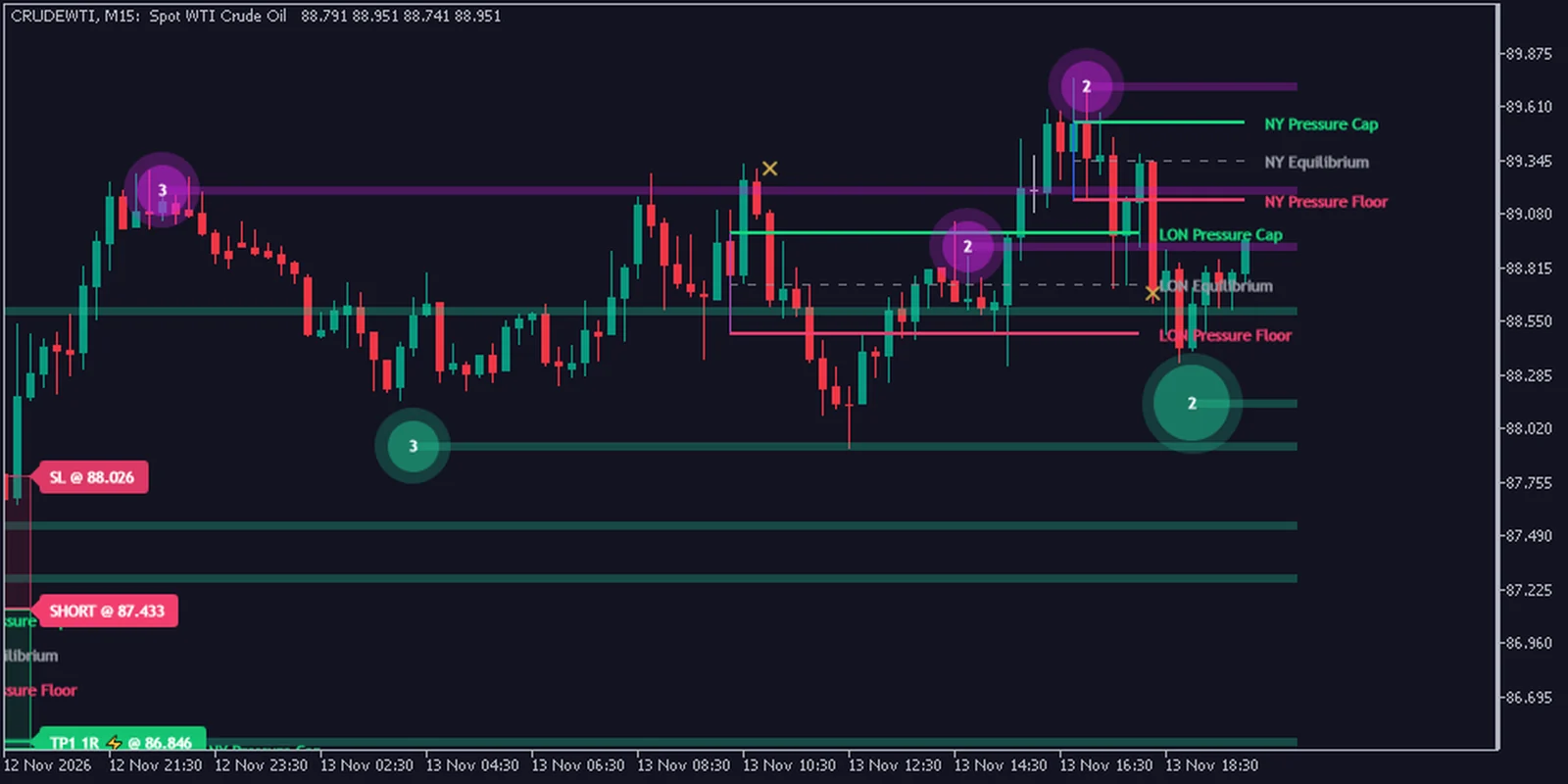
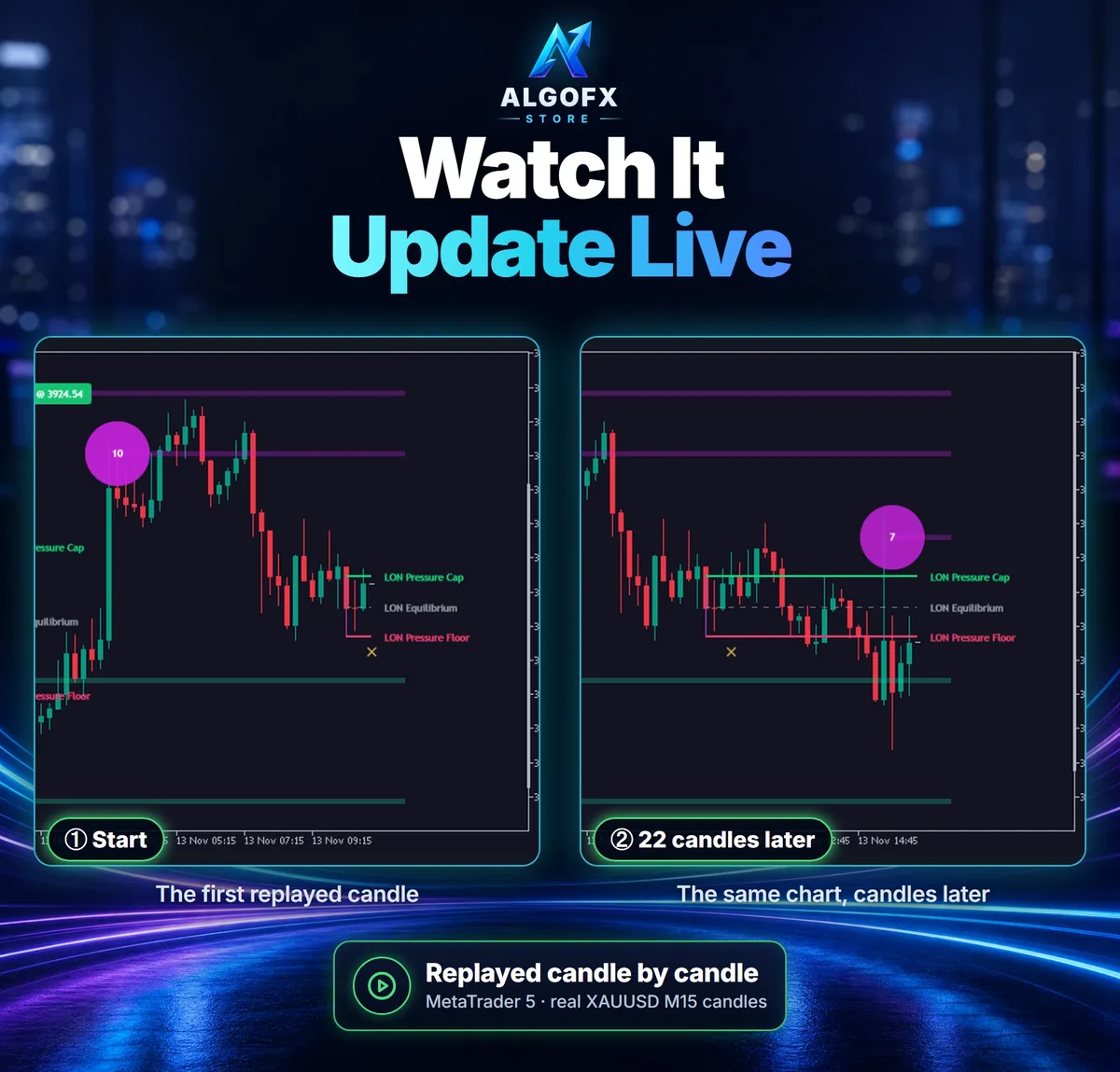
Watch Supreme Pressure Signals work on a real MetaTrader 5 chart
A screen recording and frames from the shipped indicator at its default settings, as the chart updates. Nothing is edited into the chart.
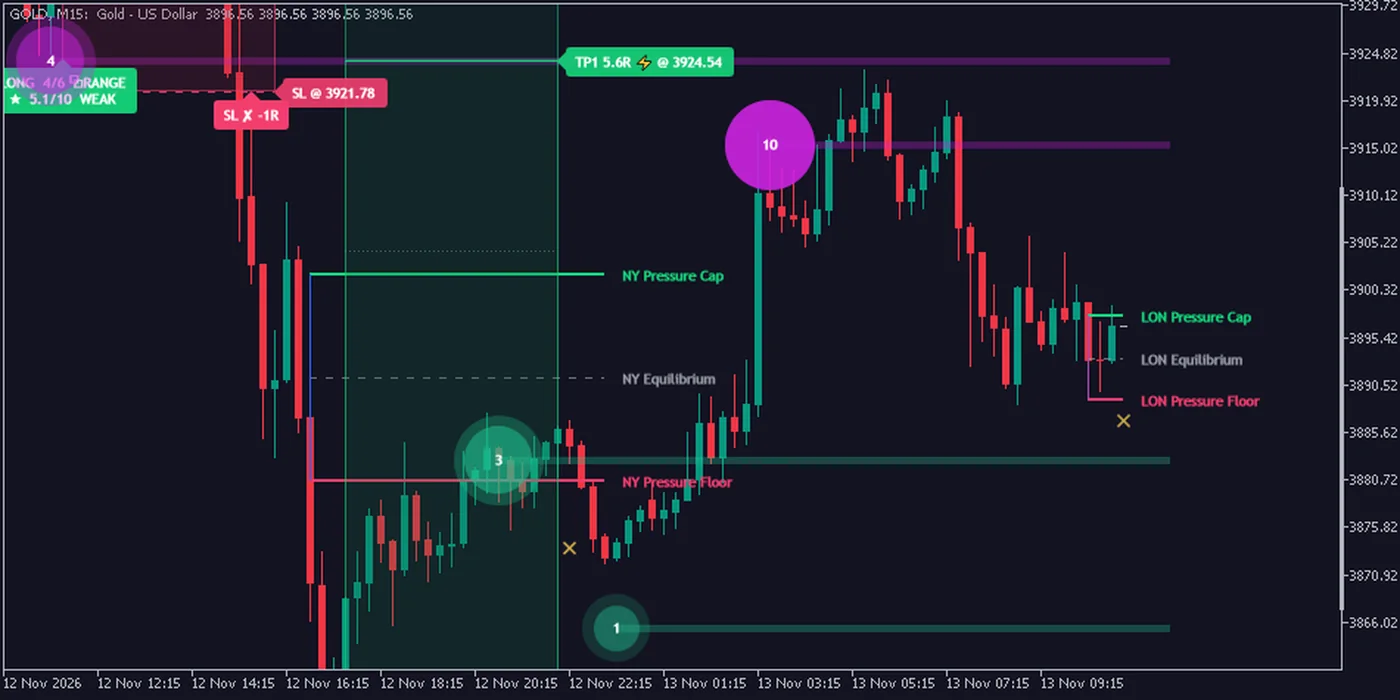
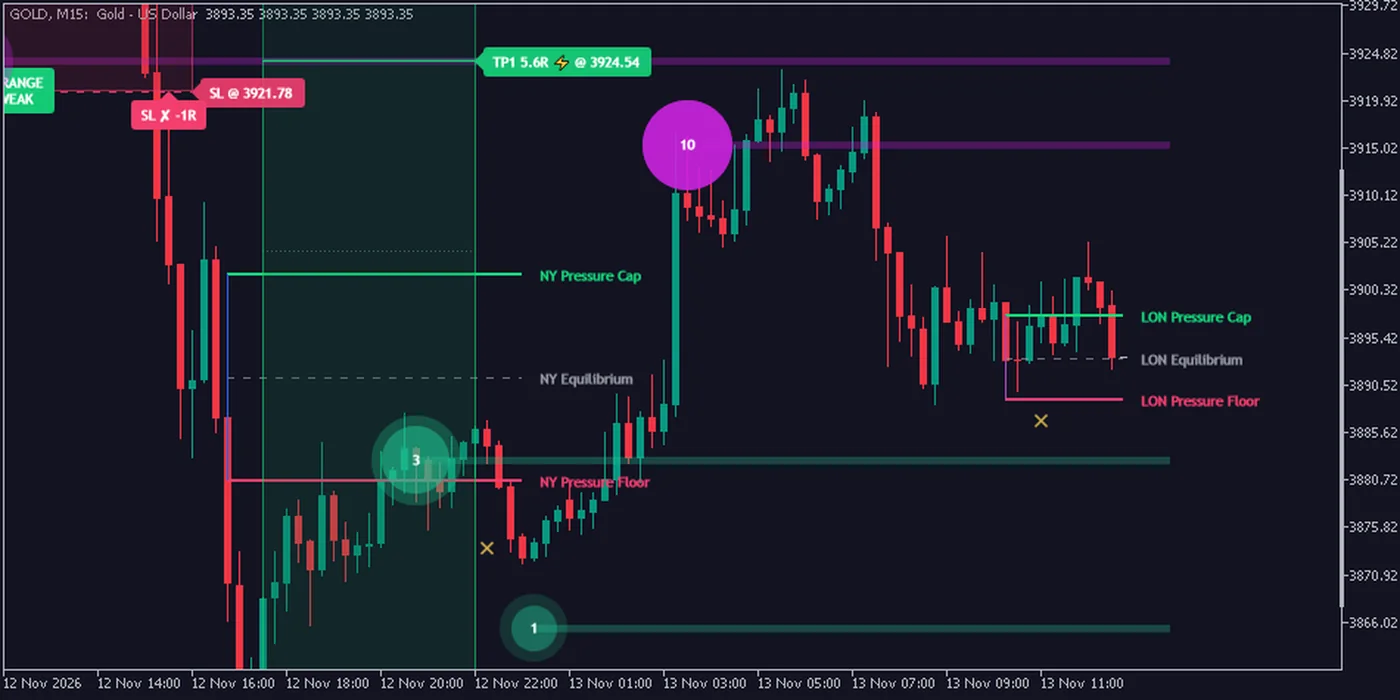
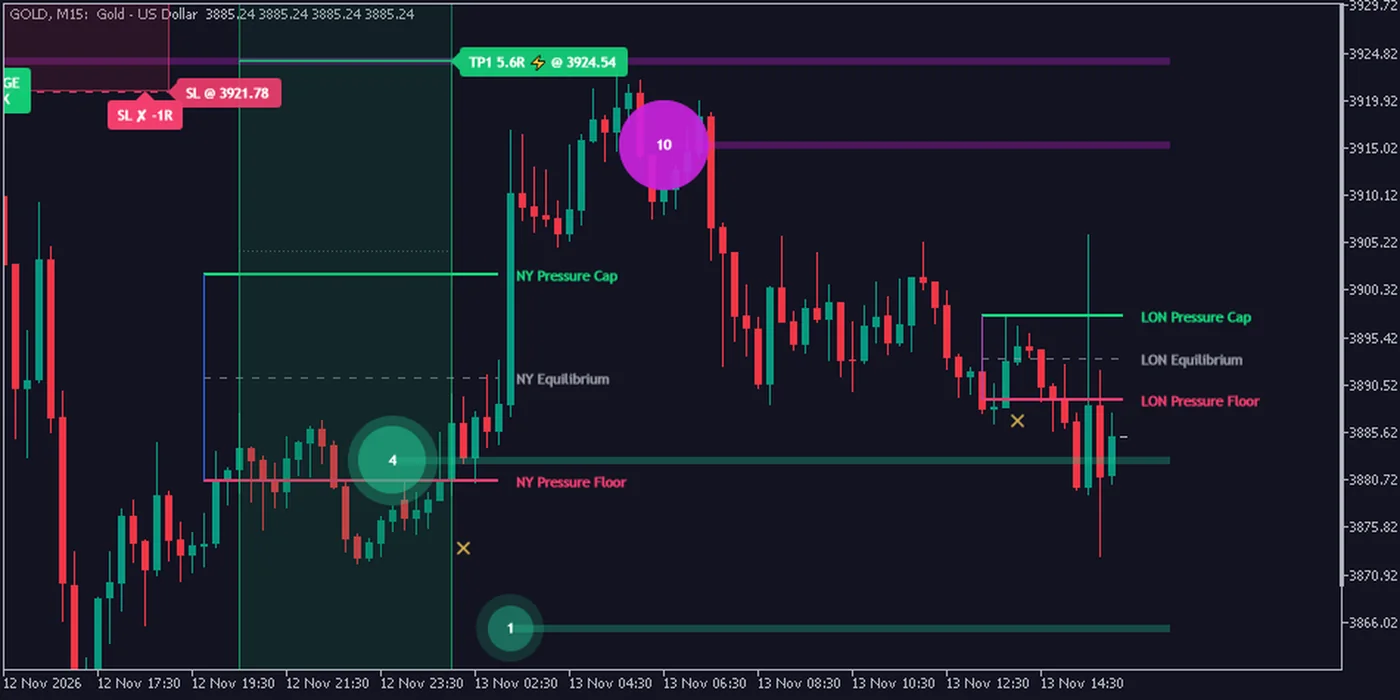
Reading and trading a signal
A label says a burst peaked and your filters passed. Read it in the same order every time; the decision and the order stay with you.
- 1
What burst, and what did it reach
Read the side and the stack on the label, for example SHORT 4/6. A PRESSURE tag means the burst reached or swept a cluster on its side, a RANGE tag that it went beyond the session range, and no tag that it stalled in open space. Hover the label for every reading behind the score.
- 2
Check the rank and the room
Look at the stars and the score, then at the dashboard's Resist and Support rows: the nearest clusters and their distance in ATR. A Pressure Ladder TP1 sits at the nearest opposite cluster if it is at least 0.6R away. A signal with a cluster target close by has less room than one with open space towards the basis.
- 3
Measure the stop from your fill
You can only act after the signal candle closes, at another price and with a spread. Measure your own distance to the SL line and to TP1 from your real fill: a fill a few points away can make TP1 closer than the stop. The levels include no spread, slippage or commission, so size each position from its own stop.
- 4
Decide how you treat the targets
Targets and the stop count on a touch. If the stop is touched after TP1 or TP2 was reached on an earlier candle, the ticket is booked at that target; a stop candle that also touches a target counts as a full stop, because nobody can tell which came first. Decide in advance whether you take part off at TP1.
- 5
Use gates when you want fewer, stricter signals
Every gate is off by default. Switch on Require rejection wick, Require RSI exhaustion, the cluster gate, the session-range gate or session-only trading, or raise Minimum stars to take, to keep only the setups you trade. Each one removes signals; check what it removes on your own chart first.
- 6
When to leave it alone
Remember that every signal goes against the move in progress, and a strong trend can run far beyond any band. Skip a signal when your stop from the fill is too large for your risk, when the opposite cluster sits closer than your stop, or when a scheduled release is about to hit. A dashboard Status of BURSTING means the stack is still below the minimum.
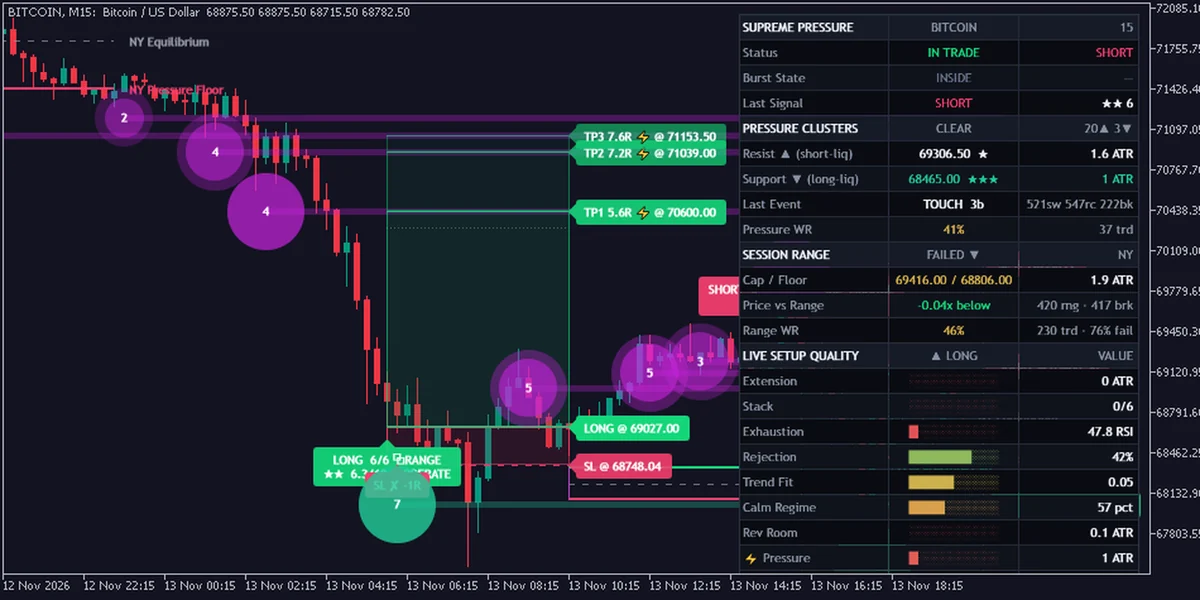
16 rows that read the market for you
- SUPREME PRESSURE | symbol | period, for example 60
- Status | IN TRADE / ARMED / BURSTING / SCANNING | LONG / SHORT / none
- Burst State | UP 4/6 / DN 3/6 / INSIDE | SHORT / LONG / none
- Last Signal | LONG / SHORT / none | its stars and score
- PRESSURE CLUSTERS | CLEAR / AT RESIST / AT SUPPORT / BOTH SIDES / n SWEPT | clusters above and below
- Resist (short-liq) | nearest resistance cluster price and stars | distance in ATR
- Support (long-liq) | nearest support cluster price and stars | distance in ATR
- Last Event | SWEEP / RECLAIM / BREAK / TOUCH and bars ago | sweep, reclaim and break counts
- SESSION RANGE | NO RANGE YET / SET / BROKE / FAILED / LAST / INTRADAY ONLY / OFF | window name
- Cap / Floor | range high and low | distance in ATR
- Price vs Range | inside / above / below, in range widths | ranges and breakouts counted
- LIVE SETUP QUALITY | LONG or SHORT side of the newest candle | value
- Extension, Stack, Exhaustion, Rejection, Trend Fit, Calm Regime, Rev Room, Pressure, Range | gauge | each pillar's reading
- SCORE | gauge | live score and stars
- MTF BURST BIAS and Bias | LONG / SHORT / none | M15 and H1, read from closed bars
- Lower sections | a tally of this chart's own past tickets, with no costs included | describes that chart's history, not future results
Everything Supreme Pressure Signals does for you
A fixed yardstick for stretch
Band width 2.0 ATR around a 20-bar EMA, measured in 0.5 ATR stack steps up to 6. The basis can also be another average type and the band any width, all in the inputs dialog.
Signals labelled with their evidence
Each plate shows side, stack and tags on the first line, stars, score and rank on the second, for example LONG 4/6 PRESSURE with three stars at 6.8/10 STRONG. The tooltip breaks the score down pillar by pillar.
A stop placed beyond the burst
Stop basis Burst Extreme puts the stop beyond the higher (or lower) of the peak and signal candles plus 0.30 ATR. ATR Multiple (1.2 ATR) and Swing Extreme (10-bar high or low) are the alternatives; every stop is held between 0.5 and 3.0 ATR.
Targets at real chart structure
The default Pressure Ladder places targets at the nearest opposite pressure clusters, with a bolt on the label. R Multiples gives even 1R, 2R and 3R; Mean Reversion places targets halfway to the basis, at the basis and half a band beyond it.
Red stop, green targets, both ways
On the default Aurora theme the SL line, label and zone are red and TP1 to TP3 lines, labels and zones green, on LONG and SHORT tickets alike. A result plate on the exit candle shows how the ticket ended and its R.
Pressure clusters you can read
Up to 30 live clusters, each ending after 400 bars. The bubble's number is its strength from 1 to 10, its size follows its weight, its opacity its score. Touch, sweep, reclaim, break and flip are tracked, with optional reclaim diamonds.
Opening ranges for each session
Three windows, NY and LON on, ASIA off, each with a range time and a session time in New York time by default. A small yellow cross marks a range breakout that failed back inside. The broker clock is detected automatically.
A dashboard that says why
Status (SCANNING, BURSTING, ARMED, IN TRADE), Burst State, Last Signal, nearest clusters in ATR, the session range, live gauges for all nine pillars, and an M15 and H1 burst bias read from closed bars. Six positions, three text sizes.
Nineteen alert events
Long and Short on by default; Long or Short into a cluster, TP3, partial TP exit, SL, extreme bursts, cluster sweep, reclaim and break, near a strong cluster, session range set, breakout, failed breakout and time stop on request. Pop-up, sound, push and e-mail.
Supreme Pressure Signals, feature by feature
Each picture is built from real platform screenshots of the shipped indicator at its default settings, labelled so you can see what every part does. Tap any picture to open it full size.
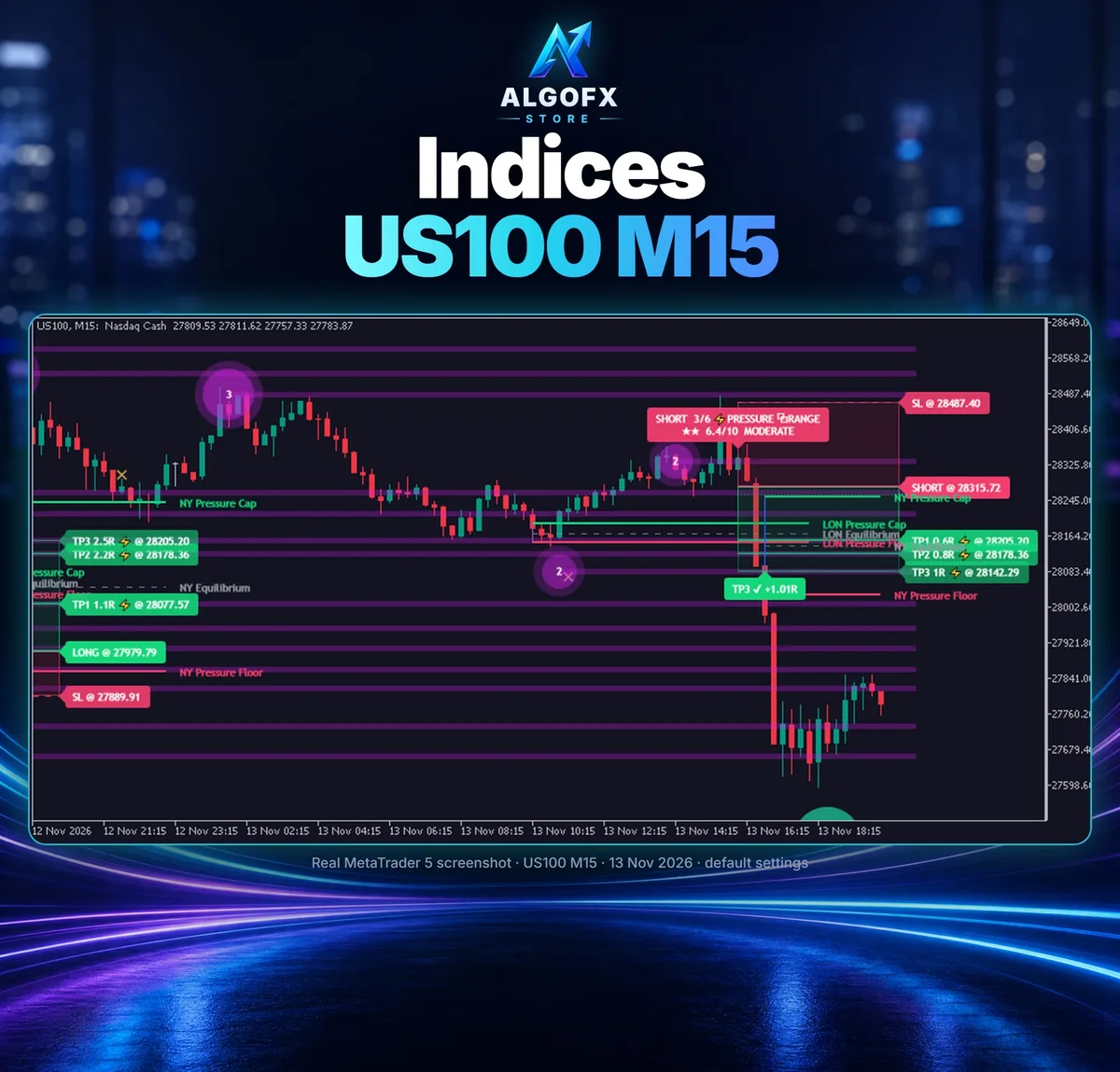
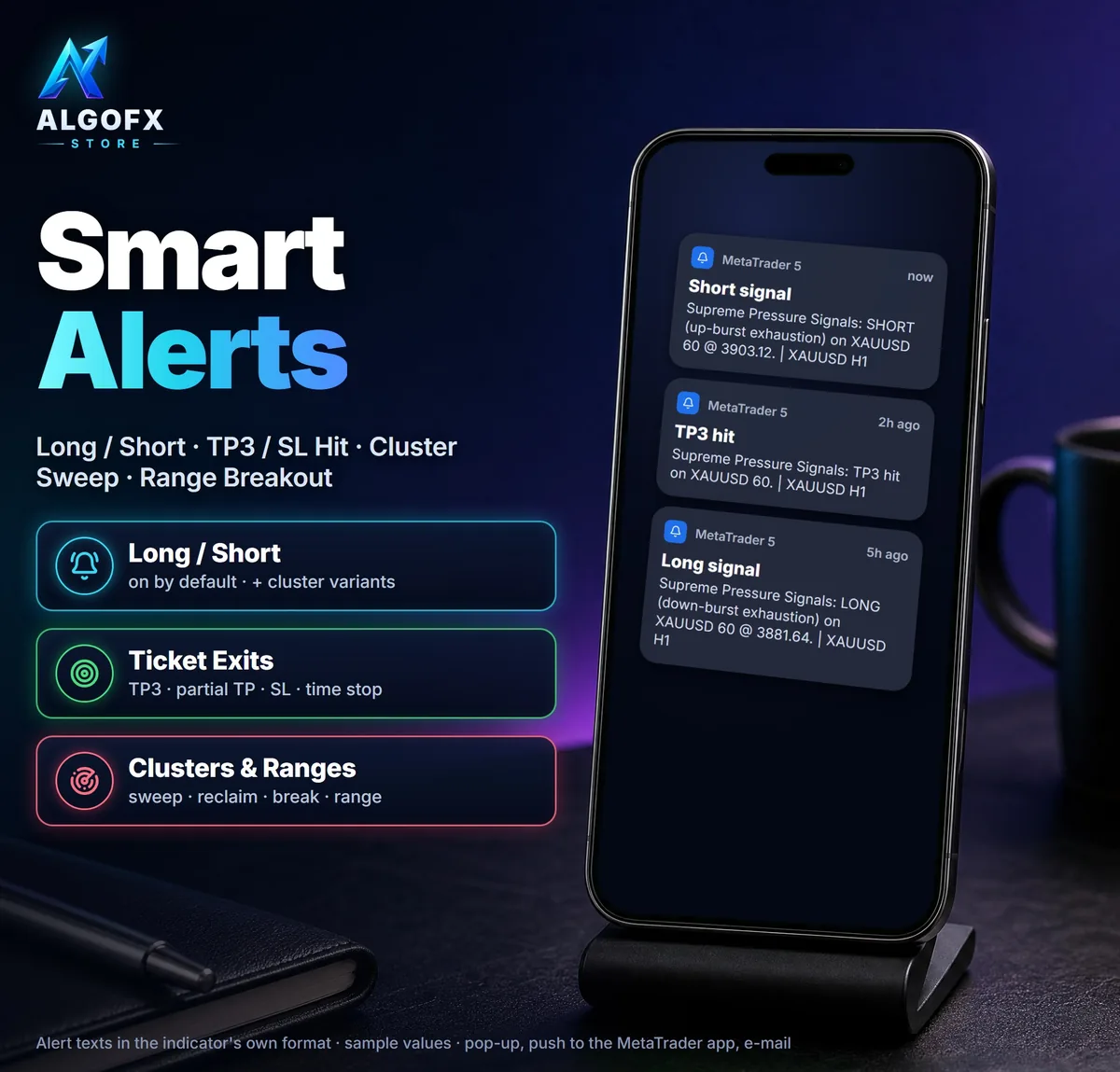
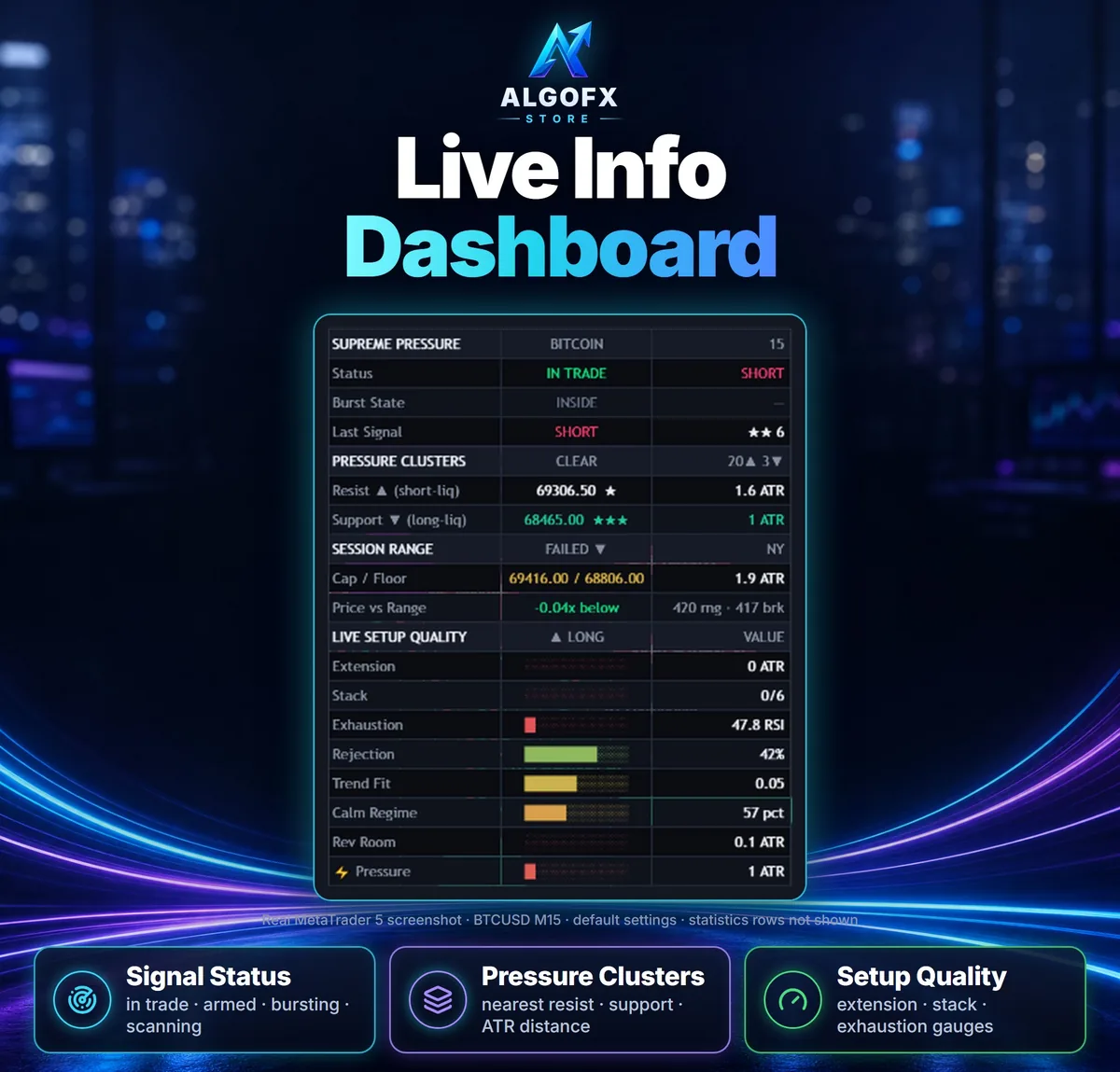
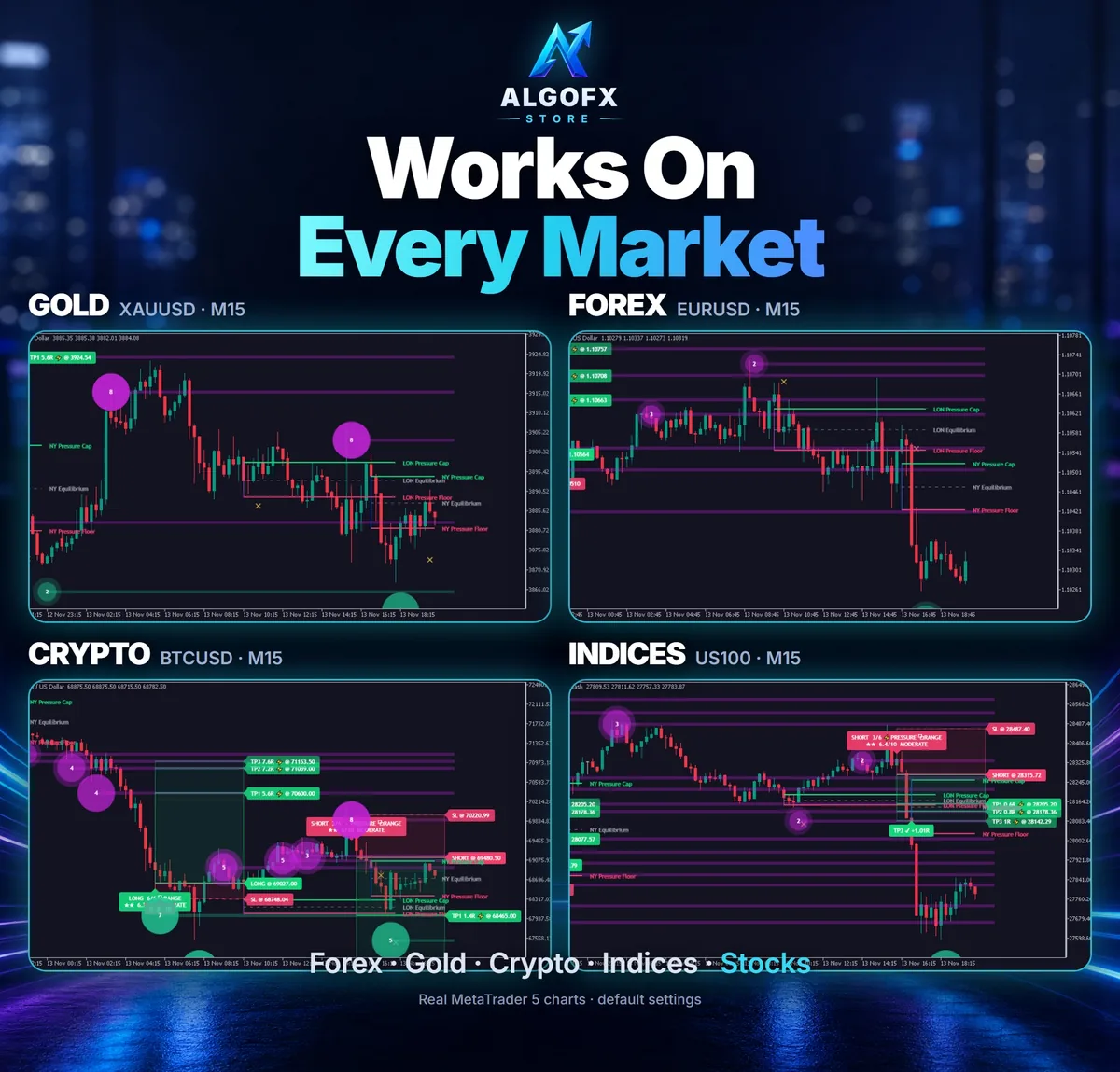
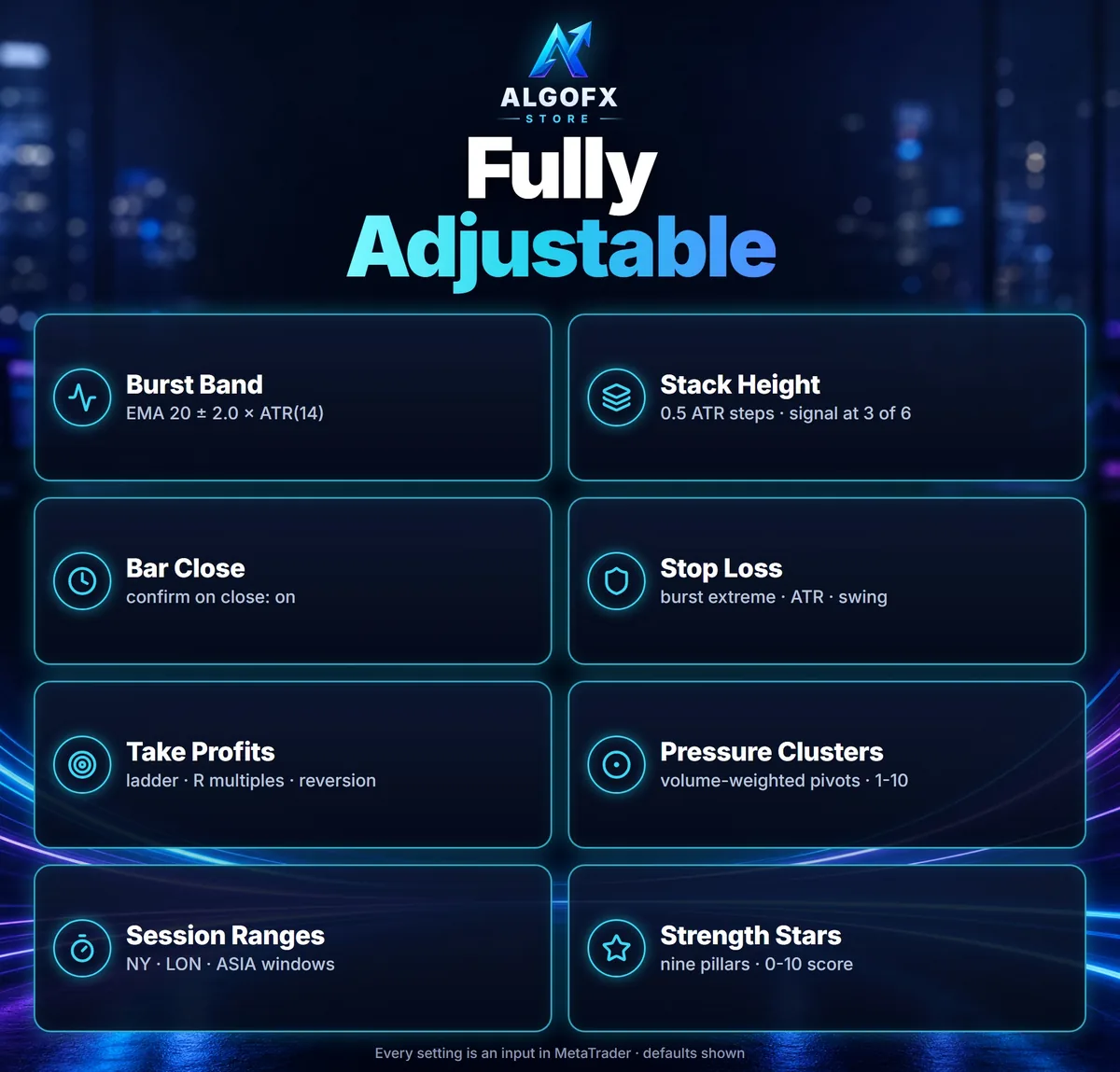
How traders put it to work
Forex pairs on H1
On H1 the London window's 0300-0315 range can fill its own candle, while New York's 0930-0945 has no H1 candle of its own and draws nothing. For New York opening ranges use M15 or lower. The burst band and stack work on H1 as on every timeframe, because they are in ATR.
Index CFDs at the New York open
On M5 or M15 the NY window records the 0930-0945 range in New York time and draws the Pressure Cap and Floor through the session to 1600. Switch on the session-range gate to keep only bursts that went past the Cap or Floor, or watch the failed-breakout crosses for fades back inside.
Gold and other fast markets
On a fast symbol a burst can travel well beyond the band before it peaks. The stop clamp of 0.5 to 3.0 ATR keeps the stop distance usable, and Minimum stars to take or Require rejection wick can keep only the peaks that stalled with a clear wick back.
Daily charts
On D1 and above the session ranges switch themselves off, the dashboard section reads INTRADAY ONLY and the Range pillar stays neutral. The burst, the clusters and the ticket work as on intraday charts, so a daily reversion trader still gets the signals and targets.
Every setting, with its default
The names are the ones in the MetaTrader inputs dialog; the defaults are what every chart on this page uses.
| Setting | Default | What it does |
|---|---|---|
| Basis type / Basis length / ATR length | EMA / 20 / 14 | InpBasisType, InpBasisLen, InpAtrLen: the average and the ATR the burst band is built on. |
| Band width (ATR beyond basis = burst starts) | 2.0 | InpBandMult: how far price must go past the basis before it counts as a burst. |
| ATR per stack step / Max stack height / Min stack height to signal | 0.5 / 6 / 3 | InpStepATR, InpMaxLevels: the burst's stack height 1-6. InpFadeMin: higher = fewer, more stretched signals. |
| Confirm on bar close (non-repaint) | on | InpConfirmBar: signals only after the candle closes. |
| Minimum spacing between signals (bars) | 20 | InpCooldown: candles between two signals. |
| Stop basis / Stop buffer beyond extreme (ATR) / Min risk / Max risk | Burst Extreme / 0.30 / 0.5 / 3.0 | InpStopMode (Burst Extreme, ATR Multiple, Swing Extreme), InpSlBuf, InpMinRisk, InpMaxRisk. |
| Target ladder / TP1 / TP2 / TP3 (R) | Pressure Ladder / 1.0 / 2.0 / 3.0 | InpTargetMode (R Multiples, Mean Reversion, Pressure Ladder) + InpTp1R..InpTp3R, InpLadderMinR 0.6. |
| Max bars in trade (time stop) | 200 | InpMaxHunt: a ticket closes at the close after this many candles. |
| Window 1 / Window 2 (Range, Session), Timezone | NY 0930-0945 / 0930-1600, LON 0300-0315 / 0300-1100, America/New_York | InpW1*, InpW2*, InpW3* (ASIA off), InpTzInput, InpServerTz Auto. |
| Show dashboard / Position / Text size / Color theme | on / Top Right / Small / Aurora | InpShowDash, InpDashPosOpt (6), InpDashSizeOpt (3), InpTheme (7). |
19 alert events
You choose which alerts are on in the inputs. Alerts can go to a pop-up in MetaTrader's Alert window, a sound, a push notification to the MetaTrader app on your phone and an e-mail (MetaTrader's e-mail settings must be filled in).
- Long
- Short
- Any Signal
- Long + Cluster
- Short + Cluster
- TP3 Hit
- Partial TP Exit
- SL Hit
- Extreme Up Burst
- Extreme Down Burst
- Cluster Sweep
- Bullish Cluster Reclaim
- Bearish Cluster Reclaim
- Cluster Break
- Near Strong Cluster
- Session Range Set
- Range Breakout
- Failed Range Breakout
- Time Stop Exit
Supreme Pressure Signals next to the usual options
Where it wins, and where it does not.
| Supreme Pressure Signals | Typical free band or envelope indicator | Reading it by hand | |
|---|---|---|---|
| When it signals | On the closed candle after a burst peaks, not while it grows | Often on the first touch of the band | When the move looks stretched |
| How stretched | Stack height in 0.5 ATR steps, minimum level 3 | Inside or outside the band only | By eye |
| Signal quality | Score 0 to 10 from nine readings, with stars and a rank | Not rated | Your own checklist |
| Stop and targets | Stop beyond the burst, targets at opposite clusters or R multiples | None | Calculated by you |
| Cost | One payment | Free | Free, plus your screen time |
| Simplicity | Many elements and settings to learn | Very simple | As simple as you make it |
Honest about who this fits
A good fit if you
- You trade reversals or mean reversion and want a fixed rule for how stretched a move is before you fade it.
- You prefer to wait for a burst to peak on a closed candle rather than sell into a growing move.
- You want each signal rated, with the readings behind the rating one hover away.
- You want a stop beyond the burst and targets at real swing structure drawn with every signal.
- You trade forex, gold, indices or crypto on MetaTrader 4 or MetaTrader 5 and set your own risk per trade.
Not for you if you
- Trend followers: every signal goes against the move in progress, and a strong trend can run far beyond any band.
- Traders who want orders placed for them or an expert advisor to read the signals: the signals are painted on the chart and there is no signal buffer.
- Anyone who needs real liquidation data: the clusters are swing pivots weighted by tick volume, as MetaTrader has no liquidation feed.
- Traders who want a quiet, minimal chart: clusters, session boxes, tickets and the dashboard take space and time to learn.
Both builds, one guide, installed in a minute
- 2Indicator buildsSupreme_Pressure_Signals.ex4 for MetaTrader 4 and Supreme_Pressure_Signals.ex5 for MetaTrader 5, in one 1.4 MB zip.
- 4Page PDF guideInstallation, every setting with its default and how to read the chart.
- 10Setting groupsEvery one explained above, with the defaults the charts use.
- 19Alert eventsYou choose which ones are on in the settings.
- 60Day money-back guaranteeIf it is not for you, request a full refund within 60 days through your Digistore24 order e-mail.
Install in four steps
- Download the zip from the page Digistore24 sends you to after checkout and unzip it.
- MetaTrader: File, Open Data Folder, then MQL4\Indicators (MetaTrader 4) or MQL5\Indicators (MetaTrader 5).
- Copy the .ex4 (MetaTrader 4) or the .ex5 (MetaTrader 5) there, refresh the Navigator and drag “Supreme_Pressure_Signals” onto a chart.
- Read the guide; the defaults are the settings shown on this page.

Kestutis Balciunas
AlgoFXStore · chart indicators for MetaTrader, TradingView, cTrader and NinjaTrader
Kestutis Balciunas builds and publishes chart indicators under the AlgoFXStore name for MetaTrader 4 and 5, TradingView, cTrader and NinjaTrader 8. Every product page shows what the indicator draws on real charts, and every number on it comes from the shipped build.
The charts on this page were captured in MetaTrader from the shipped Supreme_Pressure_Signals at its default settings and are shown unedited.
No get-rich claims and no quoted win rates. Every trade is uncertain, and no indicator changes that. If you want to know whether it suits the way you trade before you buy, e-mail [email protected] and you will get a straight answer.
One price, both platforms
- Both builds: .ex4 for MetaTrader 4 and .ex5 for MetaTrader 5, plus the 4-page PDF guide
- Delivered as a digital download: one zip with both builds and the PDF guide on your download page
- Return period: 60 days, with a full refund if it is not for you
- Free updates to the current version on the same download page
60-day money-back guarantee. Install it, run it on your own charts and read the guide. If Supreme Pressure Signals is not for you within 60 days of purchase, request a full refund from Digistore24, no questions asked: use the refund link in your Digistore24 order e-mail or Digistore24's order page digistore24.com/en/cancel-revoke-contract. Digistore24 refunds to your original payment method. It is a digital download: right after checkout you land on your download page, and the link to it is also in your Digistore24 order e-mail.
About the signals
Does it repaint?
With Confirm on bar close on, the default, the peak is tested only when a candle closes and nothing is drawn for a signal on the forming candle. What can change: an open ticket's exit can show during the forming candle, clusters appear 4 candles after their pivot, only the newest 16 closed tickets keep their drawings, and a reload on a longer history can change older tickets. With Confirm on bar close off, a signal can appear and vanish before the close.
Why did a big burst print no signal?
The stack at the peak must reach level 3, no ticket may be open, none may have ended on that candle, and 20 candles must have passed since the last signal. Any gate you switched on must pass too. The Status row explains it: BURSTING below the minimum stack, ARMED from that level up, IN TRADE while a ticket is open.
Do the stars tell me how likely the trade is to work?
No. The stars rate how the setup looks against nine fixed readings at the moment it fired. The label's score is frozen at that signal; the dashboard's SCORE row reads the newest candle and moves with every tick. Neither is a forecast.
What does the PRESSURE or RANGE tag mean?
PRESSURE means the burst reached into or swept a cluster on its side, on the peak candle or the signal candle, or a sweep was reclaimed on the signal candle. RANGE means the burst went beyond the session range's Cap or Floor. A signal with no tag stalled in open space.
What do the colours mean?
On the default Aurora theme LONG plates are green and SHORT plates red. Clusters are green for support and magenta for resistance, and change colour when they flip. Session boxes are blue for NY and purple for LON. Yellow crosses mark failed range breakouts. The stop is red and the targets green on every ticket. Other themes use other colour pairs.
Settings and tuning
Which settings change the picture most?
Min stack height to signal (higher keeps only far bursts), the gates for rejection wick, RSI, clusters, session range and sessions (each removes signals), Minimum stars to take, Minimum spacing between signals (20 candles) and the Target ladder. Change one at a time, from the defaults, on the timeframe you trade.
Why are the London times 0300 and not 0800?
All three windows read one Timezone, America/New_York by default, so LON at 0300 is 03:00 in New York. Change the Timezone and every window moves with it, so rewrite the times too. If the boxes sit an hour off, set your broker's clock in the broker server time zone input instead of Auto.
Why are there no clusters on the oldest part of my chart?
Clusters start only inside Lookback, 3,000 bars back from the newest bar when the indicator loaded, while Bars To Calculate is 20,000. Tickets in the older part ran without clusters, so their targets fell back to R multiples. Set Lookback to 0 for clusters over the whole chart; it draws more and takes longer.
Dashboard, alerts and the chart
What does the dashboard show?
The header gives the symbol and period. Then Status, Burst State, Last Signal, the pressure cluster section with the nearest resistance and support in ATR and the last event, the session range with Cap, Floor and price against the range, live gauges for the nine pillars and the score, and the M15 and H1 burst bias. Lower sections tally this chart's own past tickets with no costs in them; they describe that history, not what comes next.
Can an alert fire before the candle closes?
Signal alerts need the closed candle. With the default Alert Frequency of Once Per Bar, TP3, partial TP, SL and cluster sweep, reclaim, break and near-cluster alerts are evaluated on the forming candle too and can fire before the close. Choose Once Per Bar Close if you want every alert at the close only.
Can I run two copies on one chart?
No. The painted chart layers and the dashboard use fixed object names, so two copies on one chart overwrite each other. Use one copy per chart; separate charts each run their own copy. Nothing fires during the history pass or in the Strategy Tester.
MetaTrader 4 and MetaTrader 5
Do the MT4 and MT5 versions give the same signals?
Yes. Both builds share one engine and were checked against the same reference with zero differences on each platform. Both read tick volume for the cluster weights, the session windows work the same way, and the alert texts are identical apart from the symbol and timeframe names each terminal uses.
How it works
Will it place trades for me?
No. Supreme Pressure Signals is an indicator: it draws on the chart and can alert you. It never sends an order.
Which markets and timeframes does it work on?
Any symbol and any chart timeframe, MT4 and MT5; no other symbol is requested. The session ranges work on intraday charts only (below D1: dashboard shows 'INTRADAY ONLY'). The dashboard's MTF row reads CLOSED bars of M15 and H1 (InpMtfTf2/3) of the same symbol through CopyRates - that history must be available; it is read once a second until it arrives. Session windows are New York time by default; the broker clock is detected (Auto: GMT+2/+3 New-York-close servers or the live offset; in the tester or offline it assumes GMT+2/+3). Volume = tick volume (cluster weights, VWMA basis option). Warm-up: cluster ATR 200, volatility percentile 100, magnitude lookback 1000 bars; 'Bars To Calculate' 20000.
Do I get both MetaTrader 4 and MetaTrader 5?
Yes. The download holds the .ex4 for MetaTrader 4 and the .ex5 for MetaTrader 5.
After you buy
How do I get it after paying?
Digistore24 runs the checkout. Right after payment it takes you to your download page with one zip holding both builds and the PDF guide; the link to that page is also in your Digistore24 order e-mail, so you can download again at any time.
How do I install it?
In MetaTrader: File, Open Data Folder, then MQL4\Indicators (MetaTrader 4) or MQL5\Indicators (MetaTrader 5); copy the matching file there, refresh the Navigator and drag “Supreme_Pressure_Signals” onto a chart. The guide walks through it step by step.
Who is Digistore24?
Digistore24 is the reseller that sells Supreme Pressure Signals for Kestutis Balciunas (AlgoFXStore): it runs the checkout, charges your card or PayPal, collects the VAT for your country and delivers the download. Its name is the one on your statement, and its order e-mail holds your download link and the refund link.
What is the refund policy?
A 60-day money-back guarantee, handled by Digistore24. If Supreme Pressure Signals is not for you within 60 days of purchase, use the refund link in your Digistore24 order e-mail or Digistore24's order page (digistore24.com/en/cancel-revoke-contract) for a full refund, no questions asked. Digistore24 makes the refund to your original payment method.
Do I get the source code?
No. The download holds the compiled .ex4 and .ex5 files and the PDF guide.
Supreme Pressure Signals for MetaTrader 4 and 5.
Fade stretched moves by a fixed rule, with the stop beyond the burst and the targets on your MetaTrader chart. Both builds, the guide and every setting explained. Instant download for €47, one payment.
Get instant access