Market structure breaks on futures charts, graded, with the stop and targets in ticks
Supreme Power House finds the swing highs and lows on your NinjaTrader 8 chart, marks every CHoCH and BOS, and turns a closed-bar break into a BUY or SELL plate graded A, B or C when its filters agree.
- BUY or SELL only when a bar closes beyond the newest unbroken swing, labelled CHoCH or BOS
- Grade A, B or C from seven checks; rest the pointer on a plate to read them
- Entry, red stop held between 0.5 and 3 ATR, green TP1 / TP2 / TP3 at 1R, 2R, 3R
- Signals and their prices are fixed once the bar closes, in every Calculate mode
- A NinjaTrader 8 Add-On. Import one zip and it appears as “Supreme Power House AlgoFX” in your Indicators list.
- A 16-page PDF manual with every setting, the signals, the alerts and installation. One-time €77.

See Supreme Power House on a real chart
Press play; use the full-screen button to see every detail.
This video shows the same indicator on another charting platform; the NinjaTrader 8 edition sold here runs in NinjaTrader 8's own chart and settings windows. · 3:57 · Plays from YouTube when you press play (YouTube then sets its own cookies; see Privacy).
On a fast futures chart, the break and the stop are guessed
On MNQ or ES a five-minute bar can travel further than many traders' whole stop. Marking swings by hand on that chart is slow, and deciding in the moment whether a bar really broke a level is where errors creep in: a wick through the high looks like a breakout until the bar closes back inside.
The bigger cost comes after the decision. Without a fixed rule for the stop, it ends up either a few ticks behind the swing, where normal noise takes it, or far away, which forces a contract count your daily loss limit cannot carry. Targets chosen by eye are rarely measured against that risk, so the trade is planned after the entry instead of before it.
Supreme Power House applies one rule on closed bars: a swing needs five bars each side, a break needs a close, and the stop and targets are calculated from the swing and the ATR when the plate prints. The entry and SL prices are on the chart, so the tick count and the contract size are simple arithmetic before you click.
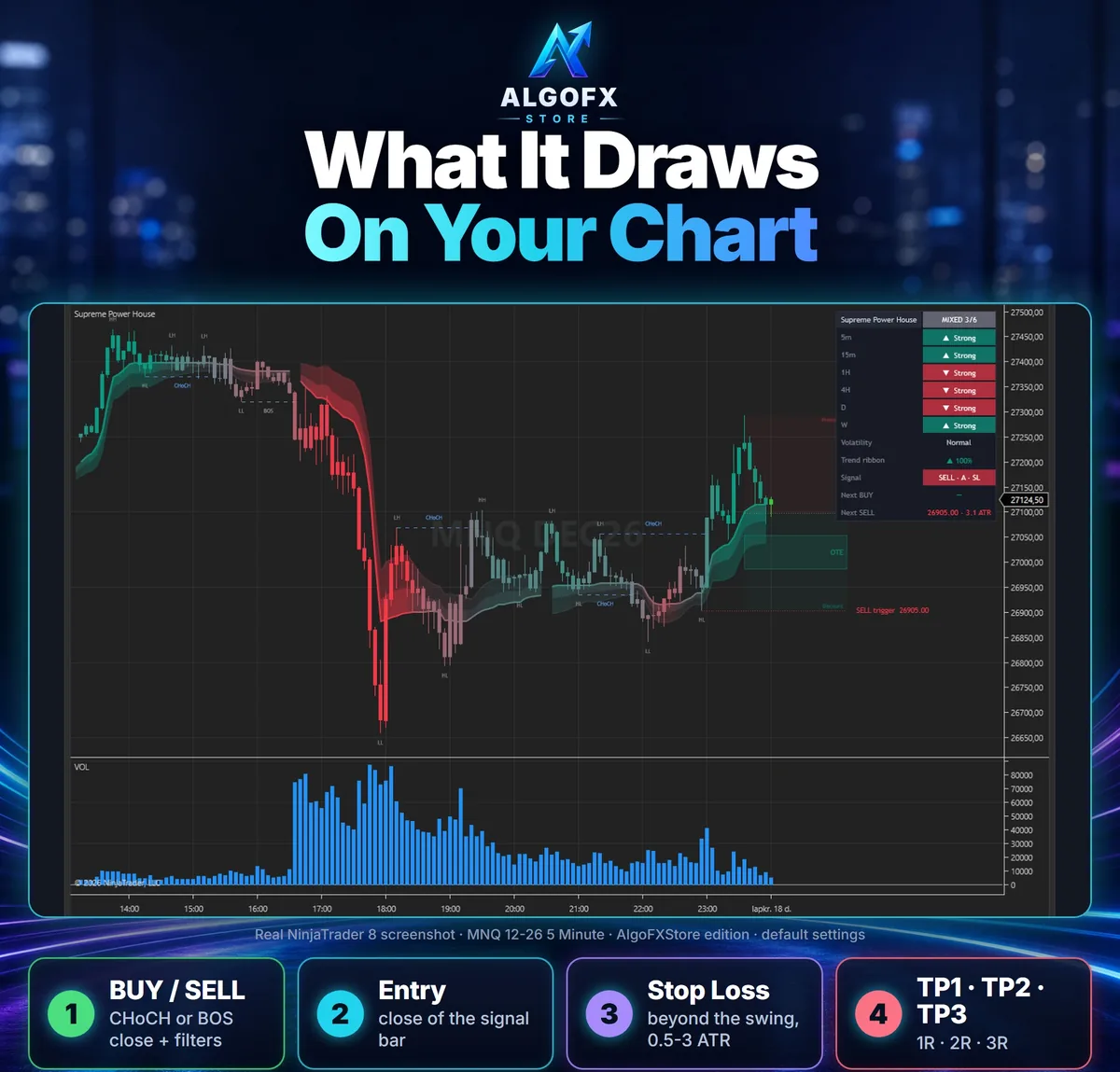
What Supreme Power House draws, and what each mark means
Read from the shipped NinjaScript edition.
| What you see | What it means |
|---|---|
| Green 'BUY · A' plate | A close above the newest swing high with every enabled filter agreeing; grade = how many of 7 checks agree. |
| Red 'SELL · B' plate | The mirror below the newest swing low. |
| Amber 'Ready' plate | Price closed within 0.5 ATR of an unbroken swing with the filters already agreeing. |
| Dashed line 'CHoCH' / 'BOS' | A break against / with the current structure. |
| HH HL LH LL | Swing labels. |
| Grey entry, red stop line and zone, green targets and bands | The trade plan; ticks on reached targets, a cross on a reached stop. |
| Dotted trigger lines with prices | The swing a close must break for the next signal. |
| Shaded box and EQ line | OTE 0.62-0.79 and the 50 % of the current leg; premium above, discount below. |
| Green / red / grey ribbon and candles | Adaptive trend ribbon: up, down, sideways. |
| Table top right | Bias, six-timeframe matrix, volatility, ribbon, last signal, next triggers. |
The logic behind every plate
Signals, plans, Get Ready plates, target and stop hits and alerts are decided when a bar closes. Under On each tick or On price change the forming bar is only previewed.
- 1
Swings with five bars each side
A swing high is a high that no bar within Structure length (5) bars on either side exceeds; a swing low is the mirror. It is confirmed five bars after it formed and labelled HH or LH against the previous swing high, HL or LL against the previous low. The newest 40 swing labels stay on the chart.
- 2
A close, not a wick, breaks structure
A close above the newest unbroken swing high is a bullish break, a close below the newest unbroken swing low a bearish one. Against the current structure it is a CHoCH, drawn as a dashed blue line from the swing to the breaking bar; with the structure it is a BOS, drawn dashed grey. Lines are drawn for both kinds whatever the Signals setting.
- 3
Every enabled filter must agree
On by default: Momentum (the close at least 0.5 ATR(14) beyond the close 5 bars earlier), Higher-timeframe trend (the last closed 1-hour bar against its EMA 50, so a bar inside the 10:00 hour reads the 09:00 bar) and Trend ribbon (blocks only a clear opposite score). Off: Lower-timeframe trend, Volume, Breakout, Order flow (CVD) and Session window.
- 4
Seven checks, one grade
The grade counts all seven checks at the signal's close, switched on or not: 5 or more agreeing is A, 3 or 4 is B, fewer is C. A plates are solid, B and C lighter. The tooltip shows a tick for each agreeing check and marks switched-off filters with (off). The lower-timeframe bars load either way because that check counts towards the grade.
- 5
Plan drawn, then followed bar by bar
Entry is the signal bar's close. Stop = Structure puts the stop beyond the newest opposite swing plus 0.1 ATR, kept between 0.5 and 3.0 ATR; Stop = ATR uses 1.5 x ATR(14), also before the first swing exists. From the next bar, the stop is checked first, then each target; a bar touching both counts as stopped. The stop never moves on its own.
- 6
Ribbon, zones and the dashboard
An adaptive Kaufman average with a two-layer band flips only when price closes 0.6 ATR beyond it, and paints the candles green, red or grey. The current leg gets an OTE box at 0.62 to 0.79, a dotted EQ line and premium / discount shading. A table rates six timeframes against their EMA 50 on closed bars.
Supreme Power House on 12 different markets
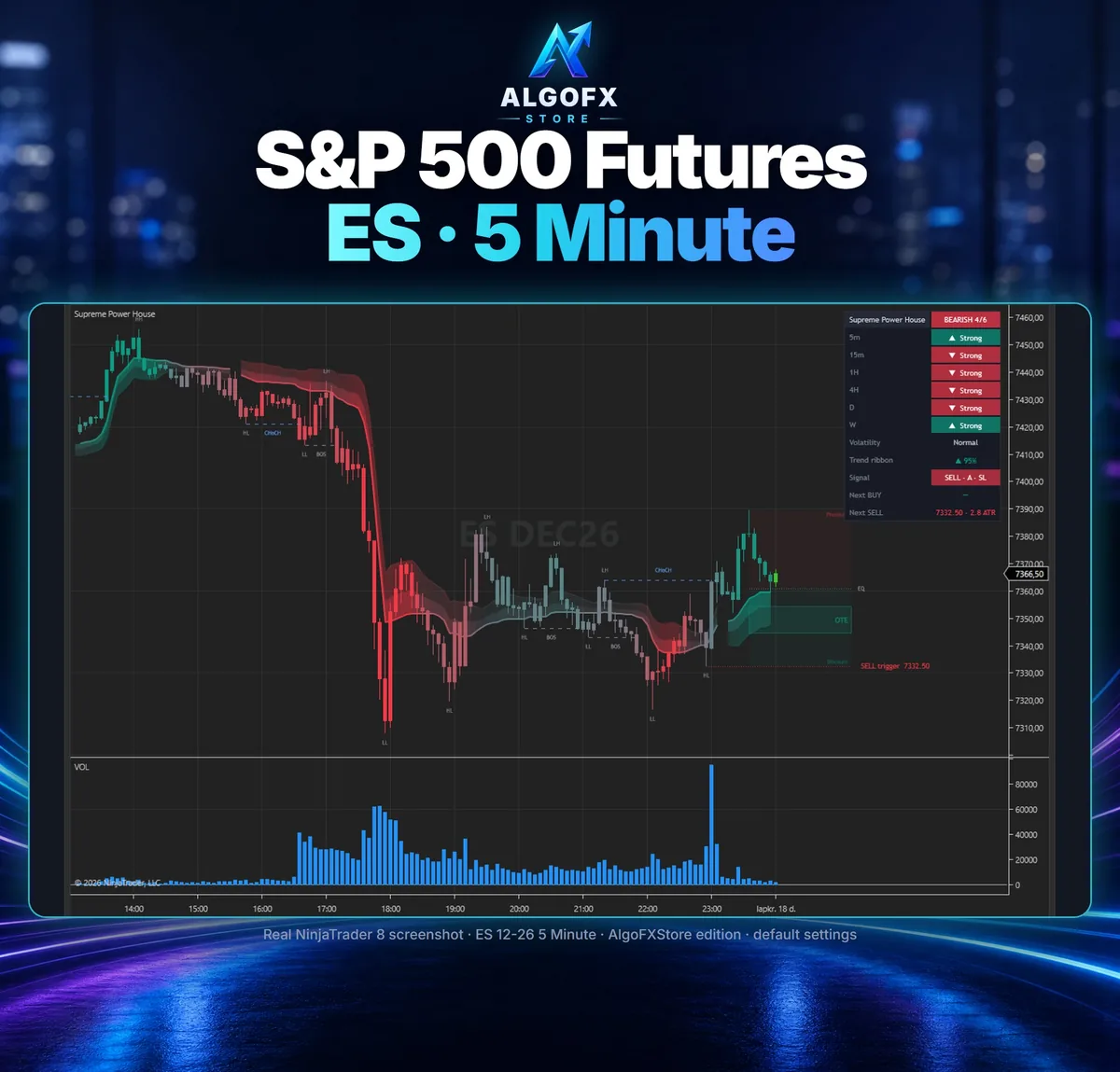
Every chart below is a screenshot of NinjaTrader 8 itself with the shipped Supreme Power House AlgoFX attached at its default settings. Forex, metals, indices, energy and crypto, so you can see how it reads each kind of market. They show what the indicator draws; they are not trading results. Tap or click any chart to open it full size.
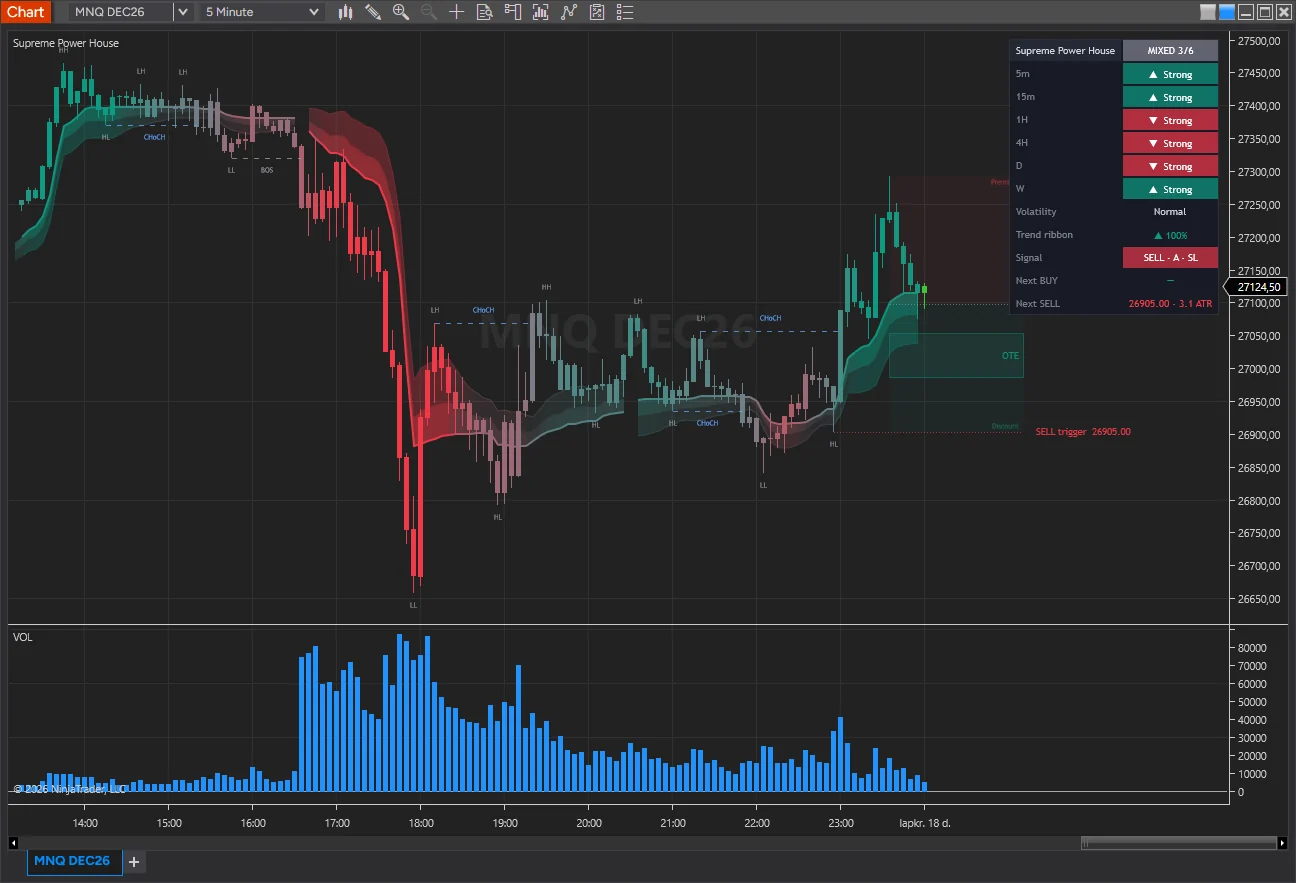
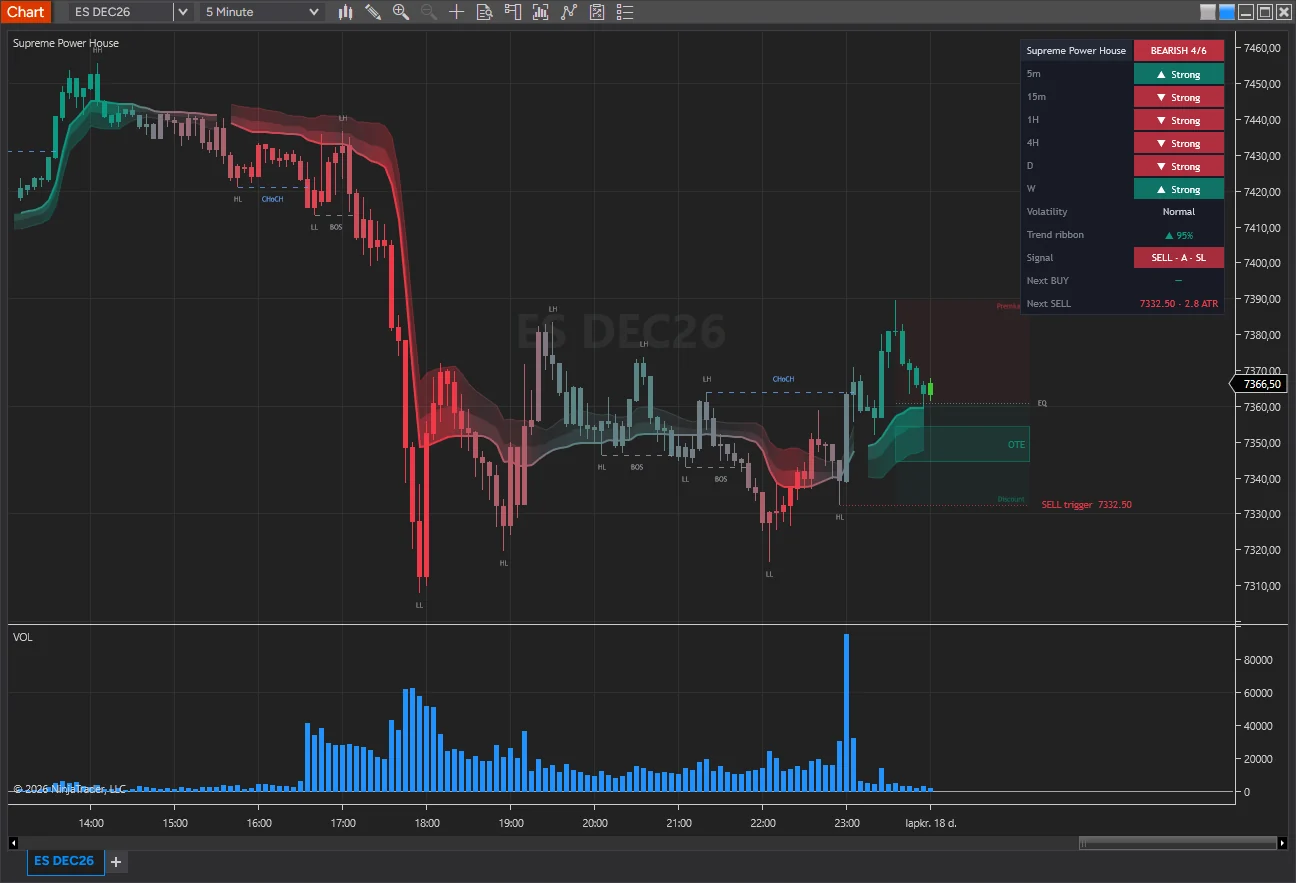
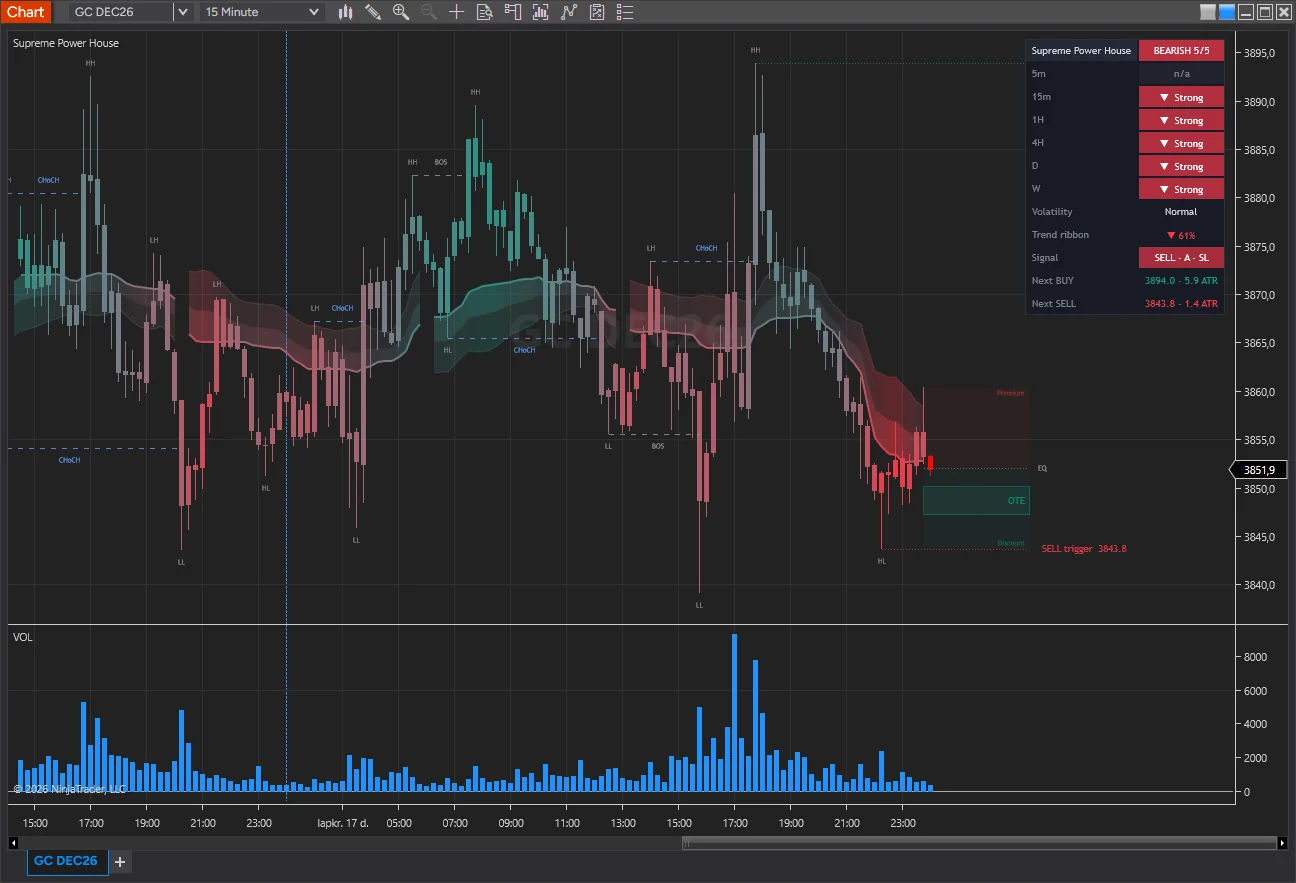
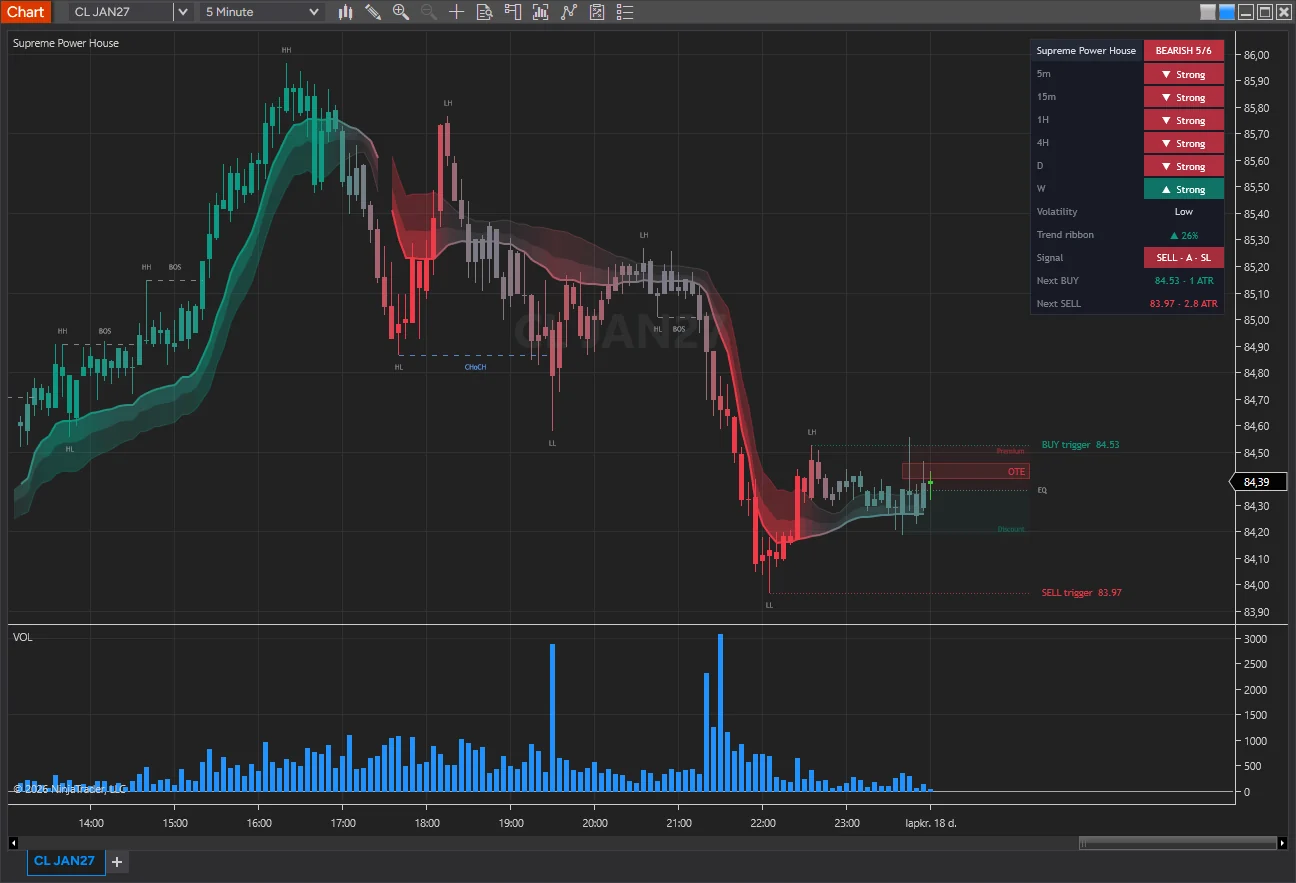
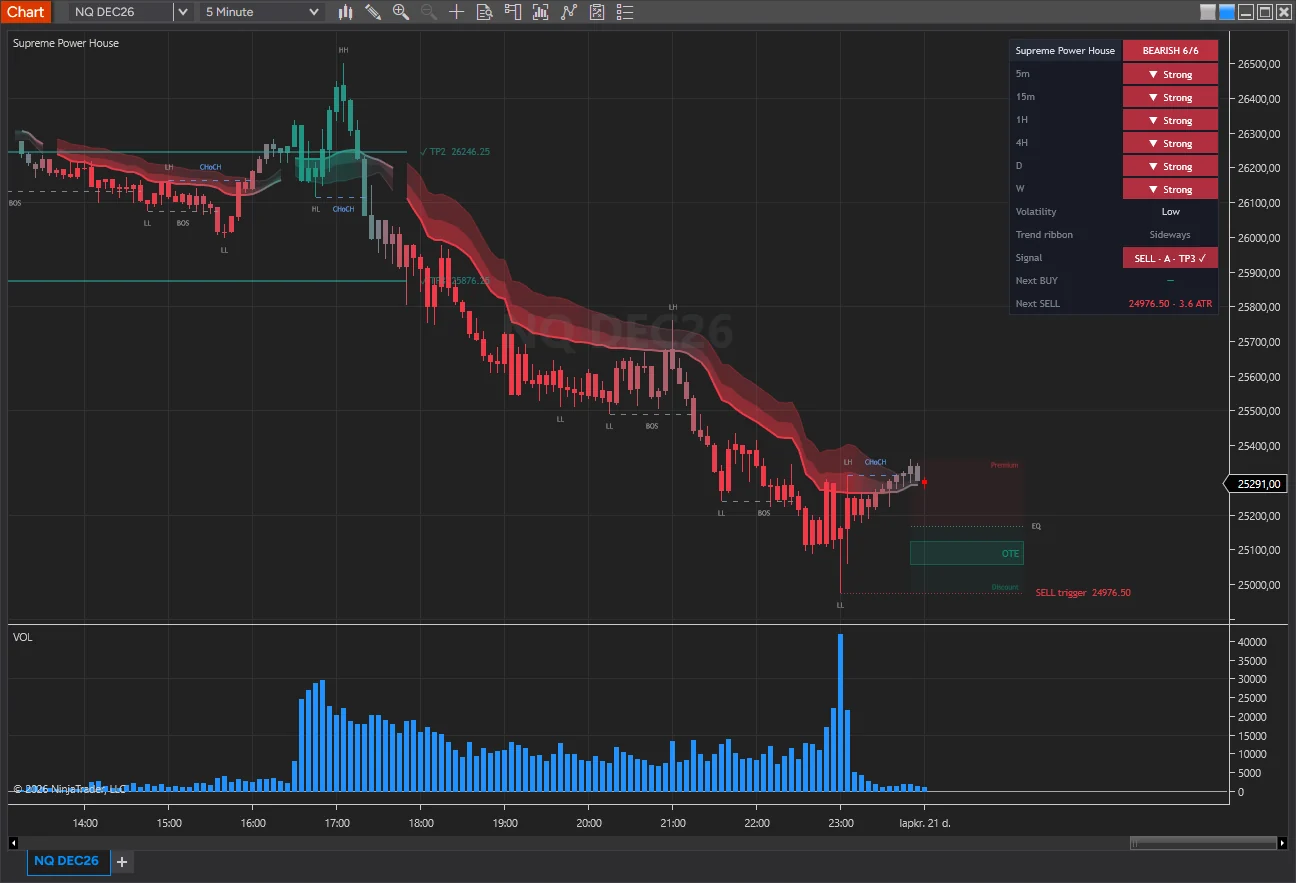
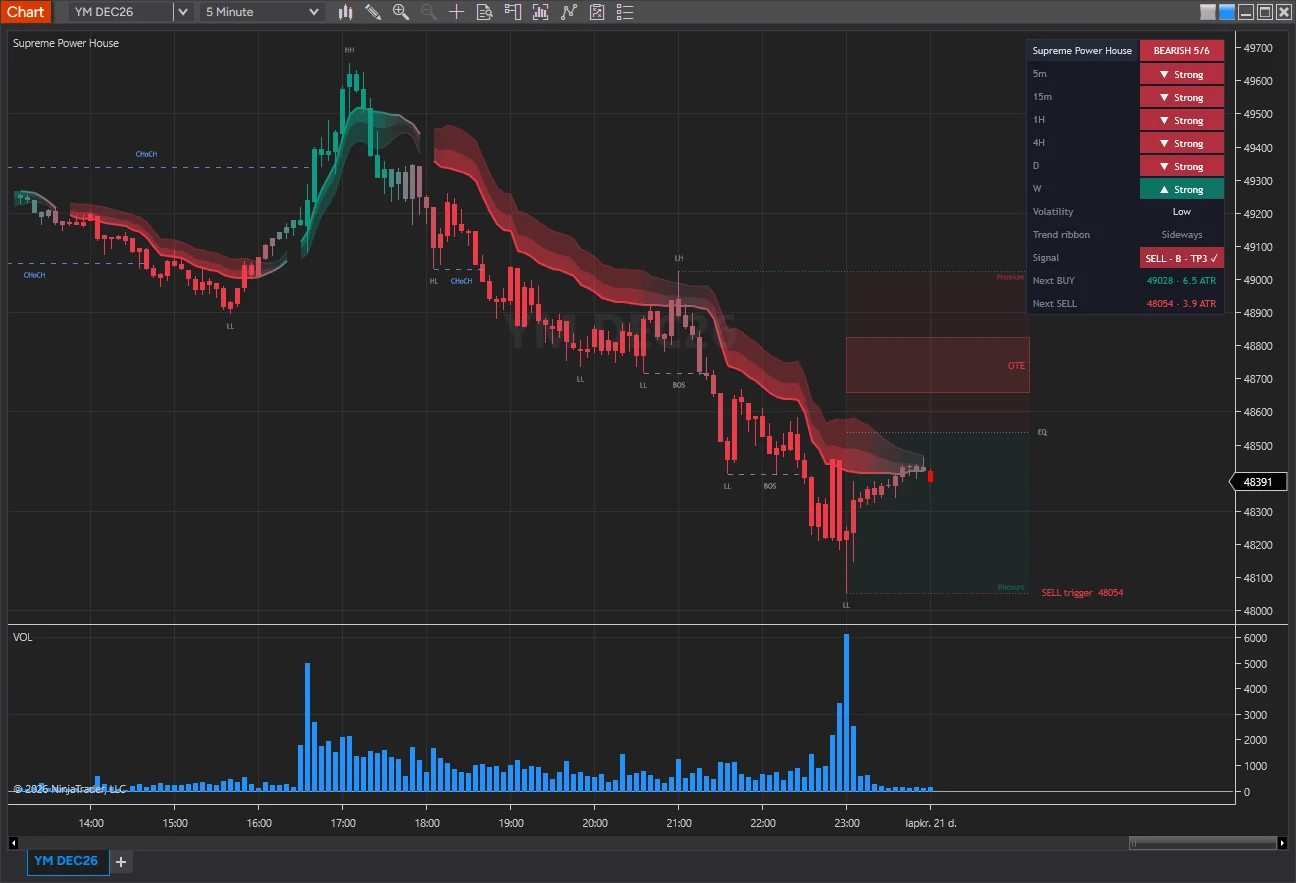
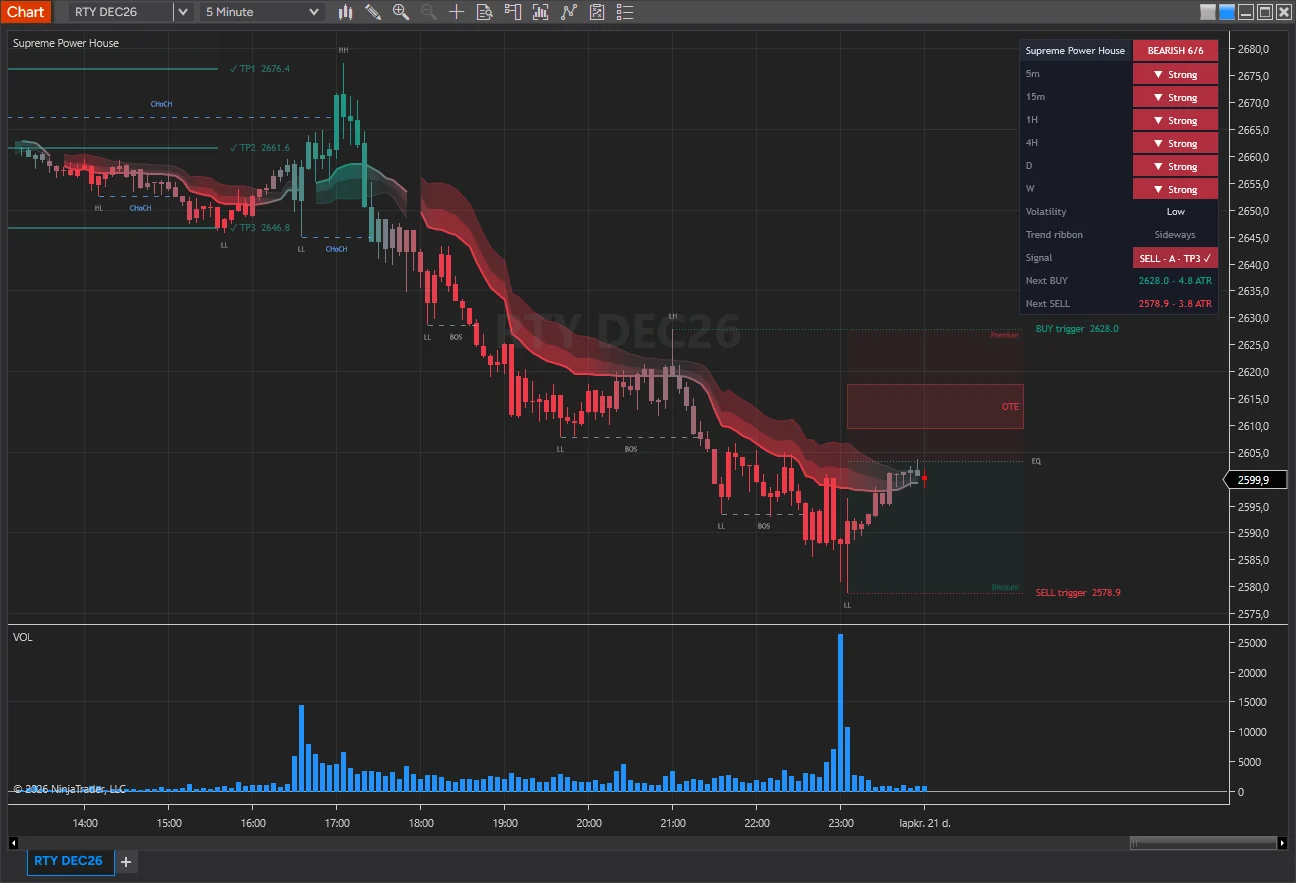
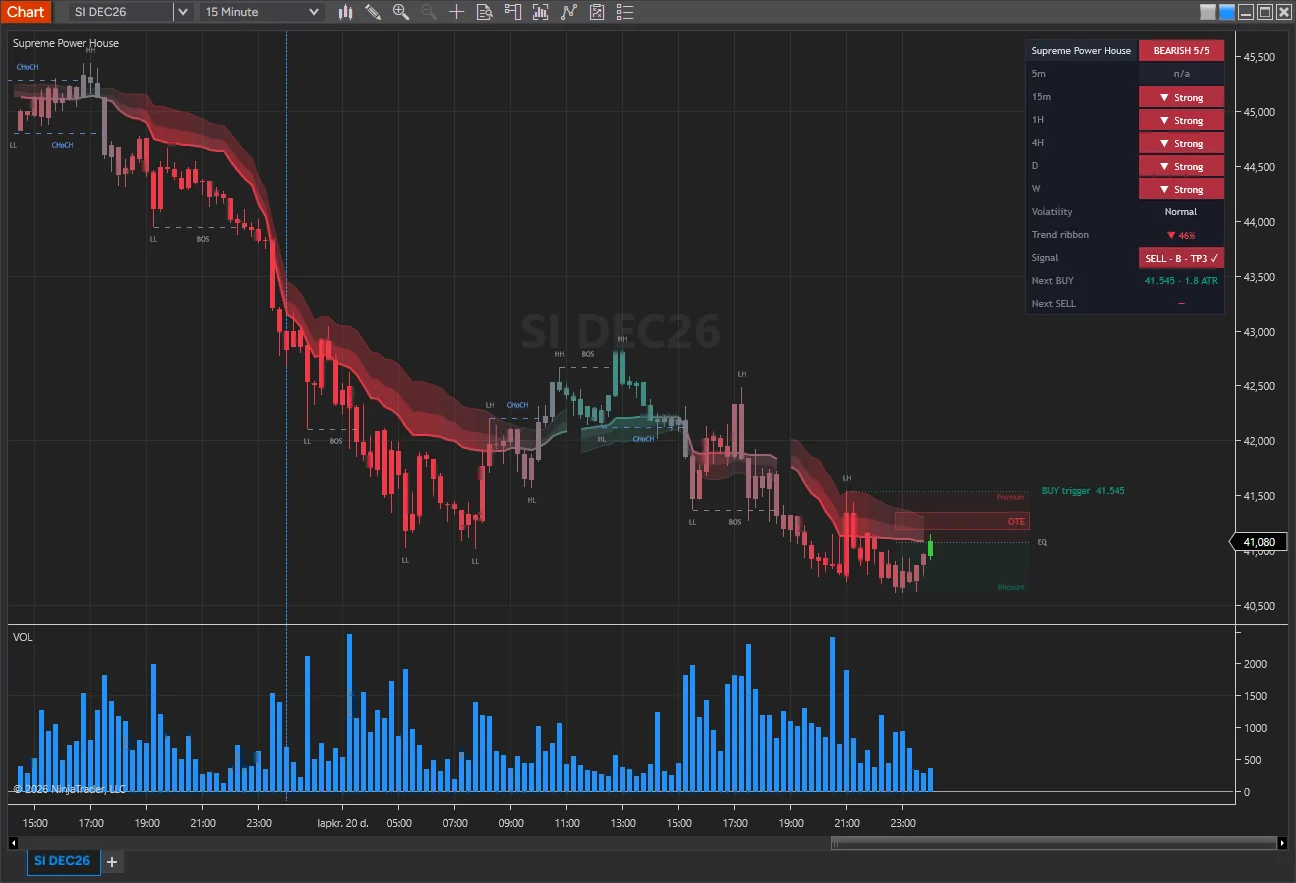
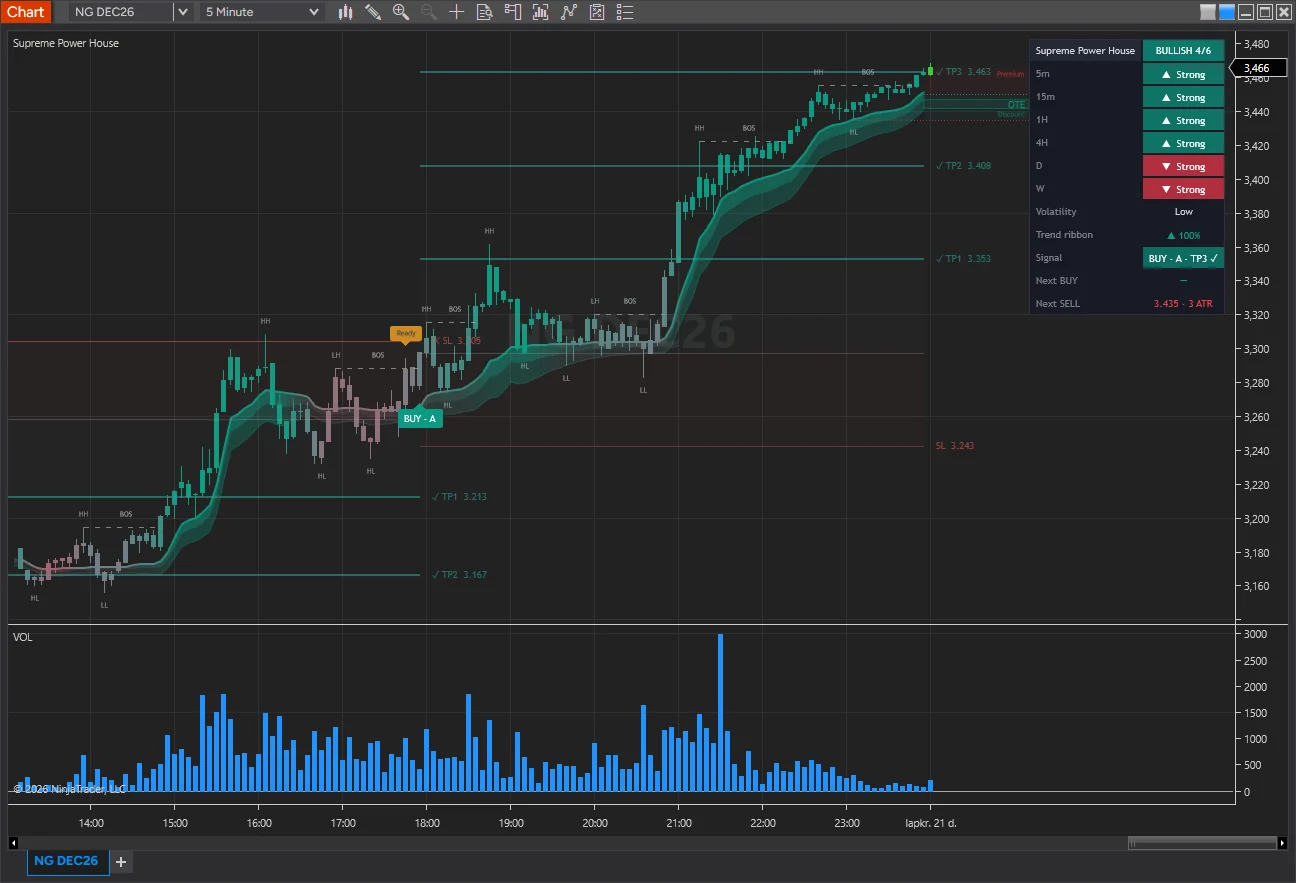
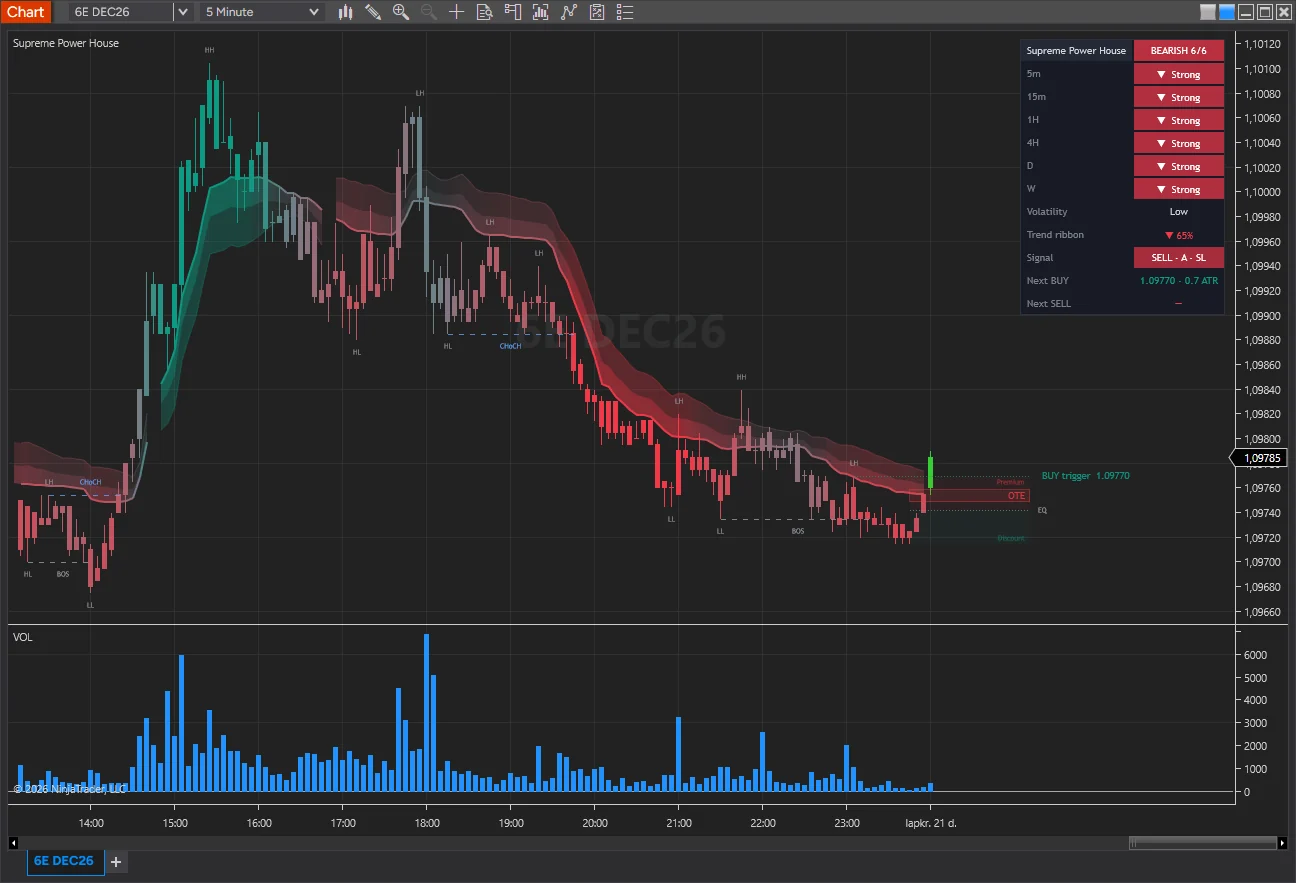
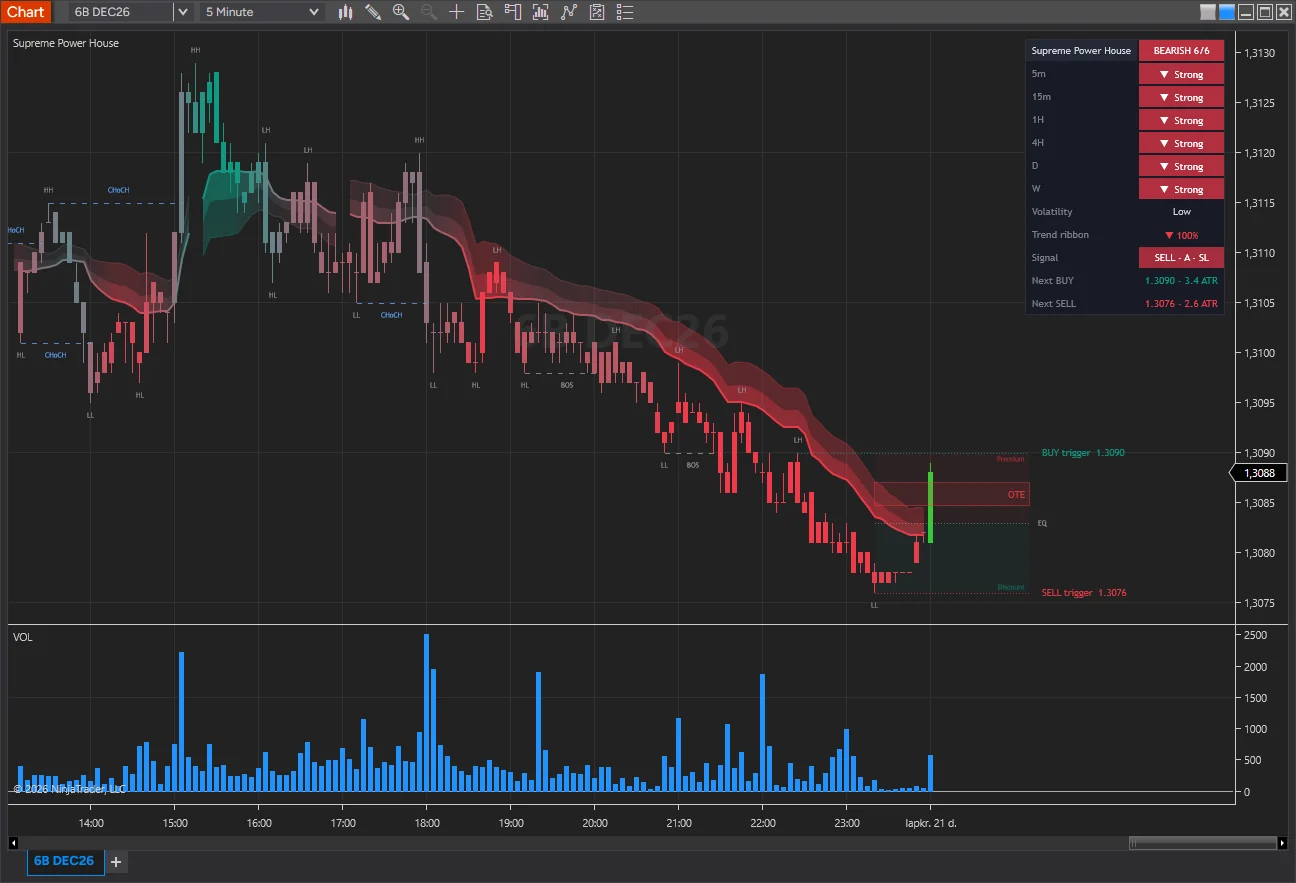
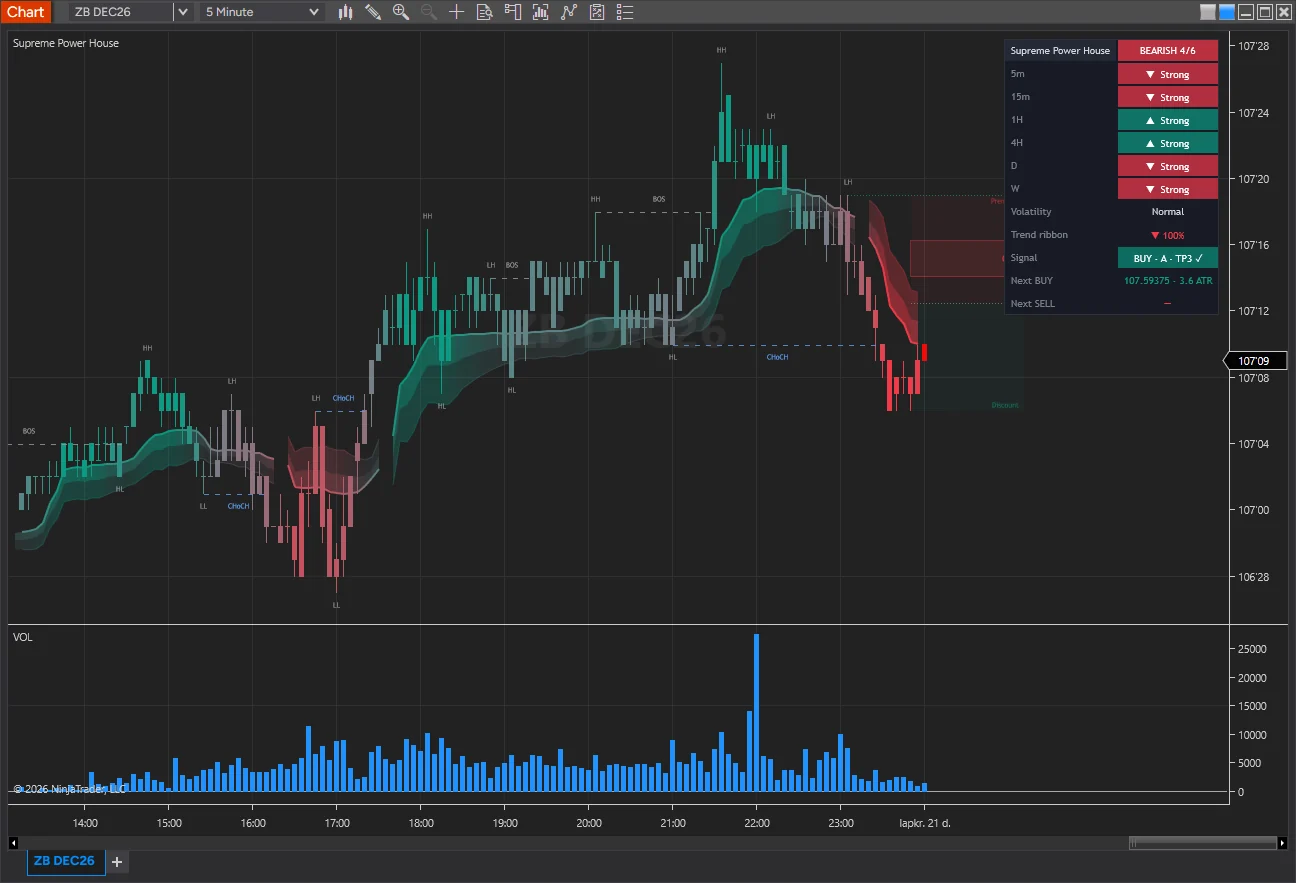
Watch Supreme Power House work on a real NinjaTrader 8 chart
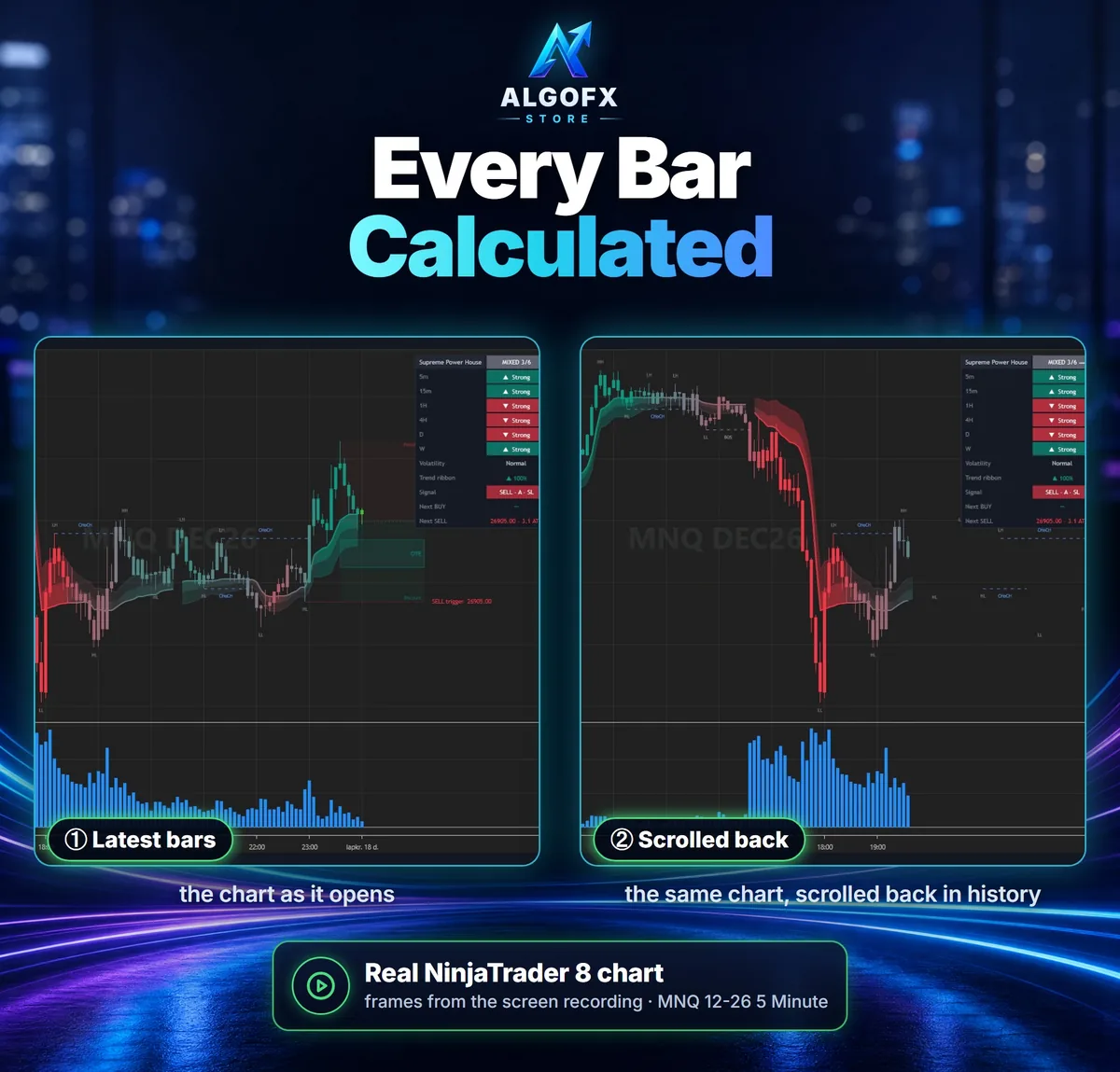
A screen recording and frames from the shipped indicator at its default settings, as the chart updates. Nothing is edited into the chart.
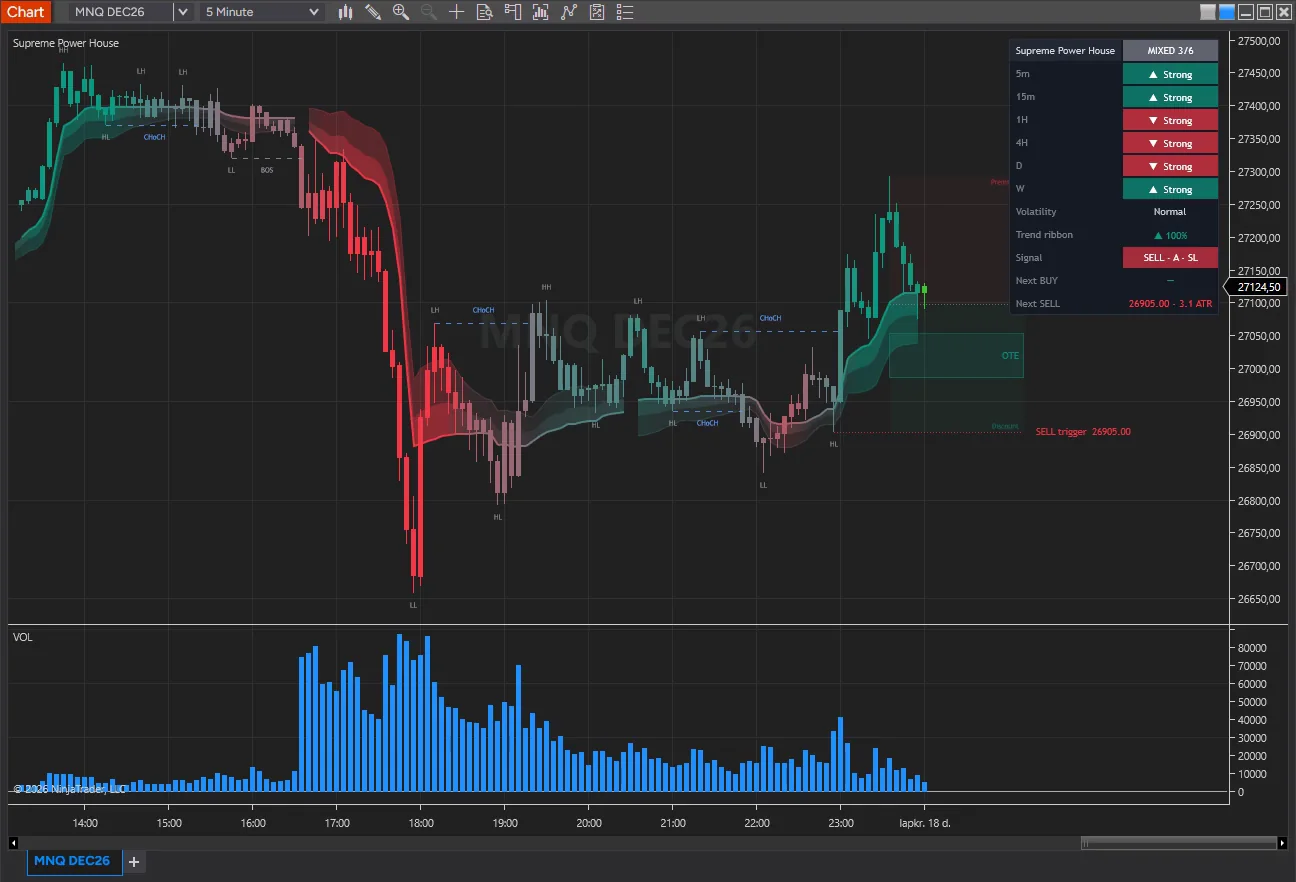
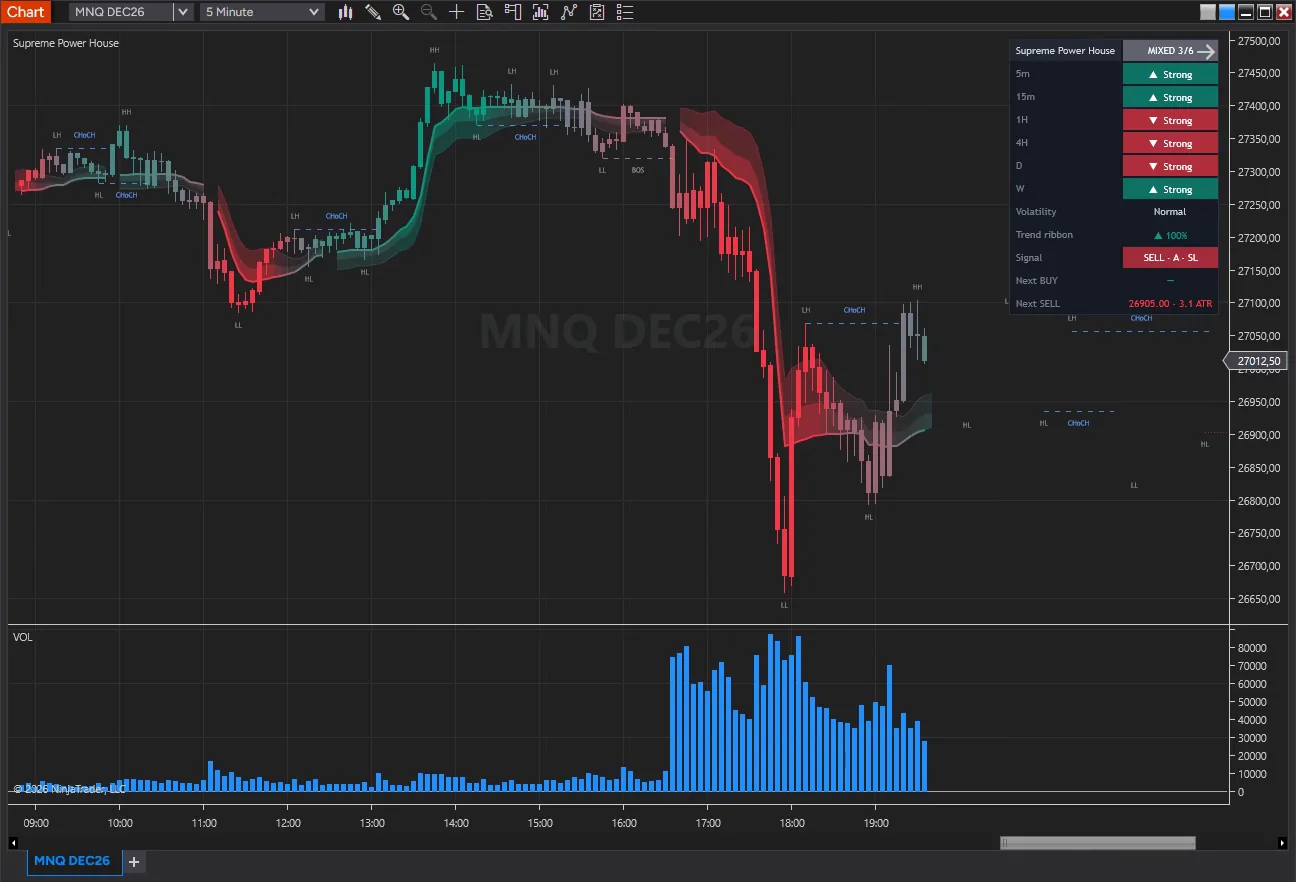
From plate to order: a futures routine
The indicator gives you the levels; NinjaTrader's order tools and your own rules do the rest. This is a routine you can repeat every session.
- 1
Check the table before the open
Read the header, for example BULLISH 4/6, and the rows above your chart period. Look for a dash in any row: it means too few bars, so raise Days to load. If the D or W row looks old, download Day history in Tools, Historical Data. Then set the Session window for today if you use it.
- 2
Prepare on the Ready plate
An amber Ready plate prints when price closes within 0.5 ATR of an unbroken swing while the filters other than momentum and breakout agree. The dotted trigger line and the opposite swing are already on the chart, so work out the stop in ticks and your contract count before the break. A Ready plate does not say the level will break.
- 3
Read the plate, then count ticks
When BUY · A or SELL · B prints, check the kind of break, the grade and whether the dashboard agrees. Then take the SL price: stop in points is entry minus SL (SL minus entry for a SELL), ticks are points divided by the tick size, and contracts are your risk per trade divided by risk per contract, rounded down.
- 4
Place the stop with the entry
The indicator sends nothing to your broker, so use an ATM Strategy or a stop order to place the SL price with every entry. With R-multiple targets, TP1 earns the same ticks the stop risks, TP2 twice and TP3 three times. Decide before the entry whether you scale out at TP1 or hold.
- 5
Let the plan tell you when it ends
Switch on Alert: Stop hit and Alert: TP1 hit so every plan's end reaches the Alerts Log. A tick mark on a target label means it was reached, a cross on SL that the stop was hit, and the dashboard's Signal row shows SL when the latest plan stopped. A new opposite signal ends the old plan where it stands.
- 6
Skip what does not fit
Skip a plan whose stop is wider than your budget allows in whole contracts, signals against the dashboard bias if that is your rule, and plates from the previous session's final bar shown at the reopen. There is no news filter, so stay flat around scheduled high-impact releases yourself.
6 rows that read the market for you
The on-chart dashboard, row by row.
- header | BULLISH / BEARISH / MIXED with how many matrix timeframes agree
- 5m, 15m, 1H, 4H, D, W (Matrix 1-6) | close vs EMA 50 on closed bars, ▲ / ▼ Strong / Weak; n/a below the chart's timeframe; — with too few bars
- Volatility | ATR percentile over 100 bars: Low / Normal / High
- Trend ribbon | Sideways, or direction with conviction %
- Signal | latest signal, grade, live / SL / TPn ✓
- Next BUY / Next SELL | trigger price and distance in ATR
Everything Supreme Power House does for you
Futures-ready prices on every plan
SL and TP labels print in the instrument's tick size, for example 28440.00 on MNQ or 93.30 on CL, so converting a stop into ticks and contracts needs no guesswork.
Fixed once the bar closes
Signals and their entry, stop and target prices do not change after the bar closes. A live MNQ 1 Minute run on each tick, across the switch from history to live bars, matched the closed-bar replay with 0 mismatches.
Graded plates with a checklist
Rest the pointer on a plate to read Buy · CHoCH · grade A, the entry and stop, and the seven checks with a tick or a dash. Show grade on signals can hide the letter if you prefer plain BUY and SELL.
A stop held inside sensible limits
Stop distance (ATR): min 0.5 and max 3.0 keep a structure stop from sitting a tick from entry or far beyond your budget. Lowering the max clamps the stop inside the swing on wide breaks, which the manual explains.
Real volume for the Volume filter
Futures volume is contract volume, so the optional Volume filter (1.2 x the 20-bar average) measures real participation. The Order flow (CVD) filter estimates delta from lower-timeframe candles, counting up candles as buying and down candles as selling.
Session window in your time zone
Off by default, preset to 0700-1600 America/New_York. The window takes any zone name such as America/Chicago, follows daylight saving, includes the start minute but not the end, and may wrap midnight. It limits signals and Get Ready plates.
Runs on the bars you trade
Minute and second charts fully, plus daily, weekly, tick, volume, range and Renko bars. The chart's Trading Hours template decides which bars count, so overnight bars are in or out as you choose.
Eight alert conditions
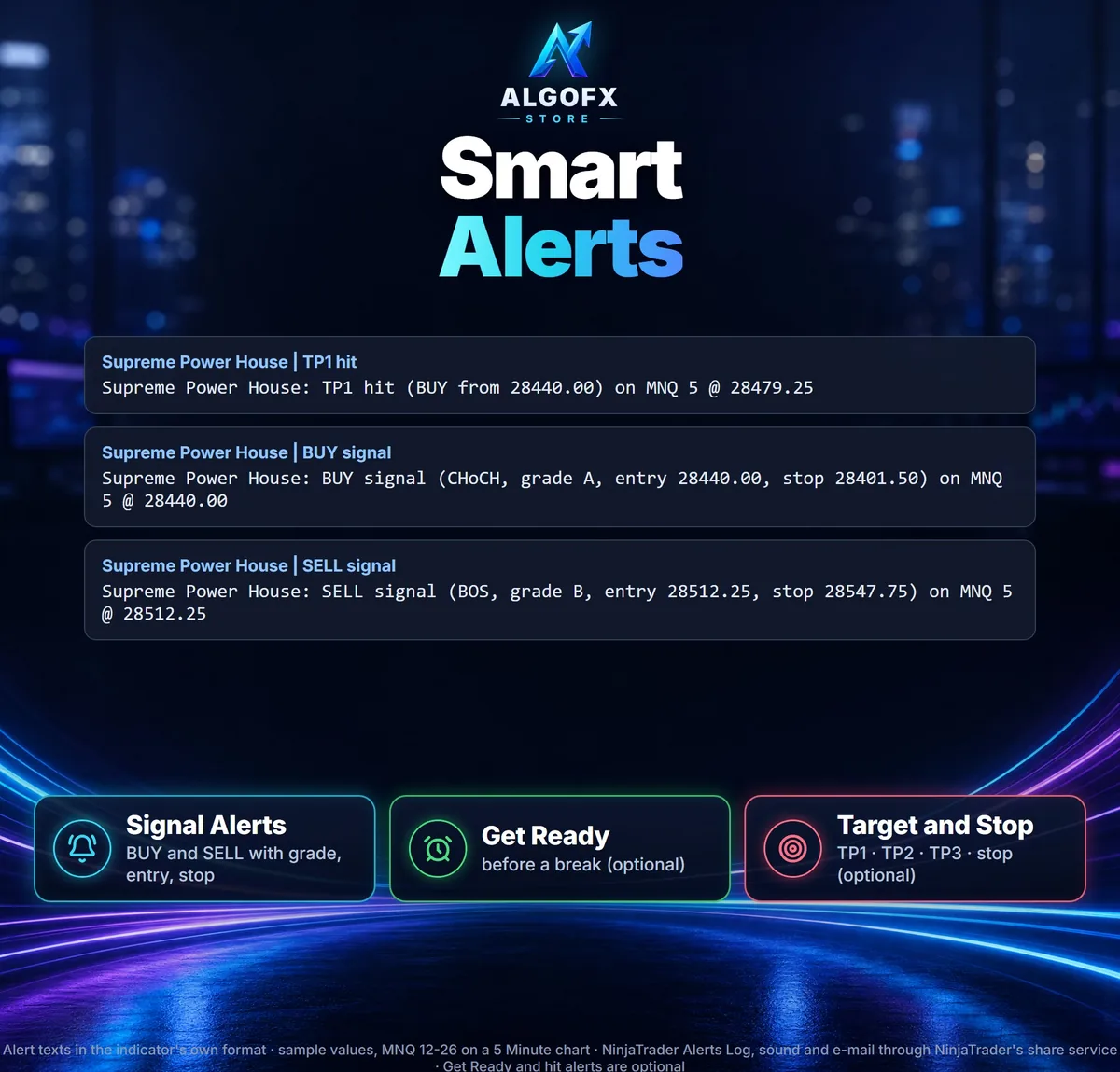
BUY, SELL, Get Ready BUY and SELL, TP1, TP2, TP3 and Stop hit, each switchable. Every alert writes an Alerts Log row, optionally a NinjaScript Output line, a sound and an e-mail through NinjaTrader's Mail share service.
Labels that stay readable
Pin Labels Inside Chart squeezes the space after the last bar so trigger, EQ and plan labels fit, and Keep Chart Object Limits holds the chart to the newest 500 boxes, lines and labels.
Supreme Power House, feature by feature
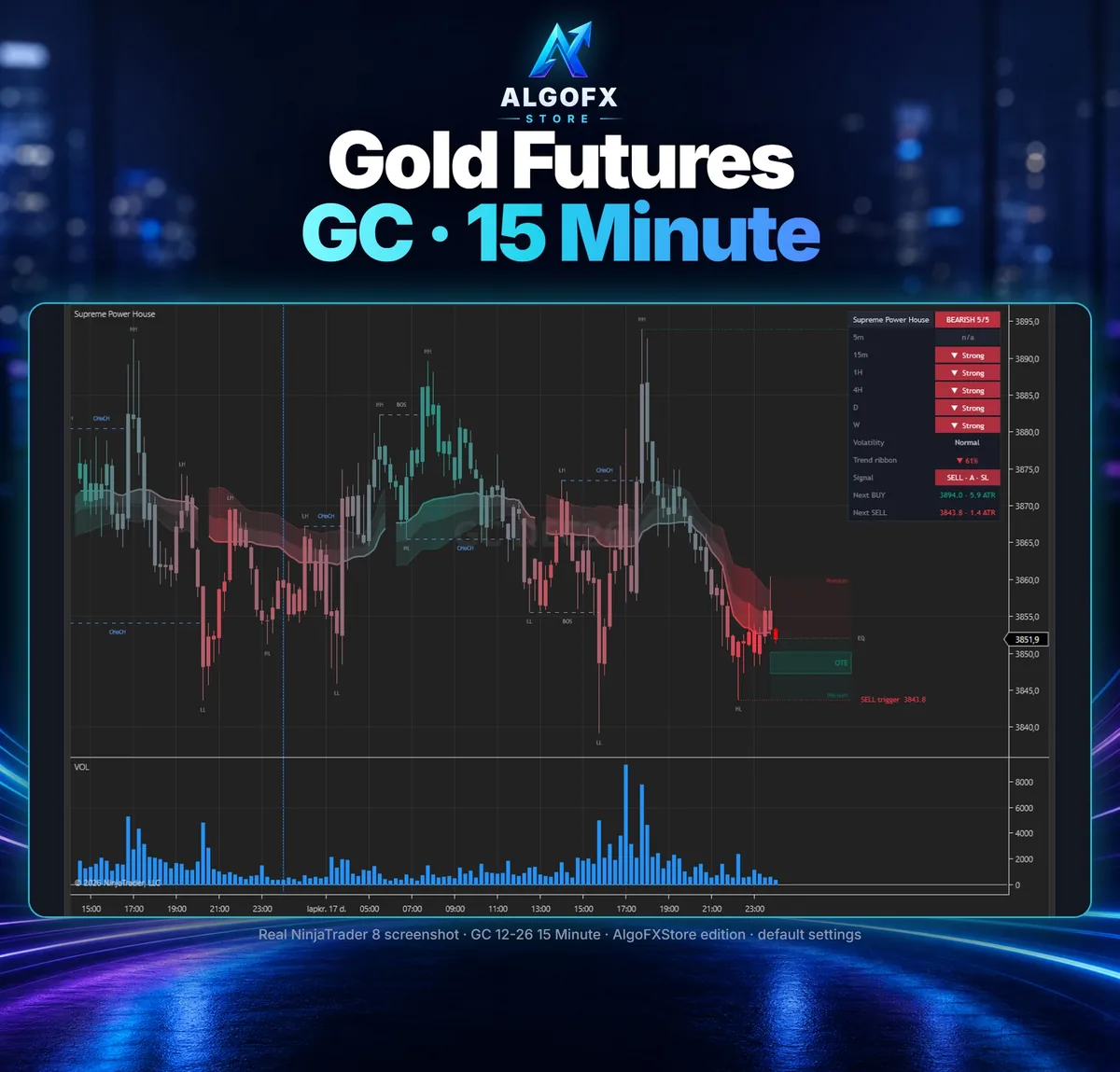
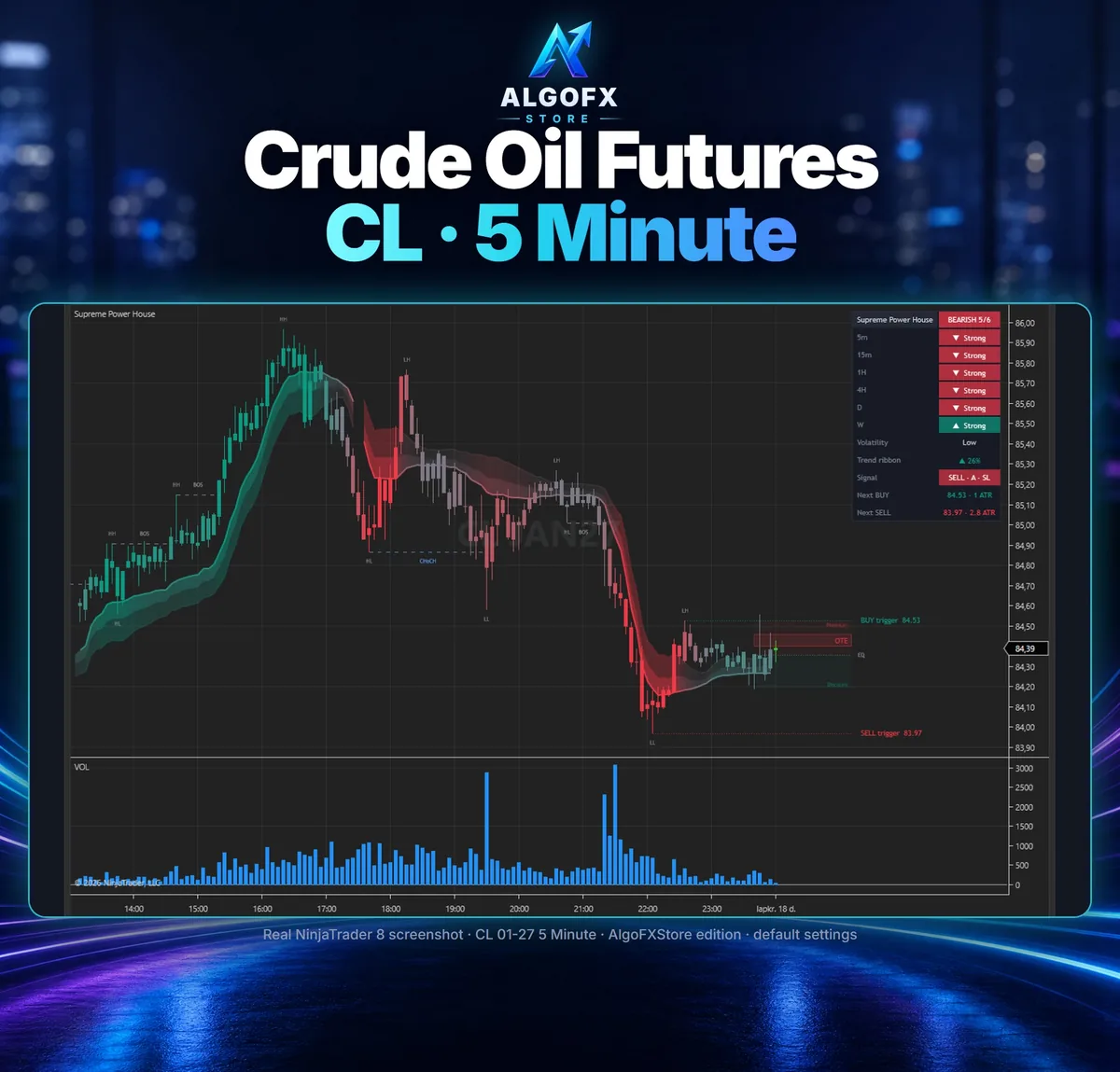
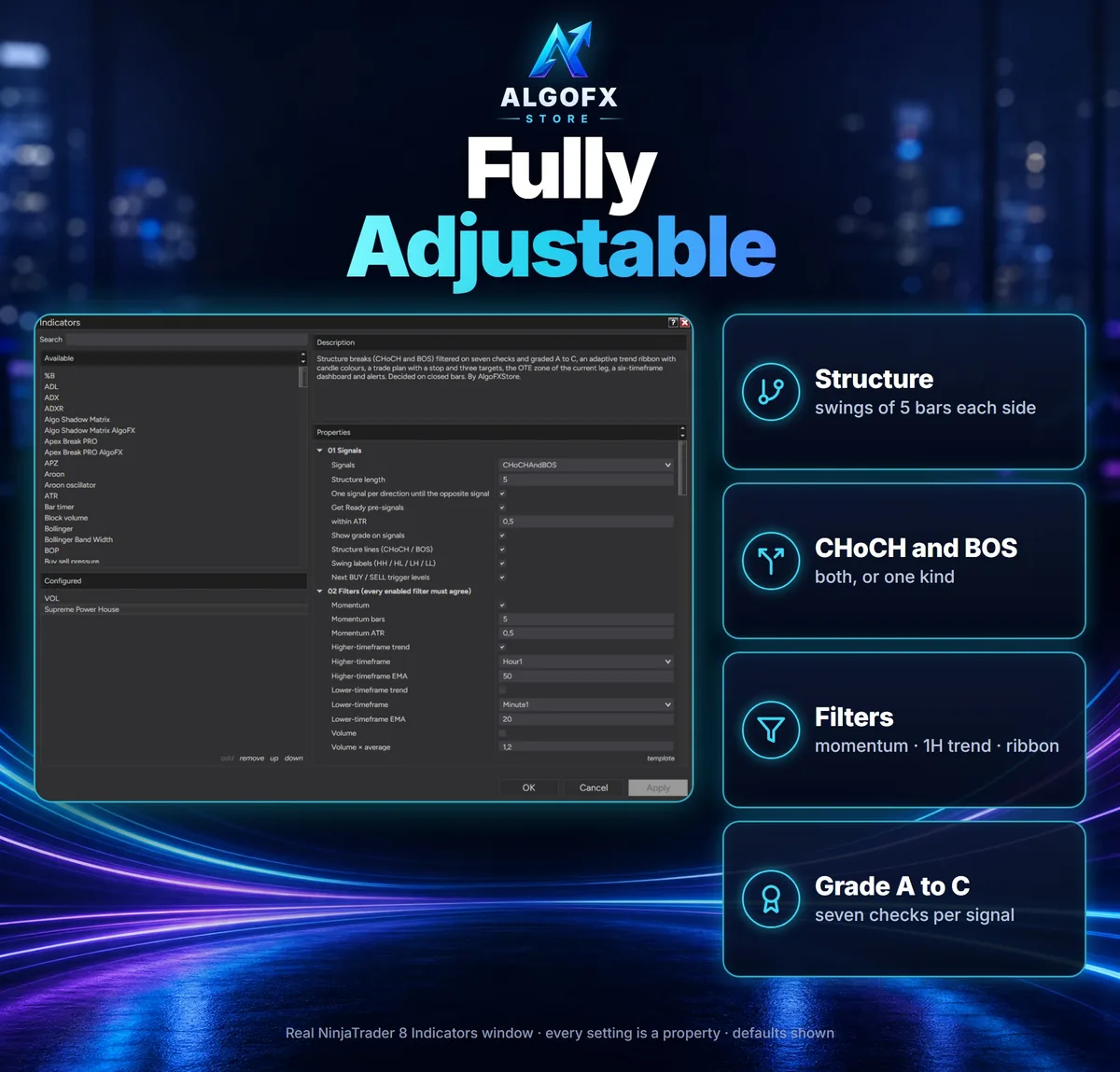
Each picture is built from real platform screenshots of the shipped indicator at its default settings, labelled so you can see what every part does. Tap any picture to open it full size.

How traders put it to work
Index micros on a 5 Minute chart
On MNQ or MES at 5 Minute every dashboard row from 5m to W is live and the 1-hour filter reads closed hourly bars. The manual names 5 Minute as a good start: stops are wide enough to sit beyond real swings, and micros let you size in small steps from the SL price.
Gold and crude oil
GC and CL swing further, so their structure stops are larger in ticks. On gold a 15 Minute plan can exceed a small budget even with one MGC, and the manual's honest answer is to skip it or use a 5 Minute chart. On CL 5 Minute the stops are often small enough for several MCL.
1 Minute charts, with care
On 1 Minute the 0.5 ATR minimum stop can sit only a few ticks from entry, so one or two ticks of slippage become a large part of the risk. The 5m matrix row reads normally, but consider 3 or 5 Minute for structure trading, as the manual recommends.
Day trading inside set hours
Switch the Session window on and set, for example, 0945-1530 with America/New_York for index futures: it skips the first fifteen minutes and stops new signals half an hour before the close. On a 5 Minute chart the last allowed bar opens 15:25 and its signal appears at 15:30. Set the end well before you need to be flat.
Regular hours or full session
With the instrument's default Trading Hours template the overnight bars count in the swings, the ribbon, the ATR and the signals; with a regular-hours template they do not. Both are valid and give different values, so choose one and keep it for every chart you compare.
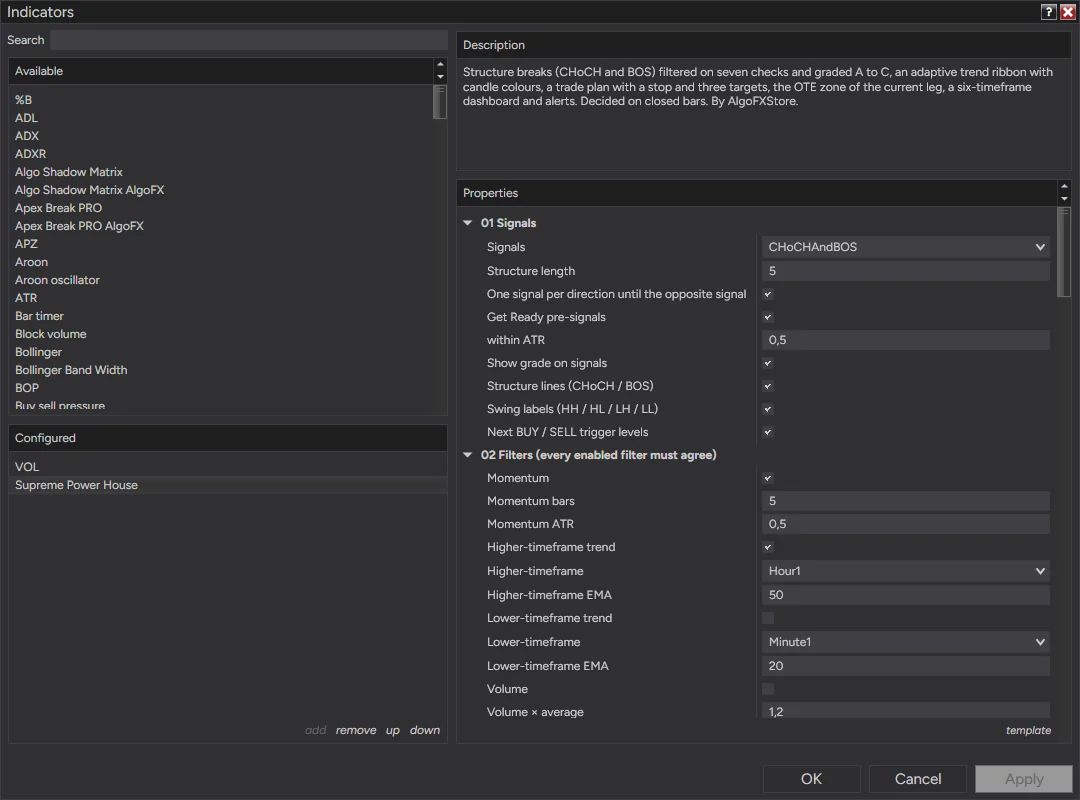
Every setting, with its default
The names are the ones in the NinjaTrader indicator dialog; the defaults are what every chart on this page uses.
| Setting | Default | What it does |
|---|---|---|
| Signals | CHoCHAndBOS | Which breaks may become signals (CHoCHOnly, BOSOnly). |
| Structure length | 5 | Bars each side of a swing (2-50). |
| One signal per direction until the opposite signal | true | After a BUY the next BUY waits for a SELL. |
| Get Ready pre-signals / within ATR | true / 0.5 | Warning plate near an unbroken swing. |
| Momentum (bars / ATR) | true (5 / 0.5) | Close must have moved 0.5 ATR over 5 bars. |
| Higher-timeframe trend (Higher-timeframe / EMA) | true (Hour1 / 50) | Last closed 1-hour bar vs its EMA 50. |
| Lower-timeframe, Volume, Breakout, Order flow (CVD), Session window | false | Optional filters. |
| Session / Session timezone | 0700-1600 / America/New_York | Window used by the Session window filter. |
| Trend ribbon filter | true | Blocks signals against a clear ribbon trend. |
| Ribbon / Candle colours / Adaptive length / Adaptive slow / Flip band / Colour smoothing | true / true / 10 / 30 / 0.6 ATR / 10 | Adaptive (Kaufman) trend ribbon. |
| Stop / Stop ATR x / min / max | Structure / 1.5 / 0.5 / 3.0 | Swing-based stop kept between 0.5 and 3 ATR. |
| Targets in / TP1 / TP2 / TP3 | RMultiple / 1 / 2 / 3 | Targets in R, ATR or points; each can be switched off. |
| Show trade plan / Hit rate on targets / Plan length / Signals kept | true / false / 20 / 5 | Plan drawing. |
| OTE zone (0.62-0.79) / Equilibrium / Premium-discount | true | Zones of the current leg. |
| Dashboard / position / text size | true / TopRight / Small | Six-timeframe matrix table. |
| Matrix 1-6 / Matrix EMA | 5m, 15m, 1h, 4h, D, W / 50 | Timeframes of the matrix. |
| Keep Chart Object Limits / Pin Labels Inside Chart | true / true | 08 Display. |
| Debug Mode / Dump Bars + Outputs CSV | false / false | 10 NinjaTrader diagnostics. |
8 alert events
Alerts can go to the NinjaTrader Alerts Log, a sound and an e-mail (NinjaTrader's e-mail share service must be set up).
- BUY signal
- SELL signal
- Get Ready BUY
- Get Ready SELL
- TP1 hit
- TP2 hit
- TP3 hit
- Stop hit
Supreme Power House next to the usual options
Where it wins, and where it does not.
| Supreme Power House | Typical free structure indicator | Reading it by hand | |
|---|---|---|---|
| When a break counts | A bar close beyond the newest unbroken swing; swings confirmed 5 bars later | Varies; some react to a wick | Your call in the moment |
| Stop and targets | Drawn on every plate with prices in the instrument's tick size | Usually not drawn | Worked out by you each time |
| How strong is the setup | Grade A, B or C from seven checks, listed in the tooltip | Rarely graded | Depends on your own checklist |
| Timeframe context | Table with 5m, 15m, 1H, 4H, D and W rated on closed bars | Usually one chart only | Flipping between charts |
| Cost | One payment | Free | Free, plus your screen time |
| Chart load | Loads secondary series: six at the defaults on a 1 or 5 Minute chart | Often lighter | Nothing to load |
Honest about who this fits
A good fit if you
- You trade futures such as MNQ, ES, GC or CL in NinjaTrader 8 Desktop and read market structure, CHoCH and BOS.
- You want the stop and targets on the chart when the bar closes, so you can count ticks and contracts before acting.
- You prefer fewer, filtered breaks with a visible grade over a plate on every swing.
- You want alerts in the Alerts Log and by e-mail for signals, Get Ready warnings, targets and stops.
- You keep your own trading rules and want an indicator that supplies the levels, not the decision.
Not for you if you
- Traders who want orders placed for them: it draws and alerts, and every order is yours.
- Users of NinjaTrader Web, mobile or NinjaTrader 8.0: it needs NinjaTrader 8.1.x Desktop for Windows.
- Anyone who needs a plate on every move: three default filters and one signal per direction leave many breaks without a plate.
- Traders who want the indicator to enforce daily loss or drawdown rules: it does not read the account.
One Add-On, one manual, imported in a minute
- 1NinjaScript Add-OnSupremePowerHouseAlgoFX.zip (0.2 MB). Import it in NinjaTrader 8 and it appears as “Supreme Power House AlgoFX”.
- 16Page PDF manualInstalling, every setting with its default, reading the signals, the levels, the dashboard, the alerts.
- 18Setting groupsEvery one explained above, with the defaults the charts use.
- 8Alert eventsYou choose which ones are on in the settings.
- 60Day money-back guaranteeIf it is not for you, request a full refund within 60 days through your Digistore24 order e-mail.
Install in four steps
- Download the zip from the page Digistore24 sends you to after checkout. Keep it zipped.
- NinjaTrader 8: Control Center, Tools, Import, NinjaScript Add-On, and choose the zip.
- Open a chart, open Indicators, and add “Supreme Power House AlgoFX”.
- Read the manual's quick start; the defaults are the settings shown on this page.

Kestutis Balciunas
AlgoFXStore · chart indicators for MetaTrader, TradingView, cTrader and NinjaTrader
Kestutis Balciunas builds and publishes chart indicators under the AlgoFXStore name for MetaTrader 4 and 5, TradingView, cTrader and NinjaTrader 8. Every product page shows what the indicator draws on real charts, and every number on it comes from the shipped build.
The charts on this page were captured in NinjaTrader 8 from the shipped Supreme Power House AlgoFX at its default settings and are shown unedited.
No get-rich claims and no quoted win rates. Every trade is uncertain, and no indicator changes that. If you want to know whether it suits the way you trade before you buy, e-mail [email protected] and you will get a straight answer.
One price, one payment
- The NinjaScript Add-On for NinjaTrader 8 and the 16-page PDF manual
- Delivered as a digital download: the Add-On zip and the PDF manual on your download page
- Return period: 60 days, with a full refund if it is not for you
- Free updates to the current version on the same download page
60-day money-back guarantee. Install it, run it on your own charts and read the manual. If Supreme Power House is not for you within 60 days of purchase, request a full refund from Digistore24, no questions asked: use the refund link in your Digistore24 order e-mail or Digistore24's order page digistore24.com/en/cancel-revoke-contract. Digistore24 refunds to your original payment method. It is a digital download: right after checkout you land on your download page, and the link to it is also in your Digistore24 order e-mail.
Also by Kestutis Balciunas: Supreme Power House for MT4 and MT5.
About the signals
Does it repaint, or do signals change after they print?
No. Signals, grades and their entry, stop and target prices are fixed once the bar closes, in On bar close, On each tick and On price change alike. What follows the newest bar: the ribbon and candle colours, the OTE, EQ and premium / discount zones, the trigger lines and the dashboard. Swing labels appear five bars after the swing. Only the newest 5 plans stay drawn.
Why did a break print no plate?
Every enabled filter must agree at the close. Look for a dash in the dashboard matrix, then switch Higher-timeframe trend off to test whether it is the blocker. One signal per direction also holds back a repeat BUY until a SELL. On the oldest bars of a long chart the 5,000-bar hourly series has not started yet.
Does an A grade mean a winning trade?
No. It means five or more of the seven checks agreed at the signal. A grade describes the conditions at the close, not the outcome, so use it to rank and size setups.
Why did a signal appear at the reopen?
NinjaTrader closes a bar when the next bar's first tick arrives. A signal on a session's final bar therefore appears at the reopen, and its alert is sent only if the reopen comes within two bar periods plus five seconds. Do not act on a plate from the previous session's last bar.
What do the colours mean?
Green Buy plates (#089981), red Sell plates (#F23645), amber Ready plates (#F5A623), blue CHoCH lines (#5B9CF6), grey BOS lines (#9598A1), a grey entry line, a red stop line and risk zone (#EF5350) and green target lines and bands (#26A69A). Stop red and targets green apply to BUY and SELL alike; all colours are inputs.
Settings and futures use
Defaults or tuning?
The defaults are a complete setup and are what the charts on this page use. Structure length changes the most: 2 to 3 gives many small swings, 10 or more few large ones. Every filter you switch on removes signals and every one you switch off adds them. Signals can be limited to CHoCHOnly or BOSOnly.
Should I lower the maximum stop for micros?
You can. Keeping 3.0 ATR and skipping plans whose SL is too wide keeps the stop beyond the swing. Lowering the max to 2.0 makes stops smaller, but on wide breaks the clamp then places the stop inside the swing, so more plans end at the stop. Stop = ATR with 1.5 gives predictable sizes.
Will a contract roll create false signals?
On a single contract month such as MNQ 12-26 nothing jumps. On a merged continuous contract, use a back-adjusted merge policy in the Data Series dialog; without it the roll gap can create a false break and an oversized ATR for a while.
How much history does it need?
A few hundred bars minimum; 10 days of 5 Minute bars is a comfortable start. The higher-timeframe filter loads its own 5,000 hourly bars and each matrix row 1,000 bars. Two charts with different Days to load can differ for a while from where the shorter one starts.
Dashboard, alerts and the platform
What does the dashboard show?
The header gives the bias, BULLISH, BEARISH or MIXED, and how many matrix timeframes agree. Rows 5m to W show up or down, Strong when the EMA 50 points the same way, Weak when not, and n/a below your chart period. Then Volatility (ATR percentile over 100 bars), the ribbon's direction and conviction, the latest signal with its state, and Next BUY and Next SELL in ATR.
Where do the alerts go?
Every alert writes a row in the Alerts Log, coloured by kind, and with Alert Log Line on the same line in the NinjaScript Output window. Alert Sound plays Alert2.wav or your own file. Alert E-mail sends through NinjaTrader's Mail share service to the E-mail To address; Test Alerts on Start checks every channel once.
Will a reconnect send old alerts?
No. Alerts fire on a live chart only, once per condition and bar, never for history, and not for a bar that closed more than two bar periods plus five seconds ago. A minimized chart keeps alerting.
Does it work with my data connection?
It reads the bars of whatever connection NinjaTrader 8 Desktop uses, such as the simulation feed, a broker feed or a Tradovate or Rithmic connection. It needs a futures feed with volume; Order Flow+, market depth and tick history are not required.
How it works
Will it place trades for me?
No. Supreme Power House is an indicator: it draws on the chart and can alert you. It never sends an order.
Which markets and charts does it work on?
Any futures instrument with bars and volume in NinjaTrader 8.1.x Desktop. Time-based bars (second, minute, day, week, month) fully; tick, volume, range and Renko run with the order-flow delta from the candle split. Signals come from the chart's own closed bars; the higher-timeframe filter (1 hour, 5,000 bars) and the matrix (5m, 15m, 1h, 4h, D, W; 1,000 bars at the defaults) load as secondary series of the same instrument - six at the defaults on a 1 or 5 minute chart; a matrix timeframe below the chart's reads n/a. The chart's Trading Hours template decides which bars exist. Docs suggest a 1 to 60 minute chart for a first look.
Does it work on NinjaTrader 7?
No. It is built for NinjaTrader 8 and imported as a NinjaScript Add-On.
After you buy
How do I get it after paying?
Digistore24 runs the checkout. Right after payment it takes you to your download page with the NinjaScript Add-On zip and the PDF manual; the link to that page is also in your Digistore24 order e-mail, so you can download again at any time.
How do I install it?
In NinjaTrader 8: Control Center, Tools, Import, NinjaScript Add-On, then choose the zip exactly as you downloaded it (do not unzip it). After the import, add “Supreme Power House AlgoFX” to a chart from the Indicators window. The manual walks through it step by step.
Who is Digistore24?
Digistore24 is the reseller that sells Supreme Power House for Kestutis Balciunas (AlgoFXStore): it runs the checkout, charges your card or PayPal, collects the VAT for your country and delivers the download. Its name is the one on your statement, and its order e-mail holds your download link and the refund link.
What is the refund policy?
A 60-day money-back guarantee, handled by Digistore24. If Supreme Power House is not for you within 60 days of purchase, use the refund link in your Digistore24 order e-mail or Digistore24's order page (digistore24.com/en/cancel-revoke-contract) for a full refund, no questions asked. Digistore24 makes the refund to your original payment method.
Do I get the source code?
No. The Add-On ships compiled; the zip is exactly what NinjaTrader imports.
Supreme Power House for NinjaTrader 8.
Get graded structure breaks with the stop and targets already priced in ticks on your NinjaTrader 8 futures charts. The Add-On, the manual and every setting explained. Instant download for €77, one payment.
Get instant access