Key levels from real contract volume, with every break and rejection marked
Supreme Dynamic Profile builds a volume profile of the latest 240 bars on your NinjaTrader 8 chart from the connection's real contract volume, and keeps its value area edges, volume peaks and high-volume rows on the chart as key levels labelled with their share of the volume.
- 64-row profile of the last 240 bars from real contract volume, rebuilt every 5 bars
- VAH and VAL around 70 % of the volume, up to 2 peak zones and a HIGH VOL row
- Break, rejection and retest markers decided when the bar closes and kept on that bar
- Nearest level above and below in ATR, so you can price a stop and a target in ticks
- A NinjaTrader 8 Add-On. Import one zip and it appears as “Supreme Dynamic Profile AlgoFX” in your Indicators list.
- A 17-page PDF manual with every setting, the signals, the alerts and installation. One-time €77.
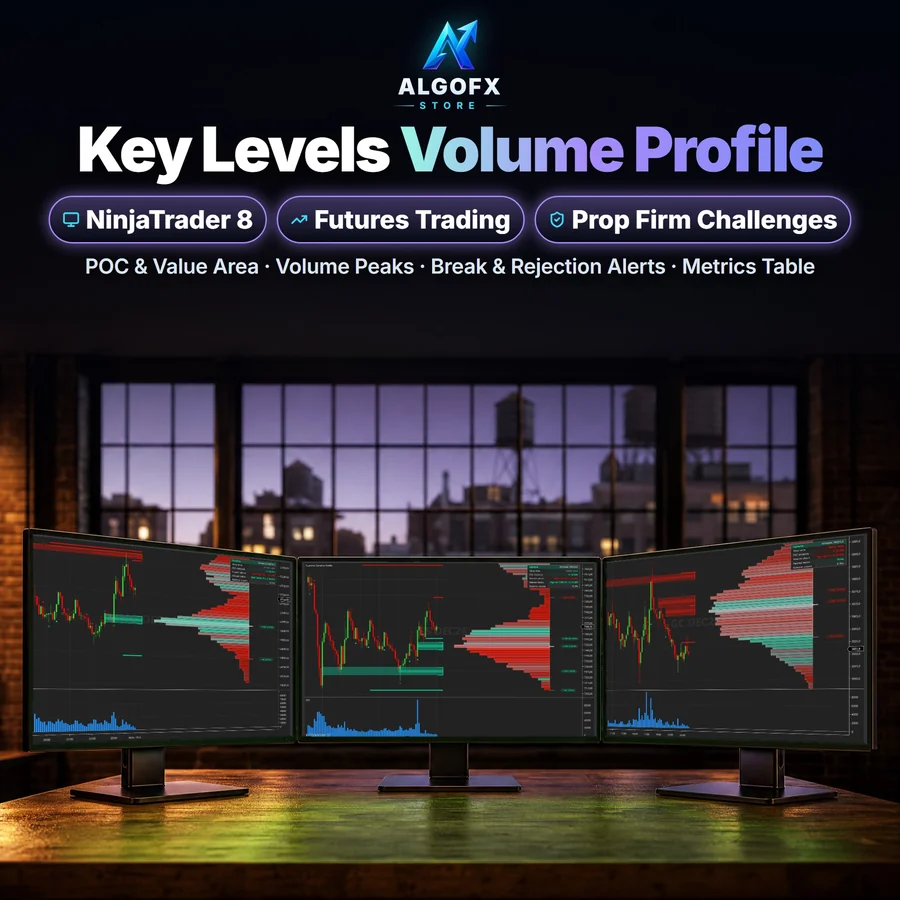
See Supreme Dynamic Profile on a real chart
Press play; use the full-screen button to see every detail.
This video shows the same indicator on another charting platform; the NinjaTrader 8 edition sold here runs in NinjaTrader 8's own chart and settings windows. · 4:31 · Plays from YouTube when you press play (YouTube then sets its own cookies; see Privacy).
On futures, the levels that matter are where the contracts traded
Many futures traders still draw support and resistance at the highs and lows that caught their eye. Those lines show where price turned once, not where the contracts actually changed hands. On a fast MNQ or ES chart, a level drawn from memory is also redrawn every session, so the reference keeps moving.
A volume profile shows where the business happened, but reading one by hand brings its own daily judgement calls: where the profile starts, which bulge counts as a peak, whether a level still matters after price closed through it, and whether the last bar was a rejection or the start of a break.
Supreme Dynamic Profile settles each of those questions with a rule you can see in the Indicators window. The window, the rows, the value area, the peaks, how long a level lives and what counts as a break, rejection or retest are fixed, so the same chart is read the same way every session.
What Supreme Dynamic Profile draws, and what each mark means
Read from the shipped NinjaScript edition.
| What you see | What it means |
|---|---|
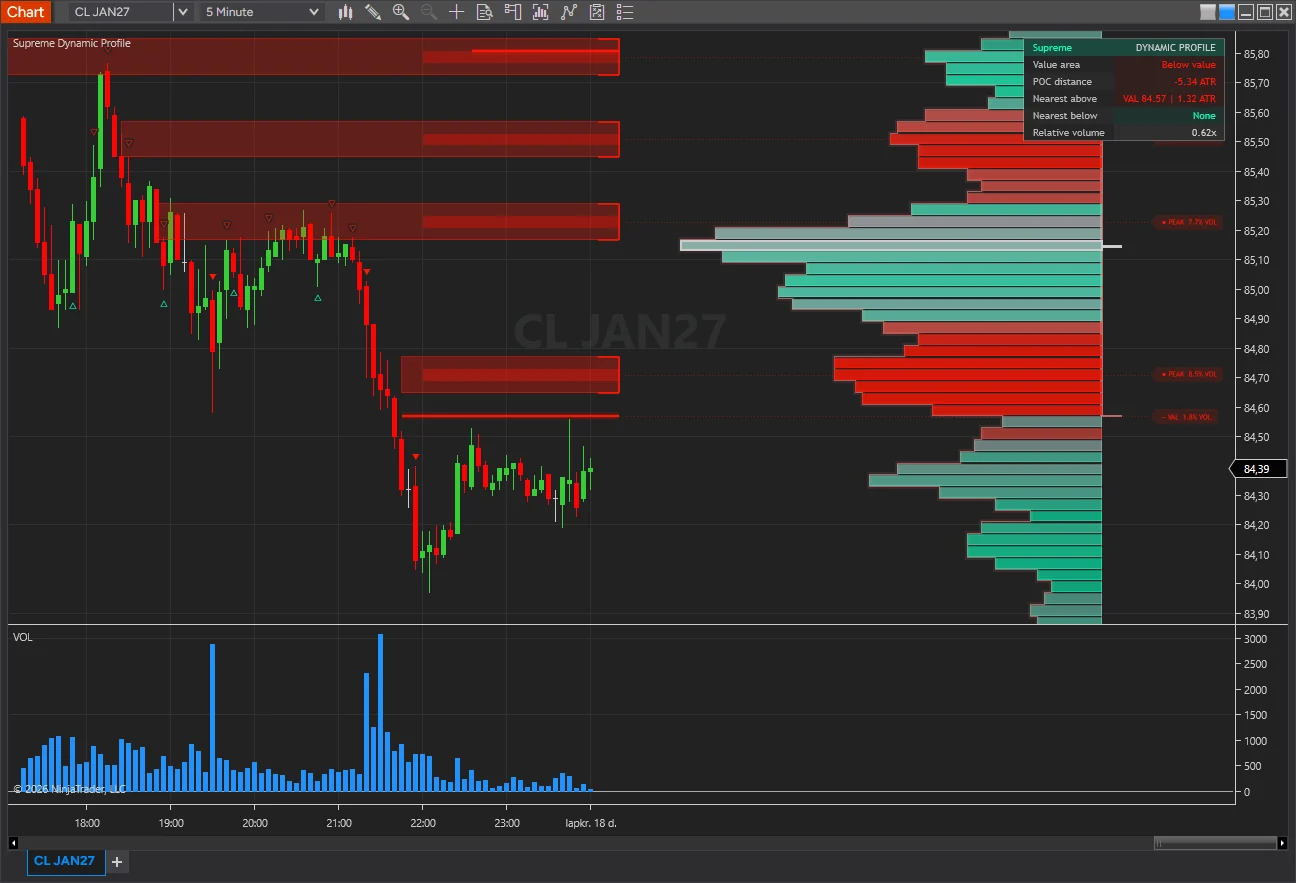
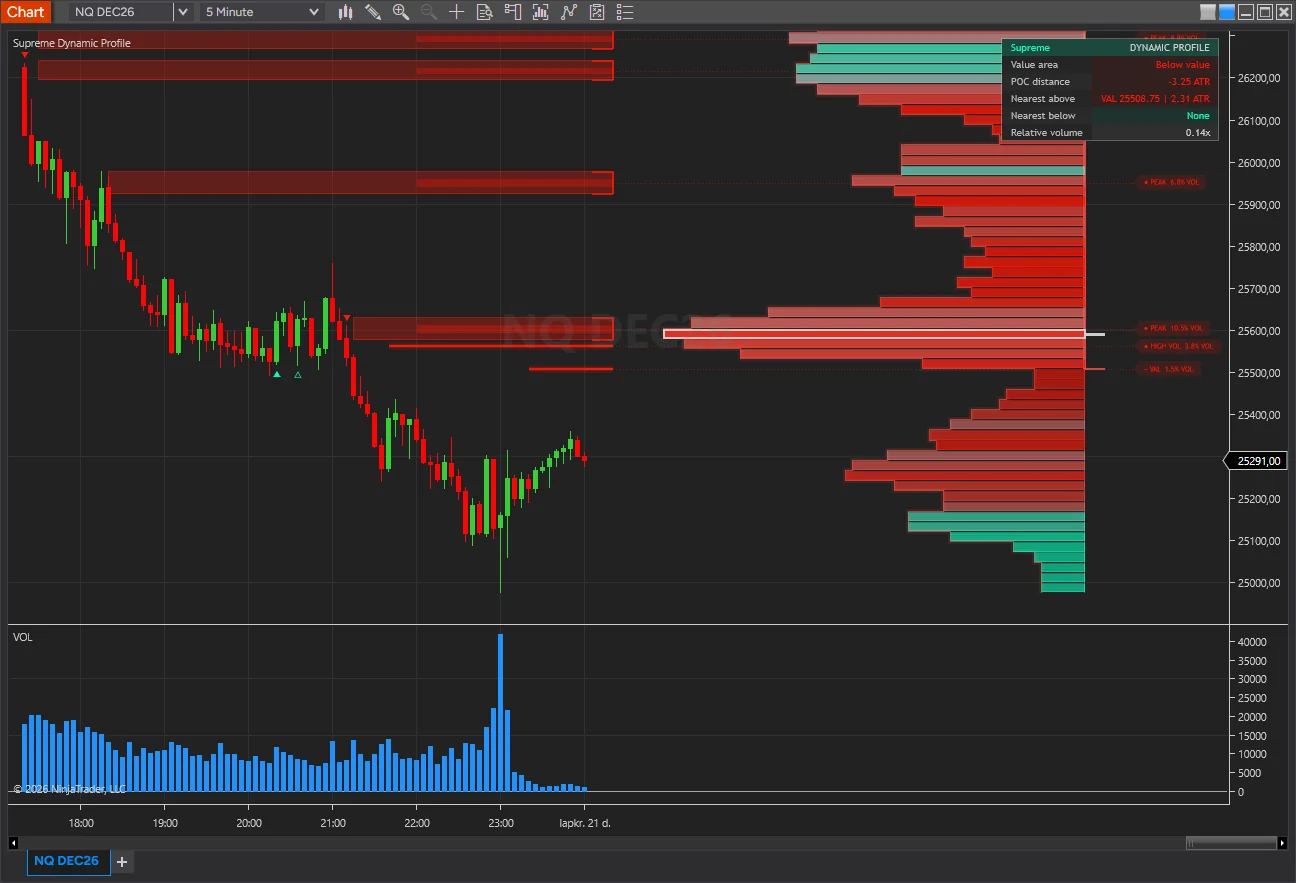
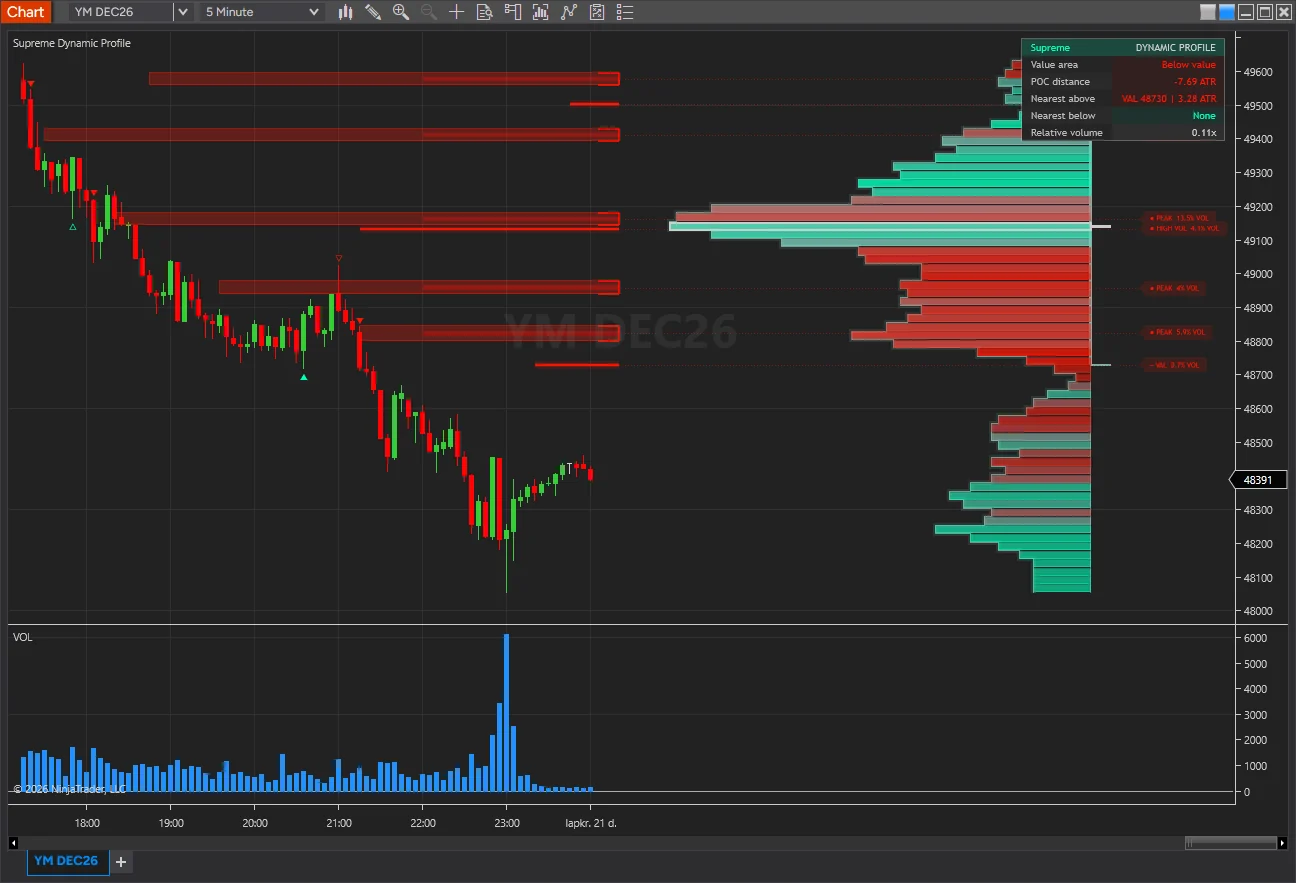
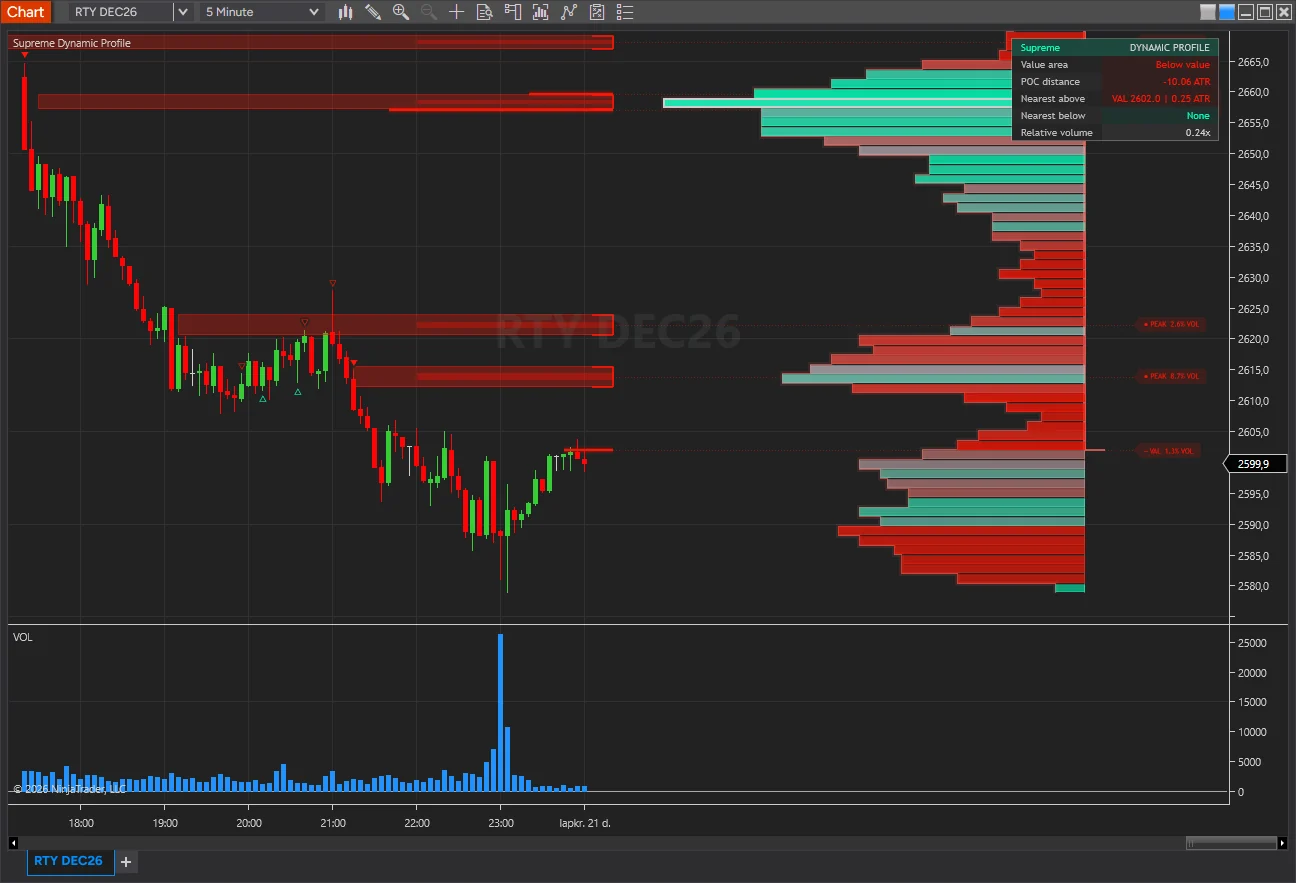
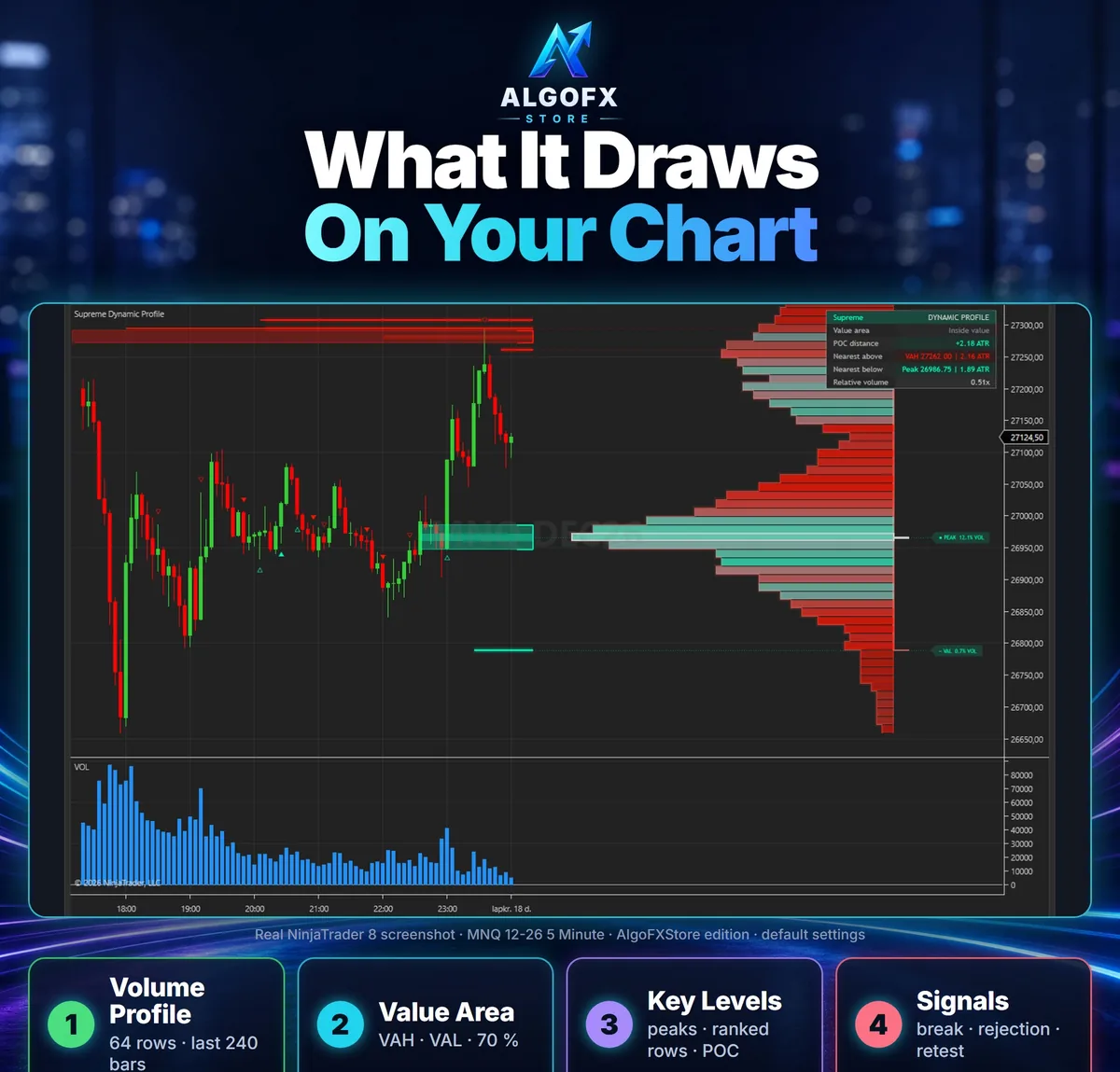
| Horizontal histogram right of the price | The latest volume profile (last 240 bars), rows tinted by estimated up / down volume. |
| Shaded band '● PEAK 17.7% VOL' | A volume peak kept as a zone; the label is its share of the profile's volume when it was created. |
| Lines '─ VAH' / '─ VAL' | Top and bottom of the value area (70 % of the volume). |
| Green level / red level / grey level | A bar closed above it / below it / not yet closed outside it. |
| Filled ▲ / ▼ under / over a bar | Bullish / bearish break: the bar closed through a level. |
| Hollow △ / ▽ | Rejection: price touched a level and closed back on its side. |
| ◆ | Retest of a broken level (needs Stop Extending On Break off). |
| Table top right | Price vs value area, distance to the POC in ATR, nearest level above and below, relative volume. |
How the profile, levels and markers are built
The default Calculate setting is On bar close: one calculation per closed bar. Under On each tick or On price change the forming bar is only previewed and creates no level, signal or alert.
- 1
A rolling window of closed bars
With Lookback Mode Fixed the profile covers the last 240 closed bars; Dynamic starts at the latest confirmed swing high or low (Pivot Period 35 bars each side), never more than 240 bars back. The window's range is split into 64 rows and the profile is rebuilt every 5th closed bar, inside the last 2,000 bars of Calculation History.
- 2
Volume spread over each bar's range
Each bar's real contract volume from your connection is spread evenly over the rows the bar covered. A bar that closed up counts as up volume, down as down volume, unchanged half and half; that estimate tints the rows. Use Lower Timeframe (off) spreads volume from smaller bars on second and minute charts.
- 3
POC, value area and nodes
The POC is the row with the most volume; the value area grows out from it until it holds 70 % of the volume, with the VAH on top and the VAL at the bottom. Up to 2 volume peaks become three-row zones, and the highest-volume row that is not already a level becomes HIGH VOL. POC, troughs and low-volume rows are optional.
- 4
Levels with a colour and a life
A level found again by a new profile keeps its original price and statistics. It is green once a bar closes above it, red once a bar closes below it, grey until either happens. It stops on a close through it, after 500 bars, or when storage is full; up to 8 node levels are drawn, nearest of each family first.
- 5
Three kinds of marker
Break: a bar closes on the other side of a level from where price last closed, a filled up or down triangle. Rejection: after a touch, a close back on the side price came from, a hollow triangle. Retest: within 30 bars of a break, a touch and a close on the break side, a diamond; it needs Stop Extending On Break off.
- 6
Filters before a marker counts
A marker is accepted only on node levels at the default Signal Levels = Nodes, at least 3 bars after that level's last signal, with any Minimum RVOL met (0 = off), and never on the bar that created the level. At most one bullish and one bearish marker per bar: a break wins over a retest, a retest over a rejection.
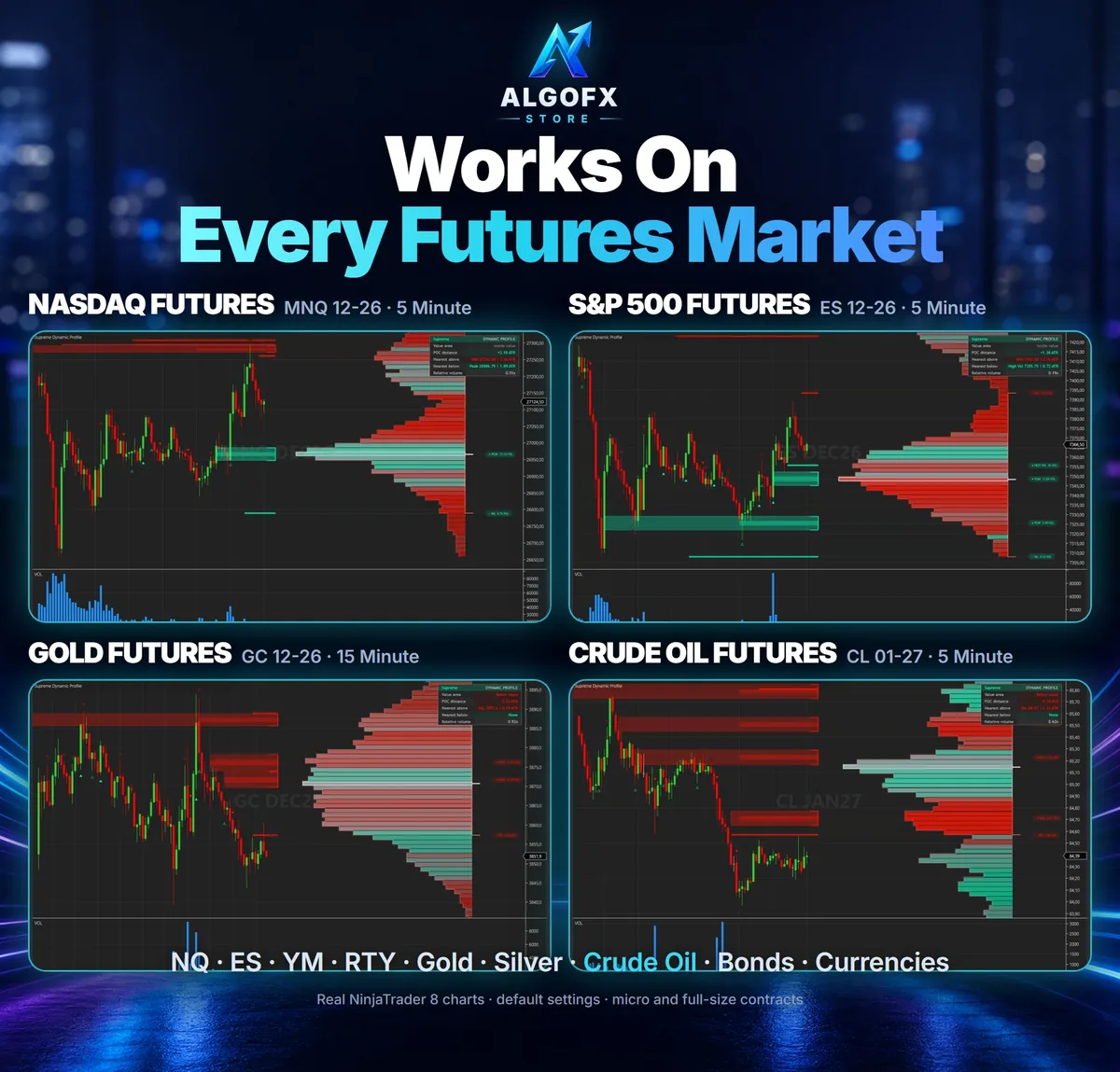
Supreme Dynamic Profile on 12 different markets
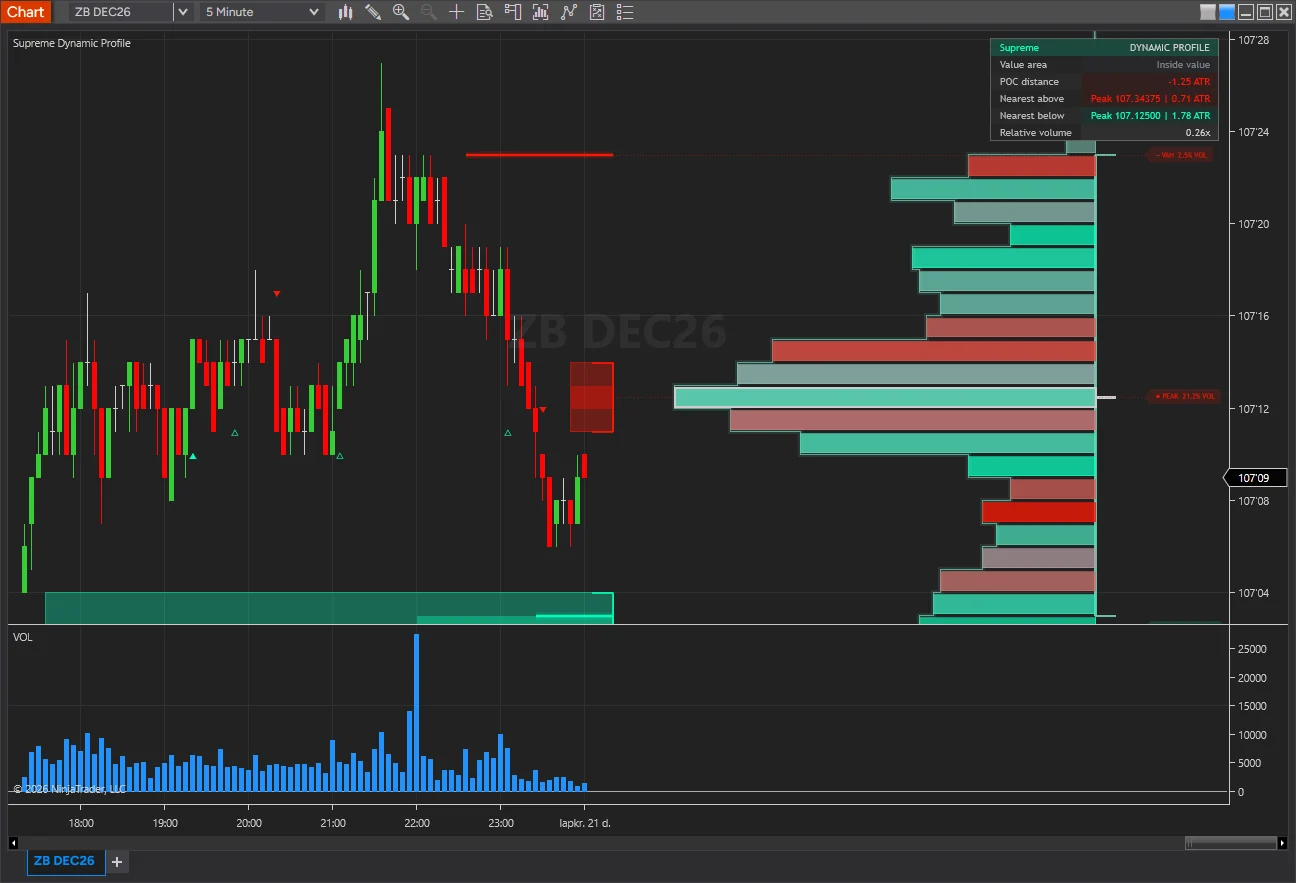
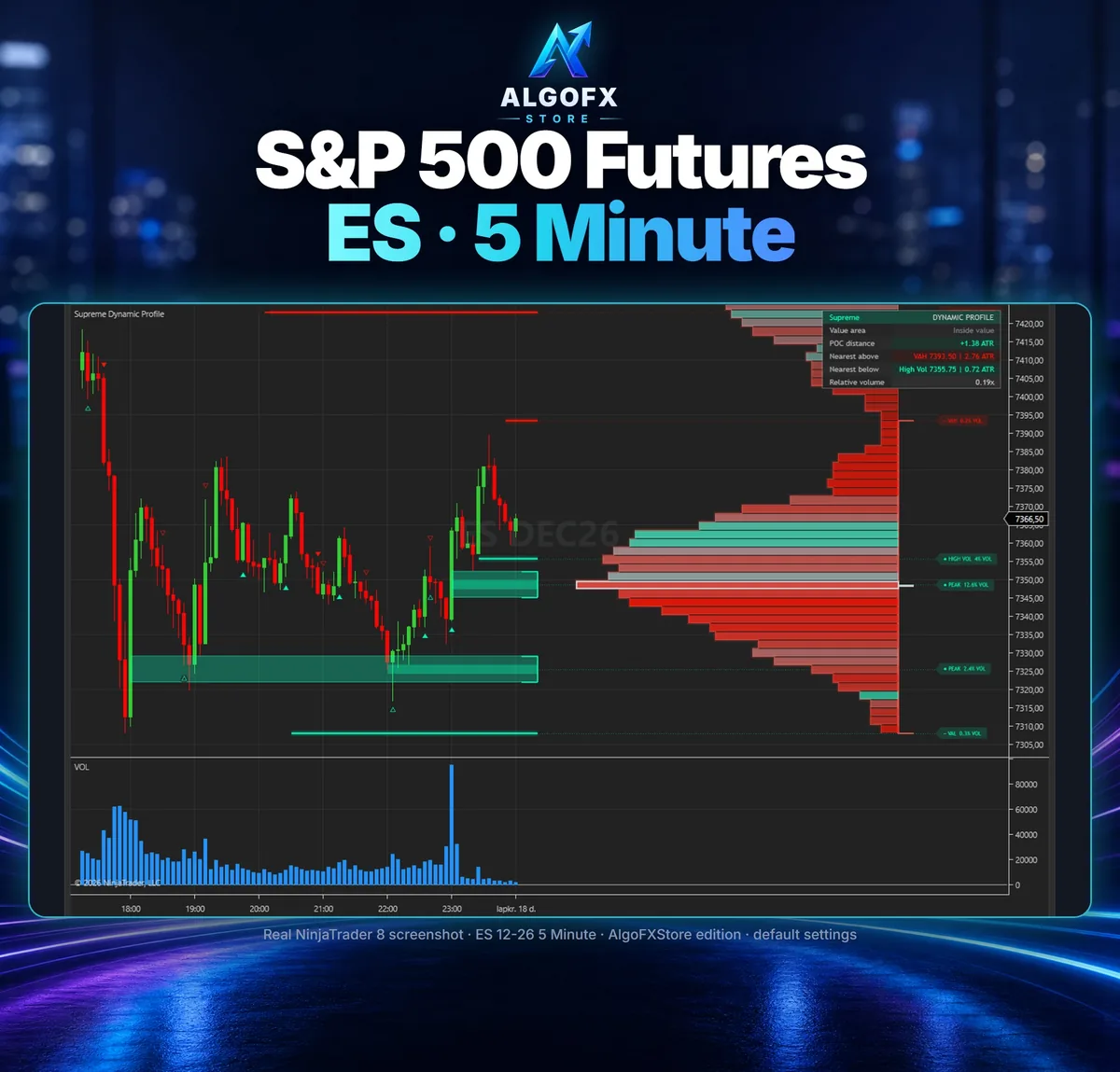
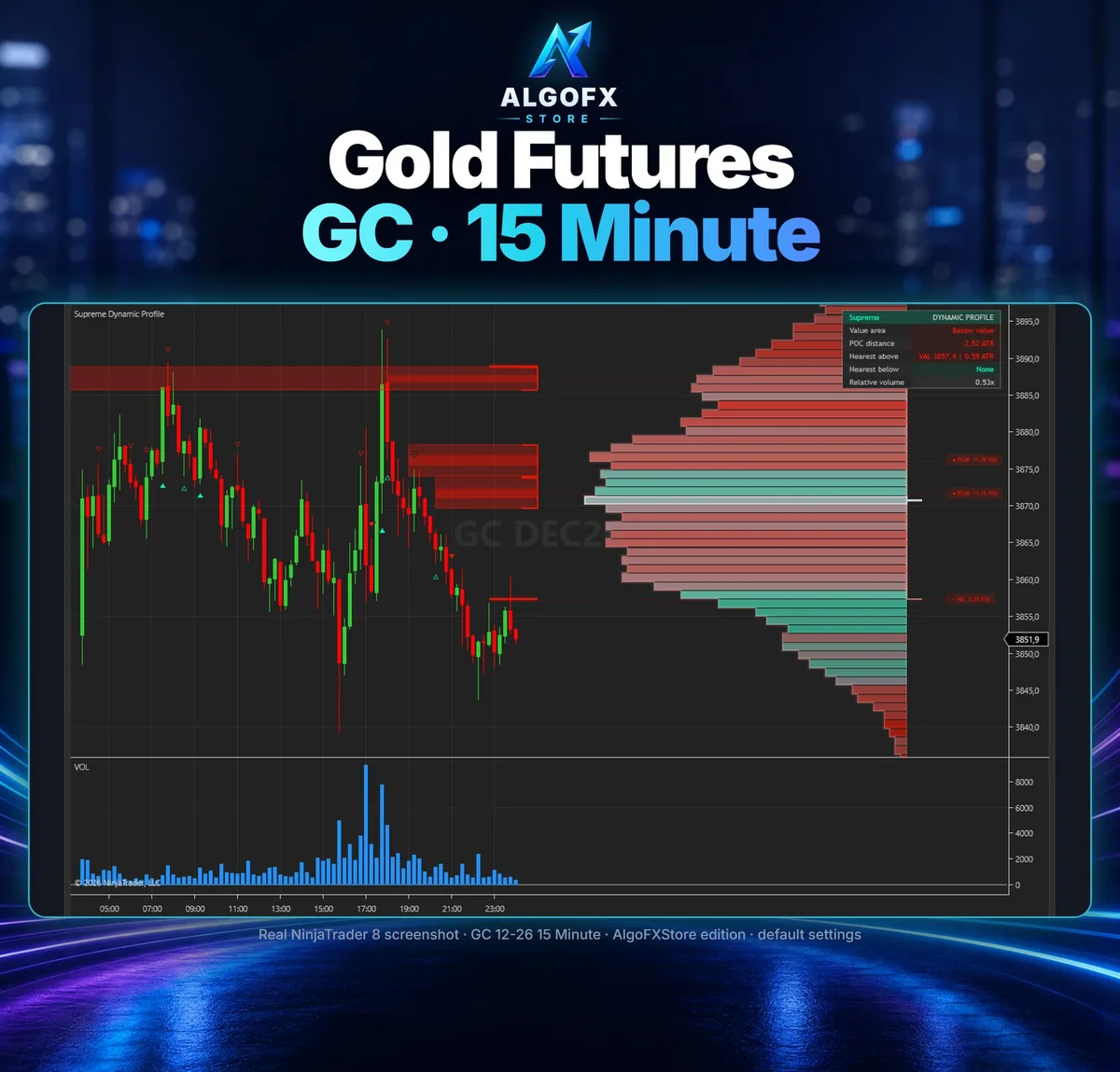
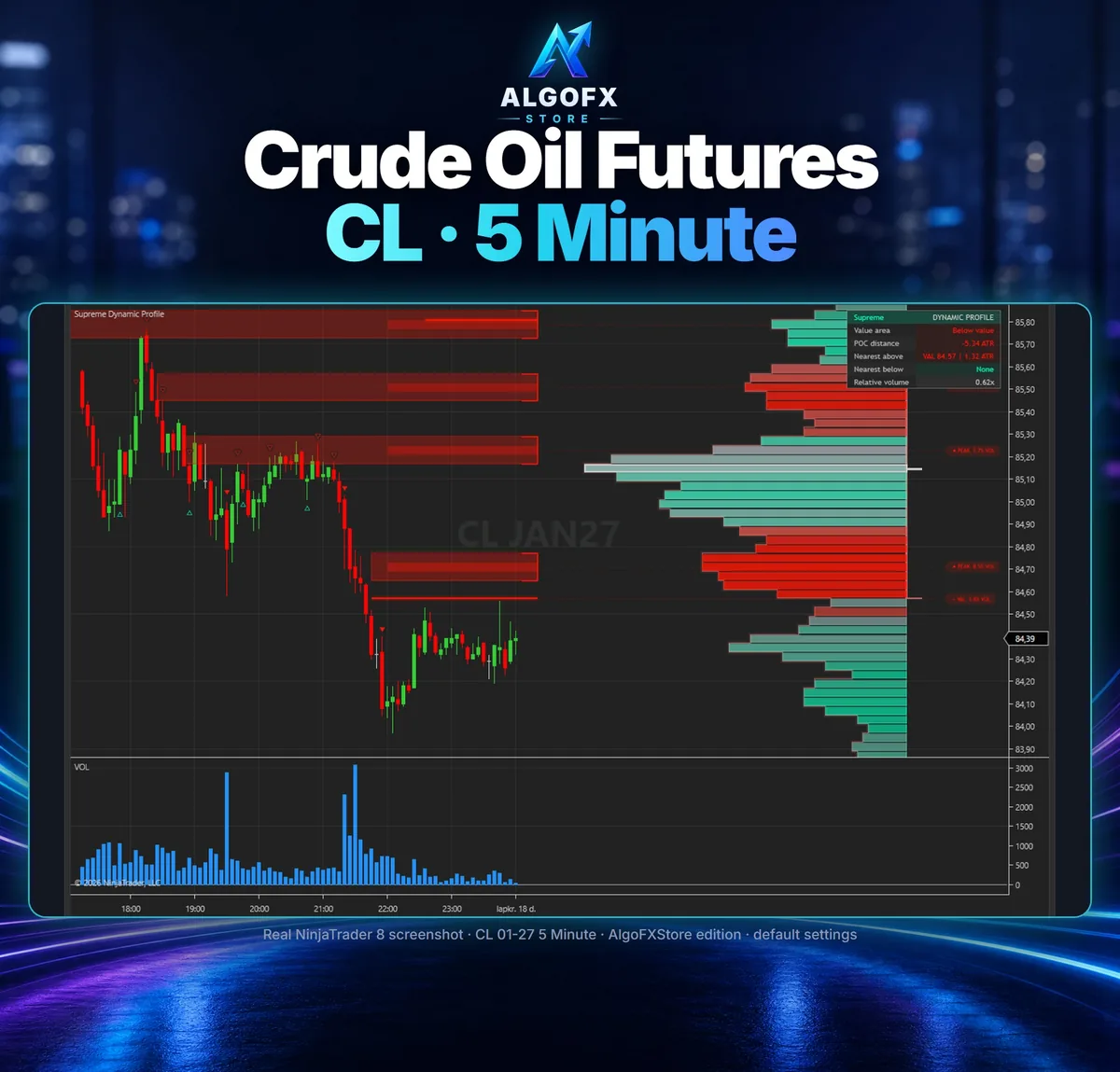
Every chart below is a screenshot of NinjaTrader 8 itself with the shipped Supreme Dynamic Profile AlgoFX attached at its default settings. Forex, metals, indices, energy and crypto, so you can see how it reads each kind of market. They show what the indicator draws; they are not trading results. Tap or click any chart to open it full size.
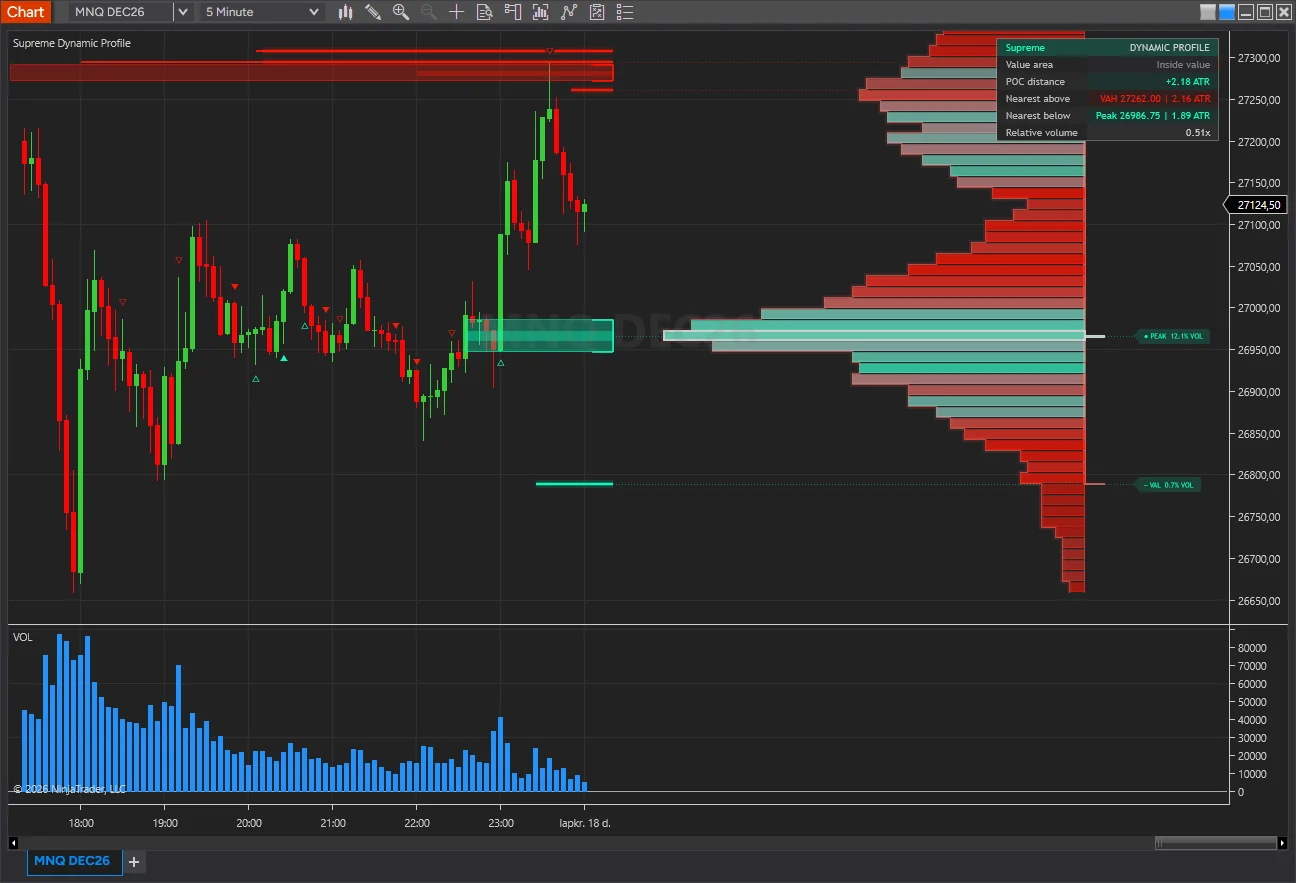
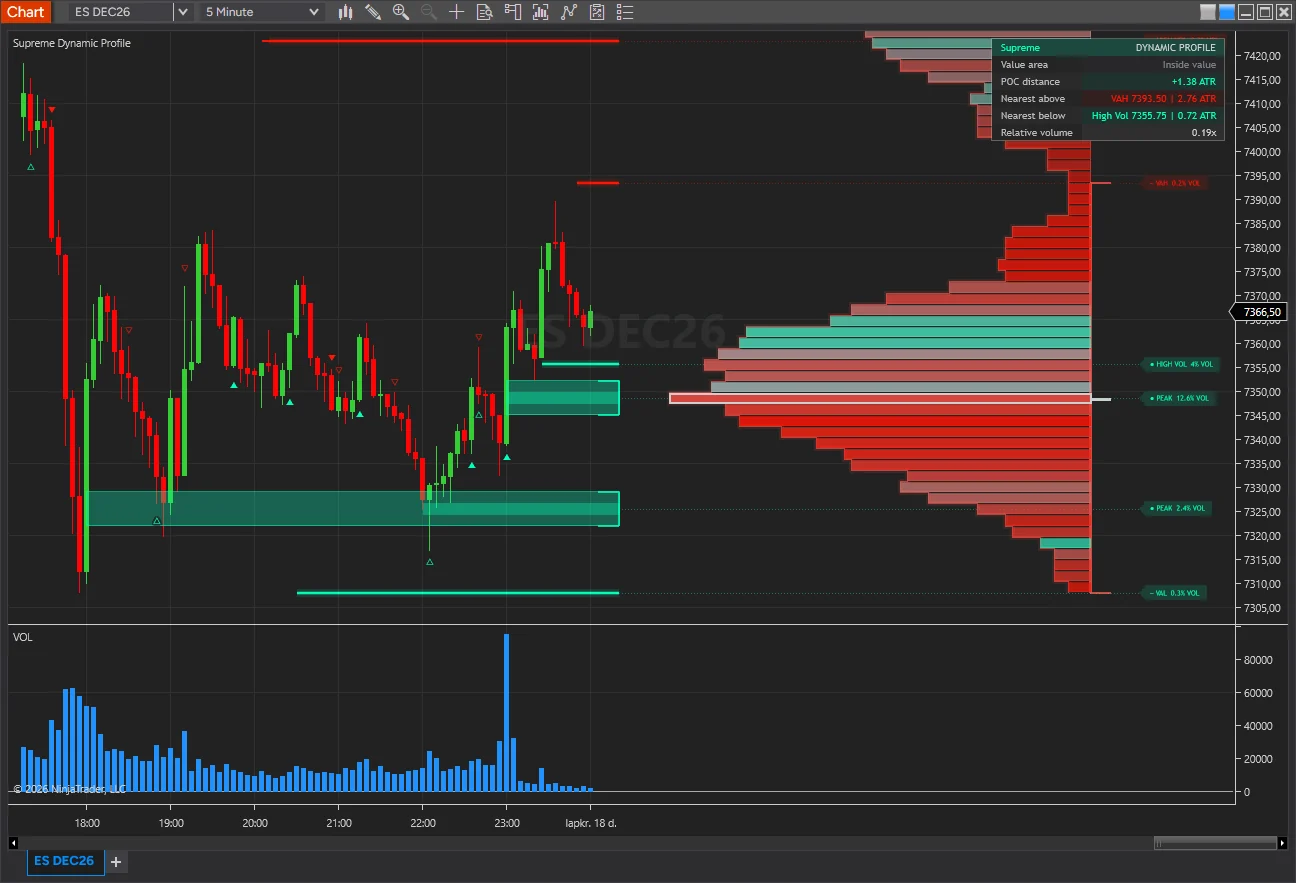
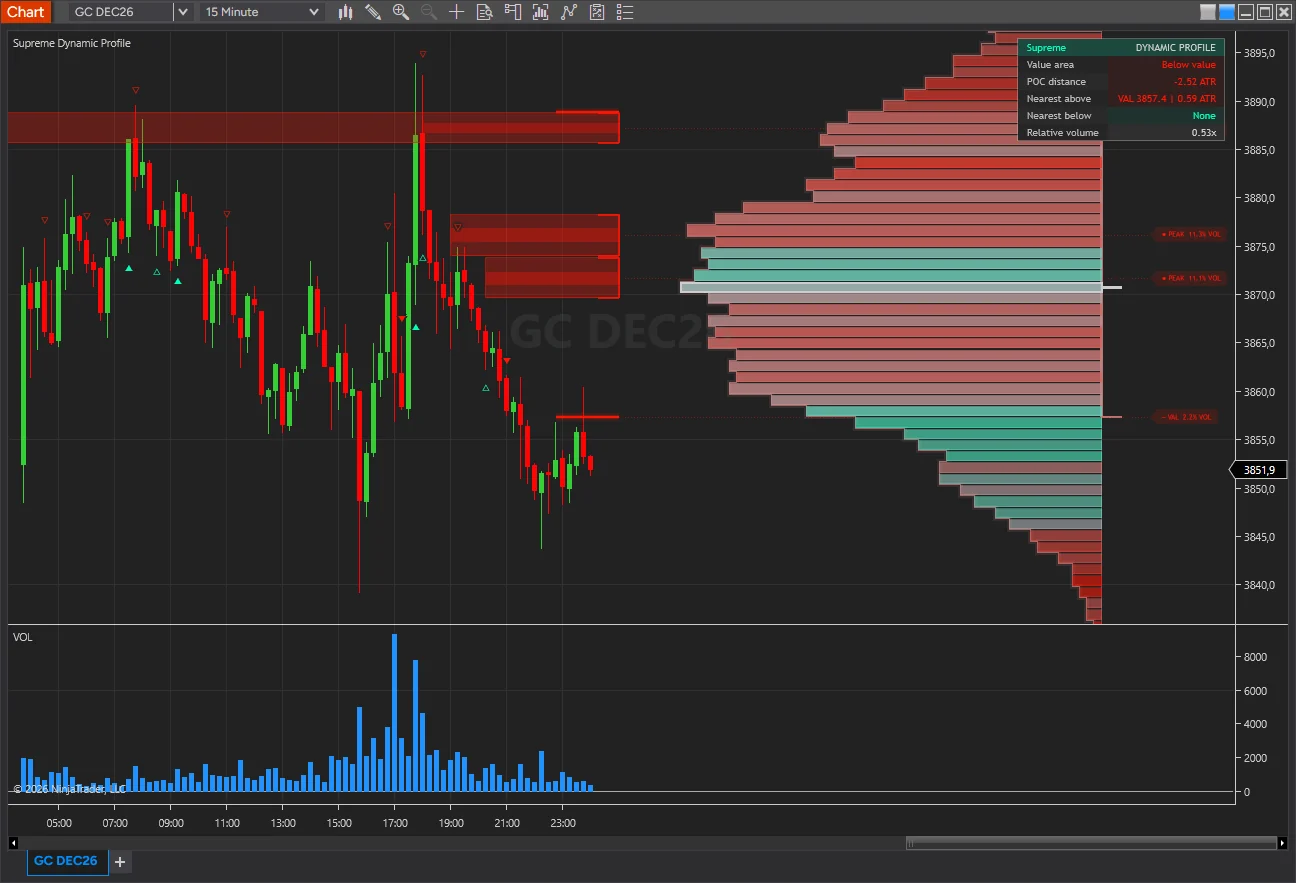
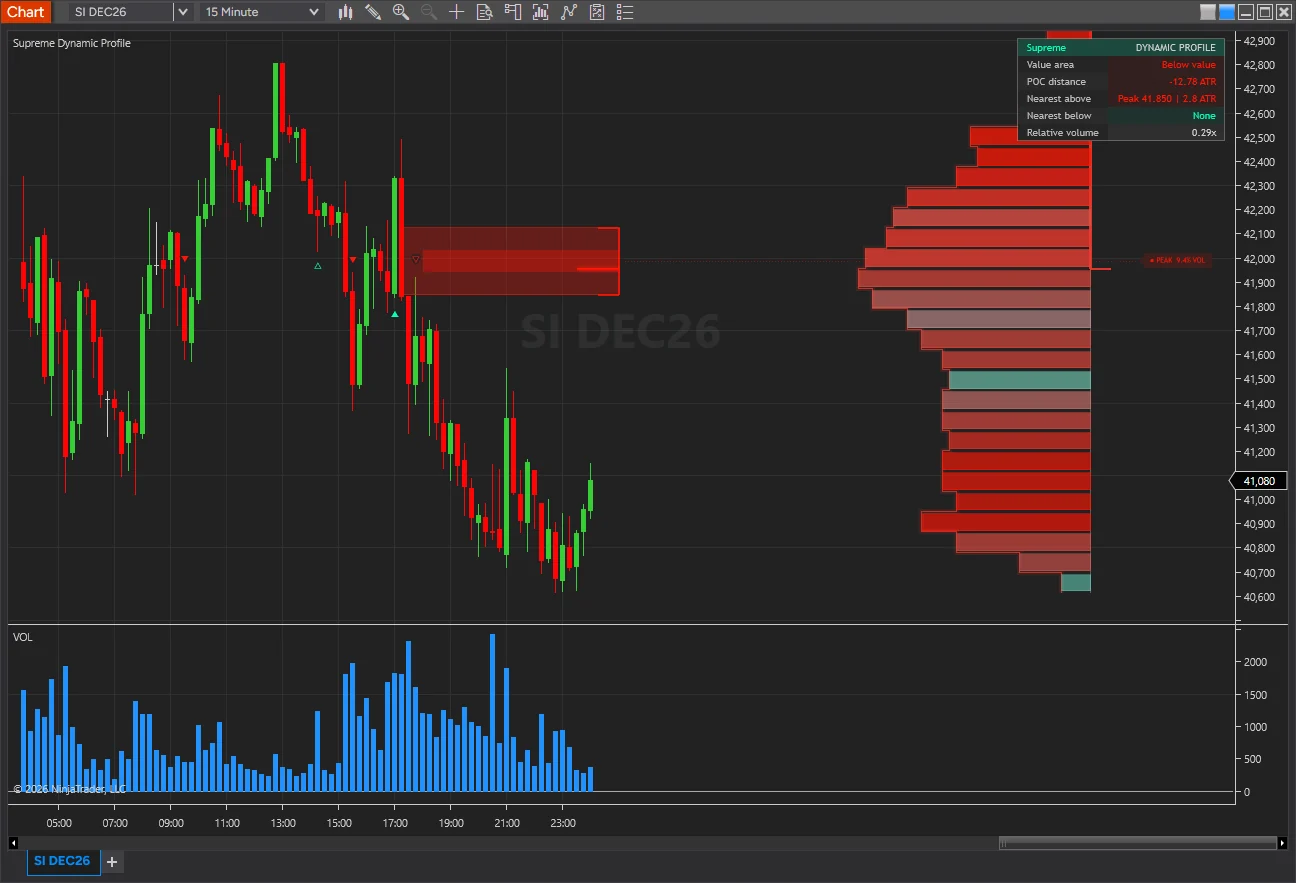
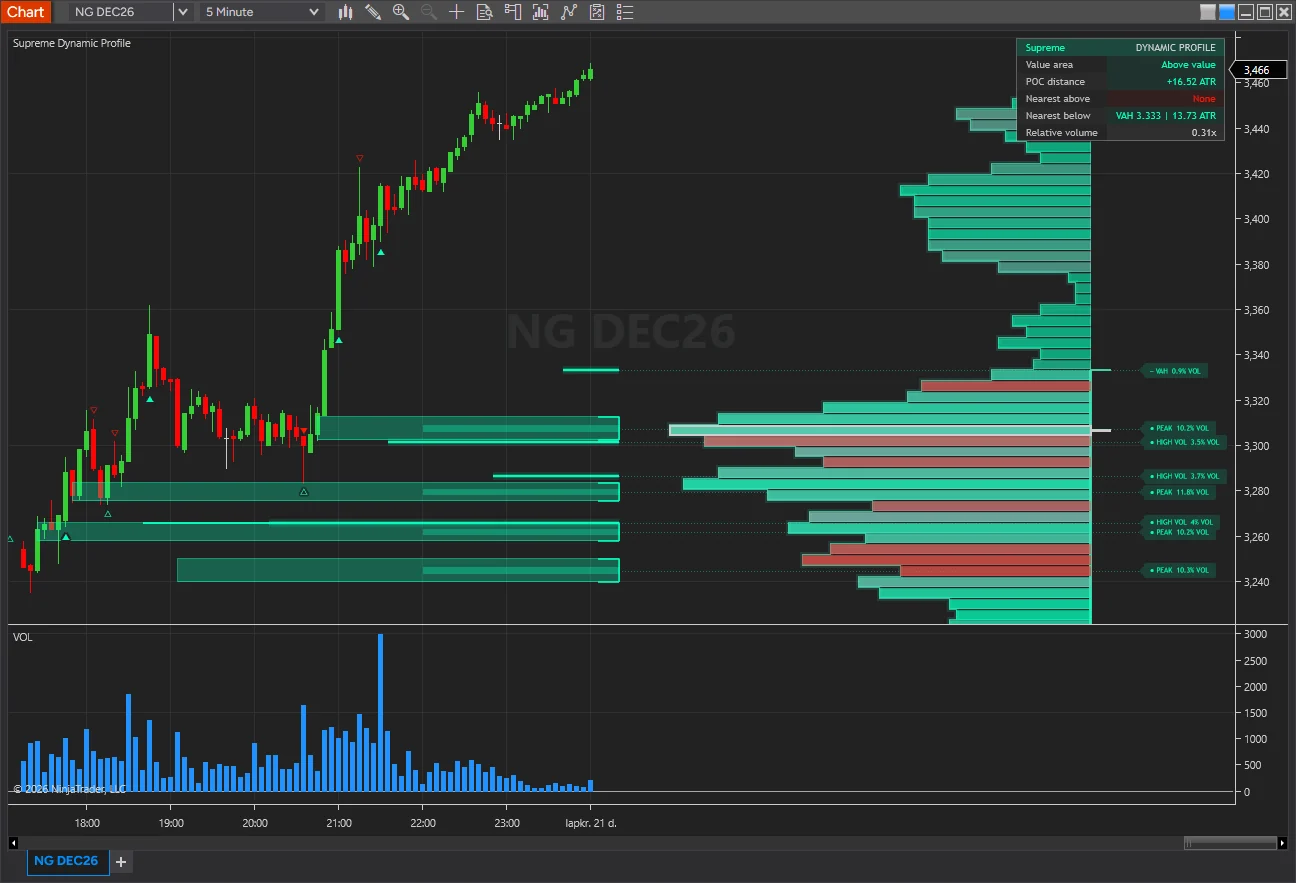
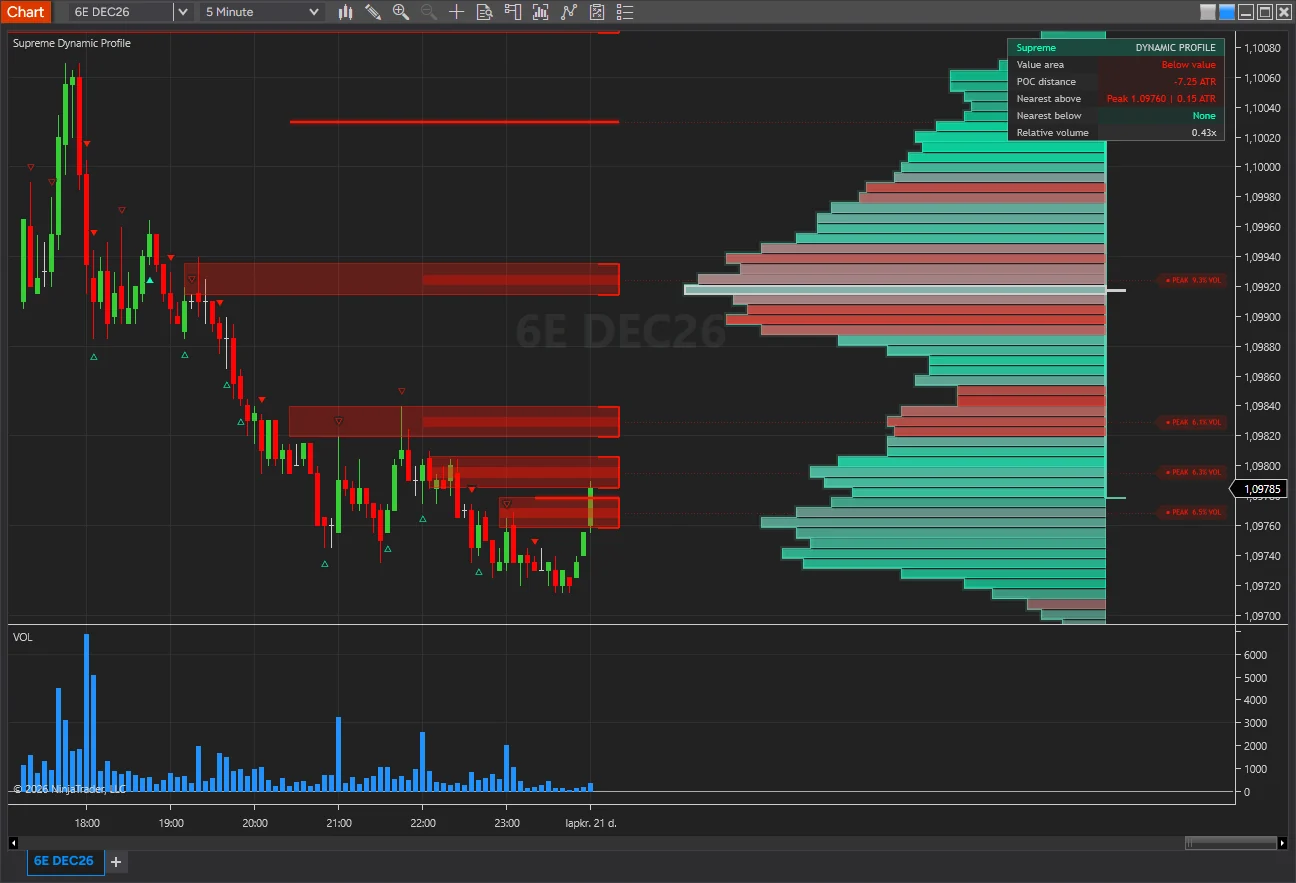
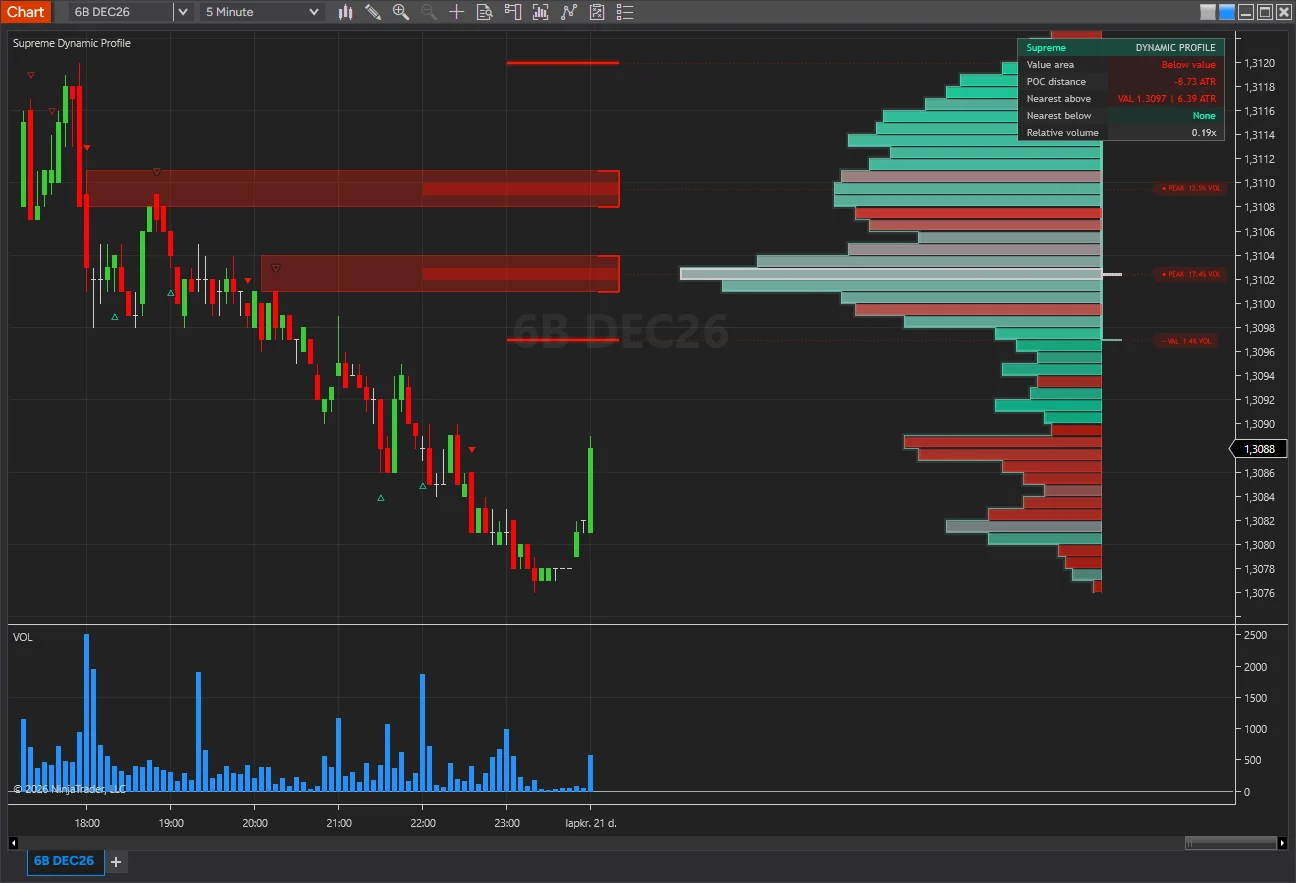
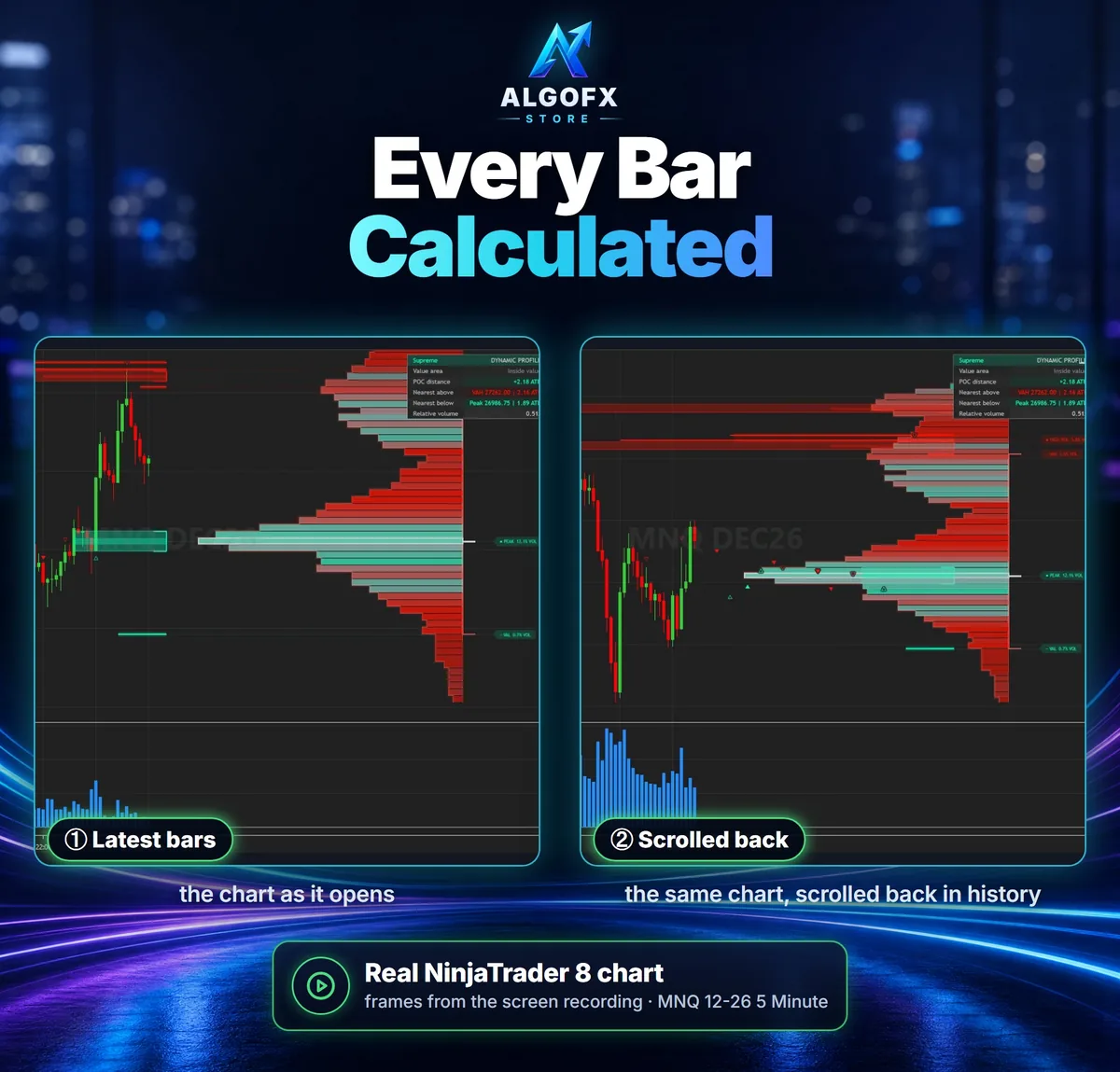
Watch Supreme Dynamic Profile work on a real NinjaTrader 8 chart
A screen recording and frames from the shipped indicator at its default settings, as the chart updates. Nothing is edited into the chart.
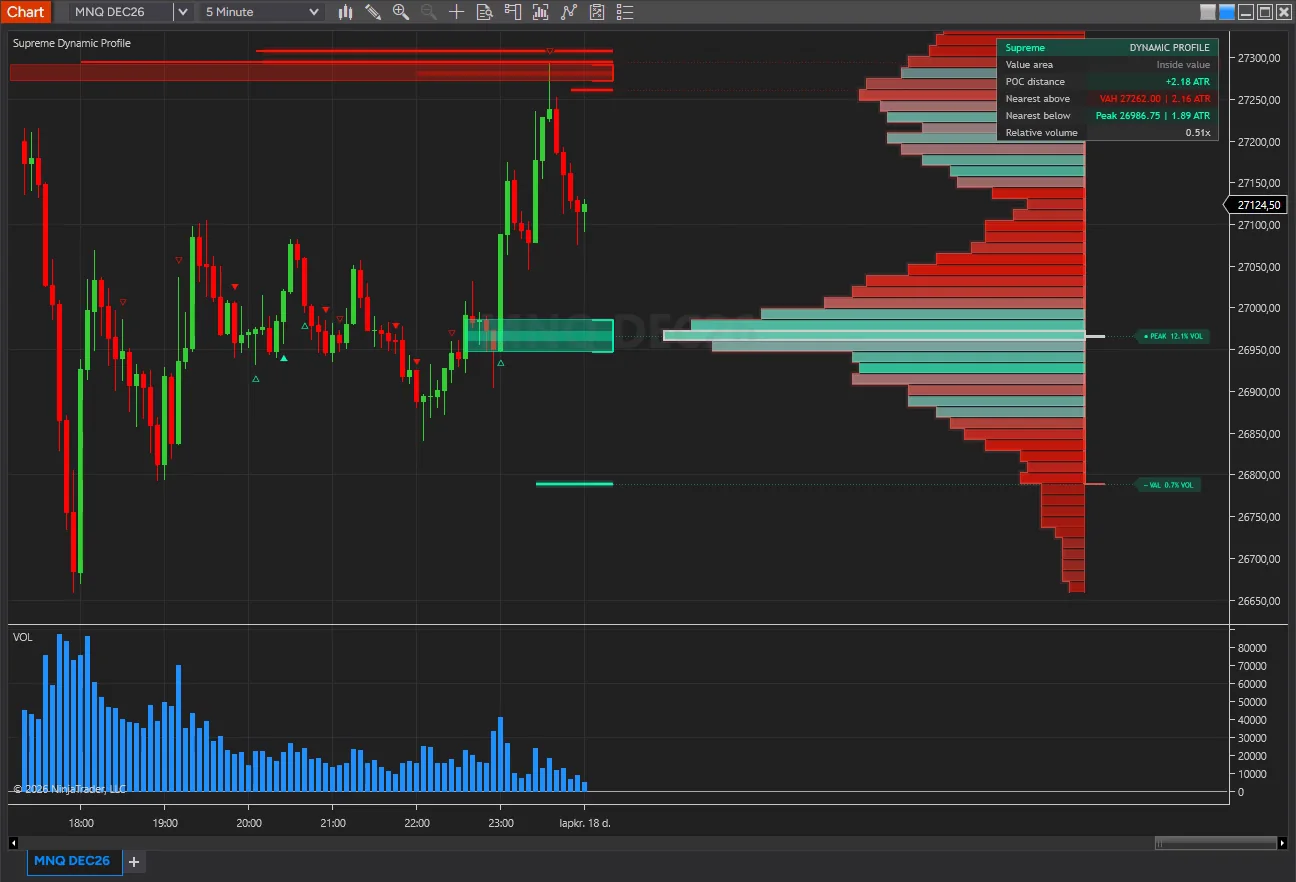
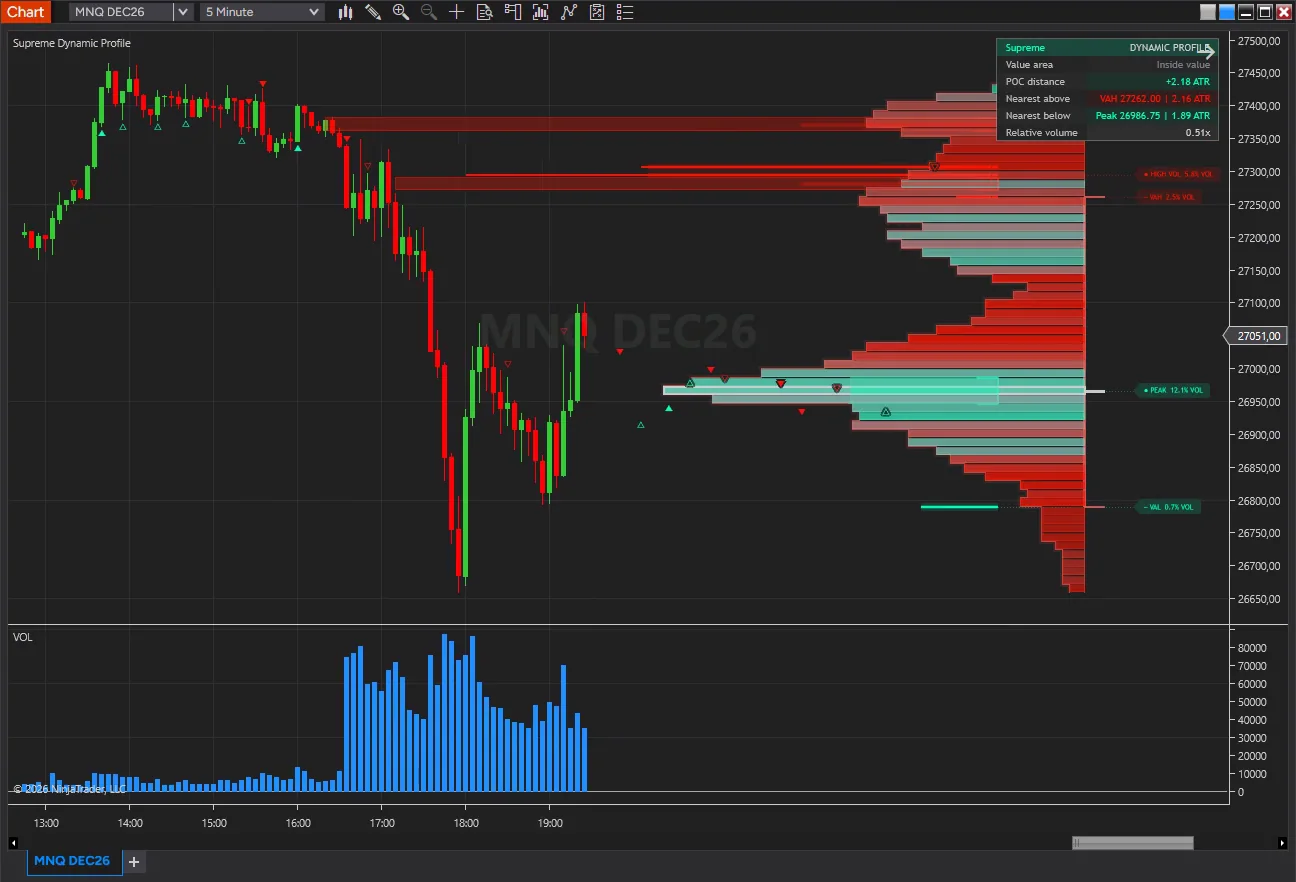
Turning levels into a futures plan
No entry, stop or target is drawn. These steps use the levels and the table to build one, priced in ticks before you place the order.
- 1
Read the table before the open
Check the Value area row: Above value, Inside value or Below value. Note the POC distance and the Nearest above and Nearest below rows with their prices and ATR distances. Mark the two or three levels closest to price; those are the places where a marker this session matters.
- 2
Take the rejection that fits value
Prefer bullish rejections at a green zone or HIGH VOL line under price while price is above value, and bearish rejections at red levels above while below value. Inside value, the VAH and VAL edges are where rotations turn. Wait for the bar to close: a wick into a zone is not a rejection until the close.
- 3
Put your stop beyond the zone
After a rejection, place your own stop a few ticks beyond the far side of the zone that held; if price closes back through it, the reason for the trade is gone. After a break, the stop goes back on the other side of the broken level. Convert the distance: points divided by tick size gives ticks.
- 4
Use the nearest level as target
The first target is the nearest level in the trade's direction, which the table names in Nearest above or Nearest below. The distance is in ATR; multiply it by the ATR in points to get points. Take the trade only when that distance is clearly larger than your stop distance.
- 5
Size, then place the order
Divide your risk per trade by the risk per contract and round down. If a zone is too wide for even one contract, use the micro, set Zone Radius (Rows) to 0, switch Peak Variant to Lines or raise Profile Resolution. Place the order with an ATM Strategy or a stop order, because the indicator sends nothing to your broker.
- 6
Know when to skip
Skip a marker when the opposite level is closer than your stop, when relative volume is under 1.0x, or just after a major scheduled release, because there is no news filter. Skip plans into the session close: a marker on the final bar only appears at the reopen and its alert is normally dropped.
6 rows that read the market for you
The on-chart dashboard, row by row.
- Value area | Above value / Inside value / Below value / No volume profile
- POC distance | close's distance to the POC in ATR, + above / - below
- Nearest above | nearest visible level above the close: name, price | distance in ATR (or None)
- Nearest below | the same below
- Relative volume | bar volume / Volume Average, e.g. 1.55x
- Detailed adds: Profile (Fixed/Dynamic | bars | age), Profile volume, Sampling (Chart candles or LTF coverage), Up / down estimate, Active / stored, Last signal
Everything Supreme Dynamic Profile does for you
Real contract volume
The profile uses the volume of your NinjaTrader connection, spread over each bar's range. It is volume at price estimated from bars, not bid/ask data, so no Order Flow+ subscription or tick history is needed.
Decided when the bar closes
Levels, markers and alerts are decided on closed bars and markers stay on their bar. A live MNQ 1 Minute run on each tick, across the switch from history to live bars, matched the closed-bar replay with 0 mismatches.
Levels labelled with their volume
Labels such as PEAK 17.7% VOL, VAH 1.5% VOL or HIGH VOL 6.9% VOL give each level's share of the profile's volume at creation. Label Content can show Name, VolumeShare, RowStrength or UpVolume; Label Max is 8.
Support and resistance by colour
Levels turn Bullish Color #00FFBB after a close above and Bearish Color #FF1100 after a close below, grey #787B86 until then. Levels near price are drawn stronger, so the ones that matter now stand out.
A metrics table with ATR distances
Compact rows: Value area, POC distance, Nearest above, Nearest below and Relative volume. Detailed adds the profile window and age, profile volume, sampling, the up/down estimate, active and stored levels and the last signal. Seven positions.
Developing POC, VAH and VAL
Set POC Variant or Value Area Variant to Developing to draw the path of each value as a step line, with no fixed level and no signals. Historical keeps stopped lines on the chart.
Nine alert conditions
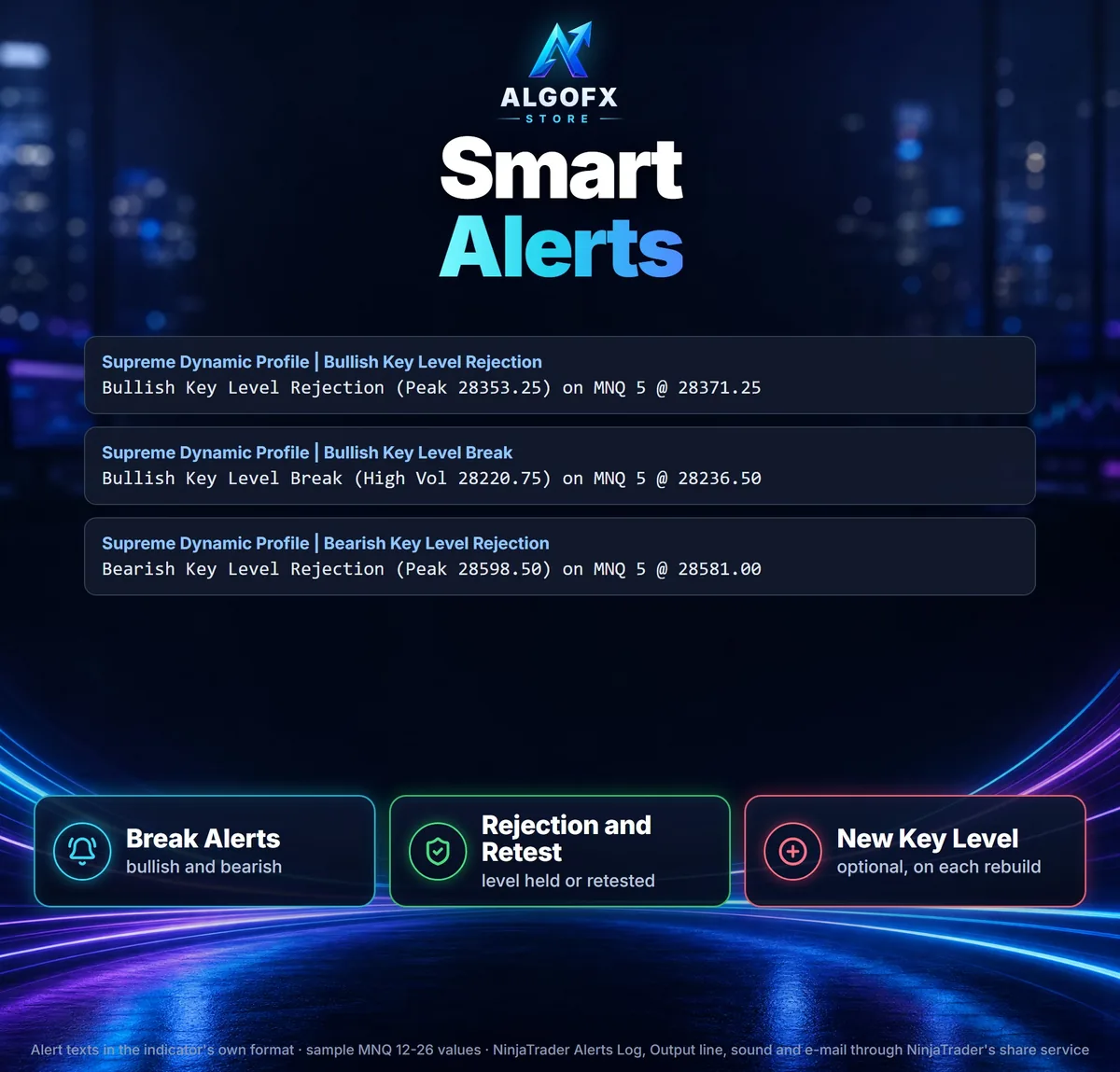
Bullish and bearish break, rejection and retest, a new profile key level, and any bullish or any bearish signal. Every alert is an Alerts Log row; NinjaScript Output line, sound and e-mail are optional.
Readable by a strategy
Ten hidden series (breaks, rejections, retests, a new level, and the developing POC, VAH and VAL) can be read from a NinjaScript strategy or the Market Analyzer.
Supreme Dynamic Profile, feature by feature
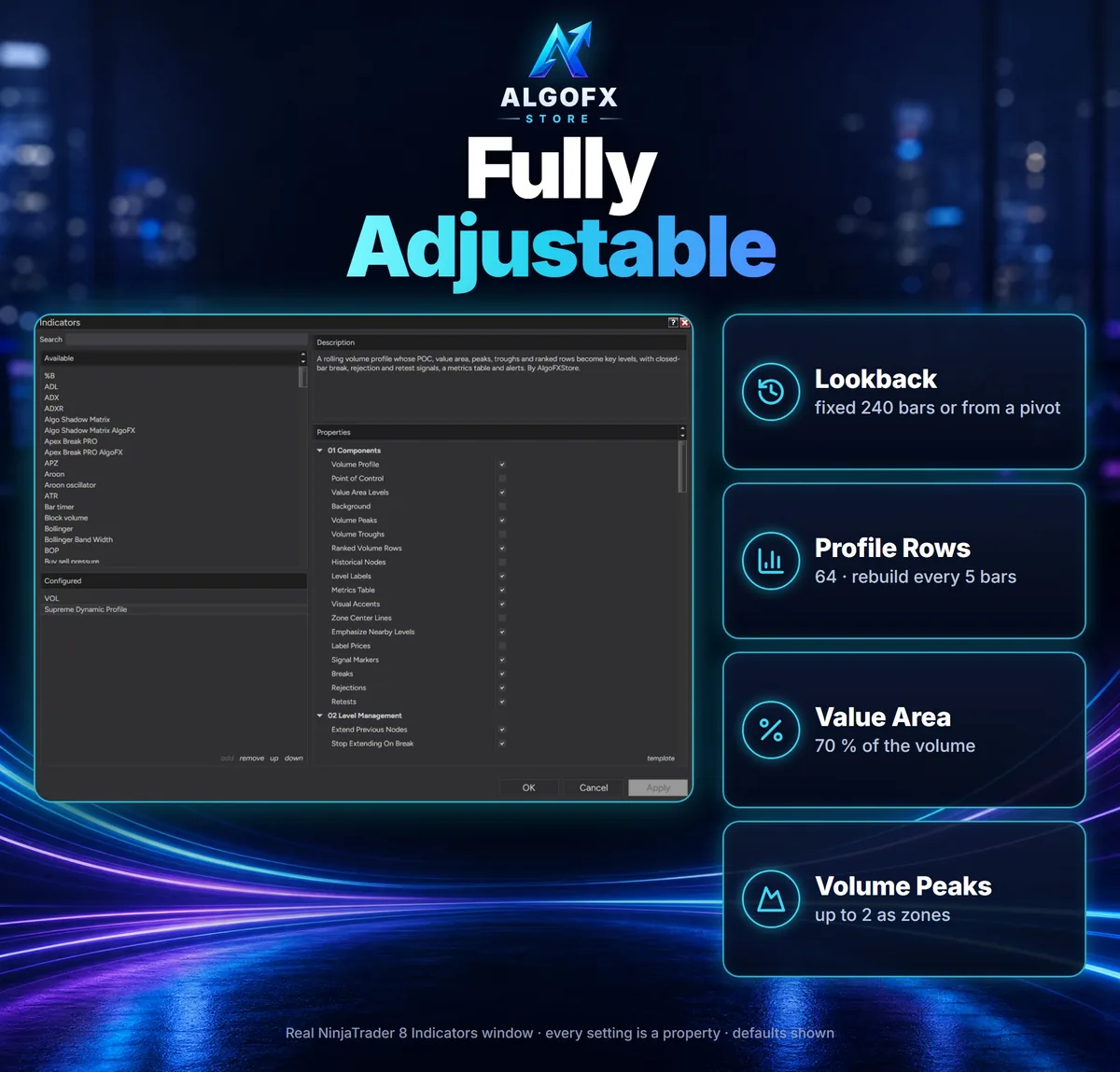
Each picture is built from real platform screenshots of the shipped indicator at its default settings, labelled so you can see what every part does. Tap any picture to open it full size.
How traders put it to work
MNQ or MES on 5 Minute
At the default 240 bars a 5 Minute chart covers about 20 hours with the overnight session loaded, the usual starting point in the manual. With an RTH template and Lookback Limit 78 (6.5 hours times 12 bars) the profile describes the regular session only. Refresh Every N Bars 5 rebuilds every 25 minutes.
1 Minute for the current session
On 1 Minute the 240-bar window covers about 4 hours, so the profile and zones describe the session in progress and are tighter. Stops beyond the zones are smaller in ticks, and Minimum RVOL helps filter markers on thin bars.
Gold on 15 Minute
Gold trades thinner per bar, so the manual suggests 15 Minute, where 240 bars cover about 60 hours and gold builds cleaner peaks. Set Refresh Every N Bars to 3 on 15 Minute so the profile does not lag; 5 would rebuild only every 75 minutes.
Crude oil in the regular session
CL and MCL on 5 Minute suit the regular session. Overnight bars carry far less volume, so Minimum RVOL 1.2 keeps only signals on bars with at least 20 % more volume than the 20-bar average, and it filters the alerts too.
Rotations inside value
When the table reads Inside value, set Signal Levels to AllLevels so the VAH and VAL, and the POC if enabled, also give markers and alerts. Rejections at the value edges become the setups, with the opposite edge as the natural target.
Every setting, with its default
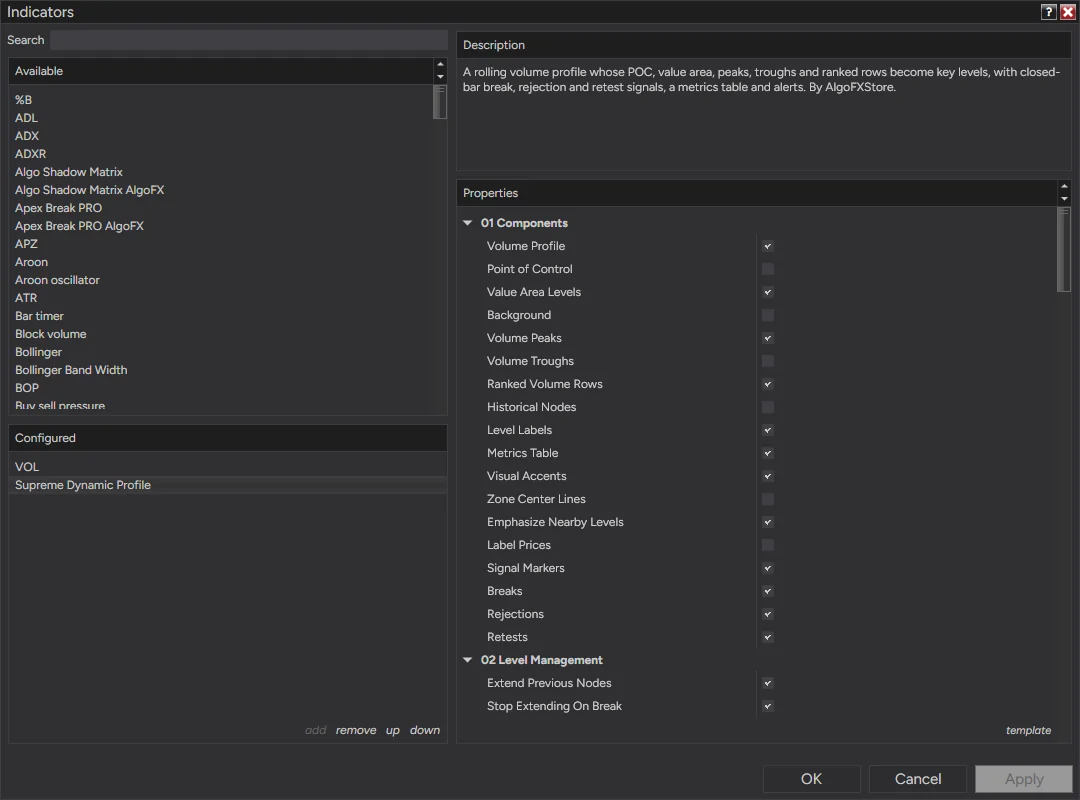
The names are the ones in the NinjaTrader indicator dialog; the defaults are what every chart on this page uses.
| Setting | Default | What it does |
|---|---|---|
| 01 Components: Volume Profile / Value Area Levels / Volume Peaks / Ranked Volume Rows | true | What is drawn and which level families are created. |
| 01 Components: Point of Control / Volume Troughs / Background / Historical Nodes | false | Optional level families and shading. |
| 03 Calculation: Lookback Mode / Lookback Limit | Fixed / 240 | Profile of the last 240 closed bars, or Dynamic from the latest pivot. |
| 03 Calculation: Pivot Period | 35 | Bars each side of a pivot (Dynamic mode). |
| 03 Calculation: Profile Resolution / Refresh Every N Bars | 64 / 5 | Rows of the profile and how often it is rebuilt. |
| 03 Calculation: Value Area (%) | 70 | Share of volume inside the value area. |
| 04 Key Level Variants: Peak Variant / Peak Max | Zones / 2 | How peaks are drawn and how many per profile. |
| 02 Level Management: Stop Extending On Break | true | A broken level stops; set false to see retests. |
| 02 Level Management: Level Expiry Bars / Maximum Stored Levels | 500 / 150 | Level duration and memory. |
| 06 Signal Settings: Signal Levels / Signal Cooldown / Retest Window | Nodes / 3 / 30 | Which levels signal, spacing per level, retest window. |
| 06 Signal Settings: Minimum RVOL / Volume Average | 0 (off) / 20 | Optional relative-volume filter for signals and alerts. |
| 05 Profile Display: Placement / Color Variant / Width / Offset | Right / Directional / 60 / 20 | Where and how the profile is drawn. |
| 07 Appearance: Visible Active Nodes / Level Extension | 8 / 5 | How many node levels are drawn and how far they extend. |
| 07 Appearance: Bullish / Bearish / Neutral Color | #00FFBB / #FF1100 / #787B86 | Level, signal and volume colours. |
| 08 Label Settings: Label Content / Label Max | VolumeShare / 8 | Level labels. |
| 09 Metrics Table: Table Variant / Position | Compact / TopRight | Metrics table. |
| 10 Advanced Calculation: Calculation History / Use Lower Timeframe | 2000 / false | History window for levels and signals; optional finer volume placement on second and minute charts. |
| 12 Display: Keep Chart Object Limits / Pin Profile Inside Chart | true / true | Newest 500 of each drawing type; keep the profile inside the chart. |
9 alert events
Alerts can go to the NinjaTrader Alerts Log, a sound and an e-mail (NinjaTrader's e-mail share service must be set up).
- New Profile Key Level
- Bullish Key Level Break
- Bearish Key Level Break
- Bullish Key Level Rejection
- Bearish Key Level Rejection
- Bullish Key Level Retest
- Bearish Key Level Retest
- Any Bullish Key Level Signal
- Any Bearish Key Level Signal
Supreme Dynamic Profile next to the usual options
Where it wins, and where it does not.
| Supreme Dynamic Profile | Typical free volume profile indicator | Reading it by hand | |
|---|---|---|---|
| Levels | VAH, VAL, peak zones and HIGH VOL rows kept as levels that stop on a break or after 500 bars | Often a histogram and a POC only | Lines drawn from memory |
| Reactions at levels | Break, rejection and retest markers on closed bars, with cooldown and RVOL filter | Usually none | Your call on each bar |
| Distance to the next level | Nearest above and below in ATR in the table | Rarely shown | Measured with the ruler |
| Alerts | Nine conditions to the Alerts Log, sound and e-mail | Often none | Only if you watch |
| Cost | One payment | Free | Free, plus your screen time |
| Order flow depth | Volume at price estimated from bars, no bid/ask split | Varies | Depends on your data |
Honest about who this fits
A good fit if you
- You trade futures such as MNQ, ES, GC or CL in NinjaTrader 8 Desktop and want levels from where the contracts traded.
- You want breaks, rejections and retests of those levels marked on the closed bar instead of judged in the moment.
- You set your own entries and stops and want the nearest level on each side measured for you.
- You use the Alerts Log or e-mail to follow several instruments without watching every bar.
- You trade value area and volume nodes, or want to learn them with every level named and measured.
Not for you if you
- Traders who want BUY and SELL entries with a stop and target drawn: it draws key levels and markers only.
- Anyone who needs bid/ask volume or a footprint: the volume at price is estimated from bars.
- Traders who want fixed levels that never go away: the profile rebuilds every 5 bars and broken or expired levels stop.
- Users of NinjaTrader Web, mobile or NinjaTrader 8.0: it needs NinjaTrader 8.1.x Desktop.
One Add-On, one manual, imported in a minute
- 1NinjaScript Add-OnSupremeDynamicProfileAlgoFX.zip (0.2 MB). Import it in NinjaTrader 8 and it appears as “Supreme Dynamic Profile AlgoFX”.
- 17Page PDF manualInstalling, every setting with its default, reading the signals, the levels, the dashboard, the alerts.
- 18Setting groupsEvery one explained above, with the defaults the charts use.
- 9Alert eventsYou choose which ones are on in the settings.
- 60Day money-back guaranteeIf it is not for you, request a full refund within 60 days through your Digistore24 order e-mail.
Install in four steps
- Download the zip from the page Digistore24 sends you to after checkout. Keep it zipped.
- NinjaTrader 8: Control Center, Tools, Import, NinjaScript Add-On, and choose the zip.
- Open a chart, open Indicators, and add “Supreme Dynamic Profile AlgoFX”.
- Read the manual's quick start; the defaults are the settings shown on this page.

Kestutis Balciunas
AlgoFXStore · chart indicators for MetaTrader, TradingView, cTrader and NinjaTrader
Kestutis Balciunas builds and publishes chart indicators under the AlgoFXStore name for MetaTrader 4 and 5, TradingView, cTrader and NinjaTrader 8. Every product page shows what the indicator draws on real charts, and every number on it comes from the shipped build.
The charts on this page were captured in NinjaTrader 8 from the shipped Supreme Dynamic Profile AlgoFX at its default settings and are shown unedited.
No get-rich claims and no quoted win rates. Every trade is uncertain, and no indicator changes that. If you want to know whether it suits the way you trade before you buy, e-mail [email protected] and you will get a straight answer.
One price, one payment
- The NinjaScript Add-On for NinjaTrader 8 and the 17-page PDF manual
- Delivered as a digital download: the Add-On zip and the PDF manual on your download page
- Return period: 60 days, with a full refund if it is not for you
- Free updates to the current version on the same download page
60-day money-back guarantee. Install it, run it on your own charts and read the manual. If Supreme Dynamic Profile is not for you within 60 days of purchase, request a full refund from Digistore24, no questions asked: use the refund link in your Digistore24 order e-mail or Digistore24's order page digistore24.com/en/cancel-revoke-contract. Digistore24 refunds to your original payment method. It is a digital download: right after checkout you land on your download page, and the link to it is also in your Digistore24 order e-mail.
Also by Kestutis Balciunas: Supreme Dynamic Profile for MT4 and MT5.
About the levels and markers
Does it repaint, or do markers change after they print?
No. Every marker is decided when its bar closes and stays on that bar. The newest profile, its labels and the table describe the latest bars and move with them by design, and under On each tick the level colours, labels and table follow the forming bar. A chart reloaded with a different Days to load can show different earliest levels, because the rebuild grid starts from the first loaded bar.
Why are there no retest markers?
At the default Stop Extending On Break = true, a close through a level ends it, so there is nothing left to retest. Switch it off and broken levels stay active; a touch within 30 bars with a close on the break side then prints a diamond and the retest alerts fire.
Price broke the VAL and nothing printed. Why?
At Signal Levels = Nodes the value area and POC give no signals or alerts; only peaks, troughs and ranked rows do. Set Signal Levels to AllLevels to include them. Also check the 3-bar cooldown and Minimum RVOL.
Does a higher volume share mean a stronger level?
It means more trading happened there in that window. It is a description of the profile when the level was created, not a probability, and the figure does not change afterwards.
Why do my levels differ from another chart?
Bars and volume differ by data feed, trading hours template and Days to load. With the ETH template the overnight bars and their volume count; with an RTH template they do not. Nothing resets at the session open, so the profile always covers the last bars that exist on that chart.
Settings and futures use
Which chart period should I start with?
5 Minute is a good start on index futures, 1 Minute for the current session, 15 Minute for gold or a longer view. Load at least 2,500 bars with Days to load so the 2,000-bar Calculation History is full.
A zone is too wide for my stop. What can I change?
Zone width follows the row size: the 240-bar range divided by 64 rows. Set Zone Radius (Rows) to 0 for one-row zones, switch Peak Variant to Lines for exact prices, or raise Profile Resolution towards 100 for finer rows. Or trade the micro contract.
What does Use Lower Timeframe change?
On second and minute charts it spreads each bar's volume from smaller bars, about the chart period divided by Bar Granularity 5, which places volume more precisely. The Seconds option allows second bars. It is off by default.
Table, alerts and the platform
What does the metrics table show?
The header reads Supreme | DYNAMIC PROFILE. Value area gives Above value, Inside value or Below value. POC distance is the close's distance to the POC in ATR(14), plus above and minus below. Nearest above and below give the level name, price and ATR distance, and Relative volume the bar's volume against its 20-bar average, such as 1.55x.
Where do alerts go, and why did one arrive twice?
Every alert writes a row in the Alerts Log, such as Bullish Key Level Rejection (Peak 28353.25) on MNQ 5 @ 28371.25. Alert Log Line copies it to the NinjaScript Output window, Alert Sound plays Alert2.wav and Alert E-mail uses the Mail share service. An alert arrives twice when an Any switch is on together with its individual switches.
Will a reconnect replay old alerts?
No. Alerts fire in realtime only, once per condition per closed bar, never for the history loaded when you add the indicator and never for a bar that closed more than two bar periods plus five seconds ago. The signal filters apply to alerts; hiding a marker type does not silence its alert.
Does it slow NinjaTrader down?
It works over Calculation History of 2,000 bars and Keep Chart Object Limits holds the newest 500 boxes, lines and labels and the newest 80 markers. If colours look wrong after changing the chart background, reload the chart with F5.
How it works
Will it place trades for me?
No. Supreme Dynamic Profile is an indicator: it draws on the chart and can alert you. It never sends an order.
Which markets and charts does it work on?
NinjaTrader 8.1.x Desktop, any instrument with bars and volume. Time-based charts (second, minute, day and longer) fully; tick, volume, range and Renko charts run (alert age limit at least five minutes there). Use Lower Timeframe on second and minute charts only. The profile needs at least ten closed bars inside Calculation History (2,000); the docs advise at least 2,500 loaded bars (Days to load). The chart's Trading Hours template (ETH or RTH) decides which bars and volume count; nothing resets at a session start. Screenshots of 4 Nov 2026 cover NQ, MNQ, ES, MES, YM, RTY, GC, SI, CL, NG, 6E, ZB on 1-30 minute charts.
Does it work on NinjaTrader 7?
No. It is built for NinjaTrader 8 and imported as a NinjaScript Add-On.
After you buy
How do I get it after paying?
Digistore24 runs the checkout. Right after payment it takes you to your download page with the NinjaScript Add-On zip and the PDF manual; the link to that page is also in your Digistore24 order e-mail, so you can download again at any time.
How do I install it?
In NinjaTrader 8: Control Center, Tools, Import, NinjaScript Add-On, then choose the zip exactly as you downloaded it (do not unzip it). After the import, add “Supreme Dynamic Profile AlgoFX” to a chart from the Indicators window. The manual walks through it step by step.
Who is Digistore24?
Digistore24 is the reseller that sells Supreme Dynamic Profile for Kestutis Balciunas (AlgoFXStore): it runs the checkout, charges your card or PayPal, collects the VAT for your country and delivers the download. Its name is the one on your statement, and its order e-mail holds your download link and the refund link.
What is the refund policy?
A 60-day money-back guarantee, handled by Digistore24. If Supreme Dynamic Profile is not for you within 60 days of purchase, use the refund link in your Digistore24 order e-mail or Digistore24's order page (digistore24.com/en/cancel-revoke-contract) for a full refund, no questions asked. Digistore24 makes the refund to your original payment method.
Do I get the source code?
No. The Add-On ships compiled; the zip is exactly what NinjaTrader imports.
Supreme Dynamic Profile for NinjaTrader 8.
Put key levels from real contract volume, and the closed bars that react to them, on your NinjaTrader 8 futures charts. The Add-On, the manual and every setting explained. Instant download for €77, one payment.
Get instant access