Market structure, order blocks and a stop for every retest, decided on closed candles
SMC Algo Spartan marks every break of structure as BOS or CHoCH on your MetaTrader 4 or MetaTrader 5 chart, draws the order block each break leaves behind, and prints a BUY or SELL arrow when a closed candle retests a live block, with the entry, stop loss and two take profit levels beside it.
- BOS as a dotted line, CHoCH as a solid line, teal for breaks up and orange for breaks down
- Up to 4 live order blocks per side, removed or turned grey when a candle closes through them
- One retest arrow per block, with entry, red sl, green tp1 at 1R and tp2 at 2R in prices
- Breaks, blocks, arrows and alerts are all decided when the candle closes, never on the forming candle
- MetaTrader 4 and 5. Both builds in one download; it appears as “SMC_Algo_Spartan” in the Navigator.
- A 4-page PDF guide with installation, every setting and how to read the chart. One-time €47.

See SMC Algo Spartan on a real chart
Press play; use the full-screen button to see every detail.
Recorded on MetaTrader with SMC Algo Spartan on real charts. · 5:46 · Plays from YouTube when you press play (YouTube then sets its own cookies; see Privacy).
Three habits that turn a sound structure idea into random trades
Most structure traders mark swings by eye. One day a swing needs three candles on each side, the next day it needs a clean V, and after a loss every wick looks like a break. Without a fixed definition you cannot say whether a BOS really happened, which order block it left, or whether the block was already used, so the same chart gives a different trade every time you read it.
The second habit is entering before the close. A candle sitting inside a block that will print a buy arrow and a candle that will close straight through the block look exactly the same until the candle ends. Entering early means taking a different trade from the one the rule describes.
The third is moving the stop. A stop beyond the block is there for a reason: if price closes through the block, the reason for the trade is gone. SMC Algo Spartan answers all three with fixed rules: swings with 5 candles on each side, breaks only on a close, one signal per block on a closed candle, and a stop drawn beyond the block before you act.
What SMC Algo Spartan draws, and what each mark means
Read from the shipped MetaTrader edition.
| What you see | What it means |
|---|---|
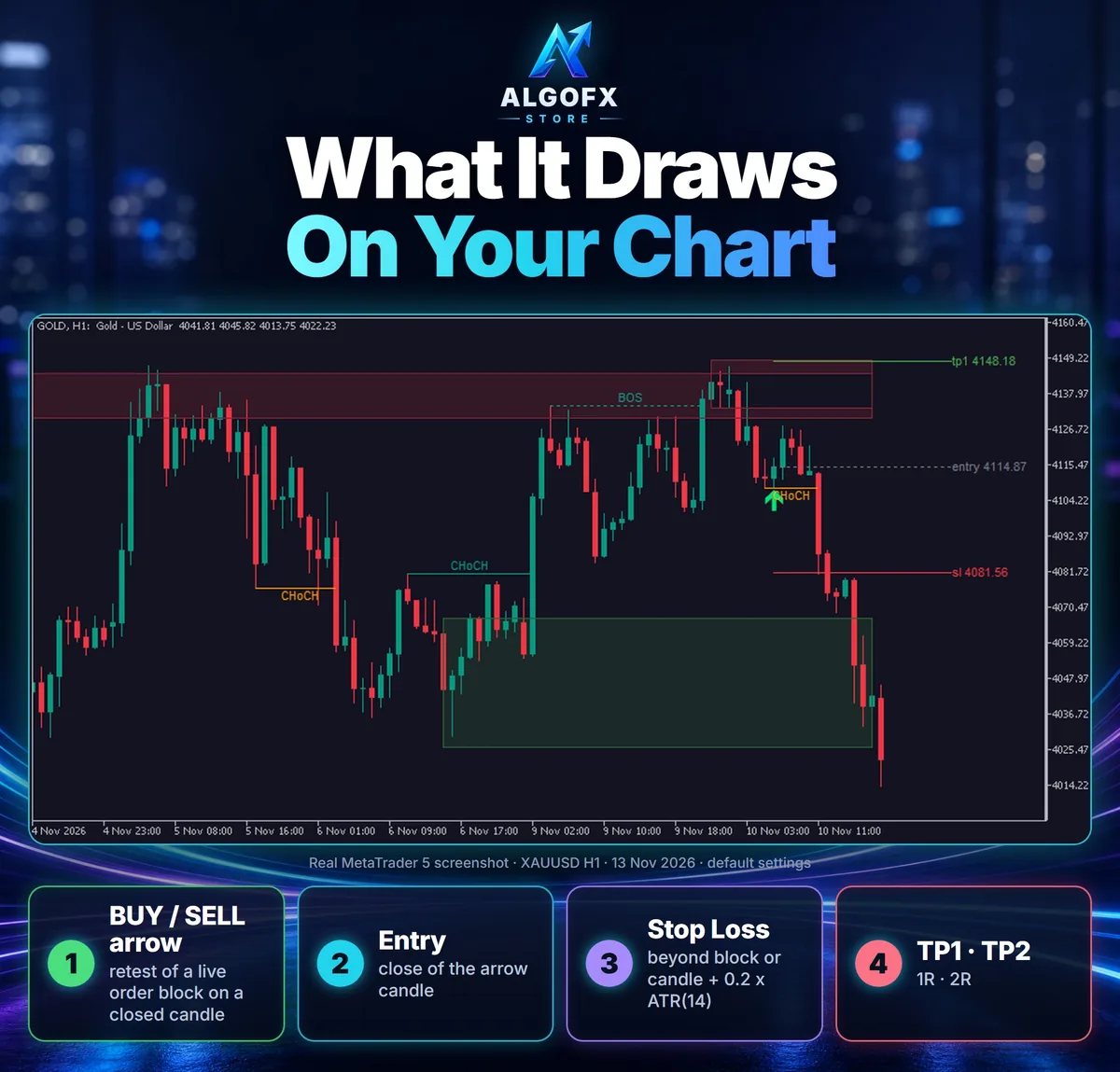
| Teal or orange dotted line with BOS | Break of structure: a close beyond the last unbroken swing in the structure's direction; the trend continues. The first break is always a BOS. |
| Teal or orange solid line with CHoCH | Change of character: a close beyond the last unbroken swing against the structure; the structure turns. |
| Green box / red box | Bullish / bearish order block left by a break. It grows to the right while live and disappears when a candle closes through it. |
| Green arrow under a candle / magenta arrow above | BUY / SELL: a closed candle reached into a live block, closed the right way and did not close through it, with the structure. |
| Grey dotted line, entry <price> | Entry: the close of the arrow candle. |
| Red line, sl <price> | Stop loss: beyond the block or the candle, whichever is further, plus 0.2 x ATR(14). |
| Green lines, tp1 <price> and tp2 <price> | Take profit 1 and 2 at 1x and 2x the risk. The lines end 20 candles after the arrow; nothing marks them as reached. |
| Grey box (option) | A mitigated block kept on the chart when Remove OB when mitigated is off. |
How it decides what to draw
SMC Algo Spartan reads only the chart's own closed candles, one at a time, in the order below. The numbers are the defaults in the inputs dialog.
- 1
Swings with 5 candles each side
A swing high is a candle whose high is not exceeded by the 5 candles before it and stays above the 5 candles after it; a swing low is the mirror. Because the 5 candles after it must exist, a swing is known 5 candles after it forms. That is a delay, not a change: once a swing is confirmed it stays. Swing length sets the number of candles.
- 2
Breaks only on a close
An upward break is the first candle that closes above the last unbroken swing high; a downward break is the first close below the last unbroken swing low. A wick alone is never a break, and a swing that has been broken cannot break again. Each break sets the structure trend: up after an upward break, down after a downward one.
- 3
BOS or CHoCH, drawn differently
A break against the current structure trend is a CHoCH, drawn as a solid line; any other break, the very first one included, is a BOS, drawn as a dotted line. Breaks up are teal and breaks down orange. The line runs at the swing's price from the swing candle to the breaking candle, with the label at its middle.
- 4
The order block each break leaves
Before a break up, the block is the candle with the lowest low between the last swing low and the breaking candle (looking back at most 100 candles, or 20 when there is no swing low), boxed from its high to its low in green. Before a break down, it is the candle with the highest high, boxed in red. Up to 4 blocks per side stay live, and a fifth removes the oldest.
- 5
Mitigation ends a block
A bullish block is mitigated when a candle closes below its bottom; a bearish block when a candle closes above its top. By default the box is then deleted. With Remove OB when mitigated off, it stays on the chart in grey and stops growing. A mitigated block can never give a signal, and a live block grows one candle to the right with every new candle.
- 6
The retest arrow and its plan
A BUY arrow prints under a later closed candle whose low reaches the bullish block's top, that closes above its open, does not close below the block, on a block not used before, while the structure is up (Only trade in direction of structure, on by default). SELL is the mirror. The plan: entry at the close, stop beyond the block or the candle, whichever is further, plus 0.2 x ATR(14), TP1 at 1R and TP2 at 2R.
SMC Algo Spartan on 12 different markets
Every chart below is a screenshot of MetaTrader itself with the shipped SMC_Algo_Spartan attached at its default settings. Forex, metals, indices, energy and crypto, so you can see how it reads each kind of market. They show what the indicator draws; they are not trading results. Tap or click any chart to open it full size.
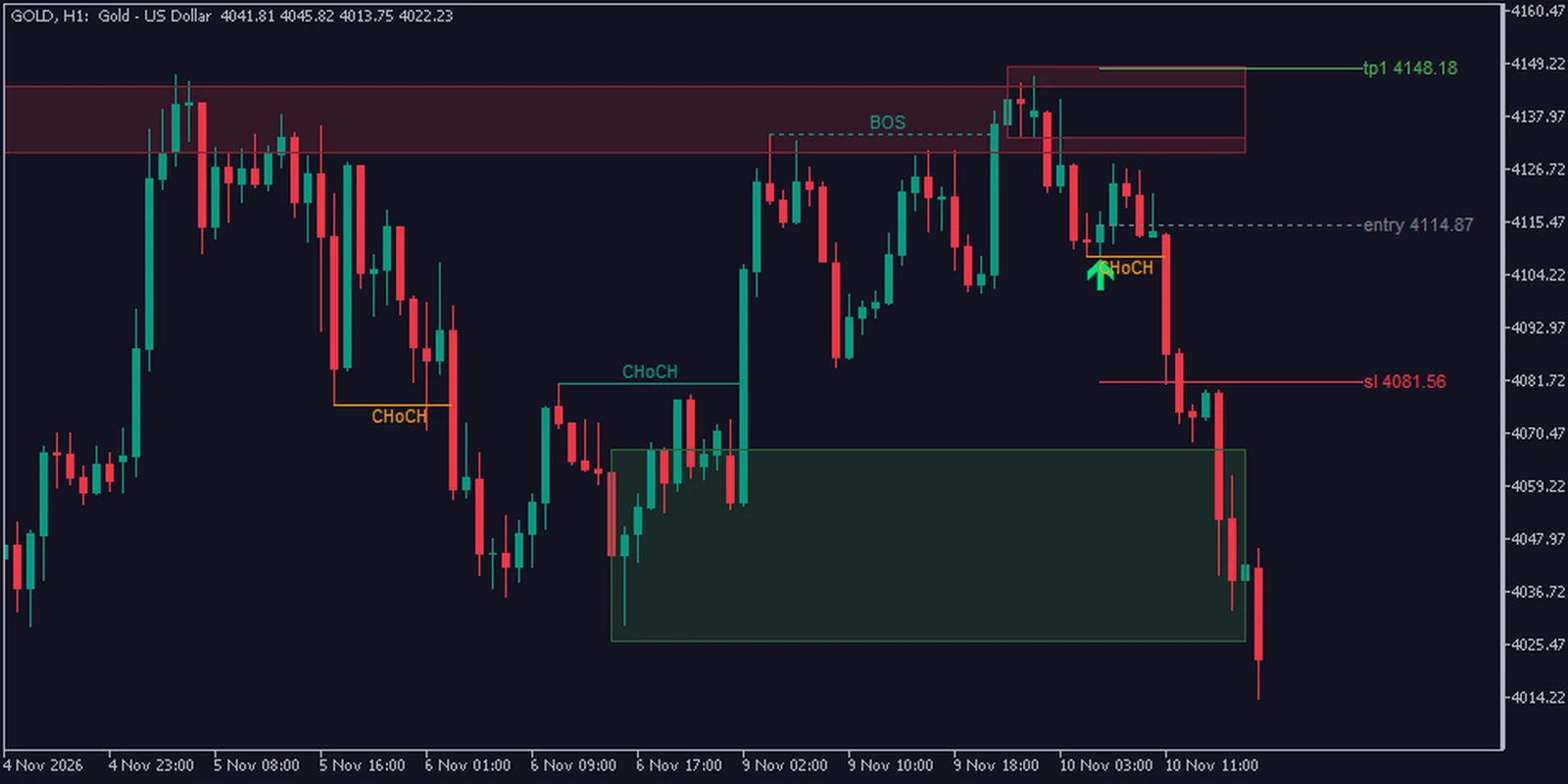
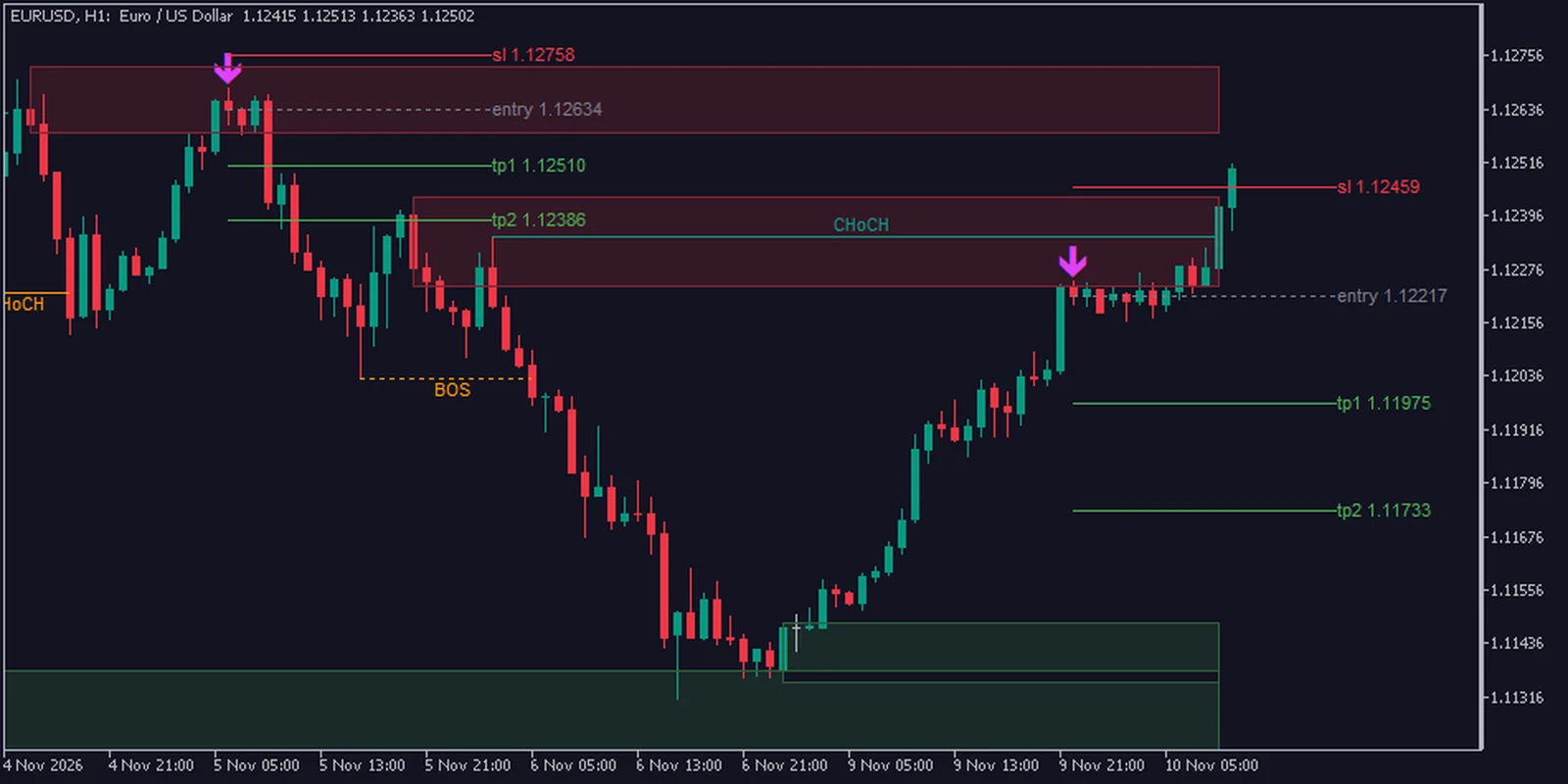
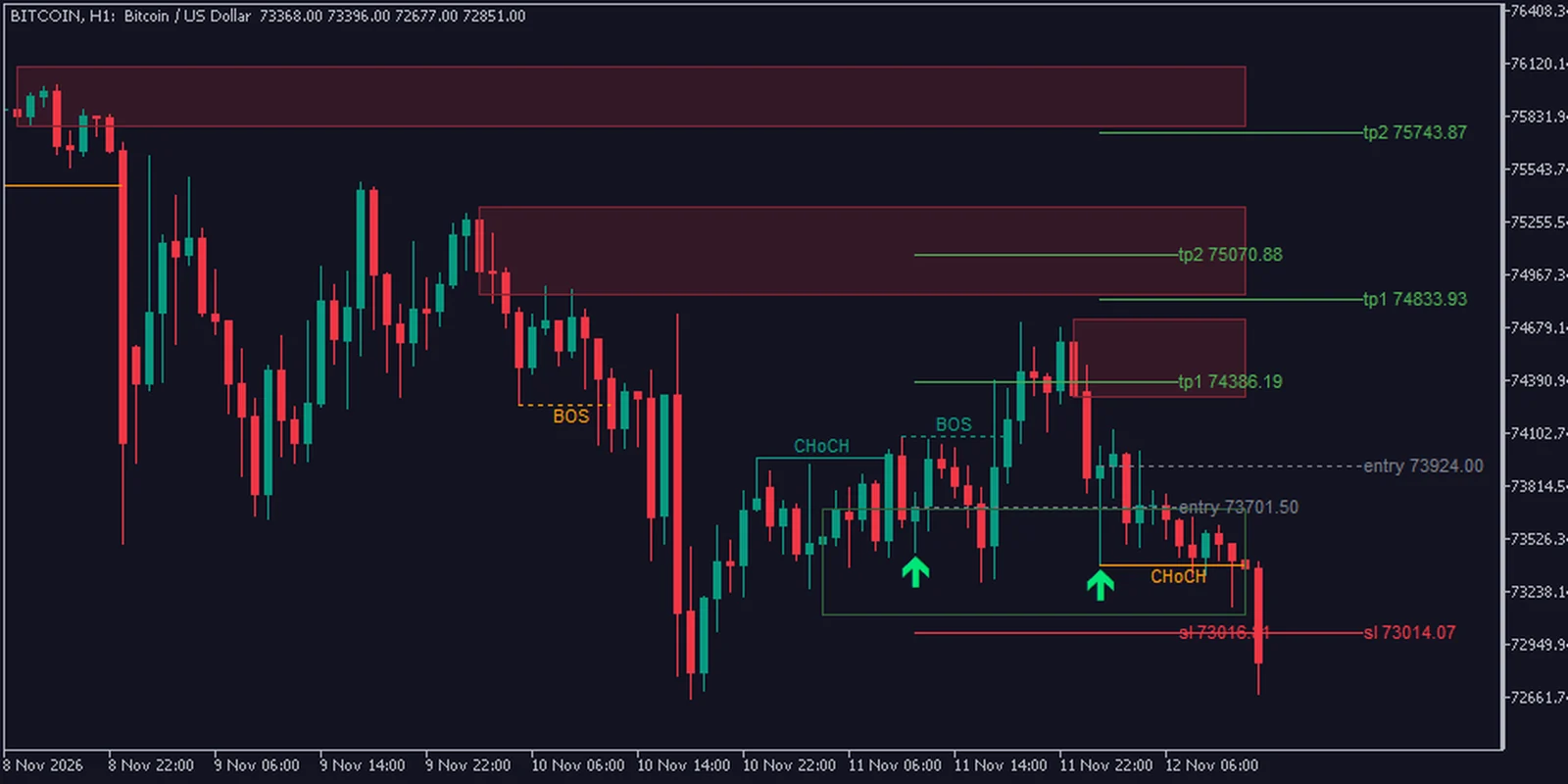
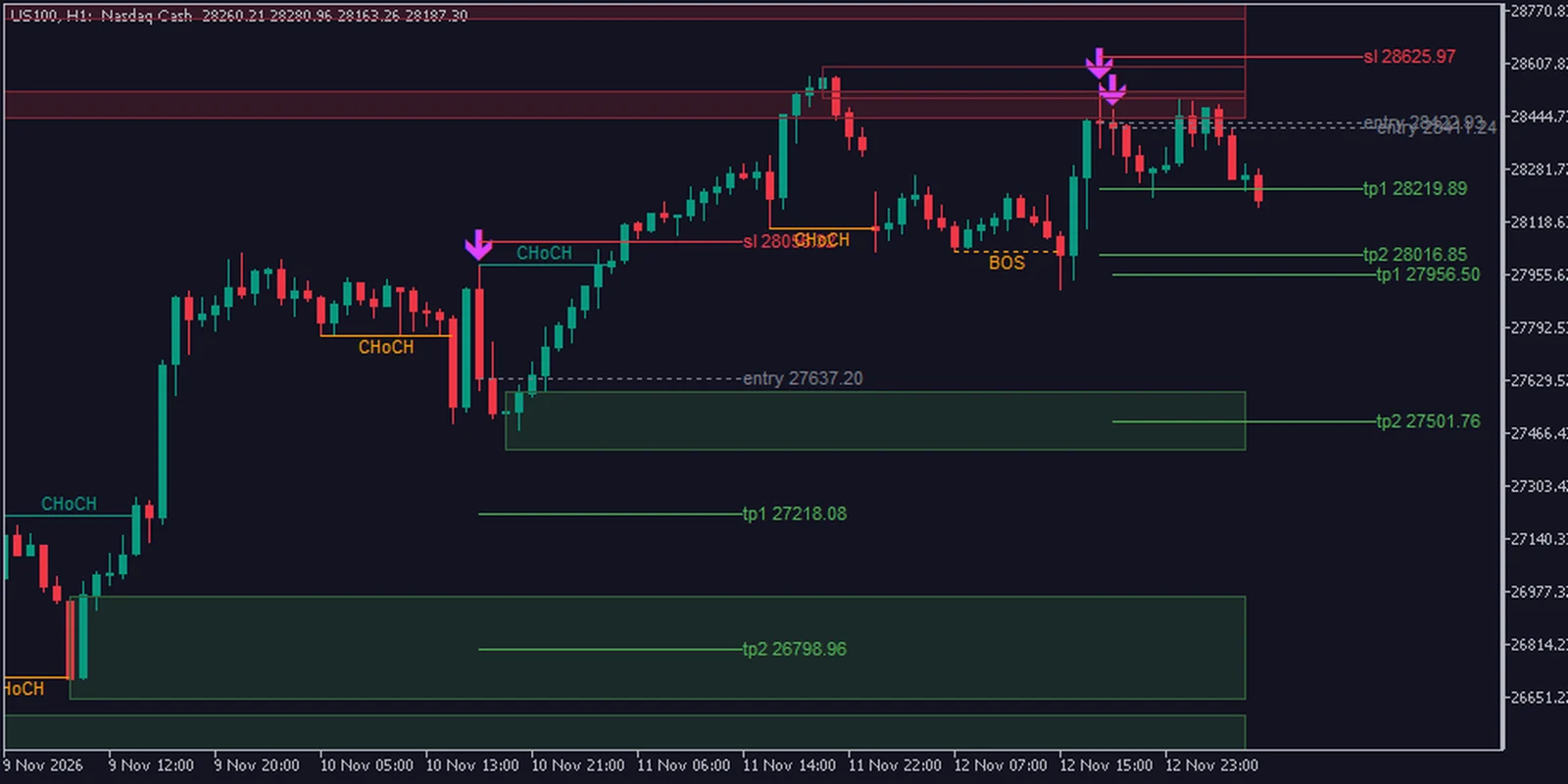
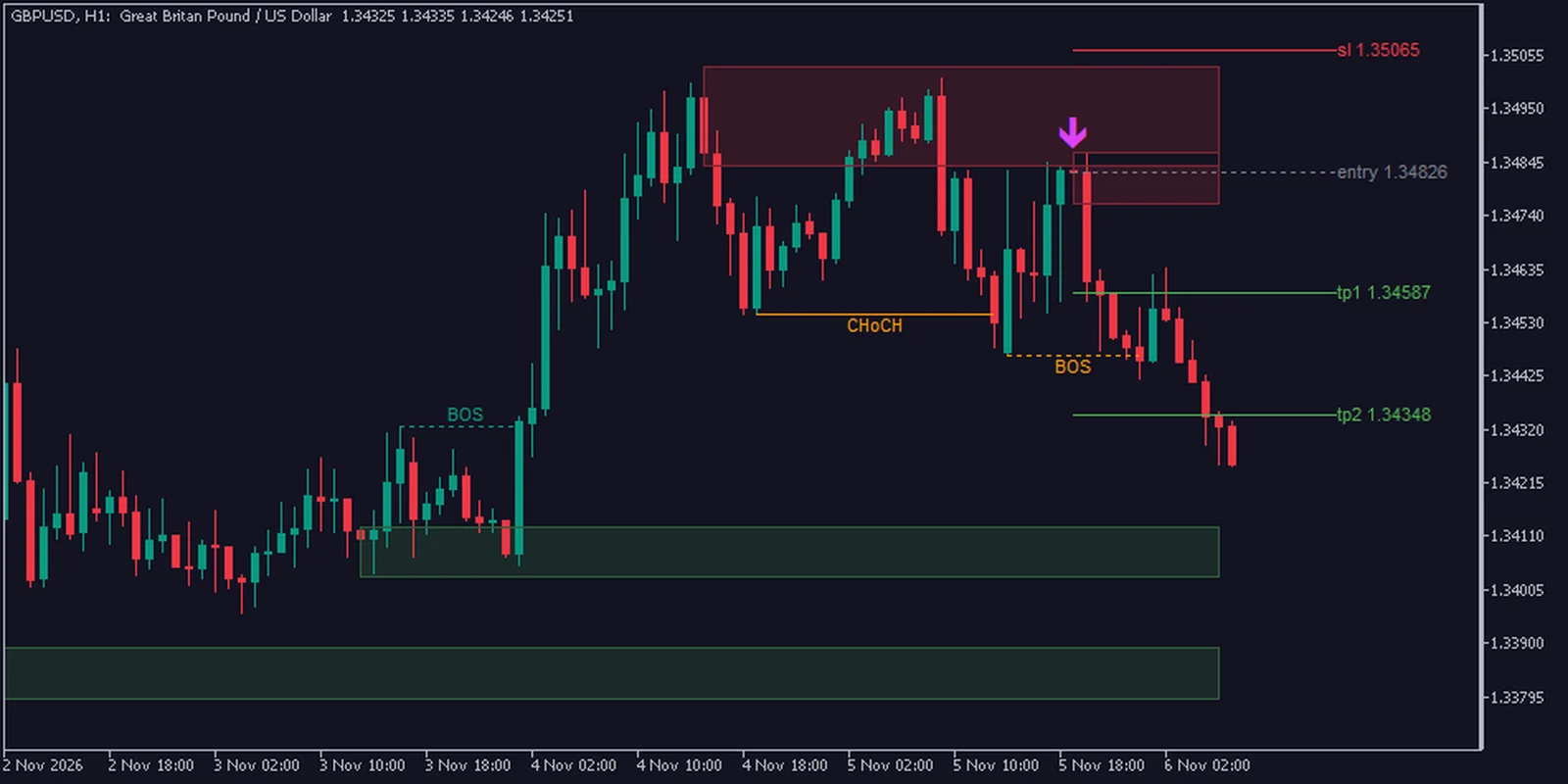
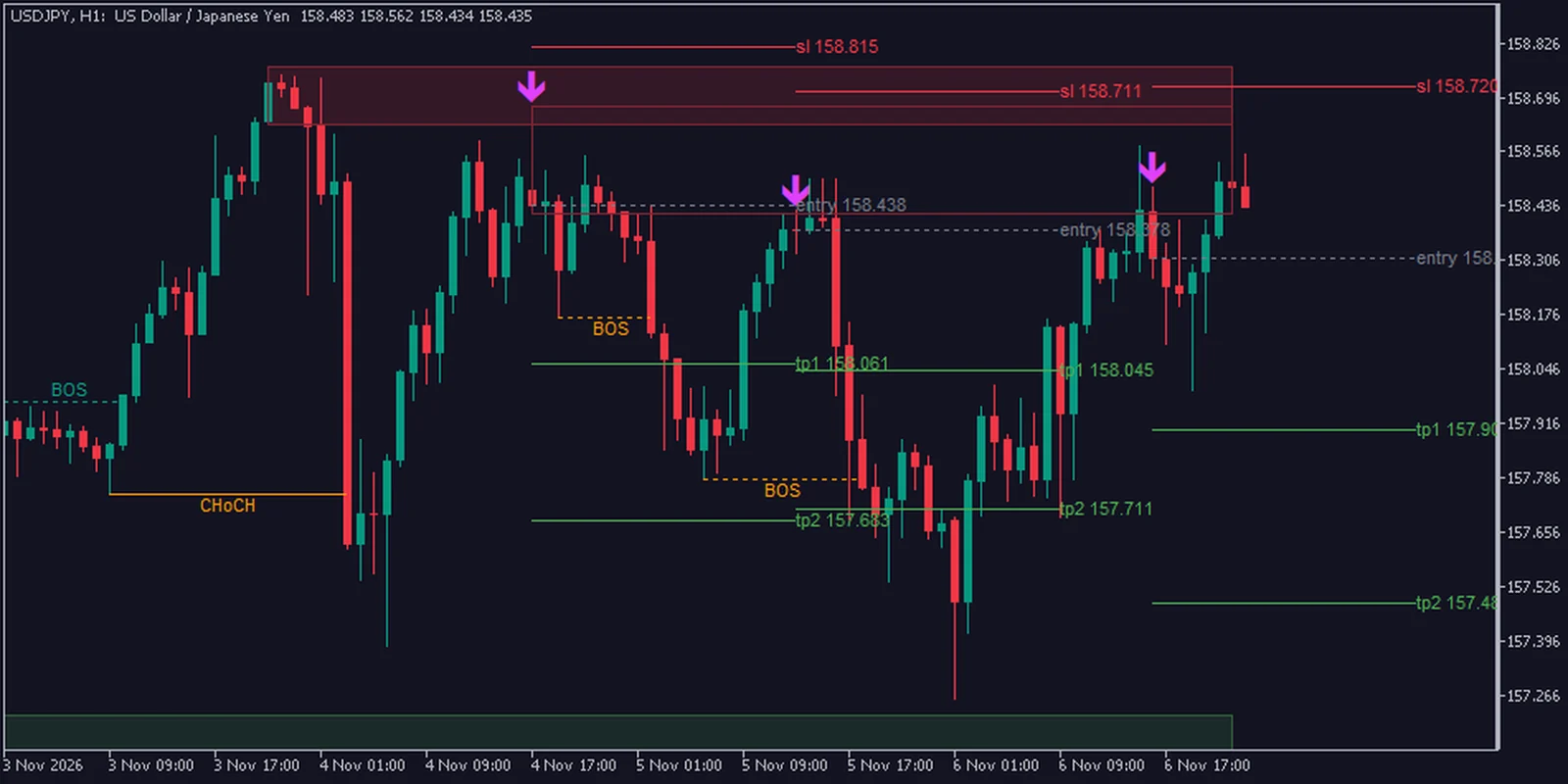
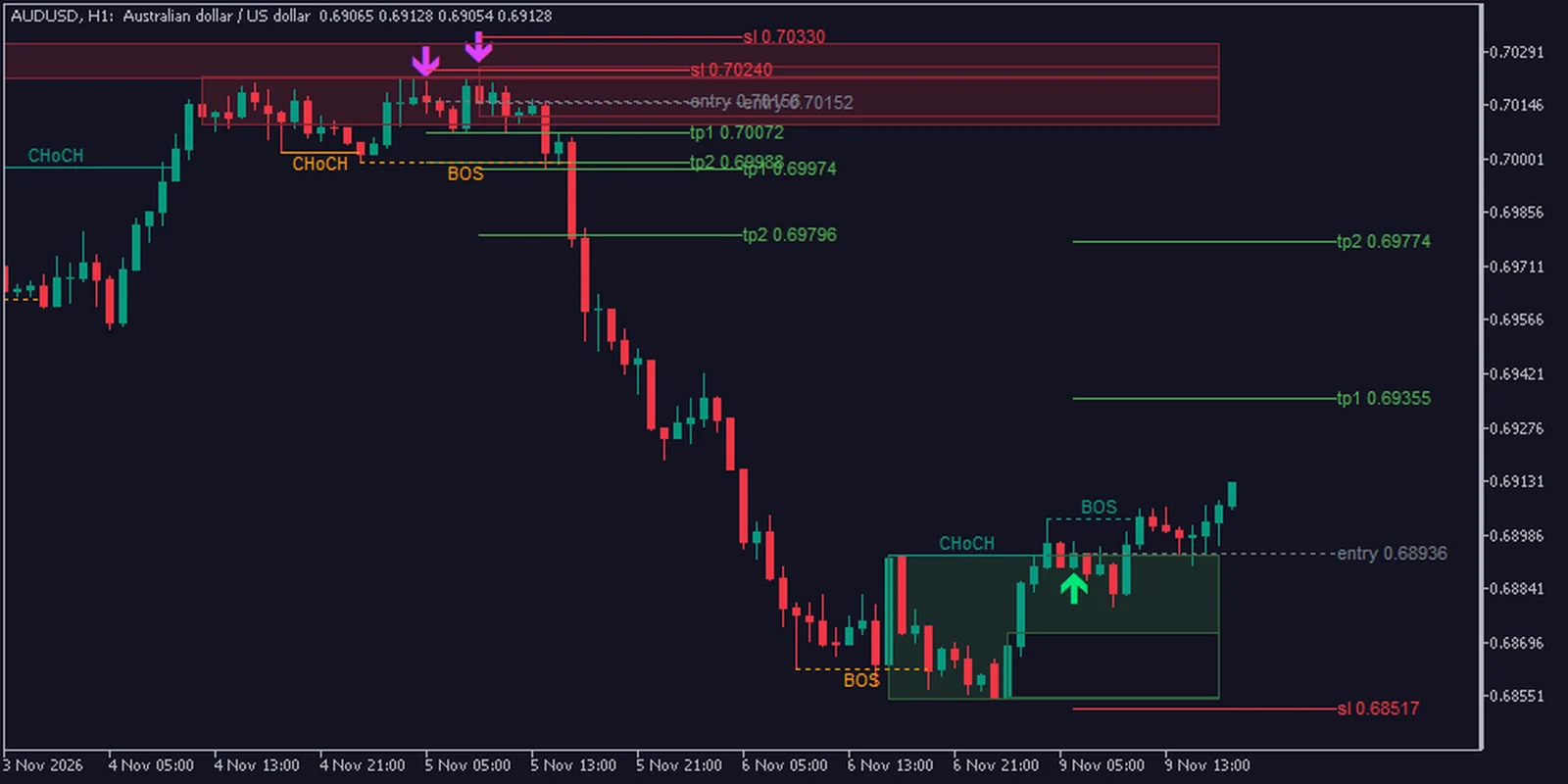
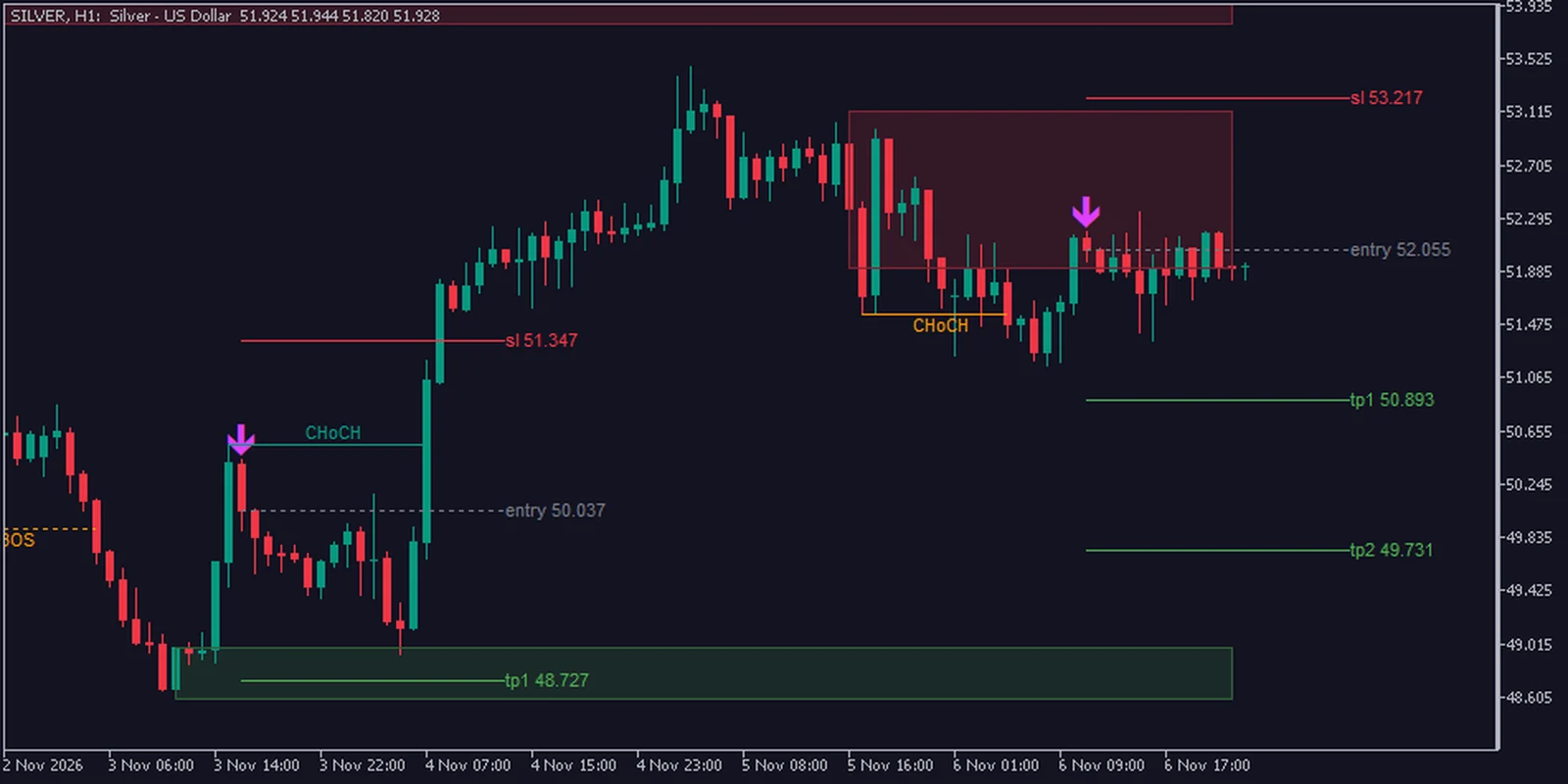
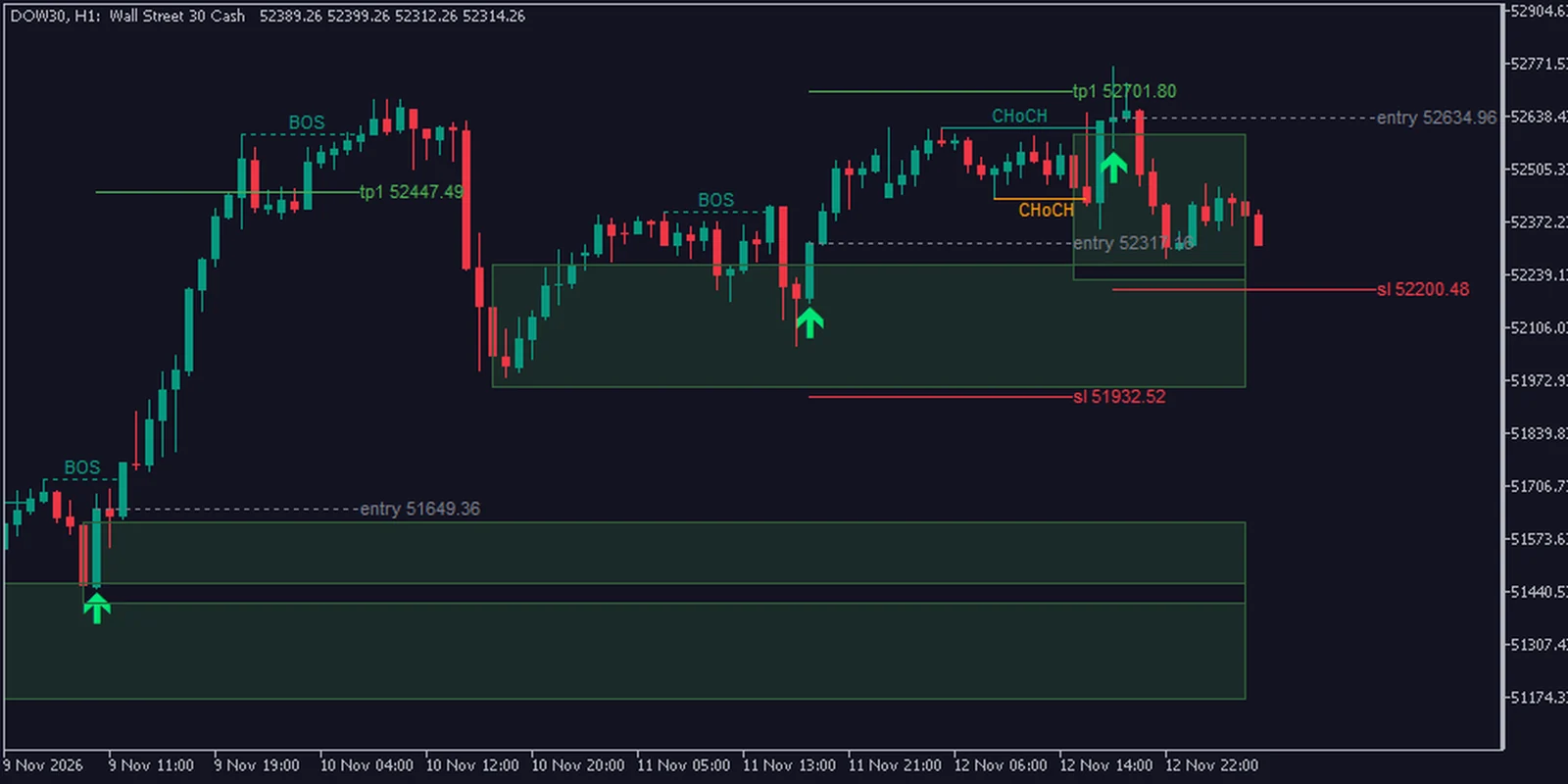
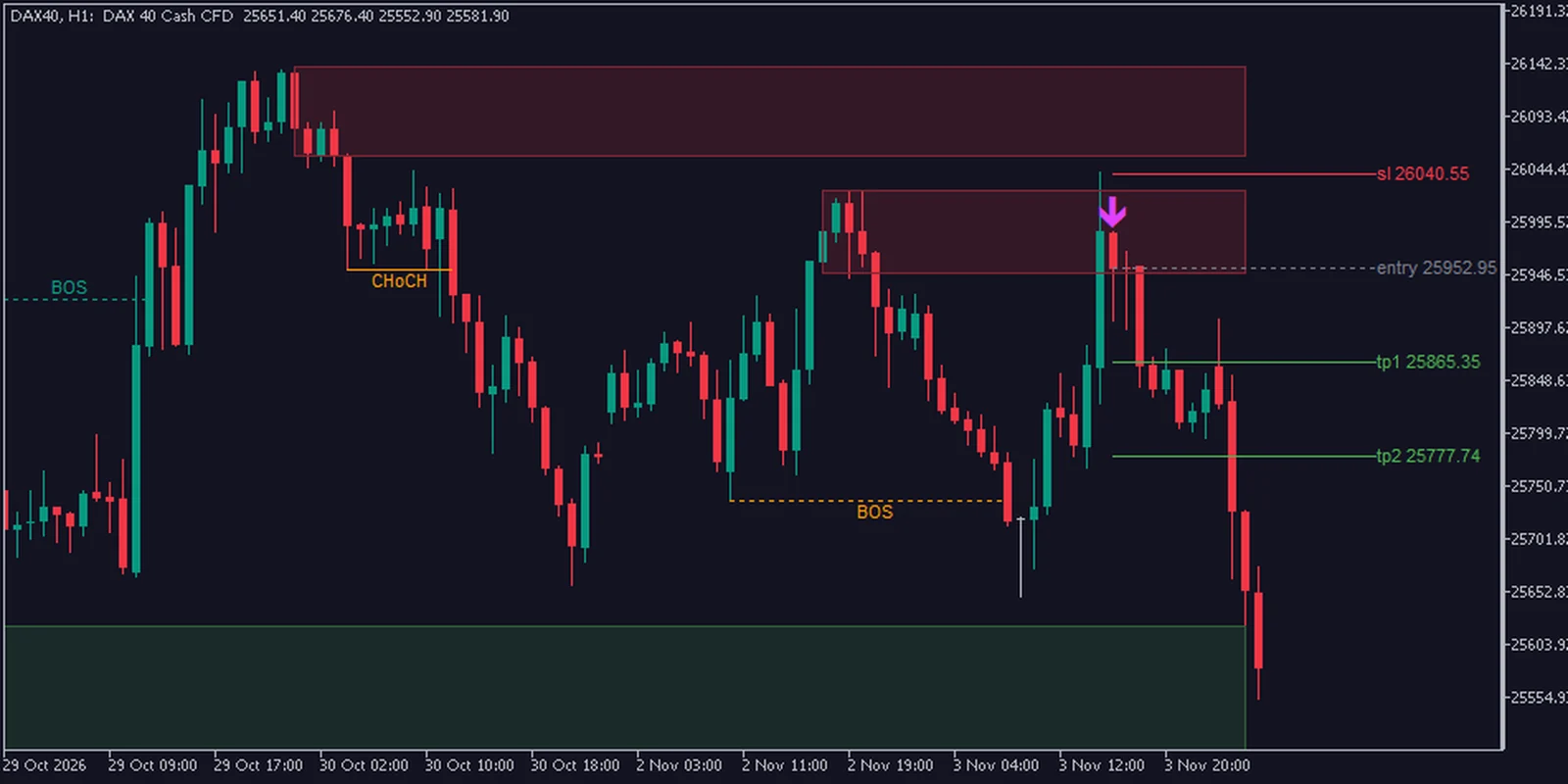
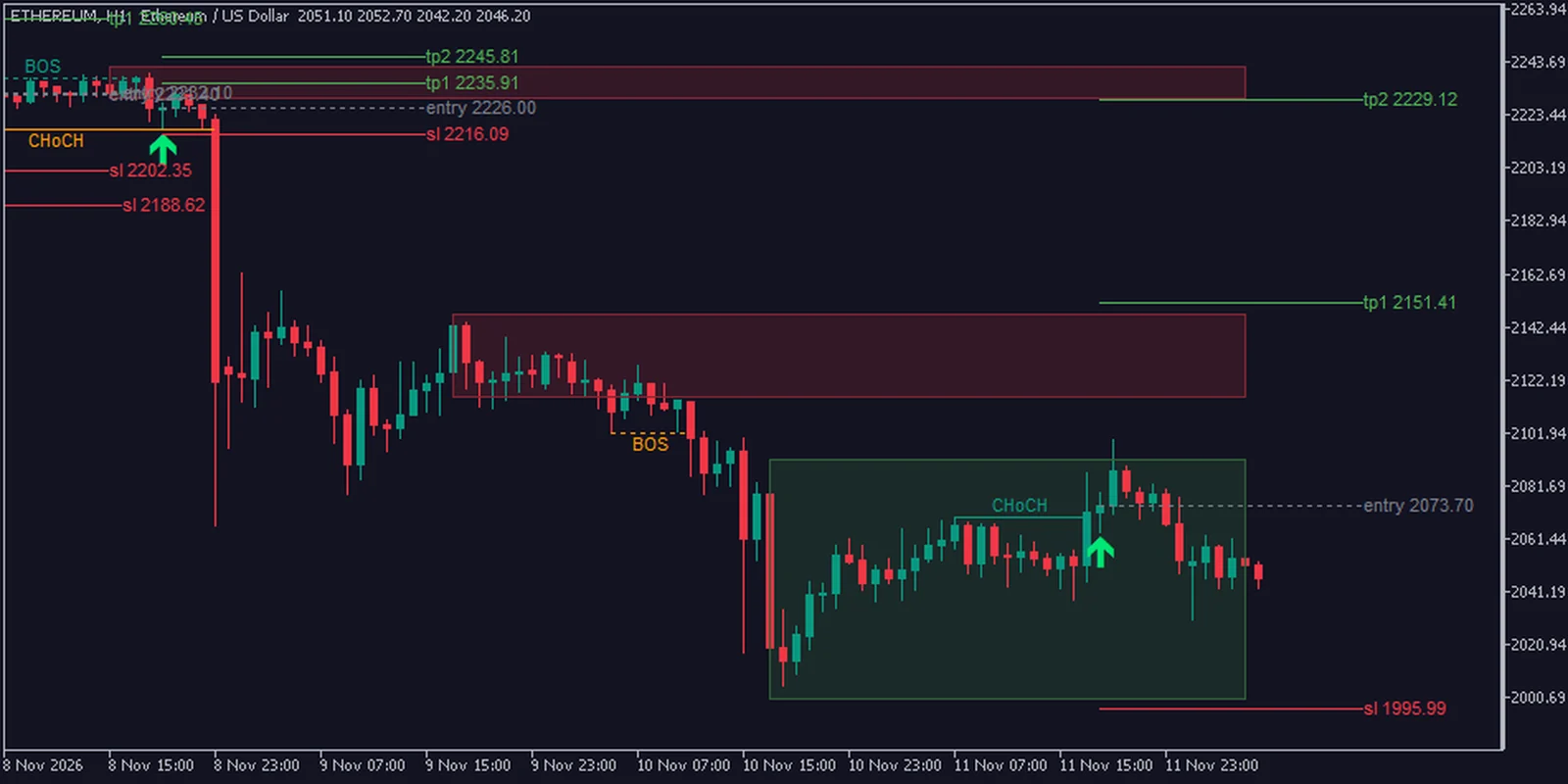
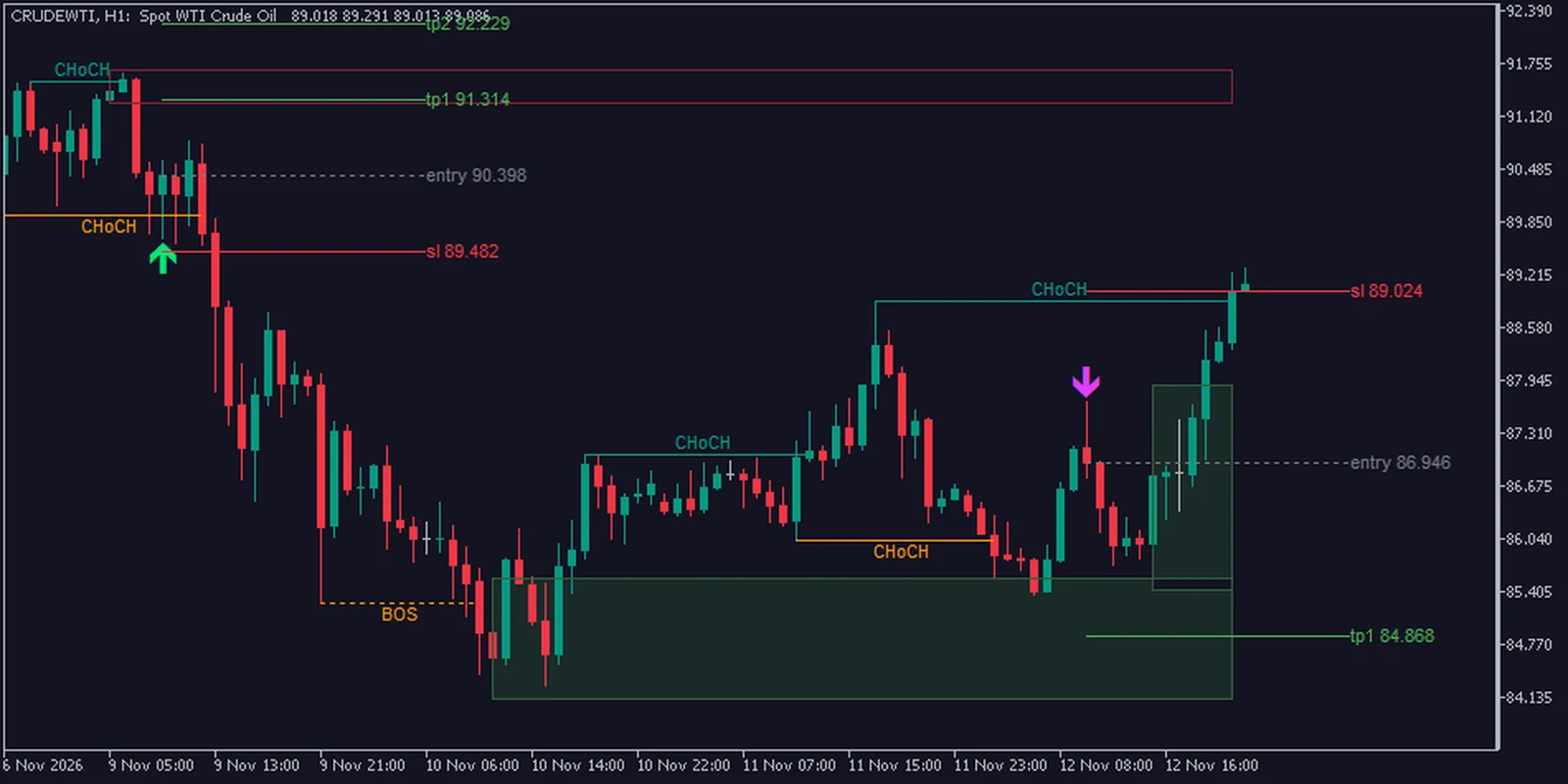
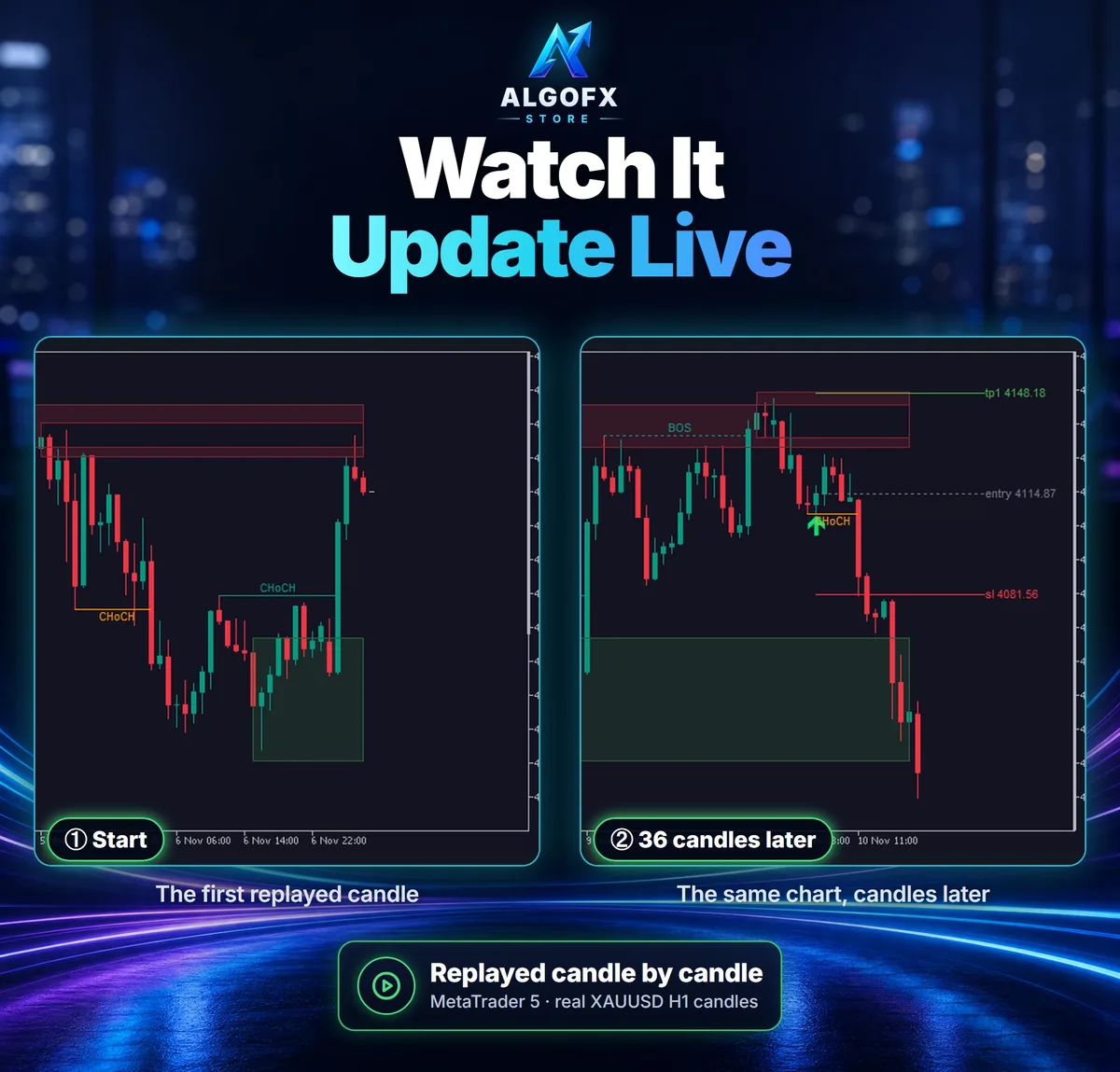
Watch SMC Algo Spartan work on a real MetaTrader 5 chart
A screen recording and frames from the shipped indicator at its default settings, as the chart updates. Nothing is edited into the chart.
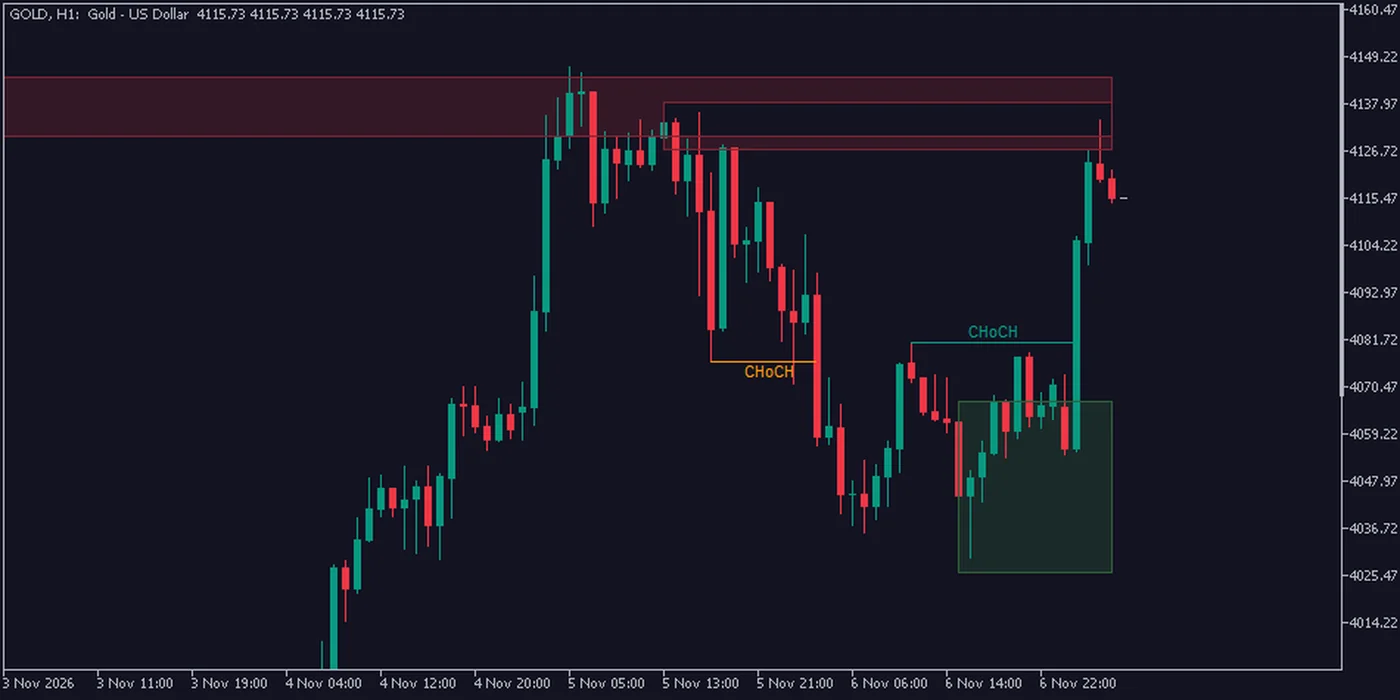
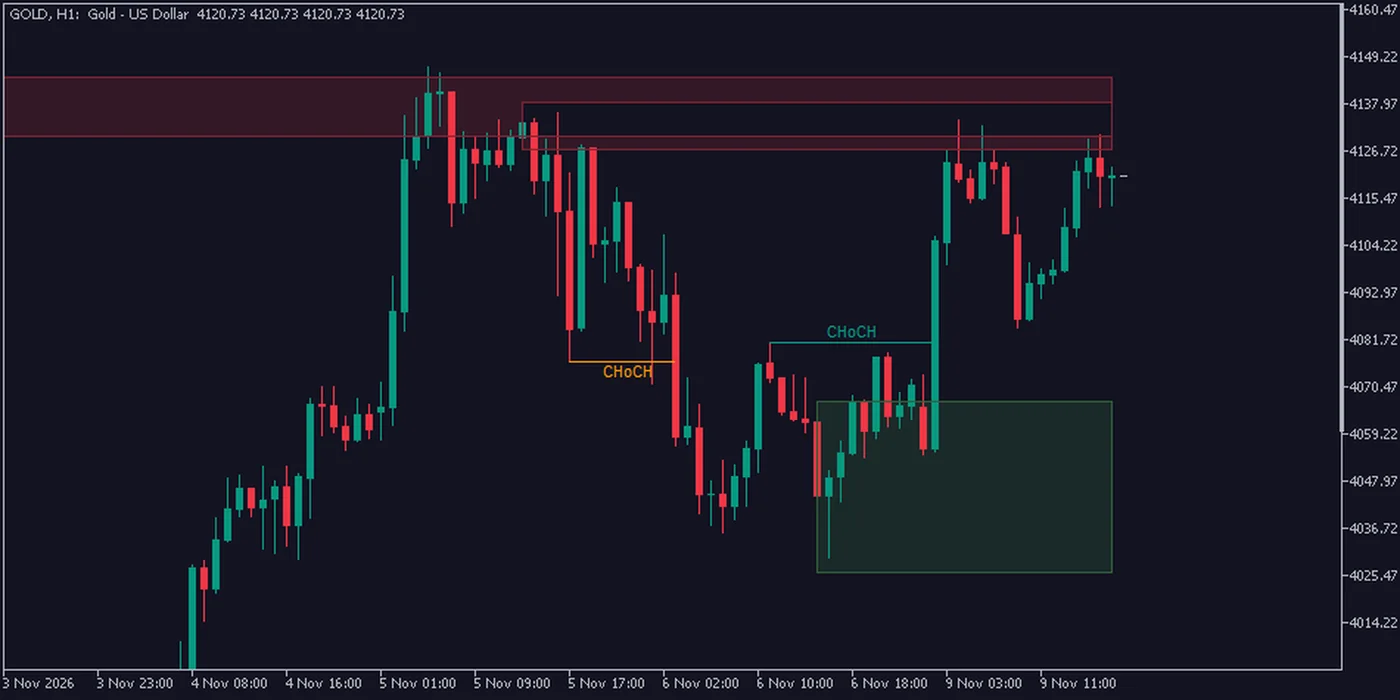
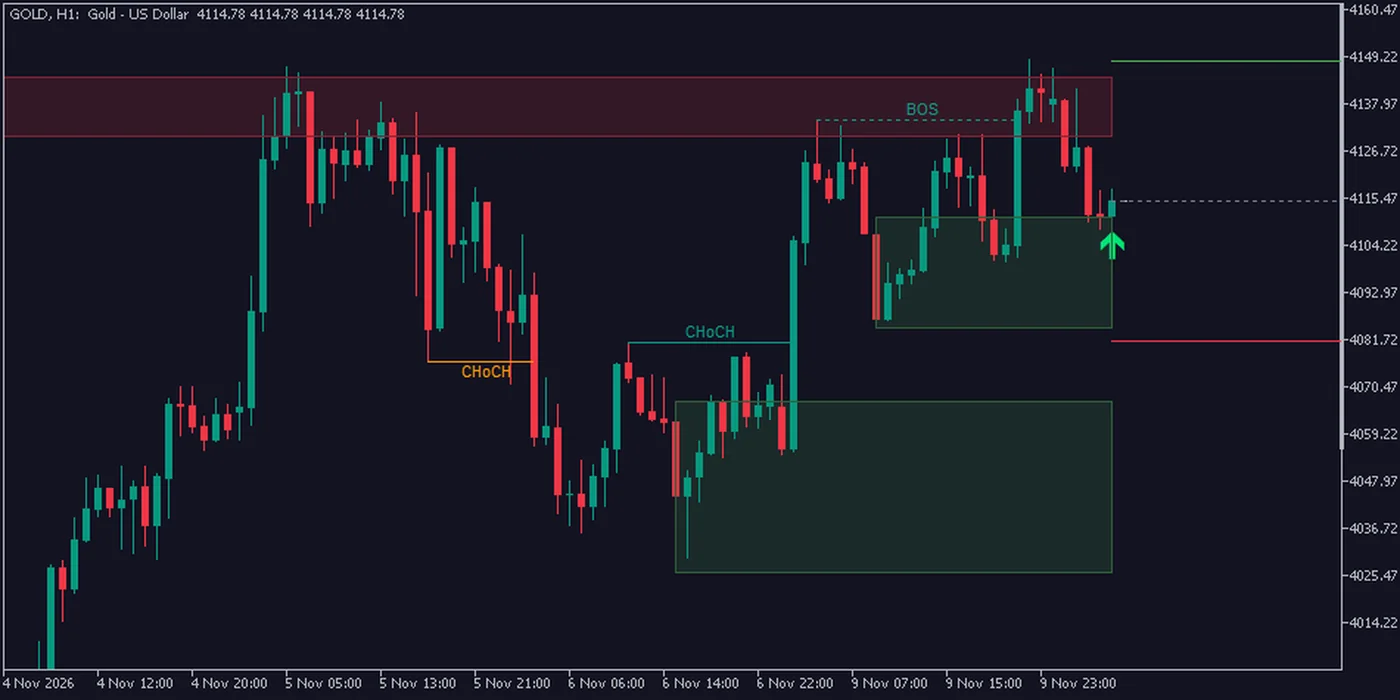
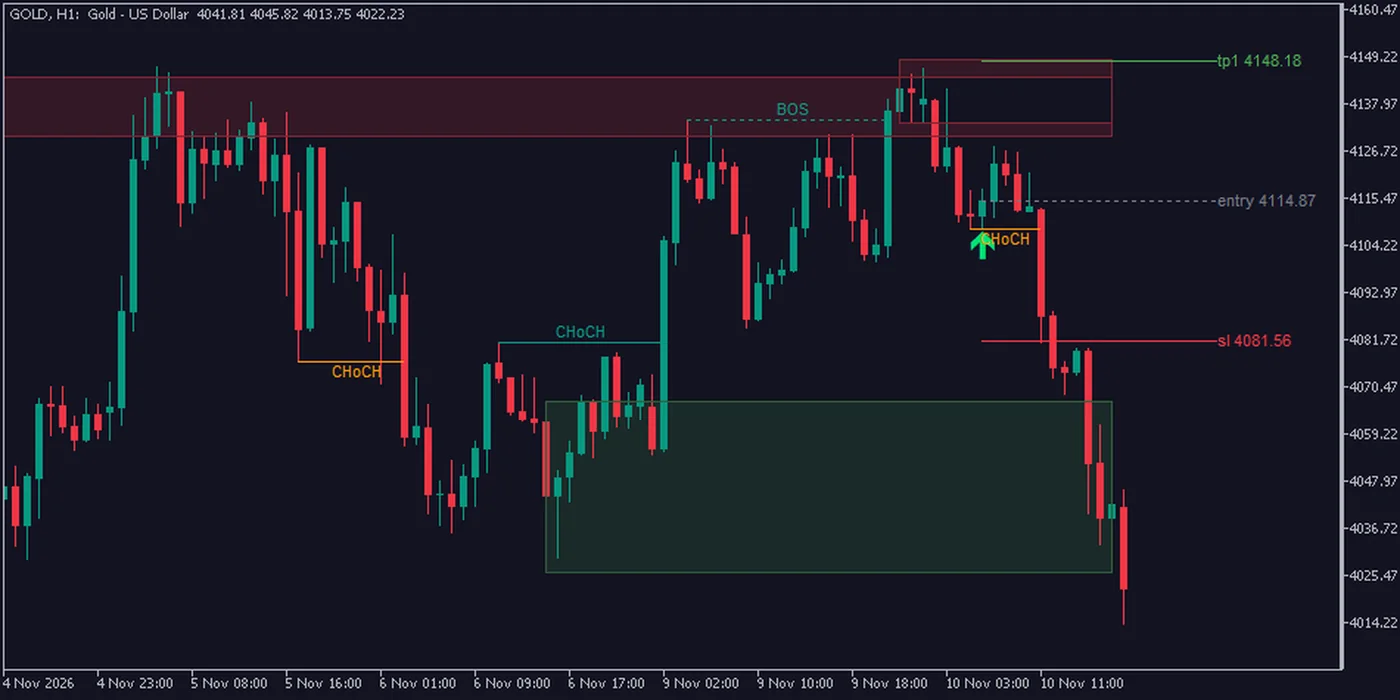
How to use it, step by step
The indicator decides what is on the chart. These decisions stay with you, in this order.
- 1
Read the structure one timeframe up
If you trade H1, put SMC Algo Spartan on H4 first. The colour of the last label is the current structure: teal up, orange down, and BOS or CHoCH tells you whether it is continuing or has just turned. An H1 buy arrow inside an H4 up-structure trades with both; the same arrow inside an H4 down-structure is a counter-trend trade, whatever H1 says.
- 2
Find the block worth waiting for
On your trading timeframe, look for a live block that has not given a signal yet, in the direction of both structures, with room to the next opposing block for at least the first target. In an up-structure the bullish blocks below price are where buy arrows can come from; bearish blocks above price are where the structure would be tested if it turned.
- 3
Wait for the close and the arrow
Set the alert and let the arrow come to you. A green up arrow under the candle or a magenta down arrow above it appears only after the candle has closed back the right way, and the alert fires once, at that moment. Entering while the candle is still inside the block is entering before the rule has decided.
- 4
Check the plan against your account
The stop distance is drawn for you as the red sl line. Decide your risk per trade in money, divide it by the value of that stop distance per lot and round down to your broker's lot step. If the result is below the minimum lot, or the spread is a large share of the risk, skip the trade. Place the order yourself and put the stop where it is drawn.
- 5
Manage by a rule chosen in advance
At tp1 you can take part off and move the stop to entry, close everything, or hold for tp2. Any of the three can be a plan; switching between them trade by trade turns a plan into guesswork. Decide in advance what an opposite CHoCH means for an open trade, and never widen the stop as price approaches it.
- 6
Remember the lines do not track
The four lines are a plan, not a tracker. They end 20 candles after the arrow, nothing marks a target or the stop as reached, and the plan stays until five newer ones replace it. Keep your own record of how each trade ended, because the chart will not keep it for you.
Everything SMC Algo Spartan does for you
Fixed once the candle closes
Every BOS and CHoCH line, every order block's creation, every arrow with its four levels and every alert is decided on a closed candle. The arrows are indicator buffers, not chart objects, so no later step removes or moves them.
Continuation and turn look different
BOS lines are dotted and CHoCH lines are solid, in teal for breaks up and orange for breaks down, so you read whether the structure is continuing or turning without reading the labels.
Order blocks that clean up after themselves
Green and red boxes run to the right while live, up to 4 per side (1 to 20 allowed). A close through a block deletes it, or keeps it in grey if you prefer to study old blocks.
One signal per block
Each block can give one arrow at most, and at most one buy or one sell prints per candle. The structure filter keeps out retests against the current structure, and Create OB only on CHoCH limits blocks, and so arrows, to reversals.
A plan drawn with every arrow
entry, sl, tp1 and tp2 lines 20 candles long with lowercase tags such as entry 1.34826, rounded to the symbol's tick size. The stop is red and both targets are green for buys and sells alike. The five newest plans stay on the chart.
Four alerts, four channels
Buy and sell order block retests and bullish and bearish CHoCH, each with its own switch. Pop-up with sound on by default; push notification to the MetaTrader phone app and e-mail when you switch them on. Each fires once per candle, after the close.
Light on your terminal
It reads only the chart's own closed candles, no other symbol or timeframe. Bars to calculate limits the work to 5,000 candles by default, and Keep object limits caps the drawing at 500 lines, 500 labels and 200 boxes.
Same on MT4 and MT5
Both builds share one engine and the same inputs, drawings and alerts, and both are in the download. A Structure value (1 up, -1 down) also appears in the Data Window for each candle.
SMC Algo Spartan, feature by feature
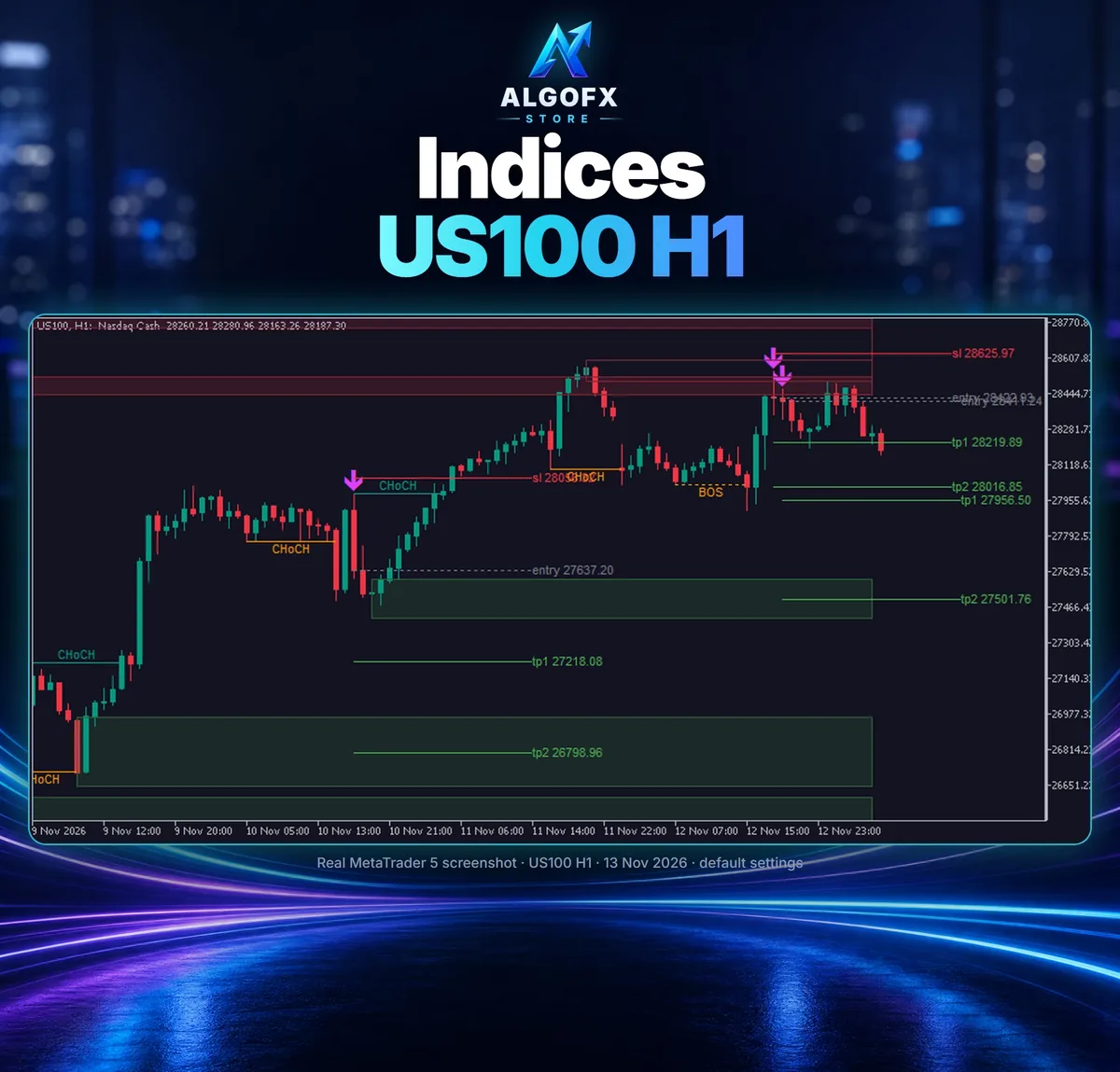
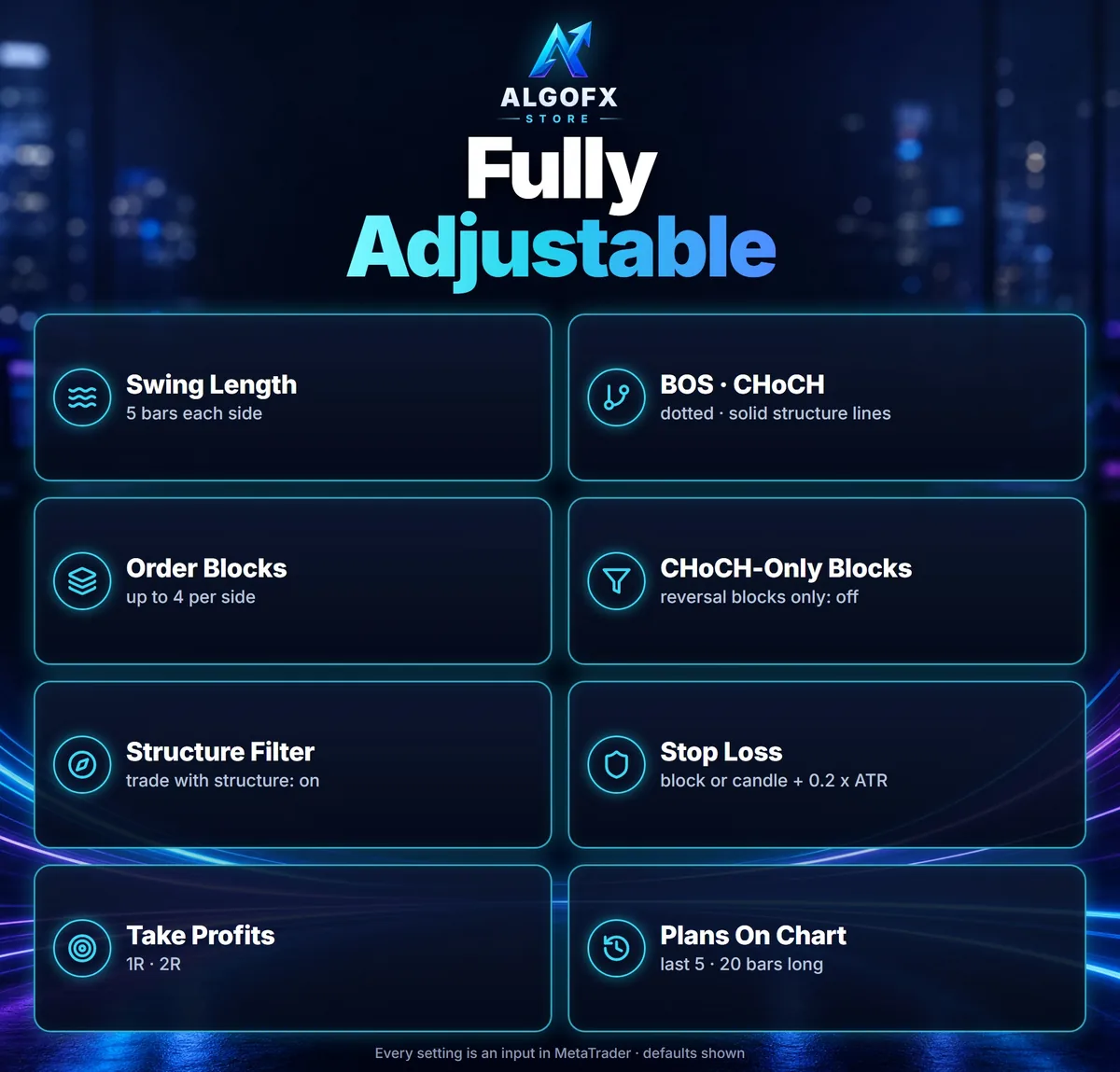
Each picture is built from real platform screenshots of the shipped indicator at its default settings, labelled so you can see what every part does. Tap any picture to open it full size.




How traders put it to work
Forex intraday on M15 and H1
On M15 a swing is confirmed 75 minutes after it forms at Swing length 5, on H1 five hours after. Use H1 or H4 for the structure read and the lower chart for the arrow. A smaller Swing length gives more, smaller swings and breaks; a larger one fewer and larger.
Gold and indices on H1 and H4
The stop sits beyond the block's candle plus 0.2 x ATR(14) of the symbol, so its size follows the candle size of the market and timeframe you choose. On XAUUSD or an index CFD a higher timeframe gives larger blocks and wider stops; check the drawn stop against your risk before taking any arrow.
Fewer, reversal-only setups
Set Create OB only on CHoCH to true and continuation blocks after a BOS are not marked, so every arrow is a retest of a structure turn and there are fewer arrows. Fewer arrows is not the same as better arrows: it is a different question asked of the chart.
Studying past structure
Turn Remove OB when mitigated off to keep mitigated blocks in grey, raise Max trades kept on chart (up to 50) to keep more plans, and set Bars to calculate to 0 for all history. Keep object limits off keeps every drawing. Useful for review, noisy for live trading.
Every setting, with its default
The names are the ones in the MetaTrader inputs dialog; the defaults are what every chart on this page uses.
| Setting | Default | What it does |
|---|---|---|
| Swing length | 5 | InpSwingLen: bars on each side that confirm a swing high/low. Smaller = more, smaller swings and breaks. |
| Show structure lines + labels / Show BOS / Show CHoCH | on / on / on | InpShowStructure, InpShowBOS, InpShowCHoCH: the dotted BOS and solid CHoCH lines with their labels. |
| Show order blocks / Max active OB per side (1-20) | on / 4 | InpShowOB, InpMaxOB: how many live blocks each side keeps. |
| Create OB only on CHoCH (reversal) | off | InpChochOnly: blocks (and so arrows) only where the structure turns. |
| Only trade in direction of structure | on | InpTrendFilter: buys only in up structure, sells only in down structure. |
| Remove OB when mitigated | on | InpRemoveMit: a close through the block deletes it; off keeps it in grey. |
| Show SL/TP with arrows / ATR length / SL buffer (x ATR) | on / 14 / 0.2 | InpShowSLTP, InpAtrLen, InpSlBuffer: the stop sits beyond the block or candle plus this much ATR. |
| TP1 risk:reward / TP2 risk:reward / Show TP2 | 1.0 / 2.0 / on | InpTp1RR, InpTp2RR, InpShowTP2: targets as multiples of the risk. |
| SL/TP line length (bars) / Max trades kept on chart (1-50) / Show price in labels | 20 / 5 / on | InpTradeLen, InpMaxTrades, InpShowPrices. |
| Bars to calculate (0 = all) / Keep object limits / Label font size | 5000 / on / 8 | InpBarsToCalc, InpKeepLimits (500 lines, 500 labels, 200 boxes), InpFontSize (6-20). |
4 alert events
You choose which alerts are on in the inputs. Alerts can go to a pop-up in MetaTrader's Alert window, a sound, a push notification to the MetaTrader app on your phone and an e-mail (MetaTrader's e-mail settings must be filled in).
- buy (bullish OB retest)
- sell (bearish OB retest)
- bullish CHoCH
- bearish CHoCH
SMC Algo Spartan next to the usual options
Where it wins, and where it does not.
| SMC Algo Spartan | Typical free SMC indicator | Reading it by hand | |
|---|---|---|---|
| Swing and break rules | Fixed: 5 candles each side, breaks only on a close | Often undocumented | Change with every read |
| When a mark is decided | On the closed candle, fixed afterwards | Some redraw on the forming candle | Whenever you notice it |
| Order block definition | Lowest or highest candle before the break, up to 4 live per side | Varies | Your choice each time |
| Trade plan | entry, sl, tp1 and tp2 drawn with each arrow | Rarely included | You work it out every time |
| Alerts | Retests and CHoCH: pop-up, sound, push, e-mail | Sometimes | None: you have to watch |
| Dashboard or statistics panel | None: chart drawings only | Some include one | Your own notes |
| Cost | A one-time purchase | Free | Free |
Honest about who this fits
A good fit if you
- You trade with market structure and order blocks and want swings, breaks and blocks marked by the same rule every time.
- You want BOS and CHoCH to look different at a glance, so continuation and turns are clear without reading labels.
- You want a stop and two targets in prices the moment an arrow prints, so lot sizing takes seconds.
- You prefer to wait for the close and want an alert when a retest has actually happened.
- You use MetaTrader 4, MetaTrader 5 or both and want the same drawings on each.
Not for you if you
- It is not for anyone who wants trades placed or managed: it draws and alerts, and nothing tracks whether a target or stop was reached.
- It is not for traders who want a dashboard, multi-timeframe panel or statistics; it draws on the chart only.
- It is not for entries on the forming candle: every signal waits for the close by design.
- It is not a promise that every arrow is worth taking; reading the higher timeframe and the room to the next block stays your job.
Both builds, one guide, installed in a minute
- 2Indicator buildsSMC_Algo_Spartan.ex4 for MetaTrader 4 and SMC_Algo_Spartan.ex5 for MetaTrader 5, in one 0.6 MB zip.
- 4Page PDF guideInstallation, every setting with its default and how to read the chart.
- 10Setting groupsEvery one explained above, with the defaults the charts use.
- 4Alert eventsYou choose which ones are on in the settings.
- 60Day money-back guaranteeIf it is not for you, request a full refund within 60 days through your Digistore24 order e-mail.
Install in four steps
- Download the zip from the page Digistore24 sends you to after checkout and unzip it.
- MetaTrader: File, Open Data Folder, then MQL4\Indicators (MetaTrader 4) or MQL5\Indicators (MetaTrader 5).
- Copy the .ex4 (MetaTrader 4) or the .ex5 (MetaTrader 5) there, refresh the Navigator and drag “SMC_Algo_Spartan” onto a chart.
- Read the guide; the defaults are the settings shown on this page.

Kestutis Balciunas
AlgoFXStore · chart indicators for MetaTrader, TradingView, cTrader and NinjaTrader
Kestutis Balciunas builds and publishes chart indicators under the AlgoFXStore name for MetaTrader 4 and 5, TradingView, cTrader and NinjaTrader 8. Every product page shows what the indicator draws on real charts, and every number on it comes from the shipped build.
The charts on this page were captured in MetaTrader from the shipped SMC_Algo_Spartan at its default settings and are shown unedited.
No get-rich claims and no quoted win rates. Every trade is uncertain, and no indicator changes that. If you want to know whether it suits the way you trade before you buy, e-mail [email protected] and you will get a straight answer.
One price, both platforms
- Both builds: .ex4 for MetaTrader 4 and .ex5 for MetaTrader 5, plus the 4-page PDF guide
- Delivered as a digital download: one zip with both builds and the PDF guide on your download page
- Return period: 60 days, with a full refund if it is not for you
- Free updates to the current version on the same download page
60-day money-back guarantee. Install it, run it on your own charts and read the guide. If SMC Algo Spartan is not for you within 60 days of purchase, request a full refund from Digistore24, no questions asked: use the refund link in your Digistore24 order e-mail or Digistore24's order page digistore24.com/en/cancel-revoke-contract. Digistore24 refunds to your original payment method. It is a digital download: right after checkout you land on your download page, and the link to it is also in your Digistore24 order e-mail.
Also by Kestutis Balciunas: SMC Algo Spartan for NinjaTrader 8.
About the signals
Does it repaint?
Breaks, order block creation, arrows with their four levels and alerts are all decided on closed candles and stay. What changes by design: a live block grows one candle to the right each candle and disappears or turns grey on the close that goes through it, the oldest block on a side goes when a fifth appears, the oldest plan goes when a sixth prints, and above 500 lines, 500 labels or 200 boxes the oldest drawings are removed. A swing is known 5 candles after it forms: a delay, not a change.
Why did price touch a block without an arrow?
All conditions must hold on one closed candle: the low reaches into the bullish block, the candle closes as an up candle, it does not close below the block, the block has not given a signal before, and with the structure filter on the structure must be up. The structure filter is the most common reason. SELL arrows are the mirror.
Why does an arrow have no levels?
Either Show SL/TP with arrows is off, the ATR did not yet have 14 candles when the arrow printed (the first candles of the window), or the arrow is older than the five newest plans, whose lines are the only ones kept by default.
Can charts with different history show different drawings?
Yes, near the left edge. The calculation starts at the first candle of the Bars to calculate window, 5,000 by default, where the first swings are still being found, so two charts with different windows can differ there. Recent drawings agree. Use the same setting on charts you compare.
Reading the chart
What does each colour and mark mean?
Teal or orange dotted line with BOS: a break that continues the structure. Teal or orange solid line with CHoCH: a break against it, the structure turns. Green or red box: bullish or bearish order block. Green up arrow under a candle or magenta down arrow above: BUY or SELL retest. Grey dotted entry line, red sl line, green tp1 and tp2 lines: the plan. A grey box appears only if you keep mitigated blocks.
Why is the first break always a BOS?
The structure trend starts neutral when the calculation begins. A CHoCH needs a trend to break against, so the very first break is drawn as a BOS and sets the trend. From then on a break against the trend is a CHoCH and a break with it is a BOS.
Does the TP2 setting change which arrows print?
No. SL buffer (x ATR), TP1 risk:reward and TP2 risk:reward only change where the levels are drawn. Which arrows print depends on swings, breaks, blocks and the structure filter alone. Show TP2 off hides the second target line and its tag.
Is there a dashboard?
No. SMC Algo Spartan draws on the chart only: structure lines and labels, order blocks, arrows and plan lines. There is no panel, no statistics and nothing to hide in a screenshot. The Data Window shows a Structure value of 1 or -1 for each candle once the first break has happened.
Alerts, platforms and setup
Which alerts can I get?
Four events, each with its own switch and all on by default: BUY (bullish OB retest), SELL (bearish OB retest), Bullish CHoCH and Bearish CHoCH, for example BUY (bullish OB retest) on EURUSD H1 @ 1.12253. BOS has no alert. Buy and sell alerts also fire with the arrows hidden, and CHoCH alerts with the CHoCH labels hidden.
When exactly does an alert fire?
Once per event and candle, on the first tick after the candle closes. Never while history loads, never after a full rebuild of the chart and never in the Strategy Tester. Push notifications need your MetaQuotes ID in Tools, Options, Notifications; e-mail needs your mail server under Tools, Options, Email. The pop-up plays MetaTrader's alert sound; the separate sound channel plays only when the pop-up is off.
Are the MT4 and MT5 versions different?
They share one engine, the same inputs and the same drawings and alerts. One display detail differs: on MetaTrader 4 the arrow's position is recalculated when you zoom, so it stays 10 pixels from the candle. The candle it belongs to never changes.
Which markets and timeframes does it support?
Any symbol in your Market Watch, including forex, gold, indices, oil, stocks and crypto, on M1 and every higher timeframe up to monthly. It reads only the chart's own candles, so no other timeframe has to be downloaded.
Can I use it on several charts or a VPS?
Yes, one copy per chart, each with its own inputs and alerts, and alerts keep firing on a VPS while the terminal runs. Do not attach two copies to the same chart: they share object names and overwrite each other's drawings, and removing one removes the drawings of both.
Can I combine it with other indicators?
Yes. Order blocks sit behind the candles with transparent fills, and its objects carry their own name prefix, so other indicators on the same chart are not affected. A second chart of a higher timeframe with SMC Algo Spartan on it gives you the structure read from step one.
How it works
Will it place trades for me?
No. SMC Algo Spartan is an indicator: it draws on the chart and can alert you. It never sends an order.
Do I get both MetaTrader 4 and MetaTrader 5?
Yes. The download holds the .ex4 for MetaTrader 4 and the .ex5 for MetaTrader 5.
After you buy
How do I get it after paying?
Digistore24 runs the checkout. Right after payment it takes you to your download page with one zip holding both builds and the PDF guide; the link to that page is also in your Digistore24 order e-mail, so you can download again at any time.
How do I install it?
In MetaTrader: File, Open Data Folder, then MQL4\Indicators (MetaTrader 4) or MQL5\Indicators (MetaTrader 5); copy the matching file there, refresh the Navigator and drag “SMC_Algo_Spartan” onto a chart. The guide walks through it step by step.
Who is Digistore24?
Digistore24 is the reseller that sells SMC Algo Spartan for Kestutis Balciunas (AlgoFXStore): it runs the checkout, charges your card or PayPal, collects the VAT for your country and delivers the download. Its name is the one on your statement, and its order e-mail holds your download link and the refund link.
What is the refund policy?
A 60-day money-back guarantee, handled by Digistore24. If SMC Algo Spartan is not for you within 60 days of purchase, use the refund link in your Digistore24 order e-mail or Digistore24's order page (digistore24.com/en/cancel-revoke-contract) for a full refund, no questions asked. Digistore24 makes the refund to your original payment method.
Do I get the source code?
No. The download holds the compiled .ex4 and .ex5 files and the PDF guide.
SMC Algo Spartan for MetaTrader 4 and 5.
Put structure, order blocks and a ready stop and two targets on your own MetaTrader charts, and let every signal wait for the close. Both builds, the guide and every setting explained. Instant download for €47, one payment.
Get instant access