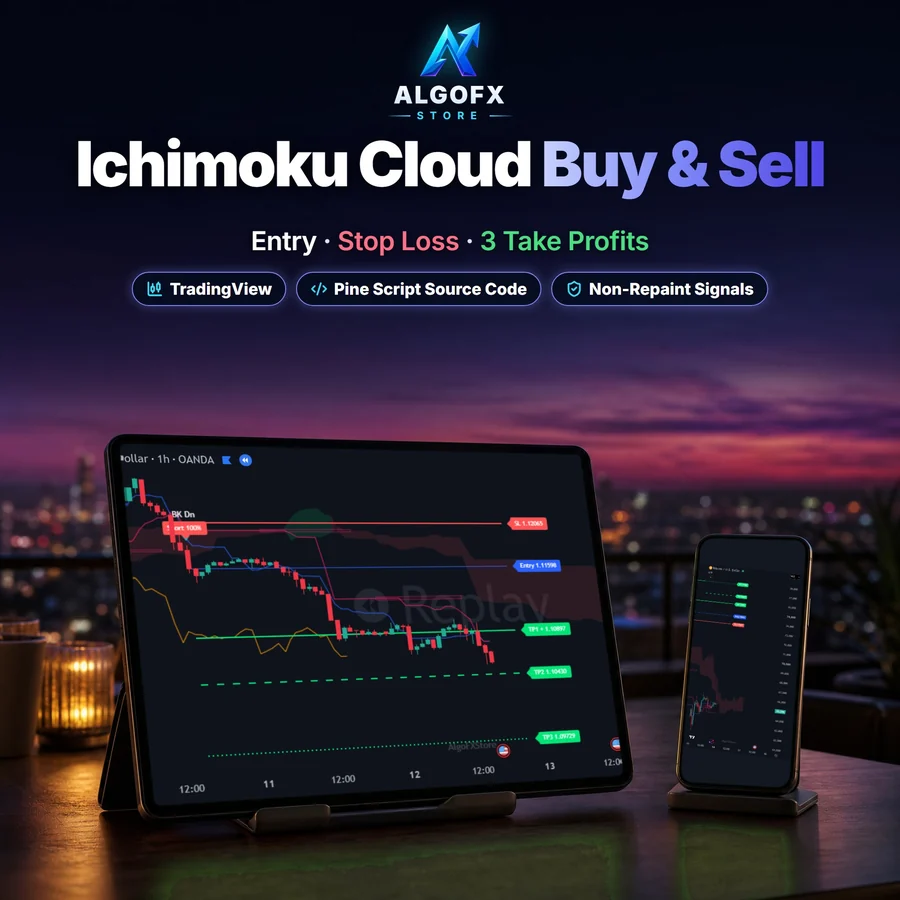
An Ichimoku cloud that adapts to volatility and scores every setup before it prints
Kumo Forge Pro draws the full Ichimoku on your TradingView chart, but in its default Adaptive mode the Tenkan, Kijun and Span B periods stretch and shorten with volatility.
- Adaptive Ichimoku periods that stretch up to 40 percent with volatility, or the classic 9, 26 and 52.
- Long and Short labels on closed candles, scored on up to nine factors, with a minimum of 40.
- Cloud breakouts, retests, Kijun bounces and cloud-edge bounces as extra marks, all on closed candles.
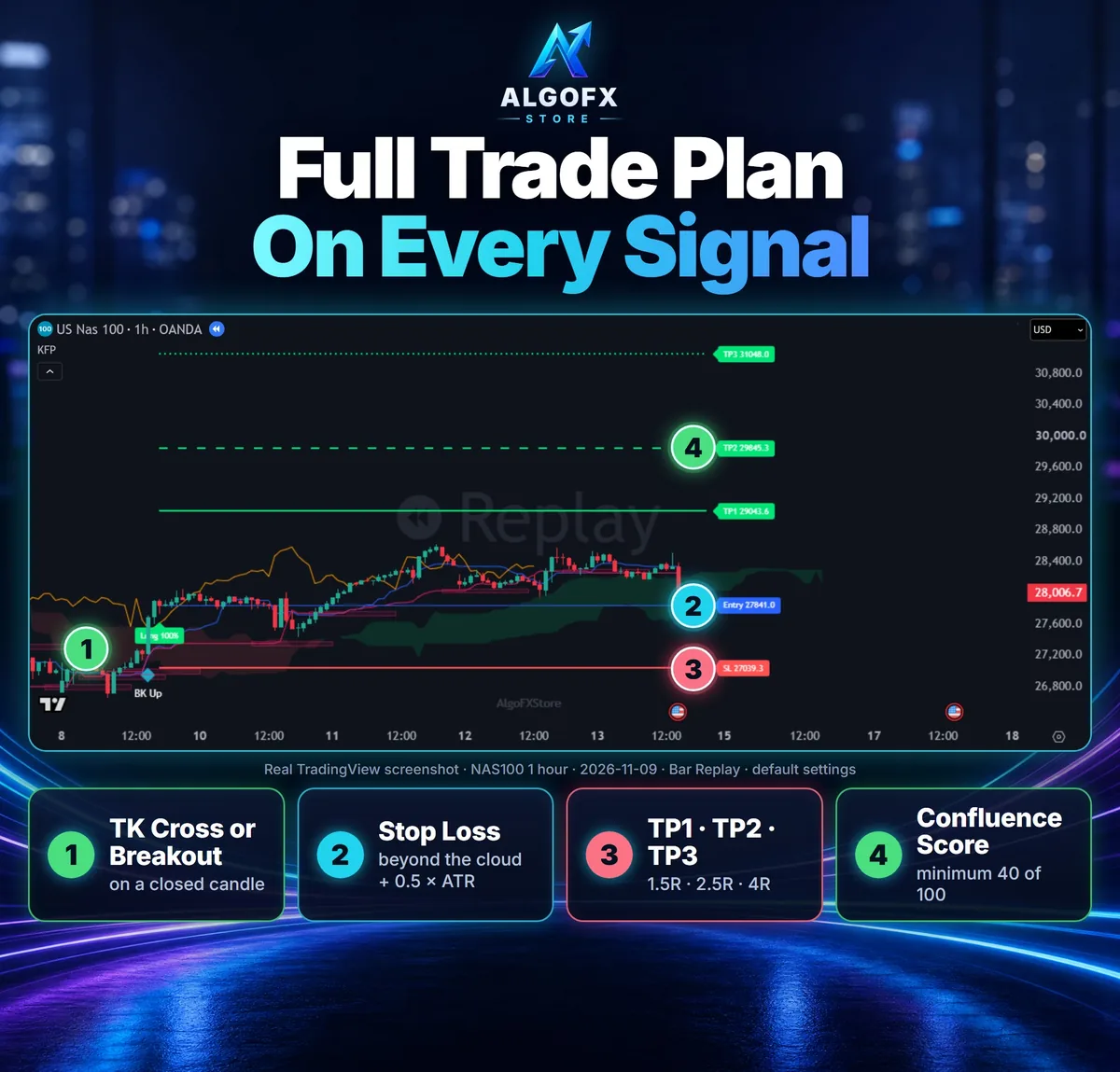
- A stop beyond the cloud plus 0.5 ATR and targets at 1.5R, 2.5R and 4R for the newest signal.
- The full Pine Script source code. Paste it into the Pine Editor, save, and add “Kumo Forge Pro [AlgoFXStore]” to your chart.
- A 5-page PDF guide with installation, every setting and how to read the chart. One-time €47.
See Kumo Forge Pro on a real chart
Press play; use the full-screen button to see every detail.
The classic Ichimoku says a lot, but not how much stands behind a cross
Ichimoku is one of the most complete trend tools on a chart: the cloud, the Tenkan and Kijun lines and the Chikou span together describe trend, momentum and support at once. Its weakness is that it treats every situation the same way. A Tenkan and Kijun cross inside a thin cloud on low volume looks exactly like one above a thick cloud with everything aligned, and its fixed periods were set for a different market long ago.
So traders who use it end up running a checklist by eye on every cross: where is price against the cloud, is the cloud thick, is the Chikou free, is volume there, is momentum building. Then they still need a stop and a target, and the cloud, which is drawn 26 bars ahead, makes it easy to misread where support really sits.
Kumo Forge Pro keeps the full Ichimoku and adds what the classic version leaves to you. The periods adapt to volatility, every signal carries a score built from the same factors you would check by hand, and the newest signal gets a stop beyond the cloud and three targets. You read the score and decide; the indicator does the measuring.
What Kumo Forge Pro draws, and what each mark means
Read from the shipped TradingView edition.
| What you see | What it means |
|---|---|
| Green / red cloud | Senkou A above B (green) or below (red), drawn 25 bars ahead |
| Blue and pink lines | Tenkan-sen (blue) and Kijun-sen (pink); orange line = Chikou span |
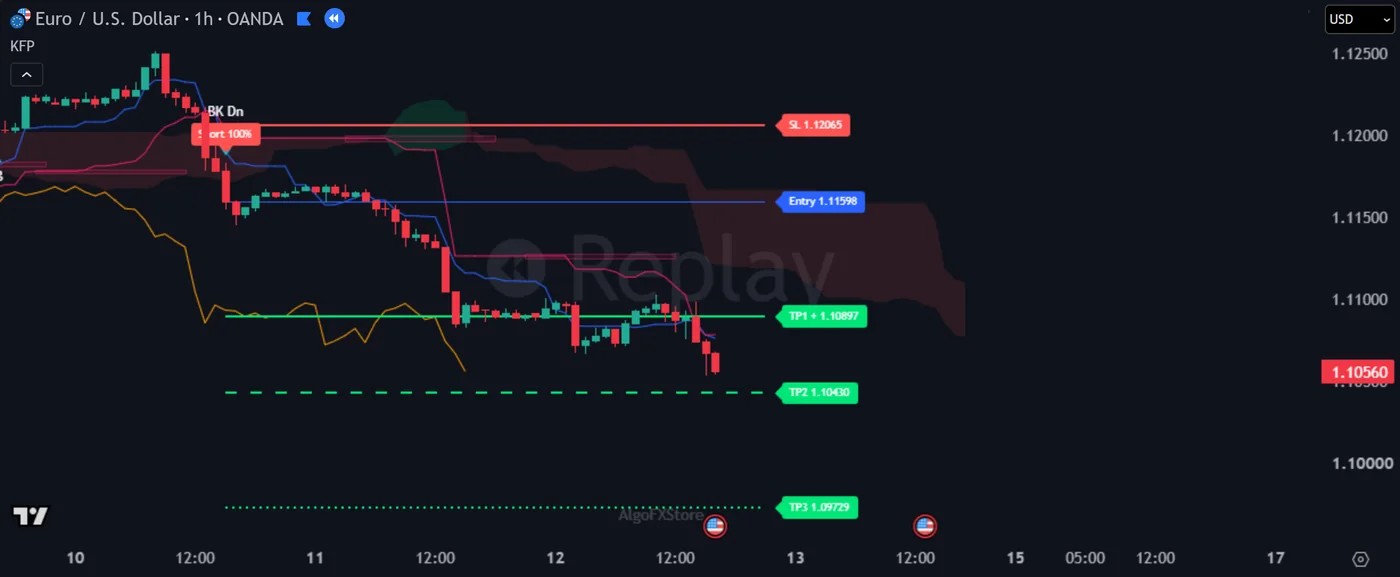
| Green 'Long 72%' label | Tenkan crossed above Kijun on the closed candle; 72 = confluence score out of 100, not a probability |
| Red 'Short 64%' label | Tenkan crossed below Kijun on the closed candle |
| Cyan diamond 'BK Up' / 'BK Dn' | Close broke through the cloud with volume above 1.3 x average |
| Small cyan dot | Retest of the cloud edge within 10 bars after a breakout |
| 'KB' / 'CB' triangles | Kijun bounce (green/red) and cloud-edge bounce (cyan) in the trend direction |
| Blue 'Entry', red 'SL', green 'TP1-TP3' lines | Trade plan of the newest signal; 'TP1 +' = reached, 'SL X' = stopped |
| Pink shaded box | End of a flat Kijun, marked as support/resistance |
Adaptive lines, scored signals and a plan
This is the shipped Pine Script, in the order it works. Every signal is decided on a closed candle, after an 80-bar warm-up.
- 1
Periods that follow volatility
In Adaptive mode the script measures ATR over a 50-bar Volatility Lookback and stretches or shortens the Conversion (9), Base (26) and Span B (52) periods by up to 40 percent (Adapt Strength 0.4). Calm markets get longer, smoother lines; volatile markets shorter, faster ones. Classic mode uses the fixed periods. The cloud is drawn 25 bars ahead and the Chikou 25 bars back, as in any Ichimoku.
- 2
A score out of nine factors
Each setup is scored: price against the cloud up to 20 points, Tenkan and Kijun alignment 15, Chikou 15, cloud direction 10, cloud thickness 8, volume 10, momentum 12 and momentum acceleration 10, plus 10 for RSI if you enable it. The total runs to 100, or 110 with RSI. 80 and above is graded Strong, 50 and above Standard.
- 3
The Tenkan and Kijun cross
A Long label prints when the Tenkan crosses above the Kijun on a closed candle, the cloud is not thin, volume is above 1.2 times its 20-bar average, the close is above the close 26 bars ago and the score is at least 40. Short is the mirror. The label shows the score, for example Long 72, and its tooltip the grade and momentum.
- 4
Breakouts, retests and bounces
BK Up and BK Dn diamonds mark a close through the cloud on volume above 1.3 times average, with no score needed. Small cyan dots mark a retest of the cloud edge within 10 bars. KB triangles mark a Kijun bounce and CB triangles a cloud-edge bounce in the trend direction, both with a score of 40 or more. Chikou breakouts exist but are off by default.
- 5
A plan for the newest signal
Any signal starts a new plan at its close. In the default Kumo Edge mode the stop sits 0.5 ATR(14) beyond the cloud: below it for a buy, above it for a sell; Kijun and ATR modes are the alternatives. Targets sit at 1.5, 2.5 and 4.0 times the risk. Hits are checked on closed candles and the plan ends at TP3 or the stop.
- 6
Context in the dashboard
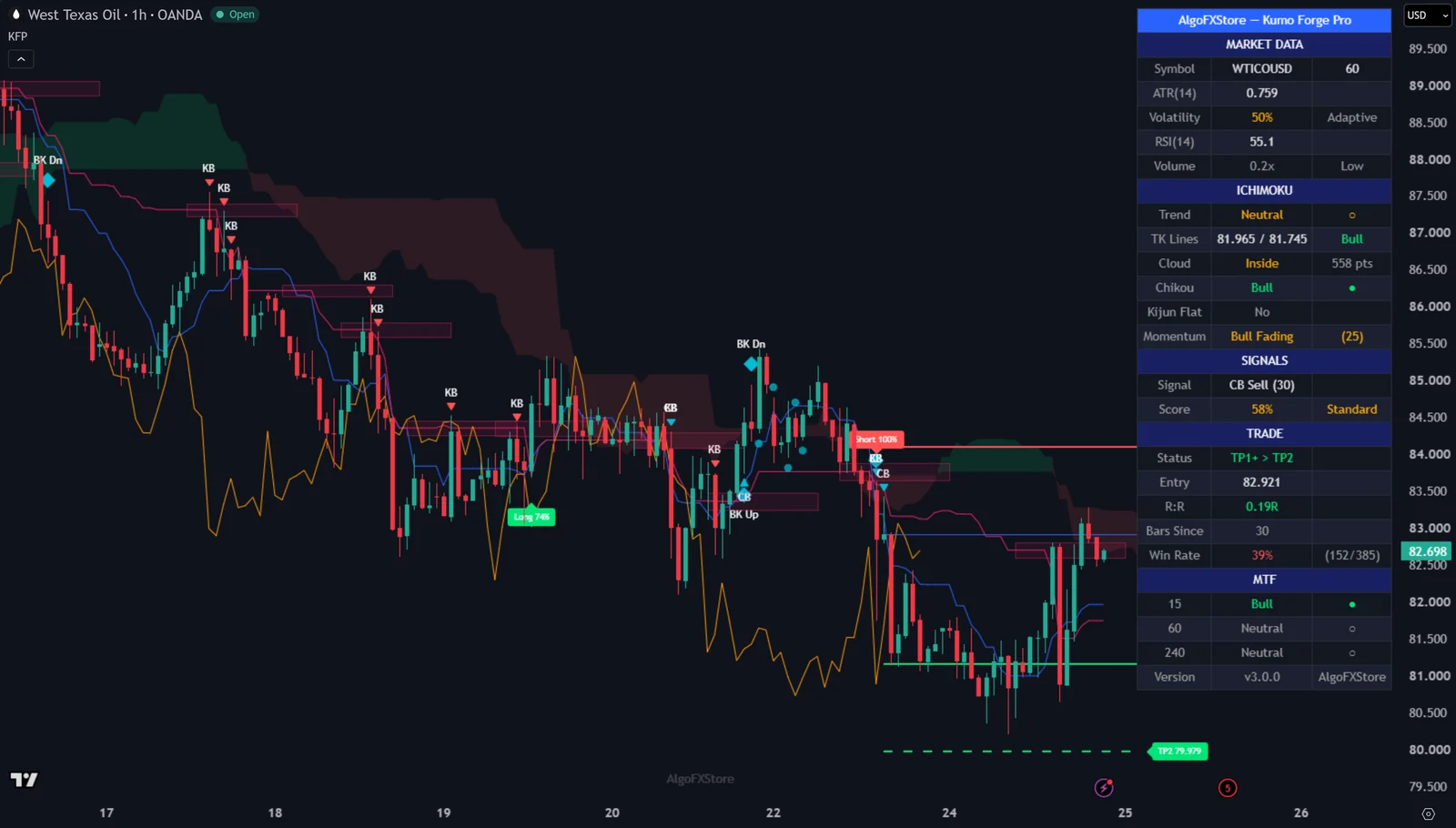
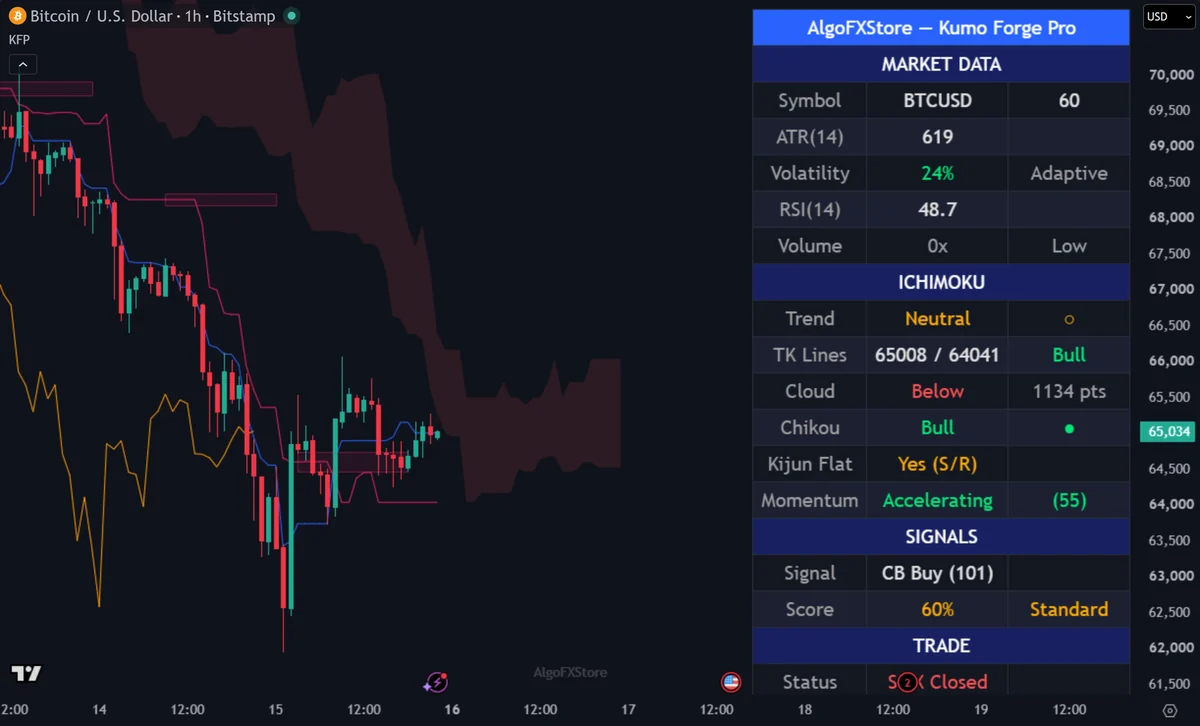
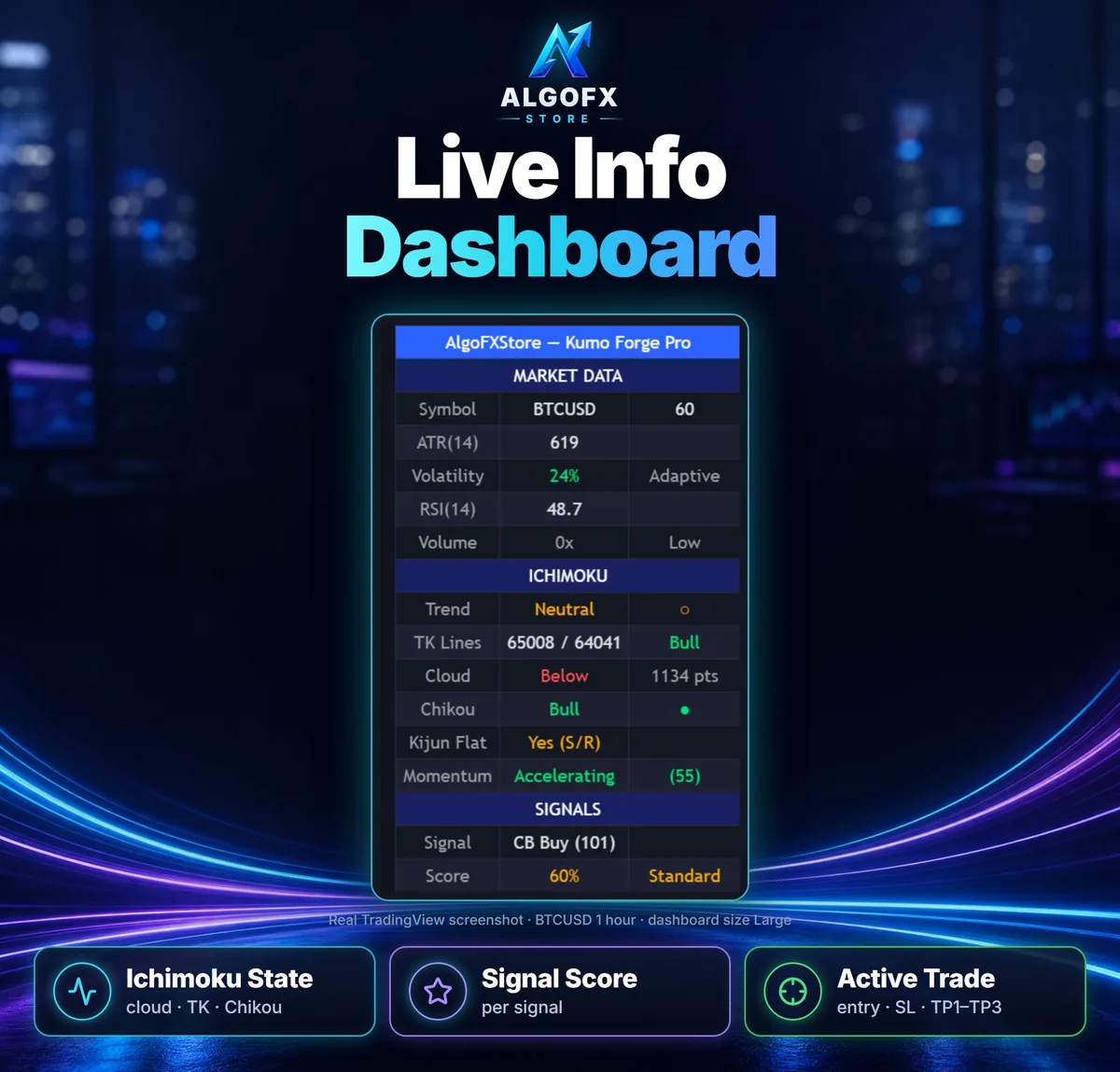
The dashboard lists ATR, volatility, RSI and volume; the Ichimoku trend, TK lines, cloud position and thickness, Chikou, a flat Kijun and momentum; the latest signal and its score; the open plan's status, entry, live R and bars since; and the Ichimoku trend on 15, 60 and 240 minutes. A flat Kijun is also shaded on the chart as support or resistance.
Kumo Forge Pro on 12 different markets
Every chart below is a screenshot of TradingView itself with the shipped Kumo Forge Pro [AlgoFXStore] attached at its default settings. Forex, metals, indices, energy and crypto, so you can see how it reads each kind of market. They show what the indicator draws; they are not trading results. Tap or click any chart to open it full size.
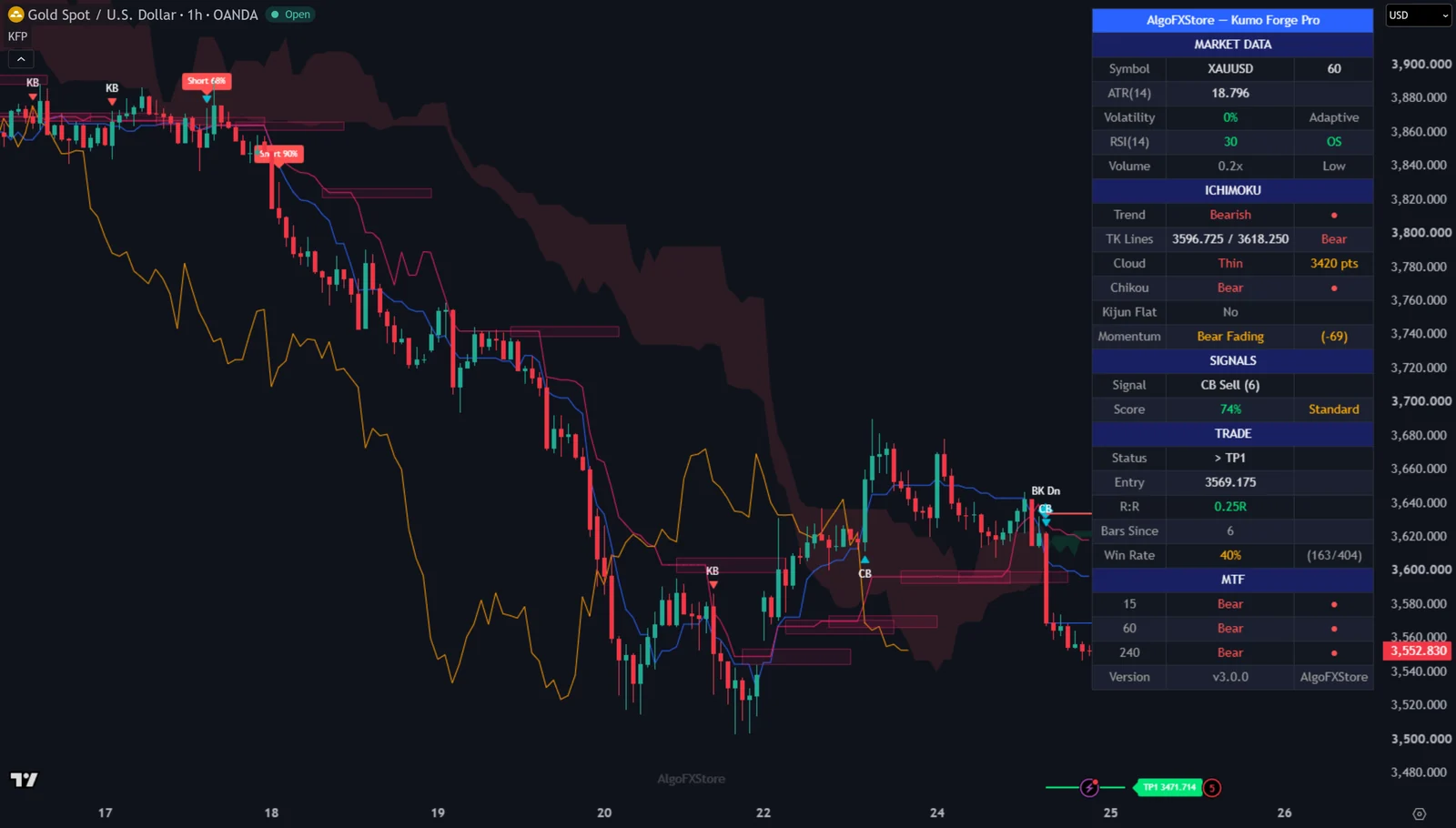
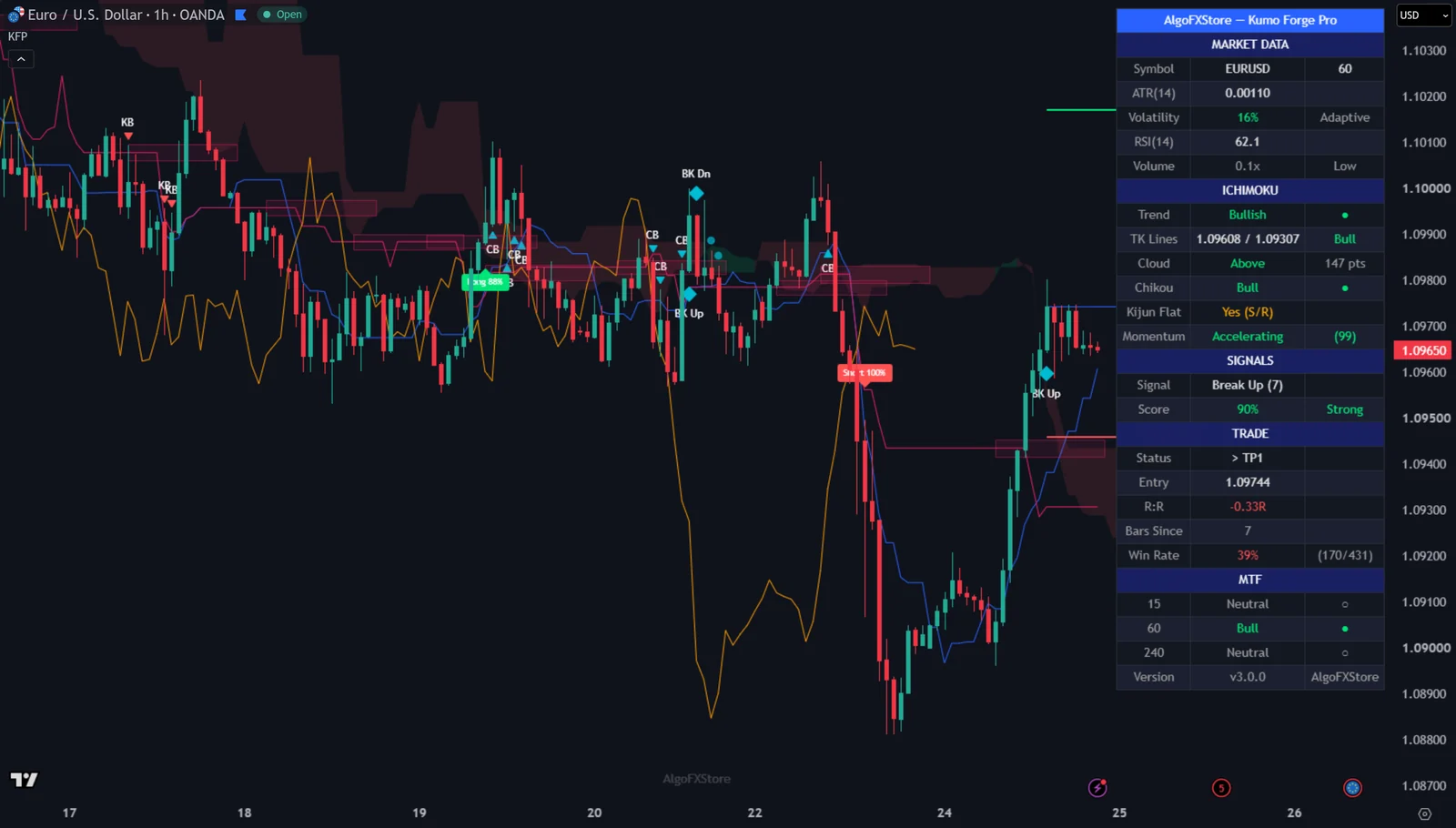
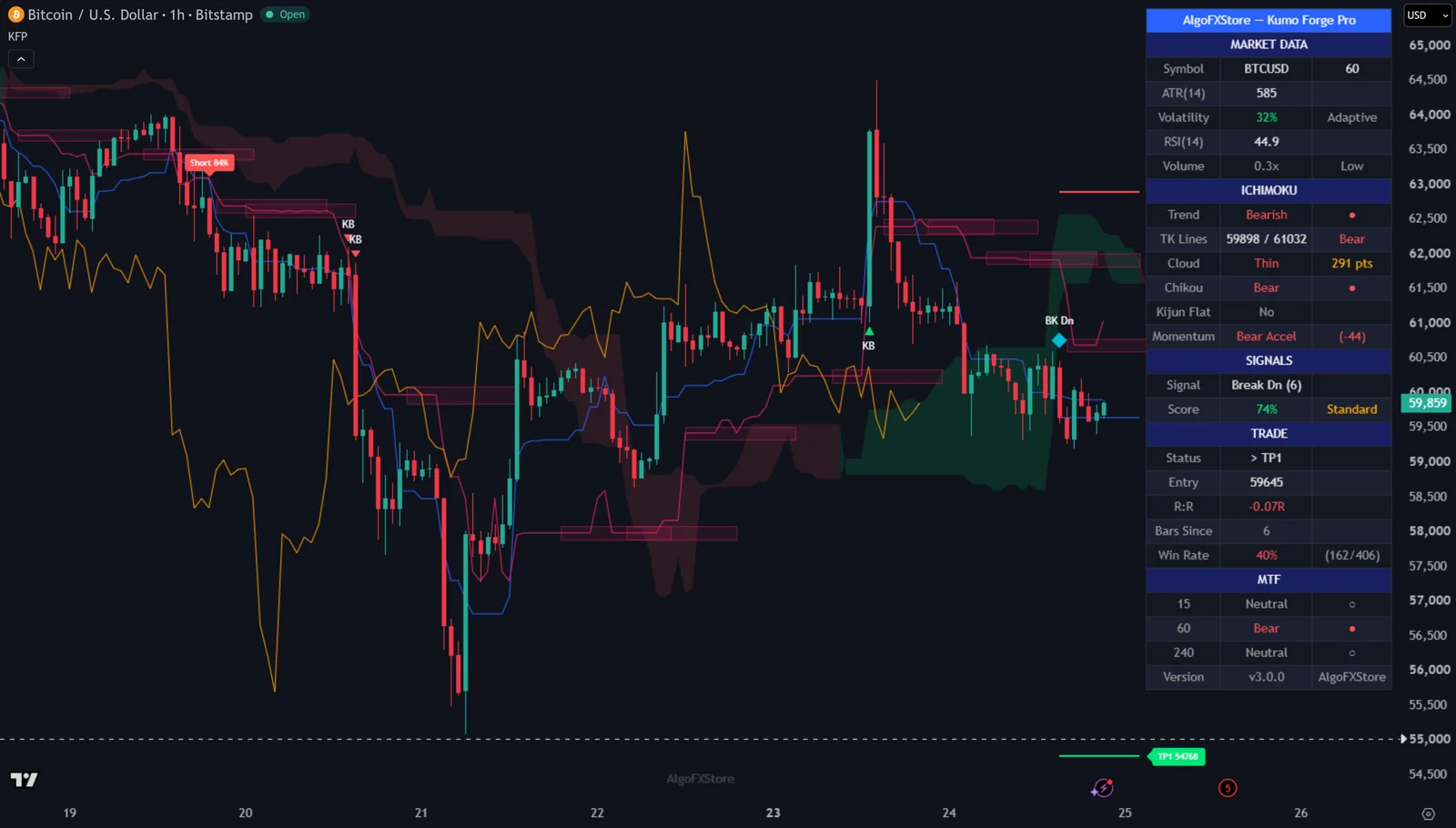
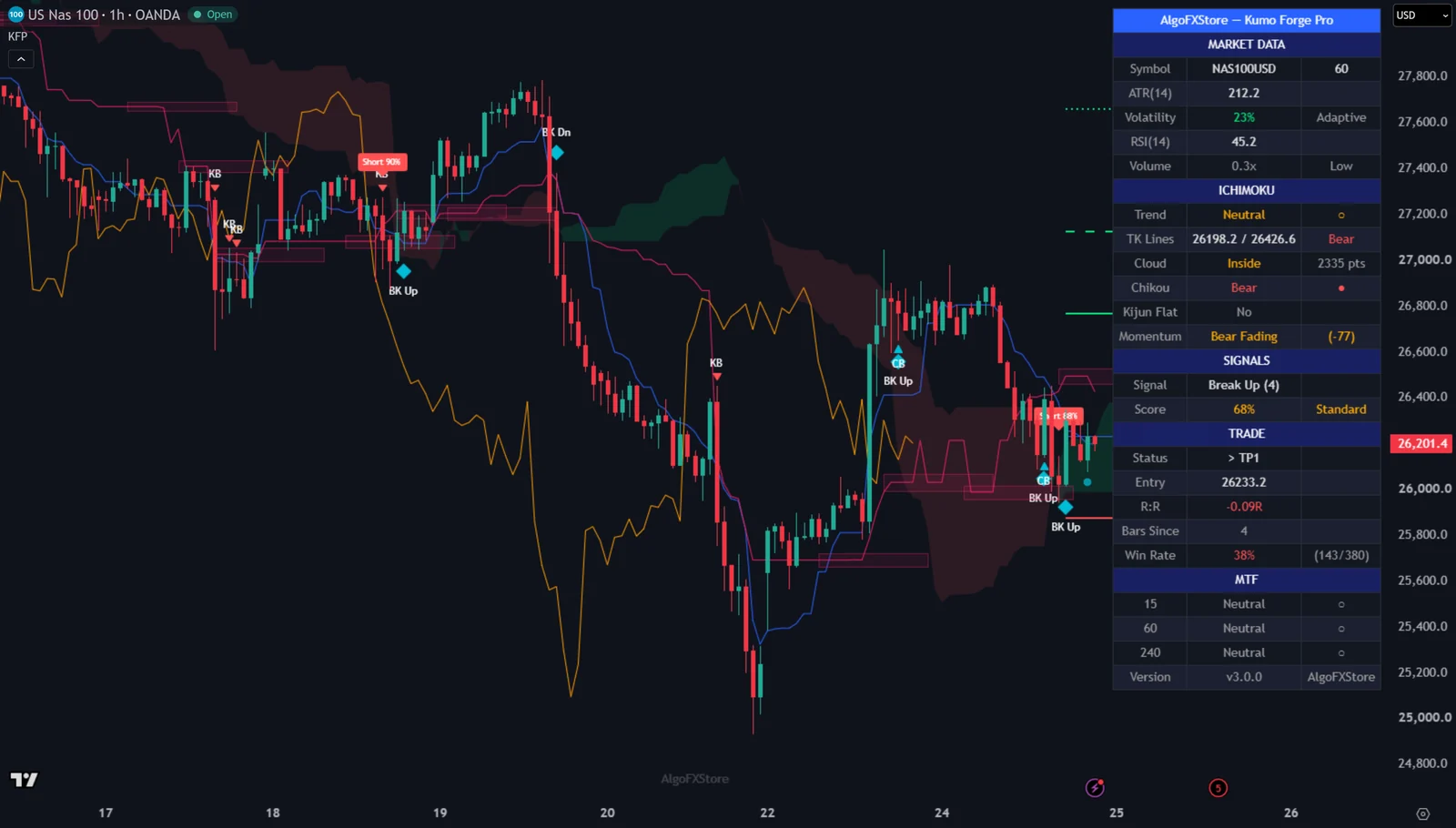
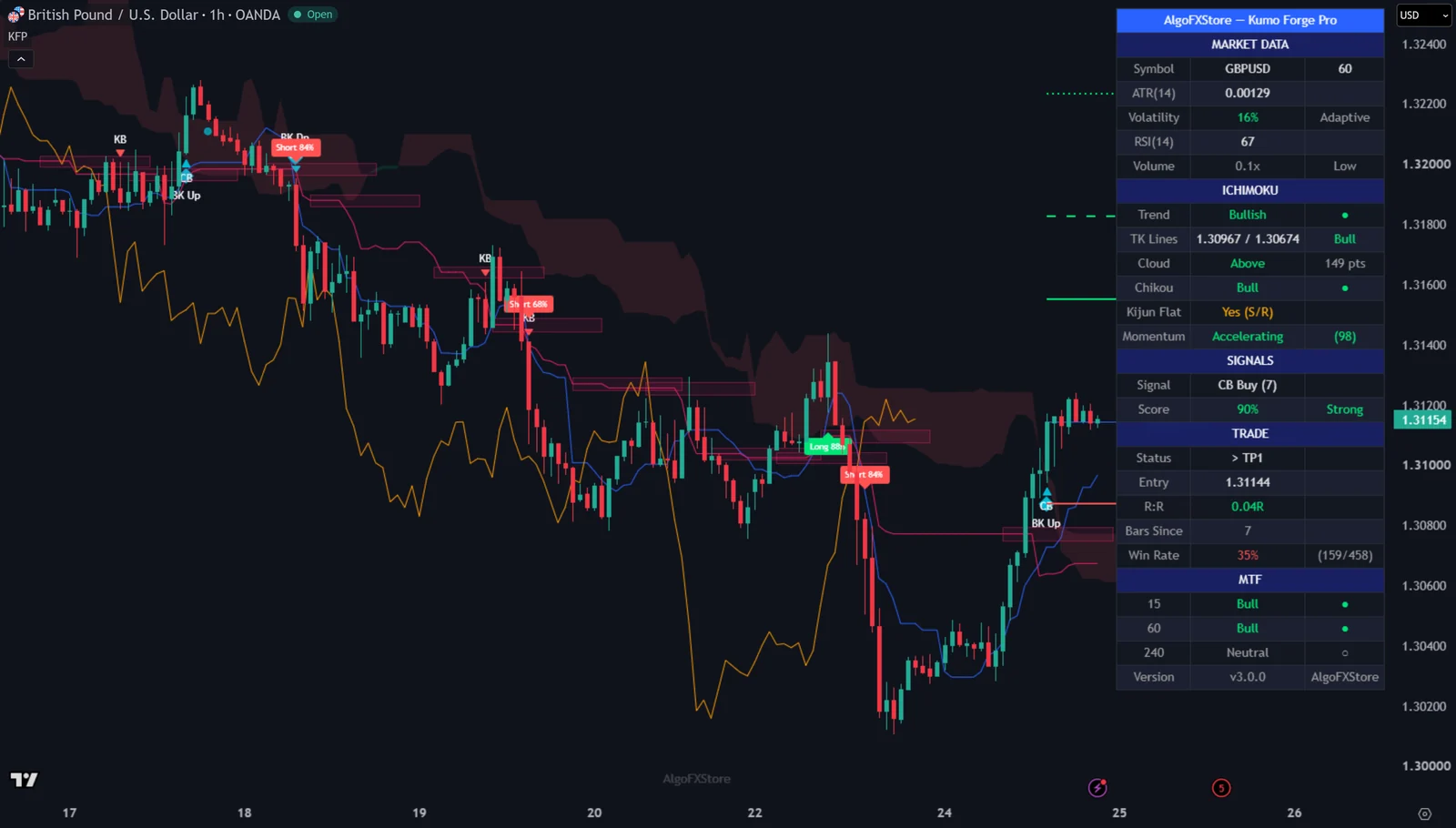
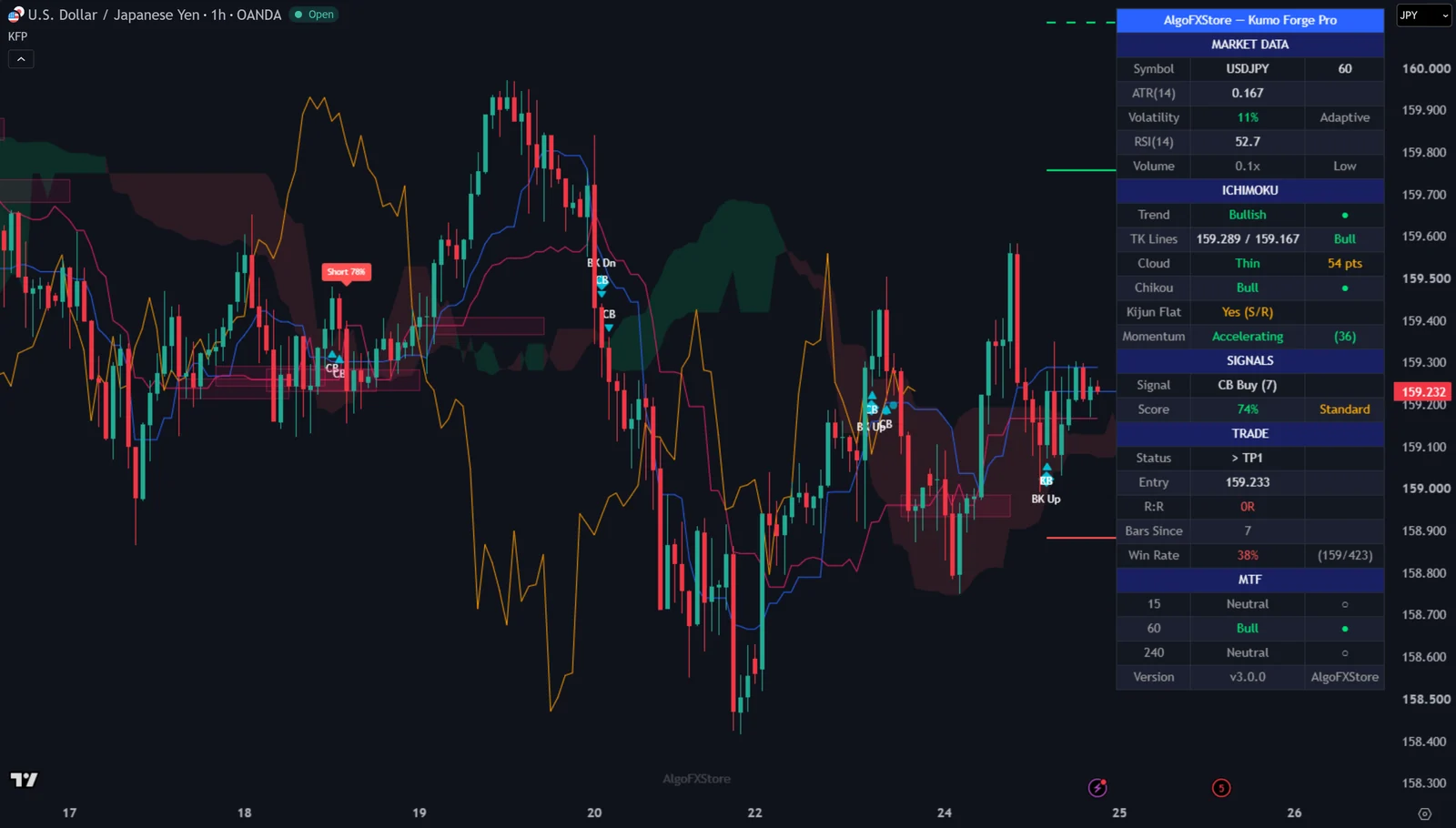
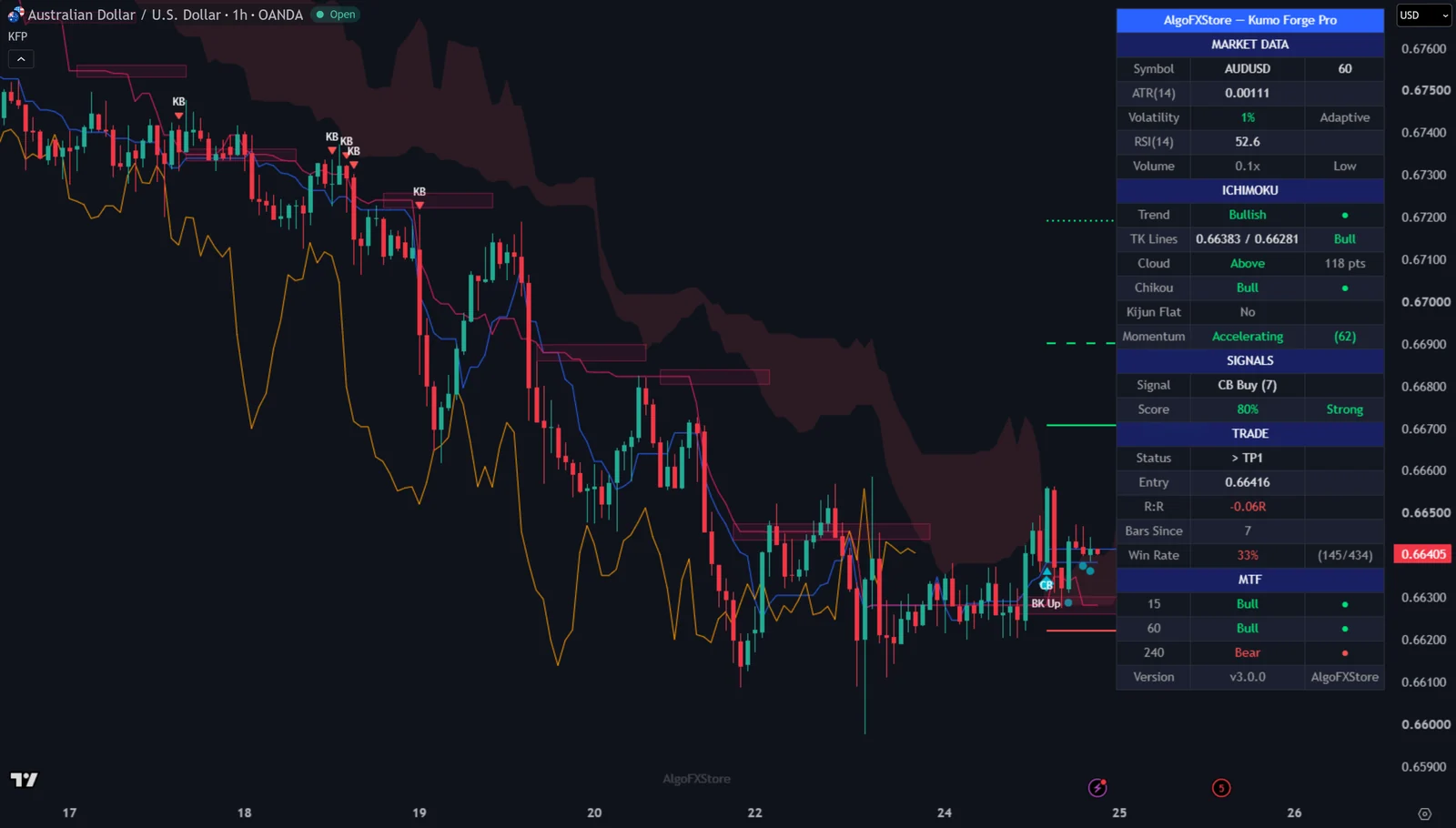
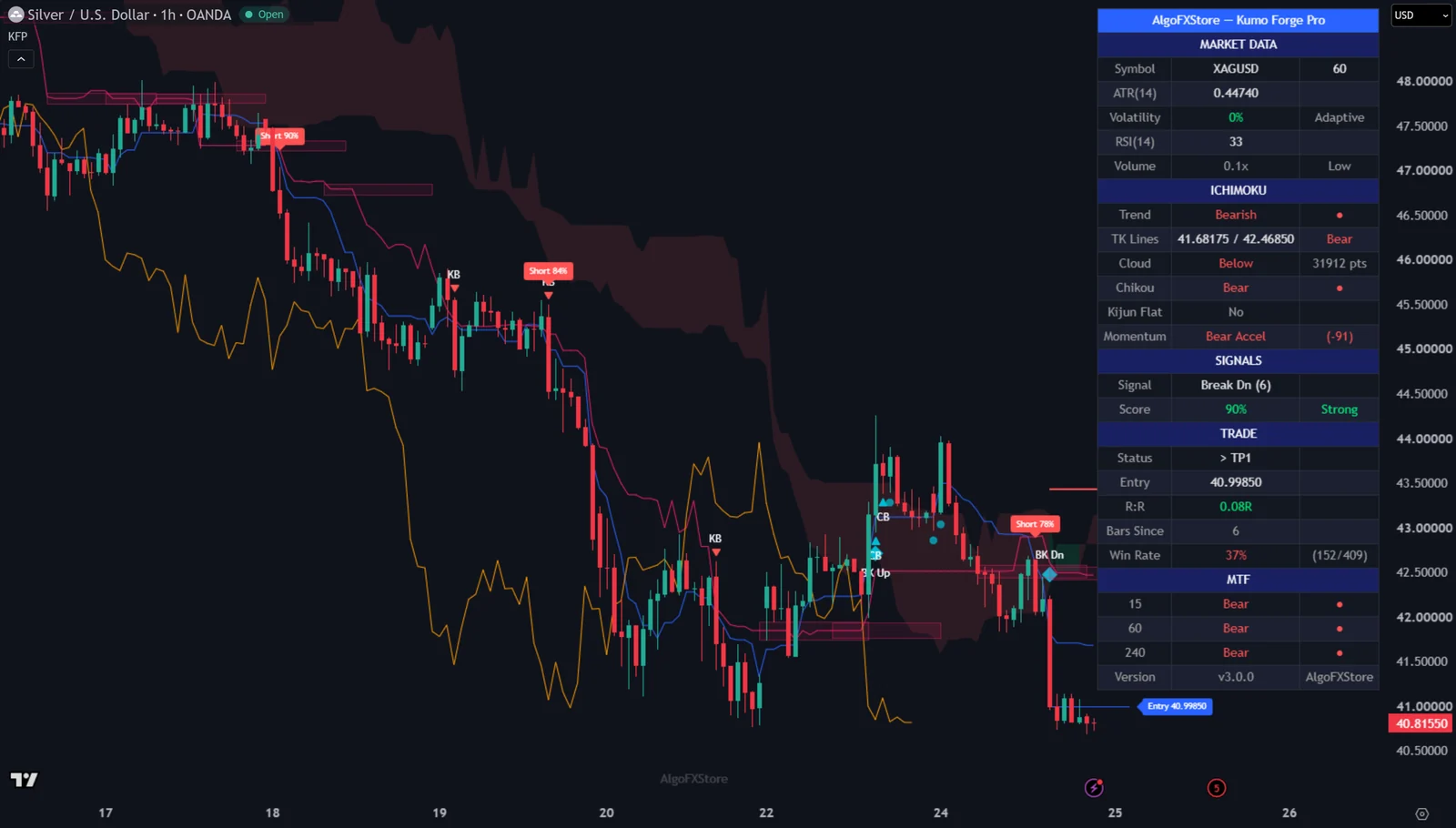
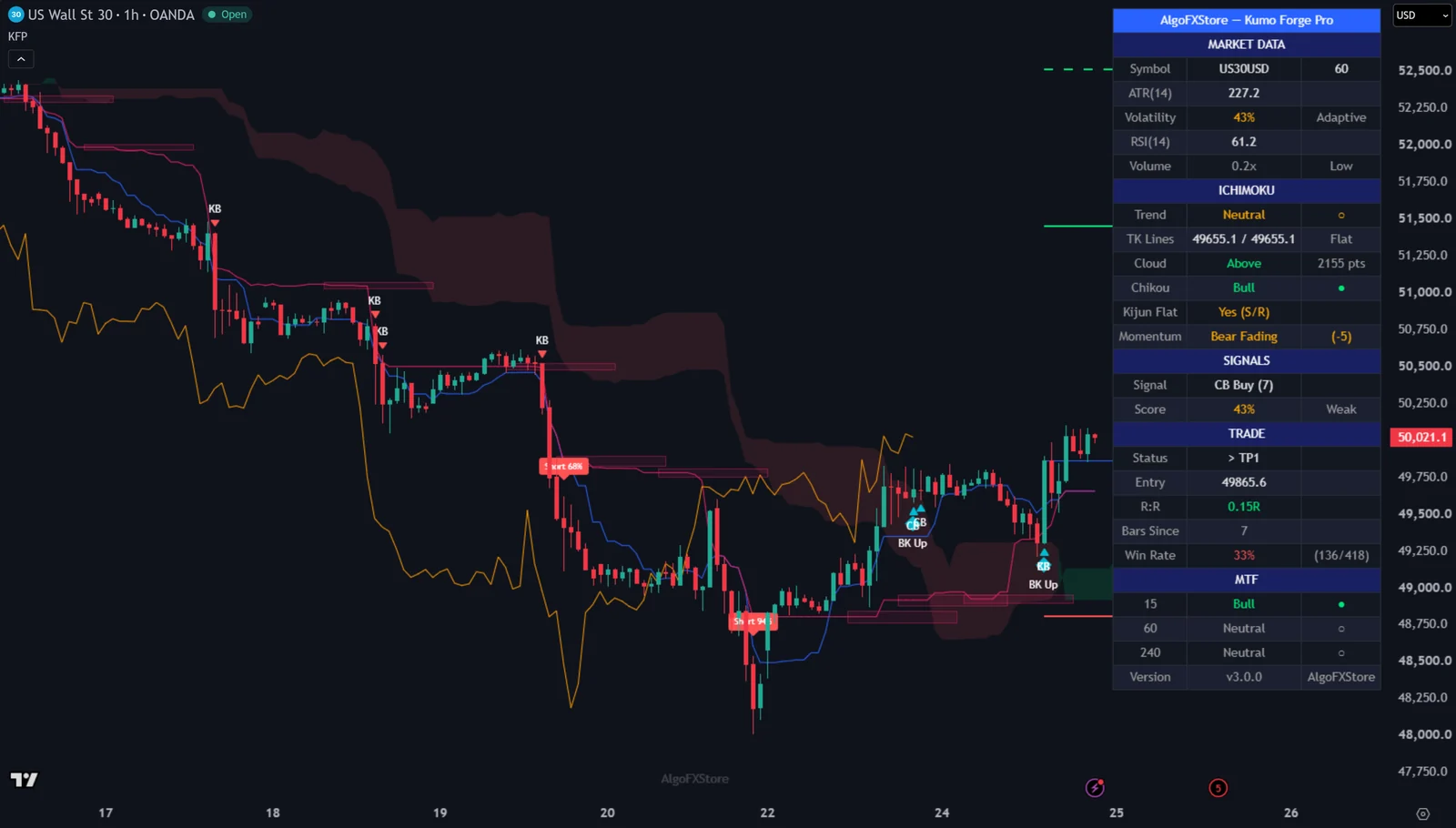
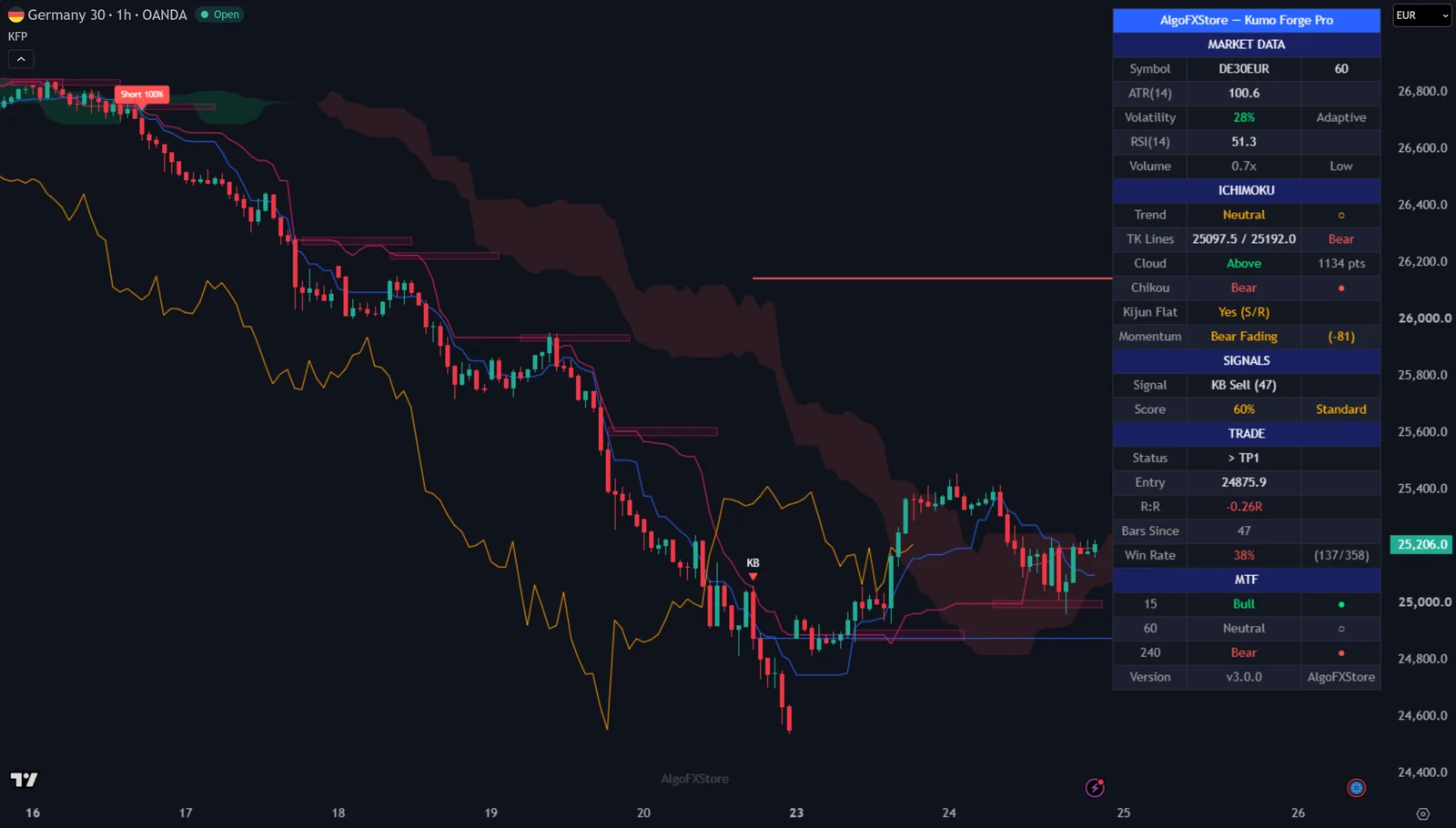
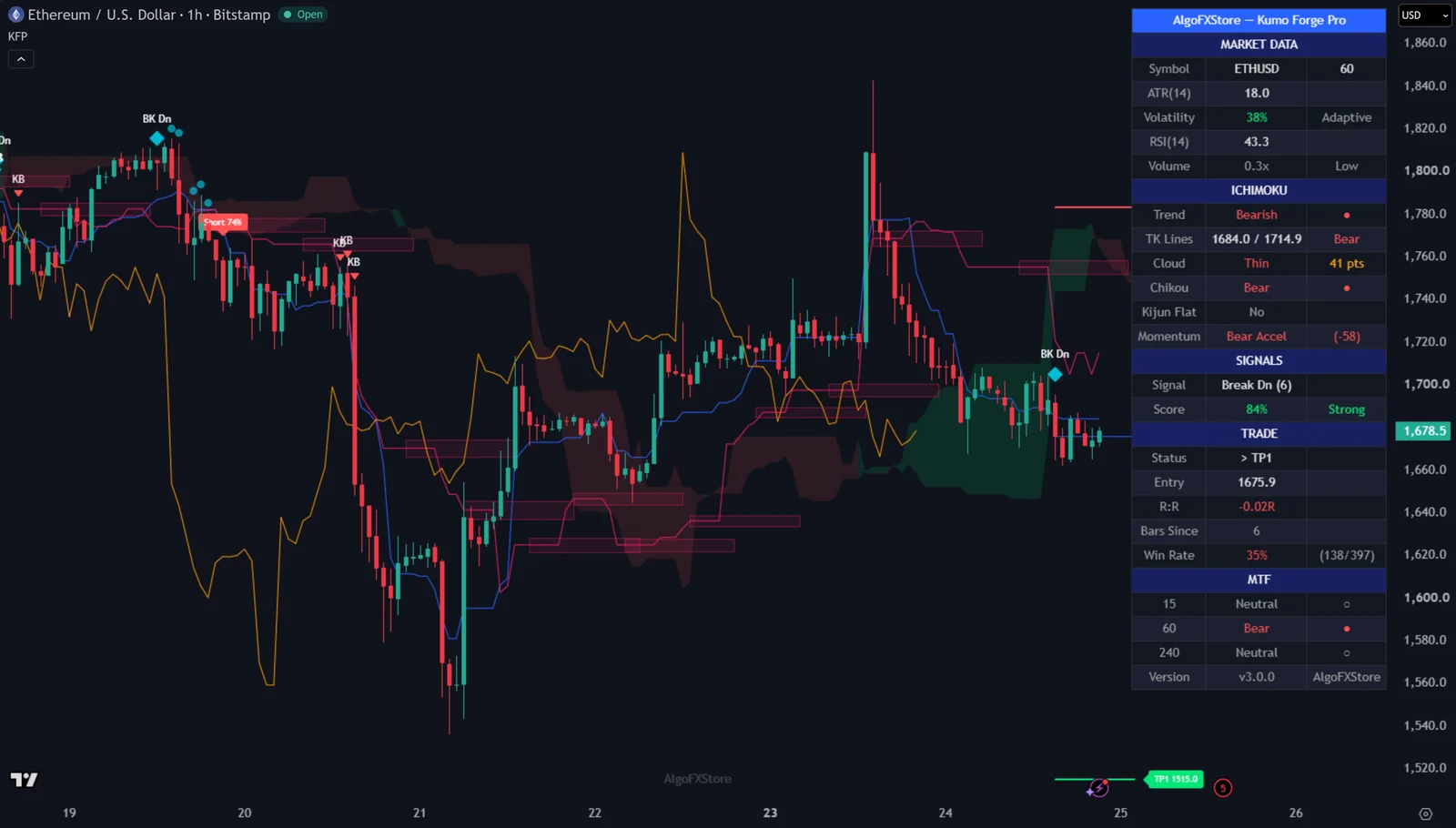
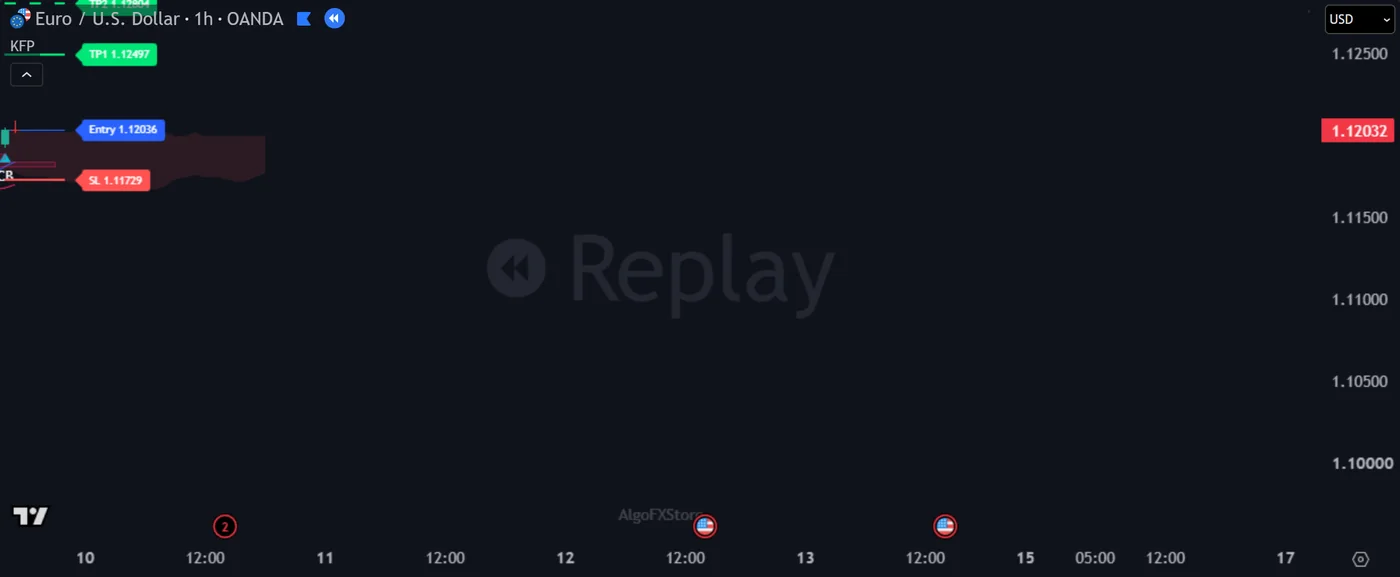
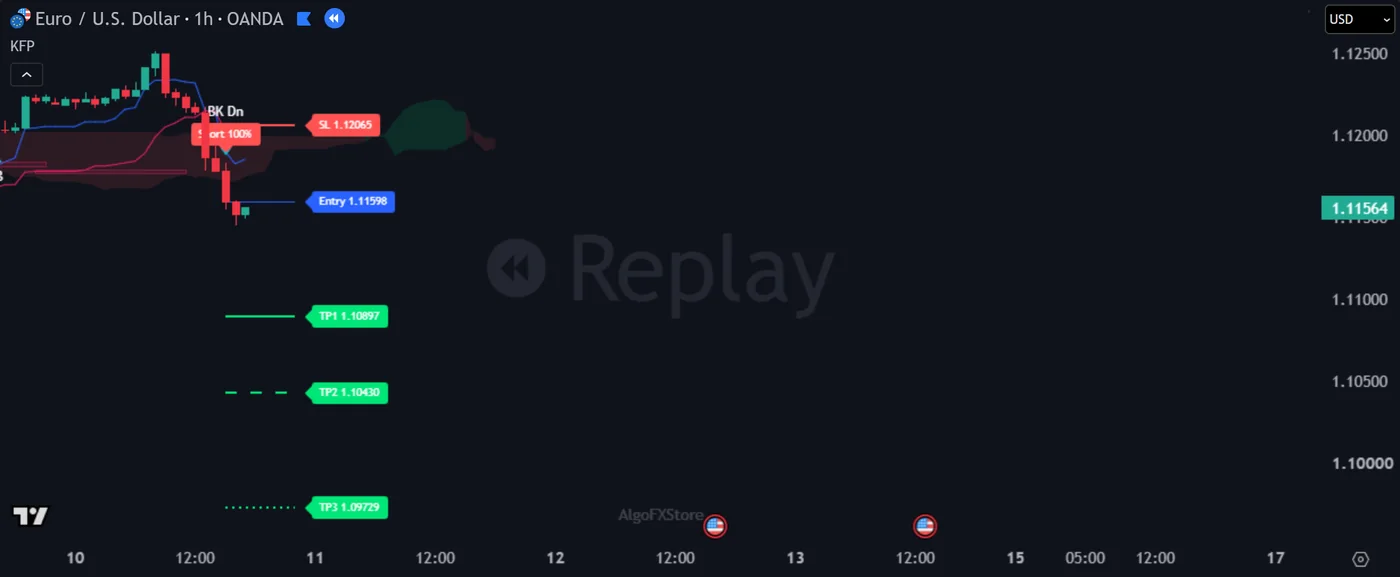
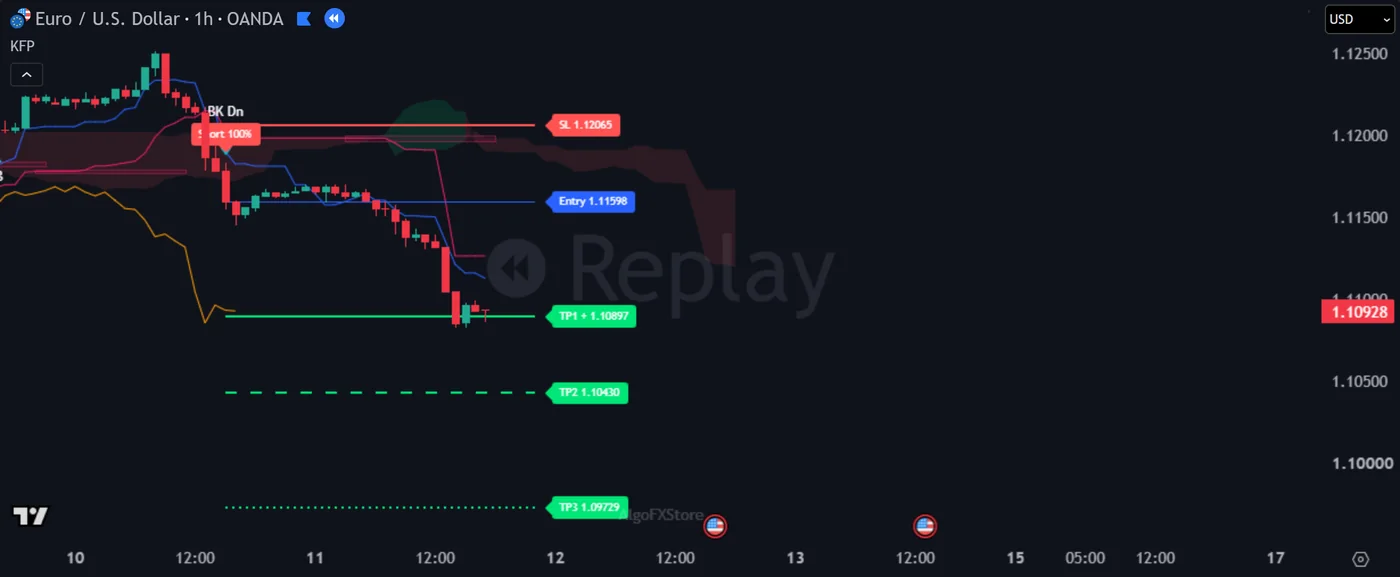
Kumo Forge Pro on a real TradingView chart, frame by frame
Frames of a screen recording of the shipped indicator at its default settings, as the chart updates. Nothing is edited into the chart.
Reading a scored Ichimoku signal before you act
The indicator scores, draws and alerts. Your rules, your size and every order stay with you; practise the routine on TradingView's Paper Trading account first.
- 1
Wait for the close and read the score
Labels and marks appear only when the candle closes, and the alerts are sent once per bar close. Read the score on the label: decide in advance whether you act on Standard signals or only on Strong ones of 80 and above, and raise Min Confluence Score if you want the chart to show fewer signals.
- 2
Check the cloud and the timeframes
A Long above a thick, rising cloud with the Chikou free is a different trade from one that just escaped a thin cloud. The dashboard's Cloud row says Above, Below, Inside or Thin. Check the 15, 60 and 240-minute rows: on a live chart they follow the forming higher-timeframe candle and can still change, so treat them as context, not a trigger.
- 3
Place the stop beyond the cloud
The default stop sits beyond the cloud plus half an ATR, where the Ichimoku idea is wrong. Size from the distance between the entry and that stop, and place a real stop order at your broker straight away. If the cloud is far away, the stop is wide: trade smaller or skip. Kijun mode gives a closer stop, ATR mode a fixed two-ATR distance.
- 4
Manage at the targets
TP1 at 1.5R is the nearest target. The label changes to TP1 + when it is reached on a closed candle, and the dashboard's Status row moves on to the next target. Many traders take part of the position at TP1 and manage the rest. A new signal of any kind starts a new plan and replaces the old lines, so note your levels.
- 5
Skip what the indicator warns about
Skip signals when the Cloud row reads Thin, when the score barely passes 40, or when the higher-timeframe rows point the other way. A flat Kijun shaded as support or resistance just ahead of the entry is another reason to wait. Cloud breakouts need volume but no minimum score, so read their context in the dashboard before treating one like a Strong cross.
The dashboard, row by row
- AlgoFXStore: Kumo Forge Pro
- MARKET DATA
- Symbol
- ATR(14)
- Volatility
- RSI(14)
- Volume
- ICHIMOKU
- Trend
- TK Lines
- Cloud
- Chikou
- Kijun Flat
- Momentum
- SIGNALS
- Signal
- Score
- TRADE
- Status
- Entry
- R:R
- Bars Since
- MTF
- 15
- 60
- 240
- Version (written over the 'Align' row, see notes)
Everything Kumo Forge Pro does for you
An adaptive Ichimoku engine
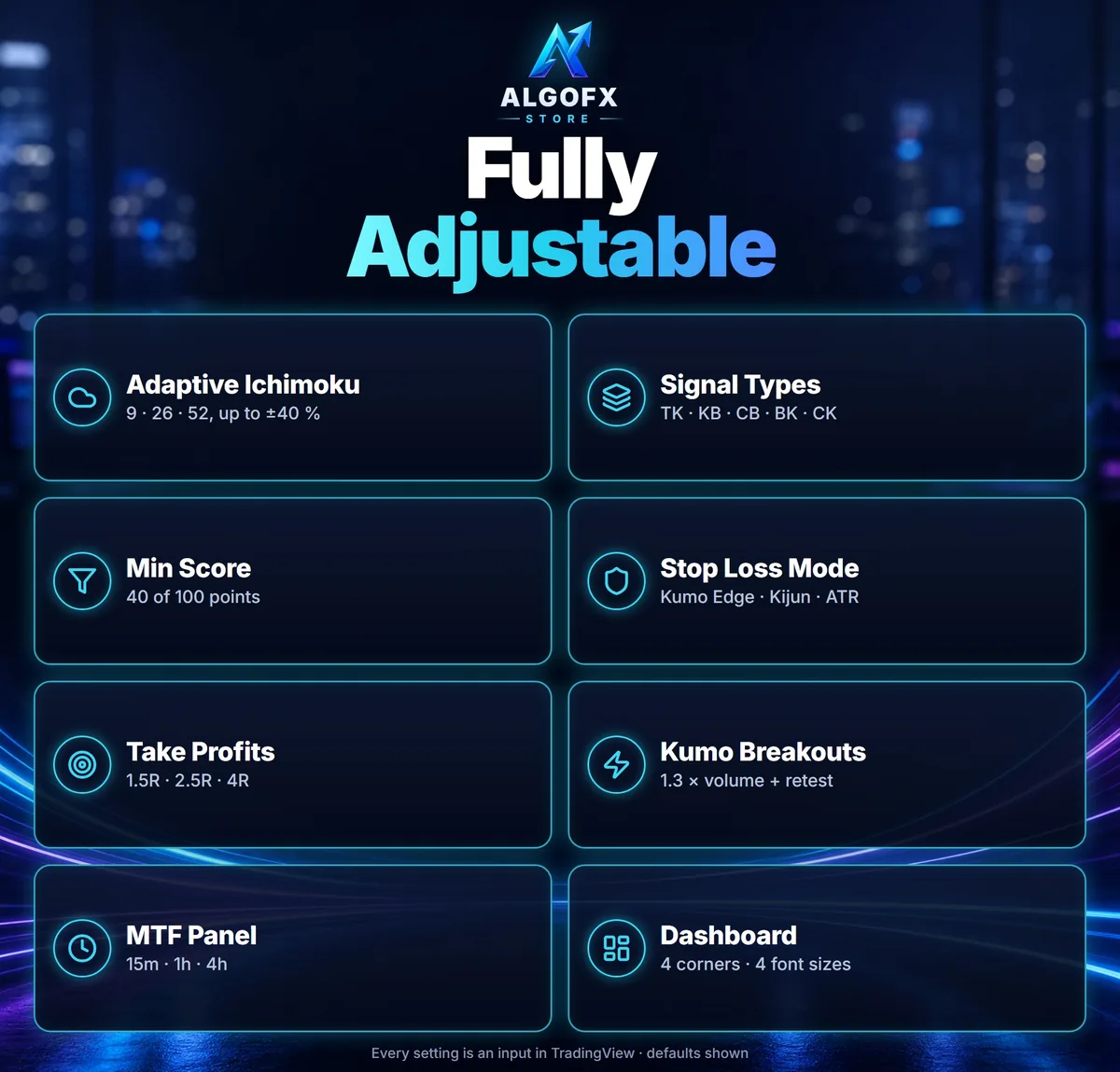
Tenkan, Kijun and Span B periods scale with ATR-measured volatility by up to 40 percent, with Volatility Lookback and Adapt Strength as inputs. Switch to Classic for the fixed 9, 26 and 52.
A score on every signal
Up to nine weighted factors, from price against the cloud to momentum acceleration and an optional RSI factor, give each setup a score and a Strong, Standard or Weak grade. The score measures agreement, not a probability.
Six signal types
Tenkan and Kijun crosses, cloud breakouts on volume, retests of the cloud edge, Kijun bounces, cloud-edge bounces and optional Chikou breakouts, each with its own switch and its own mark.
Filters you can switch
Kumo Thickness Filter, Volume Filter, Chikou Confirmation and the RSI Confluence Filter, plus Min Confluence Score from 0 to 110 in steps of 5. The volume filter is skipped when a symbol reports no volume.
A plan for the newest signal
Blue entry, red stop and green TP1, TP2 and TP3 lines with price labels. Three stop modes, Kumo Edge, Kijun and ATR, an ATR buffer and three reward-to-risk inputs. Reached levels are marked on the labels.
Support and resistance from a flat Kijun
When the Kijun stays flat and then moves, the flat level is shaded on the chart as a support or resistance zone, a classic Ichimoku reading made visible.
A sectioned dashboard
Market data, Ichimoku state, signals, the open plan and three higher timeframes in one table, in four corners and four font sizes, with an Auto, Dark or Light theme. It also keeps a hindsight count of targets versus stops since the chart loaded.
23 alert conditions
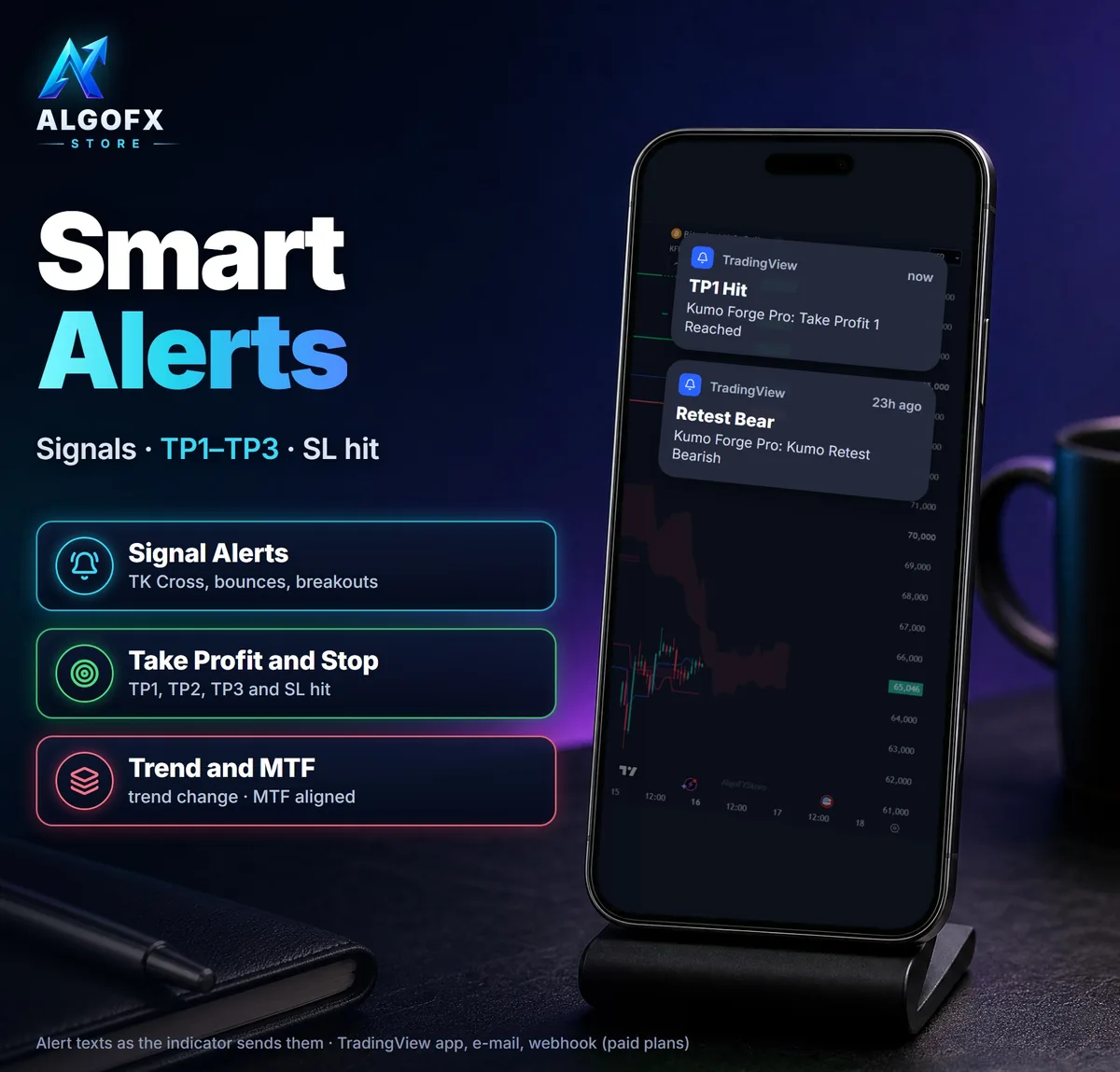
TK Cross, Kumo Break, Retest, Kijun Bounce, Cloud Bounce and Chikou Break for both directions, TP1 to TP3 and SL Hit, MTF All Bullish or Bearish, three trend changes and Strong Buy or Sell at 80 and above, plus messages with prices.
Kumo Forge Pro, feature by feature
Each picture is built from real platform screenshots of the shipped indicator at its default settings, labelled so you can see what every part does. Tap any picture to open it full size.

How traders put it to work
Swing trading on 4 hours and daily
The published notes suggest 4-hour and daily charts with Tenkan and Kijun crosses and Kijun bounces for swing traders, combined with a higher minimum score. The Adaptive mode lengthens the periods in quiet stretches, which keeps the cloud from flipping on every small move.
Momentum and breakout trading
Kumo breakouts need volume above 1.3 times its average and no minimum score, so they suit traders who trade the cloud break itself. The retest dots within 10 bars of a breakout give a second, later entry for those who wait for the pullback.
Faster charts, 15 minutes to 1 hour
For quicker entries, enable all signal types on 15-minute to 1-hour charts and lower Min Confluence Score. Expect more marks and smaller stops. Keep the dashboard's higher-timeframe rows in view so a fast signal does not fight the larger trend.
Forex, gold, indices, stocks and crypto
The adaptive engine works on any market and timeframe. On forex symbols without volume data the volume filter switches itself off; on symbols with volume, it applies. Traditional Ichimoku readers can use Classic mode and still keep the scoring and the plan.
Every setting, with its default
The names are the ones in the script's Settings dialog in TradingView (Inputs tab); the defaults are what every chart on this page uses.
| Setting | Default | What it does |
|---|---|---|
| Calculation Mode | Adaptive | Adaptive: Ichimoku periods stretch up to ±40 % with volatility; Classic: fixed periods |
| Conversion Period | 9 | Tenkan-sen length |
| Base Period | 26 | Kijun-sen length |
| Span B Period | 52 | Senkou Span B length (thicker cloud when longer) |
| Displacement | 26 | Cloud and Chikou shift in bars |
| Min Confluence Score | 40 | Minimum score (0-110) for TK Cross, Kijun bounce, cloud bounce and Chikou signals |
| SL Mode | Kumo Edge (SL ATR Buffer 0.5) | Stop beyond the cloud plus 0.5 x ATR(14); or Kijun-based, or 2 x ATR |
| TP1 R:R | 1.5 (TP2 R:R 2.5, TP3 R:R 4.0) | Targets as multiples of the stop distance |
| Show Kumo Breakouts | On (Breakout Vol Mult 1.3, Show Retest Signals on) | BK Up / BK Dn when a close breaks through the cloud on 1.3 x average volume |
| TF 1 | 15 (TF 2 60, TF 3 240) | Timeframes in the MTF trend panel |
The alert events, one by one
In TradingView: Create alert, choose “Kumo Forge Pro [AlgoFXStore]” as the condition and pick the event. TradingView then notifies you the way you set in that dialog: a pop-up in TradingView, a sound, the TradingView app on your phone or an e-mail.
- TK Cross Buy
- TK Cross Sell
- Kumo Break Up
- Kumo Break Down
- Retest Bull
- Retest Bear
- TP1 Hit
- TP2 Hit
- TP3 Hit
- SL Hit
- Kijun Bounce Buy
- Kijun Bounce Sell
- Cloud Bounce Buy
- Cloud Bounce Sell
- Chikou Break Buy
- Chikou Break Sell
- MTF All Bullish
- MTF All Bearish
- Trend to Bullish
- Trend to Bearish
- Trend to Neutral
- Strong Buy (80+)
- Strong Sell (80+)
Kumo Forge Pro next to the usual options
Where it wins, and where it does not.
| Kumo Forge Pro | Typical free Ichimoku indicator | Reading it by hand | |
|---|---|---|---|
| Ichimoku periods | Adaptive to volatility by default, or classic 9, 26, 52 | Fixed periods | Fixed periods |
| Signal quality | A score on up to nine factors with a minimum and a grade | Every cross looks the same | Judged by eye on each cross |
| Signal types | Crosses, breakouts, retests, Kijun and cloud bounces, Chikou breaks | Usually none, or the cross only | Whatever you look for |
| Stop and targets | Stop beyond the cloud and three R targets for the newest signal | None | Measured each time |
| Higher timeframes | Three timeframe rows in the dashboard; they follow the forming candle live | None | Switching charts |
| Simplicity | Many inputs and a large dashboard to learn | The five classic lines only | Clean chart |
| Cost | A one-time purchase | Free | Free, paid for in screen time |
Honest about who this fits
A good fit if you
- You like the Ichimoku cloud but want to know how much stands behind a cross before you act.
- You want the classic Ichimoku signals, breakouts, retests and bounces, decided on closed candles and marked on one chart.
- You want a stop beyond the cloud and three targets drawn for the newest signal, and you size from that stop yourself.
- You like a dashboard that shows the Ichimoku state and three higher timeframes at a glance.
- You are willing to spend time with the inputs, or happy with the defaults and the Adaptive mode as delivered.
Not for you if you
- You want something that places trades for you: it scores, draws and alerts, and every order is yours.
- You want a minimal chart: at its defaults it draws the full Ichimoku, several kinds of marks, levels and a large dashboard.
- You want the plan of every past signal on the chart: only the newest signal keeps its lines.
- You read the score as a promise: it measures how many factors agree, not the chance of profit.
The full code, one guide, installed in two minutes
- 1Pine Script source codeKumo_Forge_Pro_TradingView_Code.txt (67 KB): the full code. Paste it into the Pine Editor and it appears as “Kumo Forge Pro [AlgoFXStore]”.
- 5Page PDF guideInstallation, every setting with its default and how to read the chart.
- ✓Every main setting explainedThe table above lists the main settings with the defaults the charts use.
- ✓Alert eventsYou choose which ones are on in the settings.
- 60Day money-back guaranteeIf it is not for you, request a full refund within 60 days through your Digistore24 order e-mail.
Install in five steps
- Download the zip from the page Digistore24 sends you to after checkout and unzip it.
- Open Kumo_Forge_Pro_TradingView_Code.txt in a text editor, select all and copy the whole code.
- In TradingView, open the Pine Editor, paste the code over everything that is there and click Save.
- Click Add to chart: “Kumo Forge Pro [AlgoFXStore]” appears on your chart.
- Read the PDF guide; the defaults are the settings shown on this page.
Kestutis Balciunas
AlgoFXStore · chart indicators
Kestutis Balciunas builds and publishes chart indicators under the AlgoFXStore name. Every product page shows what the indicator draws on real charts, and every number on it comes from the shipped build.
The charts on this page were captured in TradingView from the shipped Kumo Forge Pro [AlgoFXStore] at its default settings and are shown unedited.
No get-rich claims and no quoted win rates. Every trade is uncertain, and no indicator changes that. If you want to know whether it suits the way you trade before you buy, e-mail [email protected] and you will get a straight answer.
One price, one payment
- The full Pine Script source code of Kumo Forge Pro and the 5-page PDF guide
- Delivered as a digital download: one zip with the code file and the PDF guide on your download page
- Return period: 60 days, with a full refund if it is not for you
- Free updates to the current version on the same download page
60-day money-back guarantee. Install it, run it on your own charts and read the guide. If Kumo Forge Pro is not for you within 60 days of purchase, request a full refund from Digistore24, no questions asked: use the refund link in your Digistore24 order e-mail or Digistore24's order page digistore24.com/en/cancel-revoke-contract. Digistore24 refunds to your original payment method. It is a digital download: right after checkout you land on your download page, and the link to it is also in your Digistore24 order e-mail.
Also by Kestutis Balciunas: Kumo Forge Pro for cTrader and MT4 and MT5 and NinjaTrader 8.
About the signals
Does Kumo Forge Pro repaint?
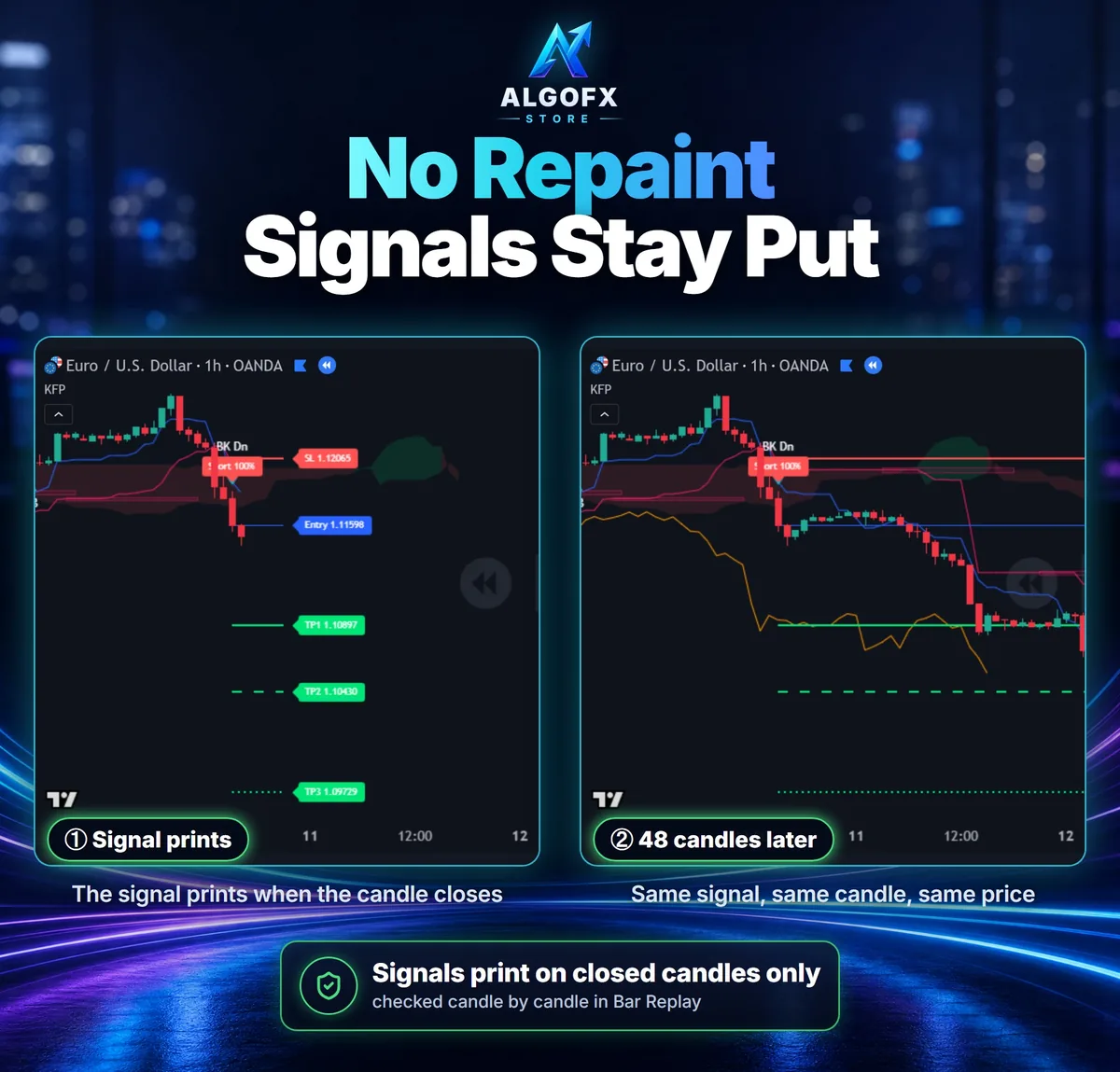
The Long and Short labels and the BK, retest, KB, CB and Chikou marks do not: they are decided on closed candles and the alerts are sent once per bar close. Other parts behave differently. The 15, 60 and 240-minute dashboard rows and the MTF All alerts follow the still-forming higher-timeframe candle on a live chart and can flip before it closes. The plan lines are redrawn on the last bar. The cloud is drawn 25 bars ahead and the Chikou 25 bars back by design.
What does the number on the label mean?
It is the confluence score: points from up to nine factors, such as price against the cloud, Tenkan and Kijun alignment, the Chikou, cloud thickness, volume and momentum. 80 and above is graded Strong, 50 and above Standard, below that Weak. It measures how much agrees, not the chance that the trade works.
What happens if a new signal prints while a plan is still open?
Any new signal of any type starts a new plan at its close and replaces the previous entry, stop and target lines. If you are still in the earlier trade, keep your own record of its levels, because the chart now shows the newest plan.
Why do signals start only after some history?
Every signal waits for an 80-bar warm-up, so the adaptive periods, the cloud and the score have enough data. On a chart with only a few bars loaded, or right after a new listing, the first signals appear later.
Reading the chart and the dashboard
What do the colours and marks mean?
Green and red clouds show Senkou A above or below B. The blue line is the Tenkan, the pink line the Kijun and the orange line the Chikou. Green Long and red Short labels are crosses, cyan diamonds breakouts, cyan dots retests, KB and CB triangles bounces. Entry is blue, the stop red and the three targets green. A pink box marks a flat Kijun.
What does Thin mean in the Cloud row?
The cloud is thinner than 30 percent of its recent average thickness. A thin cloud offers little support or resistance, so with the Kumo Thickness Filter on, crosses and Kijun bounces are suppressed there, and the thickness factor of the score drops.
What is the count at the bottom of the trade section?
The dashboard counts how many of the tracked plans since the chart loaded reached a target and how many hit the stop, and shows the share. It is hindsight bookkeeping on the loaded history, changes as history loads, and is not a forecast. The R:R row shows the open plan's current result in multiples of its risk.
Can I change the higher timeframes?
Yes. TF 1, TF 2 and TF 3 default to 15, 60 and 240 minutes and can be set to any timeframe. On charts above 15 minutes, TF 1 is a lower timeframe and shows its latest intrabar value. Switch the whole section off with Show MTF Panel.
Settings and alerts
Should I use Adaptive or Classic mode?
Adaptive, the default, stretches the periods in calm markets and shortens them in volatile ones. Classic keeps the textbook 9, 26 and 52 for traders who want the traditional Ichimoku values. The scoring, signals and plan work the same way in both modes.
Which alerts can I create?
Twenty-three alert conditions, from TK Cross Buy and Sell to Kumo Break, Retest, bounces, Chikou breaks, TP1 to TP3 and SL Hit, MTF All Bullish or Bearish, trend changes and Strong Buy or Sell. Choose Any alert() function call for messages with symbol, timeframe, price, score, stop and targets, sent once per bar close.
Does it work on TradingView's free plan?
Yes. Its three request.security calls read 15, 60 and 240 minutes of the same symbol, which every plan can access, and it uses no seconds data. Alerts work within your plan's limit; webhook delivery needs a paid plan.
Why do old labels disappear on long histories?
TradingView limits how many labels a script can keep. Once more than 450 labels exist, the oldest Long and Short labels are removed to make room. The signals themselves are unchanged; only far history loses its labels.
How it works
Will it place trades for me?
No. Kumo Forge Pro is an indicator: it draws on the chart and can alert you. It never sends an order.
After you buy
How do I get it after paying?
Digistore24 runs the checkout. Right after payment it takes you to your download page with one zip holding the Pine Script source code file and the PDF guide; the link to that page is also in your Digistore24 order e-mail, so you can download again at any time.
How do I install it?
Open the code file, open the Pine Editor in TradingView, paste the whole code, click Save and then Add to chart: “Kumo Forge Pro [AlgoFXStore]” appears on your chart. The guide walks through it step by step.
Who is Digistore24?
Digistore24 is the reseller that sells Kumo Forge Pro for Kestutis Balciunas (AlgoFXStore): it runs the checkout, charges your card or PayPal, collects the VAT for your country and delivers the download. Its name is the one on your statement, and its order e-mail holds your download link and the refund link.
What is the refund policy?
A 60-day money-back guarantee, handled by Digistore24. If Kumo Forge Pro is not for you within 60 days of purchase, use the refund link in your Digistore24 order e-mail or Digistore24's order page (digistore24.com/en/cancel-revoke-contract) for a full refund, no questions asked. Digistore24 makes the refund to your original payment method.
Do I get the source code?
Yes. You get the full Pine Script source code as a text file for your own use; the licence line at the top of the code does not allow resale, sharing or republishing.
Kumo Forge Pro for TradingView.
Put an adaptive Ichimoku with scored signals and a planned stop beyond the cloud on your chart, and decide with the whole picture in view. The full code, the guide and every setting explained. Instant download for €47, one payment.
Get instant access