SuperTrend flips scored out of five, with the stop and three targets already drawn
Hyper Trend PRO takes every SuperTrend flip on a closed candle of your cTrader chart and checks it five ways: MACD momentum, the EMA 150/250 trend, ADX, volume and the Hull slope.
- BUY and SELL plates decided on the closed candle, with the price and a score from zero to five stars.
- Entry, a stop at ATR(25) x 3.1 and three targets at 1R, 2R and 3R on every signal.
- Four presets and five optional filters decide how many stars a flip needs before it shows.
- Stop and target hit alerts in the cTrader log, with an optional sound and an optional e-mail.
- A cTrader indicator. Double-click the .algo file and “Hyper Trend PRO AlgoFX” appears in your Indicators list.
- A 14-page PDF manual with installation, every setting and how to read the chart. One-time €47.

See Hyper Trend PRO on a real chart
Press play; use the full-screen button to see every detail.
A plain SuperTrend flips the same way in a trend and in a grind
A SuperTrend is one of the clearest trend tools there is, and one of the most frustrating. It flips the same way in a strong trend and in a sideways session, every flip looks equally important, and once you are in, the line says nothing about where to take profit or how far the market can go against you before the idea is wrong. That last part decides how large a position you can take.
So most traders end up doing the same work by hand on every flip: glance at a moving average, check whether ADX is awake, look at volume, guess a stop, measure the distance, work out the position size. By the time that is done the candle has moved on, and the next flip gets a different checklist because the first one was never written down.
Hyper Trend PRO keeps the SuperTrend and adds the two things it is missing. Every flip on a closed candle is rated, one star for each of five checks that agree, so a five-star flip and a one-star flip no longer look the same. And every signal comes with its own plan, drawn at the moment it prints: the entry, a stop one risk away and three targets at multiples of that risk.
What Hyper Trend PRO draws, and what each mark means
Read from the shipped cTrader edition.
| What you see | What it means |
|---|---|
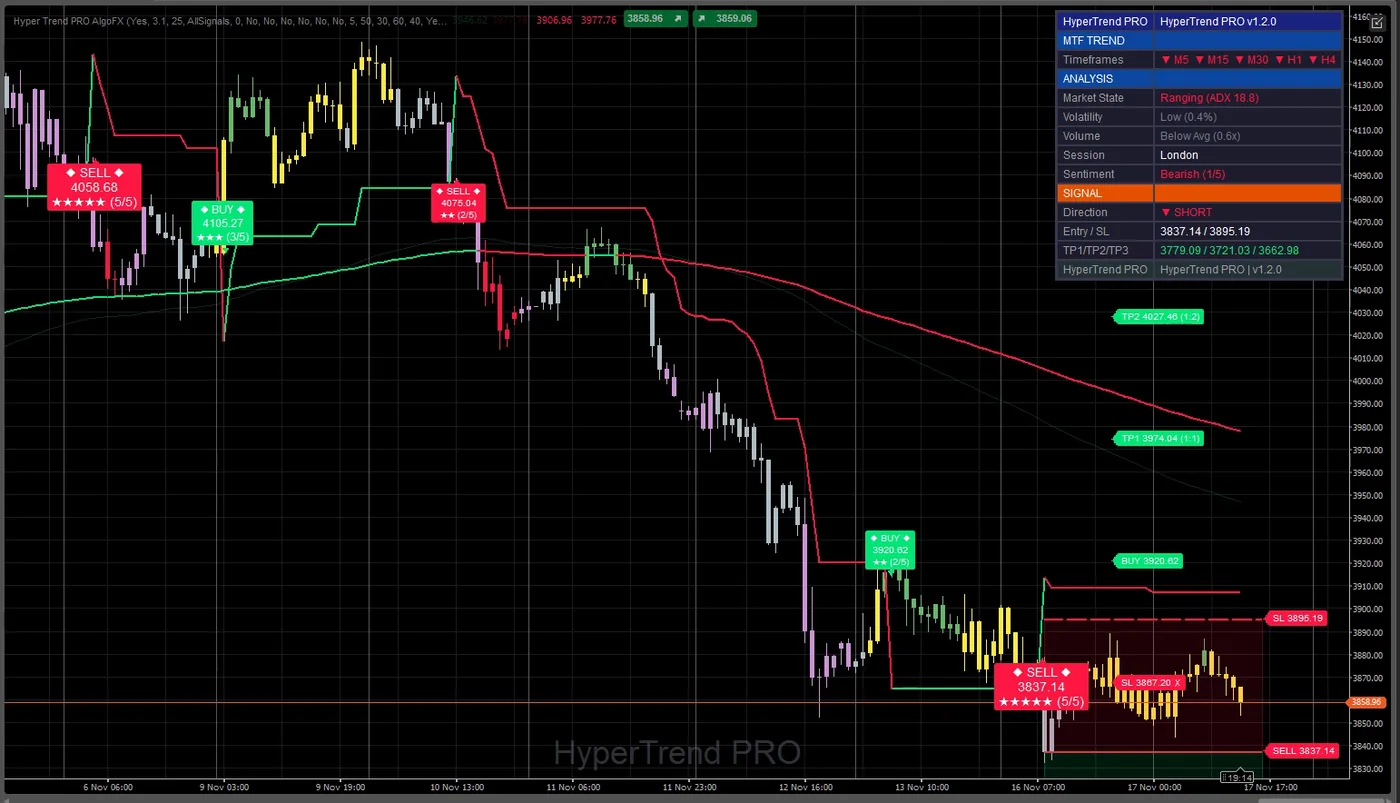
| Green ' BUY ' plate with price and stars | SuperTrend flipped up on that closed candle; stars and (n/5) = the confluence score. |
| Red ' SELL ' plate | SuperTrend flipped down on that closed candle. |
| Coloured stepped line | The SuperTrend: under price in an up trend, above it in a down trend. |
| Shaded cloud | EMA 150/250 cloud: green while the fast EMA is on top, red while it is below. |
| Line 'BUY/SELL <price>' | Entry: the close of the signal candle. |
| Red dashed line 'SL <price>' | Stop loss, ATR x Sensitivity from the entry. |
| Green dotted lines 'TP1 (1:1)', 'TP2 (1:2)', 'TP3 (1:3)' | Targets at 1, 2 and 3 times the risk; tick when reached. |
| Dashboard | Five-timeframe alignment, market state, volatility, volume, session, sentiment and the tracked trade. |
A trend, a rating and a plan on every closed candle
Three parts, each one visible on the chart or on the dashboard. This is what the indicator computes, in this order, on every candle that closes.
- 1
The SuperTrend sets the direction
The SuperTrend places its bands 'Sensitivity' (3.1) times the 25-period ATR ('Tuner') away from each candle's mid price, and each band ratchets with the trend. The trend flips when price closes through the band on the far side. A signal can only start at such a flip, up for a BUY and down for a SELL. The same ATR times Sensitivity is also the stop distance, so one setting moves both.
- 2
Five checks give the stars
At the flip, each check that agrees adds a star: the MACD (12, 26, 9) histogram rising (falling for a SELL), EMA 150 above EMA 250 (below for a SELL), ADX(14) above 20, volume above its 20-period average and the 55-period Hull average rising (falling). ADX and volume are not directional, so they count for both sides. Stars and (n/5) print on the plate: Weak 0 to 2, Moderate 3, Strong 4 or 5.
- 3
Your preset and filters decide
The preset sets the minimum score: All Signals 0, Trend Scalper 2, Quality+ 3, Strong+ 4. 'Min Strength' is a second minimum, and the higher of the two applies. Five optional filters can veto a flip on top: Trending Only (ADX above 20), Strong Only, High Vol Only, Cloud-Aligned Only and Contrarian Only. All are off by default, so every flip shows with its stars.
- 4
The plan is fixed at the signal
The signal candle's close is the entry. The risk is ATR(25) times Sensitivity, or a percentage of the entry with 'Use % SL' on. The stop sits one risk away, TP1, TP2 and TP3 at 1.0, 2.0 and 3.0 times the risk. A red box spans entry to stop, a green box entry to TP3, and the lines, tags and boxes reach 30 candles to the right of the signal.
- 5
Targets tick, the trade closes
After the signal, a target gets a tick the first time price trades through it. Reaching the stop or TP3 ends the tracked trade, and the dashboard waits for the next signal. With 'Use TP3' off only the stop ends a trade. An optional one-way ATR trailing stop can be drawn behind the open trade as a reference; it is not an exit the indicator takes.
- 6
The dashboard reads the context
Fourteen rows sum up the market: an arrow for each of M5, M15, M30, H1 and H4 (close above or below its 200 EMA on that timeframe's last closed candle), Market State from ADX, Volatility, Volume against its average, a Session label, a Sentiment score out of five and the tracked trade's direction, entry, stop and three targets.
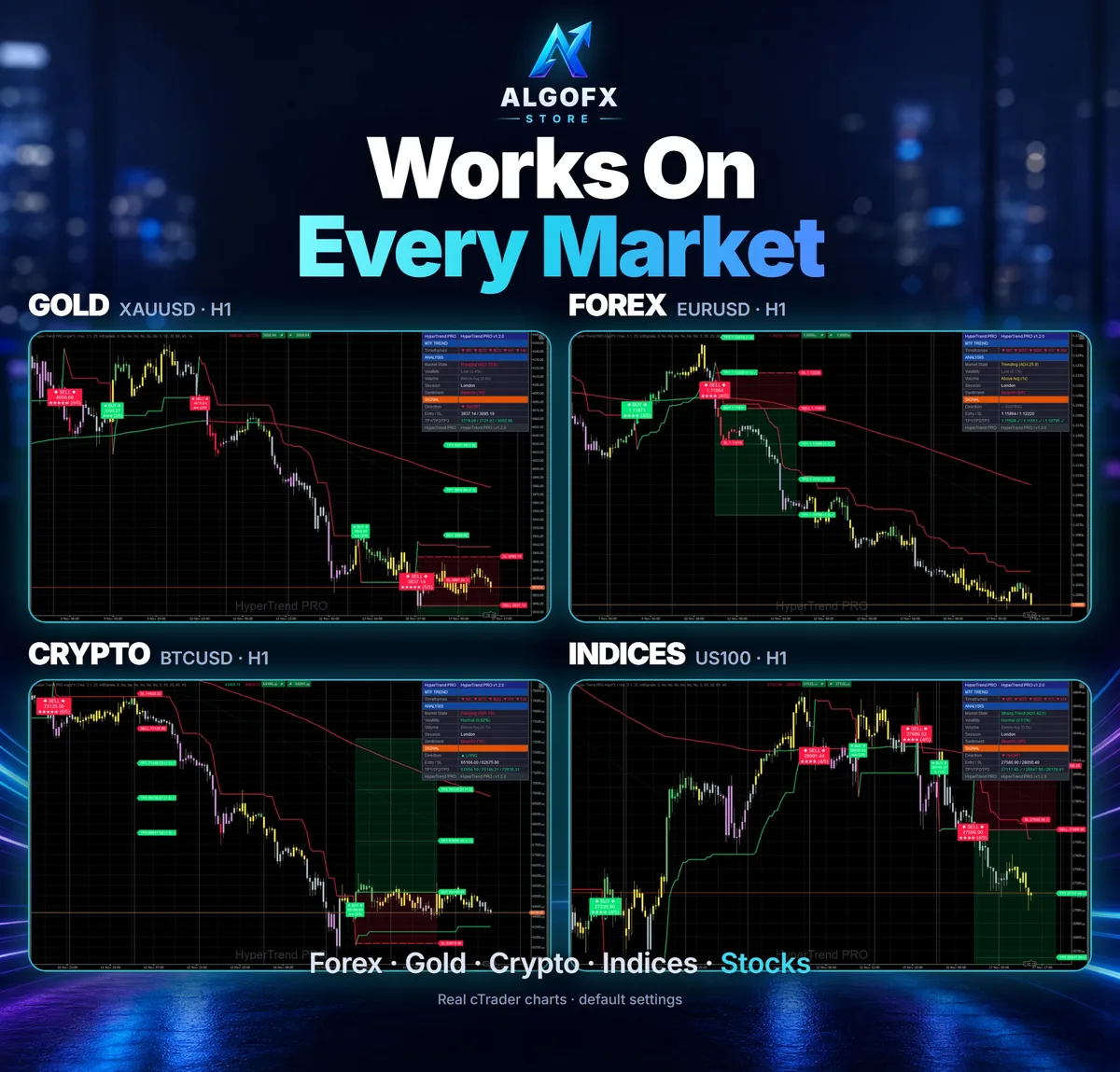
Hyper Trend PRO on 12 different markets
Every chart below is a screenshot of cTrader itself with the shipped Hyper Trend PRO AlgoFX attached at its default settings. Forex, metals, indices, energy and crypto, so you can see how it reads each kind of market. They show what the indicator draws; they are not trading results. Tap or click any chart to open it full size.
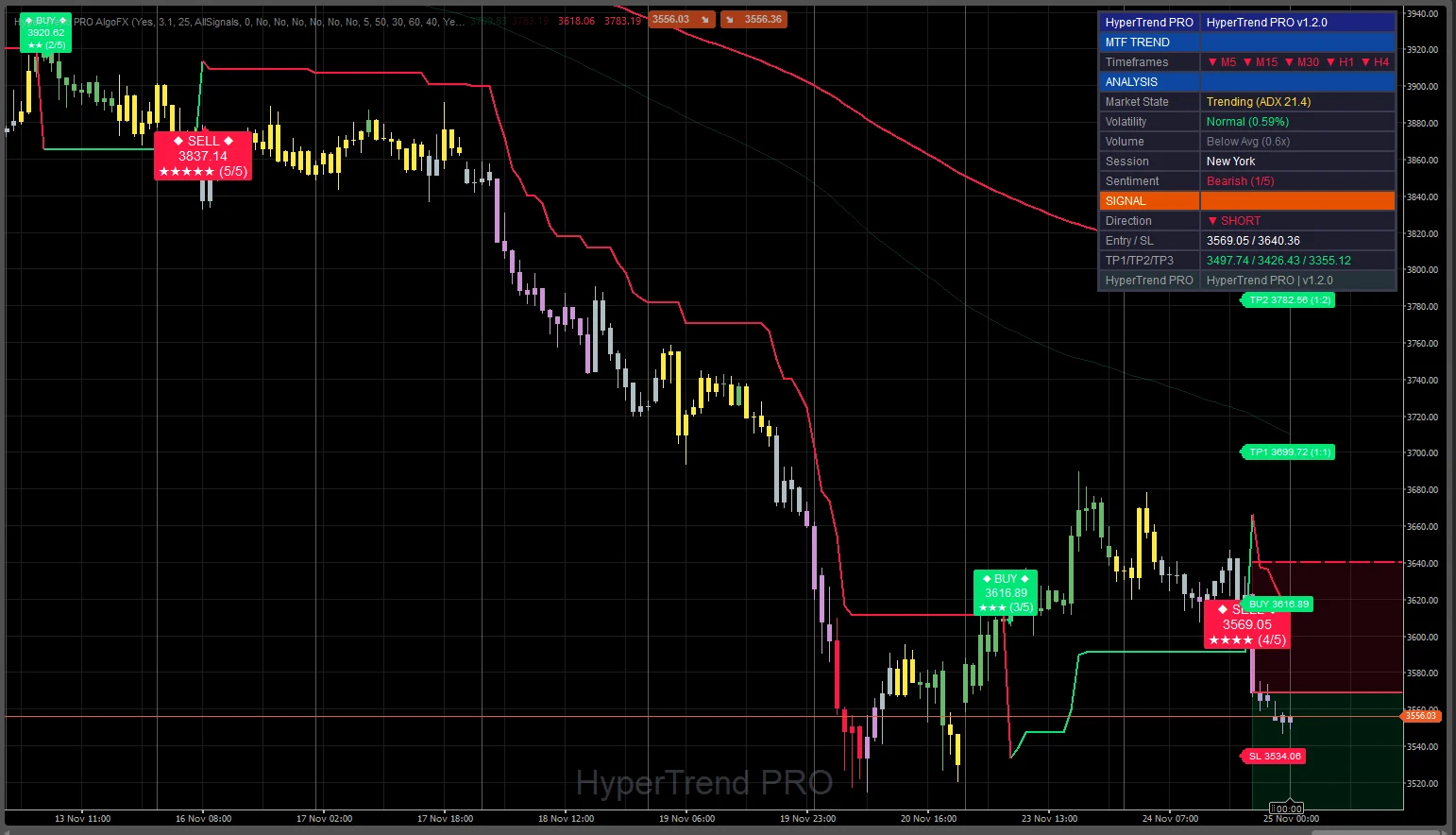
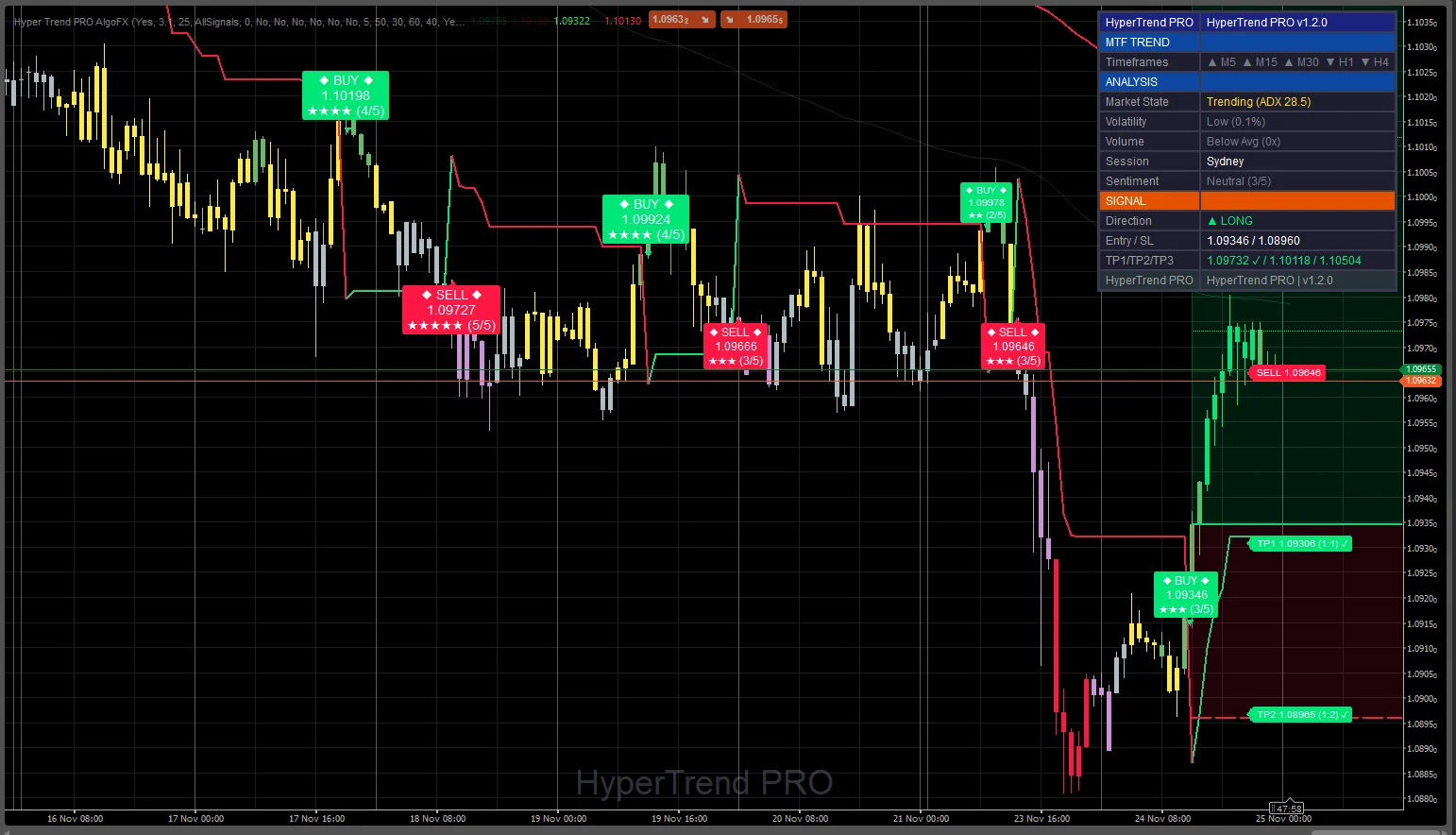
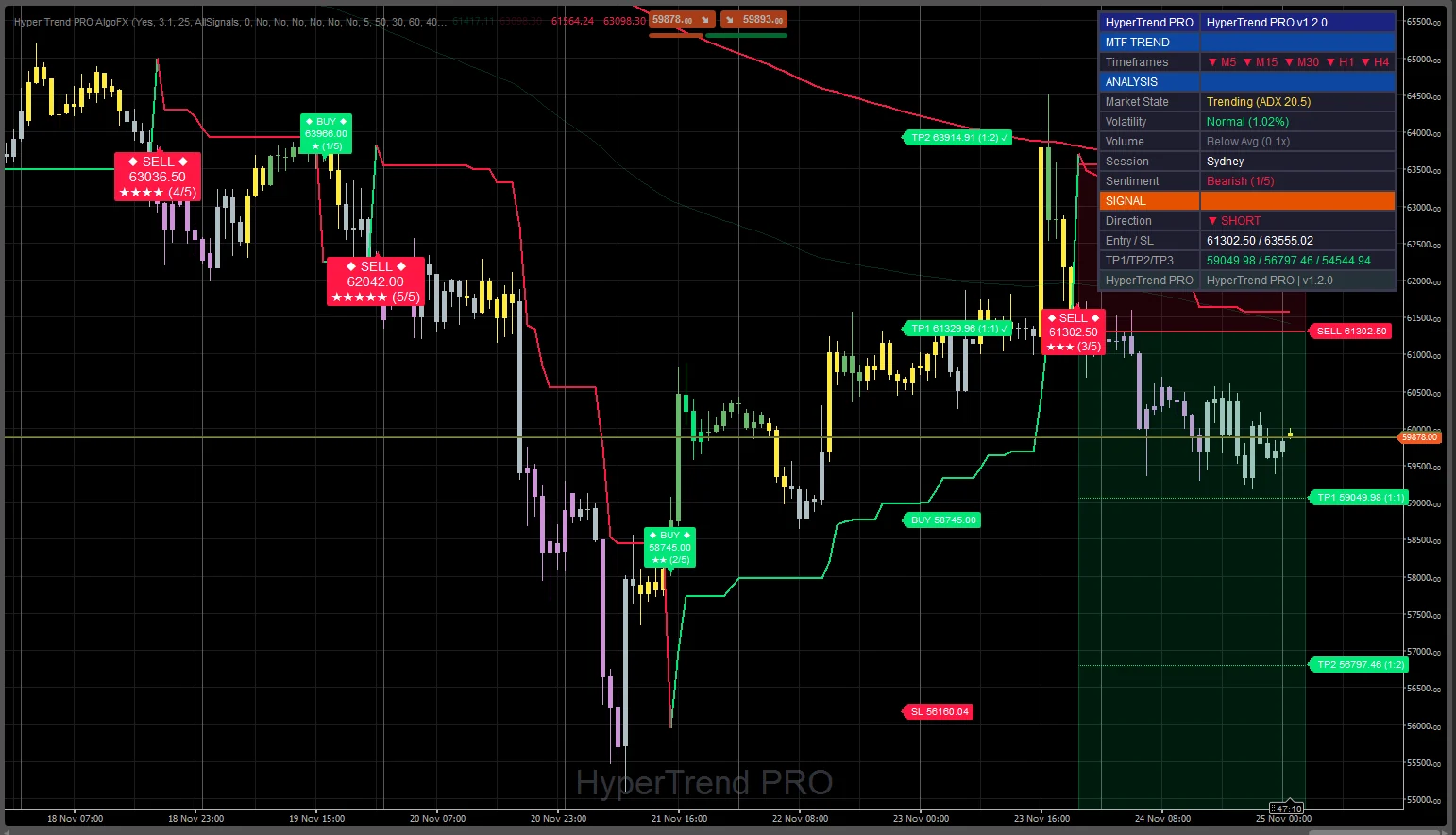
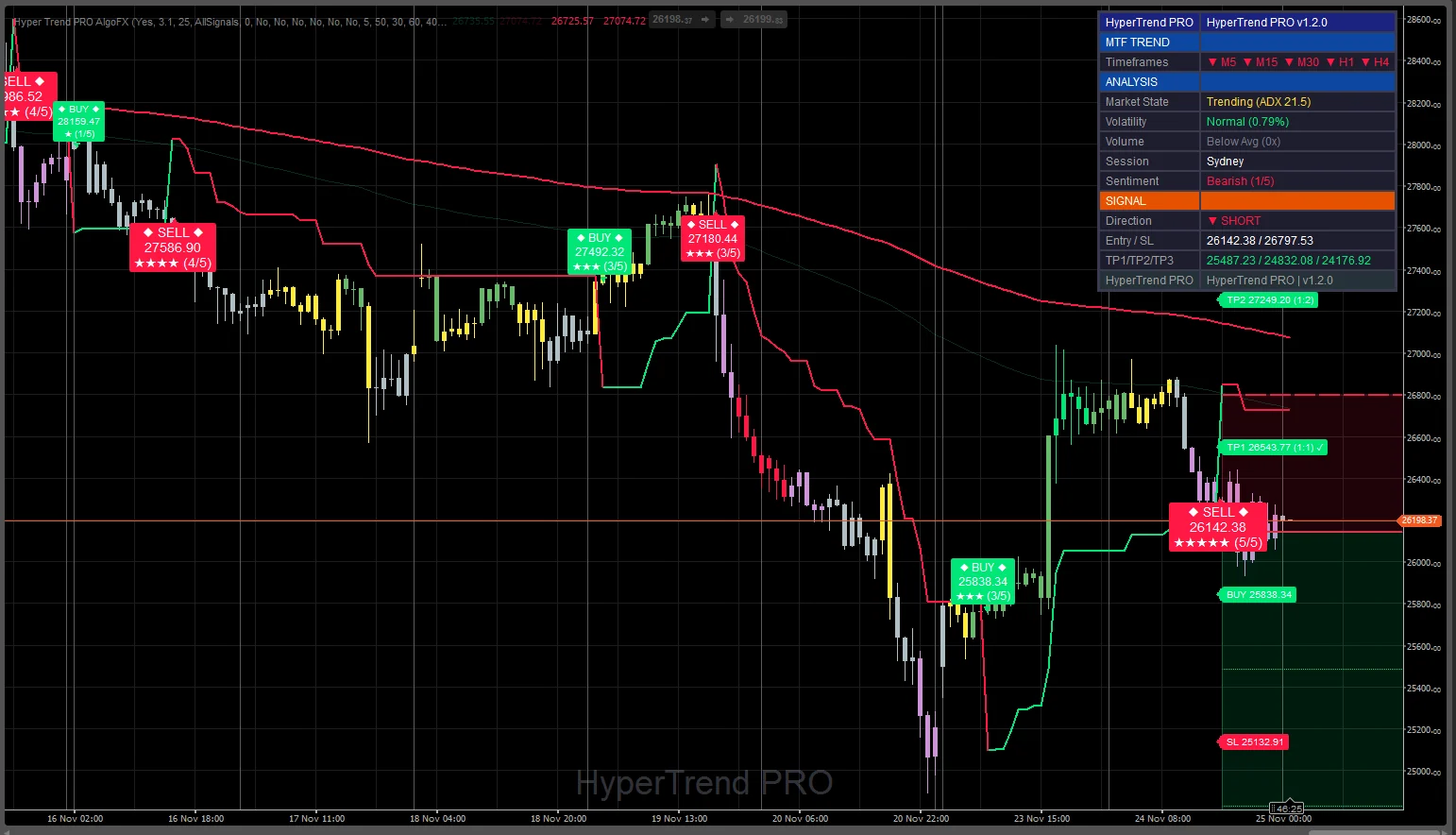
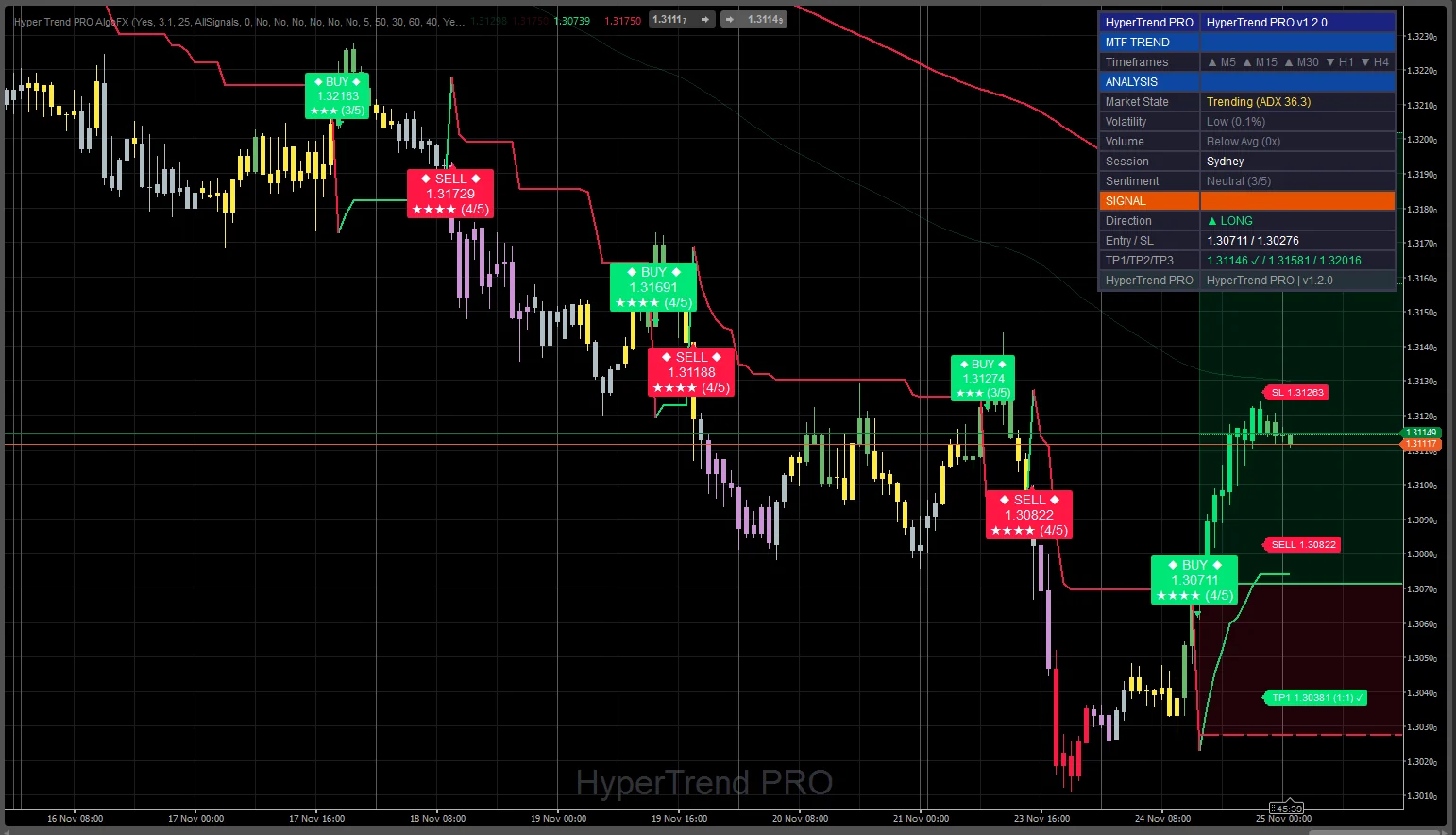
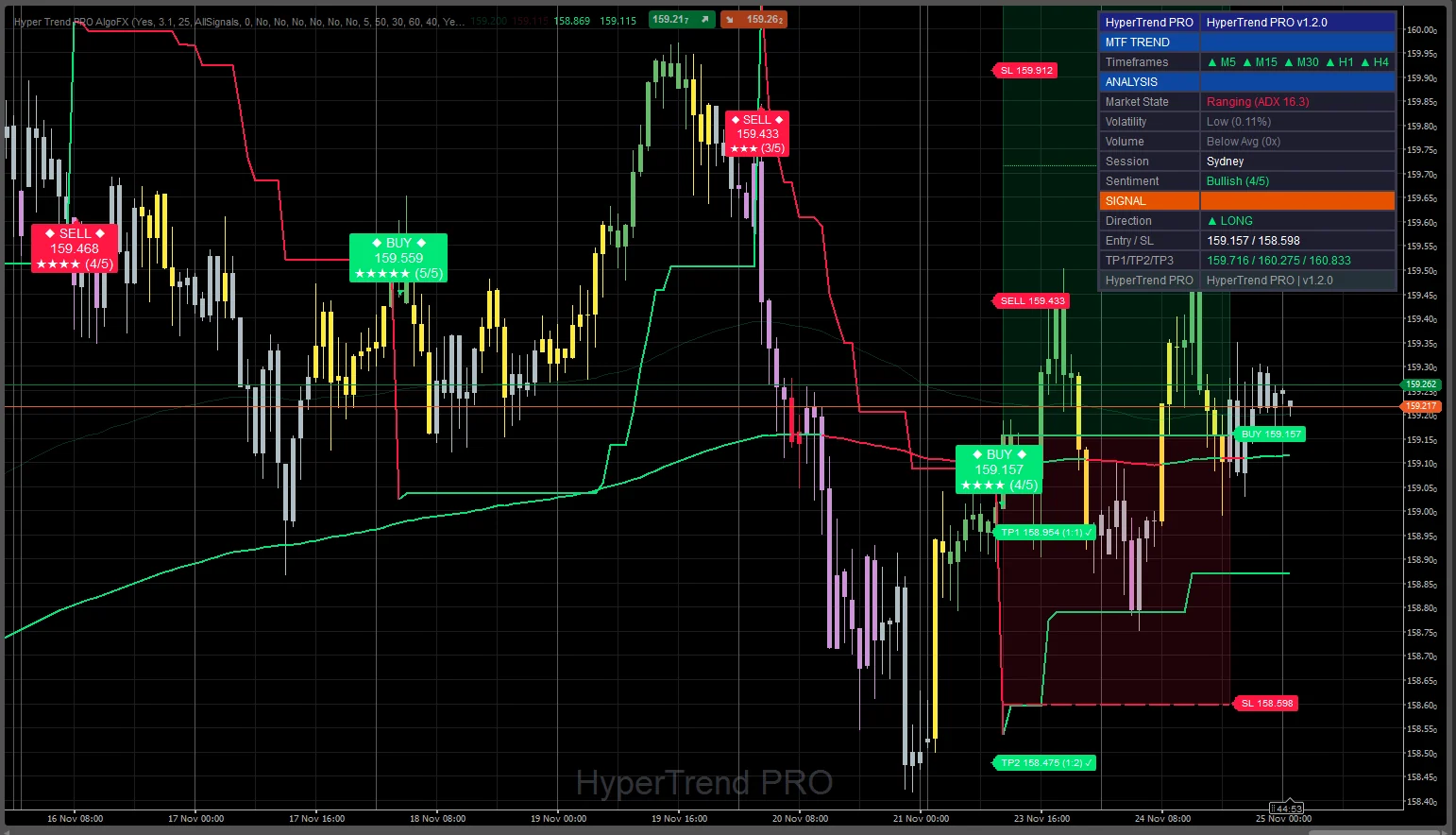
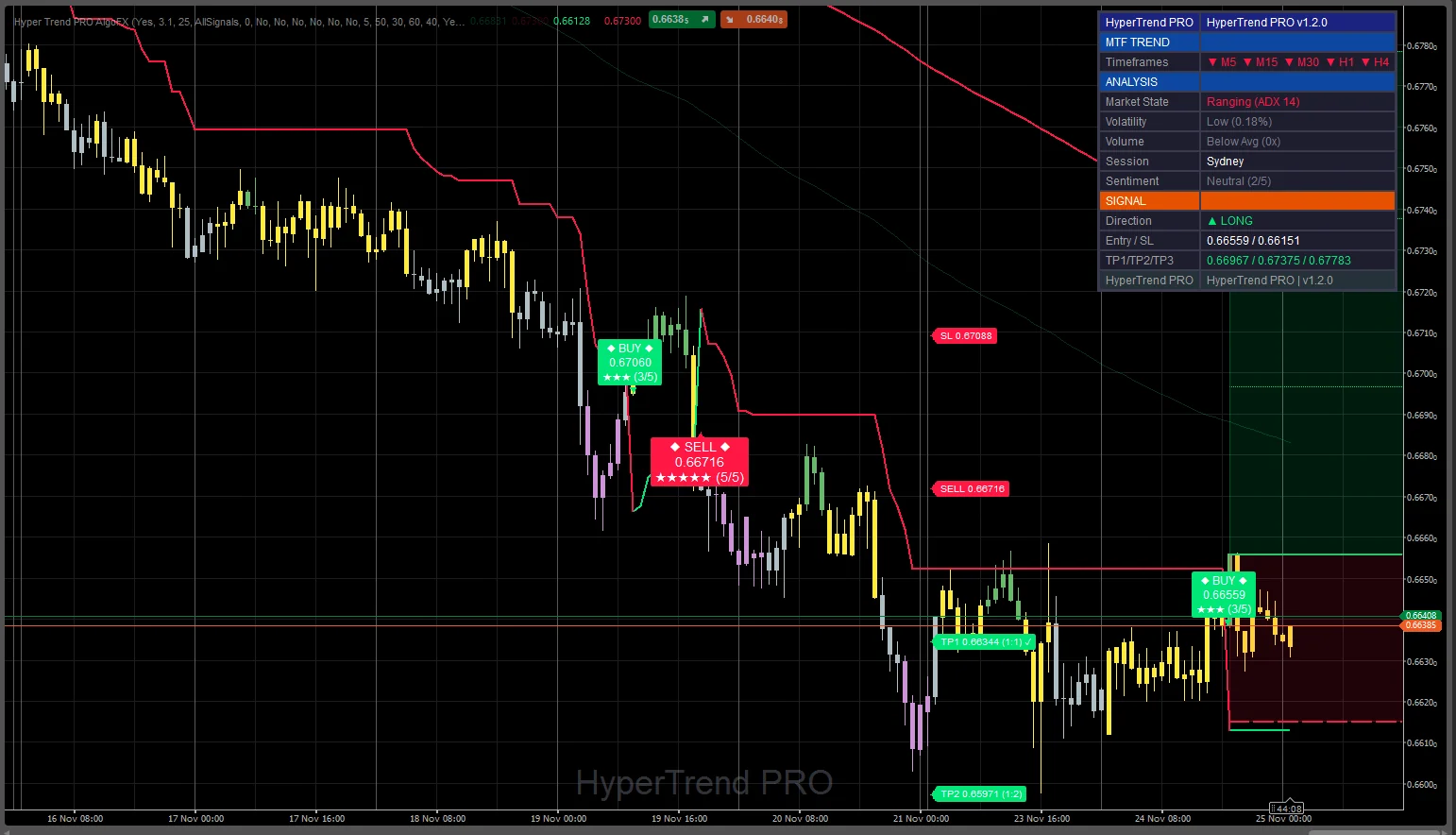
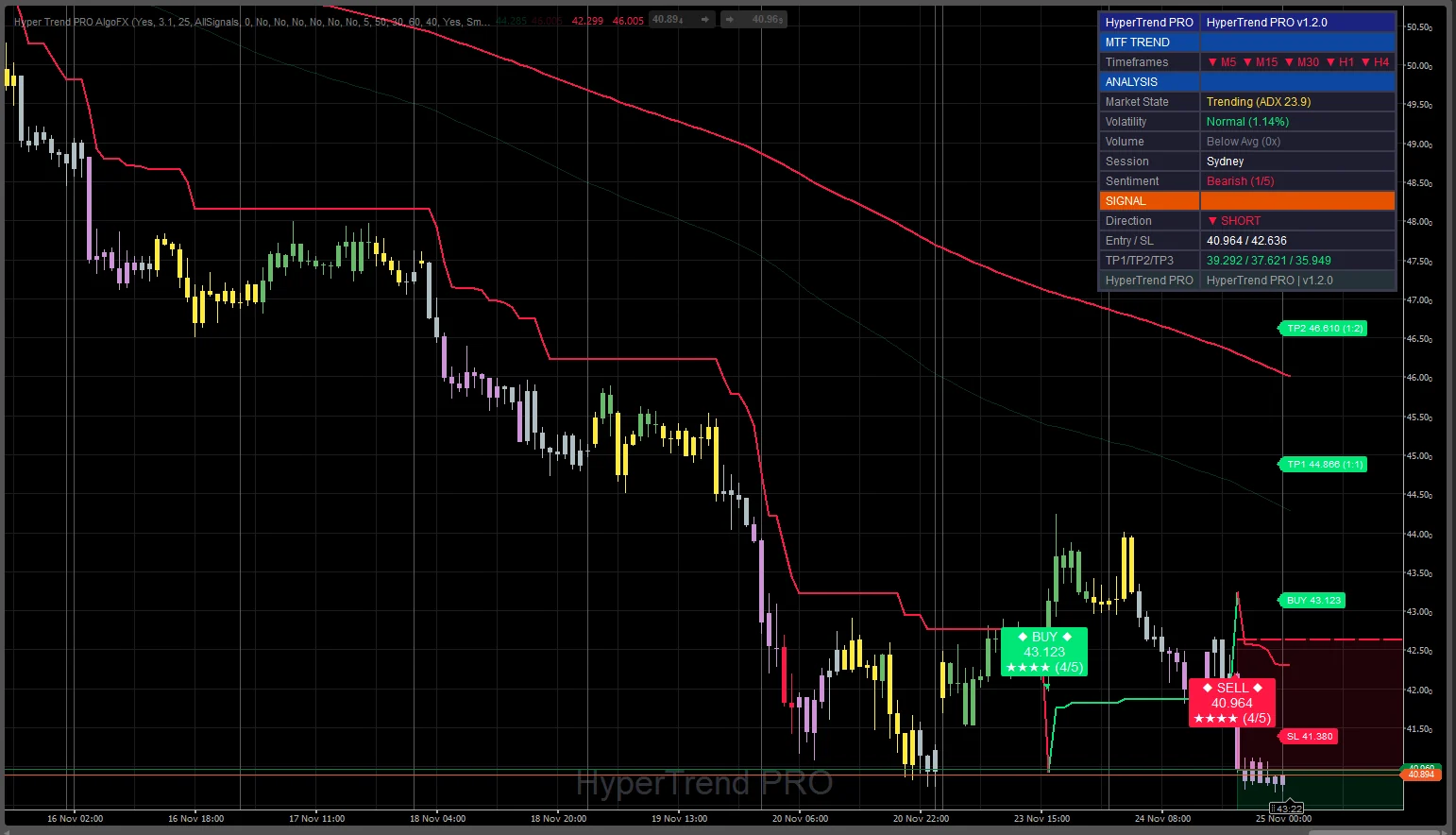
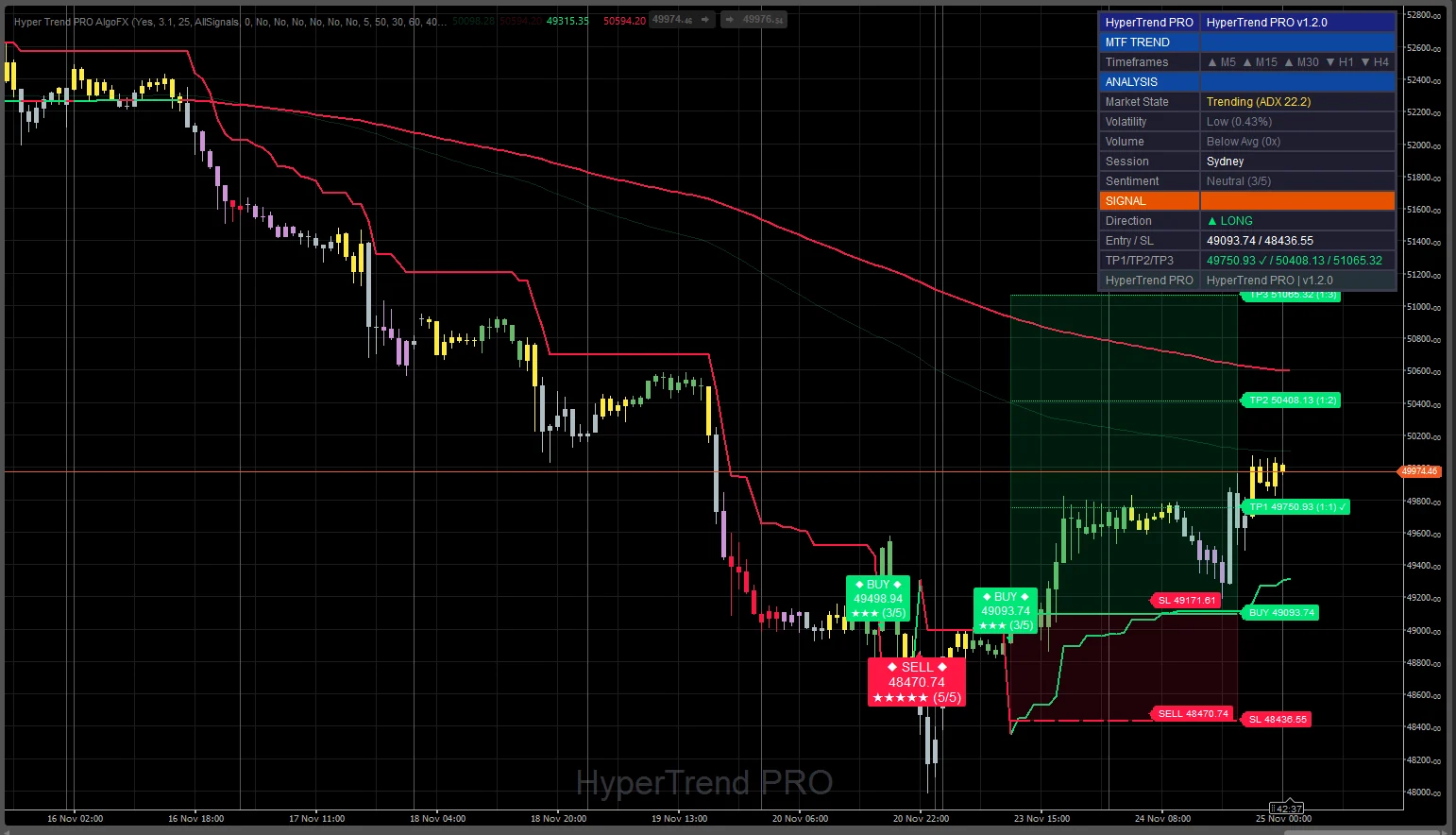
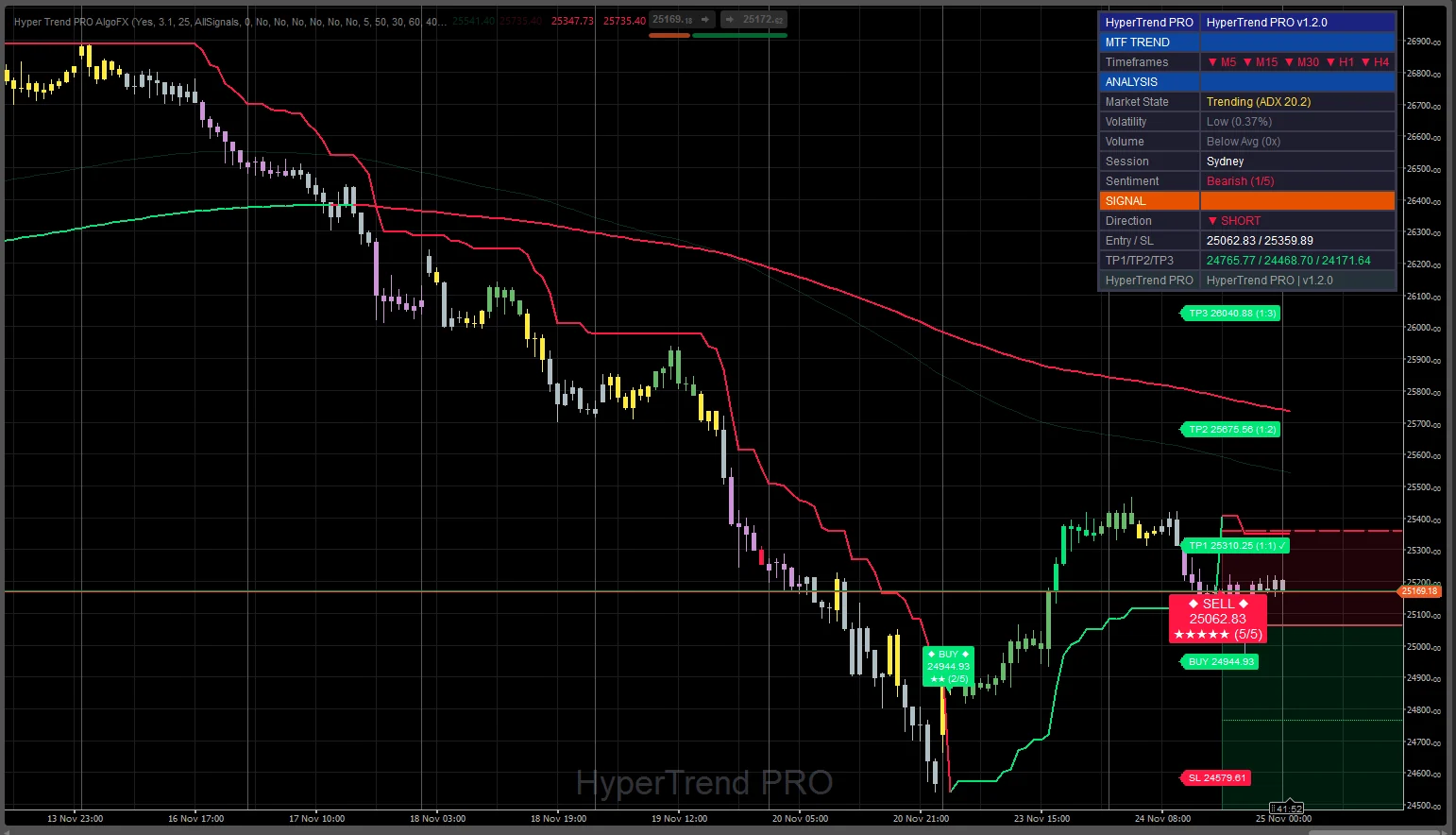
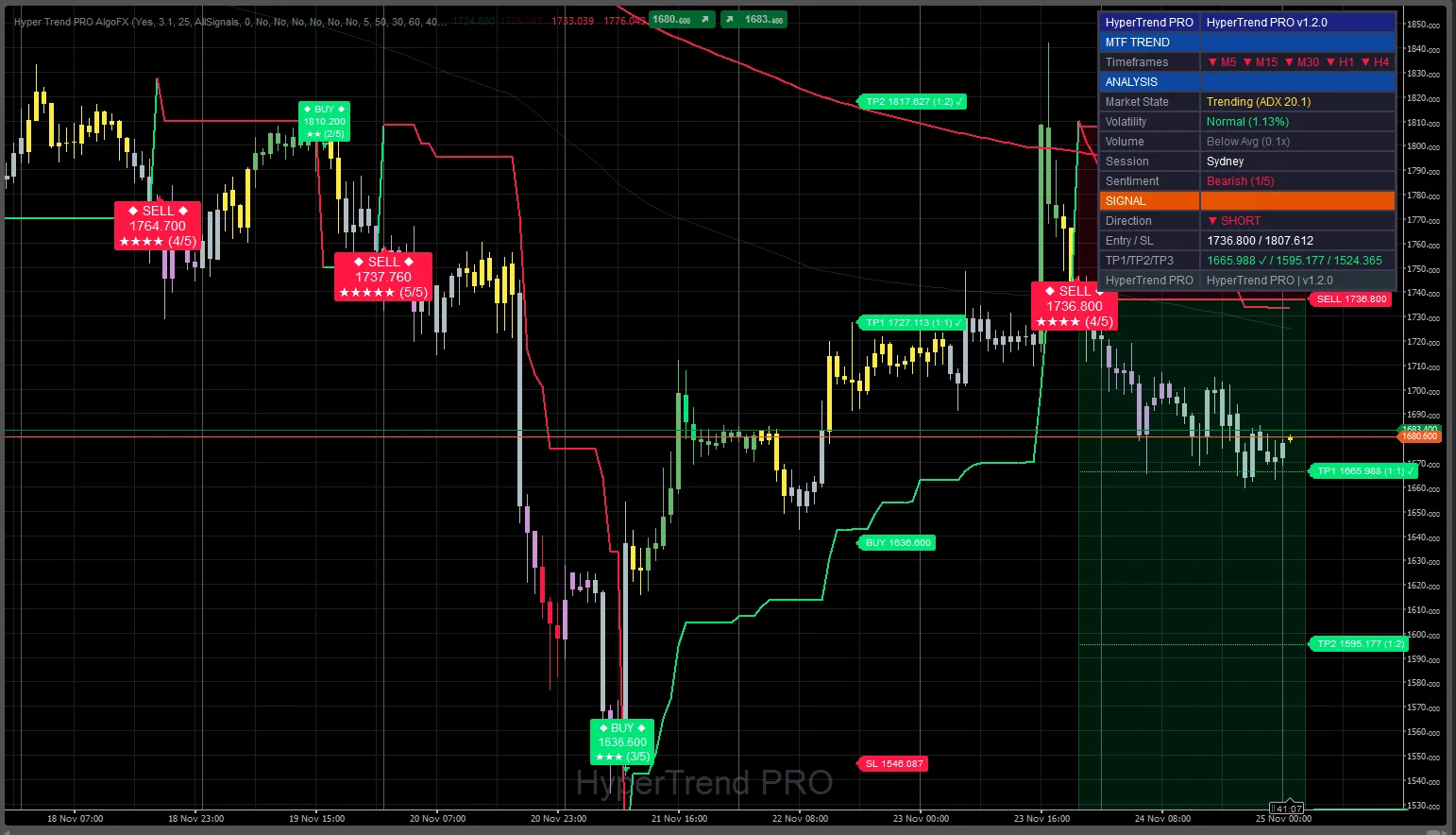
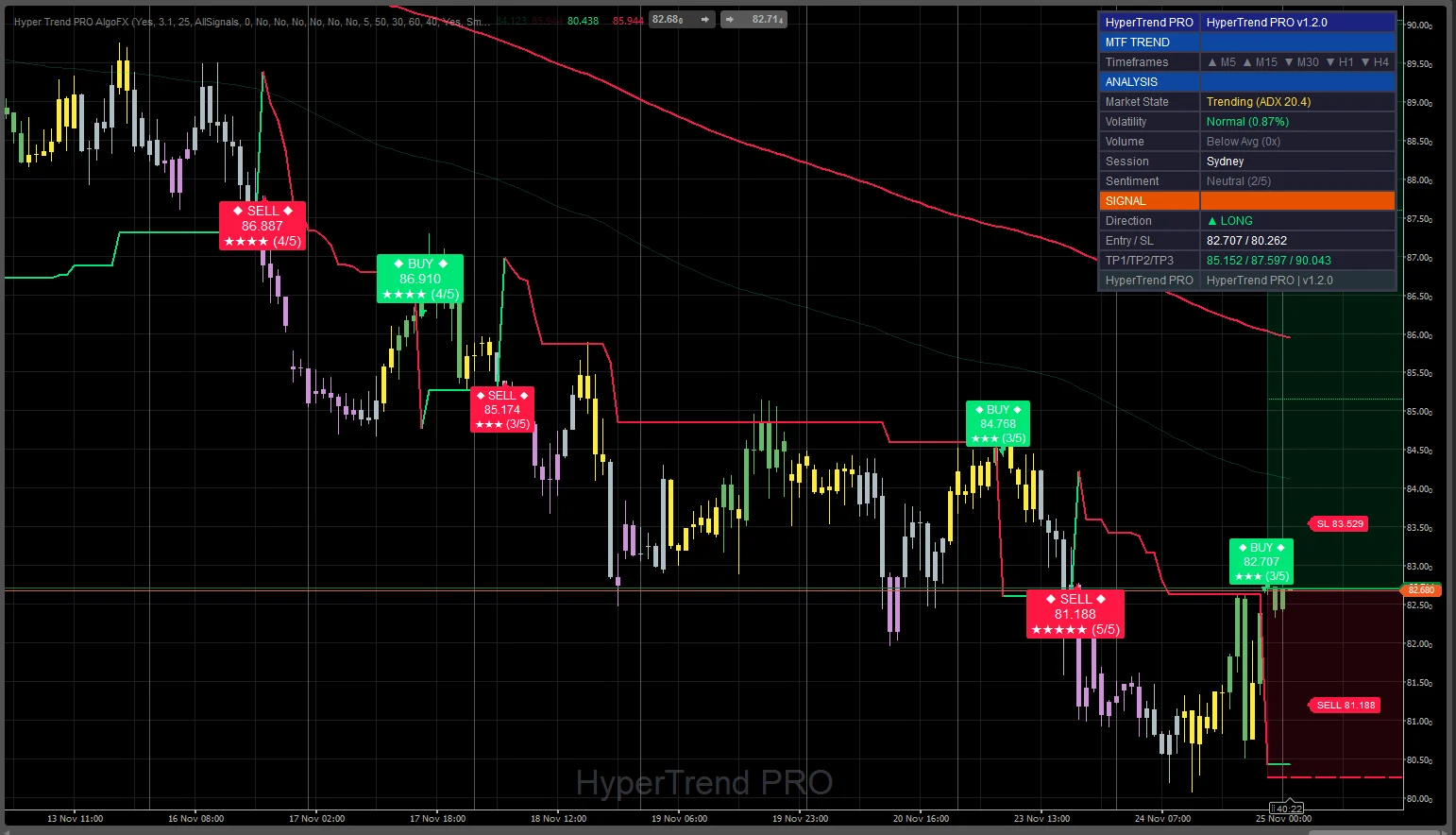
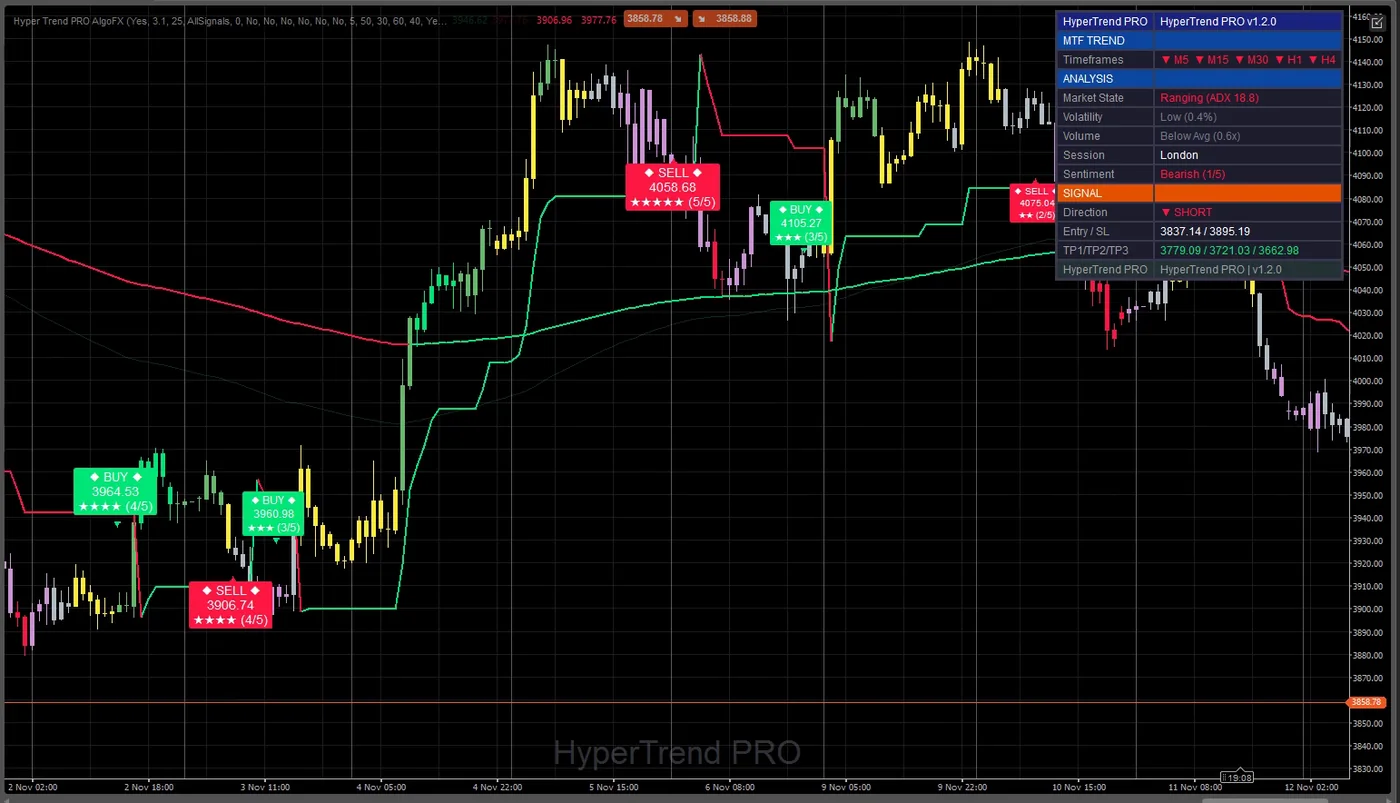
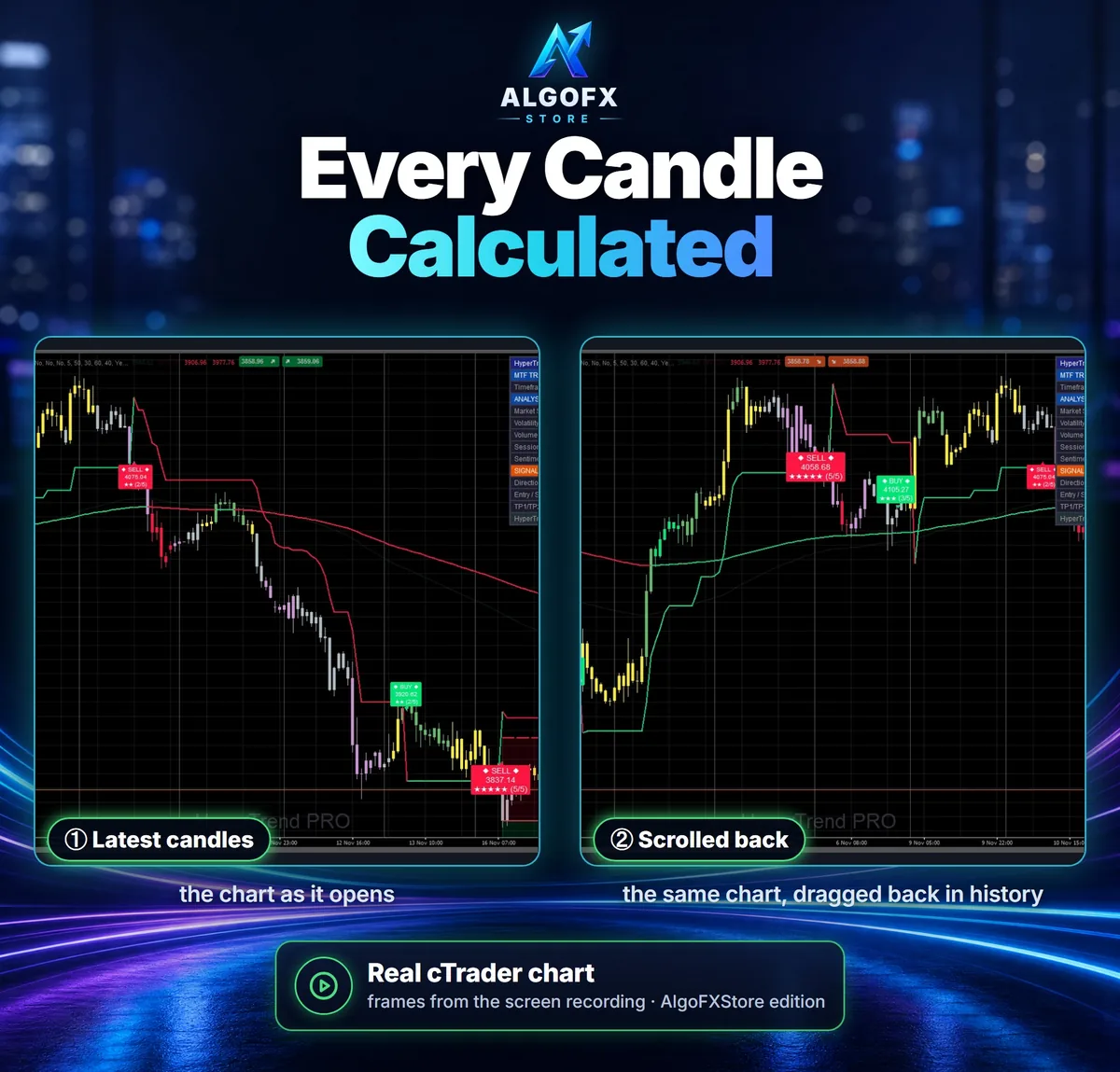
Hyper Trend PRO on a real cTrader chart
The chart as it opens and the same chart scrolled back in history, with the shipped indicator at its default settings. Nothing is edited into the chart.
From a plate on the chart to a planned trade
The indicator rates, draws and alerts; the rules, the sizing and every order stay with you. This is one routine to try on a demo account before you trade it with real money.
- 1
Let the candle close first
The plate and its levels appear when the signal candle has closed. Read the stars: Strong at 4 or 5, Moderate at 3, Weak at 0 to 2. Decide in advance which ratings you act on, then set the preset so the rest are not drawn at all: Quality+ hides everything under three stars, Strong+ everything under four.
- 2
Check the context rows
A simple plan takes a plate with three stars or more when Market State reads Trending or Strong Trend and the Timeframes row agrees, mostly up arrows for a BUY and mostly down arrows for a SELL. A plate against the colour of the cloud is a counter-trend idea; 'Cloud-Aligned Only' removes those from the chart if you never take them.
- 3
Measure the stop before you size
The stop sits ATR(25) x 3.1 from the entry, which can be wide on gold, indices or crypto. Take the distance between the entry and the stop tags, convert it into money at your position size and compare it with what you are willing to lose on one trade. If even your smallest size is too much, skip the signal rather than moving the stop.
- 4
Place a real stop at once
Enter after the close and put a real stop order at your stop straight away. The red dashed line on the chart protects nothing by itself, and the indicator never places or moves an order. The ATR changes through the day, so the stop distance and your position size change from signal to signal: do the sum every time.
- 5
Manage with the hit alerts
TP1 at 1R is the nearest target by construction, and many traders take part of the position there and move their stop to the entry by hand. The TP1 Hit alert is the cue if that is your plan; the SL Hit alert confirms the tracked trade is over. A tick on a target describes price on the chart, not your fill.
- 6
Skip what does not fit
Skip plates in a Ranging state, plates against the cloud and any signal whose stop is wider than your budget allows. Decide in advance whether you trade around major scheduled news, and how many losses end your day. In a quiet range the SuperTrend simply does not flip, so long stretches without a plate are normal.
The dashboard, row by row
- HyperTrend PRO | HyperTrend PRO v1.2.0
- MTF TREND
- Timeframes | up /M5 M15 M30 H1 H4 (close above/below its 200 EMA on the last closed bar of each)
- ANALYSIS
- Market State | Strong Trend (ADX > 40) / Trending (> 20) / Ranging + ADX
- Volatility | High (> 1.5 % of price) / Normal (> 0.5 %) / Low + figure
- Volume | Spike (> 2x 20-bar average) / Above Avg / Below Avg + ratio
- Session | Tokyo / London / New York / Sydney
- Sentiment | Bullish/Bearish (n/5)
- SIGNAL
- Direction | LONG / SHORT / WAITING
- Entry / SL | prices of the tracked trade
- TP1/TP2/TP3 | prices, tick once reached
- HyperTrend PRO | HyperTrend PRO | v1.2.0
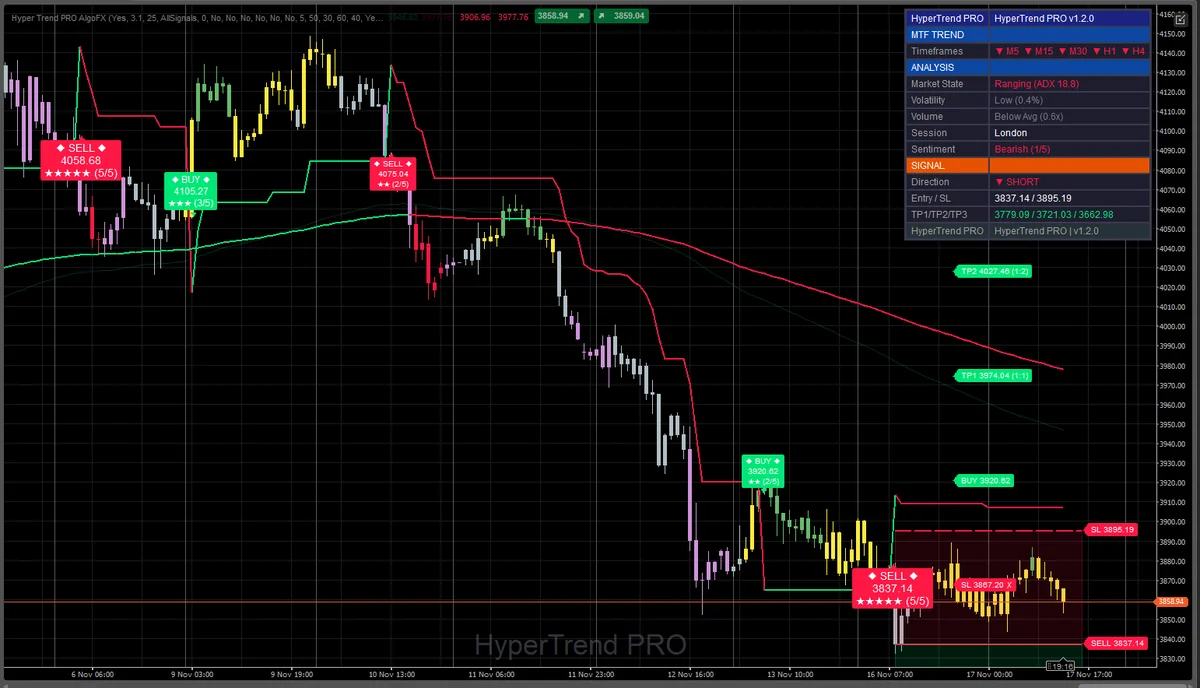
Everything Hyper Trend PRO does for you
Every flip carries its score
One star for each of five checks that agree with the flip: MACD histogram, EMA 150 against EMA 250, ADX above 20, volume above its 20-period average and the Hull 55 slope. The plate shows the stars and (n/5), sized by score when 'Signal Label Size' is on Auto.
Signals fixed when the candle closes
A BUY or SELL needs a closed candle, and so does the trade it opens with its levels. A plate never appears during a candle and then vanishes at the close, and the entry, stop and targets never move once they are set.
A complete plan on every signal
Entry at the signal close, a dashed red stop one risk away, dotted green targets tagged (1:1), (1:2) and (1:3), shaded risk and reward boxes, and a tick on each target reached. TP1, TP2 and TP3 can each be switched off, and the R multiples are parameters.
Presets and filters you control
All Signals, Trend Scalper, Quality+ and Strong+ set the minimum stars, and five optional vetoes cut the count further. 'Strong Only Rule' lets Strong Only test either the score (4 or 5) or a close beyond EMA 200.
Context drawn around the trend
An EMA cloud in four styles (Smooth EMA 150/250, Scalping, Scalping+ with a Hull pair, Swing EMA 50/200), a 250-period Trend Tracer line, and candles coloured by Momentum, Trend or Confluence, or left alone with Candle Coloring Off.
A 14-row market dashboard
Five-timeframe trend arrows from M5 to H4, Market State with the ADX value, Volatility, Volume with its ratio, Session, Sentiment out of five and the tracked trade's entry, stop and targets. Any of the four corners, in Tiny, Small or Normal size.
Alerts when the plan is hit
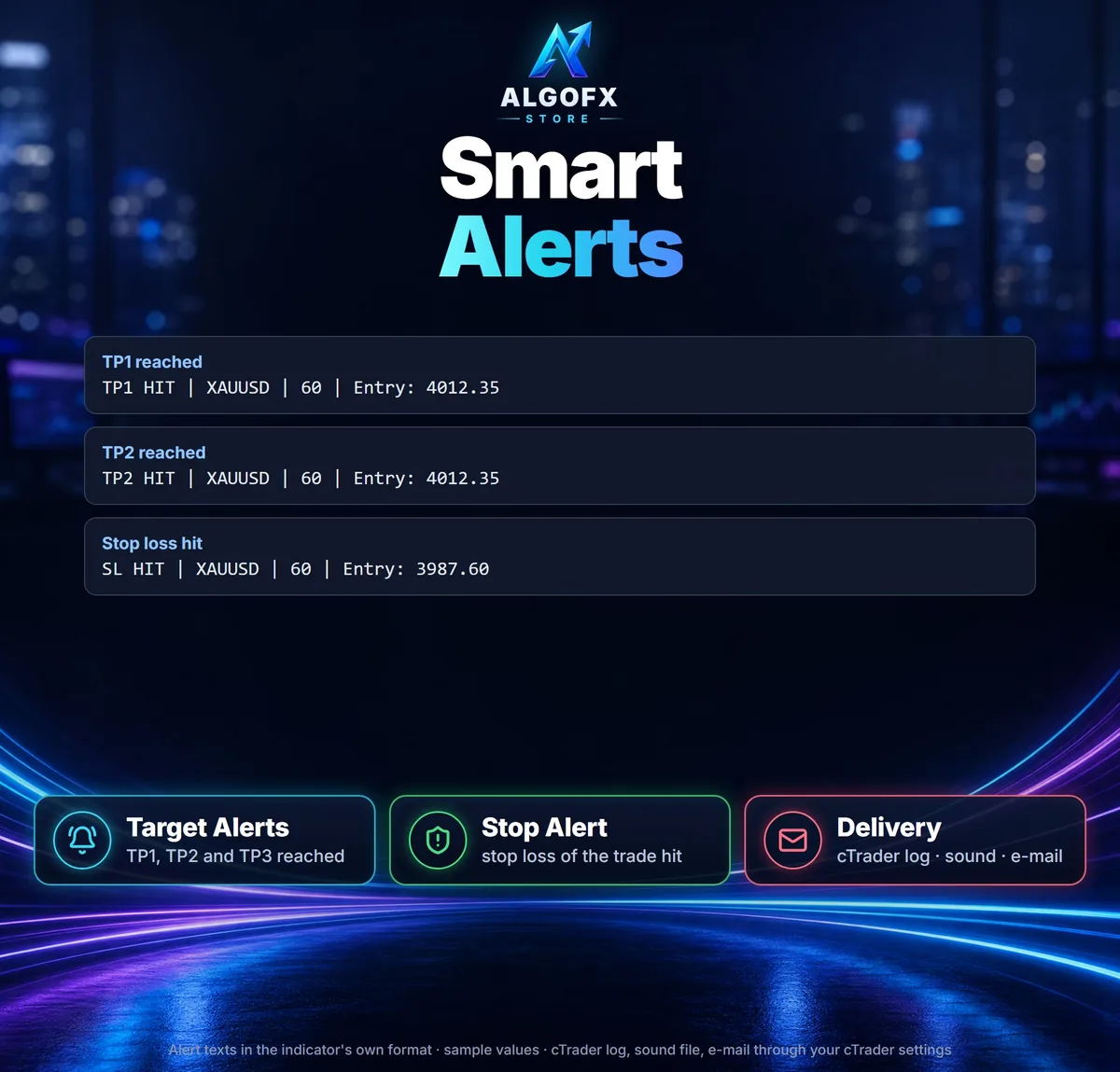
SL Hit, TP1 Hit, TP2 Hit and TP3 Hit, each once, as soon as price touches the level. Each alert is a line in the cTrader log, with an optional sound from a .wav file you choose and an optional e-mail through cTrader's own e-mail settings.
Optional structure and pullback marks
HH, HL, LH and LL labels at confirmed swing points, small PB marks where a WaveTrend turns back inside the trend, and a one-way ATR trailing stop line. All three are off by default and none of them opens a tracked trade.
A chart as busy or as clean as you like
'Signal Marker Style' swaps the plate for a triangle, arrow or dot; size, opacity and offset move or fade it; 'Show Watermark' removes the faint name at the bottom. None of these presentation settings changes a signal, a level or an alert.
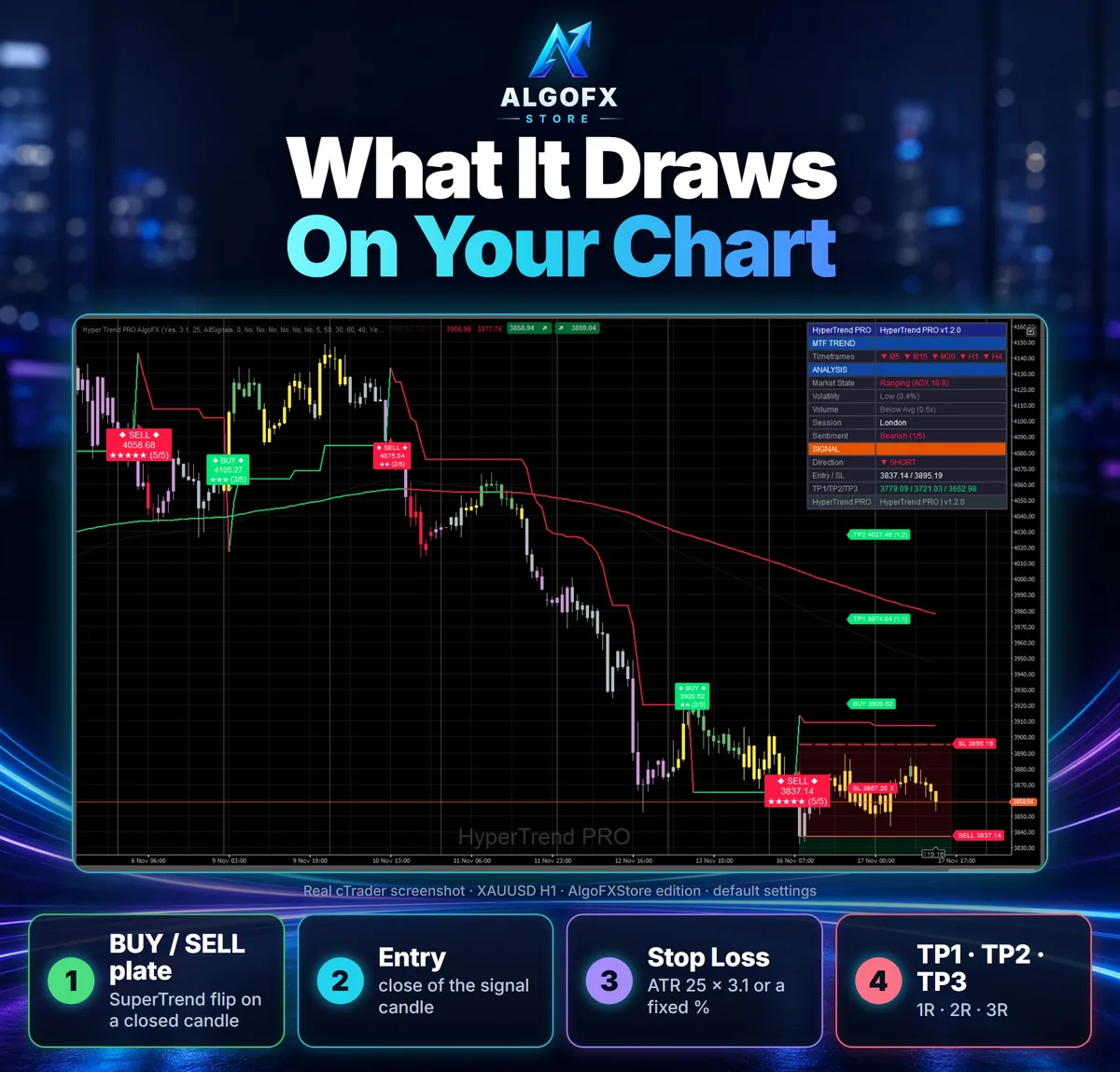
Hyper Trend PRO, feature by feature
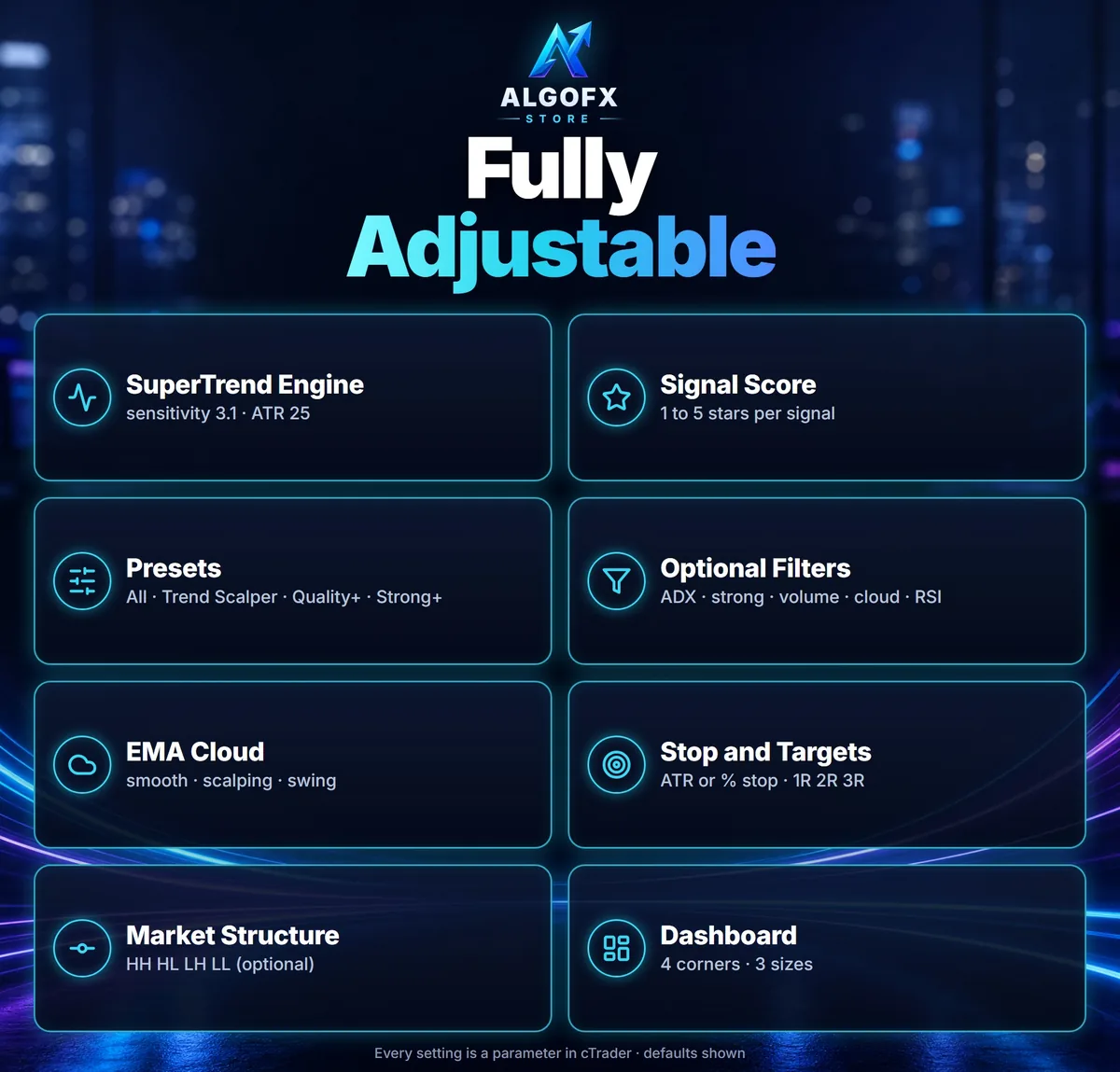
Each picture is built from real platform screenshots of the shipped indicator at its default settings, labelled so you can see what every part does. Tap any picture to open it full size.
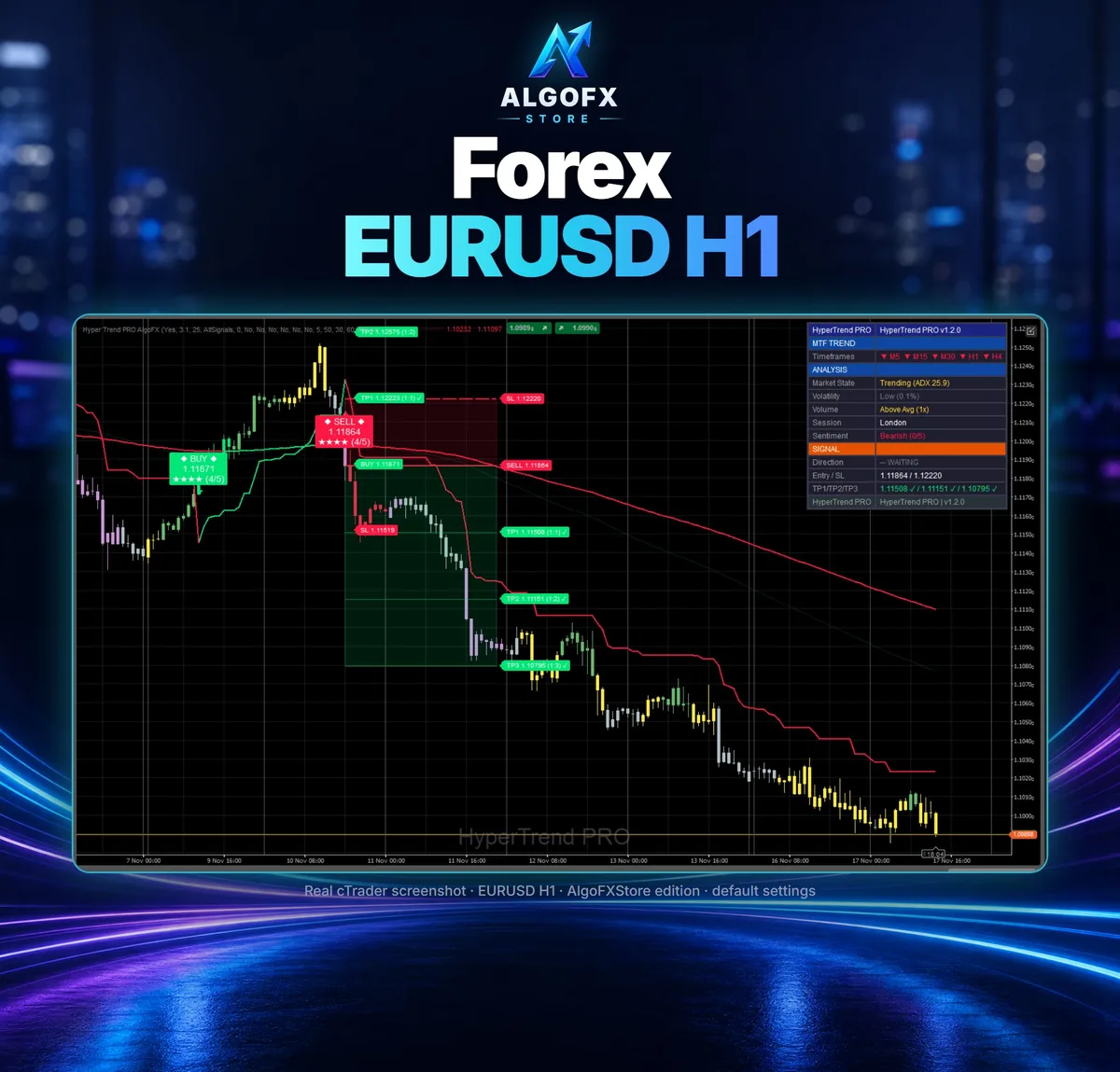
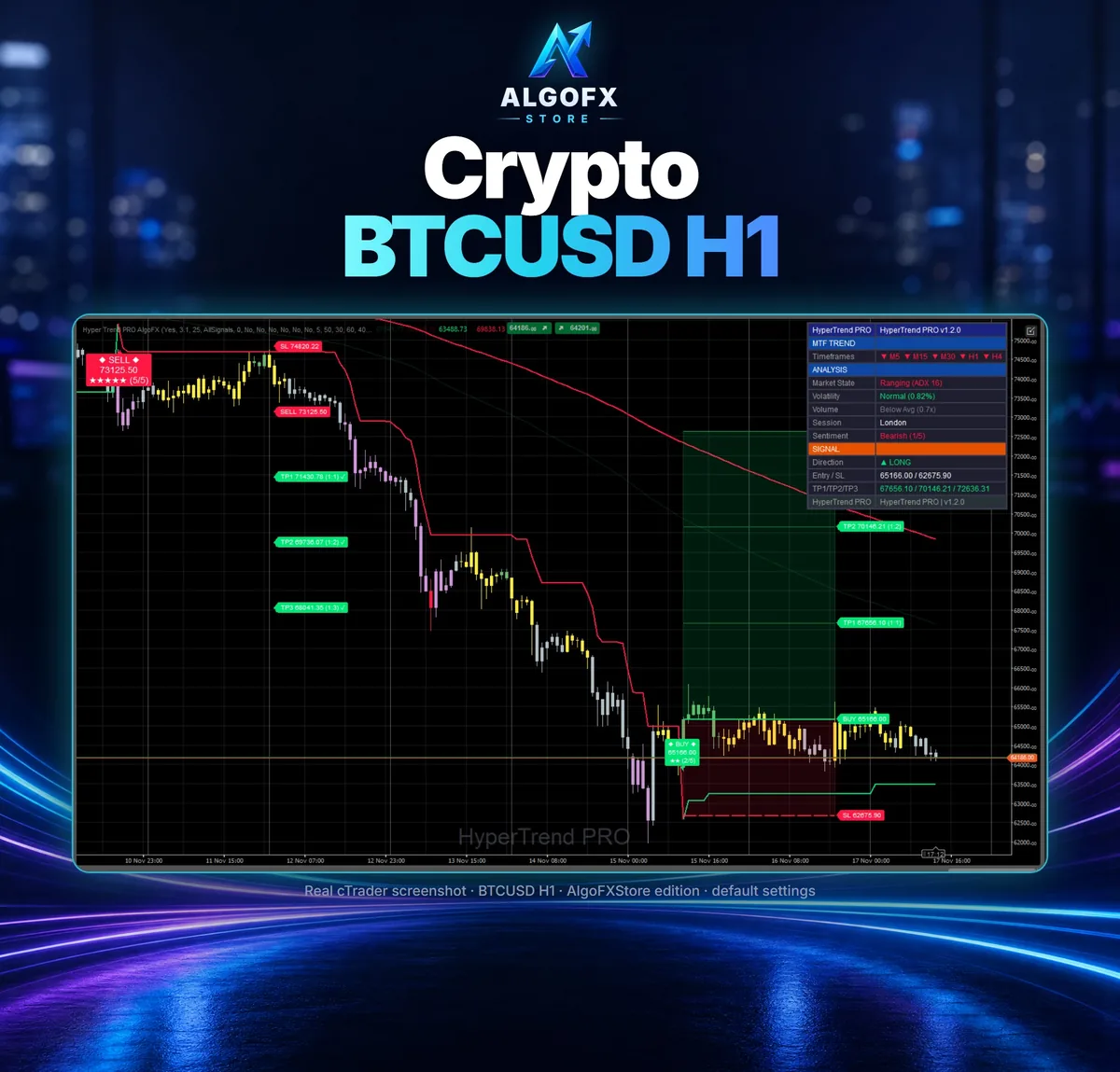
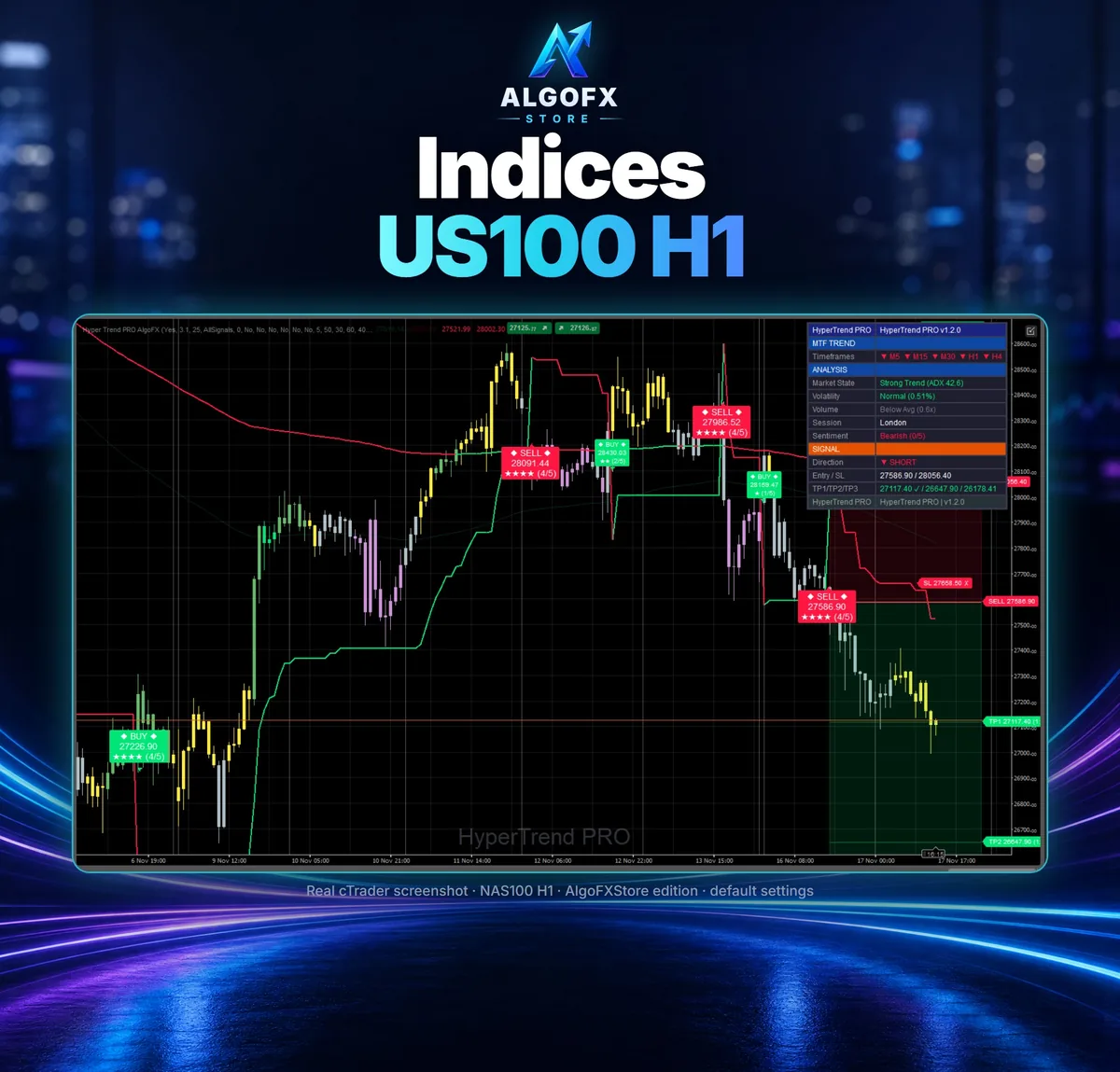
How traders put it to work
Forex intraday on m15 and h1
The manual's starting points are h1 and m15. At the defaults every flip shows with its stars, which on a busy pair is a lot of plates; start with All Signals for a few days to learn what the ratings look like on your pair, then move to Quality+ or Strong+ once you know which ones you would actually take.
Gold and other volatile symbols
On XAUUSD or an index the stop of ATR x 3.1 can be wide. Two ways to tighten it: lower 'Sensitivity', which also makes the SuperTrend flip sooner, or switch on 'Use % SL' to set the stop as a fixed percentage of the entry and keep the trend line as it is. Check the result on your own chart before you trade it.
Fewer, stronger signals
If you only want the flips with the most behind them, combine the Strong+ preset with 'Trending Only (ADX>20)'. Many low-score flips in ranging hours disappear from the chart, and the dashboard's Market State row tells you why the chart has gone quiet. Raising 'Sensitivity' or 'Tuner' also makes flips rarer.
Trend continuation entries
If you prefer to join an existing trend rather than its first flip, switch on 'Show Pullback Signals'. Small PB marks appear where a WaveTrend turns back inside the trend, on closed candles. They are markers only: they do not open a tracked trade, so plan the stop for them yourself.
A clean chart beside other tools
Set 'Candle Coloring' to Off if another indicator paints the candles, switch the cloud or the tracer off, and pick Dot or Triangle as the marker style. The levels and the dashboard stay, so you keep the plan and the context without the full visual layer.
Every setting, with its default
The names are the ones in cTrader's parameters panel; the defaults are what every chart on this page uses.
| Setting | Default | What it does |
|---|---|---|
| Sensitivity (ATR Factor) / Tuner (ATR Length) | 3.1 / 25 | SuperTrend band distance and ATR length; the same risk sets the stop. |
| Preset / Min Strength (0-5) | All Signals / 0 | Minimum confluence score: All Signals 0, Trend Scalper 2, Quality+ 3, Strong+ 4; the higher of the two wins. |
| Trending Only / Strong Only / High Vol Only / Cloud-Aligned Only / Contrarian Only | all No | Optional vetoes on each signal. |
| Show Pullback Signals / Pullback Tuner | No / 5 | PB re-entry marks inside a trend. |
| Contrarian Length / Smoothing / Overbought / Oversold | 50 / 30 / 60 / 40 | The smoothed RSI behind the contrarian filter. |
| Show Cloud / Cloud Style | Yes / Smooth | EMA 150/250 cloud; Scalping, Scalping+ (HMA) or Swing (EMA 50/200). |
| Show Tracer / Tracer Length | Yes / 250 | Trend Tracer EMA line. |
| Show TP/SL Area / Show Trailing Stop | Yes / No | Entry, stop, three targets and the two boxes; optional ATR trail. |
| Use % SL / % SL | No / 1.0 | Stop as a percentage of the entry instead of ATR x Sensitivity. |
| TP1 / TP2 / TP3 (RR) | 1.0 / 2.0 / 3.0 | Targets as multiples of the risk; TP3 closes the trade. |
| Show Swings / Swing Period | No / 10 | HH, HL, LH, LL market structure labels. |
| Show Dashboard / Dash Position / Dash Size | Yes / TopRight / Small | The 14-row panel. |
| Candle Coloring / Signal Marker Style / Signal Label Size | Momentum / Label / Auto | Candle paint mode; plate or a single symbol; plate size. |
The alert events, one by one
You choose which alerts are on in the parameters. Alerts can go to a line in cTrader's Log tab (on by default), a sound from a .wav file you name (off by default) and an e-mail (off by default; cTrader's e-mail settings must be set up).
- SL Hit
- TP1 Hit
- TP2 Hit
- TP3 Hit
Hyper Trend PRO next to the usual options
Where it wins, and where it does not.
| Hyper Trend PRO | Typical free SuperTrend indicator | Reading a SuperTrend by hand | |
|---|---|---|---|
| Signal stays where it printed | Decided on the closed candle | Can flip and flip back before the candle closes | On the closed candle, if you wait for it |
| Rates each signal | 0 to 5 stars from five checks | No rating | Your own checklist, if you keep it |
| Stop and targets drawn for you | Entry, stop and three targets on every signal | The line only | If you draw them |
| Lets you filter weak flips | Star minimum plus ADX, volume, cloud and RSI filters | No | By judgement |
| Stop at market structure | No: the stop is ATR times Sensitivity, or a percentage | The line itself | Wherever you choose |
| Alert the moment a signal prints | No: alerts cover the stop and target hits | Varies | Only if you are watching |
| Cost and setup | A one-time purchase and 65 parameters to learn | Free and simple | Free, apart from your time |
Honest about who this fits
A good fit if you
- You trade with the trend on cTrader and want the entry, stop and targets on the chart the moment a signal prints.
- You want to see how much backs a flip, and choose your own minimum number of stars.
- You size every trade from a fixed risk and want the stop distance visible before you enter.
- You like a dashboard that tells you at a glance whether the market is trending or ranging and how five timeframes line up.
- You want to be told when a tracked trade reaches a target or its stop, in the log, by sound or by e-mail.
Not for you if you
- You want something that places trades for you: it rates, draws and alerts, and every order is yours.
- You want stops at swing highs and lows: these stops are a multiple of the ATR, or a percentage of the entry.
- You need an alert the moment a new BUY or SELL prints: this version shows new signals on the chart and the dashboard, and alerts on stop and target hits.
- You want a minimal chart with one line: at its defaults it draws a cloud, a tracer, coloured candles, plates, levels and a dashboard.
One indicator file, one manual, installed in a minute
- 1cTrader indicatorHyper Trend PRO AlgoFX.algo (36 KB). Double-click it and it appears as “Hyper Trend PRO AlgoFX” in your Indicators list.
- 14Page PDF manualInstallation, every setting with its default and how to read the chart.
- 65Settings in the parameters panelThe main ones are explained in the table above, with the defaults the charts use.
- ✓Alert eventsYou choose which ones are on in the settings.
- 60Day money-back guaranteeIf it is not for you, request a full refund within 60 days through your Digistore24 order e-mail.
Install in four steps
- Download the zip from the page Digistore24 sends you to after checkout and unzip it.
- Double-click “Hyper Trend PRO AlgoFX.algo”: cTrader Desktop opens and installs it. You can also import the file in cTrader Automate.
- Open a chart, open the Indicators list and add “Hyper Trend PRO AlgoFX” (you find it under Custom).
- Read the manual's quick start; the defaults are the settings shown on this page.

Kestutis Balciunas
AlgoFXStore · chart indicators
Kestutis Balciunas builds and publishes chart indicators under the AlgoFXStore name. Every product page shows what the indicator draws on real charts, and every number on it comes from the shipped build.
The charts on this page were captured in cTrader from the shipped Hyper Trend PRO AlgoFX at its default settings and are shown unedited.
No get-rich claims and no quoted win rates. Every trade is uncertain, and no indicator changes that. If you want to know whether it suits the way you trade before you buy, e-mail [email protected] and you will get a straight answer.
One price, one payment
- The cTrader indicator (Hyper Trend PRO AlgoFX.algo) and the 14-page PDF manual
- Delivered as a digital download: one zip with the .algo file and the PDF manual on your download page
- Return period: 60 days, with a full refund if it is not for you
- Free updates to the current version on the same download page
60-day money-back guarantee. Install it, run it on your own charts and read the manual. If Hyper Trend PRO is not for you within 60 days of purchase, request a full refund from Digistore24, no questions asked: use the refund link in your Digistore24 order e-mail or Digistore24's order page digistore24.com/en/cancel-revoke-contract. Digistore24 refunds to your original payment method. It is a digital download: right after checkout you land on your download page, and the link to it is also in your Digistore24 order e-mail.
Also by Kestutis Balciunas: Hyper Trend PRO for NinjaTrader 8 and MT4 and MT5 and TradingView.
About the signals
Do the signals repaint?
BUY and SELL plates, the pullback marks and the levels of each trade are decided only on closed candles, and they stay where they printed. A plate never appears inside a candle and then disappears. What moves is the drawing on the forming candle: the SuperTrend line, the cloud and the candle colour follow the live price, the level lines extend to the right, ticks appear when a target is reached, and the dashboard updates until the candle closes.
What exactly triggers a BUY or a SELL?
A BUY needs the SuperTrend to flip up on a closed candle, a SELL needs it to flip down. The flip's score must reach the higher of the Preset and 'Min Strength', every filter you switched on must agree, and 'Show Signals' must be on, because it is part of the signal rule. With the defaults every flip is a signal. Nothing else creates one.
Which preset should I start with?
Start with All Signals to see every flip and its stars on your own symbol and timeframe. Once you know which ratings you want to act on, raise the preset: Trend Scalper needs two stars, Quality+ three and Strong+ four. Strong Only gives the same four-star cut, or a close beyond the 200 EMA if you set 'Strong Only Rule' to Above Ema200.
Why do I see the levels of older trades?
Each past trade keeps its drawn entry, stop and targets, so you can scroll back and see how earlier signals played out. The dashboard always shows only the tracked trade. 'Max Visual History (trades, 0 = all)' limits how many past trades keep their levels on a long chart.
Levels, colours and the dashboard
The stop looks far away. Can I tighten it?
The stop is ATR(25) x Sensitivity 3.1 from the entry, the same distance that keeps the SuperTrend from flipping on every wiggle. For a tighter stop without a twitchier trend, switch on 'Use % SL' and set '% SL', the stop as a percentage of the entry. The targets follow, because they are multiples of the same risk.
What do the candle colours mean?
With 'Candle Coloring' on Momentum, the default, the candles shade from green to red by the MACD histogram measured against the ATR. Trend paints them in Bull or Bear Color by the SuperTrend side, Confluence shades from grey to the trend colour by the score, and Off leaves the candles alone.
Why does the Timeframes row show down arrows everywhere?
Each arrow reads that timeframe's close against its 200 EMA, so the history of M5, M15, M30, H1 and H4 has to load first. Right after you add the indicator, wait a moment or scroll the chart left once so cTrader loads more history, and the arrows fill in.
What does a tick next to a target mean?
Only that price traded through that level on the chart. It is not a filled order and includes no spread or commission. Reaching TP3, or the stop, closes the tracked trade, and Direction then reads WAITING until the next signal.
I changed Bull Color but the cloud did not follow. Why?
Bull Color and Bear Color recolour every drawn object: plates, level lines and tags, boxes, swing labels, the dashboard and the candles. The four plotted lines, the two cloud edges, the SuperTrend and the Trend Tracer, keep their own colours. Change those in the indicator's style settings in cTrader; the chart template remembers them.
Alerts and running live
Which events send an alert?
SL Hit, TP1 Hit, TP2 Hit and TP3 Hit for the tracked trade, each once, as soon as price touches the level. New BUY and SELL signals and trend changes are shown on the chart and the dashboard; the signal switches are in the parameters, but this version does not send a message for them. Alerts are not sent for history or in backtesting.
How do the alerts reach me?
'Enable Alerts' and 'Alert Log Line' are on by default, so each alert is written to the cTrader log, for example: TP1 HIT | XAUUSD | 60 | Entry: 4012.35, where 60 is the timeframe in minutes. 'Alert Sound' plays a .wav file whose full path you enter, and 'Alert E-mail' sends the line through the e-mail account set up in cTrader, with E-mail From and E-mail To filled in.
Does cTrader have to stay open?
Yes. The indicator runs inside cTrader, so it can only track levels and send alerts while cTrader is running and connected, on your own computer or on a VPS. Many traders forward the alert e-mails to their phone so they hear about a hit while away from the screen.
Can I combine it with my own tools?
Yes. If another indicator also colours the candles, set 'Candle Coloring' to Off on one of them so they do not fight. Switch the cloud, the tracer or the watermark off if you already use your own averages, and pick a small marker style. None of this changes the signals or the levels.
How it works
Will it place trades for me?
No. Hyper Trend PRO is an indicator: it draws on the chart and can alert you. It never sends an order.
After you buy
How do I get it after paying?
Digistore24 runs the checkout. Right after payment it takes you to your download page with one zip holding the .algo indicator file and the PDF manual; the link to that page is also in your Digistore24 order e-mail, so you can download again at any time.
How do I install it?
Double-click the .algo file: cTrader Desktop opens and installs it (you can also import the file in cTrader Automate). Then add “Hyper Trend PRO AlgoFX” to a chart from the Indicators list. The manual walks through it step by step.
Who is Digistore24?
Digistore24 is the reseller that sells Hyper Trend PRO for Kestutis Balciunas (AlgoFXStore): it runs the checkout, charges your card or PayPal, collects the VAT for your country and delivers the download. Its name is the one on your statement, and its order e-mail holds your download link and the refund link.
What is the refund policy?
A 60-day money-back guarantee, handled by Digistore24. If Hyper Trend PRO is not for you within 60 days of purchase, use the refund link in your Digistore24 order e-mail or Digistore24's order page (digistore24.com/en/cancel-revoke-contract) for a full refund, no questions asked. Digistore24 makes the refund to your original payment method.
Do I get the source code?
No. The download holds the compiled .algo indicator file and the PDF manual.
Hyper Trend PRO for cTrader.
Know how many stars back a flip and where the idea is wrong before you take it on your cTrader chart. The indicator, the manual and every setting explained. Instant download for €47, one payment.
Get instant access