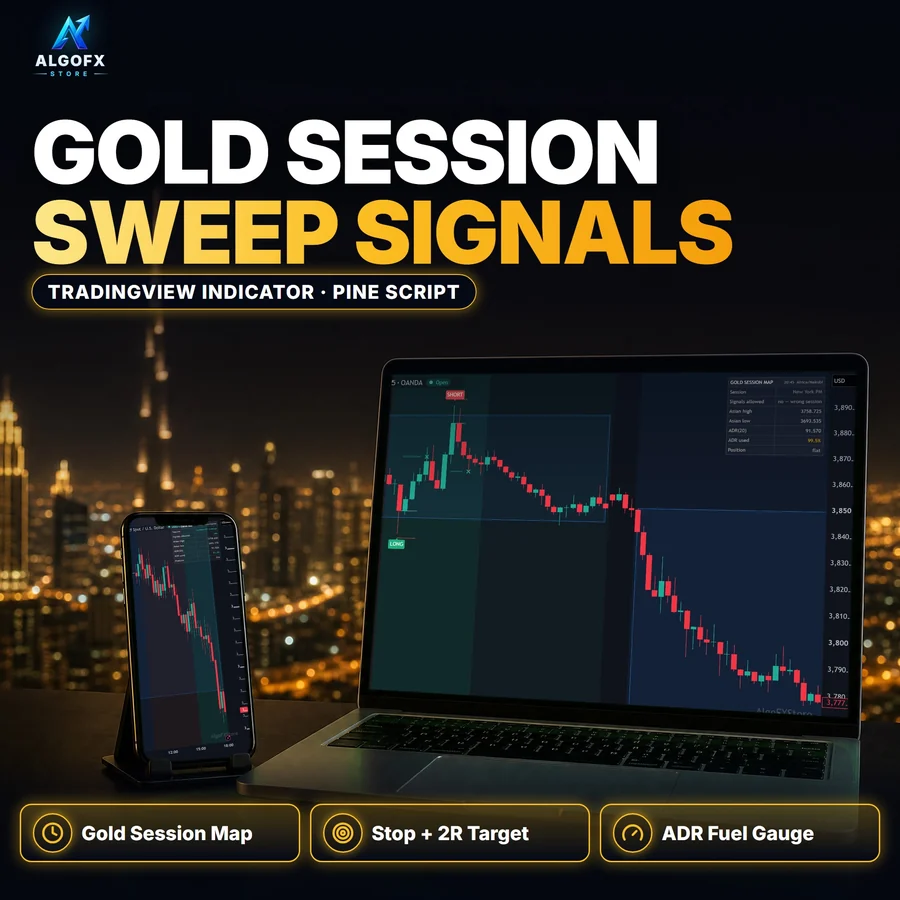
Catch London and New York sweeping the Asian range on gold, with a 2R plan drawn
Gold Session Sweep Signals shades the Asian, London, overlap and New York sessions on your TradingView gold chart, boxes the Asian range and marks a LONG or SHORT when London or New York runs that range and the candle closes back inside it.
- Asian, London, overlap and New York sessions shaded in UTC, with the Asian high and low boxed.
- LONG or SHORT when price sweeps the Asian range by 5 percent of its size and closes back inside.
- Stop beyond the two-candle extreme plus 0.25 ATR, target at 2R, closed by 21:00 UTC at the latest.
- A dashboard with session, ADR used, news window and position, and signals blocked when ADR is spent.
- The full Pine Script source code. Paste it into the Pine Editor, save, and add “Gold Session Sweep Signals [AlgoFXStore]” to your chart.
- A 13-page PDF manual with installation, every setting and how to read the chart. One-time €47.
See Gold Session Sweep Signals on a real chart
Press play; use the full-screen button to see every detail.
The Asian range break that reverses is not a breakout, it is a sweep
On gold, the quiet Asian session builds a range, and the London open often runs straight through one side of it. Many traders read that move as a breakout and buy the new high or sell the new low, right where the move runs out. A few candles later price is back inside the Asian box and heading for the other side, and the breakout trader is stopped out at the extreme.
Trading the reversal by hand has its own problems. Session times shift with daylight saving, so a box drawn by eye is off by an hour for half the year. You need the exact Asian high and low, a rule for how far beyond them counts as a sweep, a stop that sits beyond the sweep, and the discipline not to take a signal after gold has already used up its normal daily range or minutes before US data.
Gold Session Sweep Signals turns that into a fixed procedure. The sessions are defined in UTC, the Asian range freezes at 08:00 UTC, a sweep needs to poke beyond it and close back inside, and the stop, the 2R target, the ADR gate, the news window and the end-of-day exit are the same every day.
Everything Gold Session Sweep Signals draws on your chart
Read from the shipped Pine Script code.
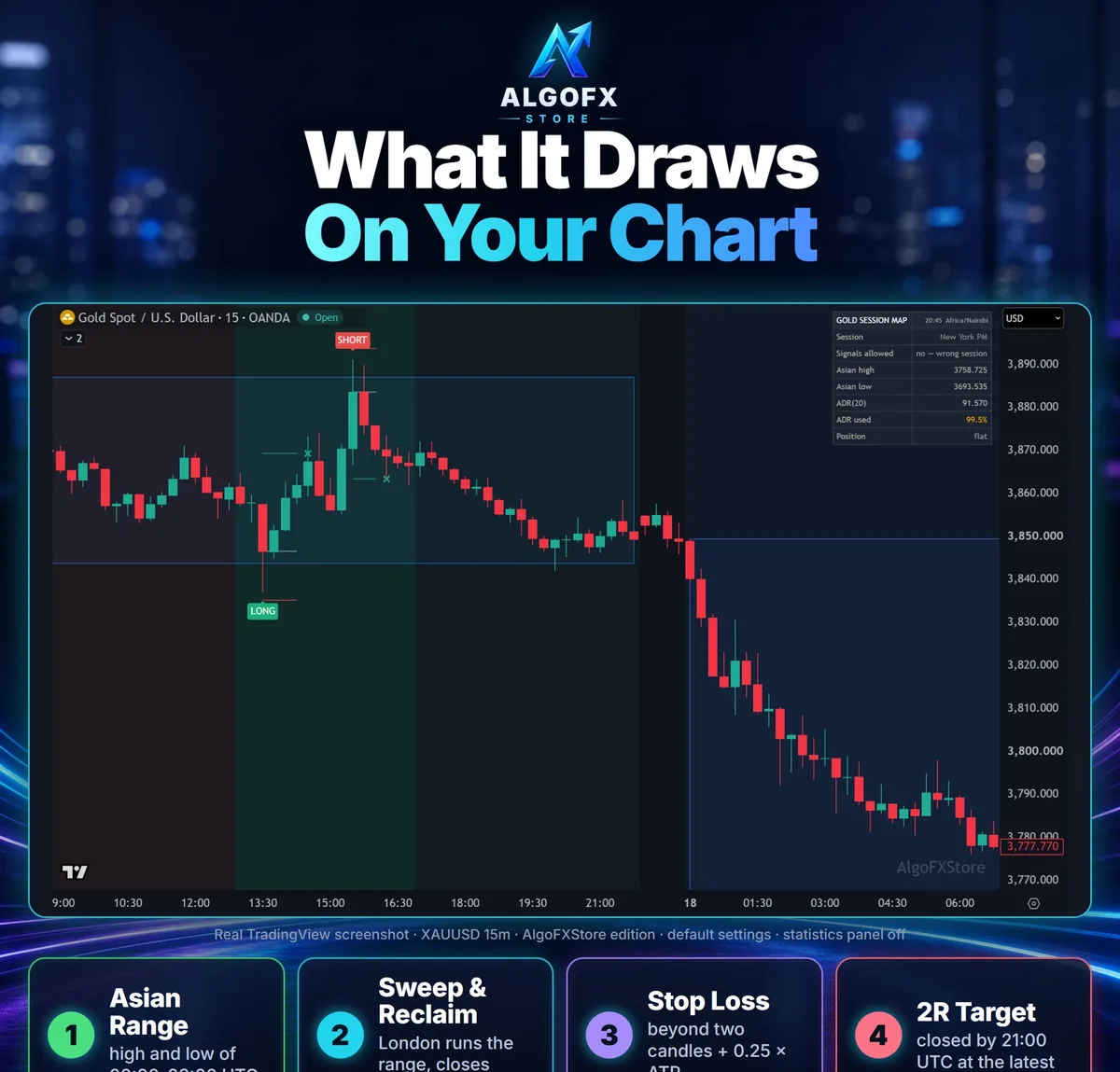
- Session shading (input 'Shade sessions on the chart', on; windows in UTC): Asian 00:00-08:00 blue at 93 % transparency, London 08:00-13:00 orange (93 %), London-NY overlap 13:00-17:00 green (86 %, the boldest), New York afternoon 17:00-22:00 green (94 %)
- Asian range box (input 'Draw the Asian range box', on): blue border and fill from the first Asian bar, top = Asian high, bottom = Asian low, stretched to the current bar through London, the overlap and the New York afternoon
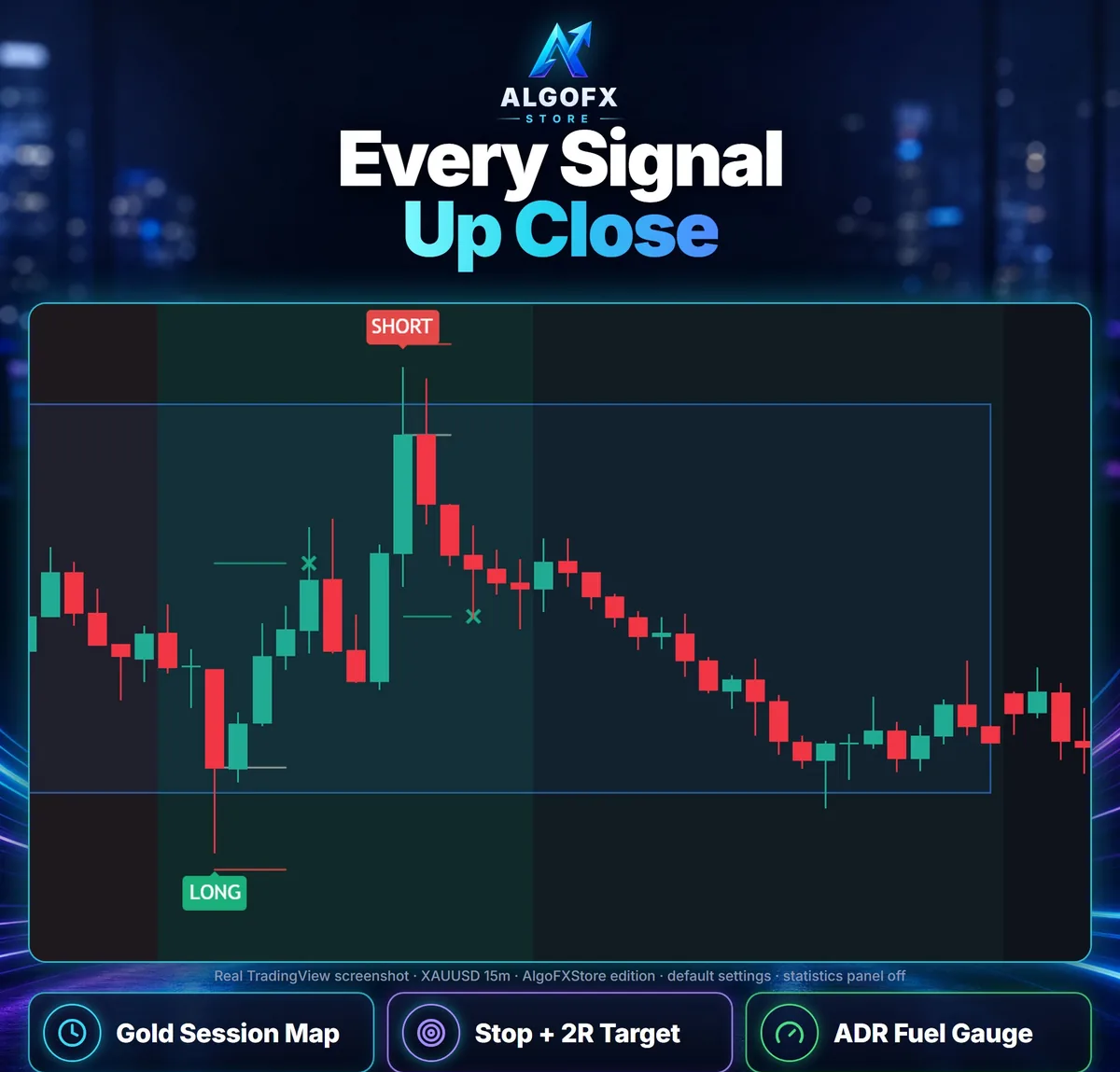
- 'LONG' label (green, below the candle) and 'SHORT' label (red, above) on the sweep-and-reclaim candle, size tiny
- While a signal runs: step lines 'Entry' (light grey), 'Stop' (red) and 'Target' (green)
- Exit crosses: green at the target price ('Target hit'), red at the stop ('Stop hit'), grey at the close when the flatten window ends a signal ('Timed out')
- Optional EMA line (grey, only when 'Require trend agreement (EMA filter)' is on,)
- Dashboard: 'GOLD SESSION MAP' + clock in the 'Dashboard clock' timezone, Session, Signals allowed, Asian high, Asian low, ADR(20), ADR used, Position, Signal record (optional)
- AlgoFXStore watermark bottom right
Sessions, a frozen range, a sweep and a plan
Everything below runs on the chart's own bars; the script uses no data from other timeframes or symbols. Times are the defaults, in UTC.
- 1
Four sessions in UTC
The Asian session runs 00:00 to 08:00 UTC (blue), London 08:00 to 13:00 (orange), the London and New York overlap 13:00 to 17:00 (green, the boldest shade) and the New York afternoon 17:00 to 22:00 (light green). UTC never changes its clock, so the windows mean the same all year. Every window and the session timezone are inputs, and the dashboard clock can show your own time.
- 2
The Asian range is built and frozen
From the first Asian bar the script tracks the highest high and lowest low, and draws them as a blue box. The box grows while Asia is open and is frozen when the session ends at 08:00 UTC; from then on it stretches to the right through London, the overlap and New York. Only after the freeze can a signal be taken.
- 3
A sweep and a close back inside
A LONG needs a low at least 0.05 times the Asian range below the Asian low and a close back above that low. A SHORT is the mirror at the Asian high. By default signals are taken only during London plus the overlap, 08:00 to 17:00 UTC, at most one per direction per day, and a bar that is already a LONG cannot also be a SHORT. An EMA(50) trend filter is optional.
- 4
Gates that block a signal
No new signal once today's range has used more than 90 percent of the 20-day average daily range (ADR), none within 15 minutes either side of 12:30 UTC, the usual time of US data in summer, and none while a signal is still running. The dashboard's Signals allowed row says yes, or which gate is closed: wrong session, news window, ADR spent or position open.
- 5
Stop, target and exits
The entry is the signal candle's close. A LONG's stop sits below the lower of the signal candle's low and the previous low, minus 0.25 times ATR(14); a SHORT's above the higher of the two highs, plus the buffer. The target is twice the stop distance. From the next bar the stop is checked first, then the target, and the 21:00 UTC flatten window closes anything still open.
Gold Session Sweep Signals on 12 gold charts
Every chart below is a screenshot of TradingView itself with the shipped Gold Session Sweep Signals [AlgoFXStore] attached at its default settings. Gold Session Sweep Signals is built for gold, so the charts show it on several data feeds and timeframes rather than on other markets. They show what the indicator draws; they are not trading results. Tap or click any chart to open it full size.
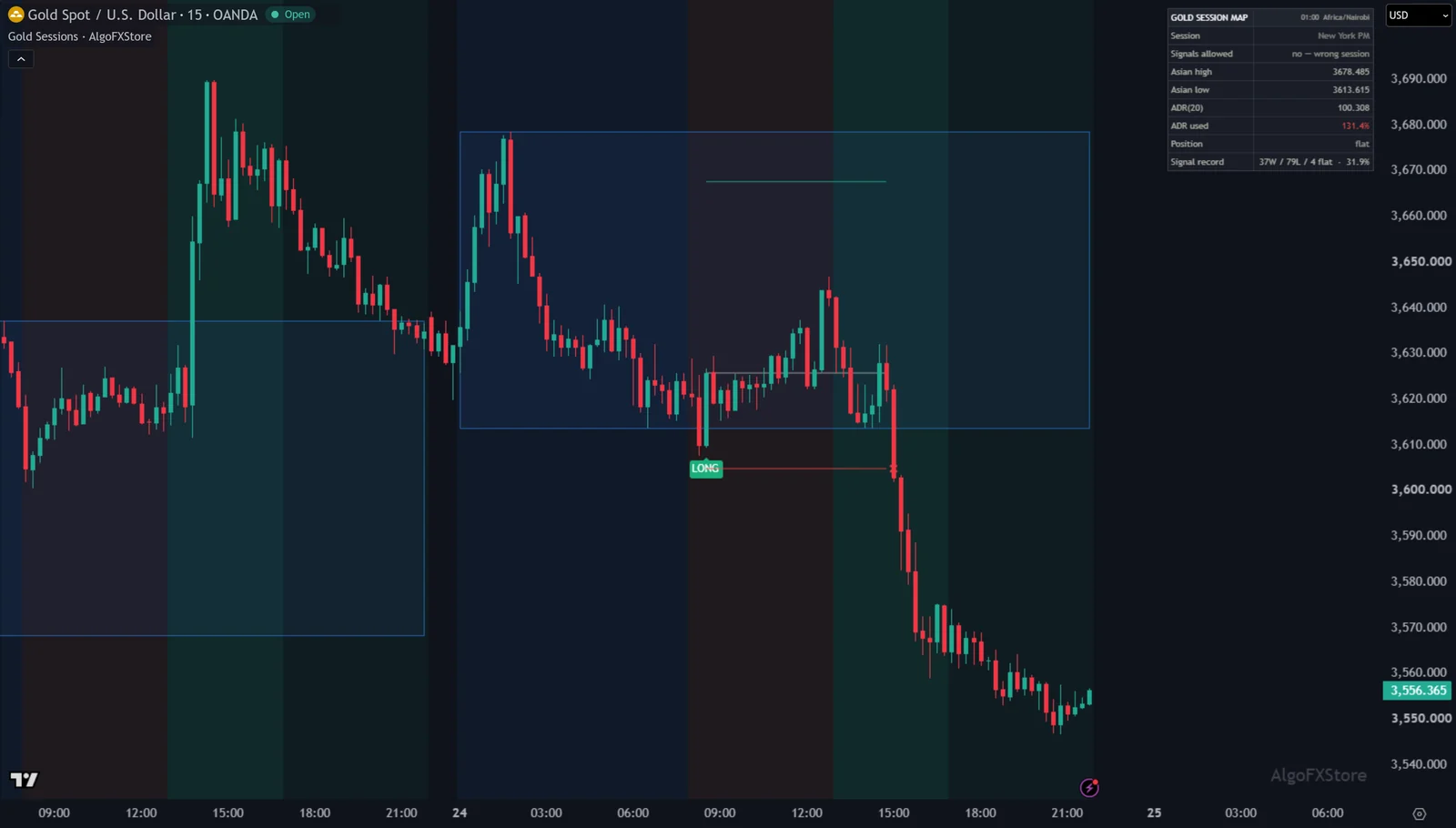
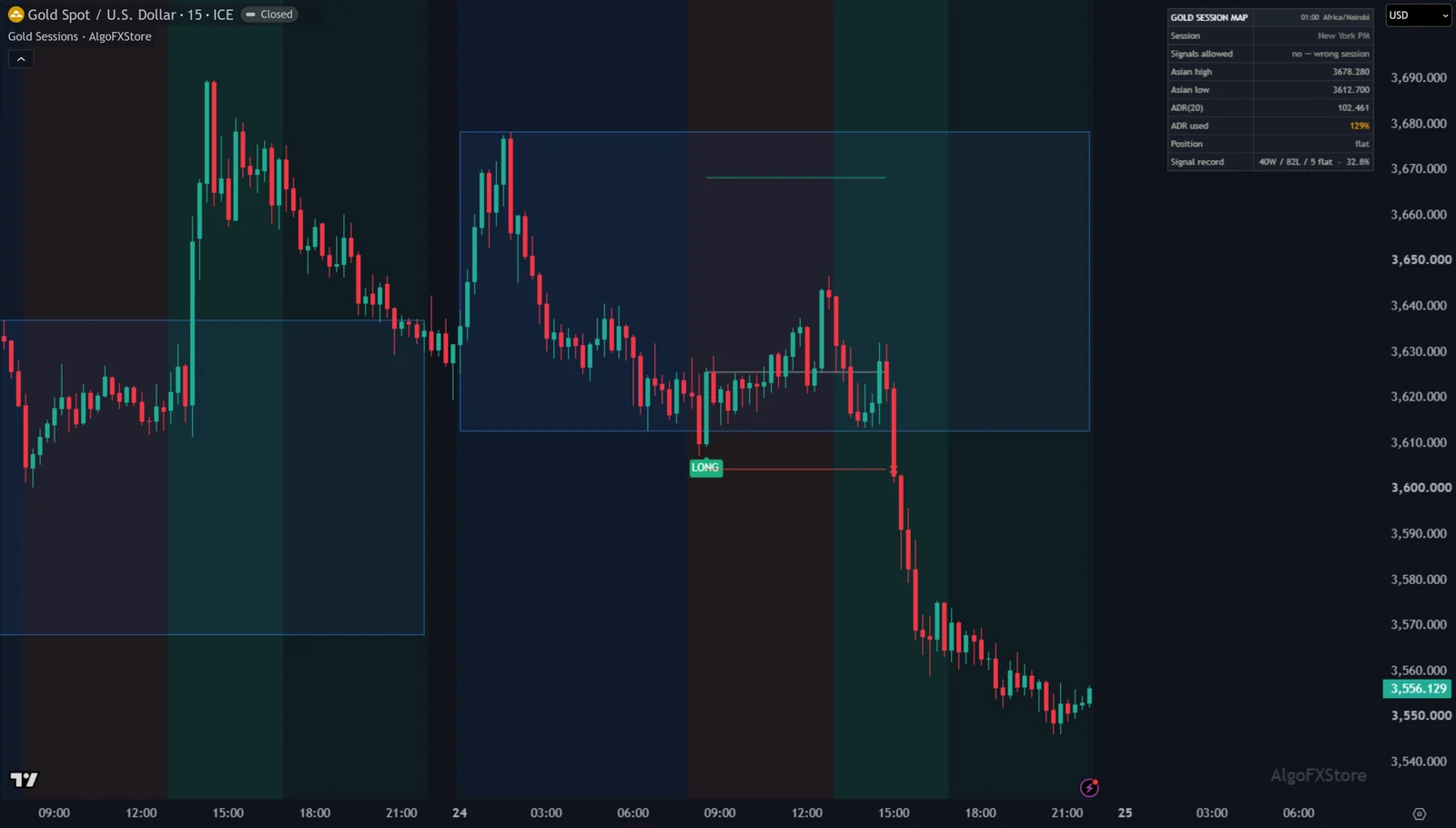
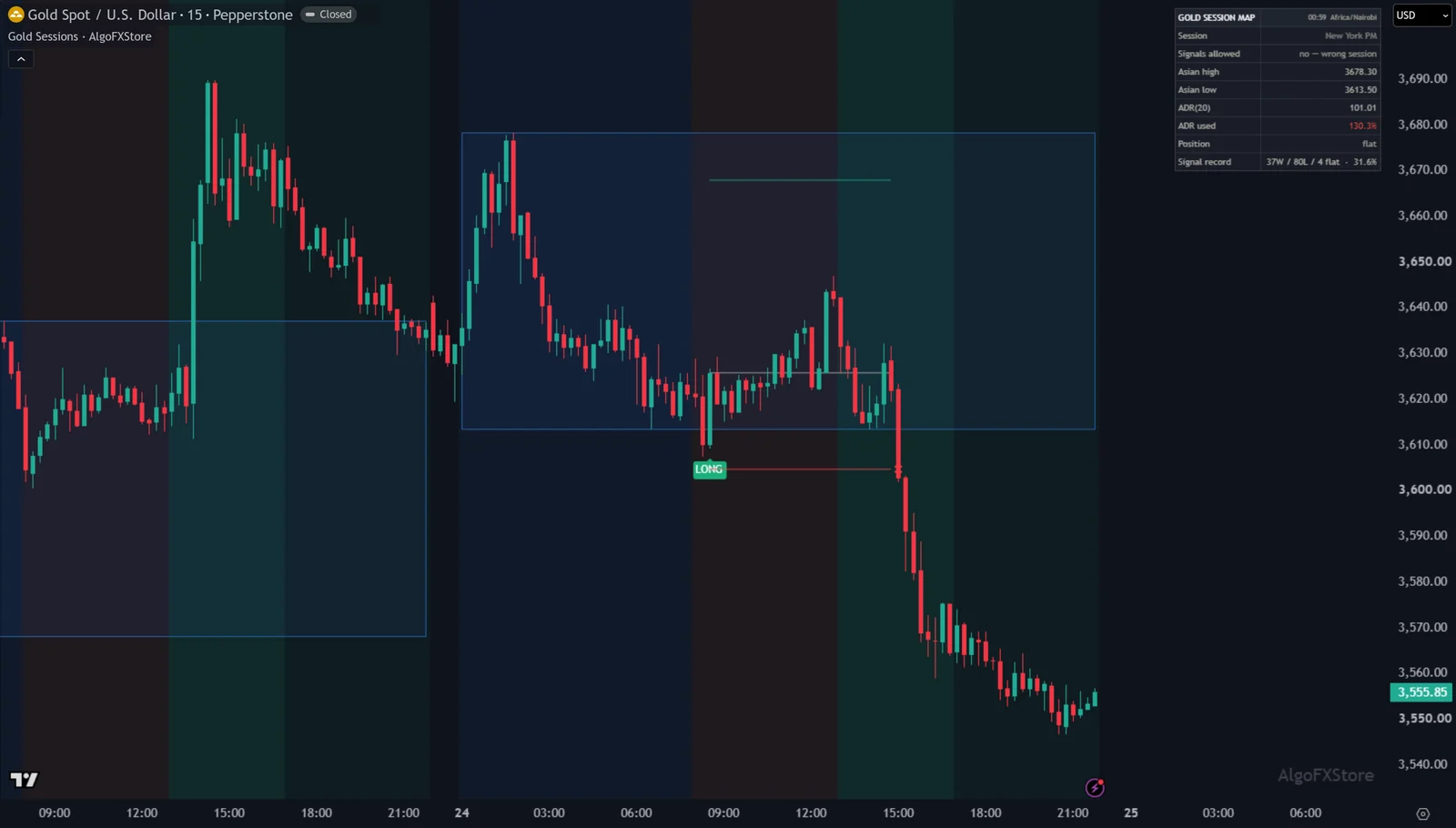
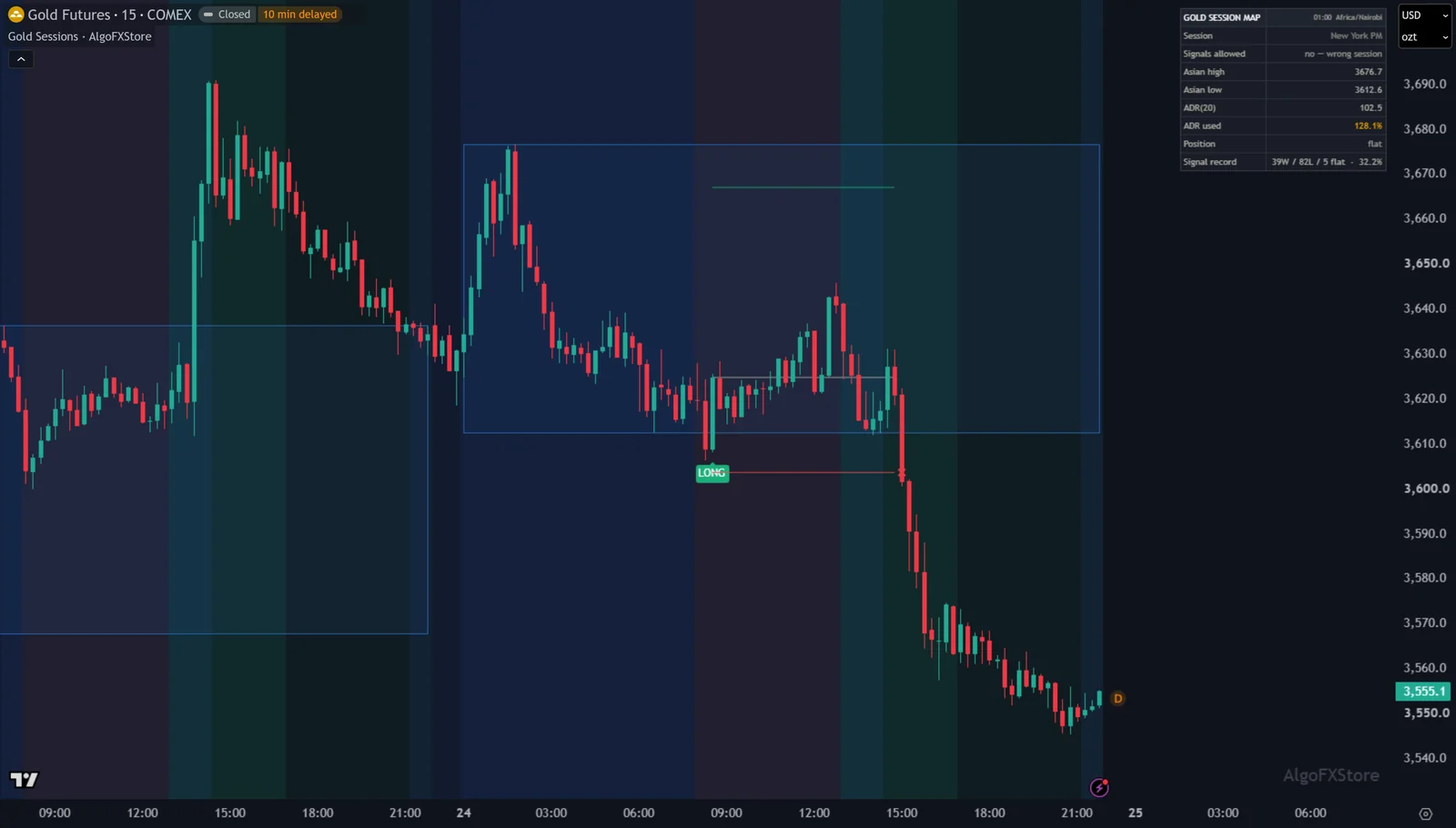
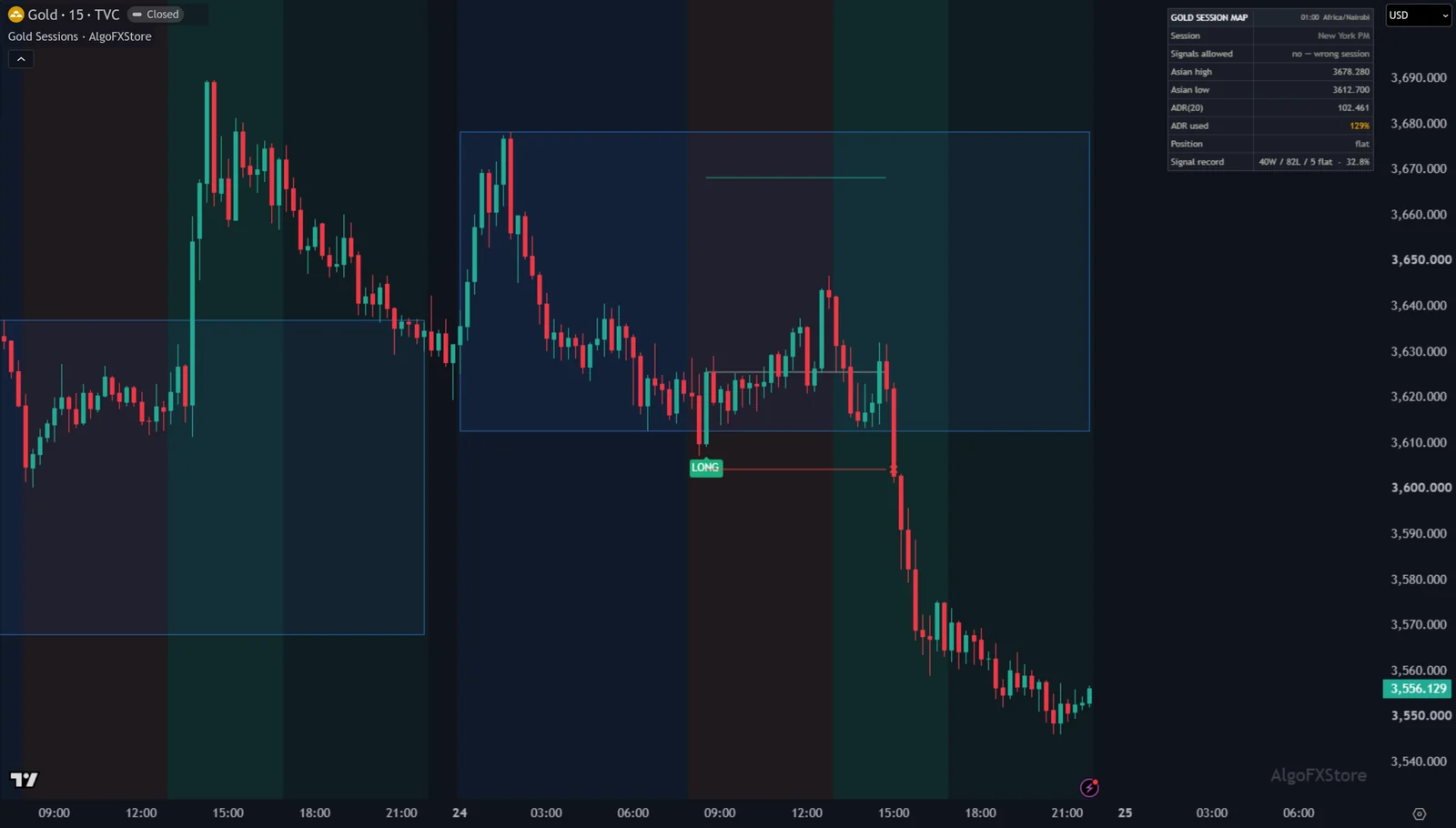
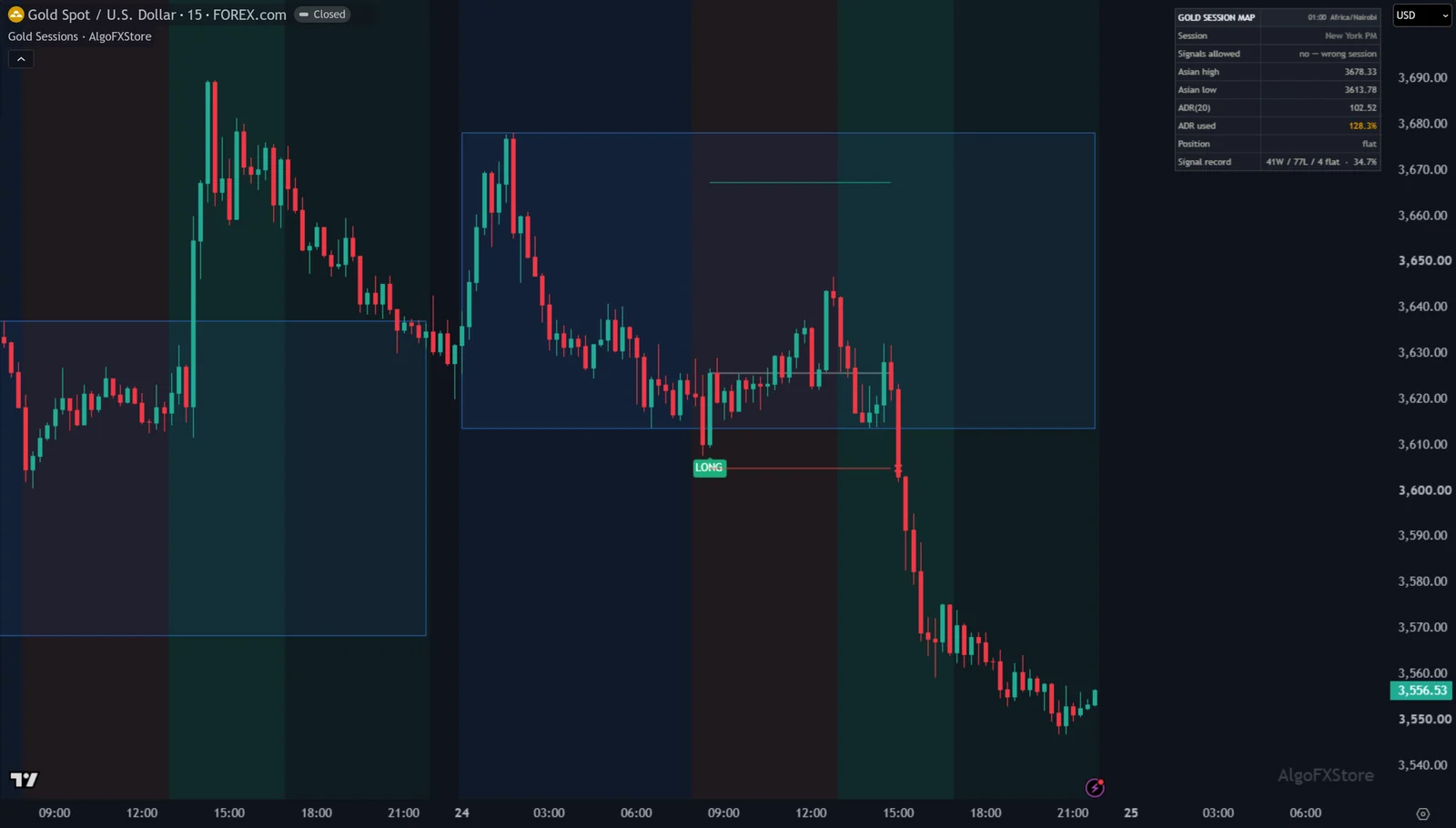
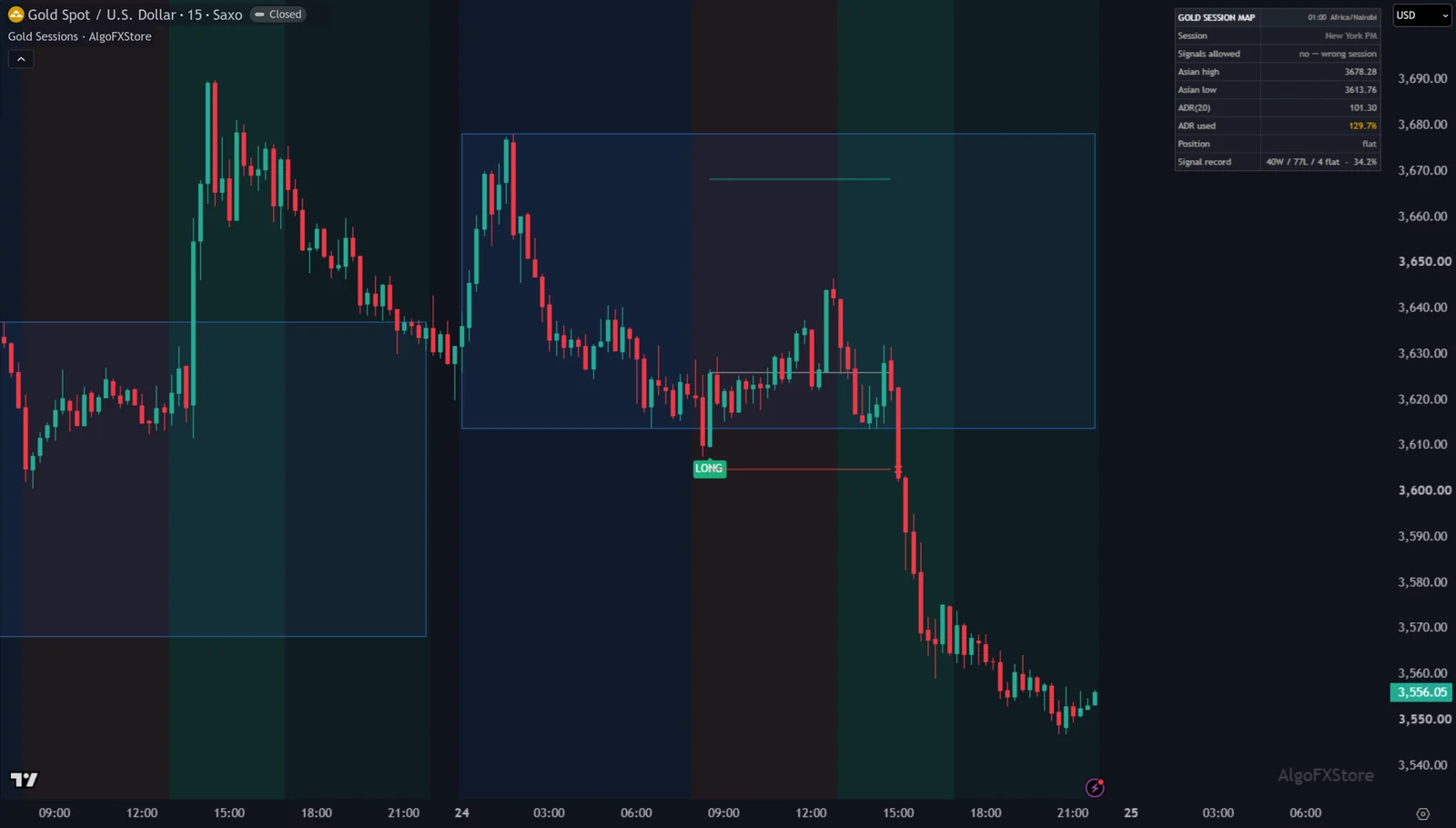
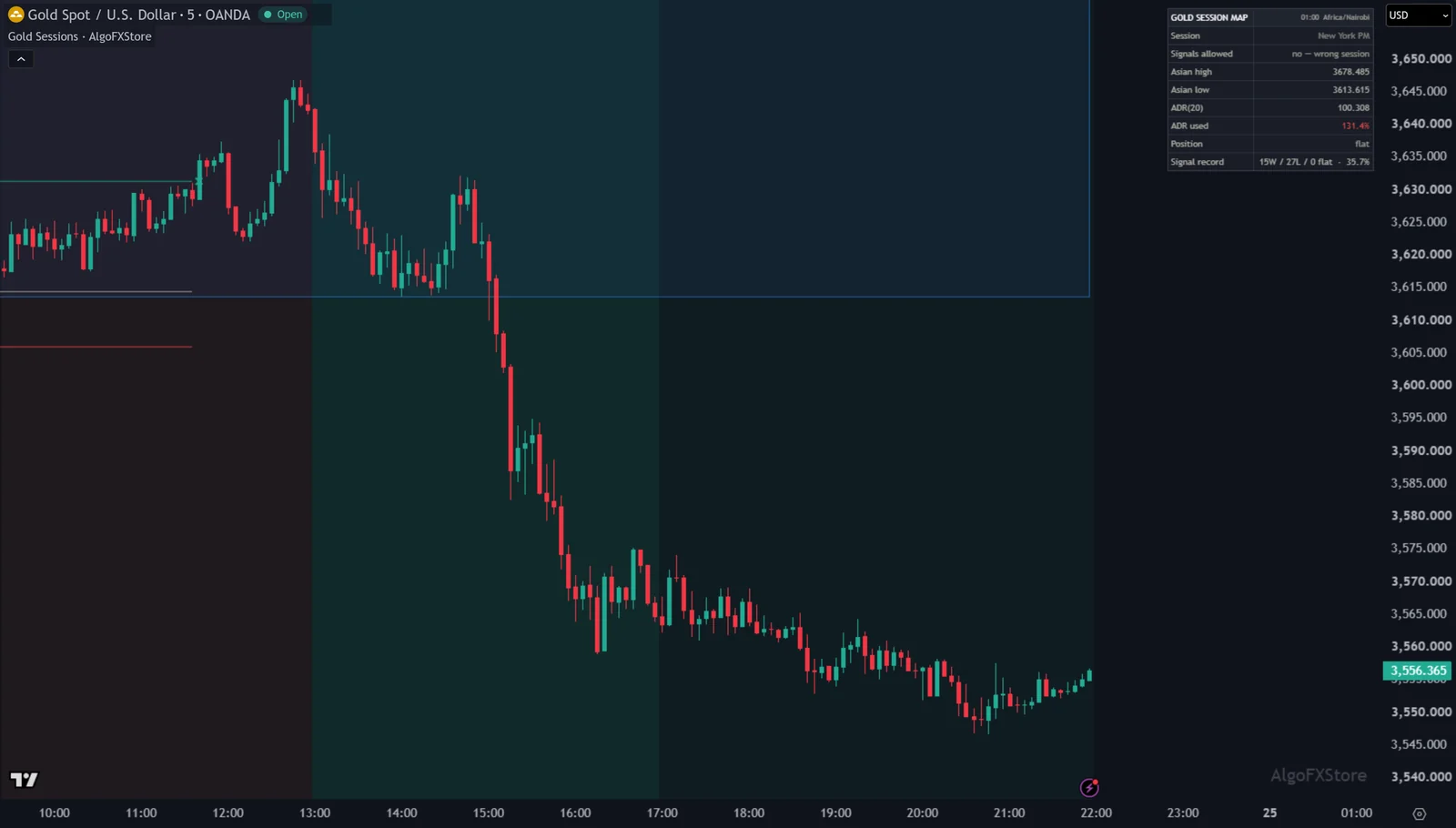
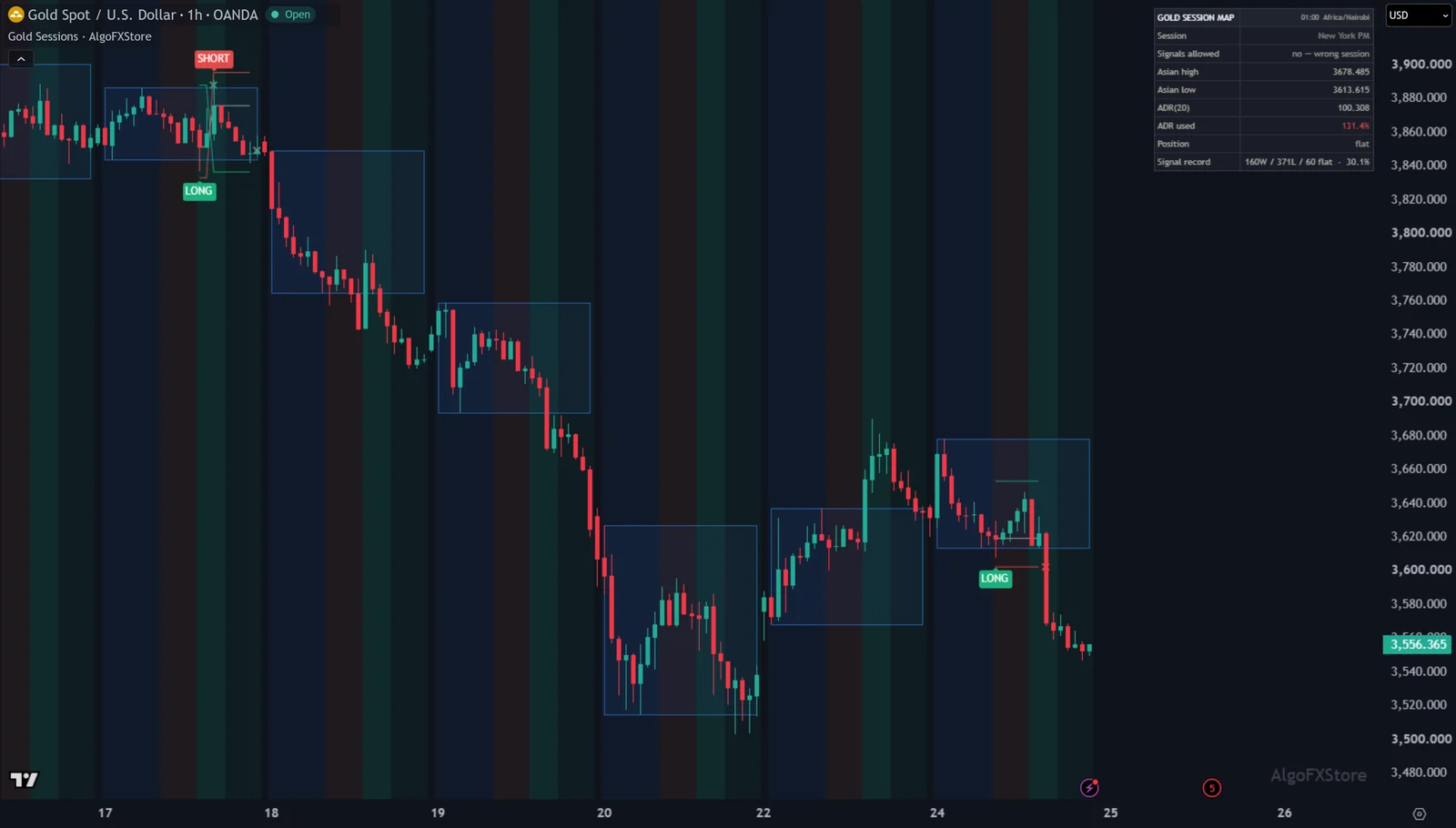
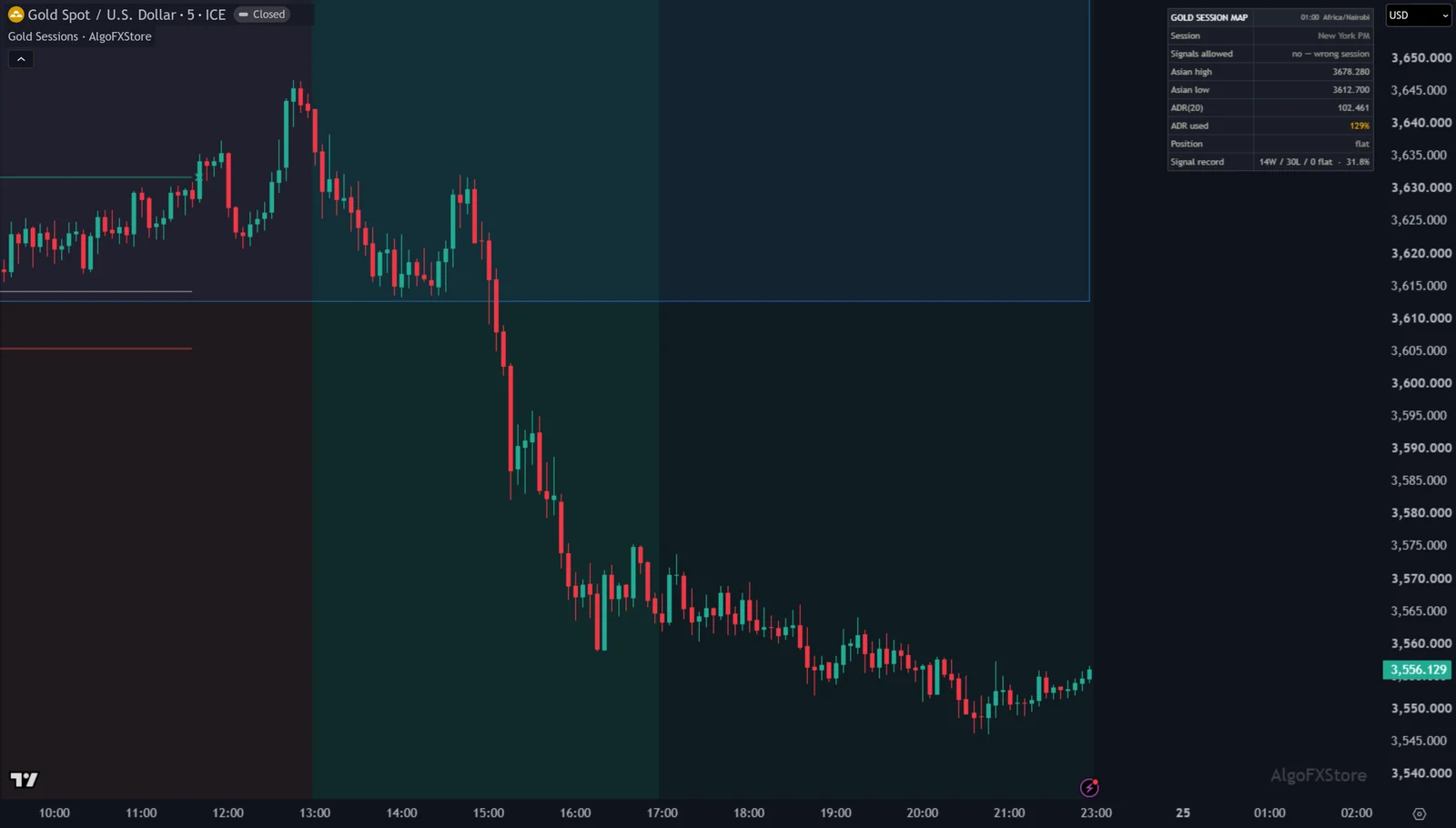
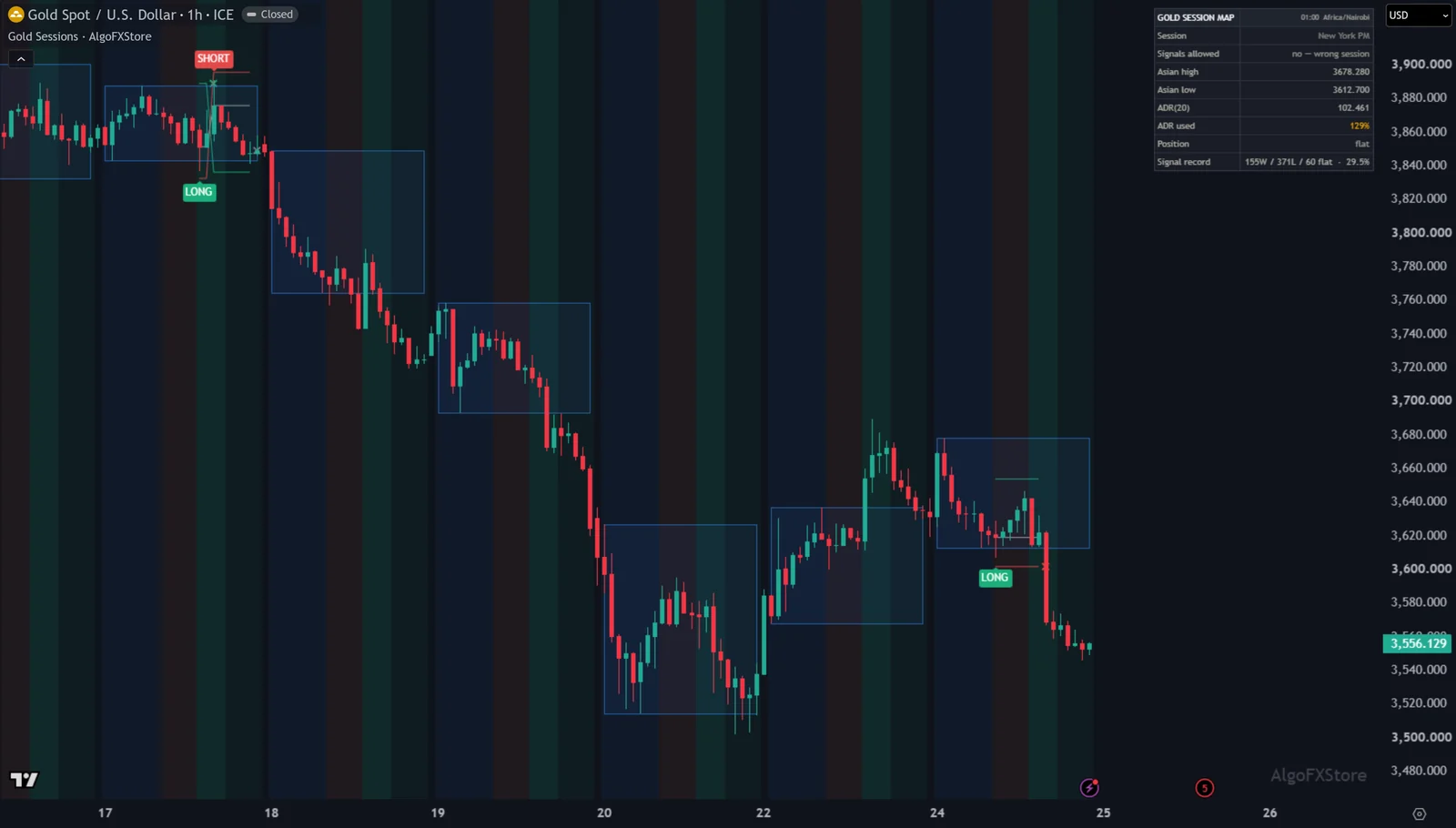
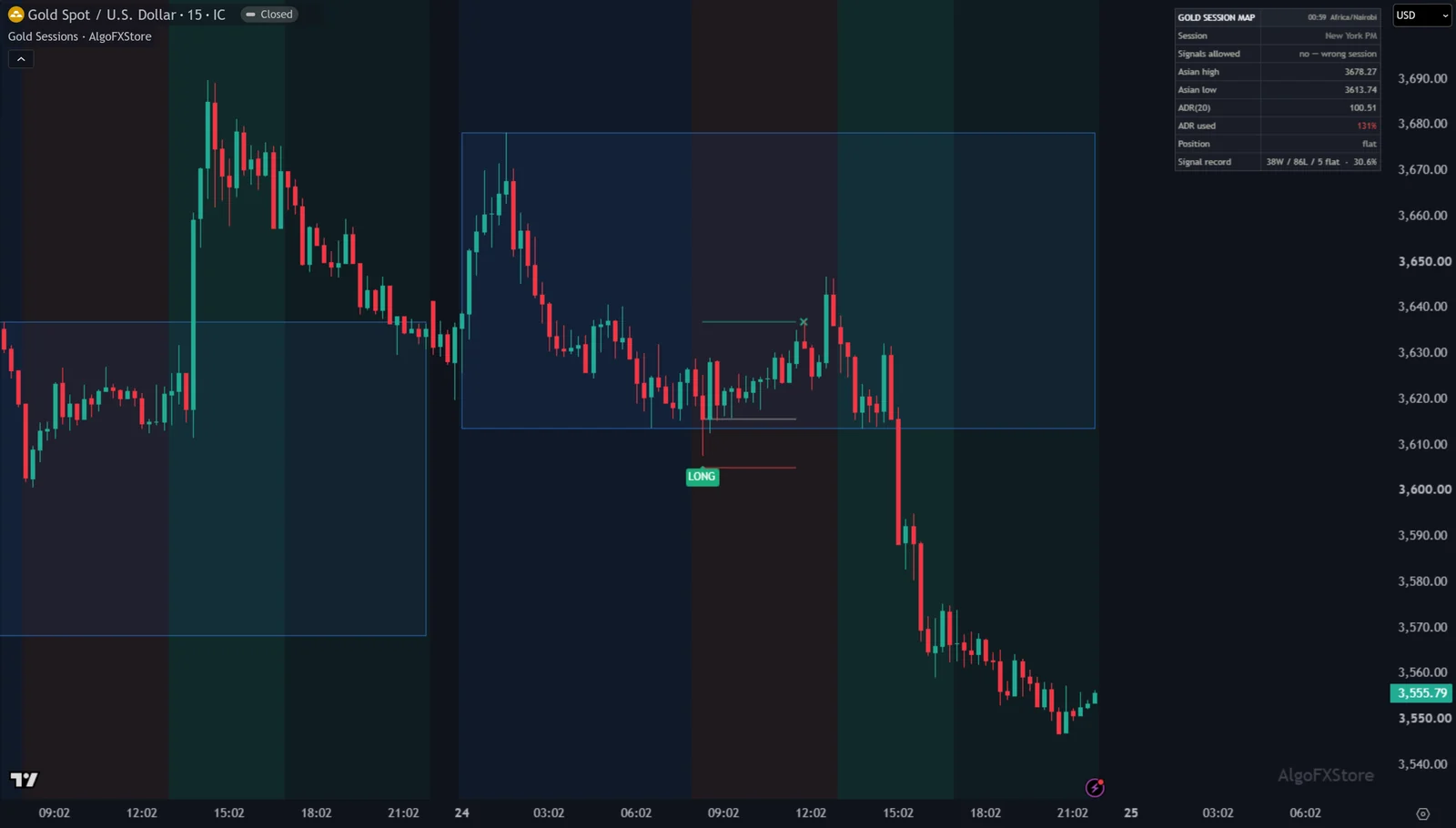
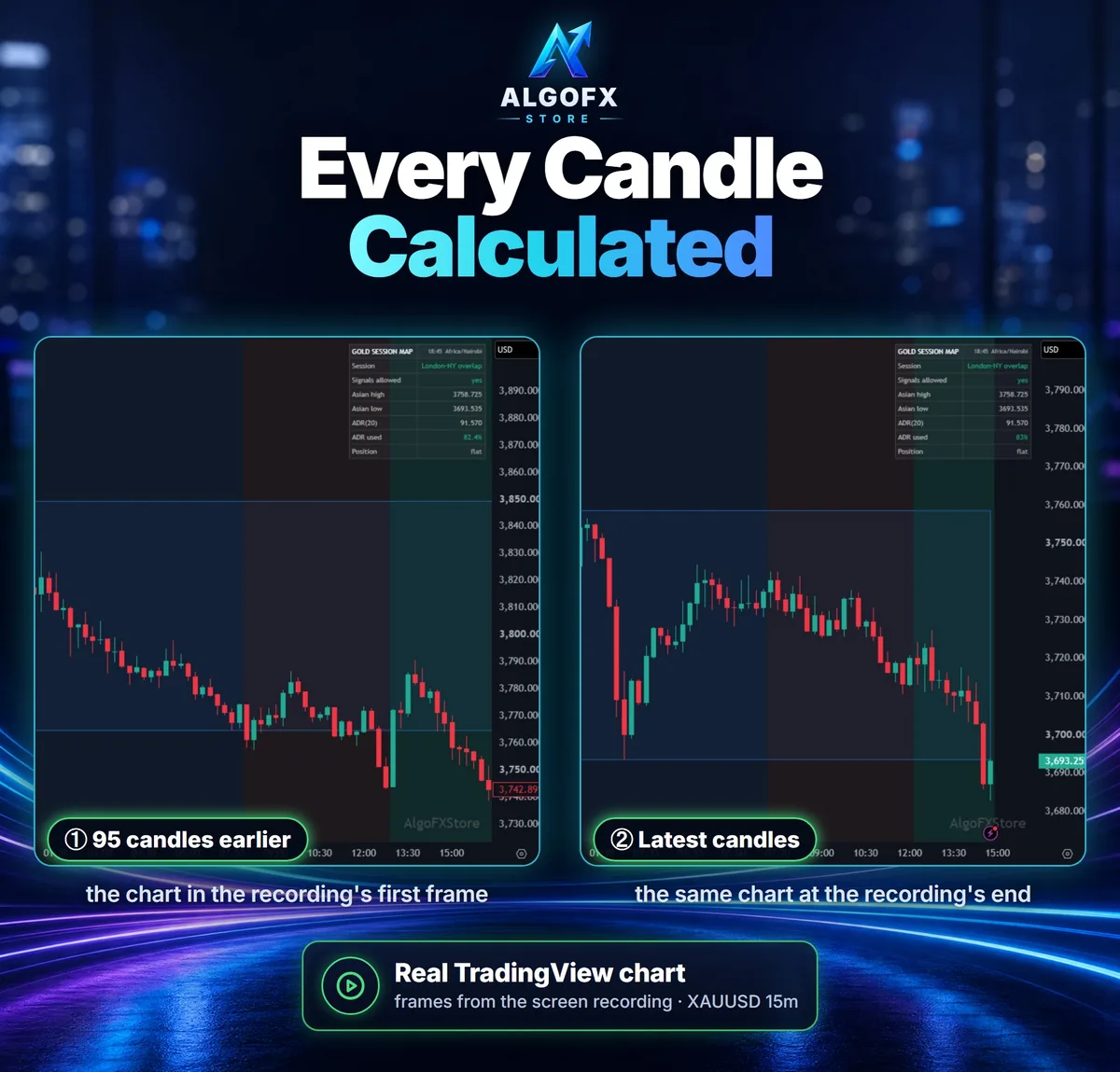
Gold Session Sweep Signals on a real TradingView chart, frame by frame
Frames of a screen recording of the shipped indicator at its default settings, as the chart updates. Nothing is edited into the chart.
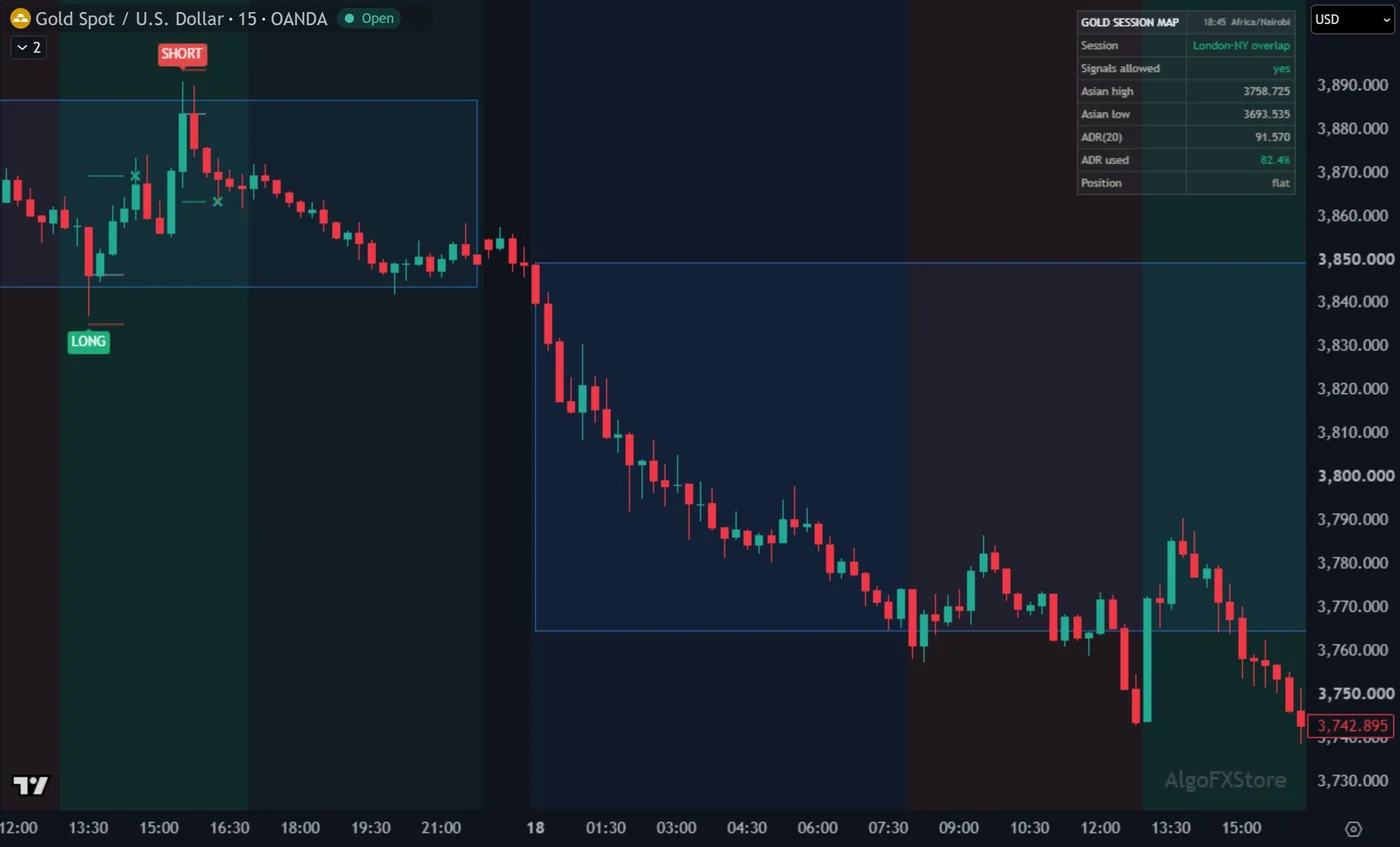
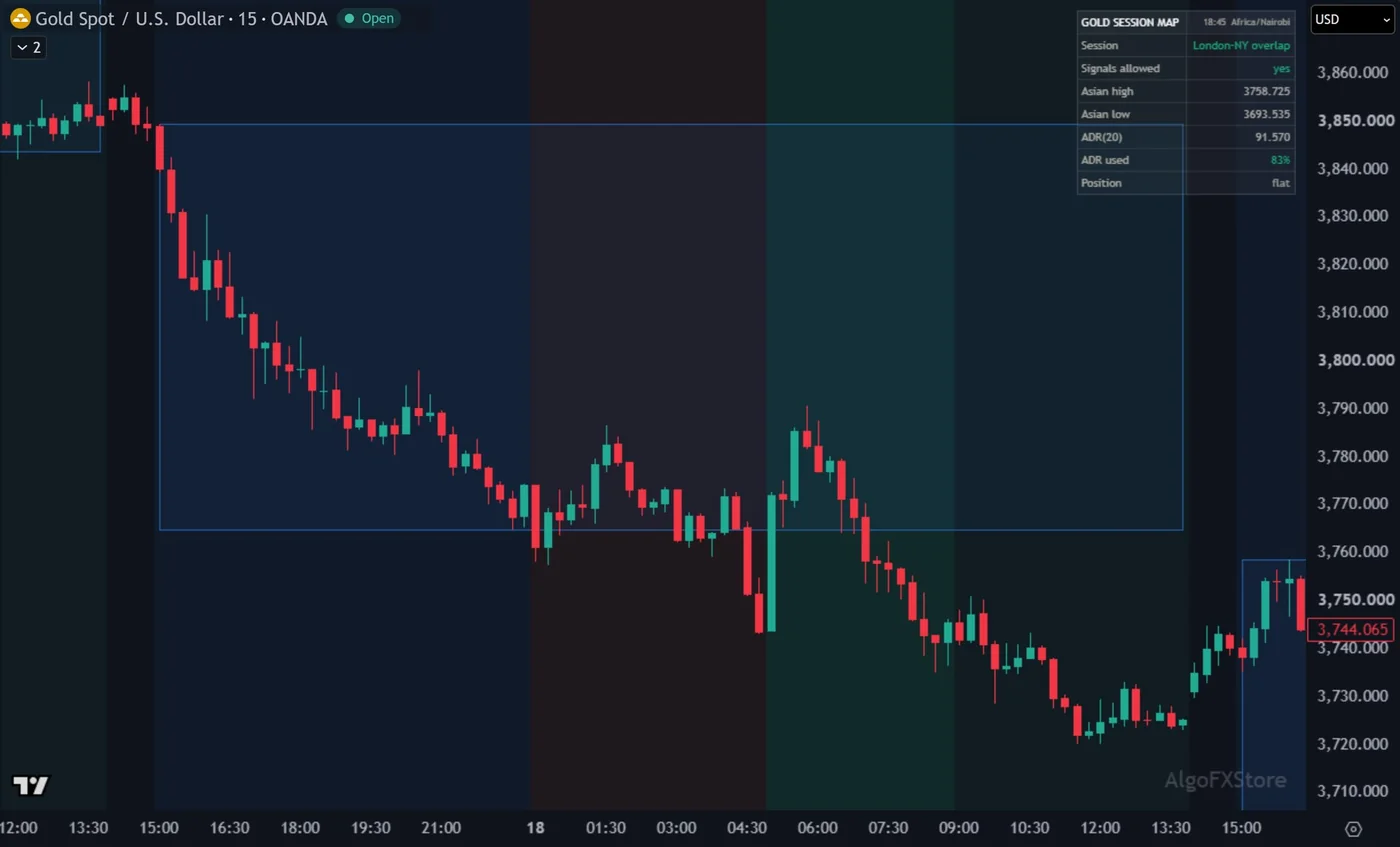
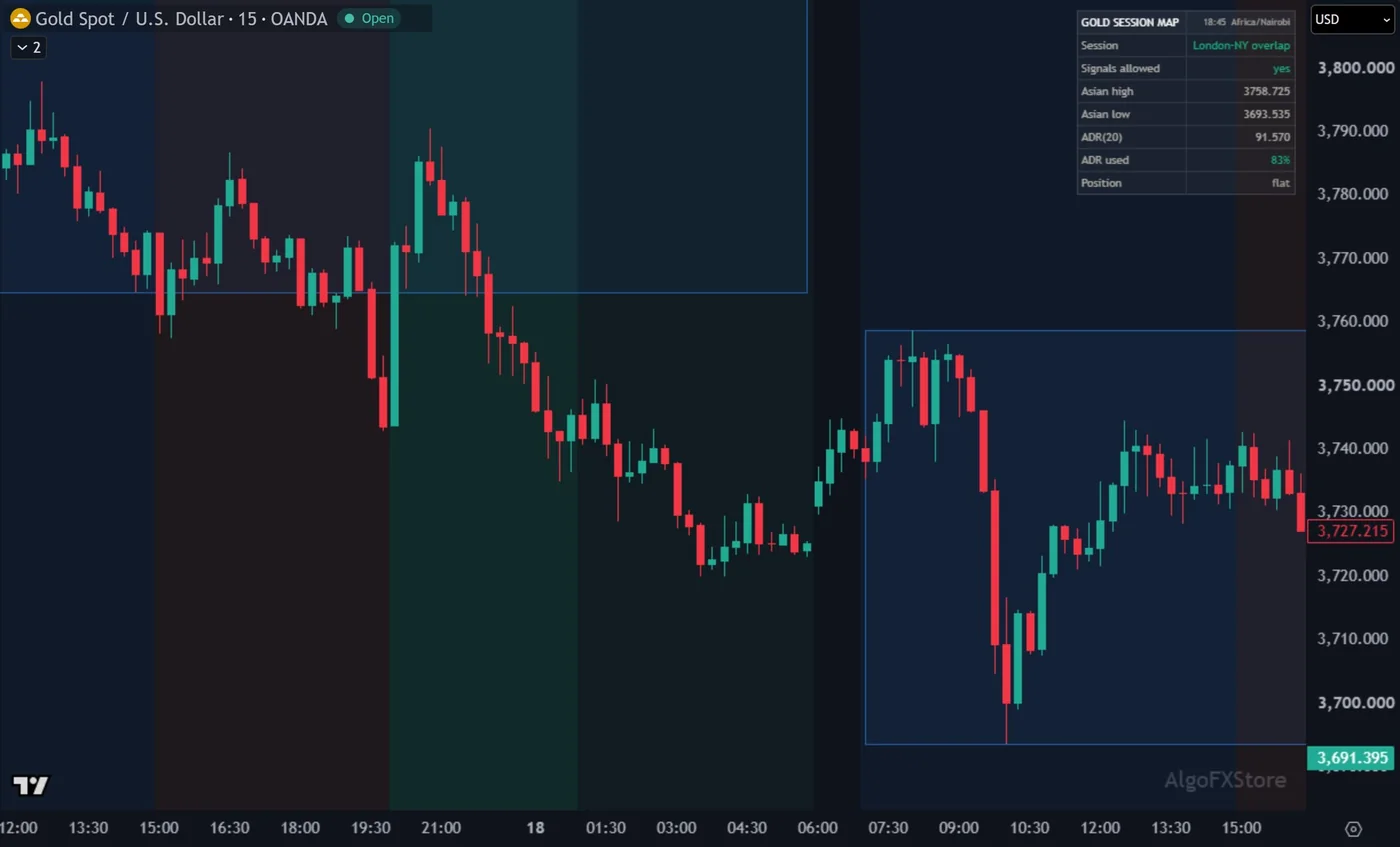
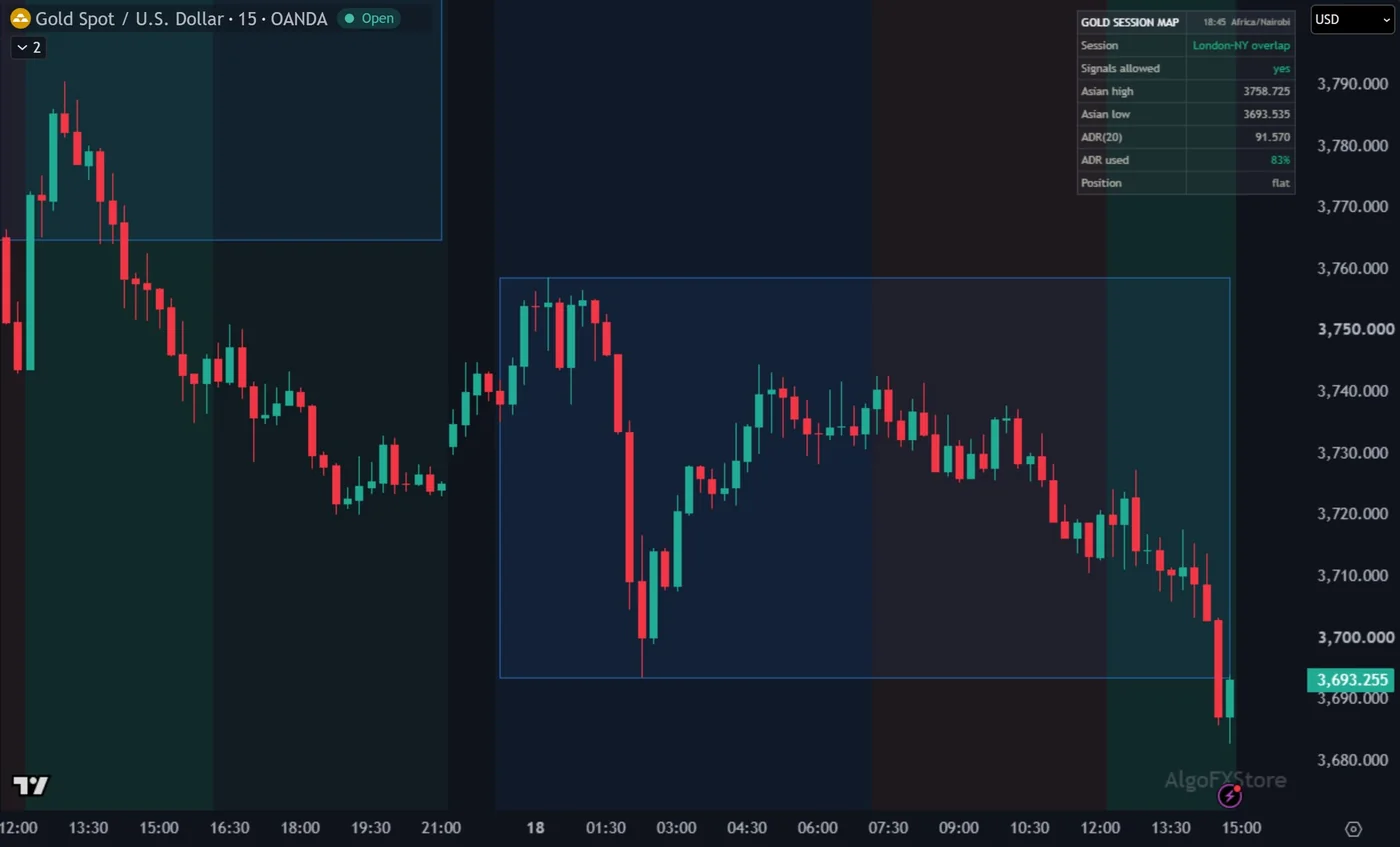
A sweep routine for the London and New York sessions
The indicator maps, signals, draws the plan and alerts. The order and the size are yours; this is the routine from the PDF guide, worth practising on a demo account first.
- 1
Let the Asian box finish first
Nothing happens before 08:00 UTC: the Asian box is still growing. Once it is frozen, look at its size. A tiny box gives tight stops and noisy sweeps, a huge one means Asia has already moved a lot. Both are reasons to be more selective that day. Then watch London and the overlap for a run beyond one side of the box.
- 2
Wait for the candle to close
On a live chart a LONG or SHORT label can appear during the candle and vanish if the candle does not close back inside the range. Act only at the close. The alert with entry, stop and target fires once per bar close; for the four alert conditions, choose Once per bar close in Create alert so they wait as well.
- 3
Check the gauge and the trend
Look at ADR used in the dashboard: above 90 percent the row turns amber and new signals are blocked, and a signal at 80 to 90 percent has less room to its target. Turn on the EMA filter if you want LONGs only above the 50 EMA and SHORTs only below it. A signal late in the overlap may not have time to reach 2R before 21:00 UTC.
- 4
Size from the stop distance
On gold the distance is dollars per ounce, and on most platforms one lot is 100 ounces. Lots equal money at risk divided by stop distance times 100. The guide's example: a 6.91 stop and a risk of 100 in account currency give 0.144, rounded down to 0.14 lots. Check your broker's contract size first; some gold CFDs use 10 ounces per lot.
- 5
Respect the stop and the clock
Place the stop with the entry and never move it further away: a sweep can turn into a real breakout, and the stop is there for that case. If the next candles close back outside the range, the sweep has failed. Count the spread, which widens around the daily close at 22:00 UTC and on news, and set a daily loss limit before the session starts.
The dashboard, row by row
- GOLD SESSION MAP | clock HH:mm + timezone of 'Dashboard clock' (Africa/Nairobi by default)
- Session: Asian / London / London-NY overlap / New York PM / Off-session (coloured by session)
- Signals allowed: yes, or no: wrong session / news window / ADR spent / position open
- Asian high, Asian low
- ADR(20): average daily range of the last 20 completed days
- ADR used: today's range in % of ADR (green up to 90 %, amber above 90 %, red above 130 %)
- Position: LONG open / SHORT open / flat
Everything Gold Session Sweep Signals does for you
Session windows that never drift
All four sessions and the news time are defined in UTC, so the Asian range covers the same hours in summer and winter. Change the Session timezone only if you want city time, and set the Dashboard clock to your own zone for display.
A frozen Asian range box
The Asian high and low are tracked bar by bar and frozen at the end of the session, then drawn as a blue box that runs through London and New York, so you can see every touch and sweep of it.
A sweep rule with a depth filter
Minimum sweep depth, 0.05 of the Asian range by default, decides how far price must poke beyond the range before a close back inside counts. Raise it on 30-minute charts to take only deeper sweeps.
A complete plan on each signal
Entry, Stop and Target step lines in grey, red and green run while the signal is live, and a cross marks how it ended: green at the target, red at the stop, grey when the flatten window closed it.
An ADR fuel gauge
The dashboard shows ADR(20) and how much of it today has used, green up to 90 percent, amber above, red above 130 percent. New signals are blocked above the ceiling you set, 90 percent by default.
A daily news blackout
No signals within 15 minutes either side of 12:30 UTC, which is 08:30 New York in US summer time. Set the centre to 13:30 in US winter time. The width and the switch are inputs.
Filters you can tighten
Take signals during London plus overlap, overlap only, London only, or all three sessions; Direction both, long only or short only; one signal per direction per day; and an optional EMA trend filter with its own length.
Alerts for every step
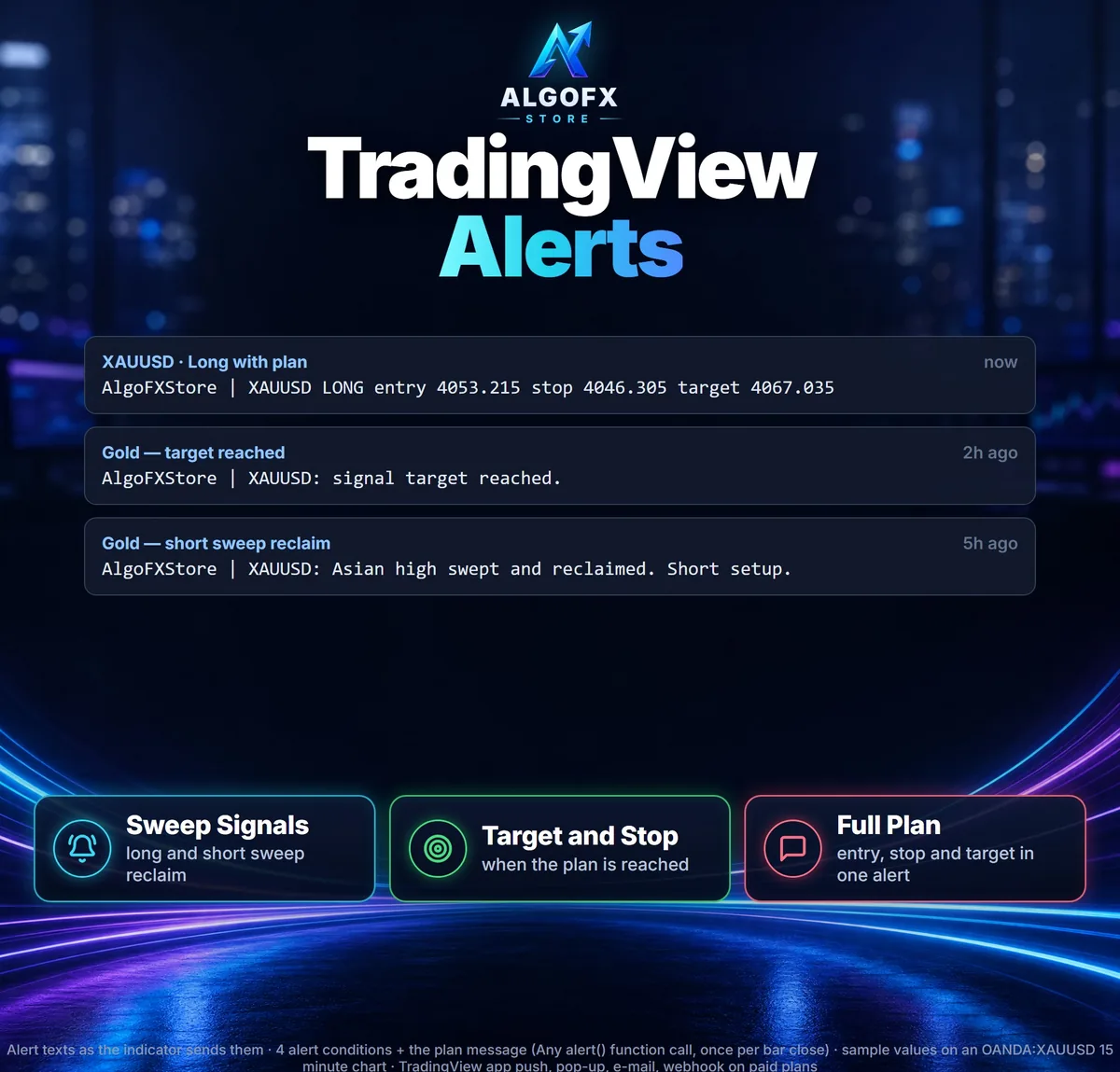
Four alert conditions, for the long sweep reclaim, the short sweep reclaim, target reached and stop reached, plus one alert() message per signal with the direction, entry, stop and target, sent once per bar close.
Gold Session Sweep Signals, feature by feature
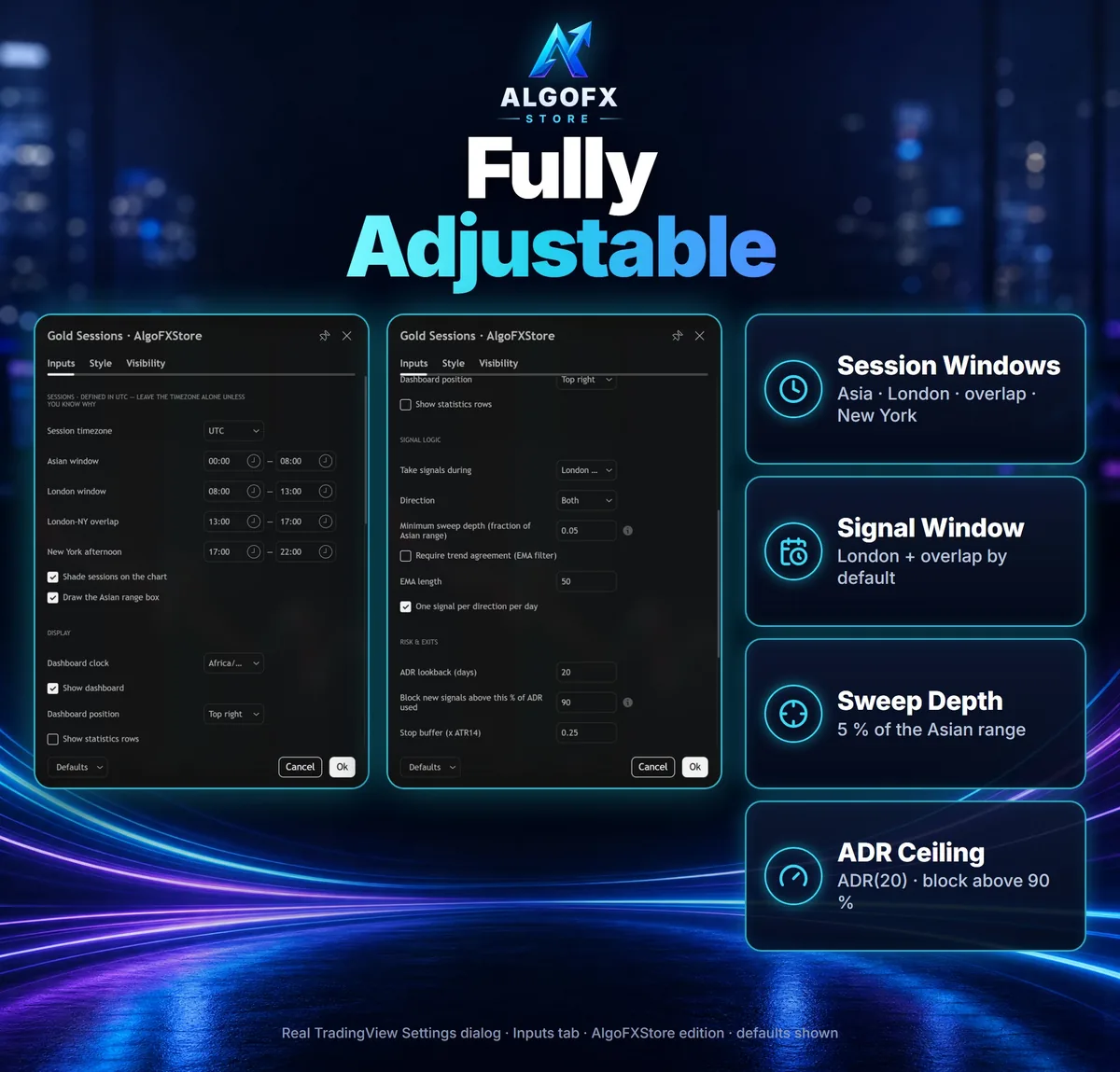
Each picture is built from real platform screenshots of the shipped indicator at its default settings, labelled so you can see what every part does. Tap any picture to open it full size.
How traders put it to work
XAUUSD on 15 minutes
The standard view and the default settings: the Asian box from 32 candles, signals during London and the overlap, a 2R target and the 21:00 UTC flatten. By default a day gives at most one setup per direction, and none while the ADR, news or session gates are closed.
Scalping the London open on 5 minutes
The defaults work on 5 minutes, where stops are tighter and signals come earlier in the sweep. Consider Take signals during set to London only if you want to trade just the open, and keep the news blackout on for the overlap.
Calmer swings on 30 minutes or 1 hour
On 30 minutes two session days fit in one view; the guide suggests a Minimum sweep depth of 0.10 there. On 1 hour the Asian box holds only 8 candles and signals are fewer. The session map itself stays useful as an overview on either timeframe.
Gold futures and other gold feeds
Any gold feed works: spot XAUUSD from your broker or gold futures such as GC1! and MGC1!. Futures trade a little above spot, and the ADR and the stops scale automatically because they come from the chart's own candles. Size from the contract's value per point.
Every setting, with its default
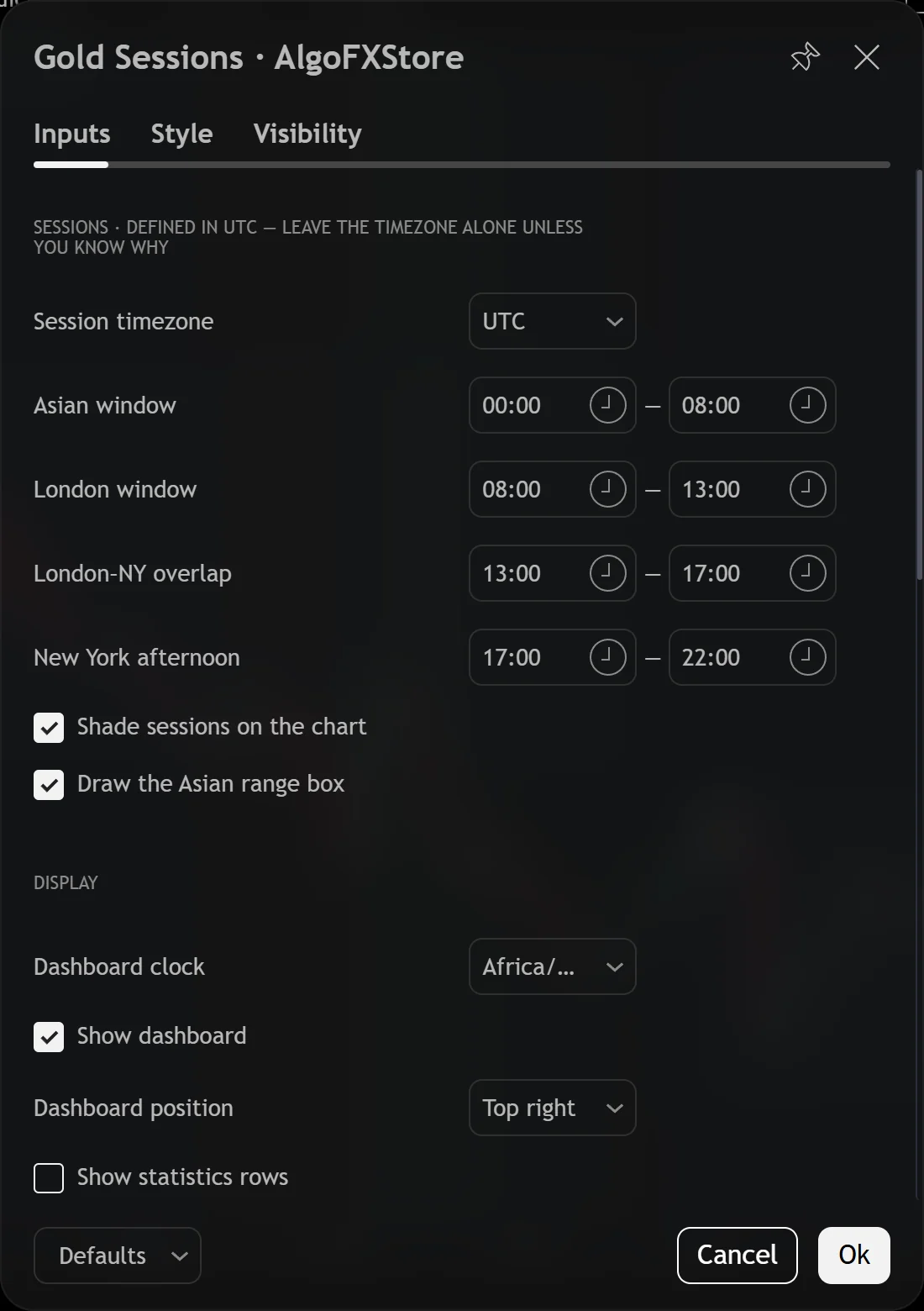
The names are the ones in the script's Settings dialog in TradingView (Inputs tab); the defaults are what every chart on this page uses.
Sessions · defined in UTC: leave the timezone alone unless you know why (7)
| Setting | Default | What it does |
|---|---|---|
| Session timezone | UTC | Timezone of every session window and of the news time (UTC, Europe/London, America/New_York, Africa/Nairobi, Asia/Tokyo, Australia/Sydney). |
| Asian window | 0000-0800 | Builds the Asian range. |
| London window | 0800-1300 | London session. |
| London-NY overlap | 1300-1700 | Overlap session (boldest shade). |
| New York afternoon | 1700-2200 | New York afternoon session. |
| Shade sessions on the chart | on | Background shading of the four sessions. |
| Draw the Asian range box | on | Box from the Asian high to the Asian low. |
Display (3)
| Setting | Default | What it does |
|---|---|---|
| Dashboard clock | Africa/Nairobi | Timezone of the clock in the dashboard header (display only). |
| Show dashboard | on | Shows the panel. |
| Dashboard position | Top right | Top right, Top left, Bottom right, Bottom left. |
Signal logic (6)
| Setting | Default | What it does |
|---|---|---|
| Take signals during | London + Overlap | London + Overlap, Overlap only, London only, London + Overlap + NY afternoon. |
| Direction | Both | Both, Long only, Short only. |
| Minimum sweep depth (fraction of Asian range) | 0.05 | How far beyond the Asian high / low price must poke before a reclaim counts. |
| Require trend agreement (EMA filter) | off | LONG only above, SHORT only below the EMA. |
| EMA length | 50 | EMA of the filter. |
| One signal per direction per day | on | At most one LONG and one SHORT per day. |
Risk & exits (5)
| Setting | Default | What it does |
|---|---|---|
| ADR lookback (days) | 20 | Days in the average daily range. |
| Block new signals above this % of ADR used | 90 | No new signals once today's range has used this share of ADR (10-300). |
| Stop buffer (x ATR14) | 0.25 | Extra distance beyond the two-candle low / high. |
| Target (R multiple) | 2 | Target distance in multiples of the stop distance. |
| Flatten-by window | 2100-2200 | A running signal is closed when this window starts. |
News blackout (4)
| Setting | Default | What it does |
|---|---|---|
| Block signals around US data | on | No signals in the window below, every day. |
| Blackout centre: hour (session tz) | 12 | Hour of the centre (session timezone). |
| Blackout centre: minute | 30 | Minute of the centre: 12:30 UTC = 08:30 New York in US summer time; set 13:30 in US winter time. |
| Minutes either side | 15 | Half-width of the window (0-120). |
The alert events, one by one
In TradingView: Create alert, choose “Gold Session Sweep Signals [AlgoFXStore]” as the condition and pick the event. TradingView then notifies you the way you set in that dialog: a pop-up in TradingView, a sound, the TradingView app on your phone or an e-mail.
- Gold: long sweep reclaim
- Gold: short sweep reclaim
- Gold: target reached
- Gold: stop reached
- Signal with entry, stop and target
Gold Session Sweep Signals next to the usual options
Where it wins, and where it does not.
| Gold Session Sweep Signals | Typical free session indicator | Reading it by hand | |
|---|---|---|---|
| Session times | Defined in UTC, the same all year, with your local clock in the dashboard | Varies by script; check whether it follows daylight saving | Adjusted by memory twice a year |
| Asian range | Built bar by bar and frozen at 08:00 UTC, drawn as a box | Session shading, sometimes a high and low | Drawn by hand each morning |
| Sweep signal | A poke of at least 0.05 of the range and a close back inside, in the chosen window | None | Judged by eye |
| Stop and target | Beyond the two-candle extreme plus 0.25 ATR, target at 2R, closed by 21:00 UTC | None | Measured on each trade |
| Filters | ADR ceiling, news blackout, one signal per direction per day, optional EMA | None | Easy to skip in the moment |
| Markets | Built for gold: the dashboard and alert texts say XAUUSD | Any symbol | Any symbol |
| Cost | A one-time purchase | Free | Free, paid for in screen time |
Honest about who this fits
A good fit if you
- You trade gold intraday, on 5 to 30-minute charts, and you are awake for London or the London and New York overlap.
- You already watch the Asian range and want the sweep and reclaim marked by a fixed rule instead of by eye.
- You want a stop, a 2R target and an end-of-day exit decided before the trade starts.
- You like filters that keep you out on spent-range days and around US data.
- You prefer a few clear, filtered setups to a signal on every swing.
Not for you if you
- You trade forex, indices or crypto: the logic would run, but the texts and defaults are made for gold and we sell it as a gold tool.
- You need a signal that is final the moment it appears on a live candle: here only the close decides.
- You want a system that trades for you: it maps, signals and alerts, and you place every order.
- You trade daily or weekly charts, where a session map has nothing to show.
The full code, one manual, installed in two minutes
- 1Pine Script source codeGold_Session_Sweep_Signals_TradingView_Code.txt (17 KB): the full code. Paste it into the Pine Editor and it appears as “Gold Session Sweep Signals [AlgoFXStore]”.
- 13Page PDF manualInstallation, every setting with its default and how to read the chart.
- ✓Every main setting explainedThe table above lists the main settings with the defaults the charts use.
- ✓Alert eventsYou choose which ones are on in the settings.
- 60Day money-back guaranteeIf it is not for you, request a full refund within 60 days through your Digistore24 order e-mail.
Install in five steps
- Download the zip from the page Digistore24 sends you to after checkout and unzip it.
- Open Gold_Session_Sweep_Signals_TradingView_Code.txt in a text editor, select all and copy the whole code.
- In TradingView, open the Pine Editor, paste the code over everything that is there and click Save.
- Click Add to chart: “Gold Session Sweep Signals [AlgoFXStore]” appears on your chart.
- Read the PDF manual; the defaults are the settings shown on this page.

Kestutis Balciunas
AlgoFXStore · chart indicators
Kestutis Balciunas builds and publishes chart indicators under the AlgoFXStore name. Every product page shows what the indicator draws on real charts, and every number on it comes from the shipped build.
The charts on this page were captured in TradingView from the shipped Gold Session Sweep Signals [AlgoFXStore] at its default settings and are shown unedited.
No get-rich claims and no quoted win rates. Every trade is uncertain, and no indicator changes that. If you want to know whether it suits the way you trade before you buy, e-mail [email protected] and you will get a straight answer.
One price, one payment
- The full Pine Script source code of Gold Session Sweep Signals and the 13-page PDF manual
- Delivered as a digital download: one zip with the code file and the PDF manual on your download page
- Return period: 60 days, with a full refund if it is not for you
- Free updates to the current version on the same download page
60-day money-back guarantee. Install it, run it on your own charts and read the manual. If Gold Session Sweep Signals is not for you within 60 days of purchase, request a full refund from Digistore24, no questions asked: use the refund link in your Digistore24 order e-mail or Digistore24's order page digistore24.com/en/cancel-revoke-contract. Digistore24 refunds to your original payment method. It is a digital download: right after checkout you land on your download page, and the link to it is also in your Digistore24 order e-mail.
About the signals
Do the LONG and SHORT signals repaint?
On closed candles, no: once a candle has closed the decision is final and the label stays. On the live candle, yes: the signal, the stop and target hits and the dashboard follow every tick, so a label or an exit cross can appear and disappear before the close if price moves back. The Asian box also grows until 08:00 UTC. Act at the close, and set the alert conditions to Once per bar close; the alert() message already fires once per bar close.
Why UTC instead of New York or London time?
UTC never changes its clock, so the Asian window, the London and New York windows and the news time mean the same all year. Local session times shift by an hour twice a year. If you want to see the time where you live, set the Dashboard clock to your timezone; it is for display only.
Why are there no signals for days?
A signal needs a frozen Asian range, a sweep plus a close back inside during the signal window, ADR used at or below 90 percent, no news window and no signal already running. On quiet or one-way days none of that lines up. Try London plus overlap plus NY afternoon, or a smaller sweep depth, if you want more.
Can a bar be both LONG and SHORT?
No. A candle that sweeps both sides of the range prints only the LONG; the SHORT condition excludes a bar that is already LONG. Only one signal runs at a time, and by default at most one LONG and one SHORT per day.
Levels and the dashboard
How is the stop placed?
For a LONG, below the lower of the signal candle's low and the previous candle's low, minus 0.25 times ATR(14). For a SHORT, above the higher of the two highs, plus the same buffer. The target sits at twice that distance from the entry. Stop buffer and Target (R multiple) are inputs in the Risk and exits group.
What does ADR used mean?
ADR(20) is the average daily range of the last 20 completed days, measured on the chart's own bars. ADR used is today's range as a percentage of it. The row is green up to 90 percent, amber above 90 and red above 130. On the first loaded day ADR is unknown and does not block signals.
What is the Signal record row?
It counts the signals on the history loaded on your chart: targets reached, stops hit and timed-out signals, with a percentage. It is a rough count in hindsight, resets when the chart reloads, and is not a forecast or a backtest. Switch it off with Show statistics rows.
Can I change the colours?
There are no colour inputs in the script, but the shading, labels, crosses and lines can be recoloured in the Style tab of the indicator's Settings. By default the stop is always red and the target always green, for LONG and SHORT alike.
Setup and alerts
Which timeframe should I use?
Start with 15 minutes, the standard view. Use 5 minutes for London-open scalps, 30 minutes for calmer swings with two days in one view, and 1 hour only as an overview, since the Asian box then has 8 candles. Daily and higher charts have no sessions to draw.
Which alerts can I create?
Four alert conditions: the long sweep reclaim, the short sweep reclaim, target reached and stop reached. Choose Once per bar close for them. Or pick Any alert() function call to get one message per signal with direction, entry, stop and target. All texts say XAUUSD, also on another symbol.
When should I move the news window?
The default centre is 12:30 UTC, which is 08:30 New York in US summer time, when the jobs report, CPI and retail sales usually come out. In US winter time set the centre to 13:30. Fed decisions at 14:00 New York fall in the New York afternoon, outside the default signal window, but they can still hit a running signal.
Does it work on TradingView's free plan and on my phone?
Yes. It uses no request.security calls and no lower-timeframe data, only the chart's own bars. Alerts run within your plan's alert limit. Add it once in a browser or the desktop app; after that it shows on your charts in the TradingView mobile app.
How it works
Will it place trades for me?
No. Gold Session Sweep Signals is an indicator: it draws on the chart and can alert you. It never sends an order.
Which markets and timeframes does it work on?
Intraday only: 15 minutes with the default settings, 5 minutes to scalp the London open, up to 1 hour for a calmer view. 15 (gold futures), PEPPERSTONE:XAUUSD 30 (two session days in one view).
Do I need a paid TradingView plan?
No. It reads only the chart's own bars, so the free TradingView plan runs it. Alerts count against your plan's alert limit.
After you buy
How do I get it after paying?
Digistore24 runs the checkout. Right after payment it takes you to your download page with one zip holding the Pine Script source code file and the PDF guide; the link to that page is also in your Digistore24 order e-mail, so you can download again at any time.
How do I install it?
Open the code file, open the Pine Editor in TradingView, paste the whole code, click Save and then Add to chart: “Gold Session Sweep Signals [AlgoFXStore]” appears on your chart. The guide walks through it step by step.
Who is Digistore24?
Digistore24 is the reseller that sells Gold Session Sweep Signals for Kestutis Balciunas (AlgoFXStore): it runs the checkout, charges your card or PayPal, collects the VAT for your country and delivers the download. Its name is the one on your statement, and its order e-mail holds your download link and the refund link.
What is the refund policy?
A 60-day money-back guarantee, handled by Digistore24. If Gold Session Sweep Signals is not for you within 60 days of purchase, use the refund link in your Digistore24 order e-mail or Digistore24's order page (digistore24.com/en/cancel-revoke-contract) for a full refund, no questions asked. Digistore24 makes the refund to your original payment method.
Do I get the source code?
Yes. You get the full Pine Script source code as a text file for your own use; the licence line at the top of the code does not allow resale, sharing or republishing.
Gold Session Sweep Signals for TradingView.
Put the Asian range, the sessions and a planned sweep signal on your gold chart before the next London open. The full code, the manual and every setting explained. Instant download for €47, one payment.
Get instant access