Trend signals scored out of 16, printed only when every gate agrees at the candle close
FXB Confluence Engine draws a range-filter trend line on your TradingView chart and, each time that line turns at a candle close, adds up to ten layers into one score, out of 16 with the defaults.
- BUY and SELL diamonds only when the range filter turns at the close and every gate passes.
- A score out of 16 from EMA, momentum, five timeframes, sensitivity, volatility, RSI and volume.
- A dashboard that shows the score, each confirmation and whether the last signal still agrees with the trend.
- Daily Classic, Fibonacci or Camarilla pivots that change colour once price closes through them.
- The full Pine Script source code. Paste it into the Pine Editor, save, and add “FXB Confluence Engine [AlgoFXStore]” to your chart.
- A 5-page PDF guide with installation, every setting and how to read the chart. One-time €47.
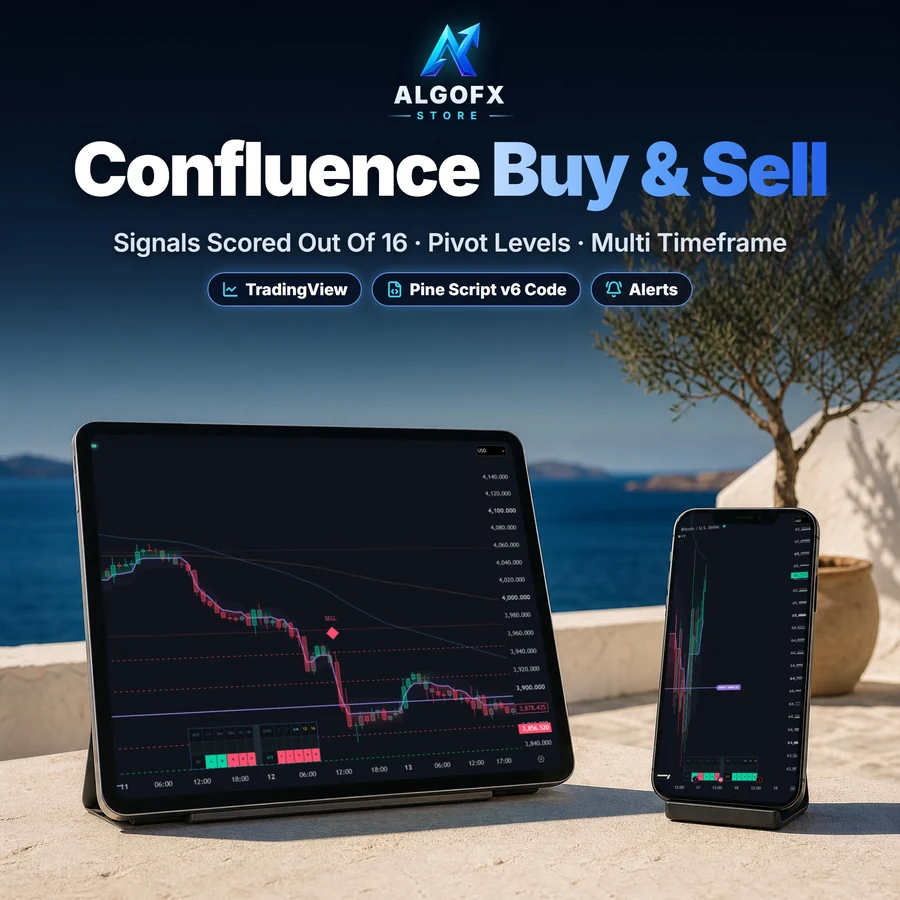
See FXB Confluence Engine on a real chart
Press play; use the full-screen button to see every detail.
Most trend flips are noise, and the chart rarely tells you which
A trend filter that flips on every swing is easy to build and hard to trade. In a clean trend its turns are useful; in a sideways session they come every few bars, each one looking exactly as convincing as the last. Traders end up adding an EMA here, an RSI there, a volume check and a higher-timeframe chart, and then still decide by feel which flip to trust.
The checks themselves are not the problem. The problem is that they live in different places and are read at different times, so the same setup gets a different answer depending on how tired you are. And when a flip does not turn into a trade, there is no record of which filter stopped it, so you cannot learn from the ones you skipped.
FXB Confluence Engine puts those checks into one score and one set of gates, evaluated on the same closed candle. A diamond prints only when the score is high enough and the gates are open, and the dashboard lists every confirmation, so when the trend line turns without a signal you can read exactly which filter held it back.
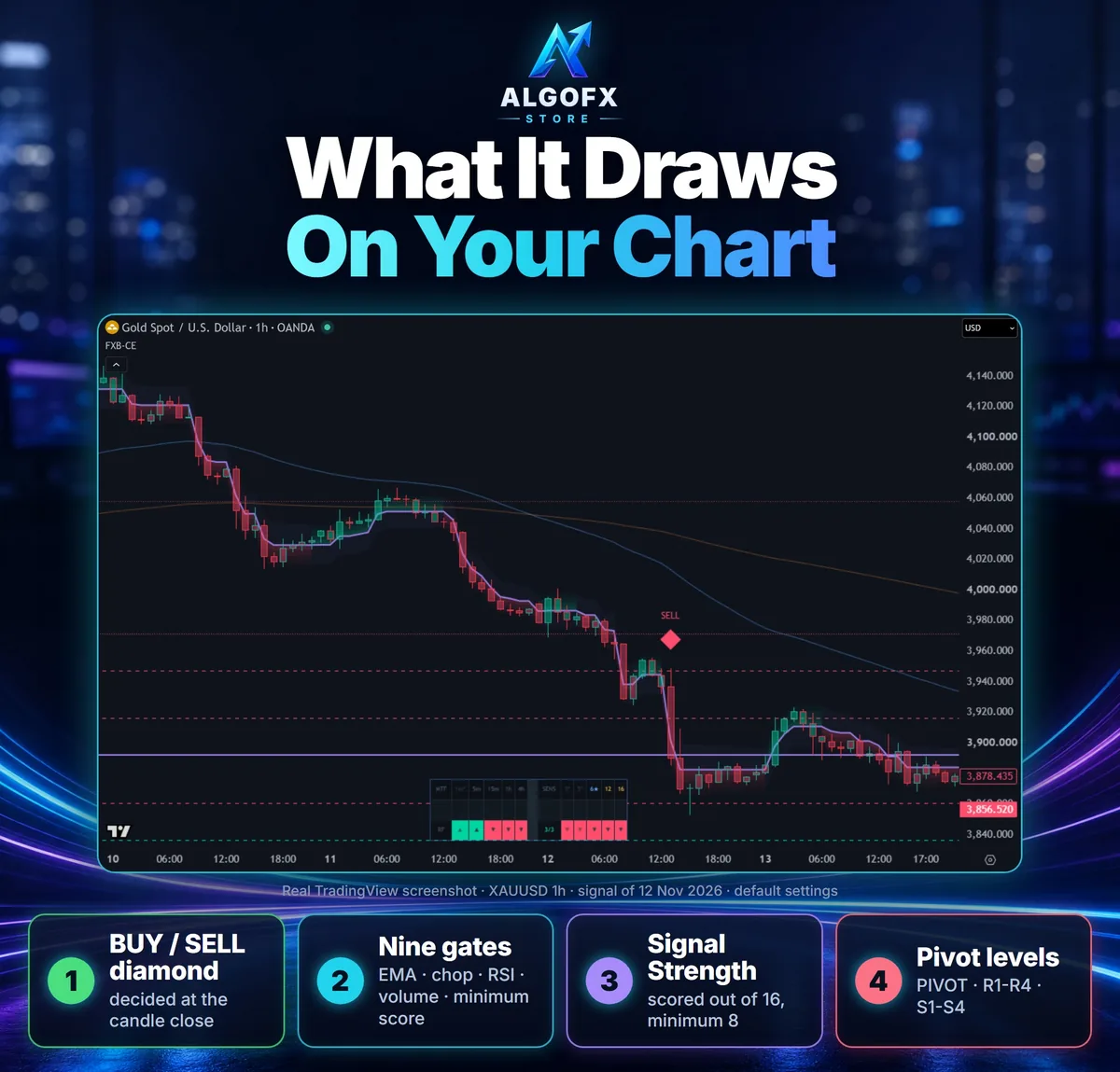
What FXB Confluence Engine draws, and what each mark means
Read from the shipped TradingView edition.
| What you see | What it means |
|---|---|
| Green diamond with BUY / red diamond with SELL | A signal decided at the candle close: the range filter turned and every gate passed with a score of at least 8. |
| Purple line with layered green / red band | The range filter and its trailing band; colour = trend. |
| Coloured bars | Range filter trend. |
| Blue / orange thin lines | EMA 60 and EMA 200. |
| PIVOT, R1-R4, S1-S4 | The previous day's pivots; a level turns bright green / red once price closes through it. |
| Dashboard SIGNAL QUALITY | The confluence score out of 16 and its grade. |
| Dashboard TRADE STATUS | ALIGNED while the trend supports the last signal, REVERSED once it flips. |
| Bottom strip | Range filter trend on 1m, 5m, 15m, 1h, 4h and at sensitivities 3, 5, 6, 12, 16. |
A trend line, a score and a set of gates
This is the shipped Pine Script, in the order it decides. The turn and the gates on the chart's own candles are decided at the candle close; the higher-timeframe score points are explained in the FAQ.
- 1
The range filter sets the trend
A stepped purple line follows the close but only moves when price gets further from it than a range of ATR(14) times 0.8 times Sensitivity 6 divided by 8. Its direction is the trend, and a layered band surrounds it, green in an up trend and red in a down trend, with the candles coloured to match. A turn counts only on a confirmed candle.
- 2
Up to ten layers add up the score
EMA and momentum give up to 4 points (EMA 60 against EMA 200, the close against EMA 60, momentum), the trend on 5, 15, 60 and 240 minutes up to 4, the same filter at Sensitivity 12 and 16 up to 3, the 30-minute bias 1, volatility 2, RSI 1 and volume 1. That makes 16 with the defaults; VWAP and candle patterns can add one each.
- 3
Chop costs points and shuts the gate
ADX(14) below 20 takes one point off and a Choppiness Index(14) above 61.8 takes another. The same two readings, plus a cooldown of 5 bars since the last signal, form the chop gate: while the dashboard reads BLOCKED, no signal can print, however high the score.
- 4
Every gate must pass
With Only show signals when EMA aligned on, a BUY needs EMA 60 above EMA 200, the close above EMA 60 and EMA 60 higher than five bars ago. It also needs RSI(14) at 50 or more, volume at or above its 20-bar average and a score of at least 8. The VWAP, candle-pattern and EMA-distance gates are optional and off. SELL is the mirror.
- 5
The dashboard explains the outcome
SIGNAL QUALITY shows the score with a 14-cell bar and a grade: HIGH from 80 percent of the maximum, MED from 57, LOW from 43, WEAK below. SCORE BREAKDOWN and CONFIRMATIONS list every layer and gate. LAST SIGNAL shows its direction, age and score, and TRADE STATUS reads ALIGNED while the trend supports it and REVERSED once it flips.
- 6
Pivots and the bottom strip
The previous day's PIVOT, R1 to R4 and S1 to S4 are drawn as lines with labels, Classic by default or Fibonacci or Camarilla, on a daily, weekly or monthly timeframe. A level turns bright green or red once price closes through it. A strip at the bottom shows the trend on 1, 5, 15, 60 and 240 minutes and at five sensitivities.
FXB Confluence Engine on 12 different markets
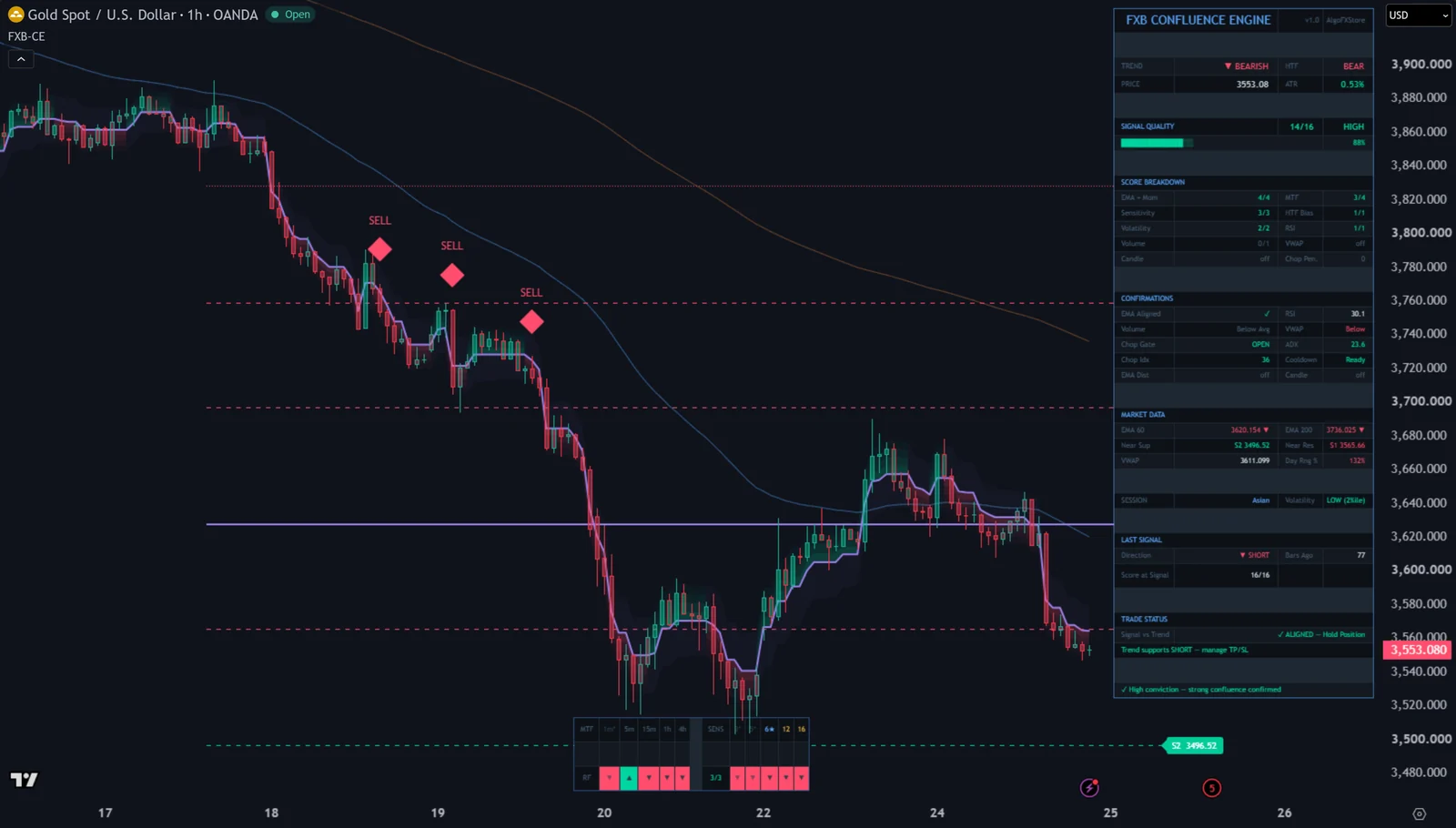
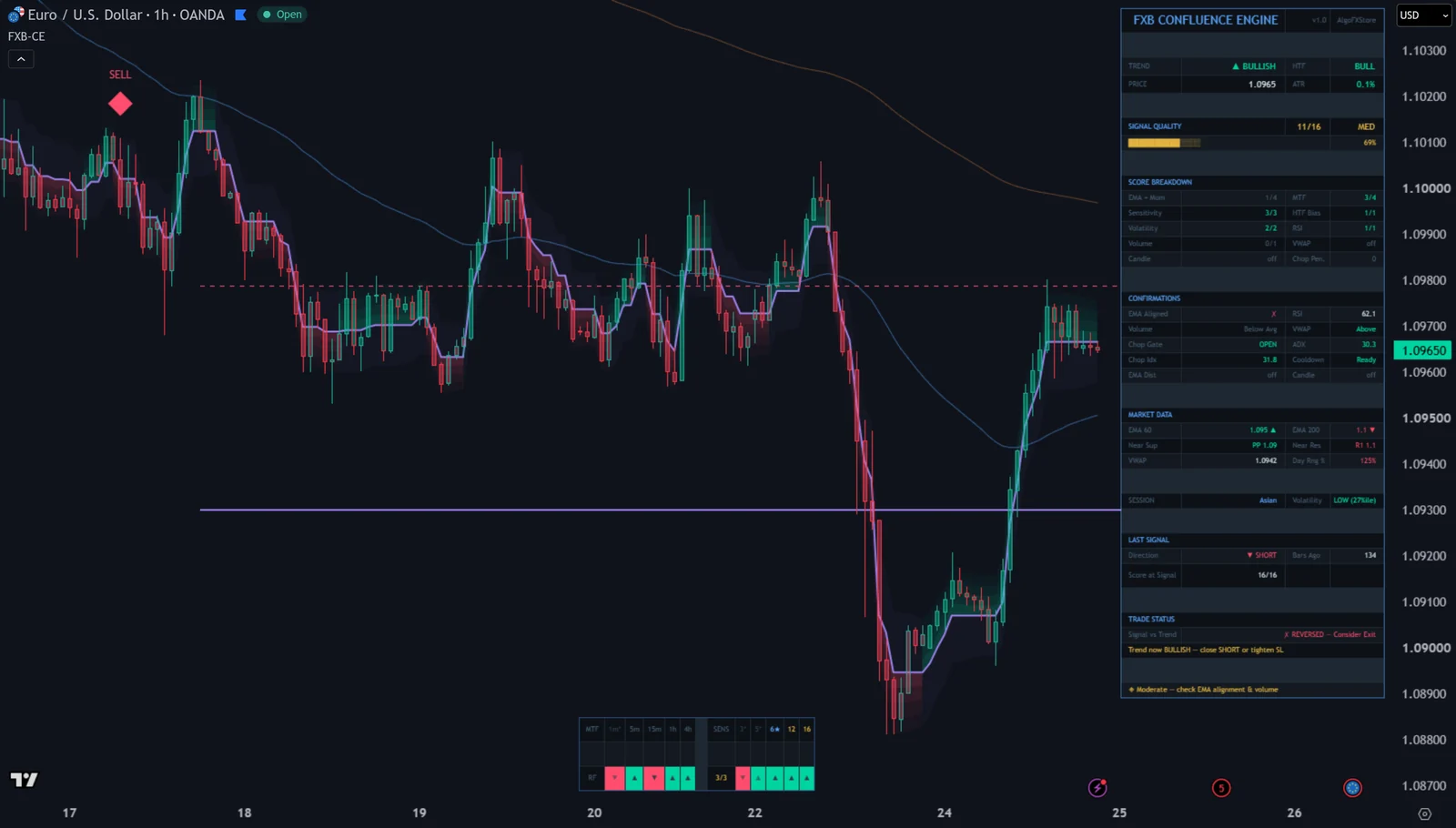
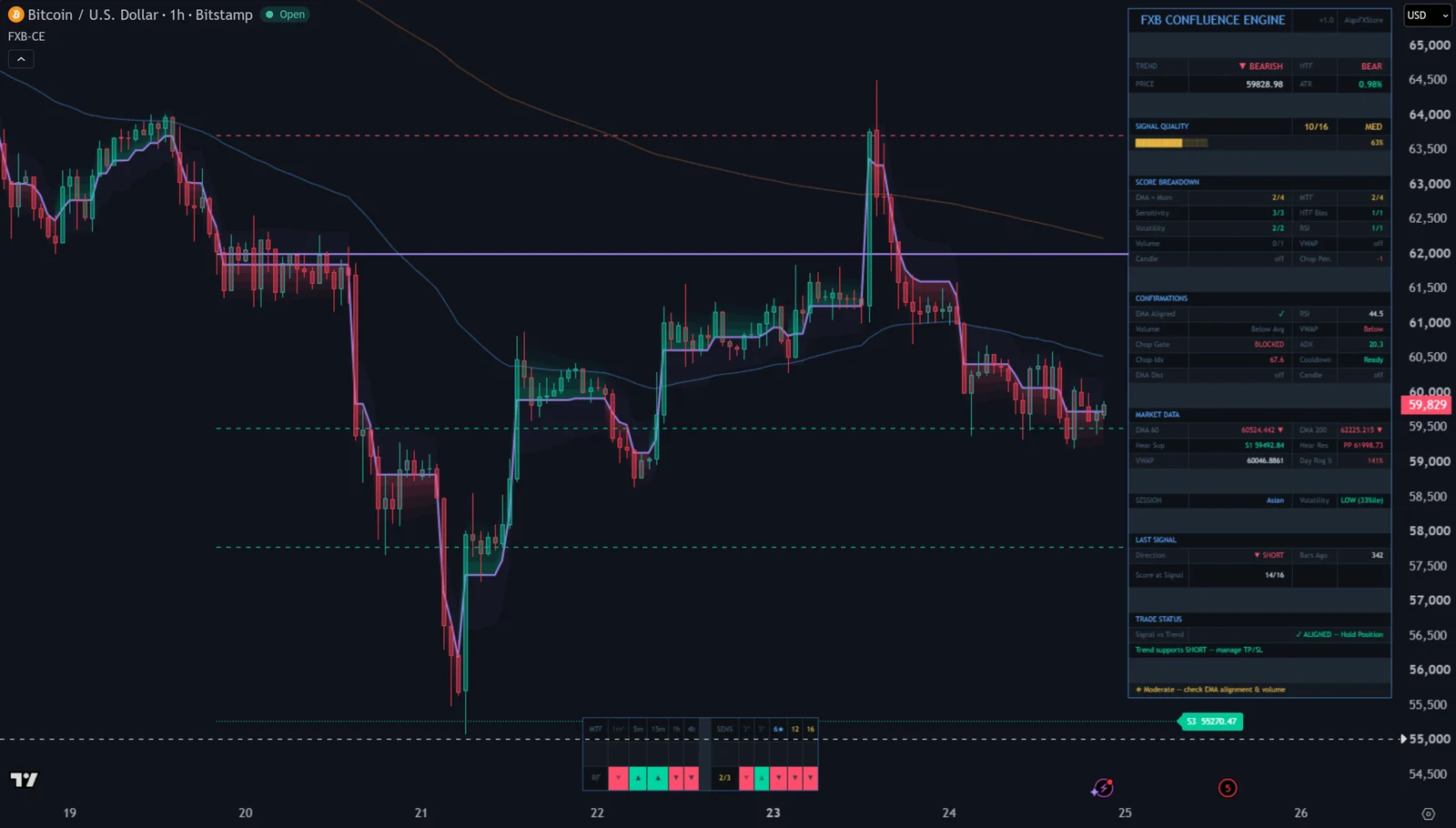
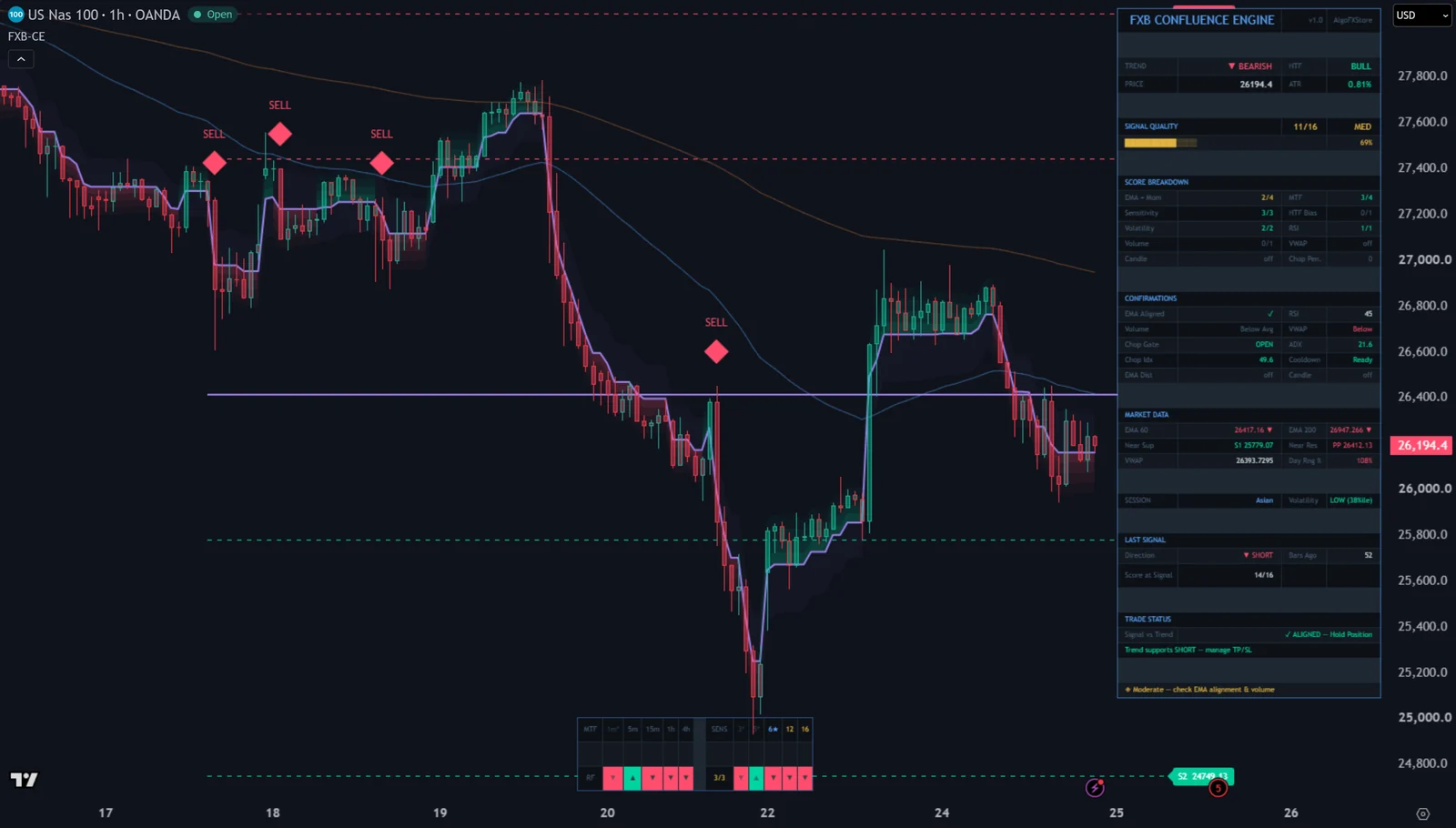
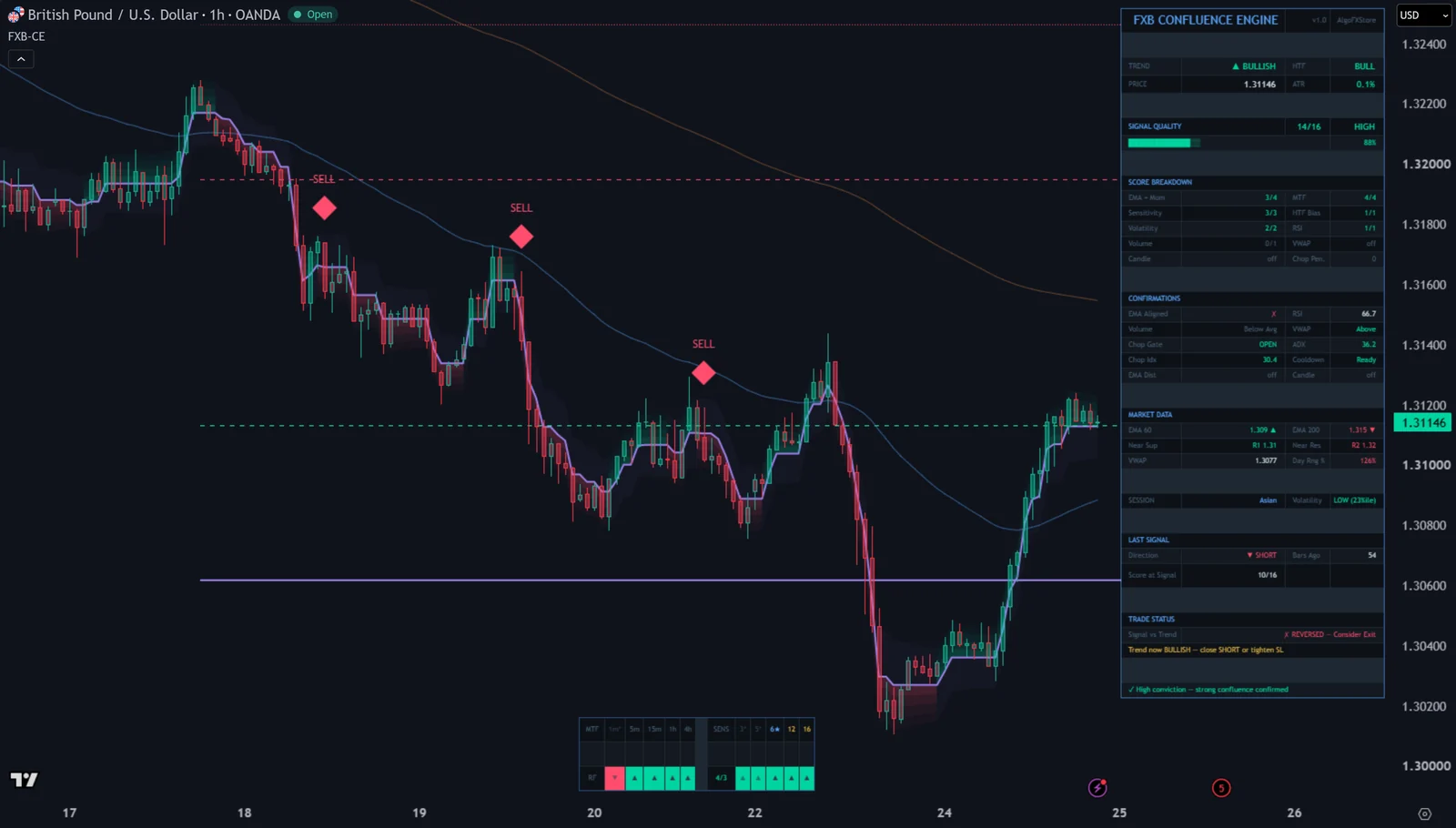
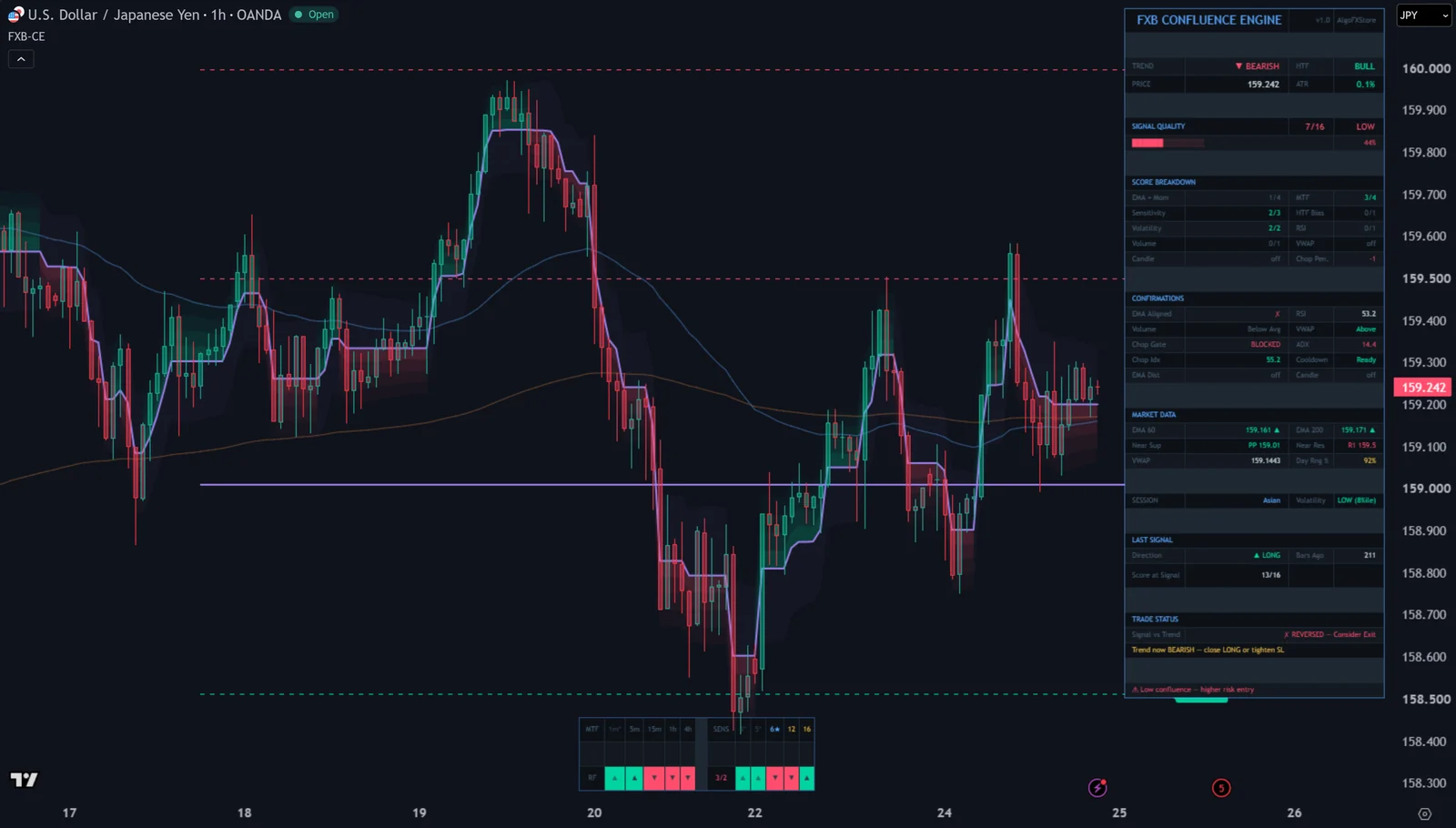
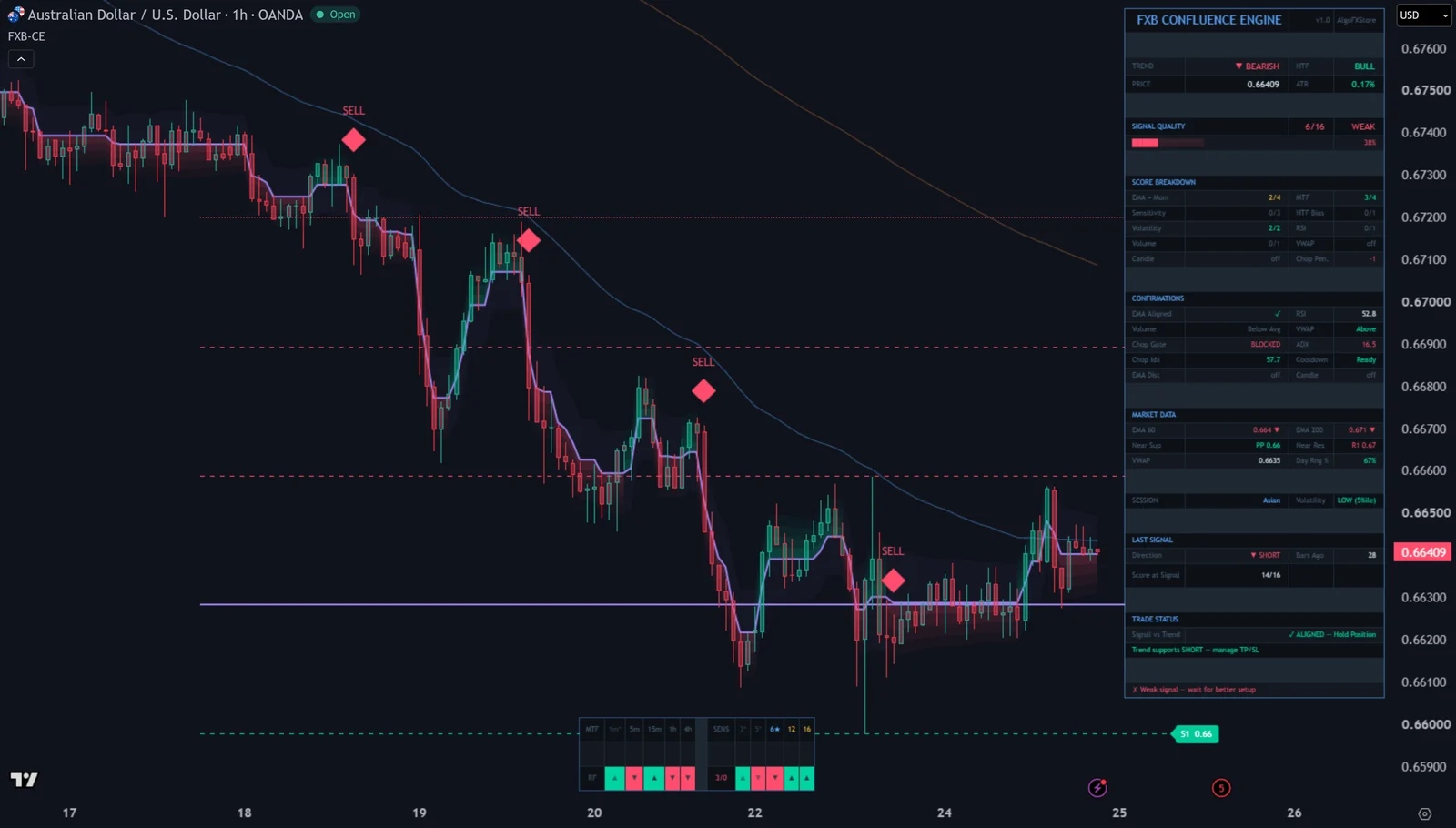
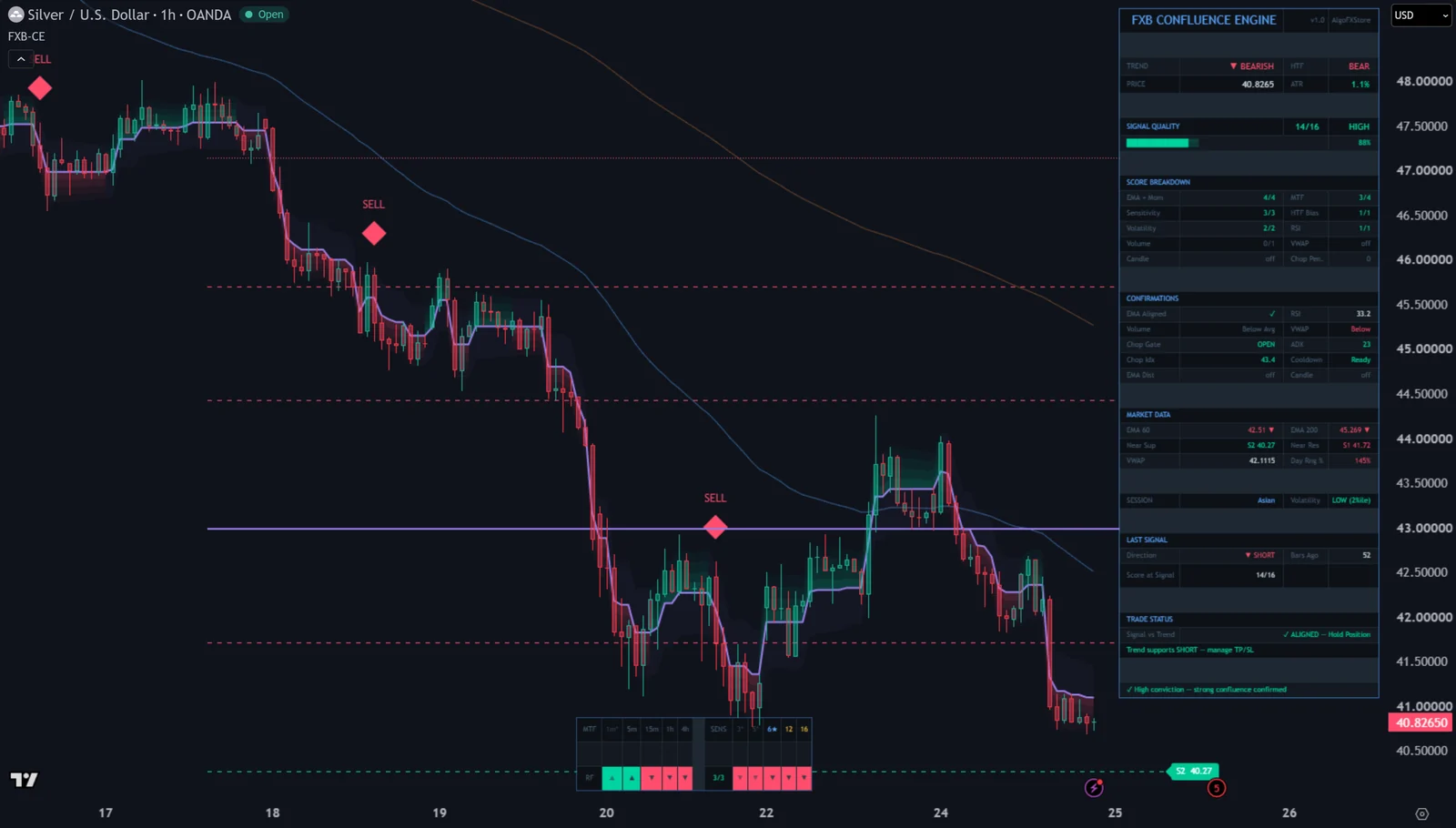
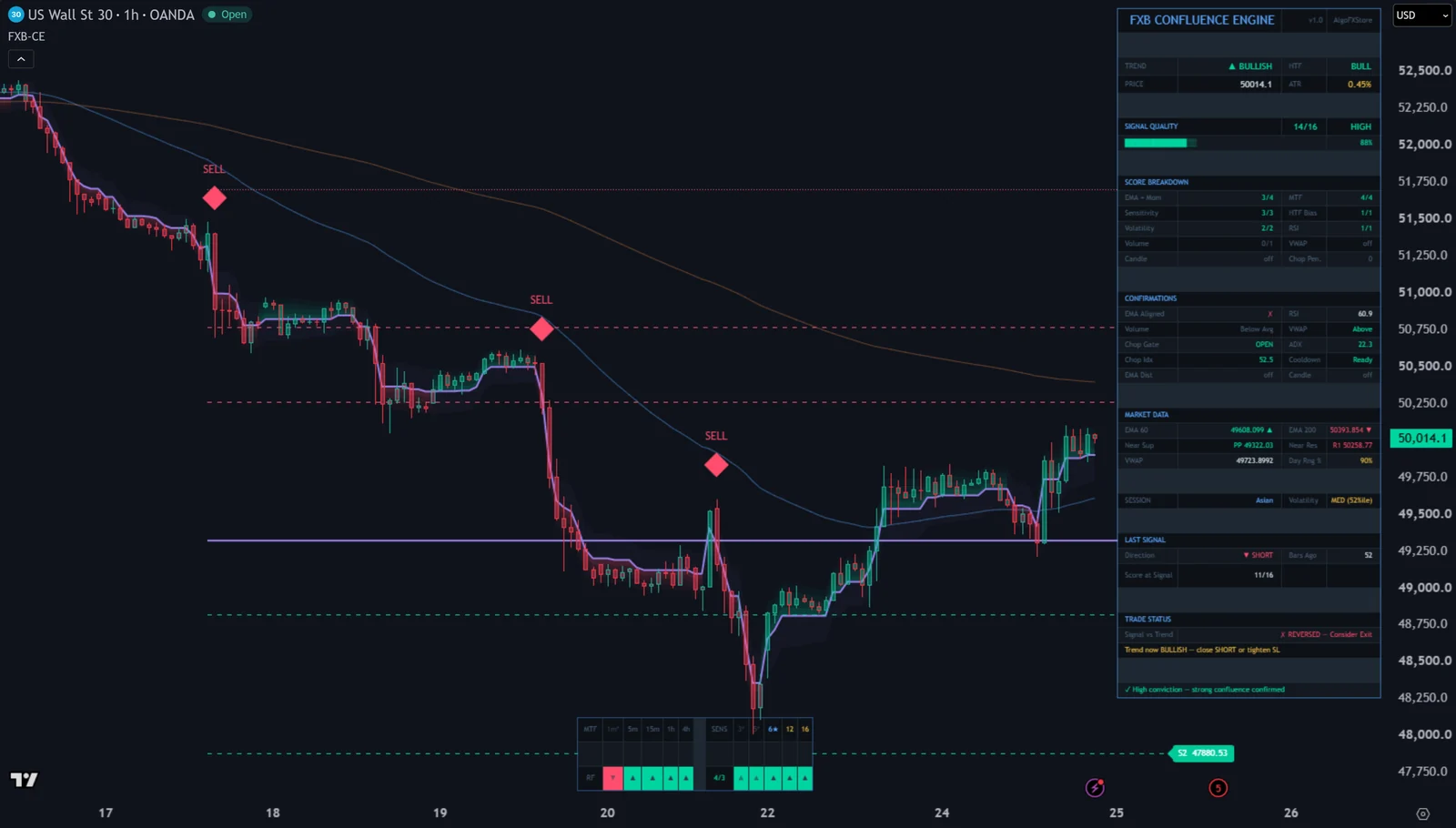
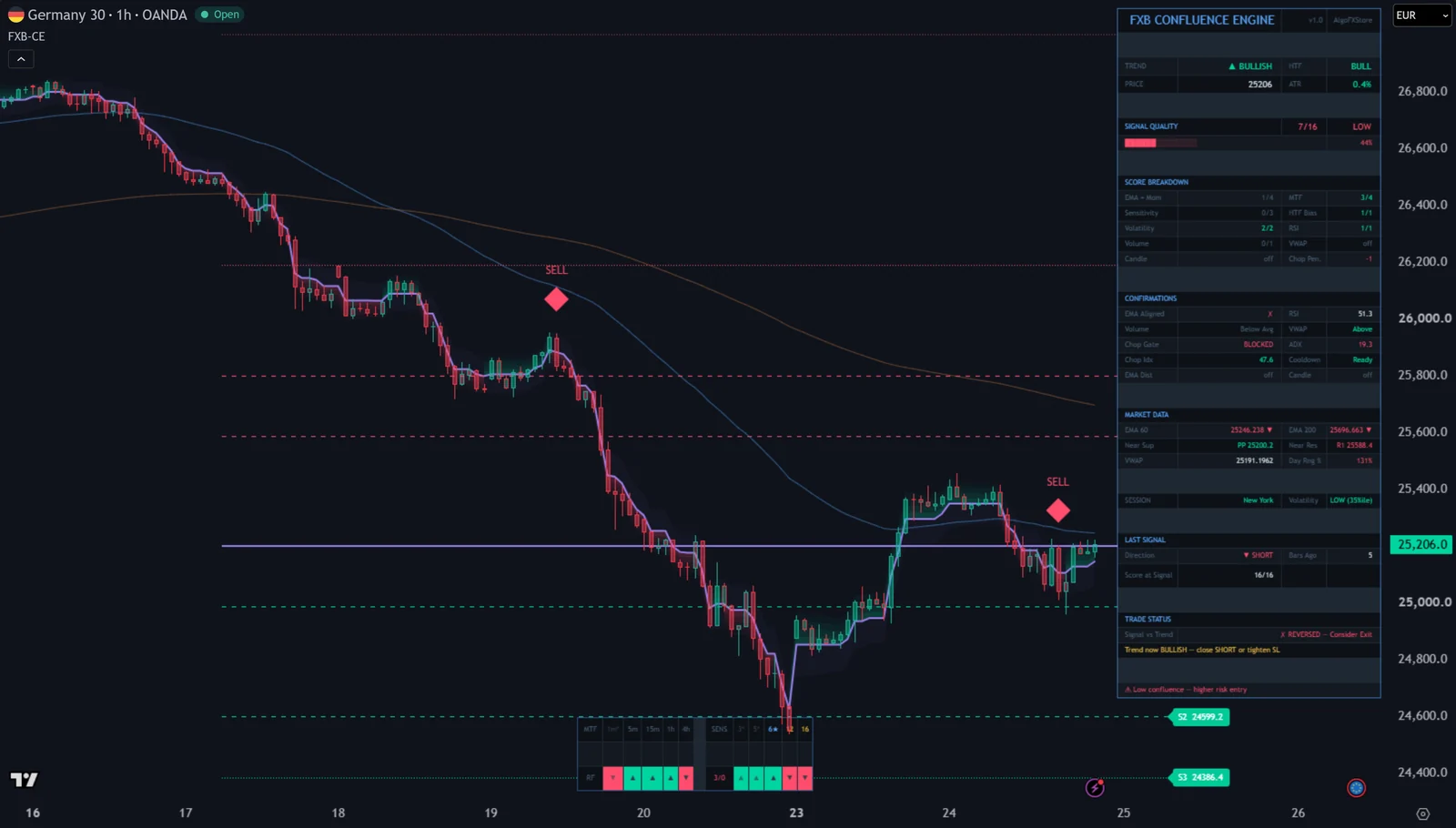
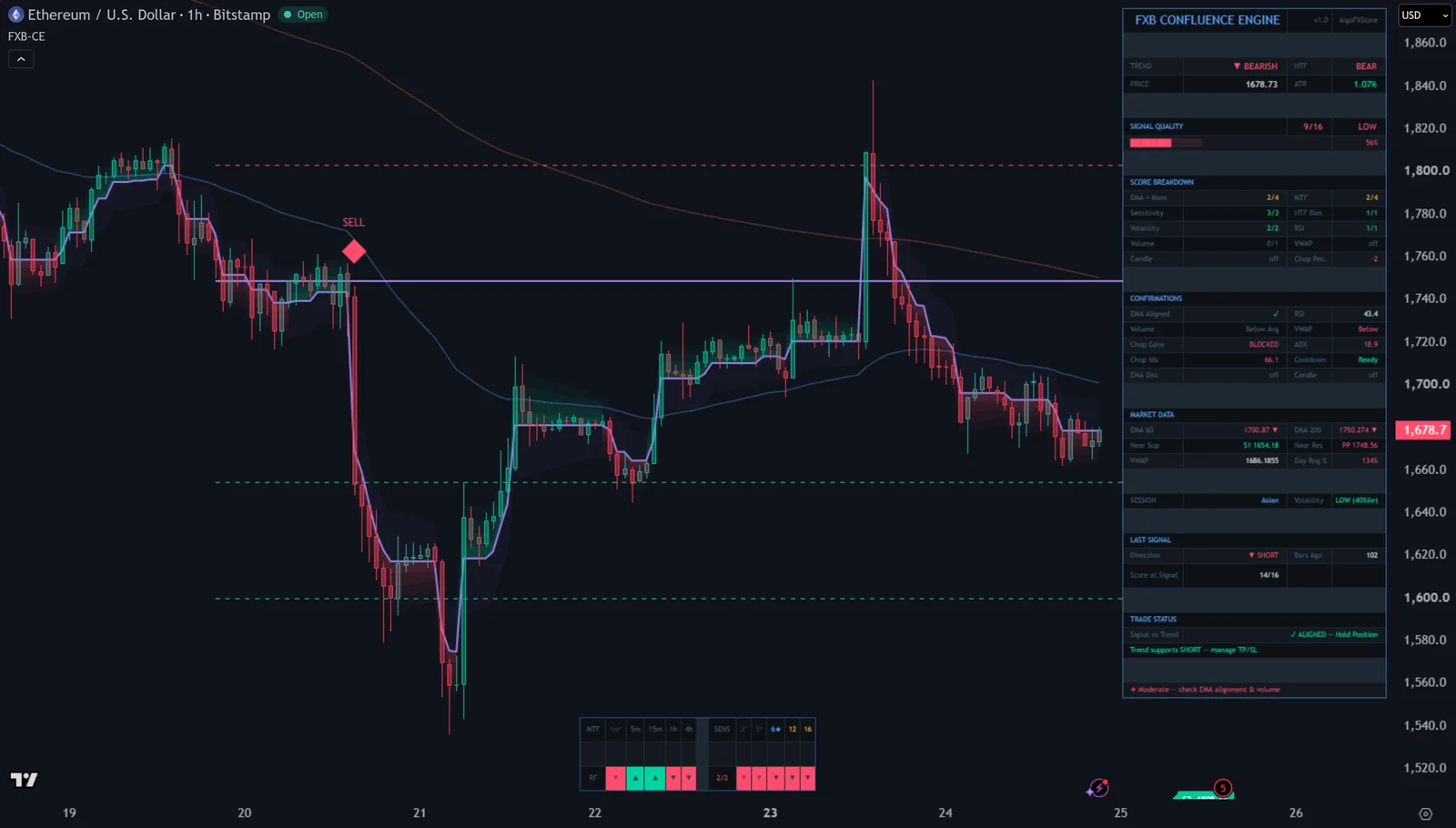
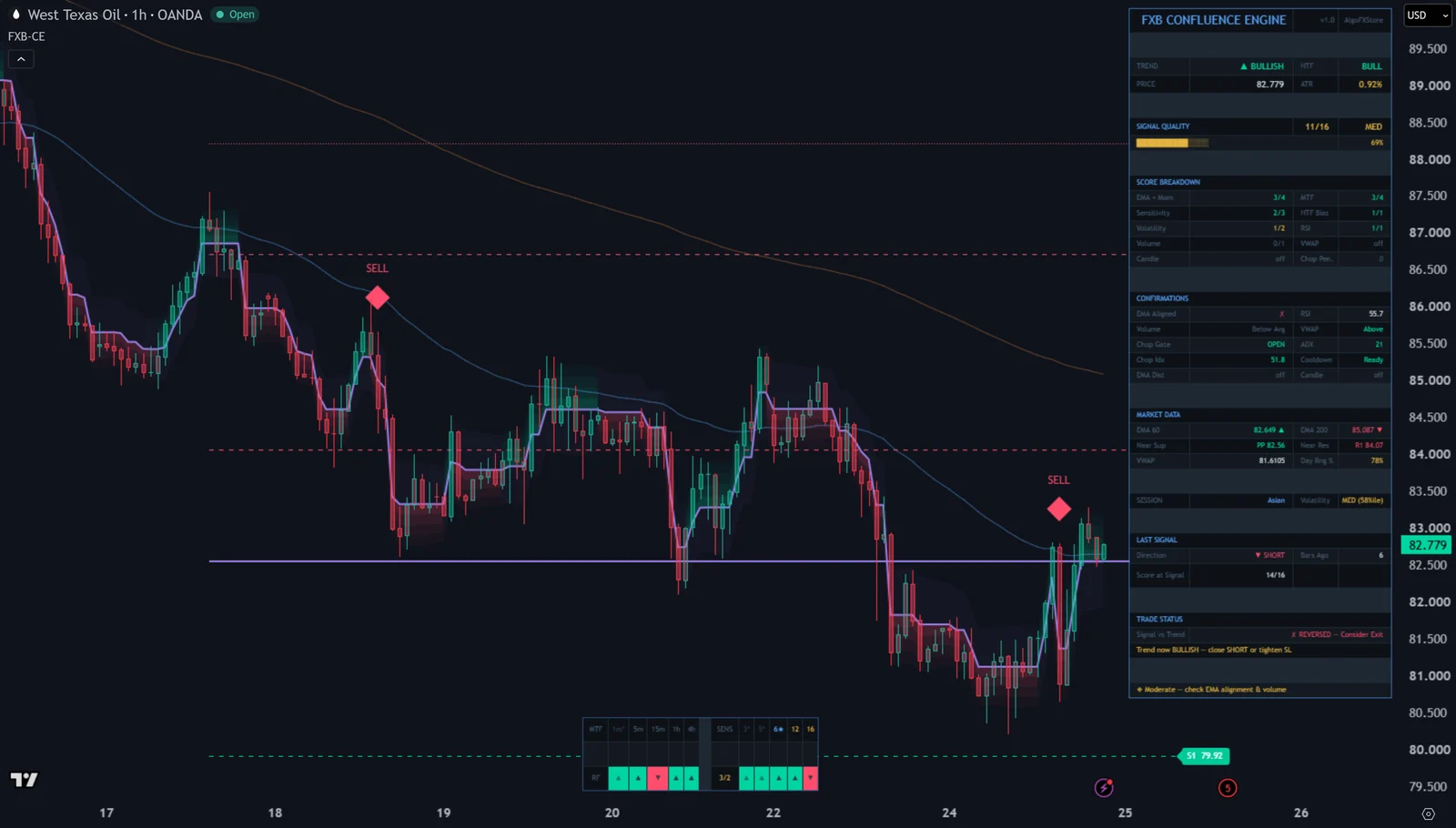
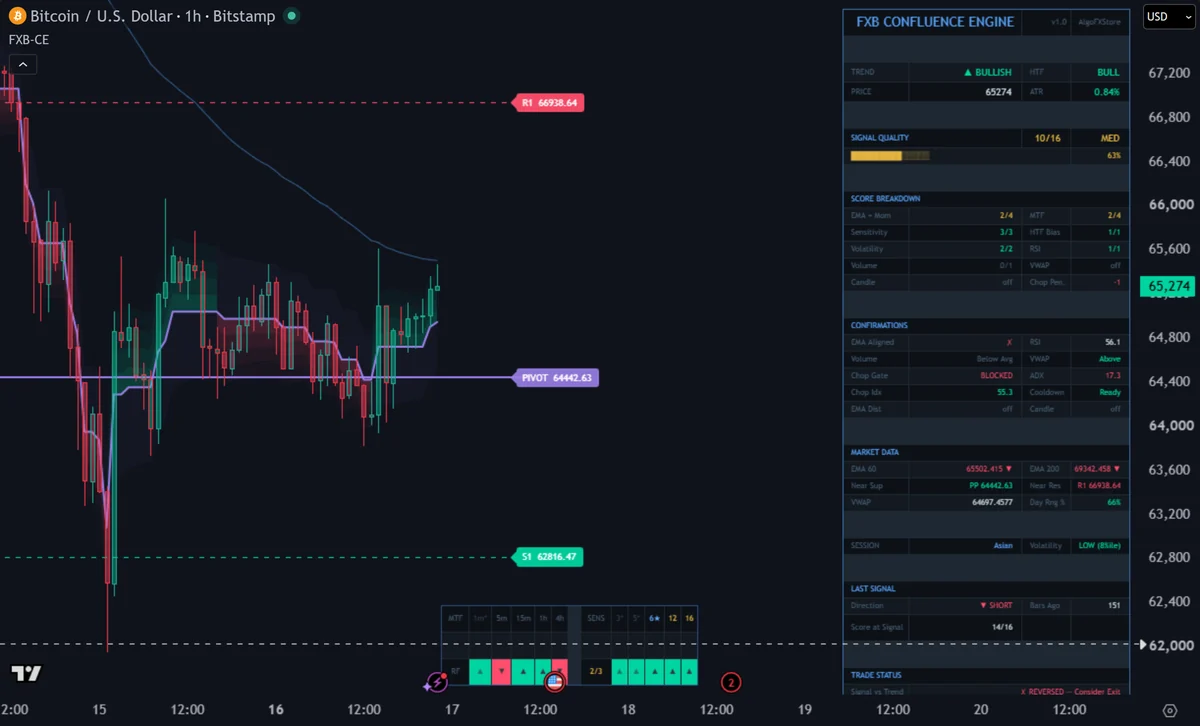
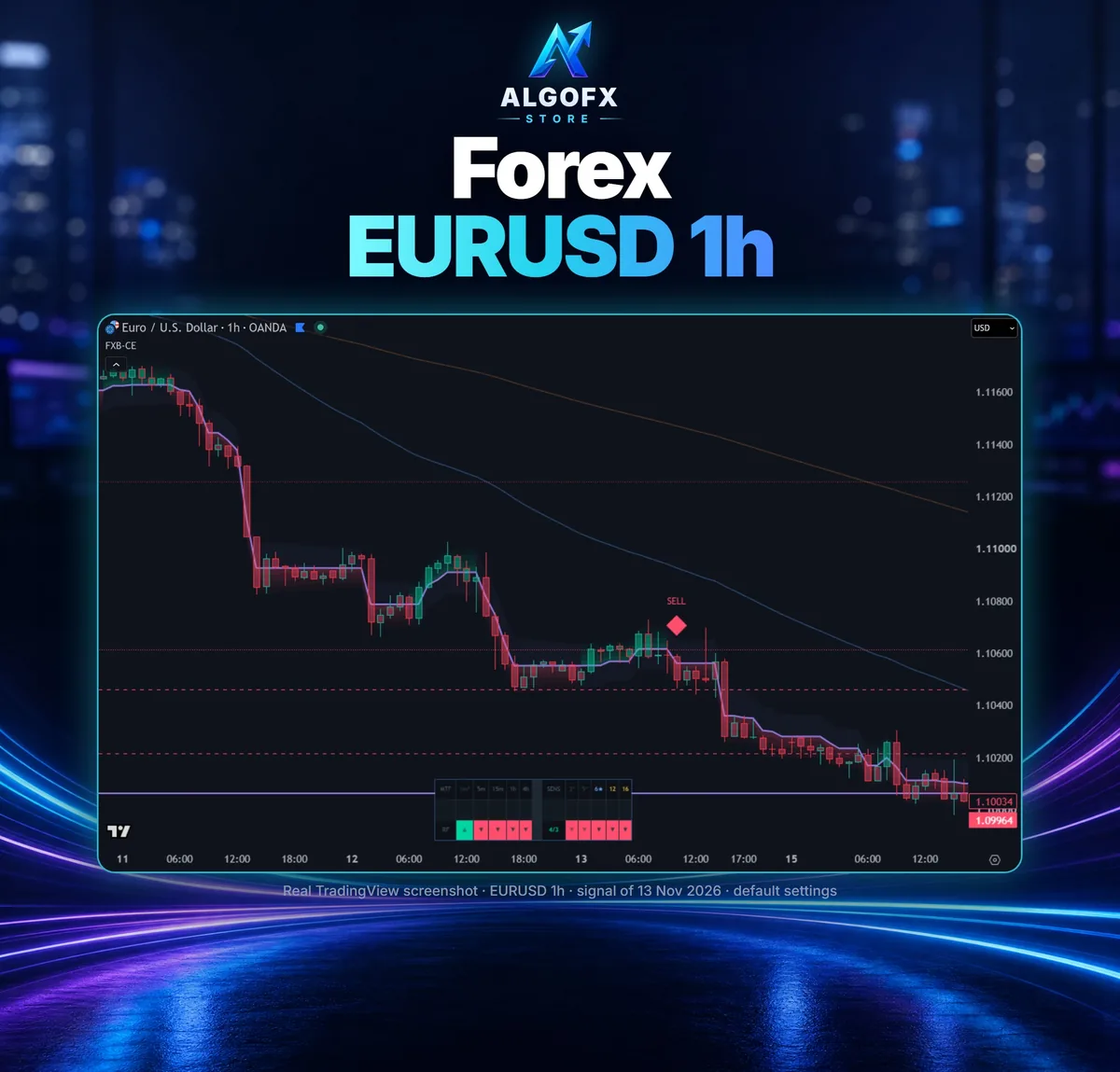
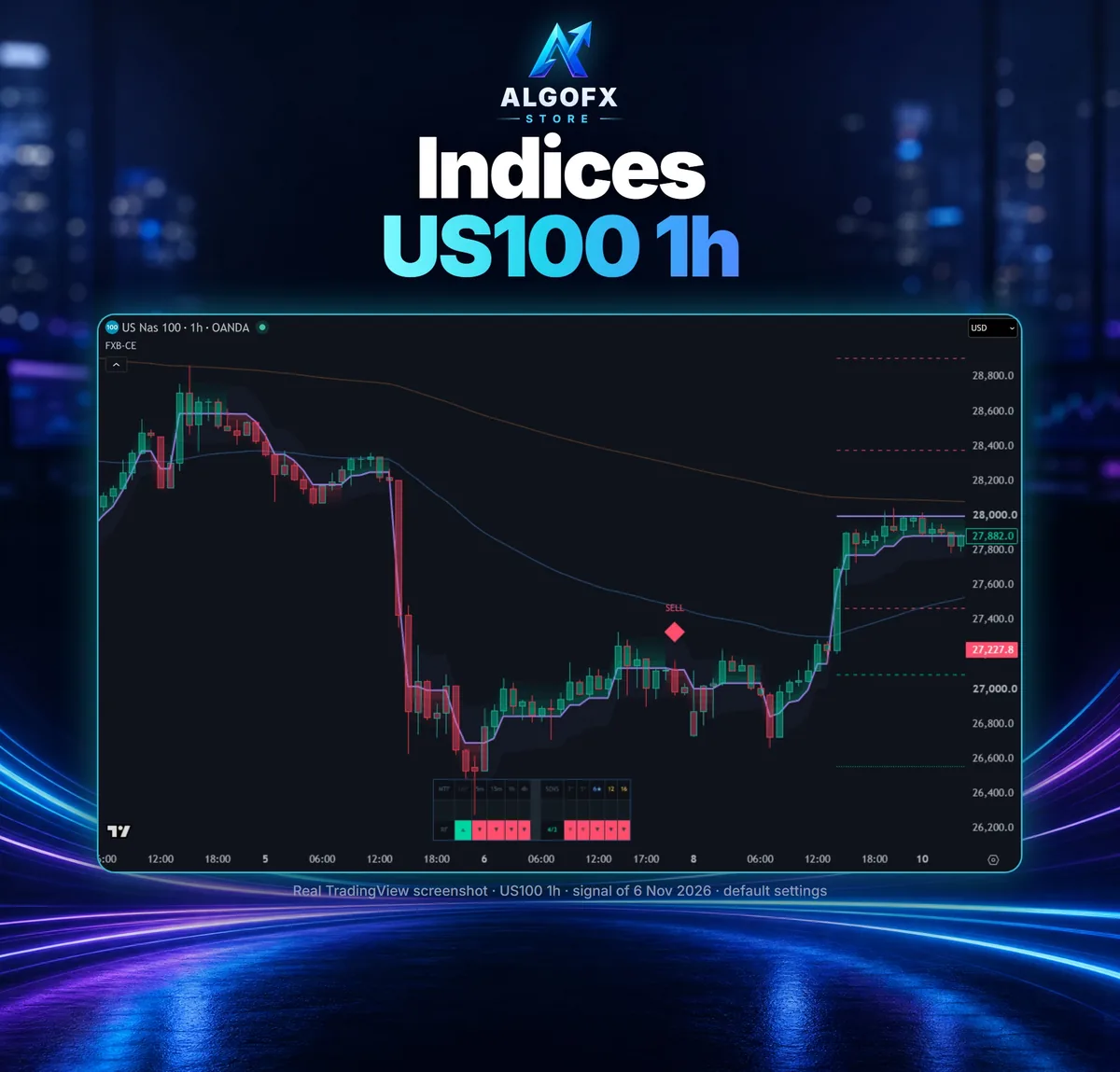
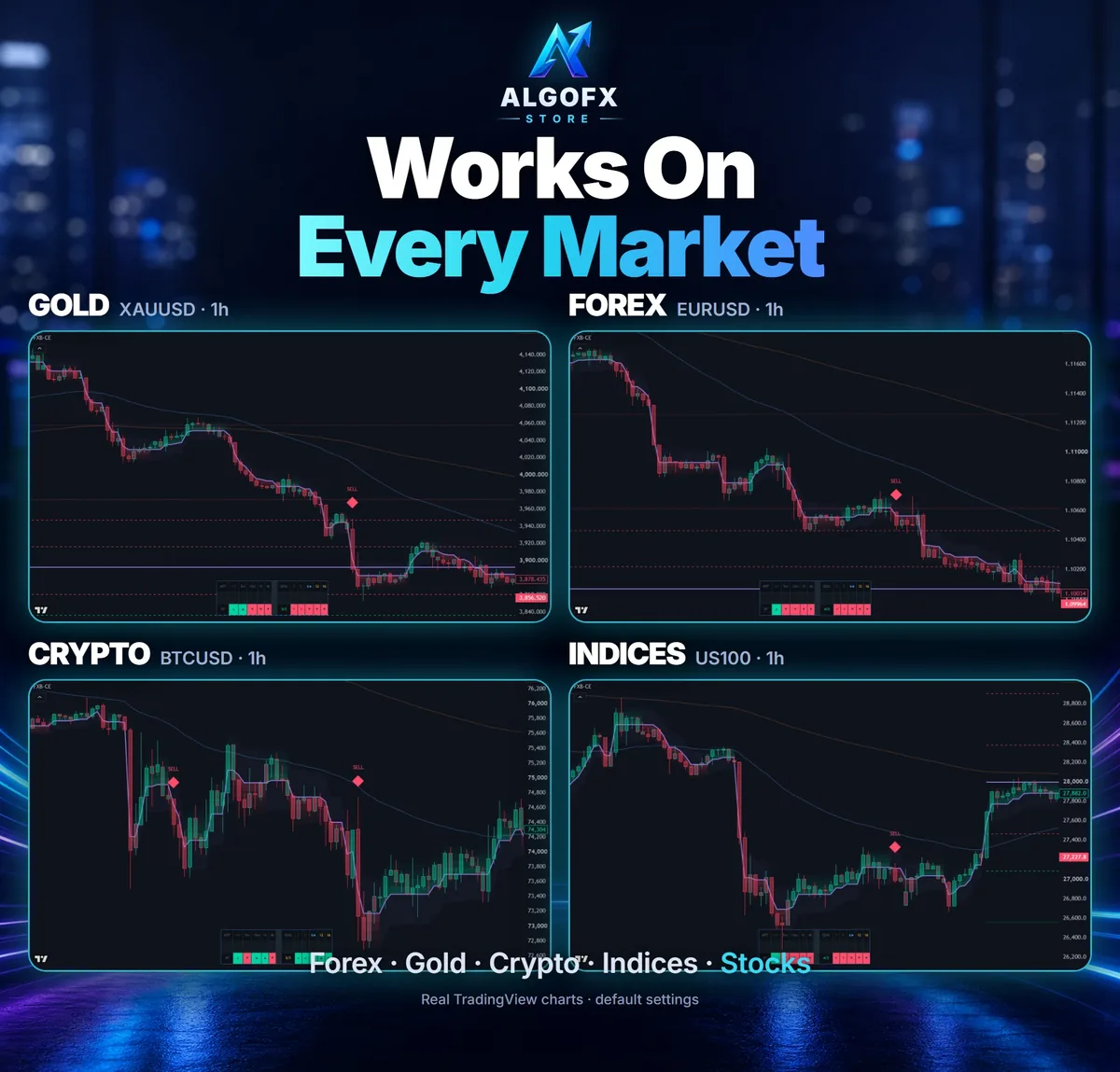
Every chart below is a screenshot of TradingView itself with the shipped FXB Confluence Engine [AlgoFXStore] attached at its default settings. Forex, metals, indices, energy and crypto, so you can see how it reads each kind of market. They show what the indicator draws; they are not trading results. Tap or click any chart to open it full size.
From a diamond on the chart to a decision
The indicator scores, gates and alerts. It draws no entry, stop or target: the plan, the size and every order are yours. Practise on TradingView's Paper Trading account first.
- 1
Wait for the close and read the grade
Diamonds and the signal alerts arrive at the candle close, once per bar. Read the score and its grade in the alert or the dashboard: decide in advance whether you act on MED signals or only on HIGH ones, which the FXB Strong Long and Strong Short alerts catch. Raise Minimum Signal Strength if you want fewer diamonds on the chart.
- 2
Check the pivots in the way
A BUY just under R1 or the daily PIVOT, or a SELL just above S1, has a level close ahead where price often reacts. The dashboard's Near Sup and Near Res rows show the closest levels. Levels already broken change colour, so you can see which ones price has already cleared today.
- 3
Set your own stop and size
Because no stop is drawn, decide where the idea is wrong before you enter: beyond the last swing, beyond the range filter line, or beyond a pivot level. Size from that distance and place a real stop at your broker straight away. The ATR row in the dashboard shows how far the market moves per bar right now.
- 4
Use TRADE STATUS to manage
While TRADE STATUS reads ALIGNED, the trend still agrees with your last signal. When it reads REVERSED and the FXB Trade Invalidated alert fires, the confirmed trend has turned against the signal: that is the indicator's cue to consider leaving the trade. It is a cue, not an exit order.
- 5
Learn from the turns that did not print
When the trend line turns without a diamond, look at CONFIRMATIONS: the chop gate, the EMA alignment, RSI or volume will show which one held it back. Over time this tells you which filters matter on your market, and whether a setting such as the cooldown or the minimum score suits it.
The dashboard, row by row
- FXB CONFLUENCE ENGINE | v1.0 | AlgoFXStore
- TREND BULLISH / BEARISH | HTF BULL / BEAR
- PRICE <close> | ATR <atr %>
- SIGNAL QUALITY <score>/<max> | HIGH / MED / LOW / WEAK
- <14-cell bar> | <score %>
- SCORE BREAKDOWN; 9: EMA + Mom n/4 | MTF n/4; 10: Sensitivity n/3 | HTF Bias n/1; 11: Volatility n/2 | RSI n/1; 12: Volume n/1 | VWAP; 13: Candle | Chop Pen.
- CONFIRMATIONS; 16: EMA Aligned tick / cross | RSI; 17: Volume | VWAP; 18: Chop Gate OPEN/BLOCKED | ADX; 19: Chop Idx | Cooldown; 20: EMA Dist | Candle
- MARKET DATA; 23: EMA 60 | EMA 200; 24: Near Sup | Near Res; 25: VWAP | Day Rng %
- SESSION | Volatility
- LAST SIGNAL; 30: Direction | Bars Ago; 31: Score at Signal
- TRADE STATUS; 34: Signal vs Trend tick ALIGNED: Hold Position / cross REVERSED: Consider Exit; 35: action line
- tip line (High conviction / Moderate / Low confluence / Weak signal)
- (odd row numbers between sections are thin separator rows)
Everything FXB Confluence Engine does for you
Signals with a reason
Every diamond comes with a score out of 16 by default and a grade, and the dashboard shows which layers scored and which gates were open, so a signal is never a mystery.
Gates against chop
ADX, Choppiness Index and a 5-bar cooldown block signals in sideways markets, and the dashboard shows Chop Gate OPEN or BLOCKED with the ADX and choppiness readings beside it.
Five timeframes in the score
The range filter's trend on 5, 15, 60 and 240 minutes and a 30-minute bias add up to five points, and the bottom strip shows the trend on 1 to 240 minutes at a glance.
A sensitivity cross-check
The same range filter at Sensitivity 12 and 16 adds up to three points when slower versions of the trend agree, and the strip shows the trend at sensitivities 3, 5, 6, 12 and 16.
Pivot levels on the chart
Classic, Fibonacci or Camarilla pivots of the previous day, week or month, with PIVOT, R1 to R4 and S1 to S4, read from the previous closed period. Broken levels change colour.
Trade status after the signal
TRADE STATUS reads ALIGNED while the confirmed trend supports the last signal and REVERSED once it flips, with an alert for the moment a signal is invalidated.
Market data in one panel
EMA 60 and 200, nearest support and resistance, VWAP, the share of the average daily range used, the session and a volatility percentile sit in the same dashboard as the score.
19 alert conditions
Long, Short, Any, Strong Long and Short, EMA-confirmed signals, trend changes, chop gate opened and closed, HTF bias, RSI extremes, volume spikes, score crossings and Trade Invalidated, plus messages with the score.
Dark and light palettes
Chart Background switches the whole palette between Dark and Light, and the dashboard can sit on the right or left in three text sizes. Score labels such as BUY 13/16 can be switched on beside the diamonds.
FXB Confluence Engine, feature by feature
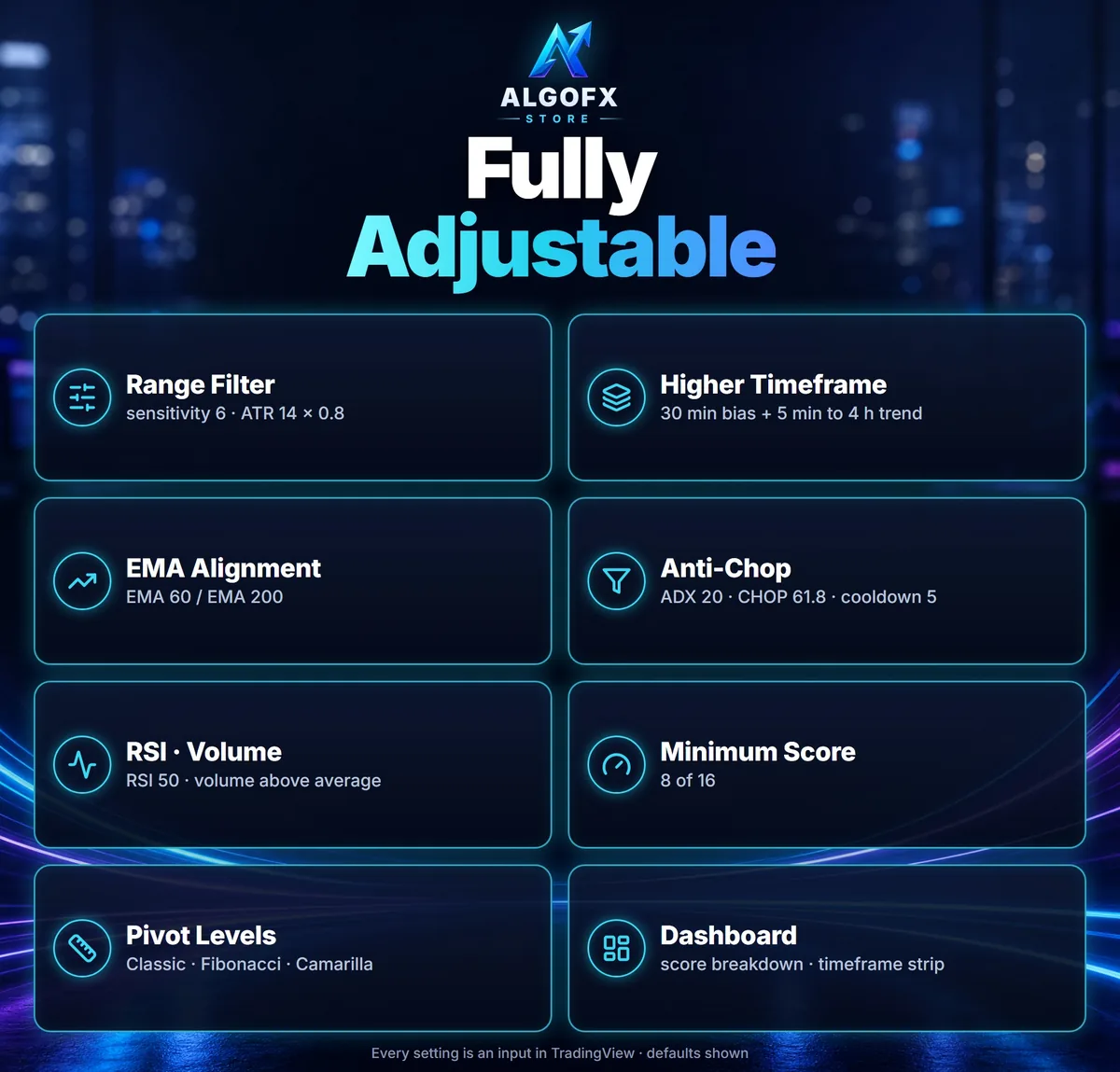
Each picture is built from real platform screenshots of the shipped indicator at its default settings, labelled so you can see what every part does. Tap any picture to open it full size.



How traders put it to work
Gold and indices intraday
On gold and index CFDs the pivots, the range filter and the score work at their defaults on 15-minute to 1-hour charts. The pivot labels print two decimals, which suits gold, indices and crypto prices well.
Forex pairs
The signals and the score work the same on forex. The pivot labels print only two decimals, so on EURUSD a level reads 1.08; read the exact level from the line or the Data Window.
Crypto around the clock
Bitcoin and other coins trade every day, so new daily pivots arrive seven days a week. The chop gate keeps signals out of the quiet, sideways hours, when the range filter would otherwise turn on small swings.
Slower charts, 1 hour to 4 hours
On 1-hour and 4-hour charts the 5 and 15-minute score points read the latest intrabar value of those lower timeframes. Set Pivot Timeframe to W or M if you want weekly or monthly pivots on these charts.
Symbols without volume
On symbols with no volume data the volume gate blocks every signal while Volume Confirmation is on. Switch it off there; the maximum score then drops to 15, and the RSI, EMA and chop gates still apply.
Every setting, with its default
The names are the ones in the script's Settings dialog in TradingView (Inputs tab); the defaults are what every chart on this page uses.
| Setting | Default | What it does |
|---|---|---|
| Sensitivity | 6 | Range filter band = ATR x multiplier x Sensitivity / 8. Higher = fewer, later trend changes. |
| ATR Length / ATR Multiplier | 14 / 0.8 | The range filter's ATR and the trailing band's width. |
| HTF Timeframe | 30 | The higher-timeframe range filter behind the HTF Bias point. |
| Fast EMA / Slow EMA / Only show signals when EMA aligned | 60 / 200 / on | The EMA gate. |
| Enable ADX Filter / Enable Choppiness Index Filter / Enable Signal Cooldown | ADX 14 >= 20 / CHOP 14 <= 61.8 / 5 bars, all on | The chop gate. |
| Enable RSI Confirmation | RSI 14: longs >= 50, shorts <= 50 (OB 70 / OS 30) | RSI gate and RSI score. |
| Enable Volume Confirmation | volume >= SMA 20 x 1.0 | Volume gate and score. |
| VWAP / Candle Pattern / EMA Distance | off / off / off (2.0 ATR) | Optional extra gates. |
| Minimum Signal Strength | 8 | Flips scoring below are suppressed (score out of 16 with the defaults). |
| Pivot Levels / Dashboard / Theme | D Classic, labels on / Right, Small, strip on / Dark | Pivot Timeframe, Pivot Formula, Show Pivot Labels, Extend Lines Left 100; Dashboard Position, Text Size, Bottom Strip; Chart Background. |
The alert events, one by one
In TradingView: Create alert, choose “FXB Confluence Engine [AlgoFXStore]” as the condition and pick the event. TradingView then notifies you the way you set in that dialog: a pop-up in TradingView, a sound, the TradingView app on your phone or an e-mail.
- FXB Long Signal
- FXB Short Signal
- FXB Any Signal
- FXB Strong Long
- FXB Strong Short
- FXB EMA-Confirmed Long
- FXB EMA-Confirmed Short
- FXB Trend Change Bullish
- FXB Trend Change Bearish
- FXB Chop Gate Opened
- FXB Chop Gate Closed
- FXB HTF Bias Bullish
- FXB HTF Bias Bearish
- FXB RSI Overbought
- FXB RSI Oversold
- FXB Volume Spike
- FXB Score Above Threshold
- FXB Score Below Threshold
- FXB Trade Invalidated
FXB Confluence Engine next to the usual options
Where it wins, and where it does not.
| FXB Confluence Engine | Typical free range filter indicator | Reading it by hand | |
|---|---|---|---|
| When a signal prints | A turn at the candle close that passes every gate with a score of 8 or more | Every turn of the filter | Whenever it looks right |
| Why a signal printed | Score breakdown and confirmations in the dashboard | No explanation | A checklist you have to remember |
| Choppy markets | Chop gate with ADX, Choppiness Index and a cooldown | Turns on every swing | Easy to overtrade |
| Stop and targets | None drawn; you set them yourself | Sometimes drawn | Your own |
| Simplicity | Many inputs and a large dashboard | A couple of inputs | Nothing to learn |
| Cost | A one-time purchase | Free | Free, paid for in screen time |
Honest about who this fits
A good fit if you
- You trade with the trend and want a signal only when several independent checks agree on the same closed candle.
- You want to see why a signal printed, and why the last turn did not, instead of trusting a bare arrow.
- You already plan your own stops and targets and want a filter that tells you when conditions line up.
- You use pivot levels and want them on the same chart as the signals, with broken levels marked.
- You like alerts that carry the score and grade, so you can decide from your phone whether to look.
Not for you if you
- You want an entry, stop and targets drawn for every signal: this indicator draws none.
- You want a system that places trades: it scores, gates and alerts, and every order is yours.
- You need a reloaded chart to show exactly the signals you saw live: near the minimum score it may not, as the repainting answer below explains.
- You want a minimal chart: the band, the coloured candles, the pivots and the dashboard take space, although each can be switched off.
The full code, one guide, installed in two minutes
- 1Pine Script source codeFXB_Confluence_Engine_TradingView_Code.txt (66 KB): the full code. Paste it into the Pine Editor and it appears as “FXB Confluence Engine [AlgoFXStore]”.
- 5Page PDF guideInstallation, every setting with its default and how to read the chart.
- ✓Every main setting explainedThe table above lists the main settings with the defaults the charts use.
- ✓Alert eventsYou choose which ones are on in the settings.
- 60Day money-back guaranteeIf it is not for you, request a full refund within 60 days through your Digistore24 order e-mail.
Install in five steps
- Download the zip from the page Digistore24 sends you to after checkout and unzip it.
- Open FXB_Confluence_Engine_TradingView_Code.txt in a text editor, select all and copy the whole code.
- In TradingView, open the Pine Editor, paste the code over everything that is there and click Save.
- Click Add to chart: “FXB Confluence Engine [AlgoFXStore]” appears on your chart.
- Read the PDF guide; the defaults are the settings shown on this page.

Kestutis Balciunas
AlgoFXStore · chart indicators
Kestutis Balciunas builds and publishes chart indicators under the AlgoFXStore name. Every product page shows what the indicator draws on real charts, and every number on it comes from the shipped build.
The charts on this page were captured in TradingView from the shipped FXB Confluence Engine [AlgoFXStore] at its default settings and are shown unedited.
No get-rich claims and no quoted win rates. Every trade is uncertain, and no indicator changes that. If you want to know whether it suits the way you trade before you buy, e-mail [email protected] and you will get a straight answer.
One price, one payment
- The full Pine Script source code of FXB Confluence Engine and the 5-page PDF guide
- Delivered as a digital download: one zip with the code file and the PDF guide on your download page
- Return period: 60 days, with a full refund if it is not for you
- Free updates to the current version on the same download page
60-day money-back guarantee. Install it, run it on your own charts and read the guide. If FXB Confluence Engine is not for you within 60 days of purchase, request a full refund from Digistore24, no questions asked: use the refund link in your Digistore24 order e-mail or Digistore24's order page digistore24.com/en/cancel-revoke-contract. Digistore24 refunds to your original payment method. It is a digital download: right after checkout you land on your download page, and the link to it is also in your Digistore24 order e-mail.
Also by Kestutis Balciunas: FXB Confluence Engine for cTrader and NinjaTrader 8 and MT4 and MT5.
About the signals
Does FXB Confluence Engine repaint?
The turn of the range filter and the gates on the chart's own candles are decided at the candle close, and a diamond is not drawn on a forming candle. But the 30-minute bias and the 5, 15, 60 and 240-minute score points read the forming higher-timeframe candle on a live chart and the completed one in history. A signal whose score sits near the minimum can therefore print live and be missing after a reload, or the reverse. The line, band and candle colours follow price on the forming candle.
The trend line turned but no diamond printed. Why?
At least one gate was closed or the score was below the minimum. Look at CONFIRMATIONS in the dashboard: the chop gate may read BLOCKED, the EMAs may not be aligned, RSI may be on the wrong side of 50, or volume may be below its average. SCORE BREAKDOWN shows which layers were missing points.
What does the score out of 16 mean?
It is the sum of the layers that agree with the turn, minus up to two points for low ADX or high choppiness. HIGH means at least 80 percent of the maximum, MED 57, LOW 43. It measures how much agrees at the close, not the chance that the trade works.
What does TRADE STATUS REVERSED mean?
The confirmed trend of the range filter has turned against the last signal. The dashboard then reads REVERSED with the hint to consider an exit, and the FXB Trade Invalidated alert fires. Nothing closes automatically; it is information for your own trade management.
Settings and charts
Should I keep the defaults or tune them?
The defaults, Sensitivity 6, Minimum Signal Strength 8 and all main gates on, are a balanced start. Raise the minimum score or the Sensitivity for fewer, later signals; lower them for more. Change one thing at a time and watch the CONFIRMATIONS rows to see what each setting does on your market.
Which timeframes does it suit?
Any symbol and timeframe. On charts above a requested timeframe, the lower one returns its latest intrabar value, so on a 4-hour chart the 5 and 15-minute points behave differently from a 15-minute chart. The 1-minute strip cell is display only.
Why do forex pivot labels show only two decimals?
The pivot labels are formatted with two decimals, which fits gold, indices and crypto but is coarse on forex, where 1.08542 shows as 1.08. The lines themselves sit at the exact level; read it from the line or the Data Window.
Does it work on TradingView's free plan?
Yes. It makes eight request.security calls, for 30 minutes, 1, 5, 15, 60 and 240 minutes and the daily data, all within the free plan's limits, and needs no seconds data. Alerts run within your plan's limit; webhook delivery needs a paid plan.
Alerts
Which alerts can I create?
Nineteen alert conditions, from FXB Long, Short and Any Signal to Strong and EMA-confirmed signals, trend changes, chop gate opened or closed, HTF bias, RSI overbought or oversold, volume spikes, score crossing the threshold and Trade Invalidated. Choose Any alert() function call for messages with the symbol, timeframe, price, score, grade, HTF bias, RSI and volume.
What does a signal alert message contain?
For example: FXB-CE LONG, the symbol, the timeframe, the price, Score 13/16 (HIGH), HTF BULL, RSI 58.3 and Vol Above Avg. Trend-change and trade-invalidated messages name the new direction and the price. All alert() messages are sent once per bar close.
Can I combine it with my own tools?
Yes. It is an overlay indicator, so you can add your own drawings or other indicators to the same chart. If another script also colours the candles, the colours compete, so keep only one candle-colouring script on the chart.
Can I hide parts of it?
Yes. Show Signal Arrows, Show Pivot Levels and their labels, Show Dashboard and Show Bottom Strip each have their own switch, and the score labels are off by default. Hiding a part does not change the signals or the alerts.
How it works
Will it place trades for me?
No. FXB Confluence Engine is an indicator: it draws on the chart and can alert you. It never sends an order.
After you buy
How do I get it after paying?
Digistore24 runs the checkout. Right after payment it takes you to your download page with one zip holding the Pine Script source code file and the PDF guide; the link to that page is also in your Digistore24 order e-mail, so you can download again at any time.
How do I install it?
Open the code file, open the Pine Editor in TradingView, paste the whole code, click Save and then Add to chart: “FXB Confluence Engine [AlgoFXStore]” appears on your chart. The guide walks through it step by step.
Who is Digistore24?
Digistore24 is the reseller that sells FXB Confluence Engine for Kestutis Balciunas (AlgoFXStore): it runs the checkout, charges your card or PayPal, collects the VAT for your country and delivers the download. Its name is the one on your statement, and its order e-mail holds your download link and the refund link.
What is the refund policy?
A 60-day money-back guarantee, handled by Digistore24. If FXB Confluence Engine is not for you within 60 days of purchase, use the refund link in your Digistore24 order e-mail or Digistore24's order page (digistore24.com/en/cancel-revoke-contract) for a full refund, no questions asked. Digistore24 makes the refund to your original payment method.
Do I get the source code?
Yes. You get the full Pine Script source code as a text file for your own use; the licence line at the top of the code does not allow resale, sharing or republishing.
FXB Confluence Engine for TradingView.
Put a range-filter trend with a score, a set of gates and a dashboard that explains every signal on your chart, and trade only the turns that pass. The full code, the guide and every setting explained. Instant download for €47, one payment.
Get instant access