Trade bitcoin EMA crosses only when eight factors and the bitcoin clock agree
Bitcoin Sniper Confluence turns a 9 and 21 EMA cross on your TradingView bitcoin chart into a BUY or SELL only when at least 5 of 8 factors agree and its bitcoin gates are open: a bitcoin chart, the Europe or US hours, no weekend and room left in the average daily range.
- A 9 / 21 EMA cross on a closed candle is the trigger; 5 of 8 factors on its side make it a candidate.
- Eight factors: VWAP, RSI, MACD, EMA alignment, ADX, volume, a 15-minute RSI and a Nasdaq futures link with a correlation check.
- Four bitcoin gates: bitcoin chart, Europe or US window, no weekend and today's range below the 14-day average; blocked crosses get a grey x.
- Stop at 1.5 x ATR(14), targets at 1R, 2R and 3R, a move to breakeven at TP1, a 24-row dashboard and 14 alert conditions.
- The full Pine Script source code. Paste it into the Pine Editor, save, and add “Bitcoin Sniper Confluence [AlgoFXStore]” to your chart.
- A 15-page PDF manual with installation, every setting and how to read the chart. One-time €47.
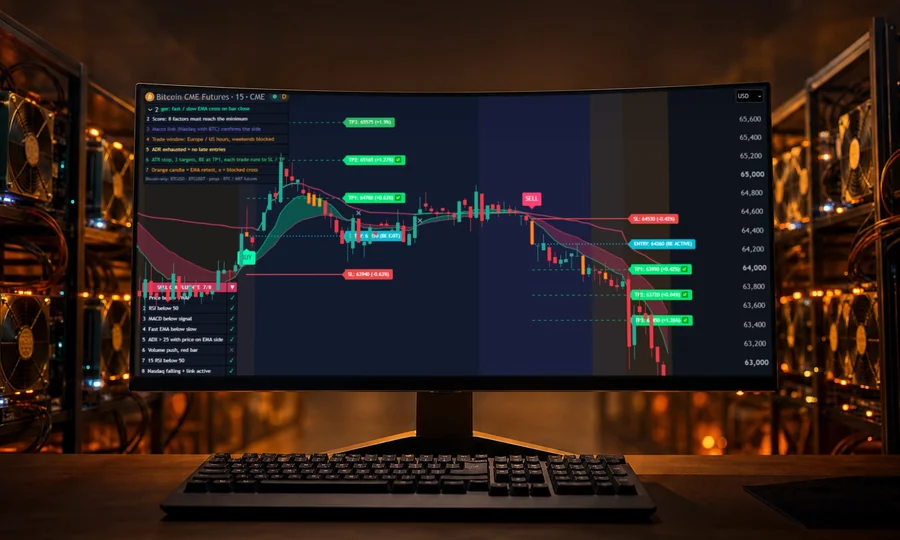
See Bitcoin Sniper Confluence on a real chart
Press play; use the full-screen button to see every detail.
A bitcoin EMA cross at the wrong hour is just noise
The 9 and 21 EMA cross is one of the most common bitcoin triggers, and on its own it fires all day and all weekend. Bitcoin trades around the clock, but its cleanest moves tend to come when Europe and the US are active. A cross in thin Asian hours, on a Sunday afternoon or after the day has already travelled its usual distance often leads nowhere.
Traders add filters by hand: a glance at RSI, a check of VWAP, a look at whether the Nasdaq is moving the same way today. Each check takes seconds, but doing all of them on every cross, consistently, on a fast 5 or 15 minute chart is where it falls apart. Some crosses get the full checklist, others get none.
This indicator runs the same checklist on every cross. It scores eight factors on the cross's side, including a macro link that only counts while bitcoin is actually correlated with the Nasdaq futures, and then applies four gates written for bitcoin: the symbol, the hours, the weekend and the daily range. Crosses that pass become signals with a planned stop and targets; crosses that score but fail a gate are marked so you can see what was skipped.
Everything Bitcoin Sniper Confluence draws on your chart
Read from the shipped Pine Script code.
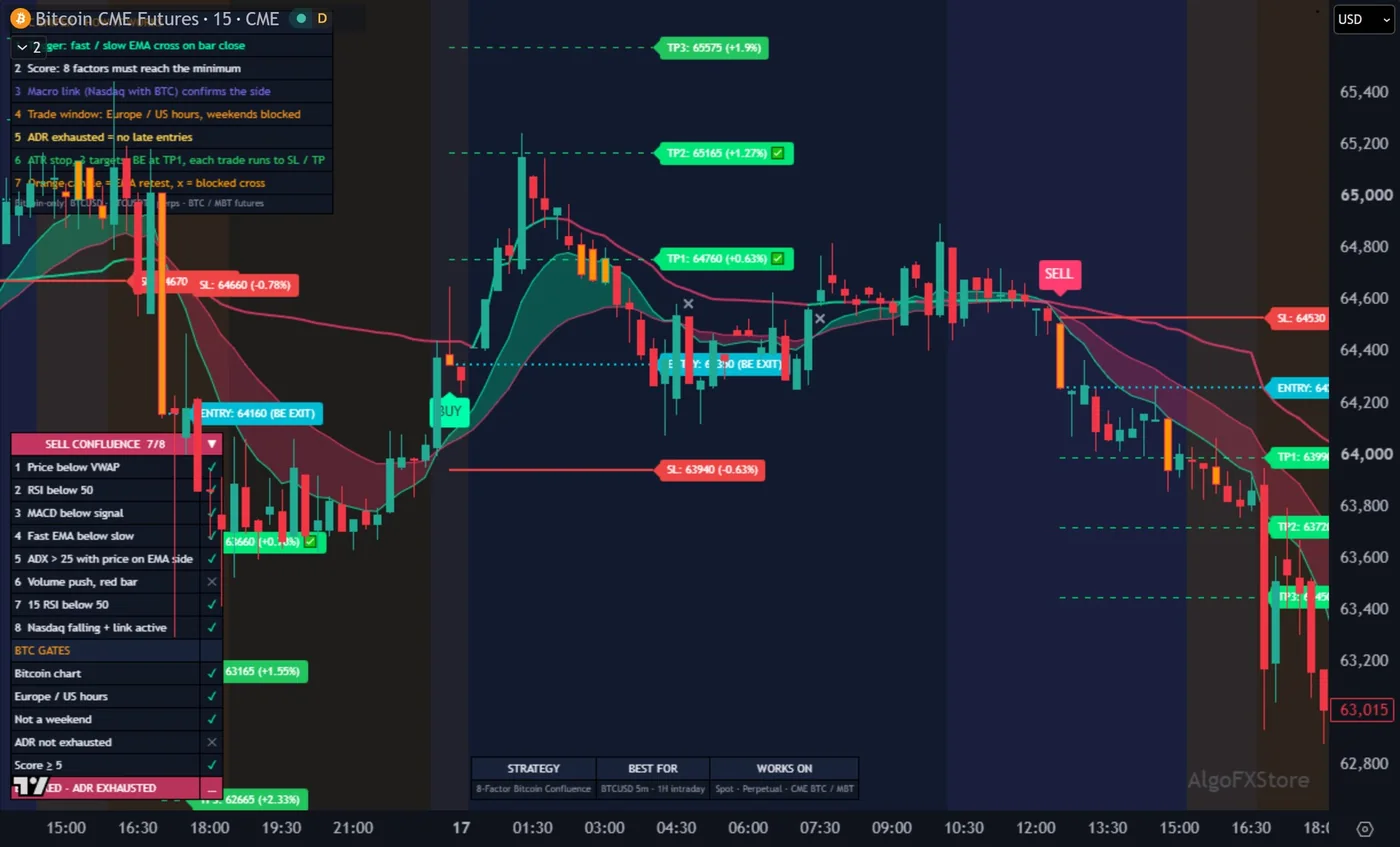
- Fast EMA 9 (green, 20 % transparent) and slow EMA 21 (red) with a ribbon fill between them: green while the fast EMA is above the slow one, red below, 75 % transparent
- Session VWAP (ta.vwap(hlc3)), width 2, green while price is above it, red below
- Background shading of the bitcoin liquidity windows (New York time by default): violet for Europe only (03:00-08:00), brighter orange for the Europe / US overlap (08:00-12:00), orange for US only (12:00-17:00), grey on Saturday and Sunday, none off-hours; not on daily and higher charts
- BUY label (green, black text) below the signal candle and SELL label (red, white text) above it; the signal candle itself is painted bitcoin orange
- A small grey x below / above a candle where a crossover reached the minimum score but was blocked by the symbol guard, the hours filter, the weekend gate or the ADR filter
- Orange candles where price pulls back into the fast EMA (between the two EMAs) while the latest trade is still open - an EMA retest
- Per signal a trade ladder from the signal bar: ENTRY (cyan, dashed), SL (red, solid, width 2), TP1 / TP2 / TP3 (green, dashed) with labels 12 bars right of the last candle while open; closed trades end at their closing bar and keep their labels there. a stopped trade gets cross on its SL label; after TP1 the entry line turns dotted, width 2, and its label reads '(BE ACTIVE)' or '(BE EXIT)'
- Dashboard, top right, 24 rows: brand header, instrument type, bull / bear score, market bias, the 8 factors, BTC dominance, session, ADR, ATR, stop distance, confluence, BTC gates, open trades, latest trade, outcome tally, signal state
- HOW IT WORKS legend, top left: 7 numbered lines plus 'Bitcoin-only: BTCUSD · BTCUSDT · perps · BTC / MBT futures'
- Live confluence checklist, bottom left: the 8 factors with tick / for the stronger side, the 4 BTC gates, 'Score ≥ 5' and a footer 'SIGNAL NOW' / 'ARMED · waiting for EMA cross' / 'BLOCKED · <reason>' / 'Waiting for confluence'
- Strategy summary footer, bottom centre: STRATEGY '8-Factor Bitcoin Confluence' · suited to 'BTCUSD 5m - 1H intraday' · WORKS ON 'Spot · Perpetual · CME BTC / MBT'
- Watermark 'AlgoFXStore' bottom right, grey
How a cross becomes a signal and a trade
The steps follow the shipped Pine Script code with its default settings. Everything is calculated on your chart; four extra series are read as described below.
- 1
The trigger: an EMA cross
A long starts with the 9 EMA crossing above the 21 EMA, a short with a cross below. With Bar-close confirmation on, the default, the cross only counts once the candle has closed. The two EMAs are drawn with a green or red ribbon between them, and the session VWAP is drawn green or red by the side price is on.
- 2
Eight factors score the cross
Each side gets a point for: close beyond the session VWAP, RSI(14) beyond 50, MACD(12,26,9) beyond its signal, fast EMA beyond the slow one, ADX(14) above 25 with price beyond the fast EMA, volume above its 20-bar average on a candle of that colour, the 15-minute RSI beyond 50, and the macro link. A cross needs at least 5 points on its side.
- 3
The macro link only counts when it is real
The macro symbol, Nasdaq-100 futures by default, scores a point when it closes beyond its 21 EMA in the same direction, but only while the 20-bar correlation between bitcoin and that symbol is at least +0.3. Inverse mode for a dollar index reverses the logic. With the factor off, the score is out of 7.
- 4
Four bitcoin gates
A candidate becomes a signal only when the chart is bitcoin, the candle is inside the Europe (03:00 to 12:00) or US (08:00 to 17:00) window in New York time, it is not Saturday or Sunday, and today's high-low range is below 100 % of the 14-day average of completed days. A candidate that fails a gate is marked with a small grey x.
- 5
Every signal opens a tracked trade
BUY or SELL prints on an orange candle and a ladder is drawn from the signal bar's close: cyan dashed entry, red stop at 1.5 x ATR(14), and green dashed TP1, TP2 and TP3 at 1R, 2R and 3R, each with price and percent. From the next candle the stop is checked first, then the targets; a wick touch counts.
- 6
Breakeven, closing and overlap
At TP1 the working stop moves to the entry, the entry line turns dotted and reads BE ACTIVE. The final target, the stop or a return to entry closes the trade, and its ladder stays where it ended. An opposite signal does not close an open trade, so a long and a short can be tracked at the same time. The last 50 ladders are kept.
Bitcoin Sniper Confluence on 12 Bitcoin charts
Every chart below is a screenshot of TradingView itself with the shipped Bitcoin Sniper Confluence [AlgoFXStore] attached at its default settings. Bitcoin Sniper Confluence is built for Bitcoin, so the charts show it on several data feeds and timeframes rather than on other markets. They show what the indicator draws; they are not trading results. Tap or click any chart to open it full size.
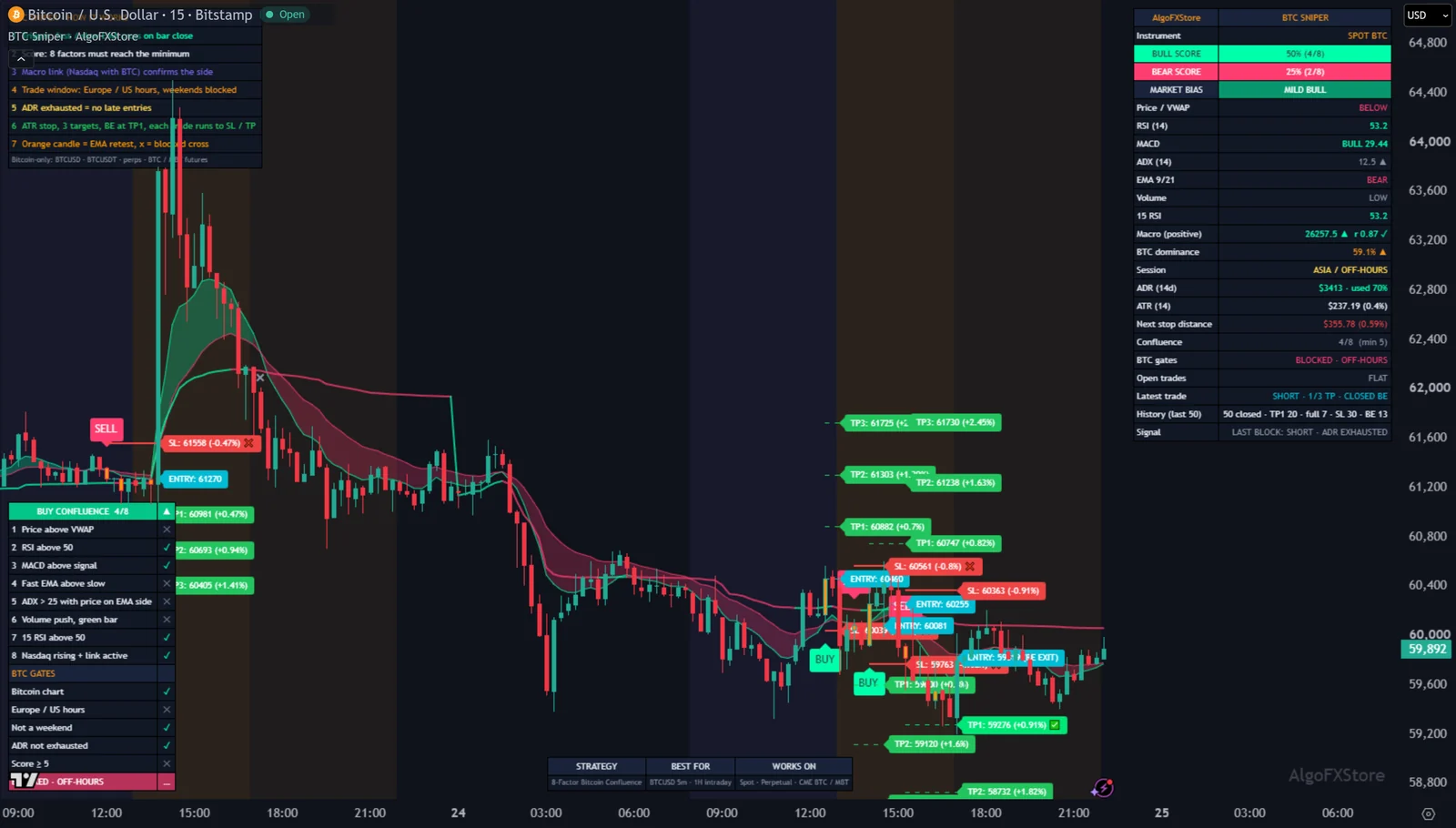
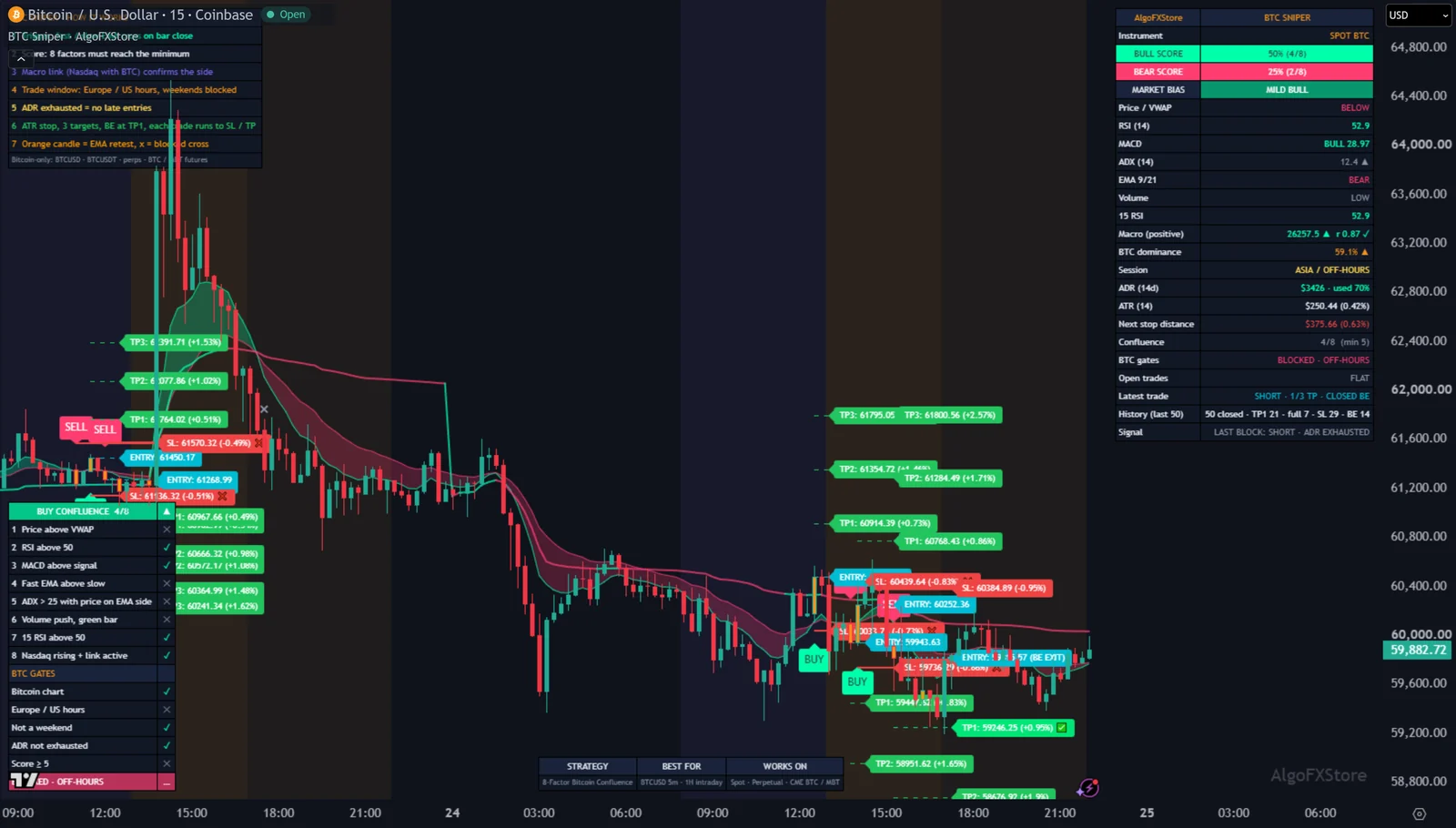
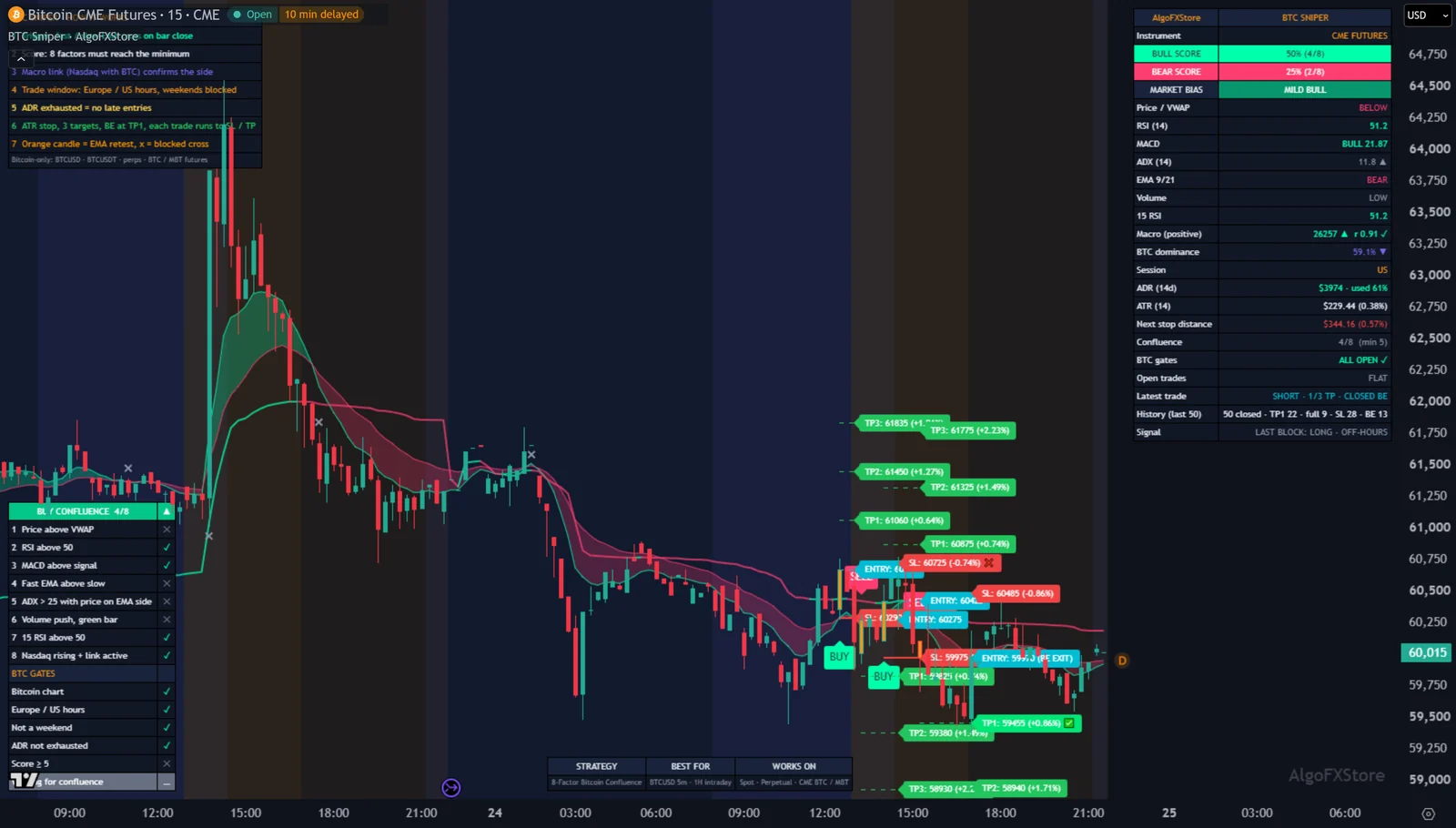
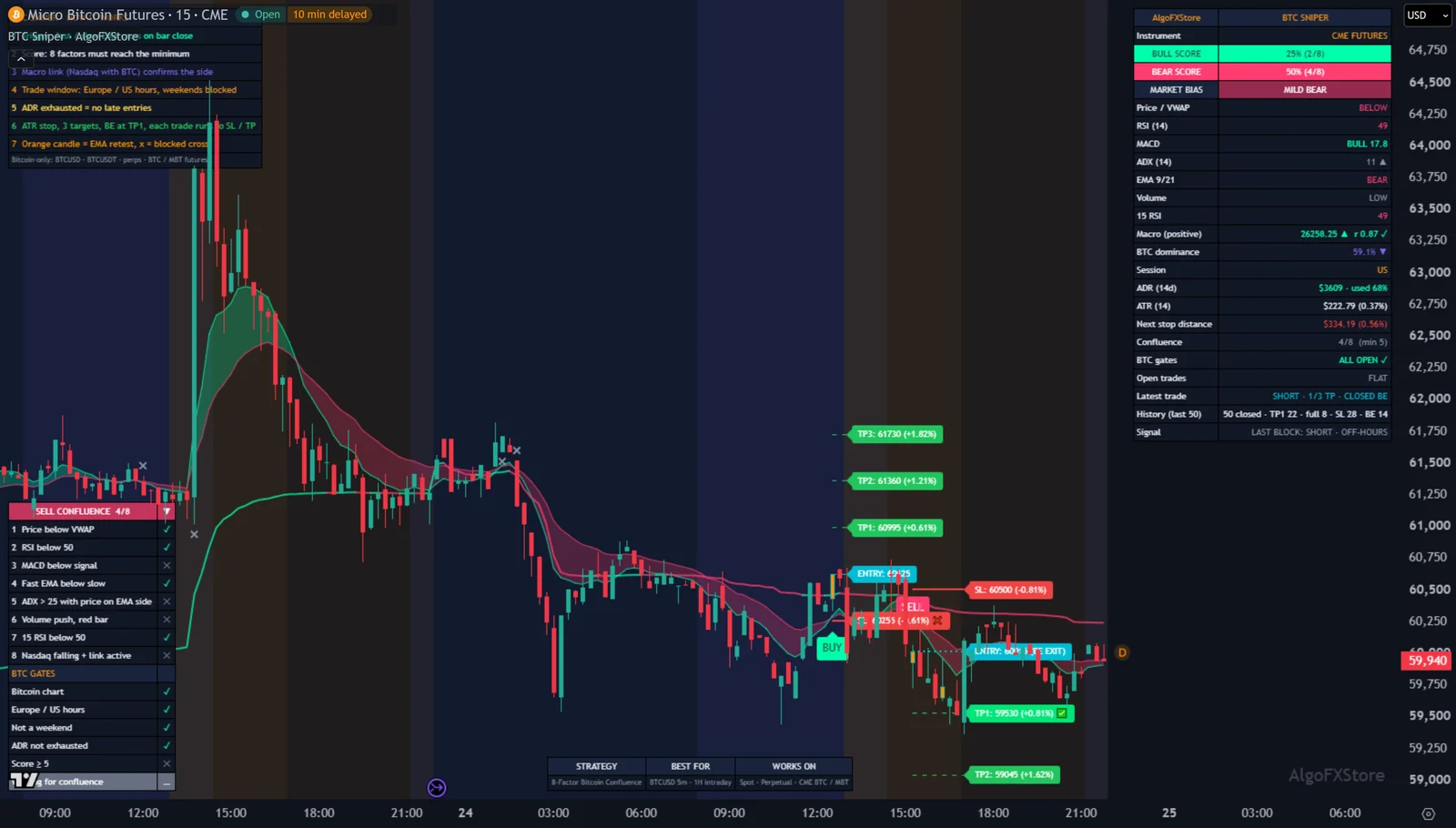
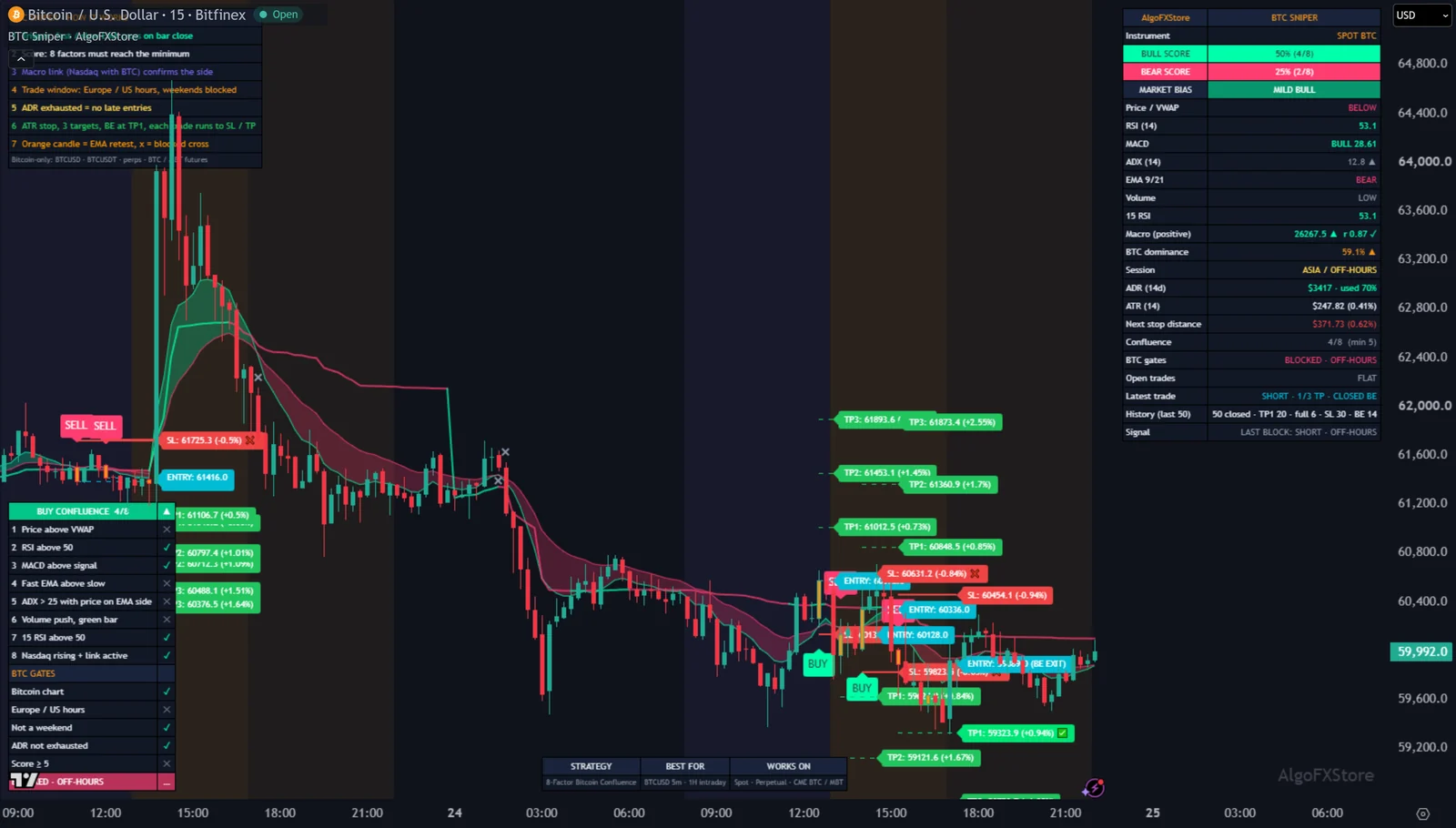
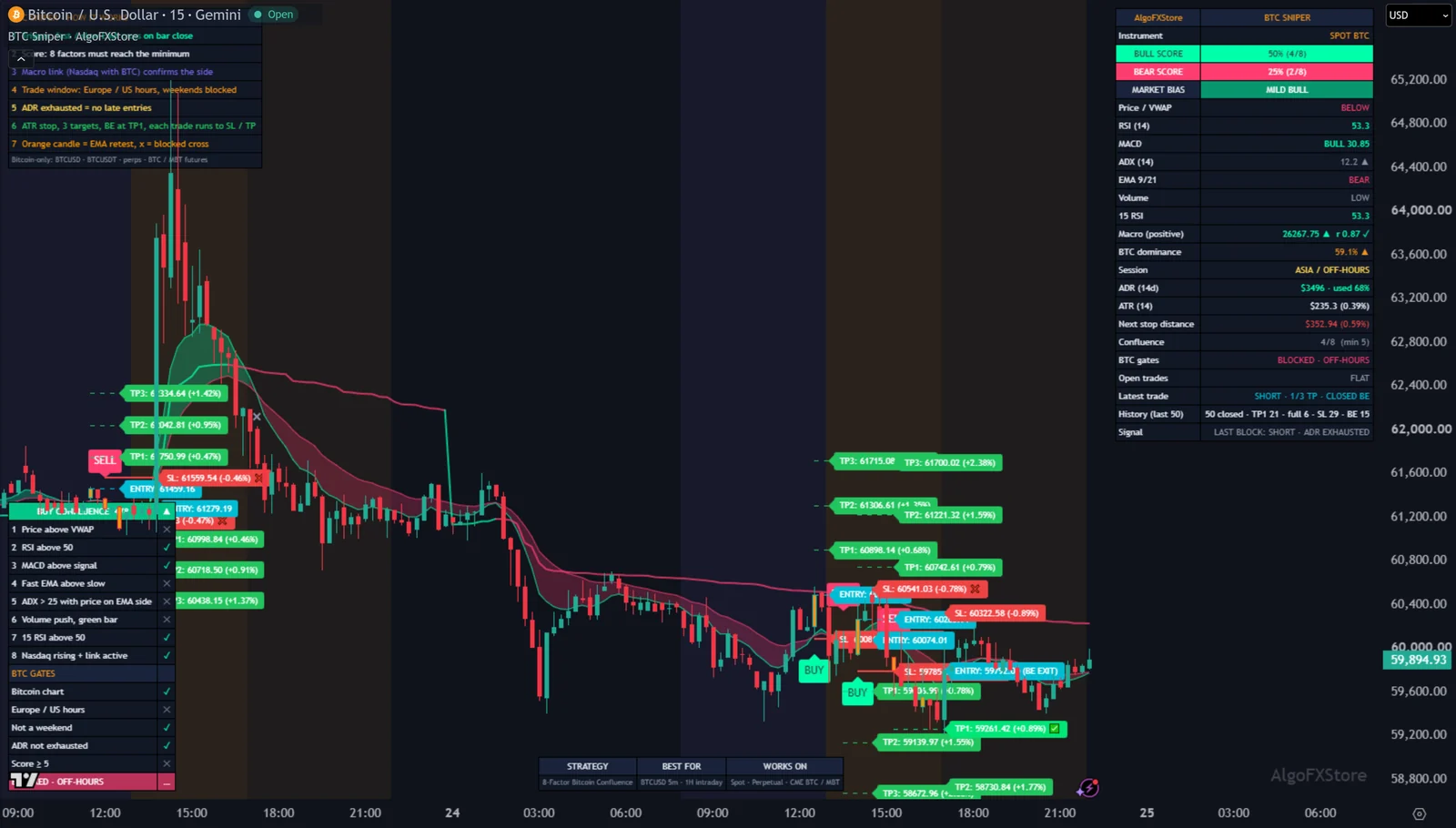
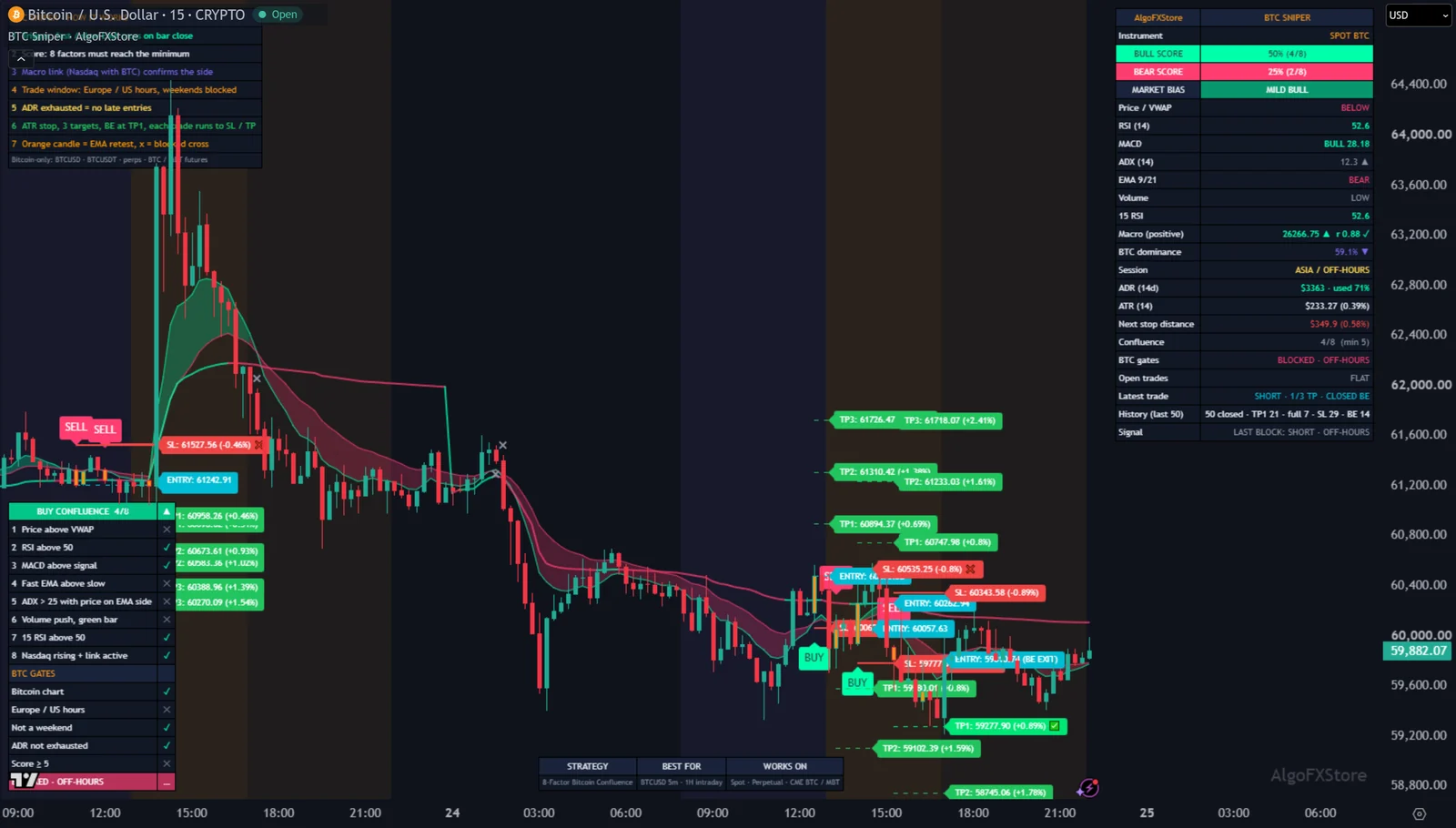
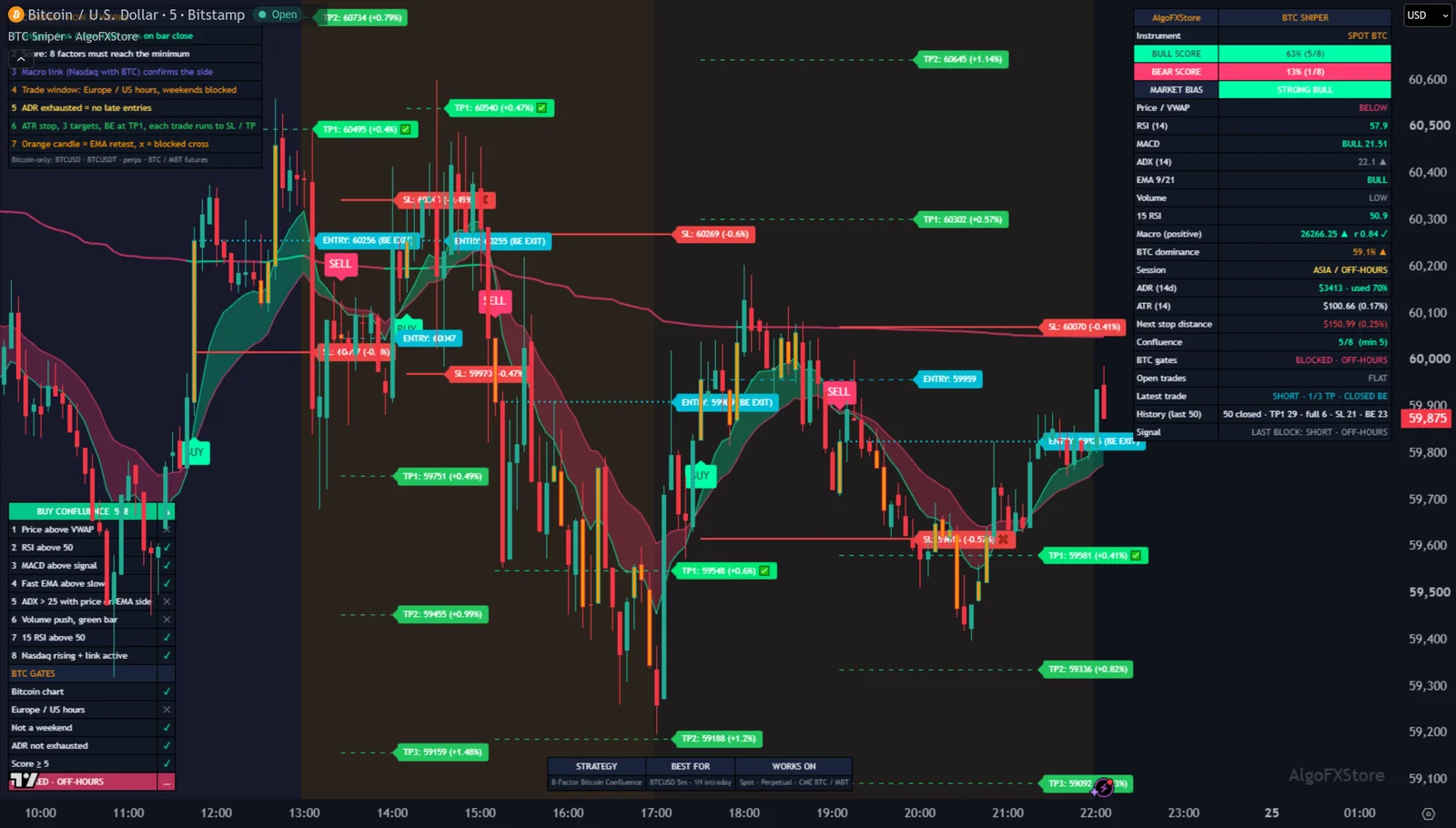
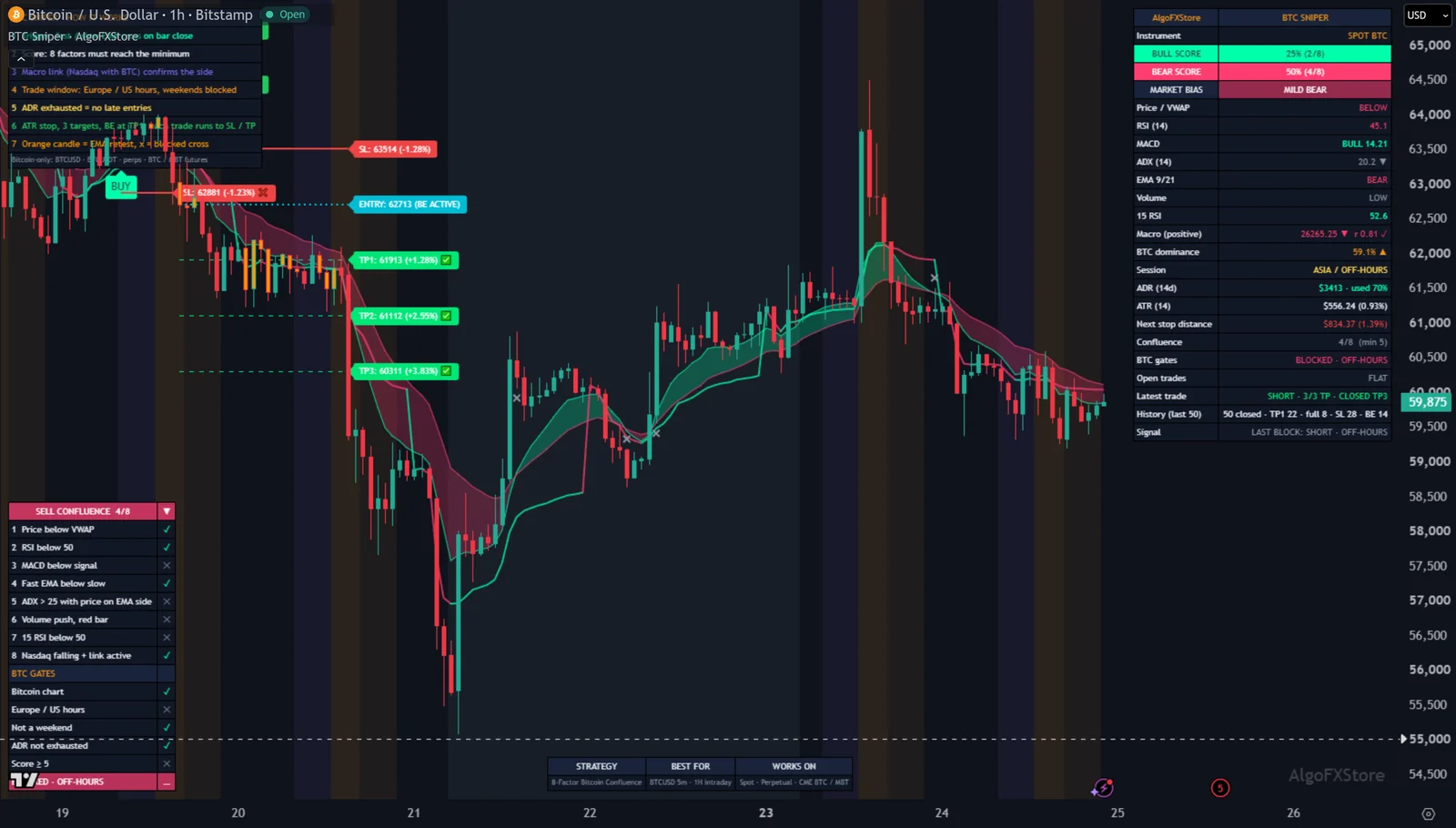
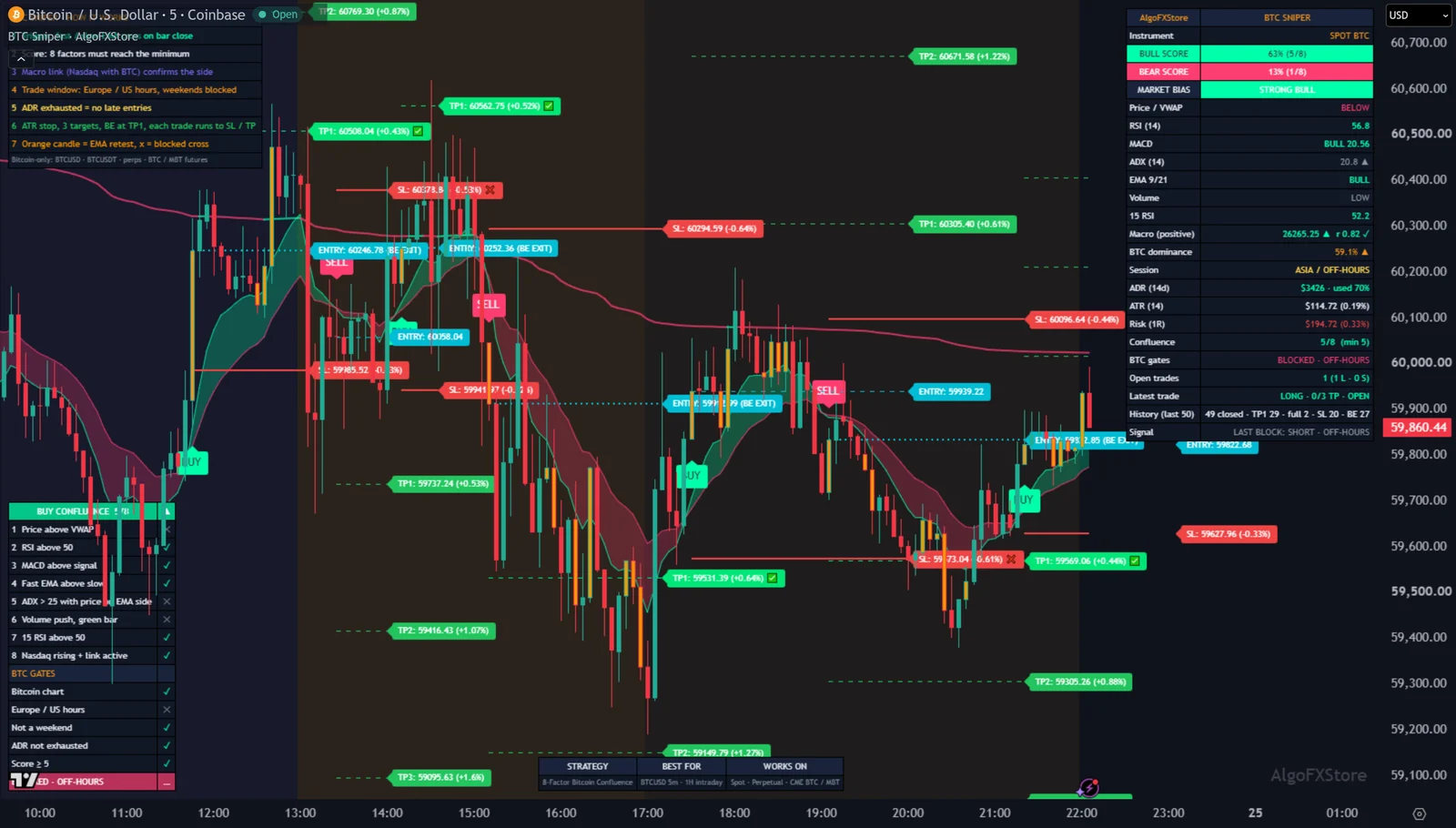
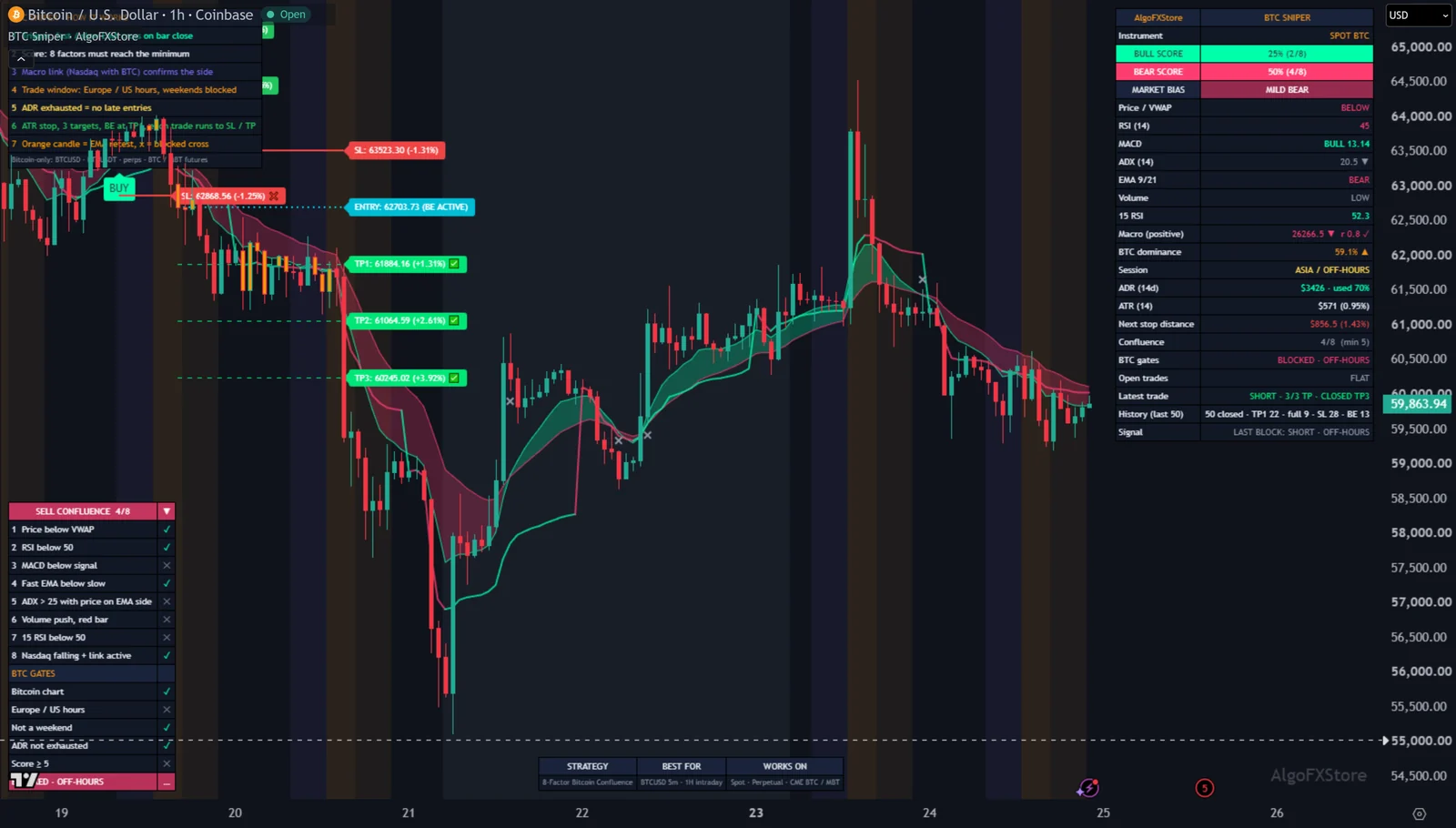
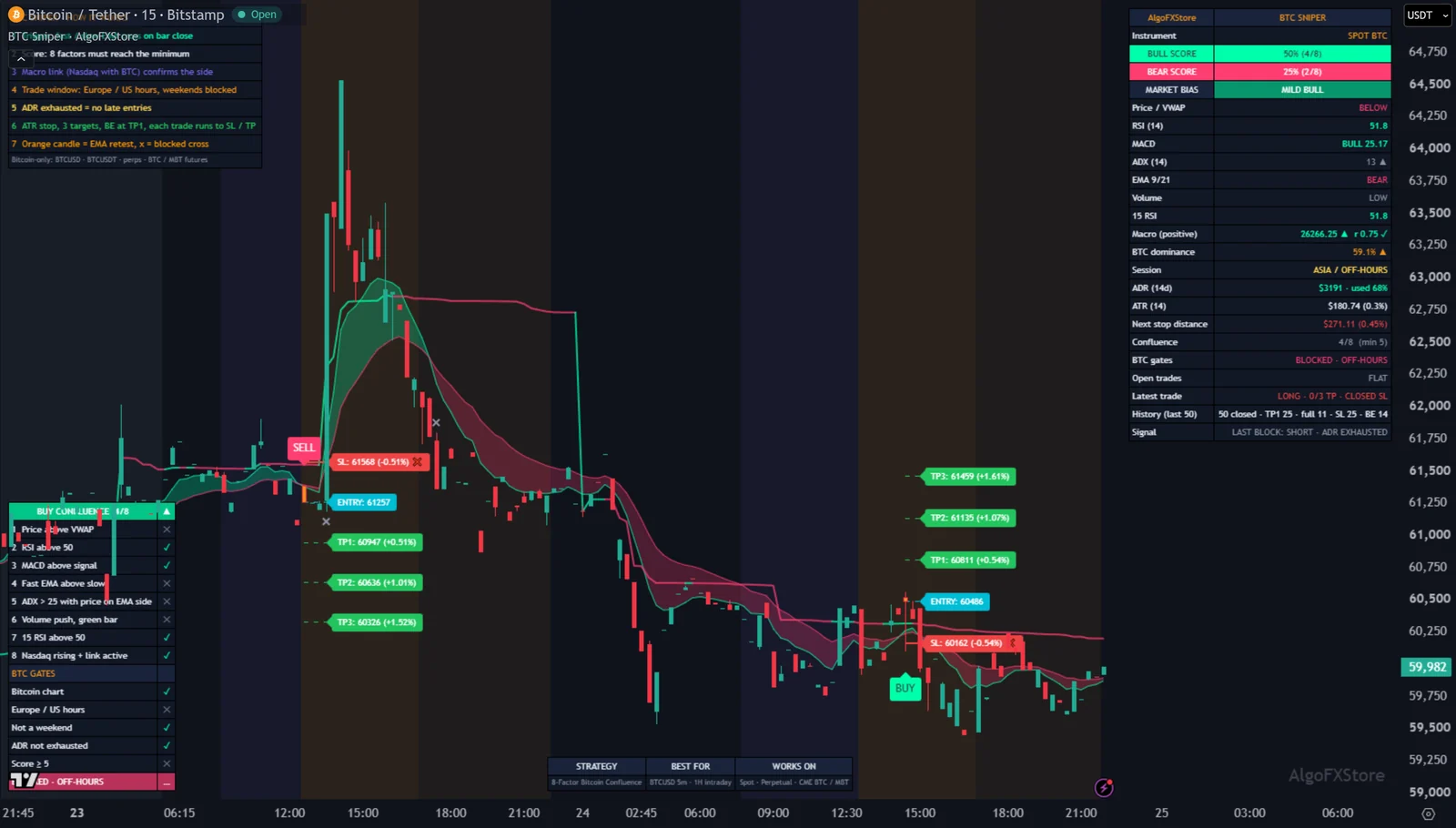
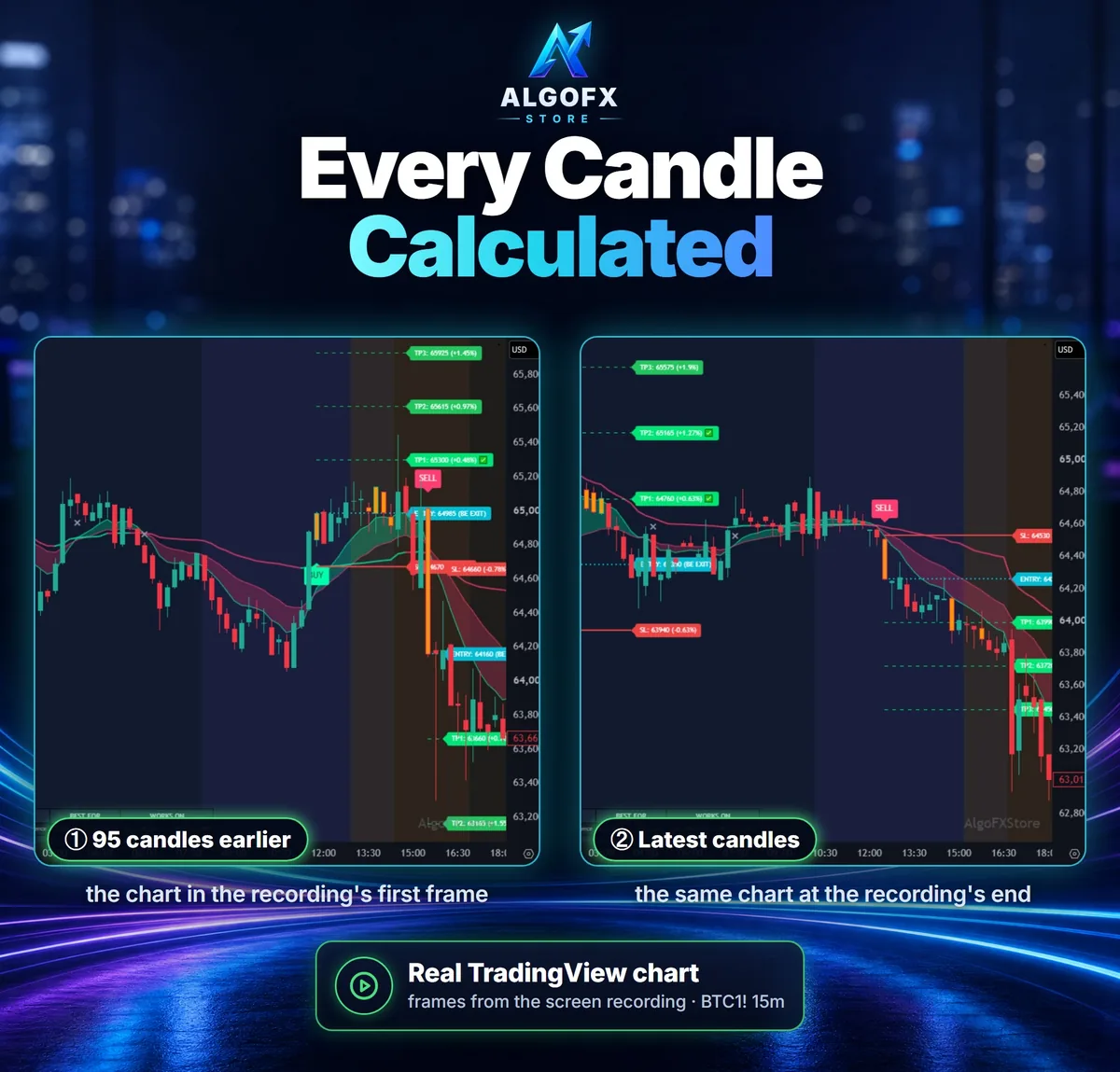
Bitcoin Sniper Confluence on a real TradingView chart, frame by frame
Frames of a screen recording of the shipped indicator at its default settings, as the chart updates. Nothing is edited into the chart.
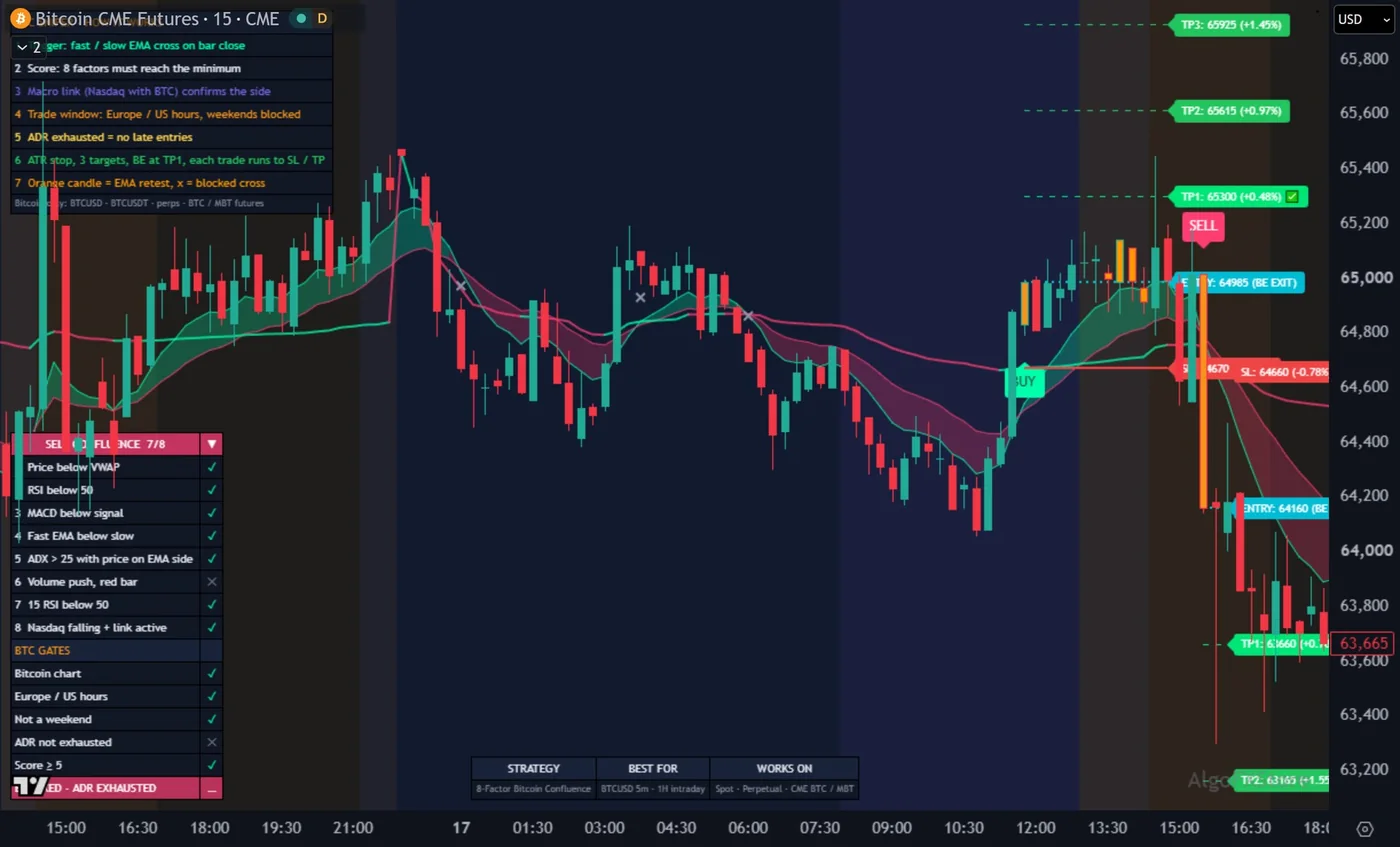
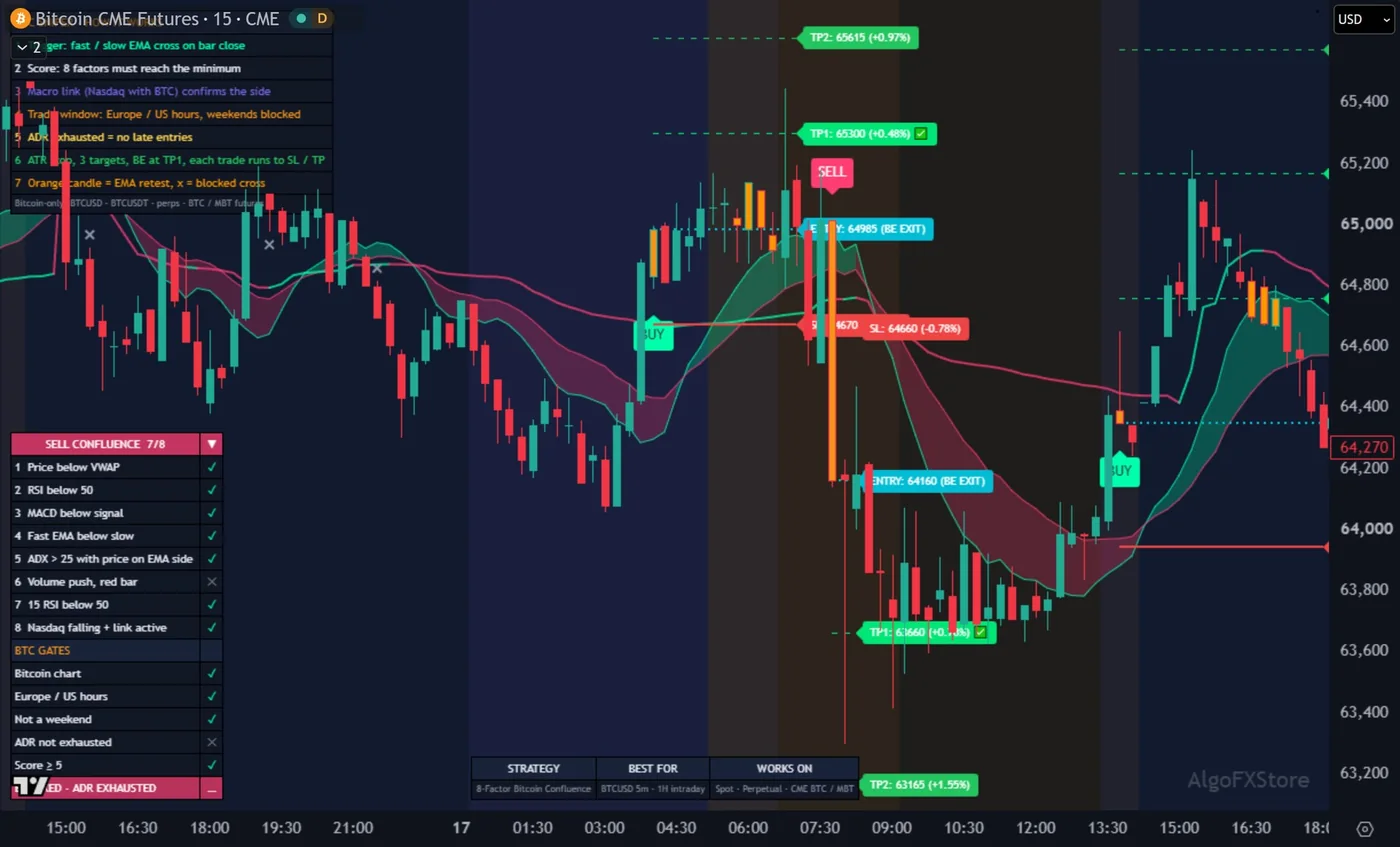
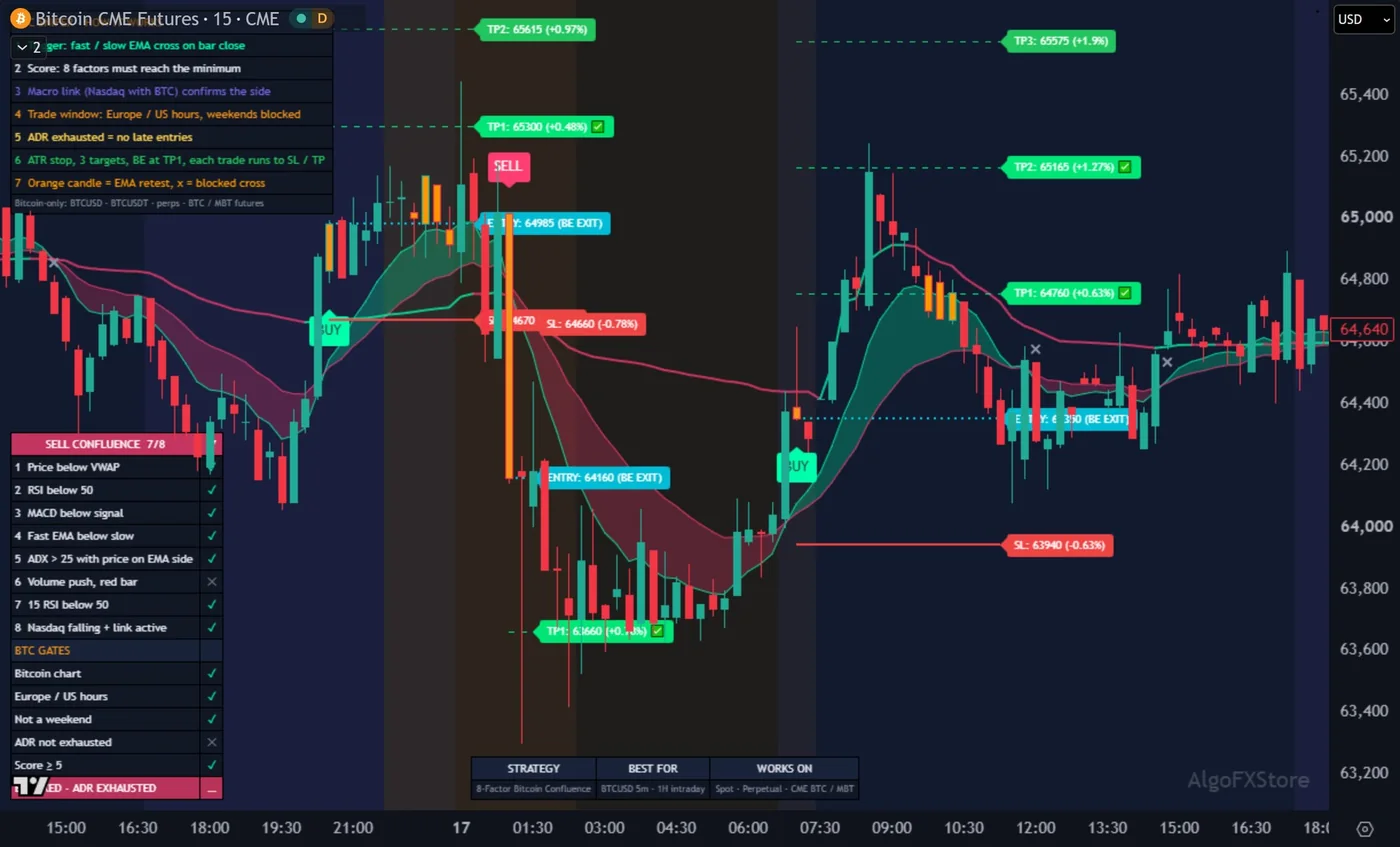
A step-by-step way to use it on your charts
The indicator scores, gates and plans each cross. The order, the size and the decision stay yours. A routine you can start from and practise on a demo account:
- 1
Use a bitcoin chart and the right confirmation
Open spot BTCUSD, a perpetual, a bitcoin CFD or CME bitcoin futures. The code's own footer names 5 minutes to 1 hour intraday as its range. Keep the confirmation RSI at 15 on 1 to 5 minute charts; on a 15 minute chart set it to 60, because 15 would simply repeat the chart's own RSI.
- 2
Read the dashboard before the signal
Before a signal arrives, check the Instrument row, the macro link, how much of the daily range is used, the Session row and the Next stop distance. Work out what size that stop allows for your account now, so you are not doing arithmetic when the alert comes.
- 3
Act on the closed-candle signal
Take a signal only once it has printed on a closed candle and the checklist shows all four gates open. Look at the score: 5 of 8 is the minimum, and some traders require 6. If the ADR row is amber or red, the day has already travelled far; if the macro row is amber, the Nasdaq link is not active.
- 4
Place your own bracket
The indicator draws but does not order. Place your stop just beyond the SL label and your targets at TP1, TP2 and TP3, for example one part per target. When TP1 is reached, move your real stop to the entry yourself; the indicator only draws its breakeven line.
- 5
Decide what an opposite signal means
Because an opposite signal does not close the open trade on the chart, decide in advance whether it is your exit or a signal to skip. On a futures account positions net, so a long and a short ladder on the chart are not two positions at your broker.
- 6
Respect news and the weekend
US CPI, the jobs report, the Fed decision and PCE move bitcoin together with the Nasdaq; many traders skip signals from 10 minutes before to 10 minutes after. CME bitcoin is closed at the weekend while spot keeps trading, so futures can reopen on Sunday evening far from Friday's close.
The dashboard, row by row
- Header: 'AlgoFXStore' | 'BTC SNIPER' (dark header; red when the chart is not bitcoin)
- Instrument: CME FUTURES / PERPETUAL / BTC CFD / SPOT BTC, or 'NOT BITCOIN · SIGNALS OFF
- BULL SCORE: e.g. '63% (5/8)' on green
- BEAR SCORE: e.g. '25% (2/8)' on red
- MARKET BIAS: STRONG BULL / MILD BULL / NEUTRAL / MILD BEAR / STRONG BEAR (strong = 40 points or more between the two scores)
- Price / VWAP: ABOVE / BELOW
- RSI (14): value
- MACD: BULL / BEAR + histogram
- ADX (14): value with up / down (+DI vs -DI)
- EMA 9/21: BULL / BEAR
- Volume: HIGH / LOW / N/A
- RSI: confirmation-timeframe RSI
- Macro (positive): macro close up / down, 'r <correlation>' and tick / for the link, or OFF / NO DATA (amber while the link is not active)
- BTC dominance: CRYPTOCAP:BTC.D % with up / against its 20-bar average (information only, not scored)
- Session: EUROPE / US / EU + US OVERLAP / ASIA / OFF-HOURS / WEEKEND
- ADR (14d): '<adr> dollars · used <x>%' (green, amber from 75 % of the block level, red when exhausted)
- ATR (14): '<atr> dollars (<x>%)
- Risk (1R) of the open trade, or Next stop distance (1.5 x ATR): '<distance> dollars (<x>%)' in red
- Confluence: '<n>/8 (min 5)
- BTC gates: 'ALL OPEN tick ' / 'BLOCKED · OFF-HOURS / WEEKEND / ADR EXHAUSTED / NOT BITCOIN
- Open trades: FLAT / '2 (1 L · 1 S)
- Latest trade: e.g. 'LONG · 1/3 TP · BE ACTIVE' or 'SHORT · 3/3 TP · CLOSED TP3' (one trade, like an exit mark)
- History (last 50): outcome tally - see stats_rows
- Signal: NEW / 'LAST BLOCK: LONG · OFF-HOURS' / WATCHING
Everything Bitcoin Sniper Confluence does for you
Eight factors on every cross
VWAP, RSI, MACD, EMA alignment, ADX with direction, volume, a 15-minute RSI and the macro link are scored for both sides on every candle, and a cross needs 5 on its side by default (adjustable from 1 to 8).
A macro link that switches itself off
The Nasdaq futures point counts only while bitcoin's 20-bar correlation with it is at least +0.3. When bitcoin decouples, the factor pauses and the dashboard turns the row amber. You can choose another index or an inverse dollar index.
Gates written for bitcoin
Symbol guard, Europe and US liquidity windows with shaded background, a weekend block and an average daily range filter. Crosses that score but fail a gate get a grey x, and the checklist names the reason.
Decided on the closed candle
With Bar-close confirmation on, BUY and SELL, the ladders and the entry alerts only appear once the candle has closed. The daily range filter uses completed days only.
A full ladder on every signal
Entry, a 1.5 x ATR(14) stop and one to three targets at 1R, 2R and 3R with prices and percent distance. A reached target is marked and turns a brighter green; a stopped trade is marked on its SL label.
Breakeven after the first target
With Move stop to breakeven on, the working stop moves to the entry at TP1 and the entry line turns dotted with BE ACTIVE, then BE EXIT if price returns there. The red stop line stays visible.
A dashboard and a live checklist
Twenty-four dashboard rows cover instrument type, both scores, market bias, each factor, BTC dominance (information only), session, ADR used, ATR, stop distance, gates, open and latest trades. The checklist ends with SIGNAL NOW, ARMED, BLOCKED with a reason, or Waiting for confluence.
Fourteen alert conditions
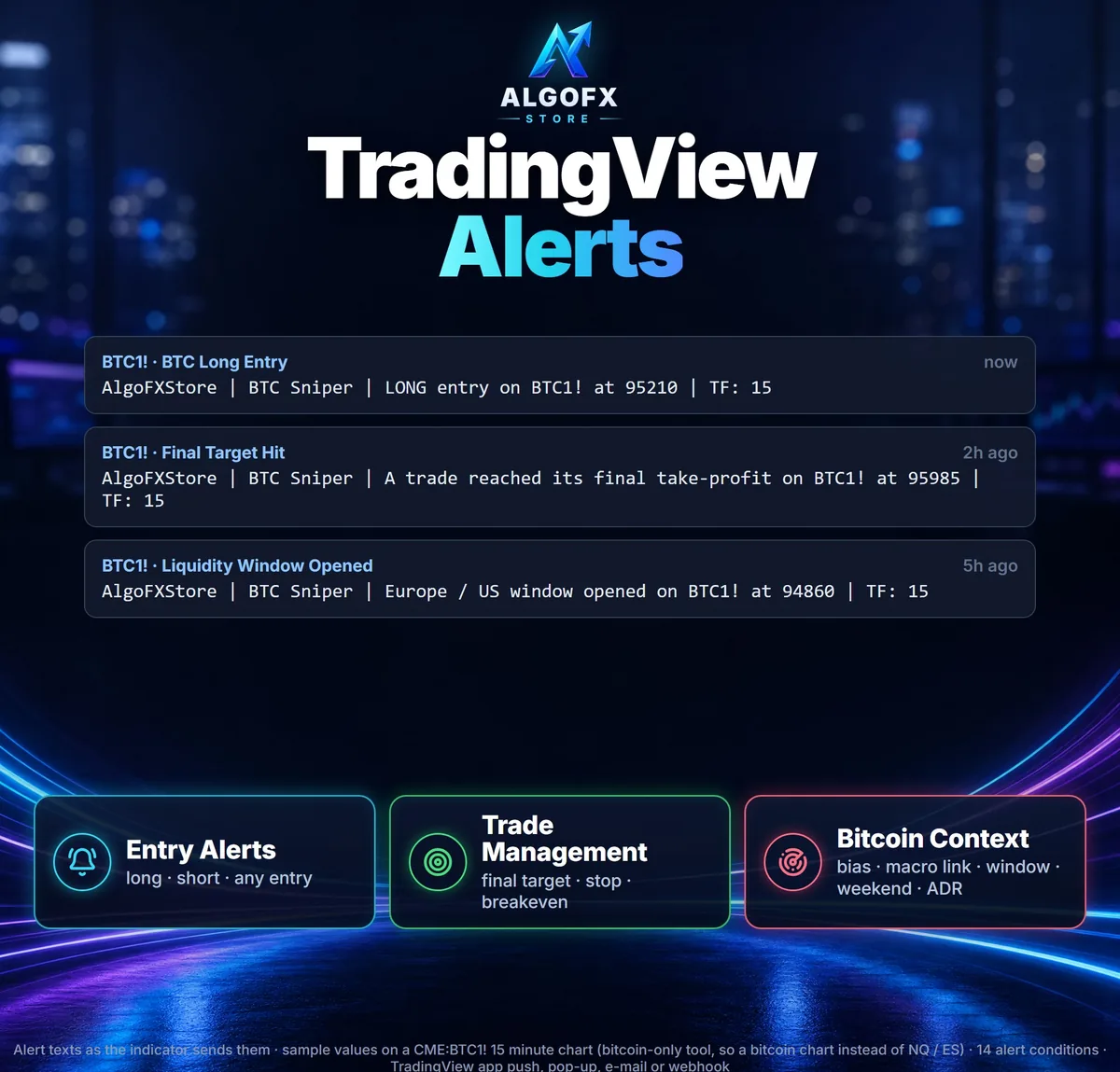
Long, short and any entry; strong bull and bear bias; macro link active and lost; liquidity window opened; weekend started; ADR exhausted; signal blocked; final target, stop-loss and breakeven exits. Entry messages carry the symbol, close and timeframe.
Bitcoin Sniper Confluence, feature by feature
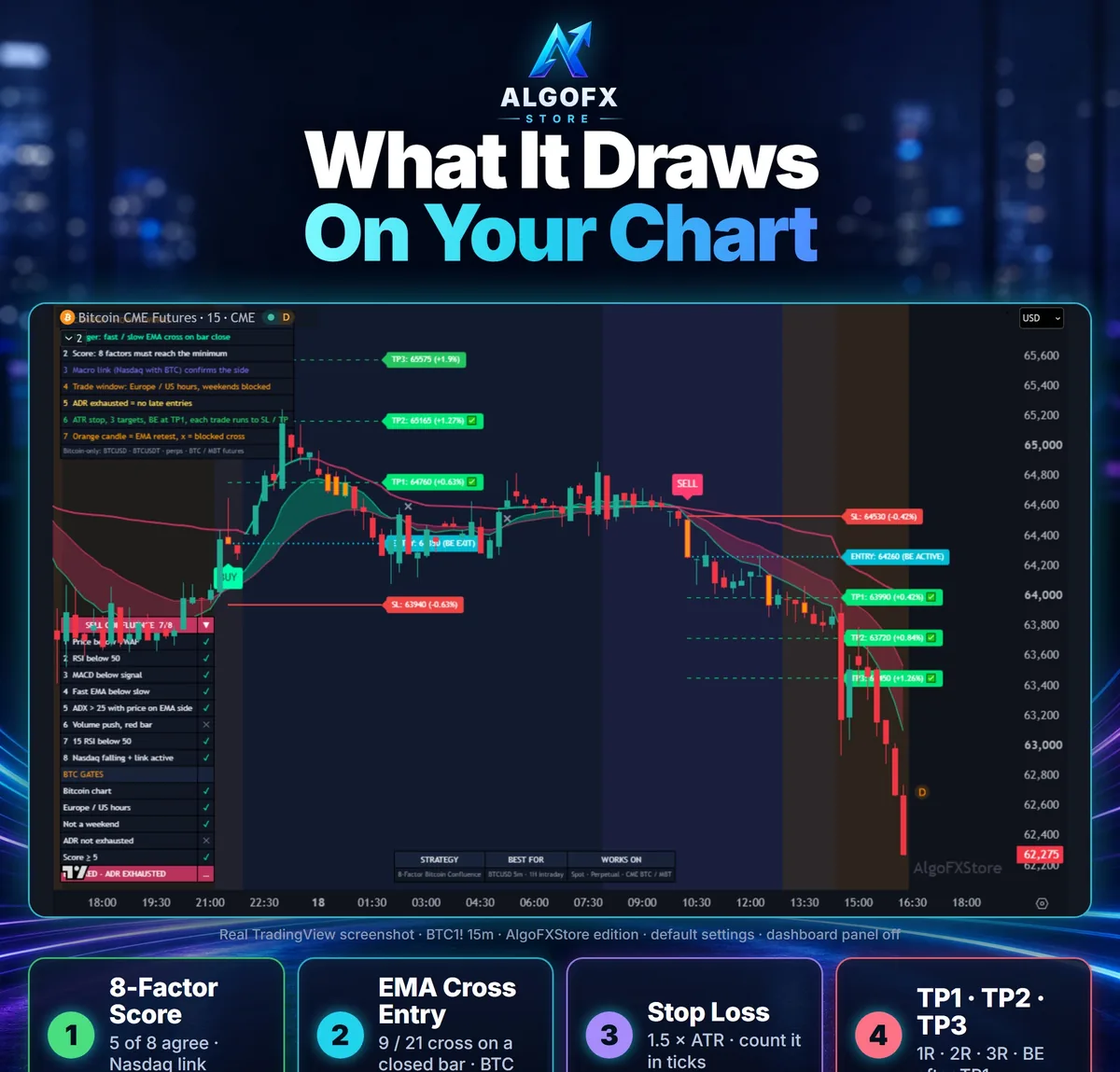
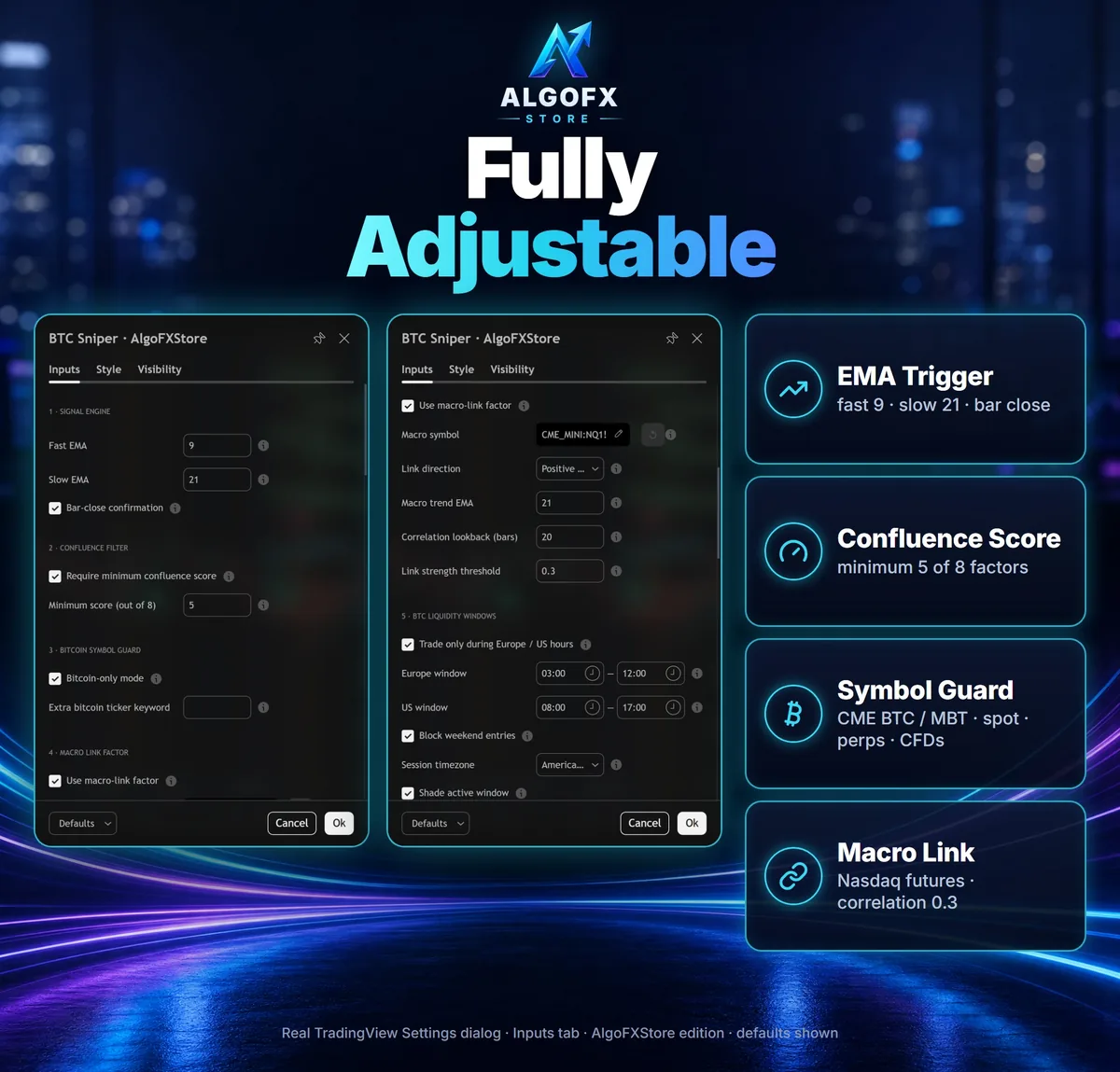
Each picture is built from real platform screenshots of the shipped indicator at its default settings, labelled so you can see what every part does. Tap any picture to open it full size.
How traders put it to work
Micro Bitcoin futures on 5 minutes
On MBT1! the 15-minute RSI is a real higher-timeframe confirmation. The dashboard's distances are per one bitcoin, so multiply by 0.1 for one MBT contract. Without a real-time CME data package the chart and the default Nasdaq macro symbol are delayed on TradingView.
Bitcoin futures on 15 minutes
On BTC1! set the confirmation RSI to 60. Multiply dashboard distances by 5 for one contract. If you must be flat before a set time, end the US window about 30 minutes before it, for example 0800-1530; the default 17:00 is the CME bitcoin daily close.
Spot and perpetual bitcoin up to 1 hour
Spot and perpetual bitcoin trade 24/7, so weekend candles exist and are shaded grey, and crosses there are blocked by the weekend gate. On the 1 hour chart you see several sessions at once; the hours filter stays active up to intraday charts and is ignored on daily and higher.
Stricter days
Raise the minimum score to 6 for fewer signals, and lower the ADR block level to 80 to 90 % to stop earlier on big days. Keep the stop multiplier at 1.5: a smaller one puts the stop inside bitcoin's normal wicks, and a lower timeframe is the better way to a smaller stop.
Other markets with the guard off
With Bitcoin-only mode off, the same engine runs on forex, gold, index, crypto and stock charts. Its windows, weekend gate, Nasdaq link and ADR filter stay set up for bitcoin, so adjust or switch them off for the market you trade.
Every setting, with its default
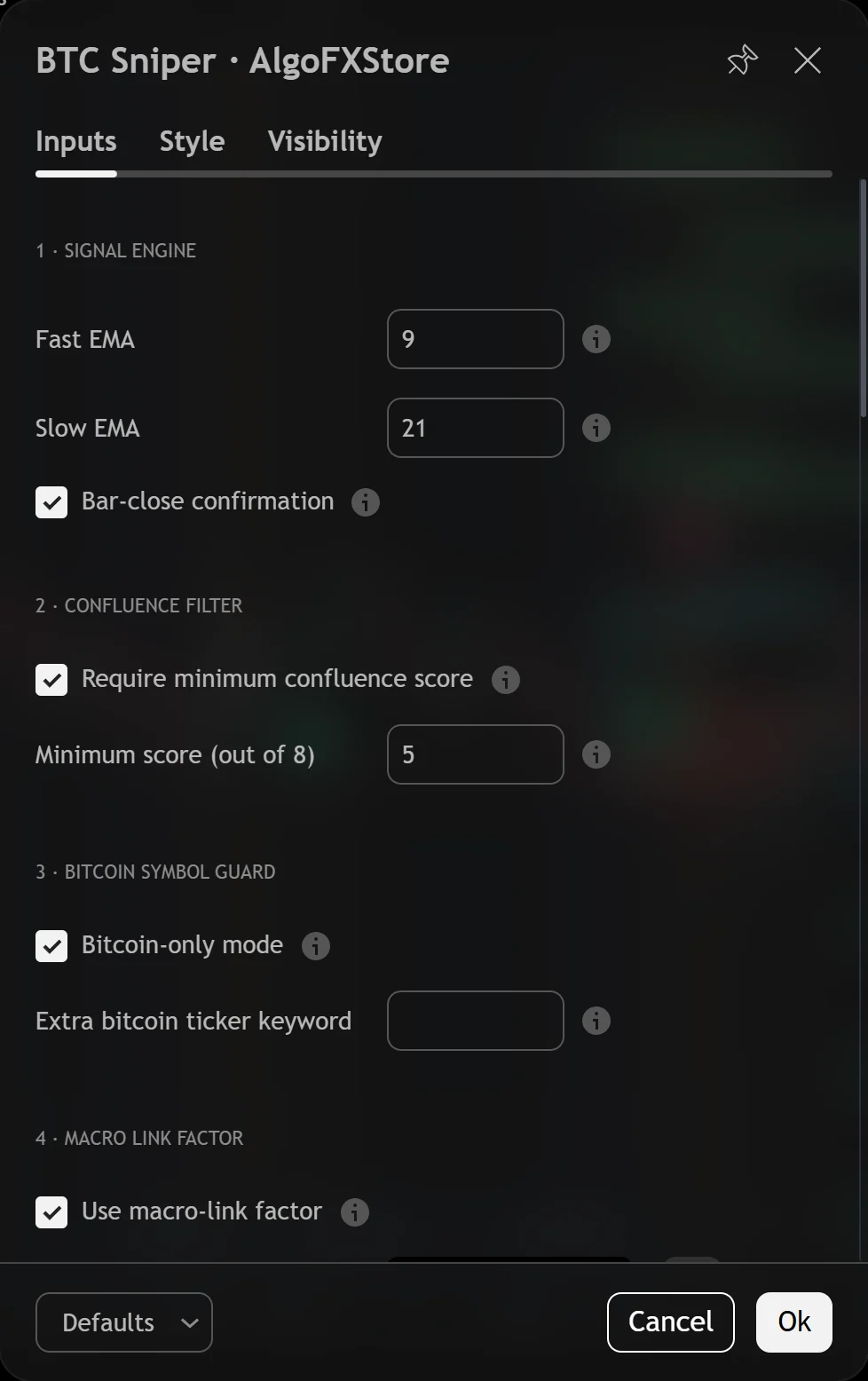
The names are the ones in the script's Settings dialog in TradingView (Inputs tab); the defaults are what every chart on this page uses. Open a group to see its settings.
1 · Signal Engine (3)
| Setting | Default | What it does |
|---|---|---|
| Fast EMA | 9 | Fast EMA length (2-50); its cross of the slow EMA is the trigger |
| Slow EMA | 21 | Slow EMA length (5-200) |
| Bar-close confirmation | on | A cross counts only once the bar has closed |
2 · Confluence Filter (2)
| Setting | Default | What it does |
|---|---|---|
| Require minimum confluence score | on | A cross becomes a signal only with enough factors on its side |
| Minimum score (out of 8) | 5 | Factors that must agree (1-8); out of 7 when the macro factor is off |
3 · Bitcoin Symbol Guard (2)
| Setting | Default | What it does |
|---|---|---|
| Bitcoin-only mode | on | Signals only on bitcoin charts (BTC / XBT base, BTC or XBT in the ticker, CME BTC / MBT futures); off = any market |
| Extra bitcoin ticker keyword | (empty) | Part of an unusual broker ticker to treat as bitcoin |
4 · Macro Link Factor (6)
| Setting | Default | What it does |
|---|---|---|
| Use macro-link factor | on | Adds the macro point to the score (8 factors instead of 7) |
| Macro symbol | CME_MINI:NQ1! | Symbol whose trend votes (NASDAQ:NDX, CME_MINI:ES1!, SP:SPX positive; TVC:DXY inverse) |
| Link direction | Positive (Nasdaq / S&P) | Positive: macro rising = bull point; Inverse (DXY): macro falling = bull point |
| Macro trend EMA | 21 | Macro rising = close above this EMA on the chart timeframe |
| Correlation lookback (bars) | 20 | Bars of the rolling correlation between bitcoin and the macro symbol |
| Link strength threshold | 0.3 | The point counts only while the correlation is at least +0.3 (positive) or at most -0.3 (inverse) |
5 · BTC Liquidity Windows (6)
| Setting | Default | What it does |
|---|---|---|
| Trade only during Europe / US hours | on | Crosses outside both windows are blocked (x); ignored on daily and higher charts |
| Europe window | 0300-1200 | Europe window in the session timezone (08:00-17:00 London) |
| US window | 0800-1700 | US window in the session timezone |
| Block weekend entries | on | Saturday and Sunday blocked; ignored on weekly and monthly charts |
| Session timezone | America/New_York | America/New_York, Europe/London, UTC or Exchange |
| Shade active window | on | Violet Europe, orange US, brighter orange overlap, grey weekend |
6 · ADR Exhaustion (3)
| Setting | Default | What it does |
|---|---|---|
| Block entries when ADR is exhausted | on | No new entries once today's range has used the set share of the ADR |
| ADR lookback (days) | 14 | Completed daily ranges averaged |
| Block at % of ADR used | 100 | Block level (30-300 %) |
7 · Risk Management (5)
| Setting | Default | What it does |
|---|---|---|
| Stop-loss ATR multiplier | 1.5 | Stop distance = ATR x this; targets at 1R, 2R, 3R |
| ATR period | 14 | ATR length for stop and targets |
| Take-profit levels | 3 | 1 to 3 targets; the last one closes the trade |
| Move stop to breakeven at TP1 | on | After TP1 a return to entry closes the trade as BE |
| Trades kept on chart | 50 | Ladders kept (1-100); the tally covers the same trades |
8 · Confirmation Timeframe (1)
| Setting | Default | What it does |
|---|---|---|
| RSI confirmation timeframe | 15 | Timeframe of the 14-period RSI factor |
9 · Dashboard (4)
| Setting | Default | What it does |
|---|---|---|
| Show dashboard | on | The 24-row read-out |
| Dashboard position | Top Right | 9 positions |
| Dashboard text size | small | tiny / small / normal / large / huge |
| Show BTC dominance row | on | CRYPTOCAP:BTC.D vs its 20-bar average, not scored |
10 · On-Chart Panels (6)
| Setting | Default | What it does |
|---|---|---|
| Show HOW IT WORKS legend | on | Seven-line legend |
| HOW IT WORKS position | Top Left | 9 positions |
| Show live confluence checklist | on | tick / list of the 8 factors and 4 gates for the stronger side |
| Checklist position | Bottom Left | 9 positions |
| Show strategy summary footer | on | Strategy · suited to · works on |
| Summary position | Bottom Center | 9 positions |
11 · Visuals (8)
| Setting | Default | What it does |
|---|---|---|
| EMA ribbon fill | on | Green / red fill between the EMAs |
| Ribbon transparency | 75 | 0 solid, 100 invisible |
| VWAP line | on | Session VWAP coloured by price side |
| Entry / SL / TP lines and labels | on | Trade ladder of every signal |
| Trade label size | small | tiny to huge |
| Label offset (bars right) | 12 | Label distance right of the last candle for open trades |
| Highlight EMA retest candles | on | Orange candle on a pullback into the fast EMA while the latest trade is open |
| Mark crossovers blocked by bitcoin filters | on | Grey x where a scored cross was blocked |
The alert events, one by one
In TradingView: Create alert, choose “Bitcoin Sniper Confluence [AlgoFXStore]” as the condition and pick the event. TradingView then notifies you the way you set in that dialog: a pop-up in TradingView, a sound, the TradingView app on your phone or an e-mail.
- BTC Long Entry
- BTC Short Entry
- Any BTC Entry
- Strong Bull Bias
- Strong Bear Bias
- Macro Link Active
- Macro Link Lost
- Liquidity Window Opened
- Weekend Started
- ADR Exhausted
- Signal Blocked by BTC Filter
- Final Target Hit
- Stop-Loss Hit
- Breakeven Exit
Bitcoin Sniper Confluence next to the usual options
Where it wins, and where it does not.
| Bitcoin Sniper Confluence | Typical free EMA cross indicator | Reading it by hand | |
|---|---|---|---|
| What makes a signal | EMA cross plus 5 of 8 scored factors plus four bitcoin gates | The cross alone | The cross plus whatever you check that day |
| Time and day awareness | Europe and US windows, weekend block and a daily range filter | None | Your own discipline about hours |
| Macro context | Nasdaq futures point only while bitcoin is correlated with it | None | A second chart you glance at |
| Trade plan | ATR stop, up to three R targets and breakeven at TP1, drawn per signal | Usually none | You measure every level |
| Markets | Built for bitcoin; other markets need the guard and filters switched off | Any symbol as is | Any symbol |
| Simplicity | 46 inputs, a 24-row dashboard and three panels to learn | Two lengths | No software to learn at all |
| Cost | A one-time payment | Free | Free, paid for in screen time |
Honest about who this fits
A good fit if you
- You trade bitcoin intraday on spot, perpetual, CFD or CME futures charts on TradingView.
- You already use EMA crosses and want each one checked against the same eight factors every time.
- You want the indicator to keep you out of thin hours, weekends and days that have already run their usual range.
- You plan every trade from a stop and like to see the stop distance before the signal arrives.
- You want to see why a cross was skipped as well as why one was taken.
Not for you if you
- Traders who want orders placed or stops moved for them: it draws and alerts, it never sends an order.
- Anyone who mainly trades forex, gold, indices or stocks: it is built for bitcoin, and other markets need its gates reworked.
- Swing traders on daily and higher charts: the design is intraday, 5 minutes to 1 hour.
- Traders who want an opposite signal to close the open trade automatically: on the chart, long and short trades can run side by side.
The full code, one manual, installed in two minutes
- 1Pine Script source codeBitcoin_Sniper_Confluence_TradingView_Code.txt (62 KB): the full code. Paste it into the Pine Editor and it appears as “Bitcoin Sniper Confluence [AlgoFXStore]”.
- 15Page PDF manualInstallation, every setting with its default and how to read the chart.
- 46SettingsEvery one explained above, with the defaults the charts use.
- ✓Alert eventsYou choose which ones are on in the settings.
- 60Day money-back guaranteeIf it is not for you, request a full refund within 60 days through your Digistore24 order e-mail.
Install in five steps
- Download the zip from the page Digistore24 sends you to after checkout and unzip it.
- Open Bitcoin_Sniper_Confluence_TradingView_Code.txt in a text editor, select all and copy the whole code.
- In TradingView, open the Pine Editor, paste the code over everything that is there and click Save.
- Click Add to chart: “Bitcoin Sniper Confluence [AlgoFXStore]” appears on your chart.
- Read the PDF manual; the defaults are the settings shown on this page.

Kestutis Balciunas
AlgoFXStore · chart indicators
Kestutis Balciunas builds and publishes chart indicators under the AlgoFXStore name. Every product page shows what the indicator draws on real charts, and every number on it comes from the shipped build.
The charts on this page were captured in TradingView from the shipped Bitcoin Sniper Confluence [AlgoFXStore] at its default settings and are shown unedited.
No get-rich claims and no quoted win rates. Every trade is uncertain, and no indicator changes that. If you want to know whether it suits the way you trade before you buy, e-mail [email protected] and you will get a straight answer.
One price, one payment
- The full Pine Script source code of Bitcoin Sniper Confluence and the 15-page PDF manual
- Delivered as a digital download: one zip with the code file and the PDF manual on your download page
- Return period: 60 days, with a full refund if it is not for you
- Free updates to the current version on the same download page
60-day money-back guarantee. Install it, run it on your own charts and read the manual. If Bitcoin Sniper Confluence is not for you within 60 days of purchase, request a full refund from Digistore24, no questions asked: use the refund link in your Digistore24 order e-mail or Digistore24's order page digistore24.com/en/cancel-revoke-contract. Digistore24 refunds to your original payment method. It is a digital download: right after checkout you land on your download page, and the link to it is also in your Digistore24 order e-mail.
About the signals
Does it repaint?
With Bar-close confirmation on, BUY and SELL are decided when the candle closes and stay where they printed. Two factors can still make a live signal differ from what the same candle shows later: below 15 minutes the 15-minute RSI uses the developing 15-minute candle in real time but completed values on history, and with delayed CME data the Nasdaq candles arrive late and the macro point can update afterwards. Trade outcomes are a model on candle highs and lows.
Why was a crossover skipped?
Either the score on its side was below the minimum, in which case nothing is drawn, or a bitcoin gate blocked it, in which case a small grey x marks the candle. The checklist and the BTC gates row name the reason: off-hours, weekend, ADR exhausted or not bitcoin.
What do the colours and marks mean?
Green or red ribbon: fast EMA above or below the slow one. Thick green or red line: VWAP. BUY or SELL on an orange candle: a signal. Grey x: a blocked cross. Orange candle without a label: a pullback into the fast EMA while the latest trade is open. Cyan entry, red stop, green targets; violet, orange and grey background for Europe, US and weekend.
What is the History row on the dashboard?
It counts how the trades kept on the chart ended: first target, full target, stop or breakeven. It is hindsight bookkeeping of the indicator's own ladders on the loaded candles, with wick touches counted and no spread or costs, it changes with the history loaded and the settings, and it is not a forecast.
Markets, settings and the dashboard
Which symbols does it accept?
With Bitcoin-only mode on, it signals on bitcoin charts: spot BTCUSD, BTCUSDT or BTCUSDC, perpetuals, bitcoin CFDs and CME BTC and MBT futures. On any other chart the header turns red, the Instrument row reads NOT BITCOIN, and crosses are only marked with a grey x. An unusual broker ticker can be added with the Extra bitcoin ticker keyword.
Should I keep the defaults or tune them?
Start with the defaults. Change the confirmation RSI to 60 on 15 minute charts. For fewer signals raise the minimum score to 6 or lower the ADR block level. If you must be flat at a set time, shorten the US window. Change one setting at a time and compare.
Why is the macro row amber most of the time?
Amber means bitcoin is not moving with the macro symbol right now, so the correlation is below the threshold and the factor scores nothing. That is by design. If the row reads NO DATA, choose another macro symbol, such as an S&P 500 or Nasdaq-100 index for a positive link or a dollar index for an inverse link.
What do the dollar amounts on the dashboard mean on futures?
ADR, ATR and the stop distance are price distances per one bitcoin. On the full CME contract multiply by 5 and on the micro contract by 0.1 to get the amount per contract. Always check your own contract and tick value.
Can I hide the panels?
Yes. The dashboard, the HOW IT WORKS legend, the live checklist and the summary footer each have a switch and nine positions. The BTC dominance row can be switched off on its own; it is information only and never scored.
Alerts and running it
How should I set the alerts?
Each of the 14 alert conditions needs its own alert: choose Create alert, pick the indicator, then the condition. Set the trigger to Once Per Bar Close. Entry alerts already wait for the close; the trade outcome, bias and window conditions are checked on the live candle, so this trigger keeps them to what the closed candle shows.
Do the alerts include the stop and targets?
No. The messages carry the symbol, the close price and the timeframe, for example a LONG entry at the close on that timeframe. Read the stop and targets from the chart labels or the dashboard.
Does it work on the free TradingView plan?
Yes. It uses no seconds or lower-timeframe intrabar data; its four extra requests are the 15-minute RSI, the macro symbol and BTC dominance on the chart timeframe, and the daily range. CME data, including the default Nasdaq macro symbol, is delayed without a real-time CME package, and webhooks need a paid plan.
How it works
Will it place trades for me?
No. Bitcoin Sniper Confluence is an indicator: it draws on the chart and can alert you. It never sends an order.
Which markets and timeframes does it work on?
Intraday bitcoin charts; the code's own footer says 'BTCUSD 5m - 1H intraday'. The hours filter is ignored on daily and higher charts, the weekend gate and the ADR filter on weekly and monthly. The confirmation RSI defaults to 15 minutes: a real higher-timeframe check on 1-10 minute charts, the chart's own RSI on 15 minutes (the manual suggests 60 there). CME Bitcoin futures trade Sunday-Friday 18:00-17:00 New York time with a one-hour daily break; spot and perpetual bitcoin trade 24/7, so weekend bars exist there and are shaded grey. 15 minutes (hero: the full CME contract, about 3 weeks in 2,000 bars, several windows and signals in view), MBT1!
Do I need a paid TradingView plan?
No. It reads only the chart's own bars, so the free TradingView plan runs it. Alerts count against your plan's alert limit.
After you buy
How do I get it after paying?
Digistore24 runs the checkout. Right after payment it takes you to your download page with one zip holding the Pine Script source code file and the PDF guide; the link to that page is also in your Digistore24 order e-mail, so you can download again at any time.
How do I install it?
Open the code file, open the Pine Editor in TradingView, paste the whole code, click Save and then Add to chart: “Bitcoin Sniper Confluence [AlgoFXStore]” appears on your chart. The guide walks through it step by step.
Who is Digistore24?
Digistore24 is the reseller that sells Bitcoin Sniper Confluence for Kestutis Balciunas (AlgoFXStore): it runs the checkout, charges your card or PayPal, collects the VAT for your country and delivers the download. Its name is the one on your statement, and its order e-mail holds your download link and the refund link.
What is the refund policy?
A 60-day money-back guarantee, handled by Digistore24. If Bitcoin Sniper Confluence is not for you within 60 days of purchase, use the refund link in your Digistore24 order e-mail or Digistore24's order page (digistore24.com/en/cancel-revoke-contract) for a full refund, no questions asked. Digistore24 makes the refund to your original payment method.
Do I get the source code?
Yes. You get the full Pine Script source code as a text file for your own use; the licence line at the top of the code does not allow resale, sharing or republishing.
Bitcoin Sniper Confluence for TradingView.
Put scored, bitcoin-gated EMA cross signals with a planned stop and targets on your TradingView chart today. The full code, the manual and every setting explained. Instant download for €47, one payment.
Get instant access