Size every supertrend flip in ticks: stop and three targets drawn on bar close
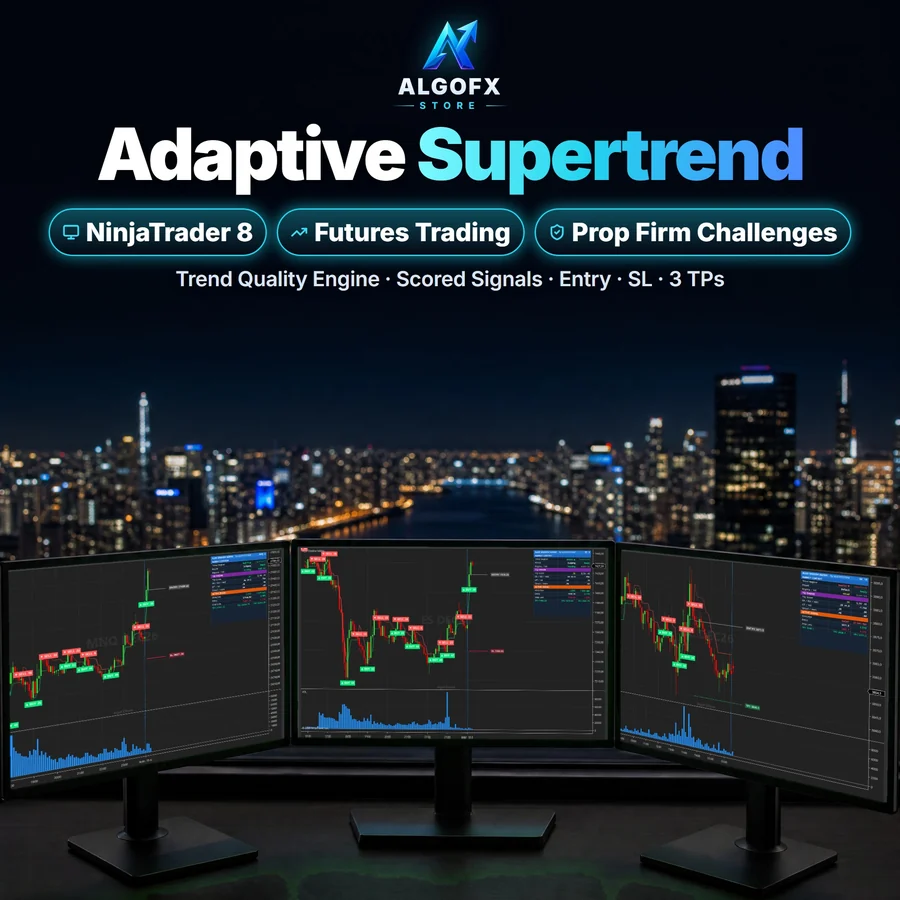
Algo Shadow Matrix is an adaptive supertrend for NinjaTrader 8: a Trend Quality Index sets the band width on every bar, and each flip on a closed bar prints a scored BUY or SELL pill with an entry, a stop loss and three take profit levels as exact prices.
- Adaptive supertrend line, green under price and red over it, brighter when trend quality is high.
- Each flip on bar close prints a pill such as ▲ BUY 62, scored from six factors on a 0 to 102 scale.
- ENTRY at the signal close, SL beyond the last swing plus an ATR buffer, TP1 to TP3 at 1R, 2R and 3R.
- Pills, levels and alerts fixed once the bar closes, matched cell for cell on a live MNQ 1 Minute run.
- A NinjaTrader 8 Add-On. Import one zip and it appears as “Algo Shadow Matrix AlgoFX” in your Indicators list.
- A 17-page PDF manual with every setting, the signals, the alerts and installation. One-time €77.
See Algo Shadow Matrix on a real chart
Press play; use the full-screen button to see every detail.
This video shows the same indicator on another charting platform; the NinjaTrader 8 edition sold here runs in NinjaTrader 8's own chart and settings windows. · 4:53 · Plays from YouTube when you press play (YouTube then sets its own cookies; see Privacy).
A fixed supertrend whips you in chop and hands you no stop size
A classic supertrend keeps one fixed distance from price, ATR times a multiplier, in every session. On index futures that one number cannot fit both a clean trend after the open and a slow midday range. Tight, it flips again and again in the range, each flip a fresh stop-out. Wide, it lags so far behind a real trend that the exit gives most of the move back.
The bigger problem for a futures trader comes after the flip. Before you take a signal you need the stop distance in ticks and the risk per contract. A plain supertrend gives you a colour change and nothing else, and you end up measuring every stop by hand, often after price has already moved.
Algo Shadow Matrix answers both. The band width follows a Trend Quality Index built from efficiency, participation, range position and momentum persistence, so the line follows clean moves closely and backs off in noise. And every flip draws ENTRY, SL and three targets as prices rounded to the instrument's tick, also shown on the dashboard and in the alert, ready to count in ticks.
What Algo Shadow Matrix draws, and what each mark means
Read from the shipped NinjaScript edition.
| What you see | What it means |
|---|---|
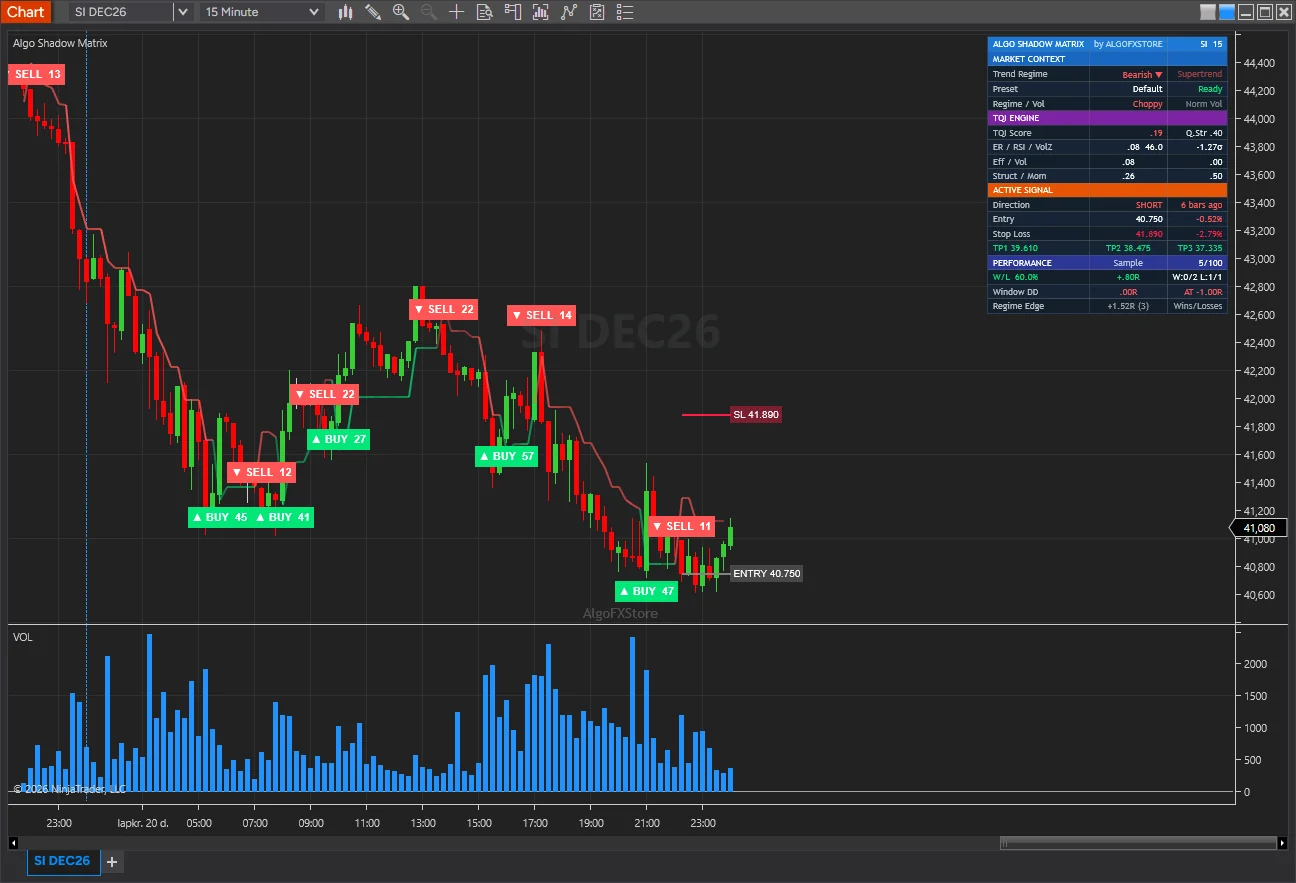
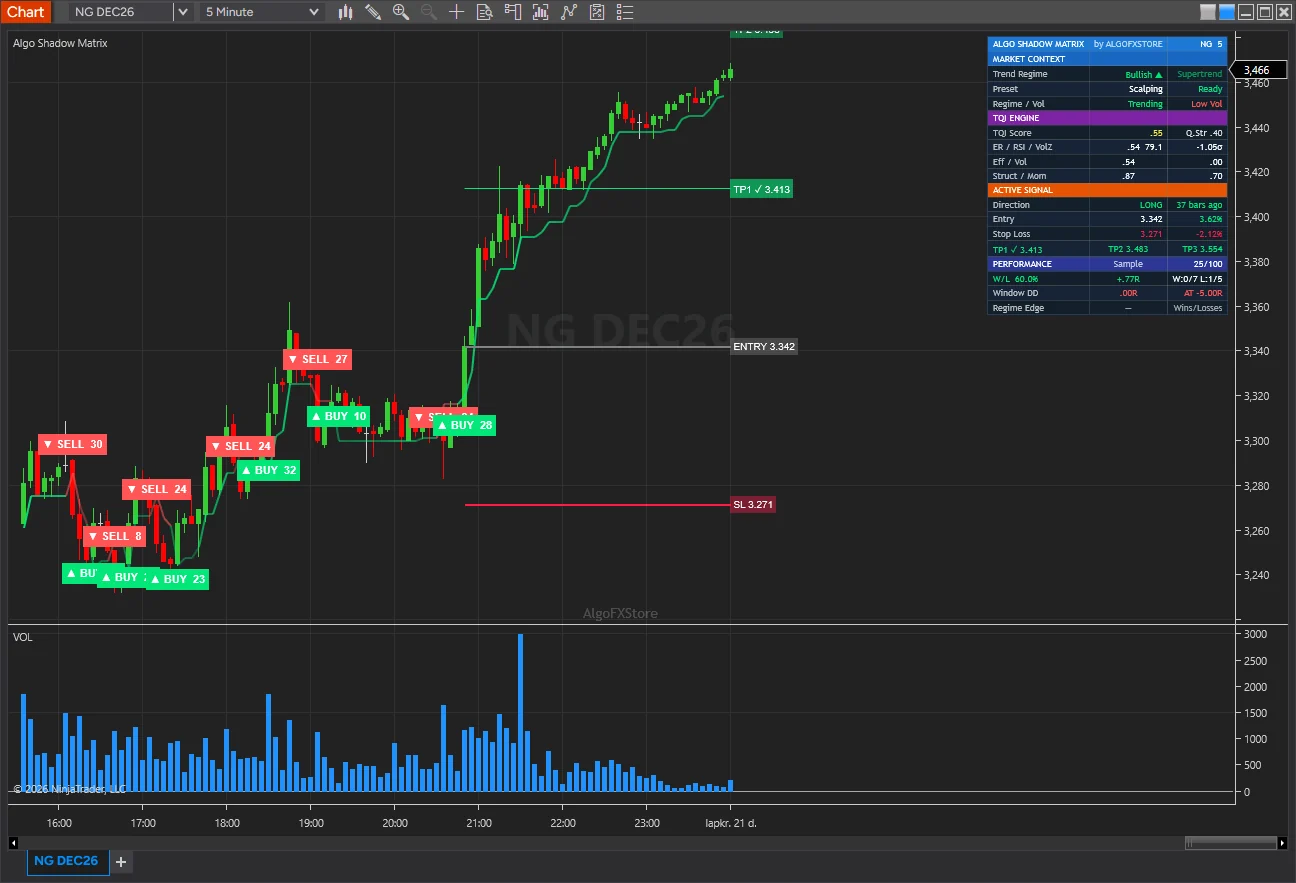
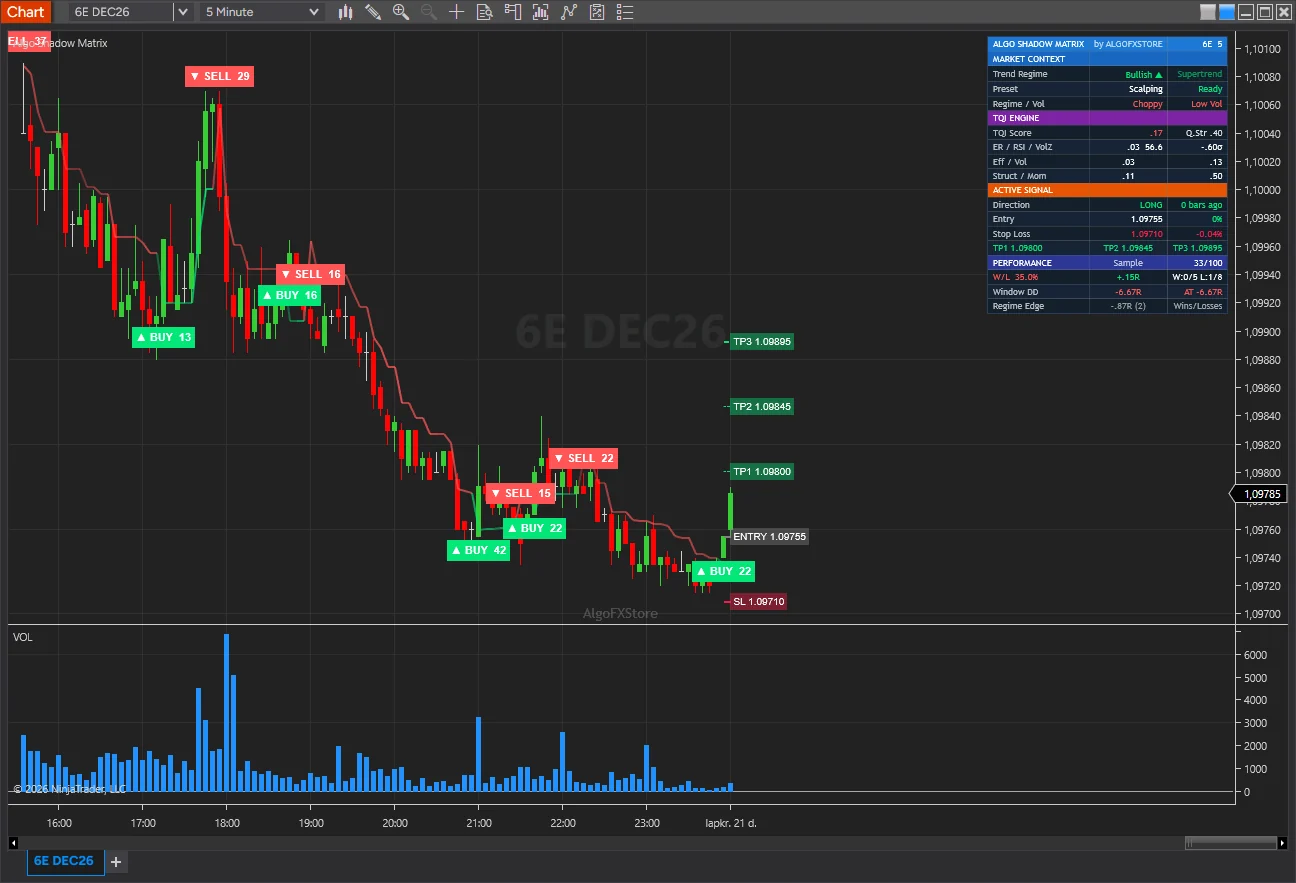
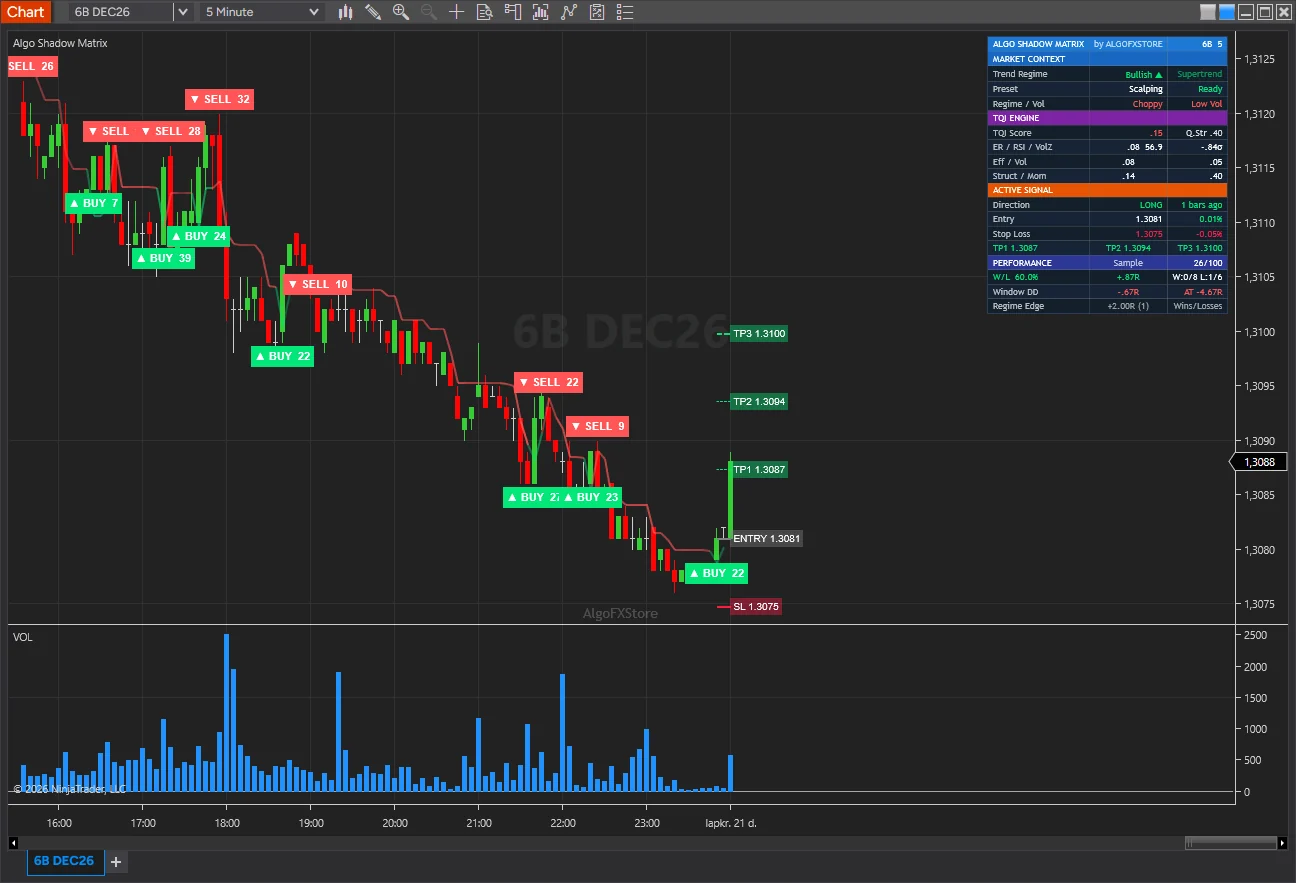
| Green line under price / red line over price | Adaptive Supertrend bullish / bearish. Brighter = higher trend quality (Color Line by TQI). |
| Green '▲ BUY 62' pill under a bar | The line flipped up on that closed bar; 62 = the signal's score out of 102. |
| Red '▼ SELL 25' pill over a bar | The line flipped down; 25 = score. |
| ENTRY <price> (grey) | Close of the signal bar. |
| SL <price> (red) | Last swing pivot plus an ATR buffer, at least one buffer from the entry. |
| TP1 / TP2 / TP3 <price> (green) | 1R, 2R, 3R; a reached target shows ✓ and turns cyan. |
| Dashboard top right | Trend regime, preset and warm-up, efficiency/volatility regime, TQI factors and the active signal with distances in percent. |
How the line, the pills and the plan are decided
Everything comes from the chart's own single data series; there are no added series. The steps follow the shipped NinjaScript edition.
- 1
An efficiency-weighted ATR
The indicator takes the ATR length of the active preset (14 on Default, 10 on Scalping) and, with Efficiency-Weighted ATR on, scales it by the efficiency ratio: ATR x (0.5 + 0.5 x ER). A straight move keeps the full ATR and a zig-zag counts it half, so noisy volatility does not push the bands as far from price. This same ATR sets the stop buffer.
- 2
A Trend Quality Index from four factors
Every bar gets a TQI between 0 and 1 from efficiency (weight 0.35), a participation and volatility factor (0.20, using real contract volume against its 20-bar average, or ATR against its 100-bar average when there is no volume), structure (0.25, how far the close sits from the middle of the 20-bar range) and momentum persistence (0.20, the share of the last 10 bars that moved in the direction of the 10-bar change).
- 3
Bands reshaped on every bar
The band width starts from the preset base (2.0 x ATR on Default), widens when efficiency is low and changes again with the TQI through Quality Influence 0.4 and Quality Curve Power 1.5. With Asymmetric Bands on, the trend-side band tightens and the other side widens as quality rises. Smooth Adaptive Multipliers keeps it from jumping, and the bands ratchet like any supertrend.
- 4
A flip on a closed bar prints the pill
When a bar closes above the previous upper band while the trend was down, the line turns up and a ▲ BUY pill with its score is placed under the bar low. A close below the previous lower band in an uptrend places ▼ SELL over the bar high. Every flip after the 50-bar warm-up prints; the score switches only change the score, never hide a signal.
- 5
A six-factor score from 0 to 102
The number on the pill adds six parts: momentum over the last three bars against ATR, efficiency, the volume z-score, how deep RSI went beyond 30 or 70 in its 20-bar memory, the distance to the last swing, and the break depth through the band. A higher number means more parts agreed at the flip. It describes the flip; it is not a probability.
- 6
The plan: entry, stop and three targets
ENTRY is the signal bar's close (grey). SL sits beyond the last swing low or high (Pivot Strength 3 bars each side) plus k x ATR, and never closer to the entry than k x ATR (red); k is 1.0 on Scalping, 1.5 on Default, 2.0 on Swing. TP1, TP2 and TP3 sit at 1R, 2R and 3R (green). The plan ends at TP3, the stop, a 100-bar timeout or the next signal.
Algo Shadow Matrix on 12 different markets
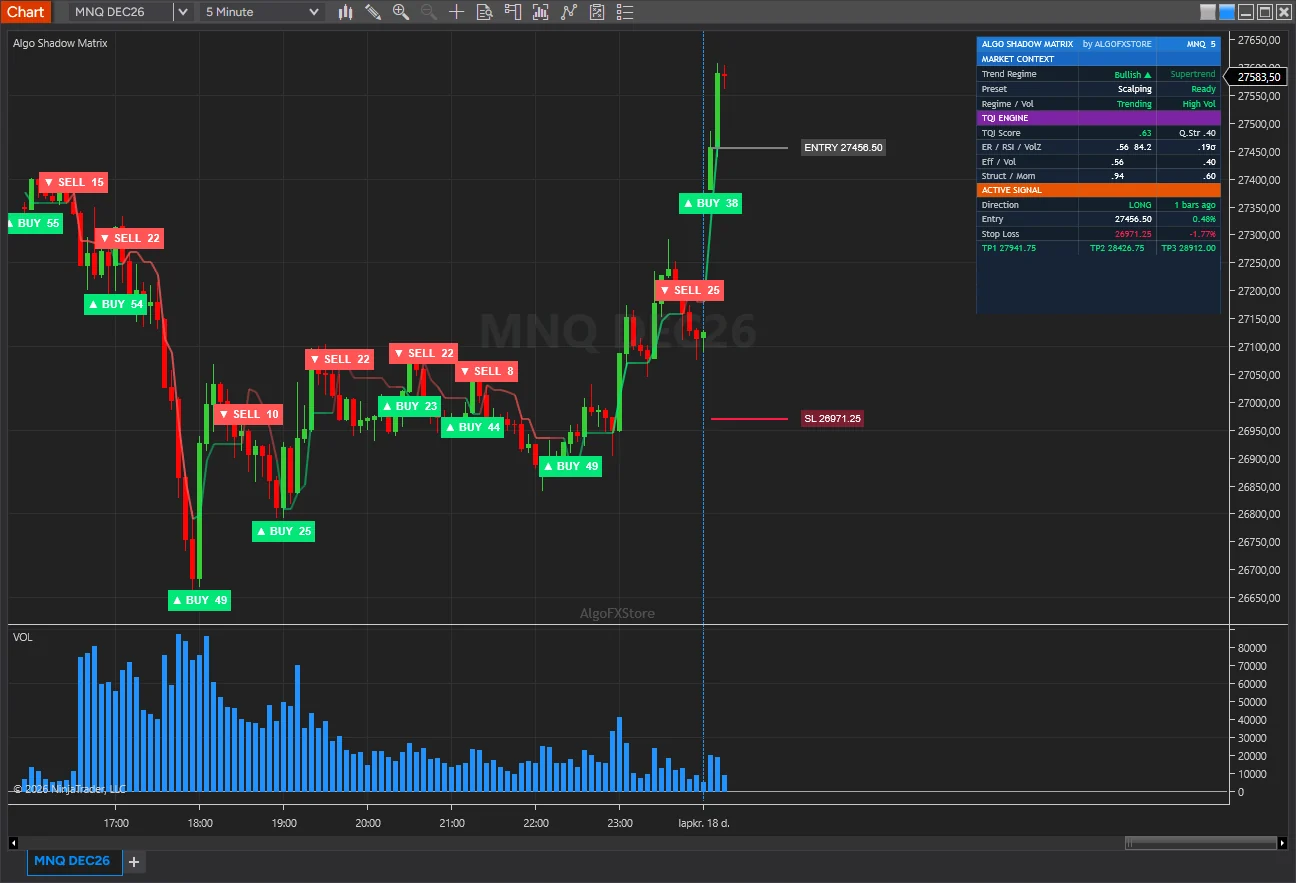
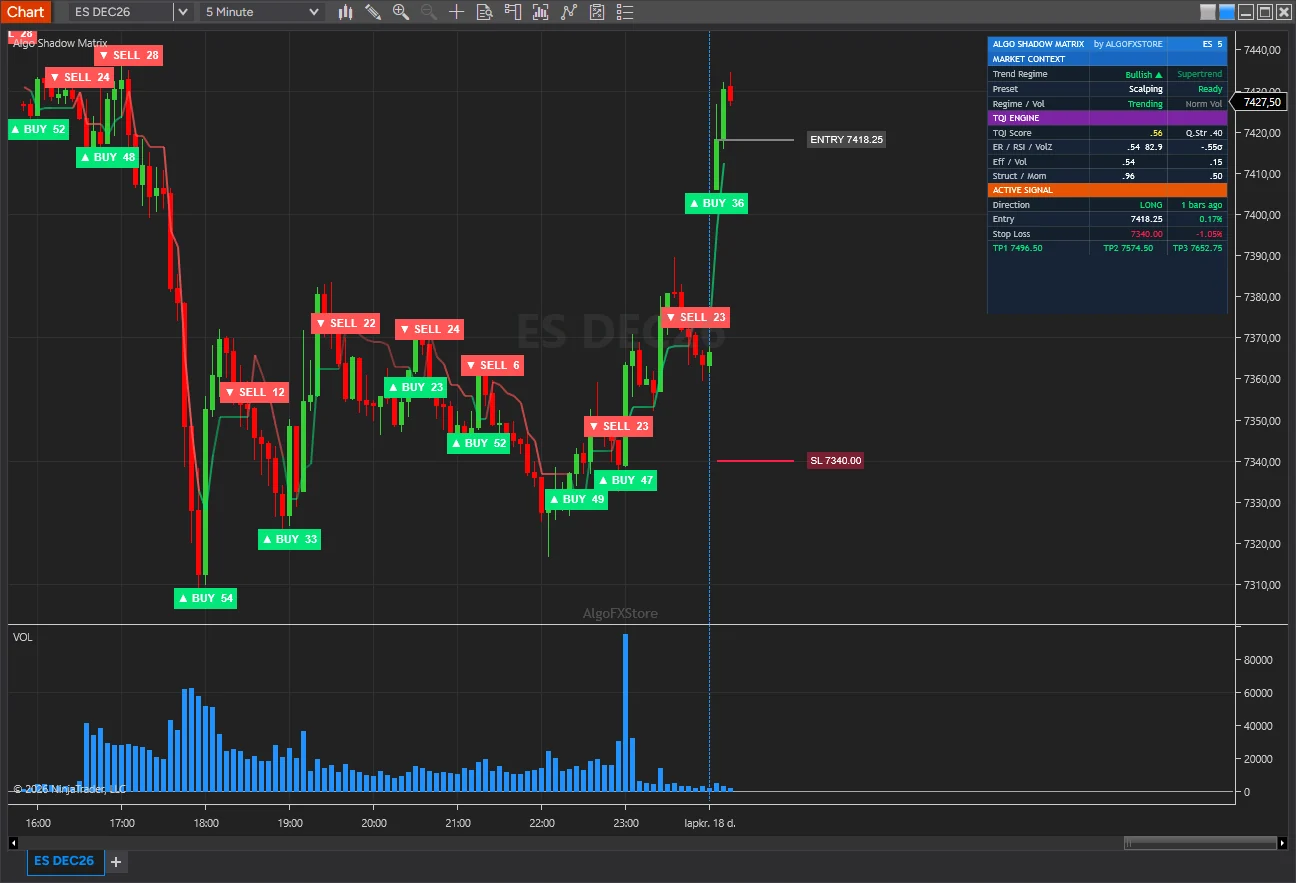
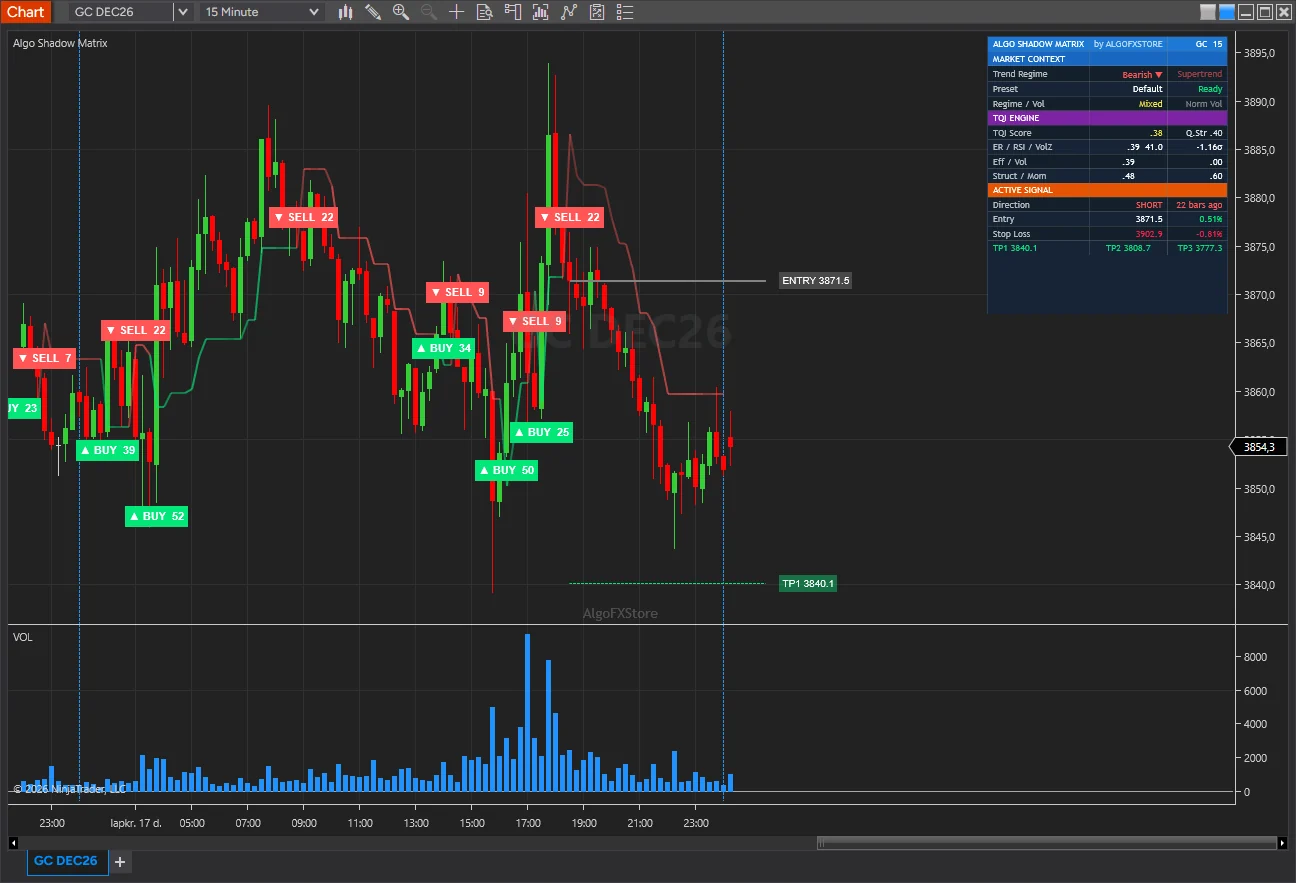
Every chart below is a screenshot of NinjaTrader 8 itself with the shipped Algo Shadow Matrix AlgoFX attached at its default settings. Forex, metals, indices, energy and crypto, so you can see how it reads each kind of market. They show what the indicator draws; they are not trading results. Tap or click any chart to open it full size.
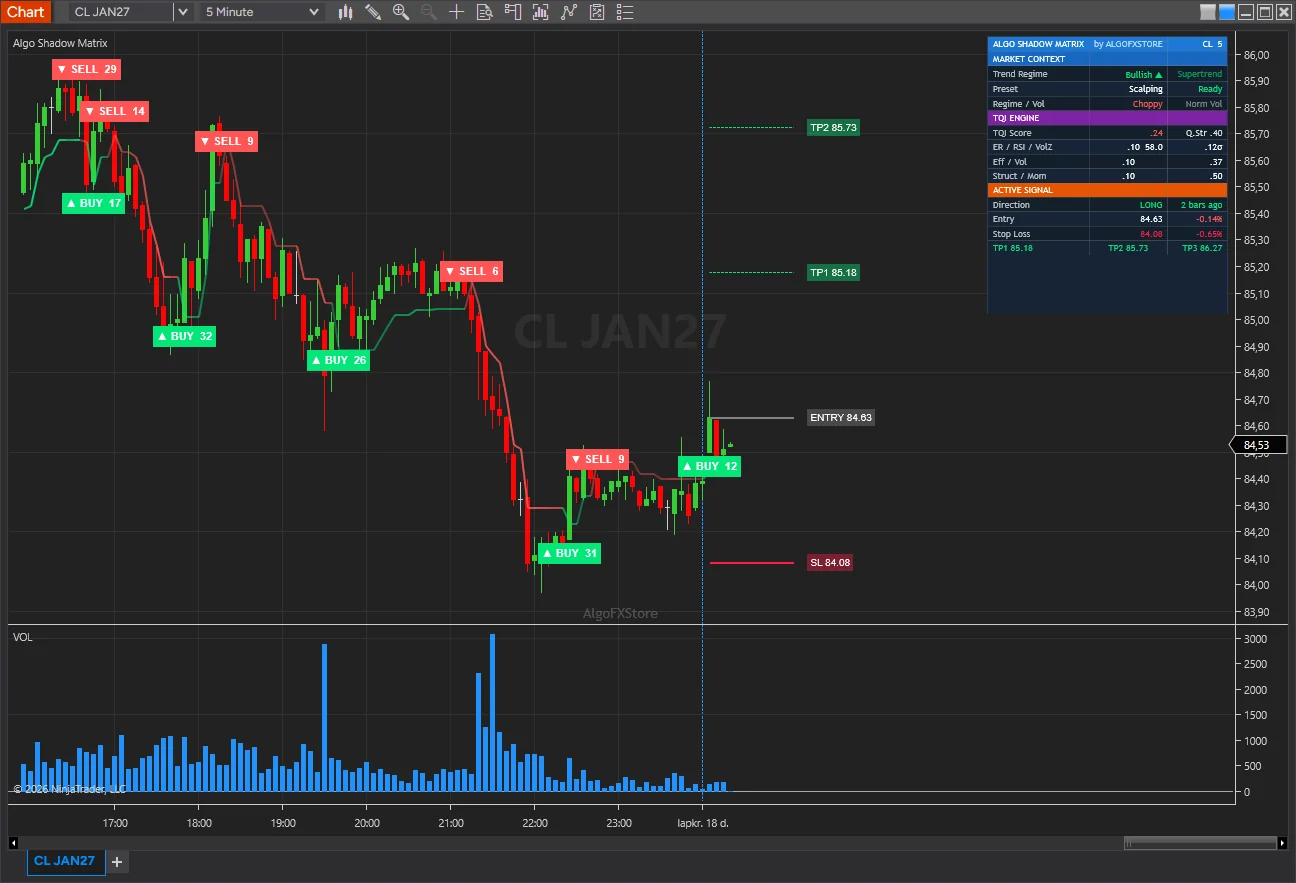
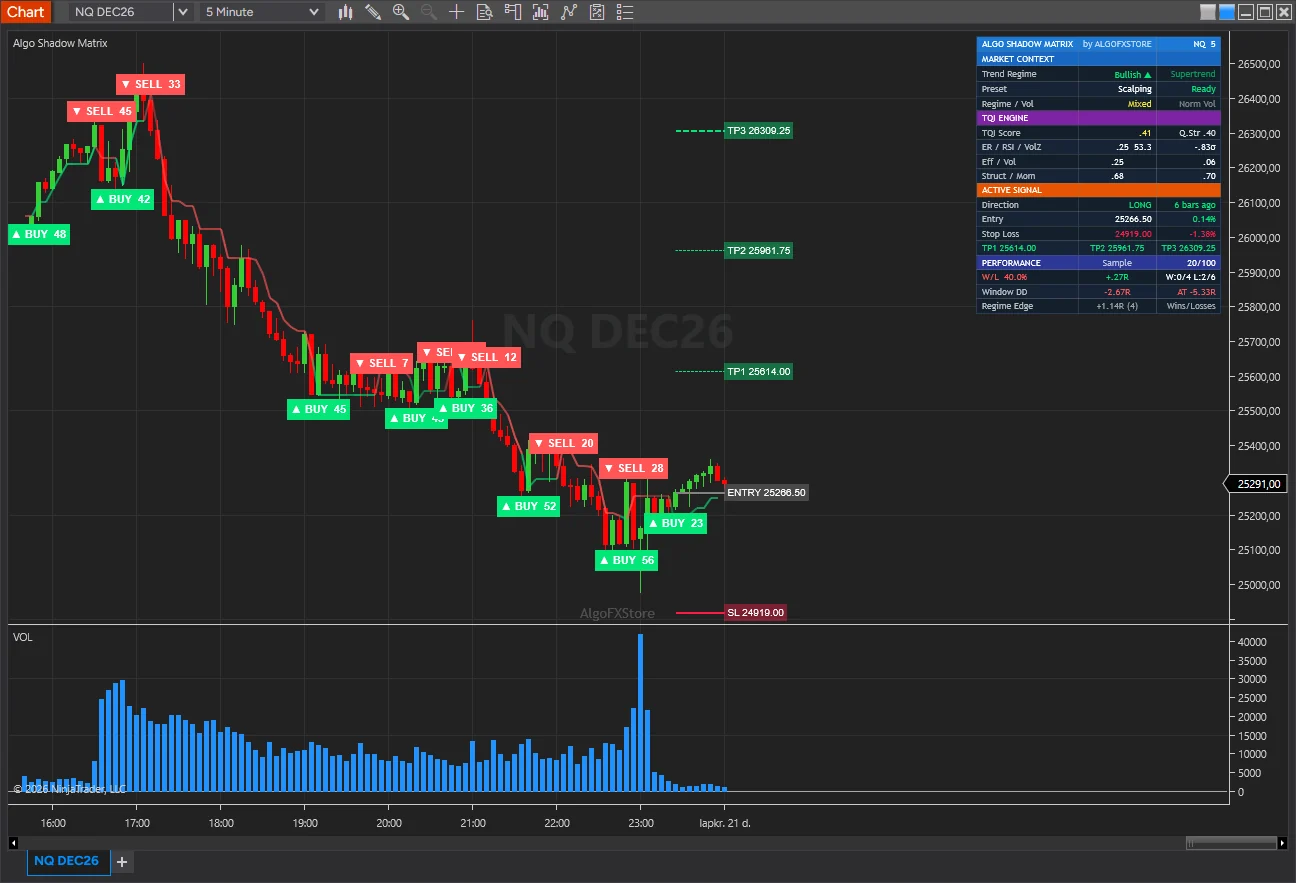
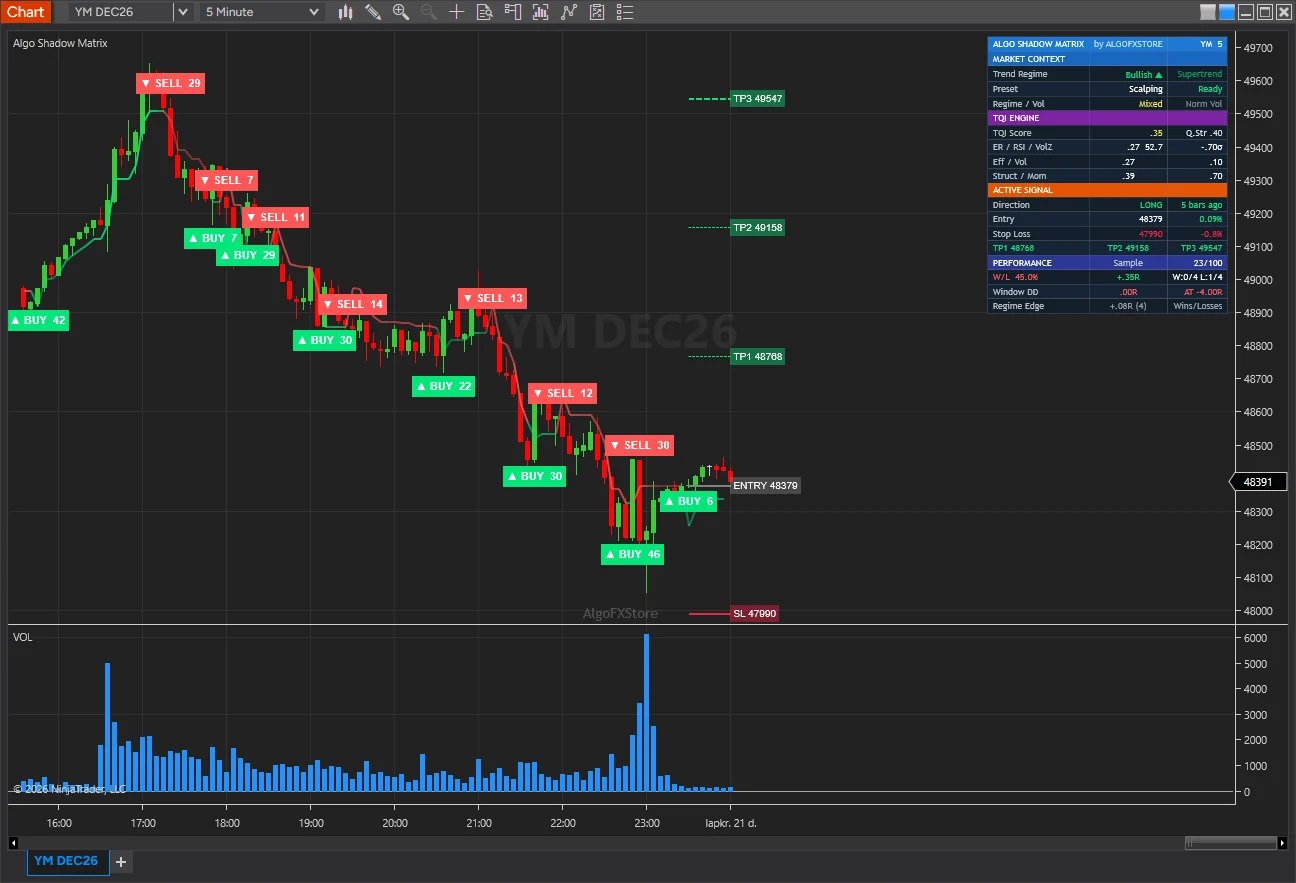
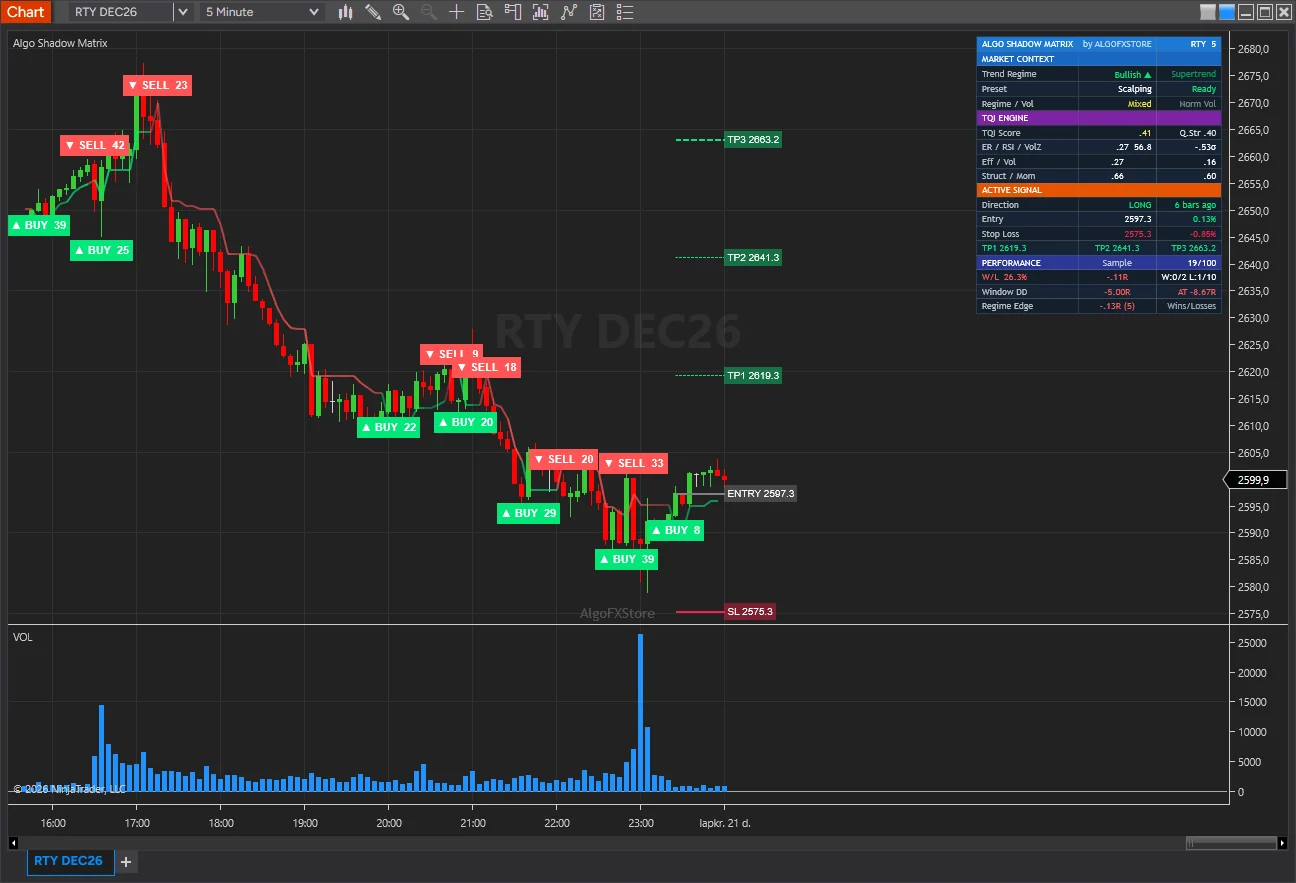
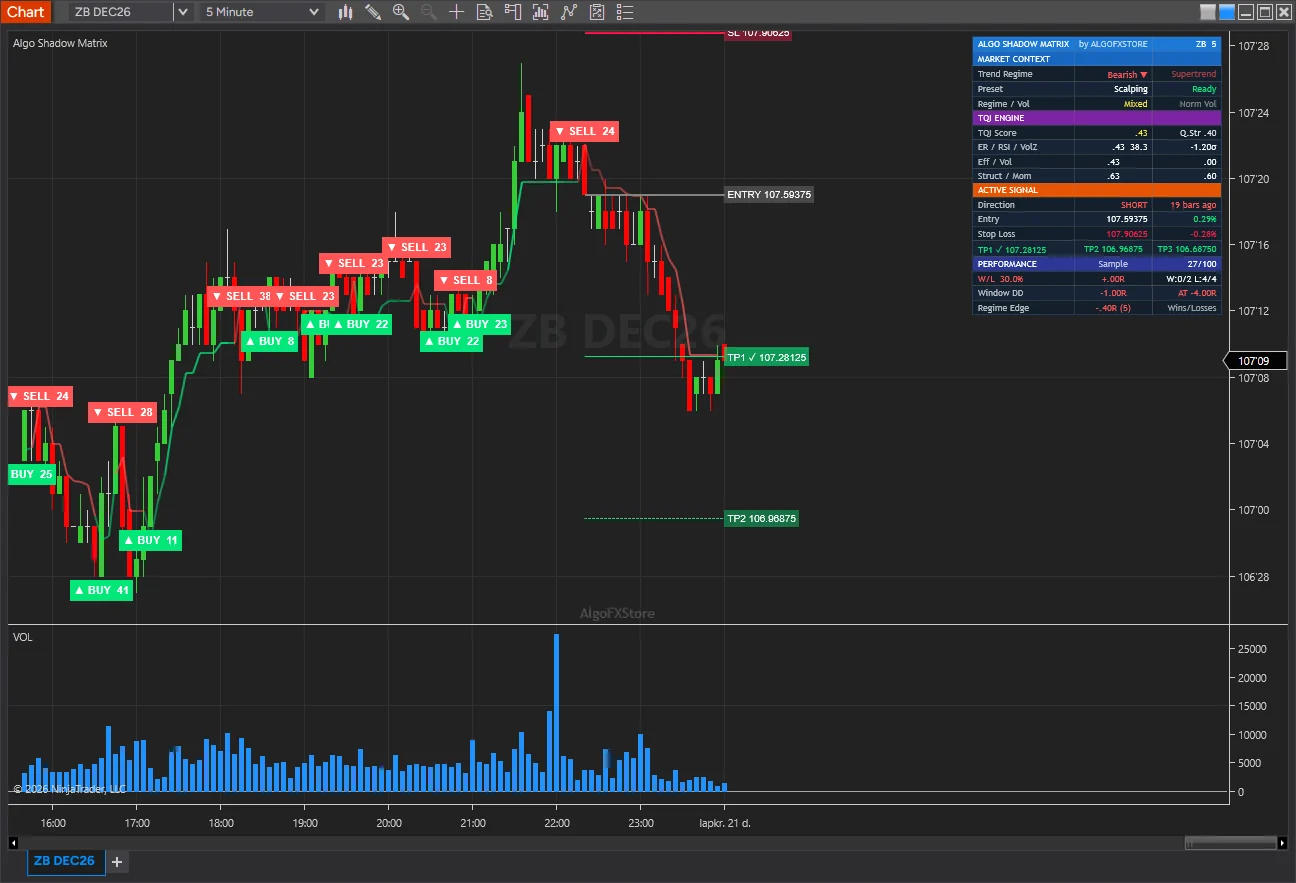
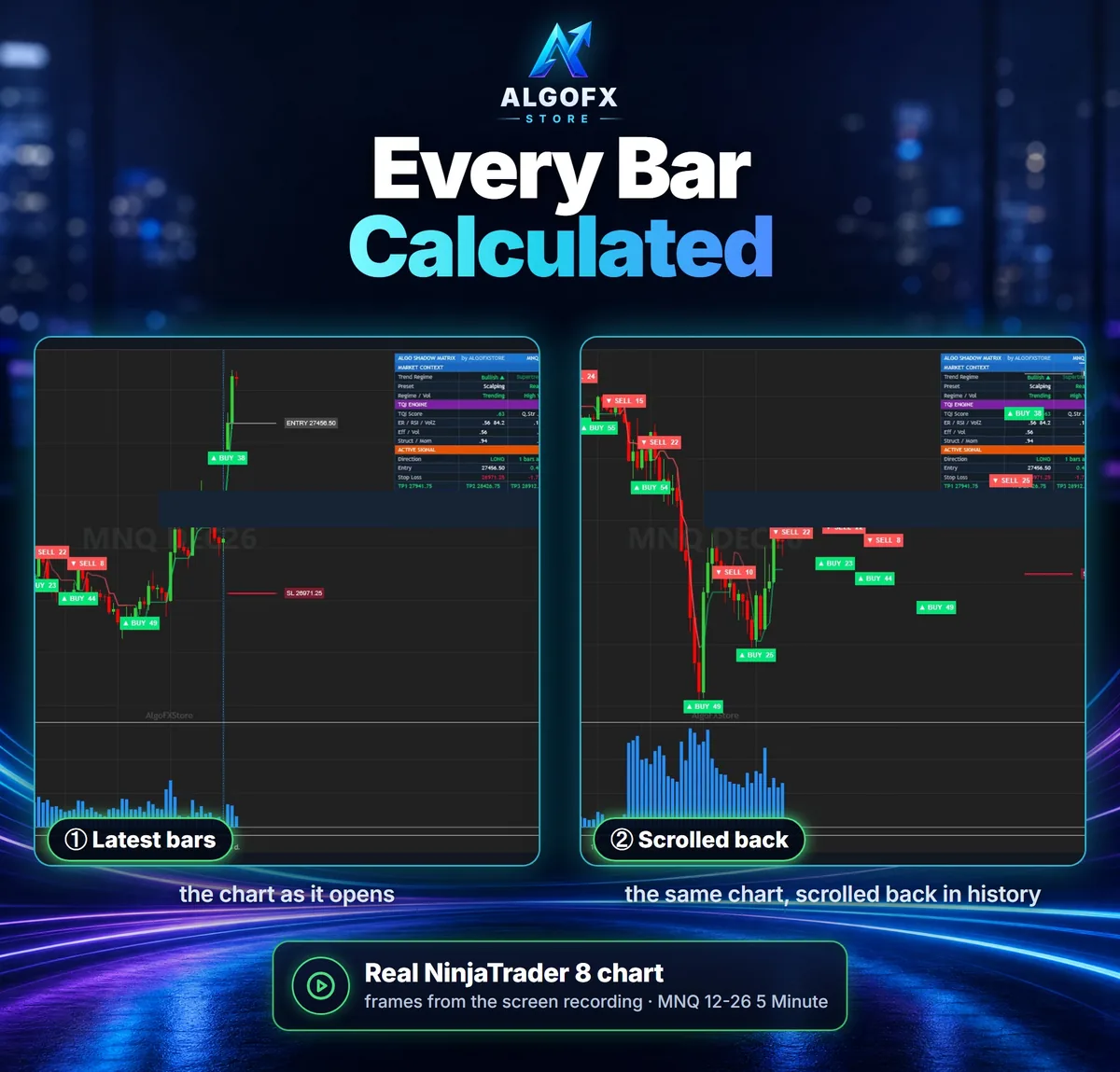
Watch Algo Shadow Matrix work on a real NinjaTrader 8 chart
A screen recording and frames from the shipped indicator at its default settings, as the chart updates. Nothing is edited into the chart.
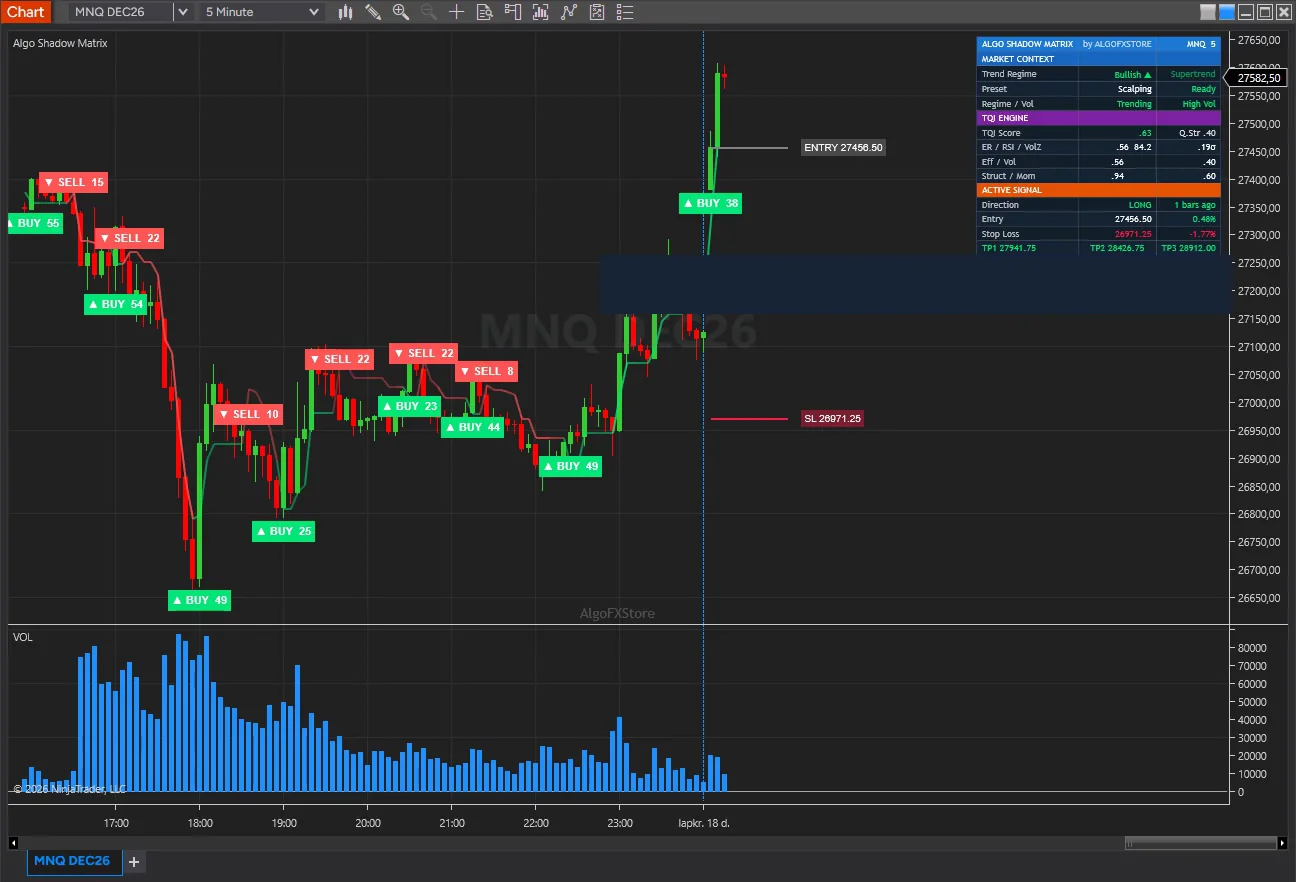
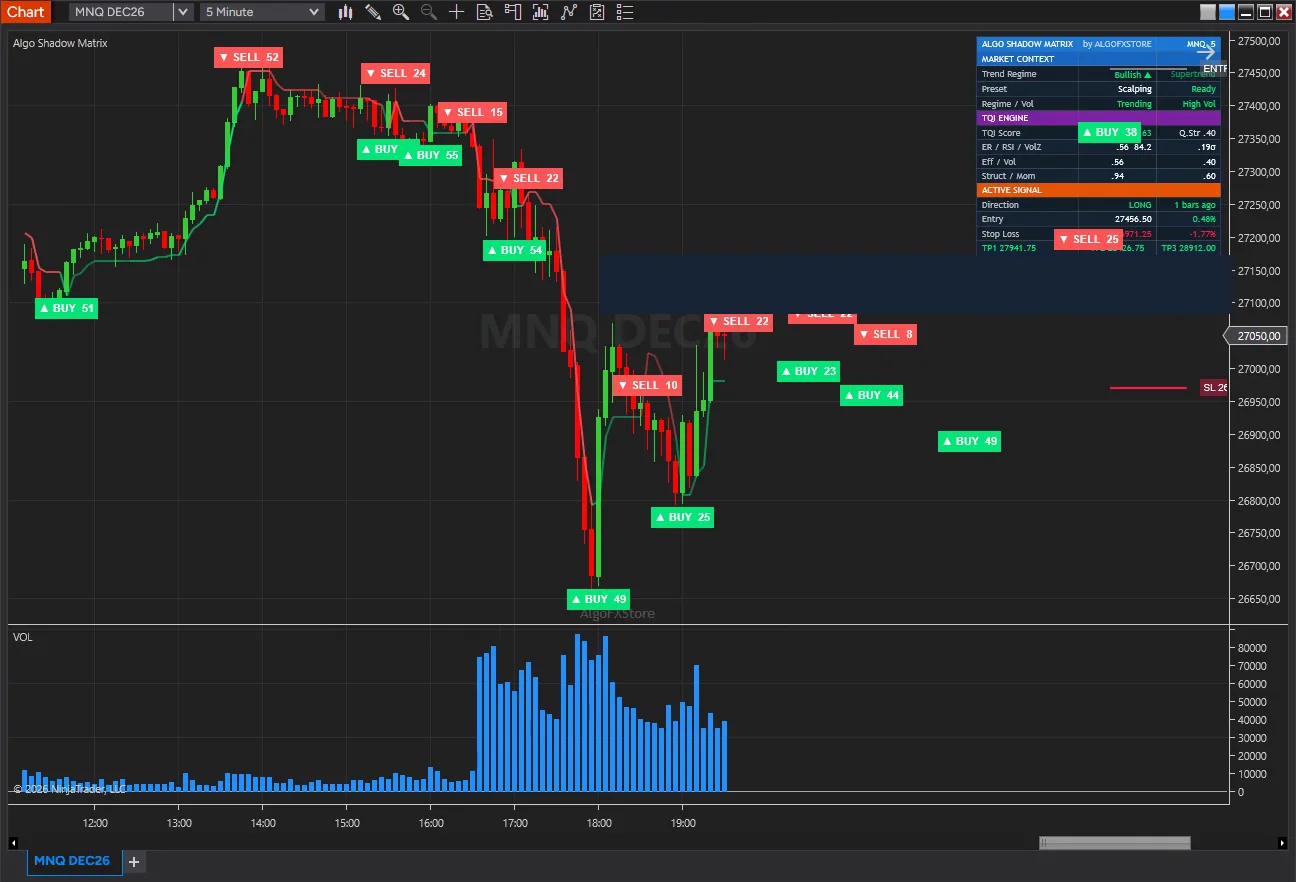
A step-by-step routine for a futures session
The indicator decides when the line flips and where the levels sit. Whether you trade the signal, and with how many contracts, stays your decision. A routine based on the manual:
- 1
Load enough history and check Ready
Open the chart on the current contract, for example MNQ 12-26 on 5 Minute, with Days to load set to 5 (10 on a 15 Minute chart) so the 100-bar ATR baseline is filled. Add the indicator and look at the dashboard's Preset row: it names the active preset and reads Ready once the 50-bar warm-up is complete.
- 2
Wait for the pill on bar close
Leave Calculate on its default, On bar close. Do nothing while the line simply follows price. Act when a bar closes and a ▲ BUY or ▼ SELL pill prints, or when the alert row appears in the Alerts Log with its sound. The alert text already carries price, TQI, score, SL and all three targets.
- 3
Read the regime before the level
Check Regime / Vol on the dashboard (Trending, Mixed or Choppy; Low, Norm or High Vol) and the TQI Score, green above 0.6, yellow above 0.35, red below. A personal filter many traders test in simulation is to skip while it reads Choppy with Low Vol, or while the TQI is red. Compare the score with your recent signals and set your own minimum.
- 4
Turn the stop into ticks and contracts
Points = ENTRY minus SL. Ticks = points divided by the tick size. Risk per contract = ticks x tick value. Contracts = your risk per trade divided by that, rounded down; if the answer is zero, skip or use the micro. On the example charts an ES 5 Minute sell needed 22 ticks of stop, while an MNQ 5 Minute buy after an impulse bar needed 554, a signal to skip.
- 5
Place your own bracket
The indicator places no orders. Put your stop at the SL price, or one tick beyond, and your targets at TP1 to TP3, for example with an ATM strategy that splits the position. You can take part off at TP1 or TP2 or move the stop to break-even by hand; the indicator never moves orders.
- 6
Know when the plan is over
A reached target gets a check mark and turns cyan; the plan ends at TP3, at the stop or after 100 bars, and an opposite pill replaces it. There are no alerts for target or stop hits, so watch your own orders. Stop for the day after your personal loss limit, and be flat before the close your account rules require.
The dashboard, row by row
The on-chart dashboard, row by row.
- ALGO SHADOW MATRIX | by ALGOFXSTORE | the instrument and chart period, for example MNQ 5
- MARKET CONTEXT
- Trend Regime: Bullish ▲ or Bearish ▼, Supertrend
- Preset: the active preset, then Ready or the bars still needed for the warm-up
- Regime / Vol: Trending, Mixed or Choppy, and Low Vol, Norm Vol or High Vol
- TQI ENGINE
- TQI Score: 0.00 to 1.00 (green above 0.6, yellow above 0.35, red below) and the quality strength in use, Q.Str
- ER / RSI / VolZ: the efficiency ratio, RSI and the volume z-score, or n/a without volume
- Eff / Vol and Struct / Mom: the four TQI factors (with Show TQI Breakdown on)
- ACTIVE SIGNAL
- Direction: LONG, SHORT or WAITING, with the bars since the signal, or the side of the last signal when no plan is open
- Entry: the entry price and the move since entry in percent
- Stop Loss: the stop price and its distance from the entry in percent
- TP1, TP2, TP3: the three target prices, each with a check mark once reached
- PERFORMANCE (with Show Performance Stats on, the default): hypothetical bookkeeping of the indicator's own past plans on the loaded chart in R, with streaks, drawdown and a per-regime figure; no commissions or slippage, hindsight and not a forecast
Everything Algo Shadow Matrix does for you
Bands that adapt on every bar
The band width is recalculated on each bar from the preset base, the efficiency ratio and the Trend Quality Index, then smoothed. In clean trends the line stays close to price; in noisy sessions it backs off, so it flips less there.
Every level as a tick-rounded price
ENTRY, SL and TP1 to TP3 are drawn as lines with price labels rounded to the instrument's tick: two decimals on MNQ, ES and CL, one on GC. The same prices sit on the dashboard and in the BUY and SELL alert text.
Stops placed at structure
The stop anchors to the last swing (Pivot Strength 3 bars each side) plus a preset ATR buffer: 1.0 on Scalping, 1.5 on Default, 2.0 on Swing, 2.5 on Crypto24x7, and it is never closer to the entry than one buffer.
Presets that follow the chart period
On Auto the preset resolves from the chart period: Scalping up to 5 minutes (ATR 10, band 1.5 x ATR), Default up to 240 minutes (ATR 14, band 2.0), Swing above (ATR 21, band 2.5). Custom and Crypto24x7 are chosen by hand.
A dashboard that explains the flip
Market context (trend regime, preset and warm-up, Trending, Mixed or Choppy and Low, Norm or High Vol), the TQI and its four factors with ER, RSI and volume z-score, and the active signal with entry, stop distance in percent and targets. Five positions, four sizes.
Fixed once the bar closes
Pills, levels and alerts are created only on closed bars. A live MNQ 1 Minute chart run from history into real time on On each tick matched a closed-bar recalculation on 91,295 values over 4,805 bars, with zero differences.
Alerts in NinjaTrader's own channels
Five events: BUY and SELL (on), any signal, bullish and bearish trend shift (off). Each fires once per bar after the close as an Alerts Log row with a sound, plus optional e-mail through NinjaTrader's mail share service. It keeps alerting while the chart is minimized.
Plots your strategies can read
Three plots are exposed: SuperTrend (the line), Signal (+1 on a BUY bar, -1 on a SELL bar, 0 otherwise) and Trend (+1 or -1). Your own NinjaScript strategies and Market Analyzer columns can read them, and they show in the Data Box.
Dark, light or automatic theme
Theme follows the chart background on Auto or is set to Dark or Light. Color Line by TQI brightens the line when quality is high, and an optional trend background tint can be switched on in the Visual group.
Algo Shadow Matrix, feature by feature
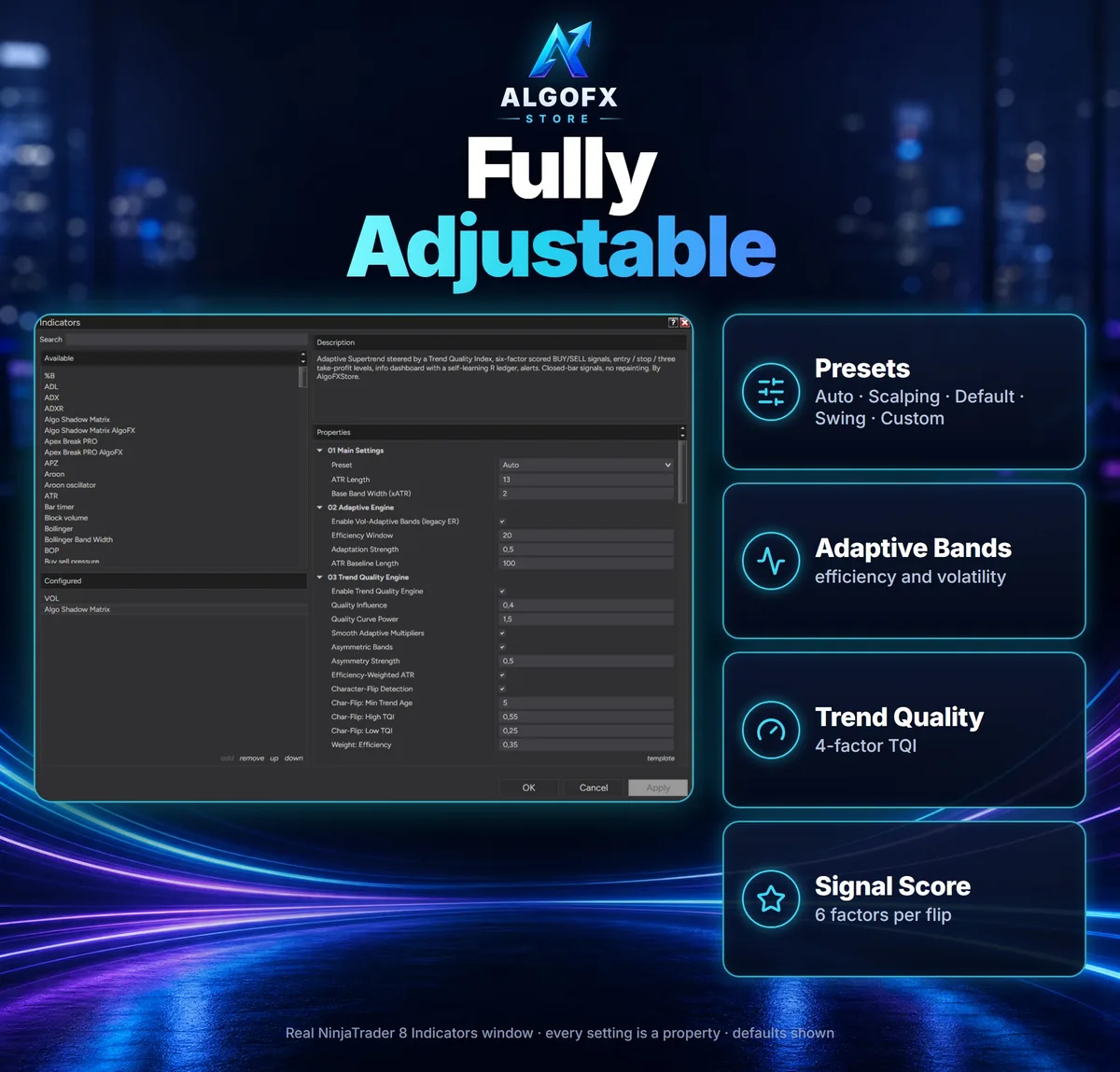
Each picture is built from real platform screenshots of the shipped indicator at its default settings, labelled so you can see what every part does. Tap any picture to open it full size.
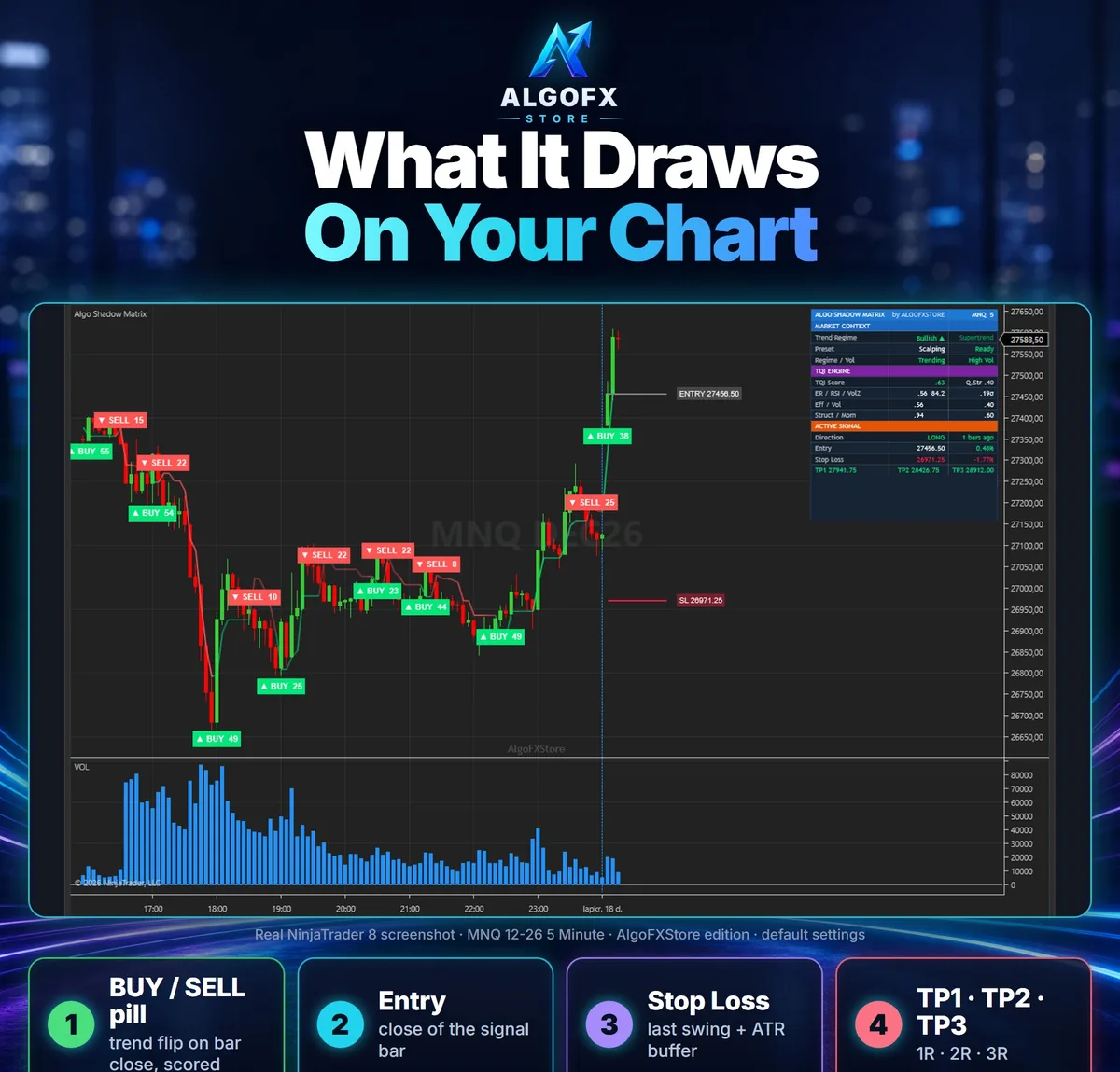
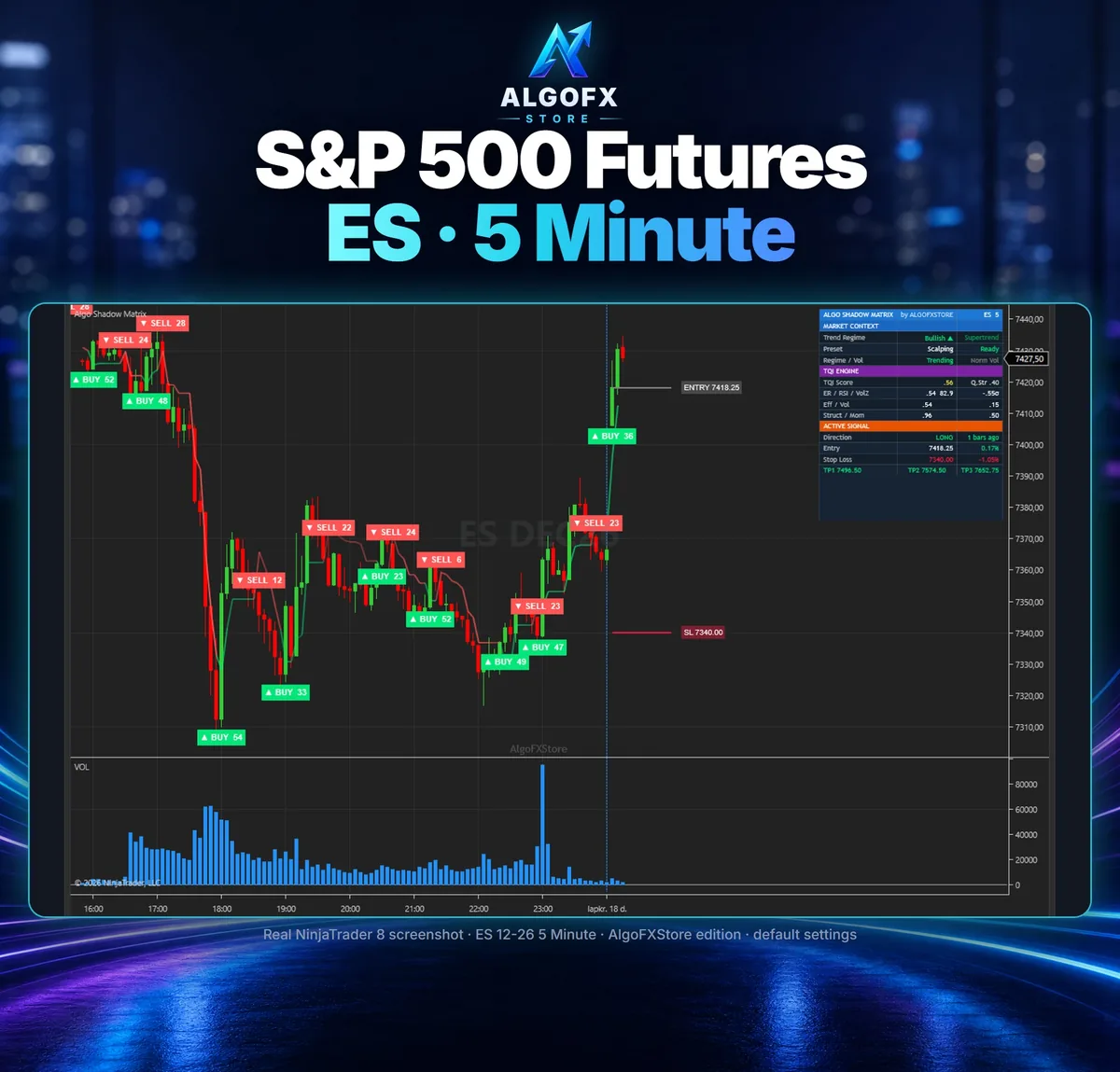
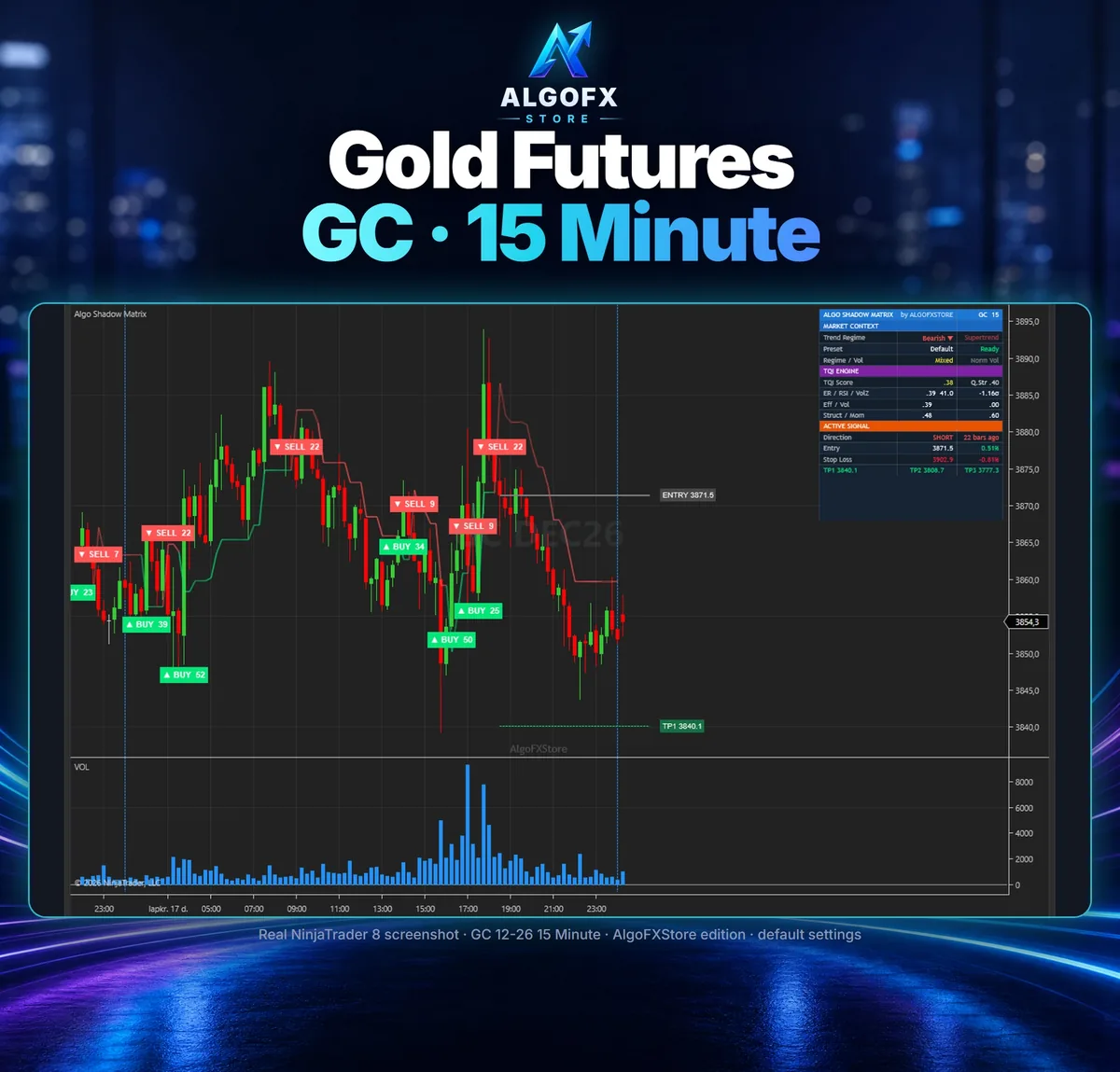
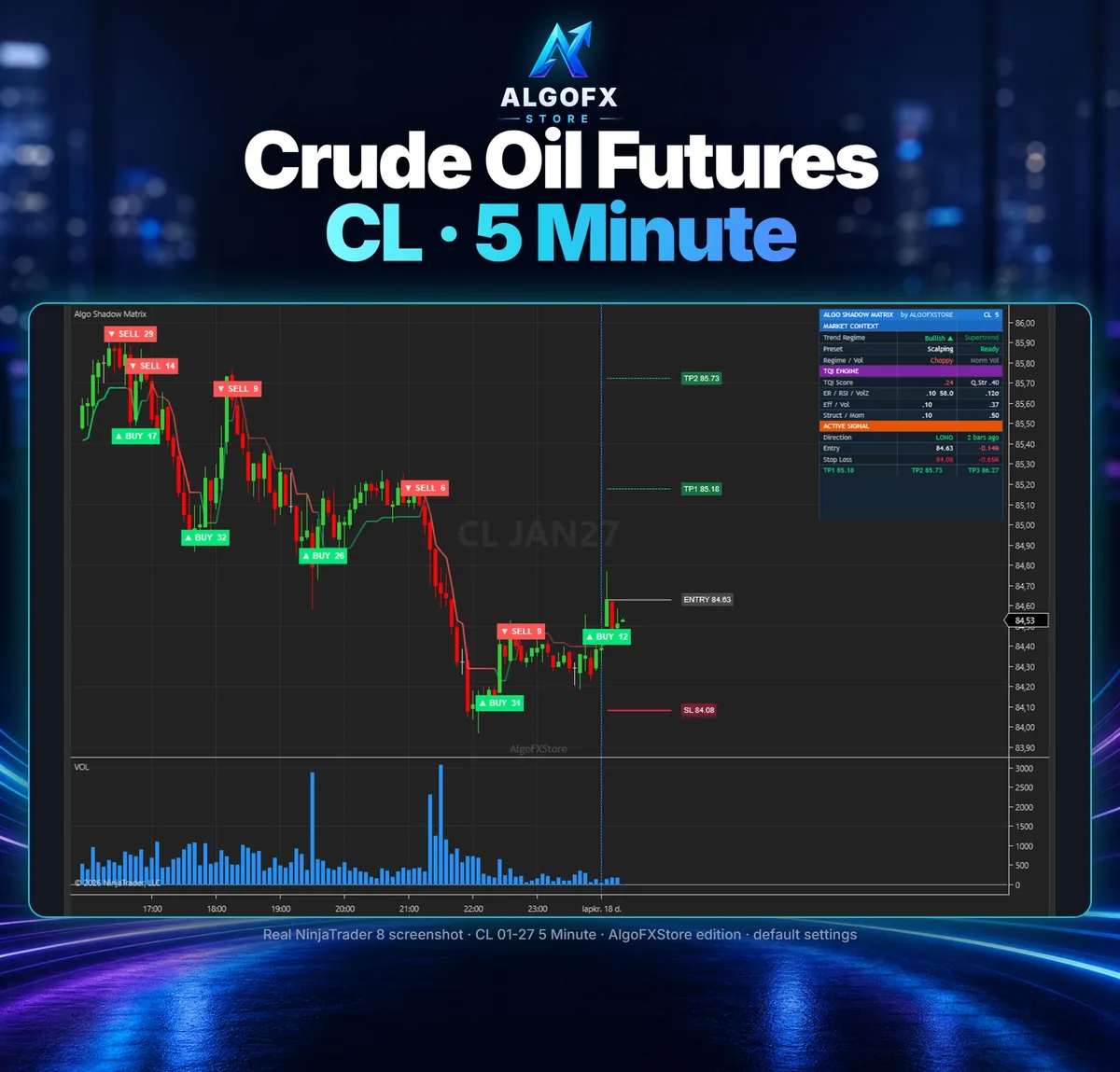
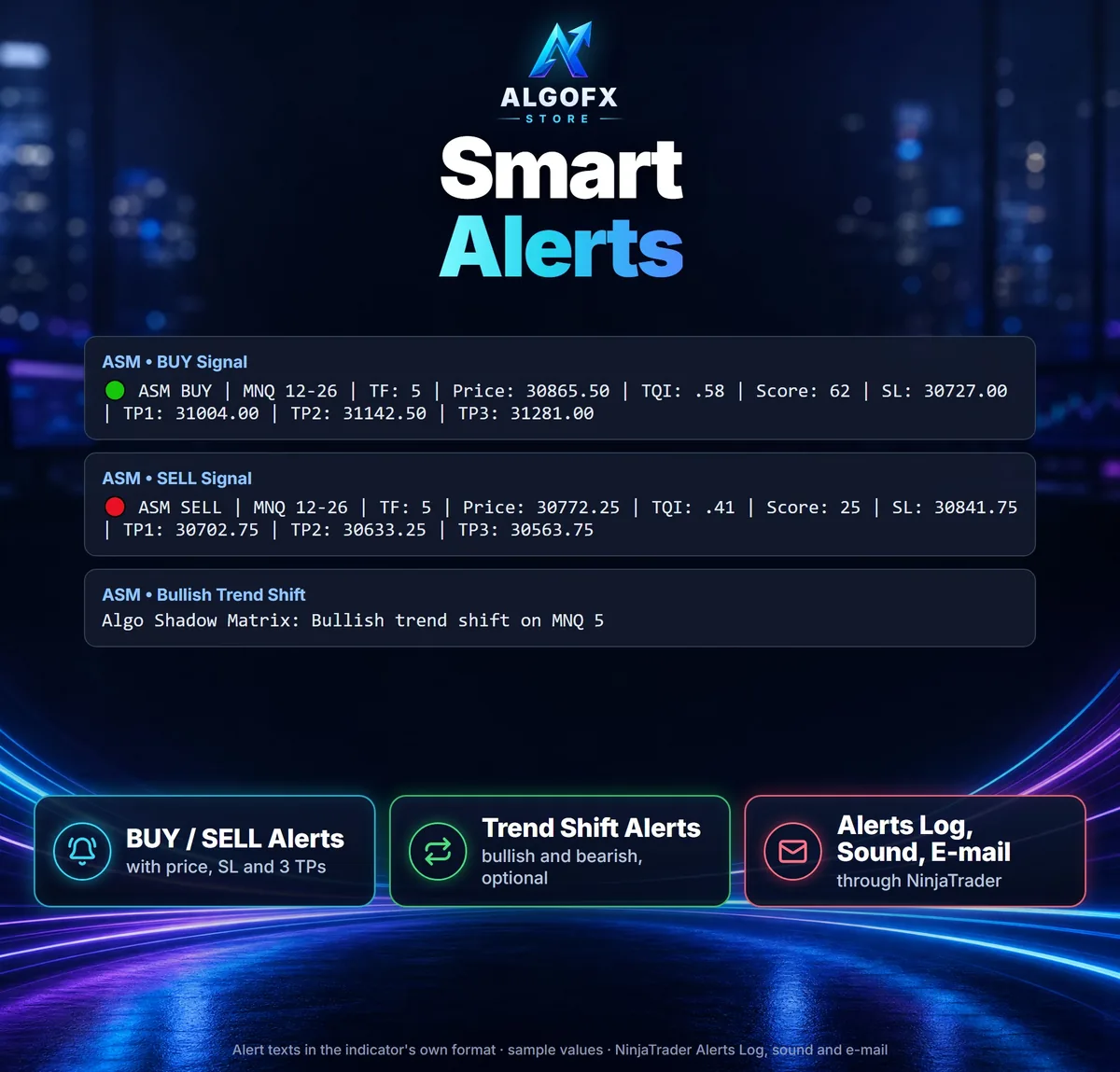

How traders put it to work
Index micros on 1 to 5 minute charts
On MNQ, MES, M2K and MYM from 1 to 5 minutes, Auto resolves the Scalping preset: ATR 10, band 1.5 x ATR and a 1.0 x ATR stop buffer, the tightest plans the indicator draws. The manual suggests starting on 5 Minute and moving to 1 to 3 minutes only after watching it in simulation. Expect several scored flips per session.
Gold and crude oil
On MCL and MGC the manual uses 5 Minute charts with the Scalping preset. On 15 Minute, Auto switches to Default with a 1.5 x ATR buffer and stops get wide: the GC 15 Minute example plan needed 376 ticks. Check the tick count on every signal and use the micro contract when the full size does not fit your risk.
Sizing contracts from the stop
Every plan gives ENTRY and SL as prices, the dashboard shows the stop distance in percent, and the manual walks through ticks, tick values and contract counts, so you know the risk per contract before the click. The indicator does not enforce any account rule: daily limits, drawdown and session times stay your job.
Tighter stops for small accounts
SL Buffer only acts with Preset Custom. To keep Scalping behaviour with a closer stop, the manual sets Custom with ATR Length 10, Base Band Width 1.5, Efficiency Window 14, RSI Length 9 and SL Buffer 0.7, or lowers Pivot Strength from 3 to 2 so the stop anchors to a more recent swing. A closer stop is hit more often; compare both in simulation.
Strategy builders and the Market Analyzer
The hidden Signal and Trend plots let you build your own NinjaScript strategy or a Market Analyzer column on the same flips you see on the chart. Signal carries +1 or -1 only on confirmed signal bars, so a strategy reading it on bar close sees the same events the pills show.
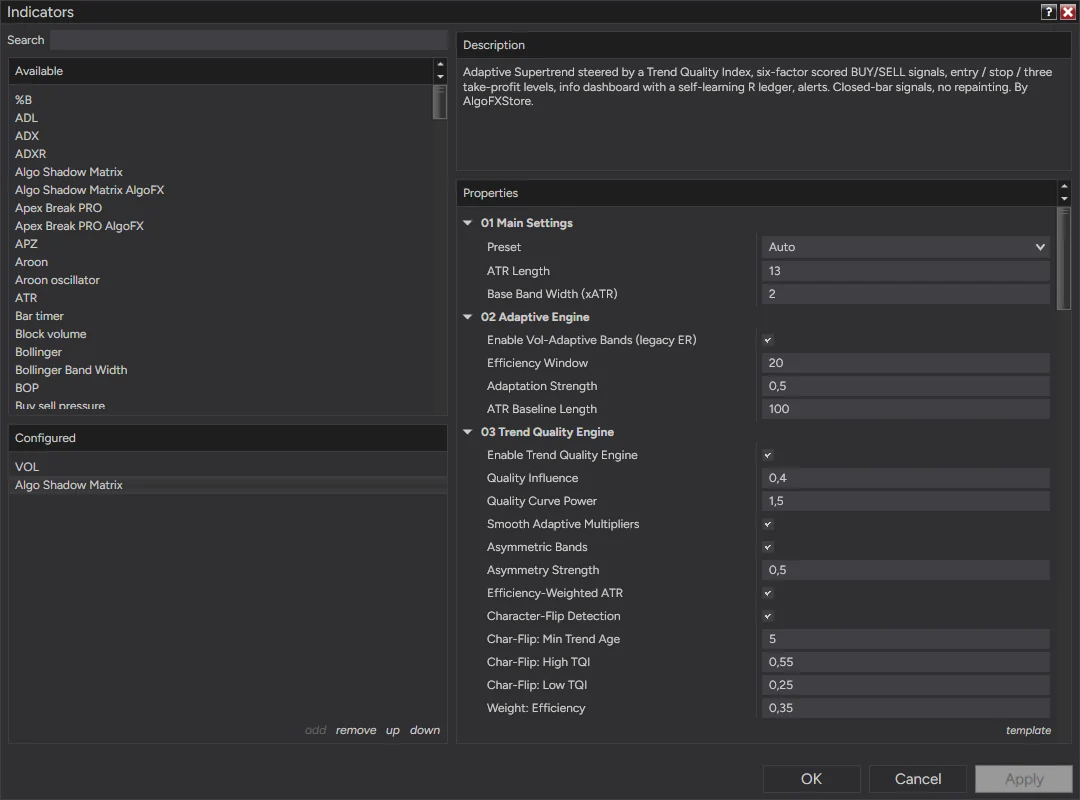
Every setting, with its default
The names are the ones in the NinjaTrader indicator dialog; the defaults are what every chart on this page uses.
| Setting | Default | What it does |
|---|---|---|
| 01 Main Settings: Preset | Auto | Auto = Scalping up to 5 min, Default up to 240 min, Swing above; or Custom, Scalping, Default, Swing, Crypto24x7. Presets set ATR length, band width, efficiency window, RSI length and stop buffer (Scalping 10/1.5/14/9/1.0, Default 14/2.0/20/14/1.5, Swing 21/2.5/30/21/2.0, Crypto24x7 14/2.8/20/14/2.5). |
| 01 Main Settings: ATR Length / Base Band Width (xATR) | 13 / 2.0 | Used only with Preset Custom. |
| 02 Adaptive Engine: Enable Vol-Adaptive Bands (legacy ER) / Efficiency Window / Adaptation Strength / ATR Baseline Length | on / 20 / 0.5 / 100 | Efficiency window used only with Custom. |
| 03 Trend Quality Engine: Enable / Quality Influence / Quality Curve Power / Smooth Adaptive Multipliers | on / 0.4 / 1.5 / on | How strongly the TQI changes the band width. |
| 03 Trend Quality Engine: Asymmetric Bands (strength 0.5) / Efficiency-Weighted ATR / Character-Flip Detection (age 5, high 0.55, low 0.25) | on / on / on | Engine refinements. |
| 03 Trend Quality Engine: Weights Efficiency / Volatility Regime / Structure / Momentum Persist; Structure Window / Momentum Persist Window | 0.35 / 0.20 / 0.25 / 0.20; 20 / 10 | Mix of the four quality factors. |
| 04 Signal Filters (Display): Use Structure / Pivot Strength / Use RSI / RSI Length / RSI 70-30 / RSI Memory / Use Volume / Volume Z Window / Min Signal Score | on / 3 / on / 14 / 70-30 / 20 / on / 20 / 60 | Inputs of the score; Pivot Strength also sets the swing used by the stop; Min Signal Score does nothing. |
| 05 Risk Management: Show TP/SL Levels / SL Buffer (xATR) / TP1 / TP2 / TP3 (R) / Label Offset / Mark TP Hits / Trade Timeout | on / 1.5 / 1 / 2 / 3 / 10 / on / 100 | SL Buffer used only with Custom. |
| 06 Self-Learning: Enable Auto-Calibration (experimental) + 7 tuning values + Reset Learning Memory | off | Leave off. |
| 07 Visual: Theme / Show SuperTrend Bands / Color Line by TQI / Show Signal Labels / Show Trend Background / Show Watermark | Auto / on / on / on / off / on | Visual switches. |
| 08 Dashboard: Show / TQI Breakdown / Score Breakdown (legacy) / Performance Stats / Position / Size / Header Color | on / on / off / on / TopRight / Tiny / #1976D2 | Panel layout. |
| 09 Colors: Bull / Bear / SL / TP | #00E676 / #FF5252 / #FF1744 / #00E676 | Colours. |
| 10 Alerts: master / structured text / BUY / SELL / Any / Bull shift / Bear shift / Play Sound / Sound File / Send Email / Email To | on / off / on / on / off / off / off / on / Alert2.wav / off / blank | Events and channels. |
| 11 NinjaTrader: Max Signal Labels / Score RSI Memory / Debug Mode / Dump Bars + Outputs CSV | 300 / FullHistory / off / off | Housekeeping and support diagnostics. |
5 alert events
Alerts can go to the NinjaTrader Alerts Log, a sound and an e-mail (NinjaTrader's e-mail share service must be set up).
- BUY Signal
- SELL Signal
- Any Signal
- Bullish Trend Shift
- Bearish Trend Shift
Algo Shadow Matrix next to the usual options
Where it wins, and where it does not.
| Algo Shadow Matrix | Typical free supertrend indicator | Reading it by hand | |
|---|---|---|---|
| Band width | Recalculated every bar from efficiency and a four-factor Trend Quality Index, asymmetric and smoothed | One fixed ATR multiplier all session | Your judgement of whether the market trends |
| After the flip | ENTRY, swing-based SL and TP1 to TP3 at 1R to 3R as tick-rounded prices | Usually a colour change or an arrow only | You measure each stop in ticks yourself |
| Context for each signal | Score from 0 to 102 on the pill and a dashboard with regime, volatility and TQI | None | Your own checklist, if you apply it every time |
| Alerts | BUY, SELL, any signal and trend shifts in the Alerts Log, with sound and optional e-mail | Often none, or a basic flip alert | You watch the chart |
| Strategy access | SuperTrend, Signal and Trend plots for NinjaScript strategies and the Market Analyzer | Usually a line plot only | Not possible |
| Simplicity | 83 settings in 11 groups to learn, though the defaults work as shipped | A handful of settings | Nothing to install or learn |
| Cost | A one-time payment | Free | Free, paid for in screen time |
Honest about who this fits
A good fit if you
- You day trade futures such as MNQ, MES, ES, NQ, MGC or MCL in NinjaTrader 8 and want the stop of every signal as a price you can count in ticks.
- You size contracts from the stop distance before you click and want that distance on the chart as a price.
- You like supertrend-style trend following but want it to back off in chop instead of flipping on every wiggle.
- You want a reason to skip a signal as much as a reason to take one, and will read a regime row and a score.
- You build your own NinjaScript strategies or Market Analyzer columns and want a clean Signal and Trend plot to read.
- You prefer alerts in the Alerts Log with a sound, so you are not watching every bar.
Not for you if you
- Traders who want orders placed or managed for them: it draws and alerts, it never places, moves or closes an order.
- Anyone who wants weak signals hidden: every flip after the warm-up prints, and Min Signal Score has no effect, so you judge the score yourself.
- Range and mean-reversion traders: a supertrend follows trends, and in a long sideways session it will flip against you more than once.
- Users of NinjaTrader Web, the mobile apps or NinjaTrader 8.0: it needs the NinjaTrader 8 desktop for Windows, version 8.1.x.
One Add-On, one manual, imported in a minute
- 1NinjaScript Add-OnAlgoShadowMatrixAlgoFX.zip (0.2 MB). Import it in NinjaTrader 8 and it appears as “Algo Shadow Matrix AlgoFX”.
- 17Page PDF manualInstalling, every setting with its default, reading the signals, the levels, the dashboard, the alerts.
- 14Setting groupsEvery one explained above, with the defaults the charts use.
- 5Alert eventsYou choose which ones are on in the settings.
- 60Day money-back guaranteeIf it is not for you, request a full refund within 60 days through your Digistore24 order e-mail.
Install in four steps
- Download the zip from the page Digistore24 sends you to after checkout. Keep it zipped.
- NinjaTrader 8: Control Center, Tools, Import, NinjaScript Add-On, and choose the zip.
- Open a chart, open Indicators, and add “Algo Shadow Matrix AlgoFX”.
- Read the manual's quick start; the defaults are the settings shown on this page.

Kestutis Balciunas
AlgoFXStore · chart indicators for MetaTrader, TradingView, cTrader and NinjaTrader
Kestutis Balciunas builds and publishes chart indicators under the AlgoFXStore name for MetaTrader 4 and 5, TradingView, cTrader and NinjaTrader 8. Every product page shows what the indicator draws on real charts, and every number on it comes from the shipped build.
The charts on this page were captured in NinjaTrader 8 from the shipped Algo Shadow Matrix AlgoFX at its default settings and are shown unedited.
No get-rich claims and no quoted win rates. Every trade is uncertain, and no indicator changes that. If you want to know whether it suits the way you trade before you buy, e-mail [email protected] and you will get a straight answer.
One price, one payment
- The NinjaScript Add-On for NinjaTrader 8 and the 17-page PDF manual
- Delivered as a digital download: the Add-On zip and the PDF manual on your download page
- Return period: 60 days, with a full refund if it is not for you
- Free updates to the current version on the same download page
60-day money-back guarantee. Install it, run it on your own charts and read the manual. If Algo Shadow Matrix is not for you within 60 days of purchase, request a full refund from Digistore24, no questions asked: use the refund link in your Digistore24 order e-mail or Digistore24's order page digistore24.com/en/cancel-revoke-contract. Digistore24 refunds to your original payment method. It is a digital download: right after checkout you land on your download page, and the link to it is also in your Digistore24 order e-mail.
Also by Kestutis Balciunas: Algo Shadow Matrix for MT4 and MT5.
About the signals
Does it repaint?
The pills, the levels and the alerts do not: they are created only when a bar closes and stay fixed. A live MNQ 1 Minute chart on On each tick, run from history into real time, matched a closed-bar recalculation on all 91,295 values over 4,805 bars. With On each tick or On price change the line, its shading and the dashboard follow the forming bar and settle at the close. A reload recomputes from the first loaded bar, so the earliest signals of a chart can differ when the loaded history starts elsewhere.
What does the number on the pill mean?
It is the signal score, from 0 to 102, the sum of six parts measured at the flip: momentum, efficiency, volume, RSI depth, distance to the last swing and break depth through the band. Higher means more parts agreed. It describes the flip and is not a probability, so compare it with your own recent signals rather than treating any number as a promise.
Why does a low-score signal still print?
Because nothing is filtered out. The Use Structure, Use RSI and Use Volume switches only change how the score is calculated, and Min Signal Score (display only) has no effect. Every flip after the 50-bar warm-up prints a pill and a plan, so you see every flip and decide which scores you trade.
What happens when a new signal prints while a plan is open?
The new flip replaces the plan: ENTRY, SL and the targets move to the new signal and the dashboard switches direction. Older pills stay where they printed, up to Max Signal Labels (300). Decide in advance whether an opposite pill means closing your position, tightening the stop or keeping your original bracket.
Why is the stop sometimes very wide?
The stop anchors to the last swing and adds the ATR buffer, and it is never closer than that buffer. After a large impulse bar the last swing can sit far away, as in the MNQ 5 Minute example with a 554-tick stop. The targets are multiples of that risk, so they move far away too. That is the kind of signal an account with a daily limit should skip or trade smaller.
Settings, charts and the dashboard
Which instruments and chart types does it work on?
Any futures instrument your connection delivers bars for, for example NQ and MNQ, ES and MES, YM and MYM, RTY and M2K, GC and MGC, CL and MCL. Minute, second and day charts are fully supported. Tick, volume, range and Renko bars also run, with the Auto preset and the level-label positions taken from the observed bar spacing, so the label position is approximate there.
Should I keep the defaults or tune it?
Start with the defaults on Auto. ATR Length, Base Band Width, Efficiency Window, RSI Length and SL Buffer only act with Preset Custom. Leave the experimental Auto-Calibration group off. With the default Close input series, Character-Flip Detection never triggers, so the line flips only on a price break. Useful changes from the manual: targets 1, 1.5 and 2R, Trade Timeout 60 on 5 Minute charts, Pivot Strength 2.
Why do values differ between two of my charts?
The bars differ. The chart's Trading Hours template (ETH with the overnight session, or RTH day session only), the contract merge policy and Days to load all change which bars exist, and the adaptive bands depend on the bars they were built on. Set up both charts the same way and they read the same.
What is the statistics section of the dashboard?
With Show Performance Stats on, which is the default, a further section keeps bookkeeping of the indicator's own past plans on the loaded chart in R. These figures are hypothetical: entry at the signal close, exits at the stop, TP3 or the timeout, no commissions, fees or slippage. They are hindsight, not a forecast. Switch Show Performance Stats off for a cleaner panel.
What does each colour and mark mean?
Green line under price: bullish; red line over price: bearish; brighter means higher trend quality. A green ▲ BUY pill under a bar or a red ▼ SELL pill over it: the line flipped on that closed bar. Grey ENTRY: the signal close. Red SL: the stop. Green TP1 to TP3: the targets, which get a check mark and turn cyan once reached.
Alerts and running it
How do the alerts reach me?
Every alert is a row in NinjaTrader's Alerts Log, tinted green for buys and red for sells, with a copy in the NinjaScript Output window and the sound file Alert2.wav from NinjaTrader's sounds folder. For e-mail, set up a mail share service under Tools, Options, then switch Send Email on and fill Email To; a phone that receives that mailbox gets it too. There are no alerts for target or stop hits.
Will reloading a chart fire old alerts?
No. Alerts fire once per event per bar, only for bars that close while the indicator is running in real time, and never for a bar older than two bar periods. Reloading a chart or a workspace does not replay old signals. Alerts need NinjaTrader running with the chart open, on your computer or on a VPS.
Does it need a particular account or data feed?
It works on charts, not accounts: it behaves the same on Sim101 or a live broker connection, as long as the chart gets data. It does not need Order Flow+ or market depth, and it does not enforce daily loss limits, drawdowns, contract limits or news rules.
Can I run it on several charts at once?
Yes. Each chart runs its own copy on its own single data series and settings. It keeps alerting while a chart window is minimized. If several charts use different periods, the Auto preset resolves separately on each one, and the dashboard's Preset row shows which preset each chart is using.
How it works
Will it place trades for me?
No. Algo Shadow Matrix is an indicator: it draws on the chart and can alert you. It never sends an order.
Which markets and charts does it work on?
Any futures instrument with bars; time-based minute/second/day charts fully, tick/volume/range/Renko run with the Auto preset and level-label positions derived from the observed bar spacing (approximate x position). Preset Auto: Scalping up to 5 min, Default up to 240 min, Swing above. Volume factor uses real contract volume. Warm-up: 50 bars with the defaults (dashboard Preset row shows 'n bars' until 'Ready').
Does it work on NinjaTrader 7?
No. It is built for NinjaTrader 8 and imported as a NinjaScript Add-On.
After you buy
How do I get it after paying?
Digistore24 runs the checkout. Right after payment it takes you to your download page with the NinjaScript Add-On zip and the PDF manual; the link to that page is also in your Digistore24 order e-mail, so you can download again at any time.
How do I install it?
In NinjaTrader 8: Control Center, Tools, Import, NinjaScript Add-On, then choose the zip exactly as you downloaded it (do not unzip it). After the import, add “Algo Shadow Matrix AlgoFX” to a chart from the Indicators window. The manual walks through it step by step.
Who is Digistore24?
Digistore24 is the reseller that sells Algo Shadow Matrix for Kestutis Balciunas (AlgoFXStore): it runs the checkout, charges your card or PayPal, collects the VAT for your country and delivers the download. Its name is the one on your statement, and its order e-mail holds your download link and the refund link.
What is the refund policy?
A 60-day money-back guarantee, handled by Digistore24. If Algo Shadow Matrix is not for you within 60 days of purchase, use the refund link in your Digistore24 order e-mail or Digistore24's order page (digistore24.com/en/cancel-revoke-contract) for a full refund, no questions asked. Digistore24 makes the refund to your original payment method.
Do I get the source code?
No. The Add-On ships compiled; the zip is exactly what NinjaTrader imports.
Algo Shadow Matrix for NinjaTrader 8.
Put an adaptive supertrend with a tick-ready stop and three targets on your NinjaTrader 8 futures charts today. The Add-On, the manual and every setting explained. Instant download for €77, one payment.
Get instant access