Trade supertrend flips with the stop and three targets already drawn
Algo Shadow Matrix draws an adaptive supertrend on your MetaTrader 4 or MetaTrader 5 chart and, on every trend flip of a closed candle, prints a scored BUY or SELL with an entry, a stop loss and three take profit levels.
- Adaptive supertrend line: green under price in an uptrend, red above it in a downtrend, width set by trend quality.
- Every flip of a closed candle prints an arrow and a label such as BUY ***** 57 with a six-part score.
- Entry at the flip close, stop beyond the last swing plus an ATR buffer, targets at 1R, 2R and 3R.
- Six alerts with the levels in the text: BUY, SELL, TP1, TP2, TP3 and SL hit, as pop-up, push or e-mail.
- MetaTrader 4 and 5. Both builds in one download; it appears as “Algo Shadow Matrix indicator” in the Navigator.
- A 4-page PDF guide with installation, every setting and how to read the chart. One-time €47.

See Algo Shadow Matrix on a real chart
Press play; use the full-screen button to see every detail.
This video shows the same indicator on another charting platform; the MetaTrader edition sold here runs in MetaTrader's own chart and settings windows. · 4:53 · Plays from YouTube when you press play (YouTube then sets its own cookies; see Privacy).
A fixed supertrend treats a clean trend and a choppy range the same
A classic supertrend sits a fixed multiple of ATR away from price. That one number has to work in a smooth trend and in a sideways session at the same time, and it cannot. Set it tight and the line flips every few candles in a range, each flip a new losing entry. Set it wide and the line lags so far behind a clean trend that the exit gives back most of the move.
The second gap comes after the arrow. A plain supertrend tells you the direction changed, then leaves you to work out where the stop goes, how far the first target is and whether this flip happened in a market that was trending or just noisy. Traders end up drawing the same lines by hand on every signal, or skipping the planning and trading the arrow alone.
Algo Shadow Matrix changes both parts. The band width follows a Trend Quality Index built from efficiency, participation, range position and momentum, so the line hugs a clean move and backs off in noise. And every flip arrives with the entry, the stop, three targets and a dashboard that says whether the market is Trending, Mixed or Choppy before you decide.
What Algo Shadow Matrix draws, and what each mark means
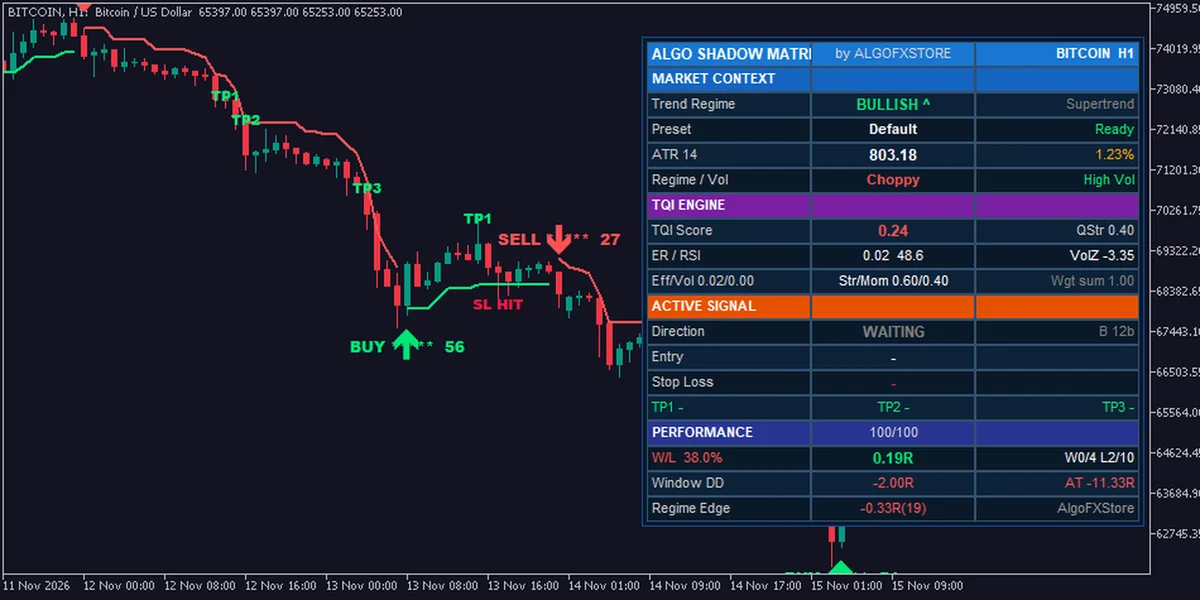
Read from the shipped MetaTrader edition.
| What you see | What it means |
|---|---|
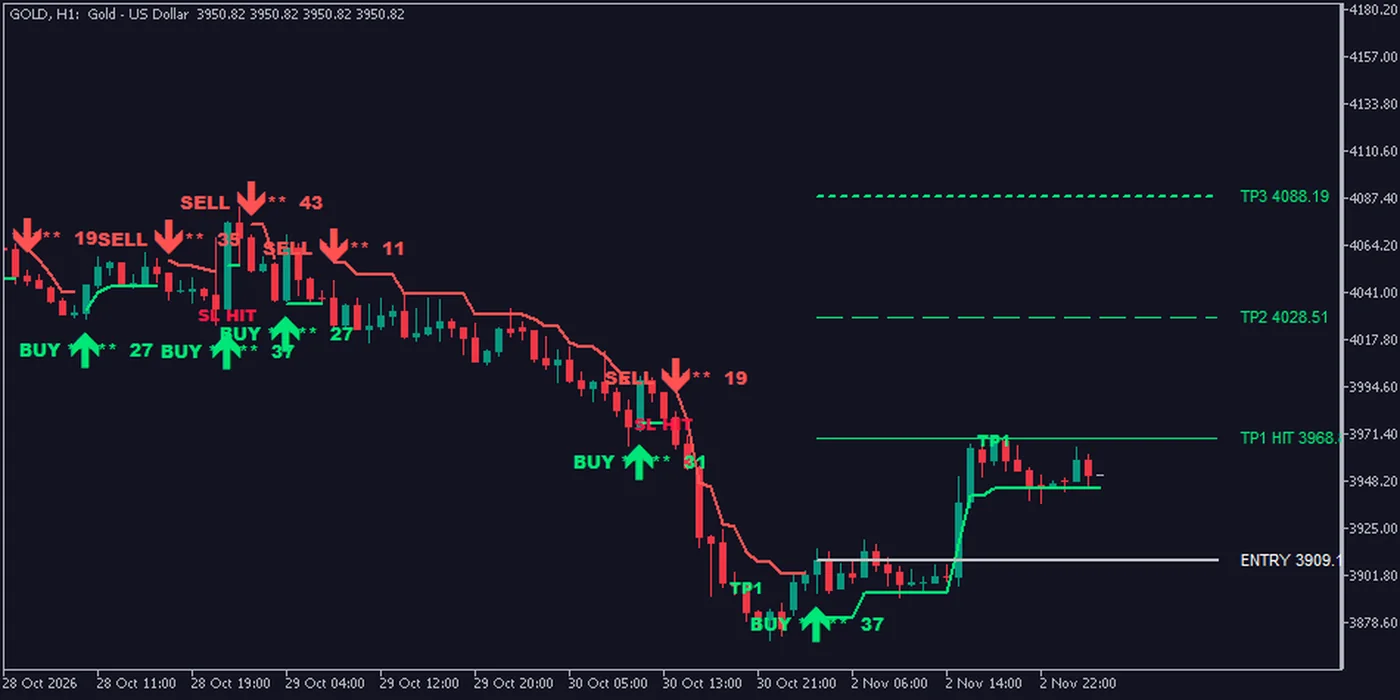
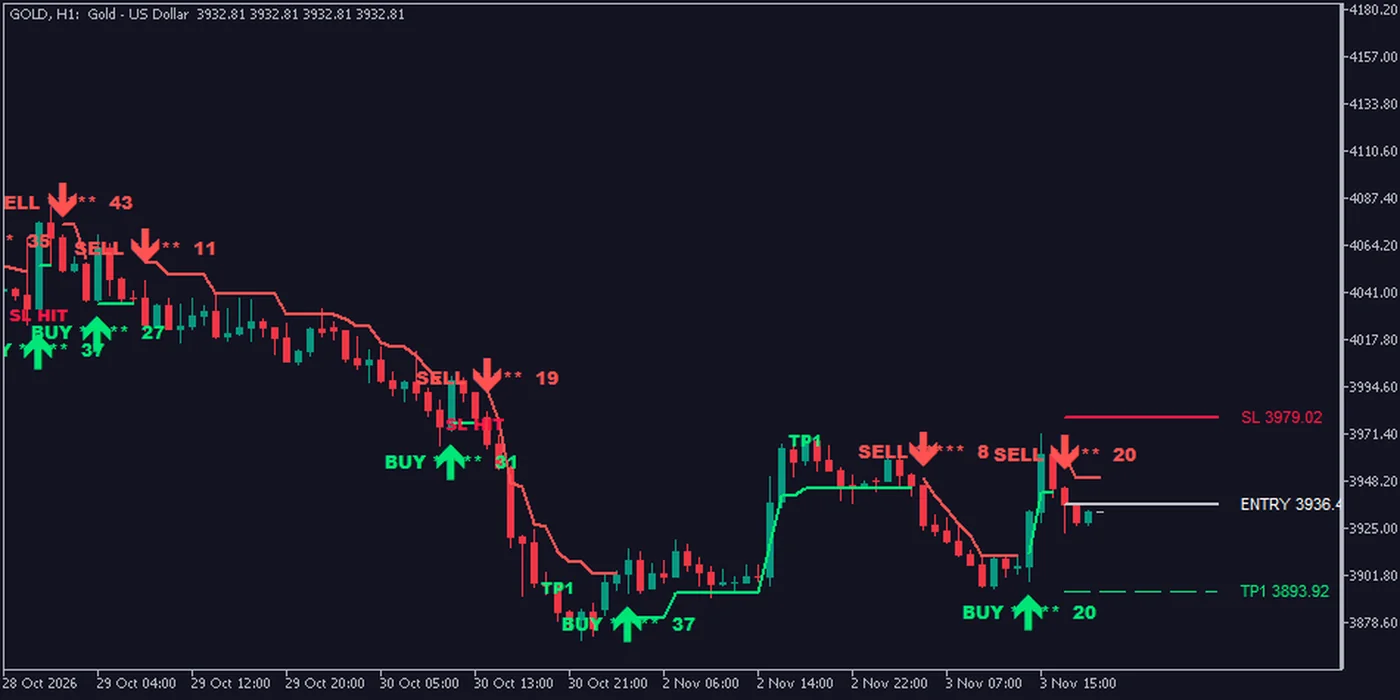
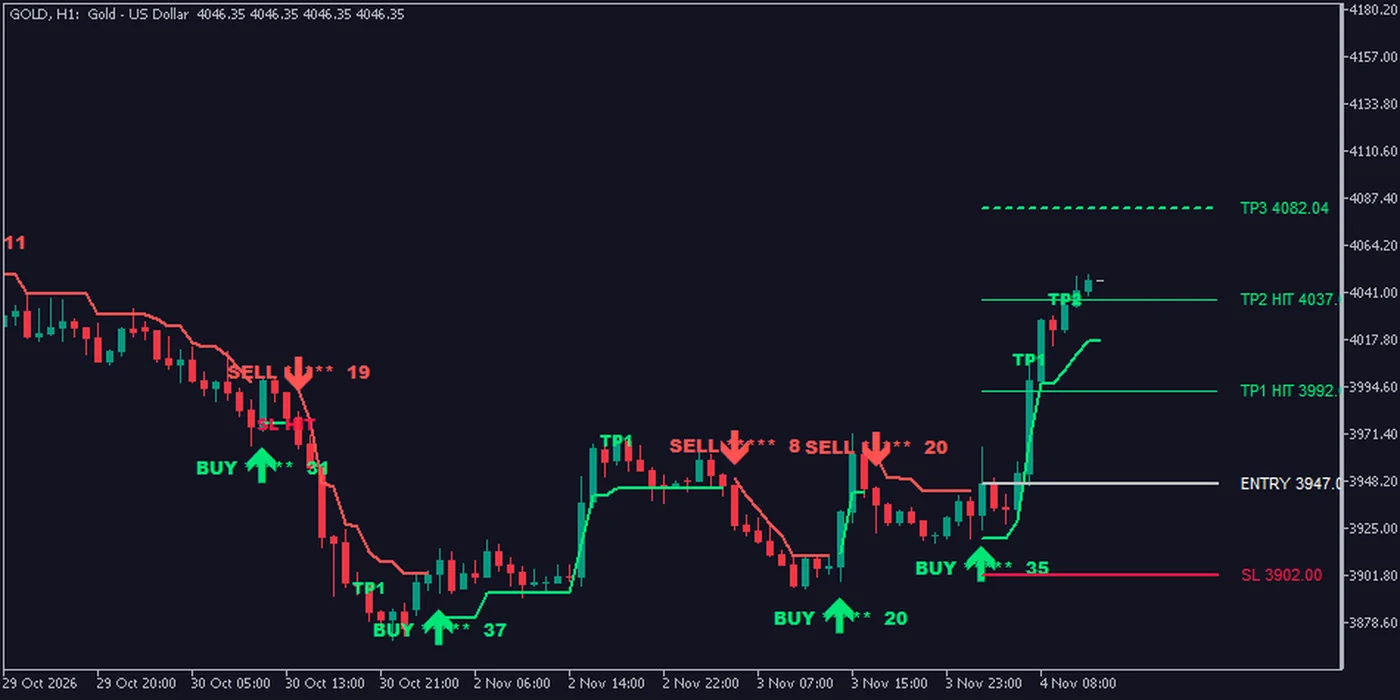
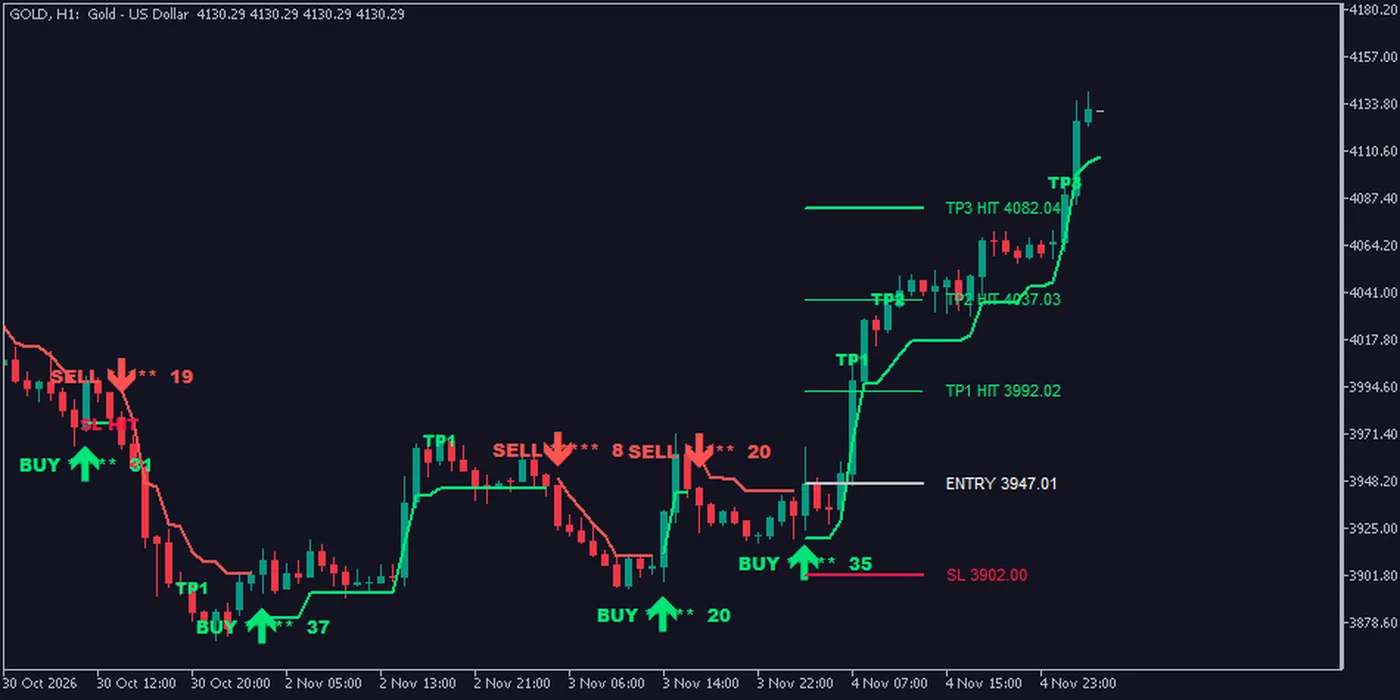
| Green / red trend line | The adaptive supertrend: green under price in an uptrend, red above it in a downtrend. |
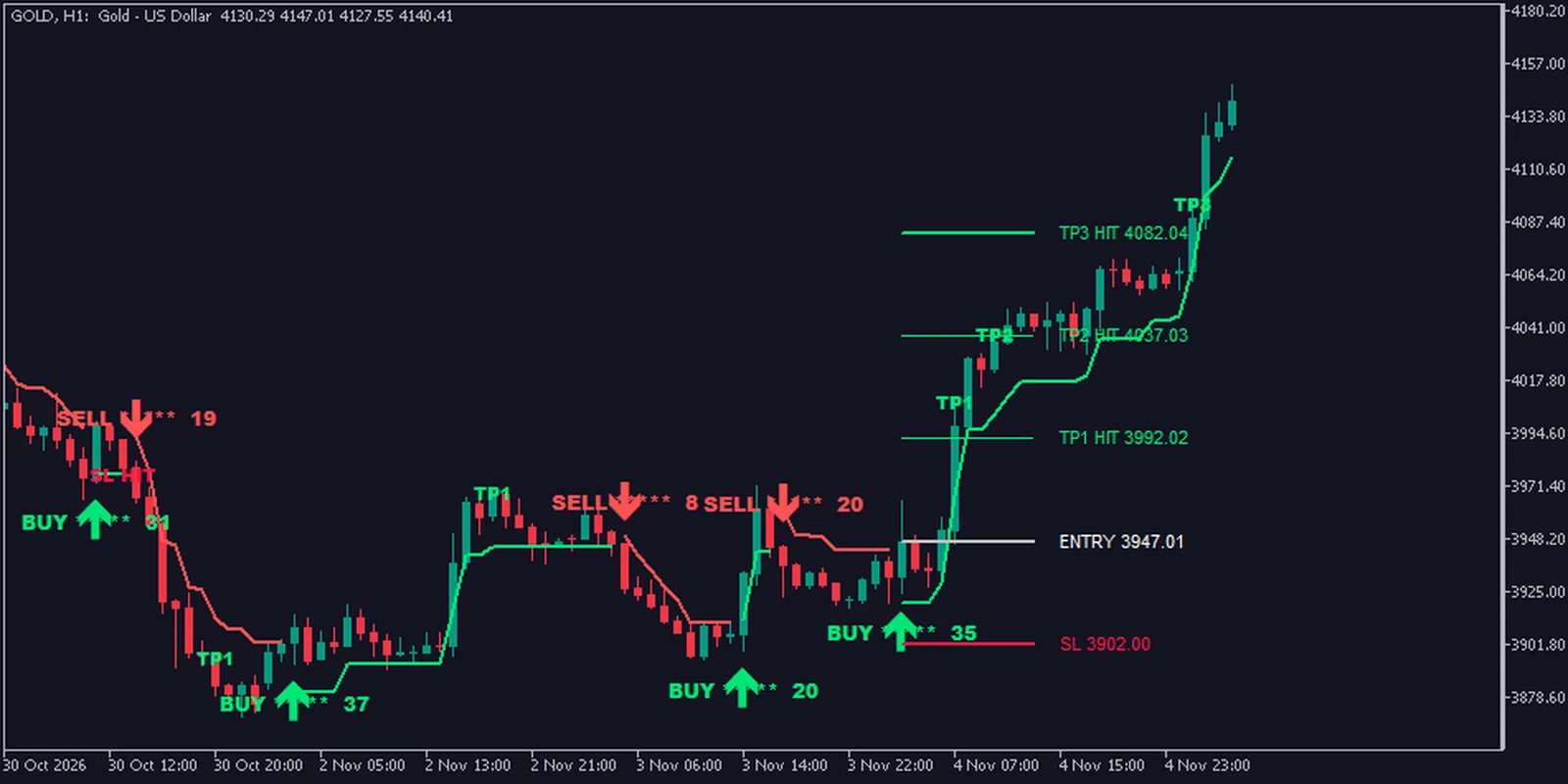
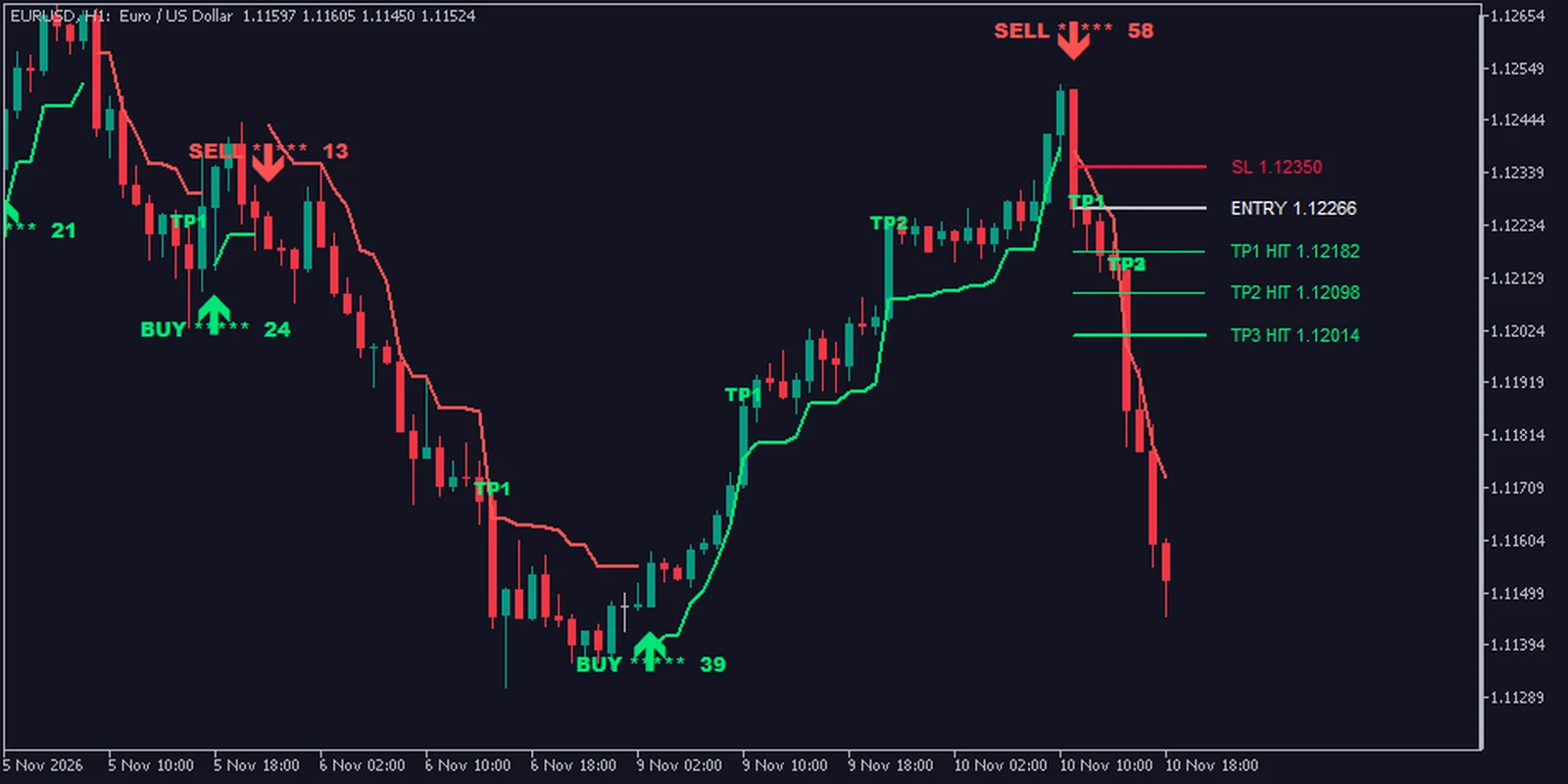
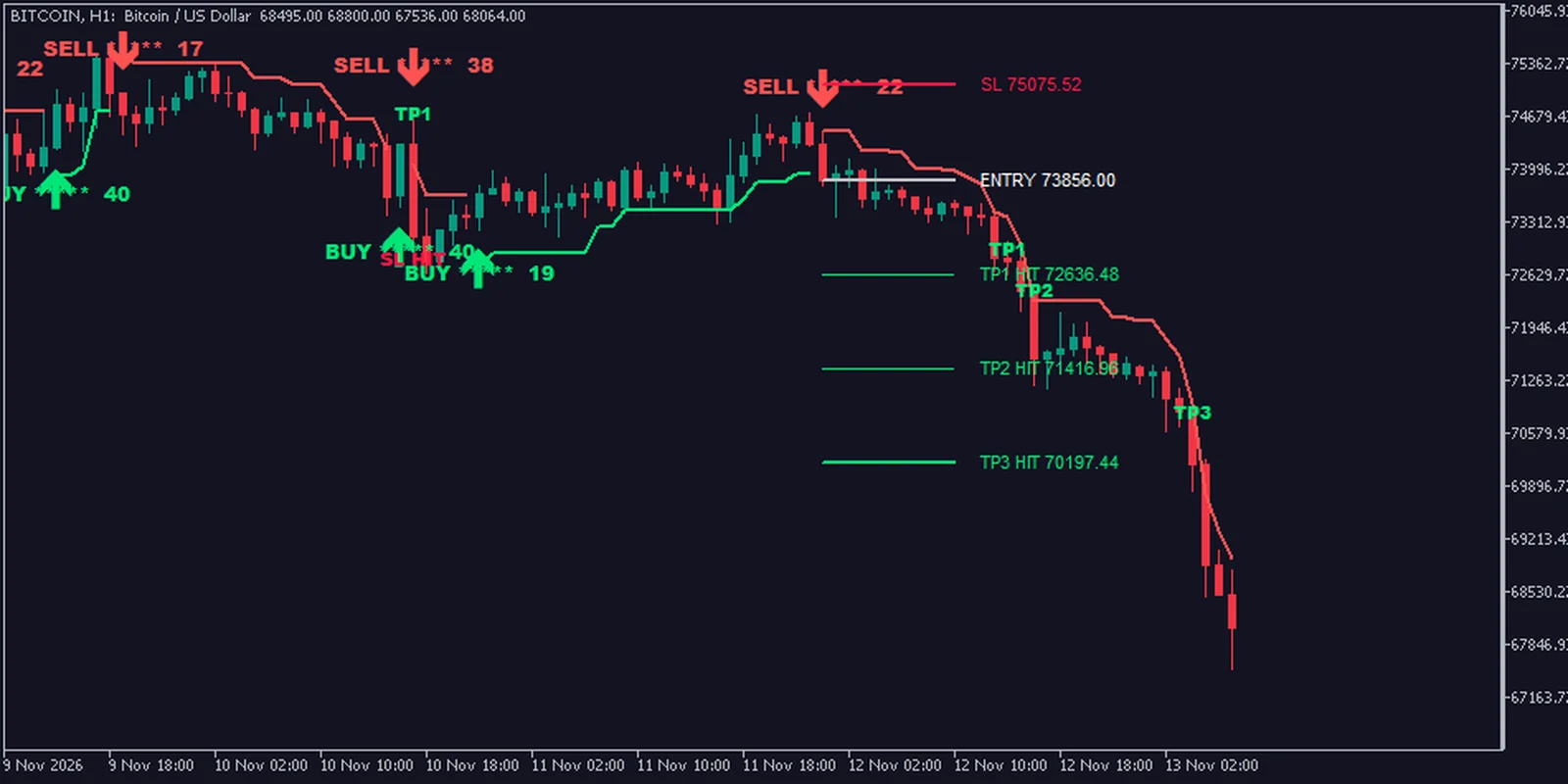
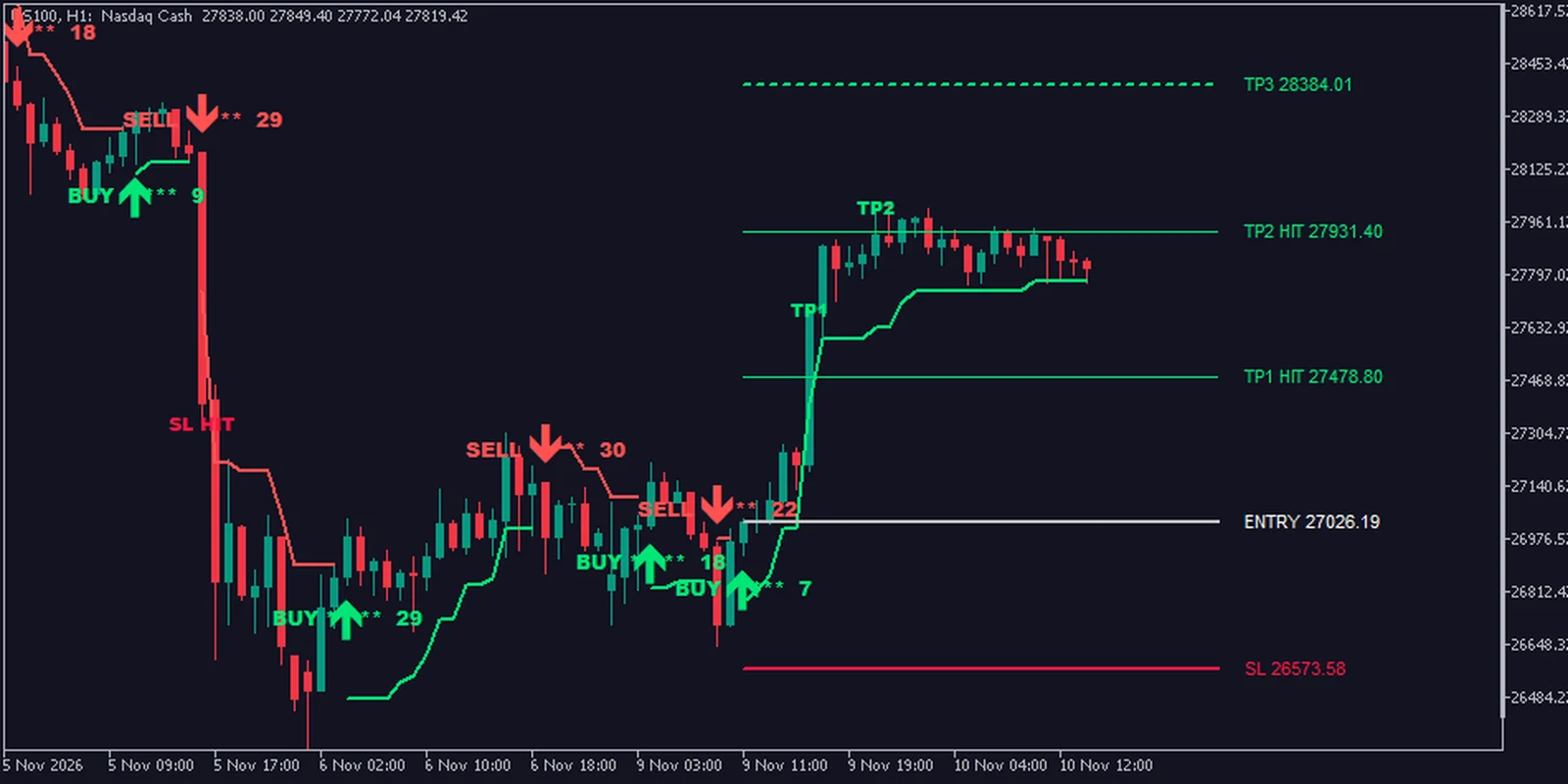
| Green up arrow with BUY ***** 57 | The trend flipped up on a closed candle; the number is the six-part signal score (the stars almost always show five, so read the number). |
| Red down arrow with SELL ***** 48 | The trend flipped down on a closed candle; the number is the score. |
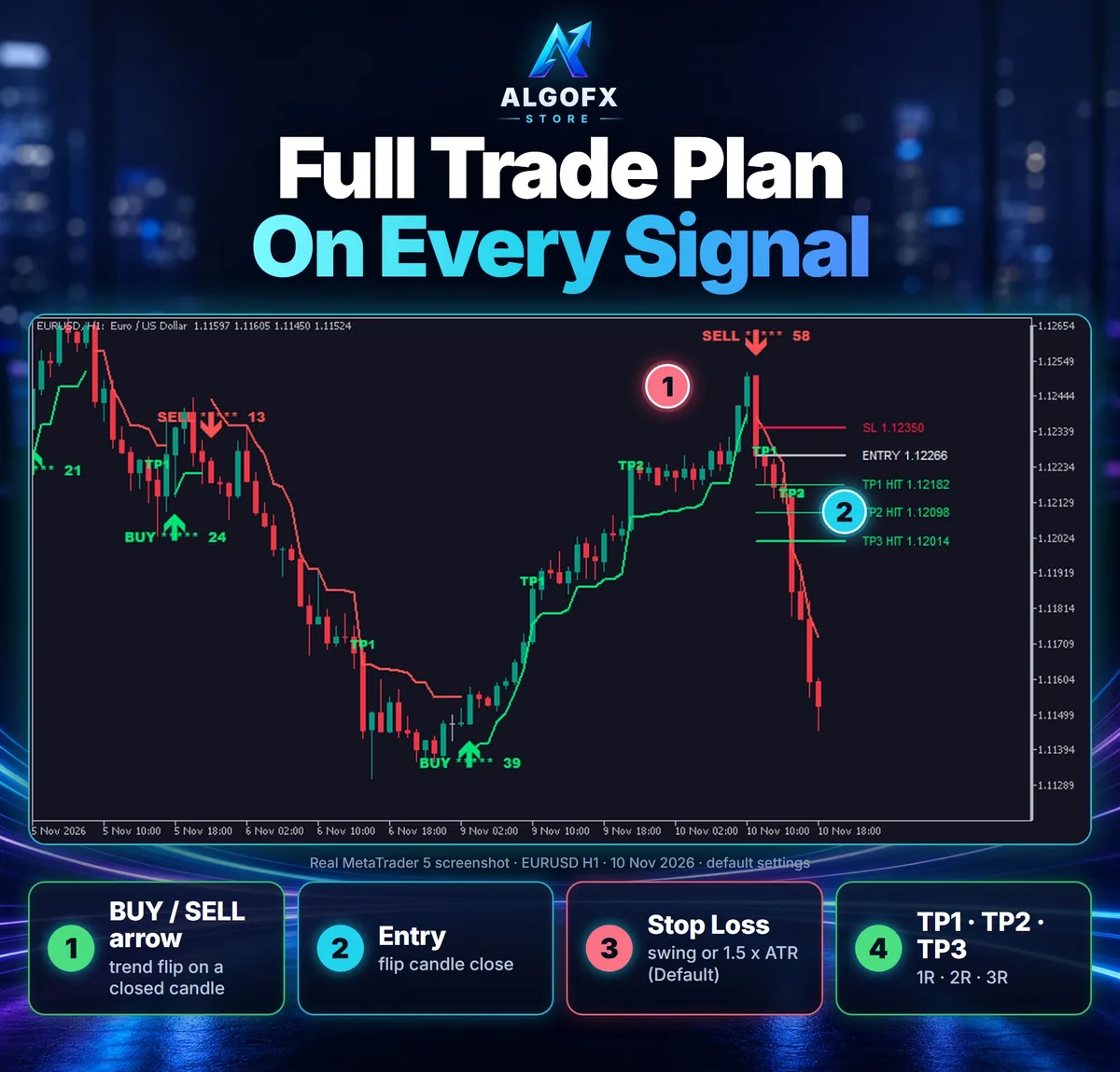
| Silver line, white ENTRY label with the price | Entry: the close of the flip candle. |
| Red line, SL label with the price | Stop loss beyond the last swing plus an ATR buffer (1.5 x the efficiency-weighted ATR on the Default preset), never closer to the entry than that buffer. |
| Green dashed lines, TP1, TP2 and TP3 labels with the price | Targets at 1R, 2R and 3R of the risk. |
| Target line turned solid, label reads TP1 HIT with the price | That target was reached; the line and the label stay green. |
| Green TP1, TP2 or TP3 mark above a candle | The target was reached on that candle. |
| Red SL HIT mark below a candle | The stop was reached; the plan ends. |
How the line, the signals and the plan are decided
Everything is computed from the chart's own candles; no other symbol or timeframe is requested. The steps below follow the shipped MetaTrader code.
- 1
An efficiency-weighted ATR
The indicator takes the ATR of the active preset (14 on the Default preset) and scales it by the efficiency ratio: ATR x (0.5 + 0.5 x ER). The efficiency ratio measures how directly price travelled over the last 20 candles. A straight move keeps the full ATR, a zig-zag counts it half, so noisy volatility does not push the bands as far away as clean volatility does.
- 2
A Trend Quality Index from four readings
Each candle gets a TQI from 0 to 1. It mixes efficiency (weight 0.35), participation (0.20: tick volume against its 20-candle average, or ATR against its 100-candle average when there is no volume), range position (0.25: how far the close sits from the middle of the 20-candle high-low range) and momentum persistence (0.20: how many of the last 10 candles moved with the 10-candle direction).
- 3
Bands reshaped by trend quality
The band multiplier starts from the preset base (2.0 on Default), widens when efficiency is low and changes again with the TQI. With Asymmetric Bands on, the band on the trend side tightens and the opposite band widens as quality rises. The multiplier is smoothed so it does not jump, and the bands ratchet like any supertrend: the support band only rises while price holds above it.
- 4
A flip on a closed candle prints the signal
When a closed candle's close breaks above the previous upper band while the trend was down, the trend turns up and a green up arrow prints under the low with a label such as BUY ***** 57. A close below the previous lower band in an uptrend prints the red SELL above the high. Every flip after the warm-up prints; the structure, RSI and volume switches only change the score.
- 5
A six-part score on every label
The number on the label adds six readings: the move of the last three candles against ATR, the efficiency ratio, the volume z-score, how deep RSI went beyond 30 or 70 in the last 20 candles, how close the last swing point is, and how far price travelled through the band. Higher means more of them agreed at the flip. It describes the flip; it is not a probability.
- 6
The plan: entry, stop and three targets
Entry is the flip candle's close (silver line, white ENTRY label). The stop goes beyond the last swing low or high found with 3 candles on each side, plus 1.5 x the efficiency-weighted ATR on Default, and never closer to the entry than that buffer (red line). TP1, TP2 and TP3 sit at 1R, 2R and 3R (green dashed lines). The plan ends at TP3, at the stop or after 100 candles.
Algo Shadow Matrix on 12 different markets
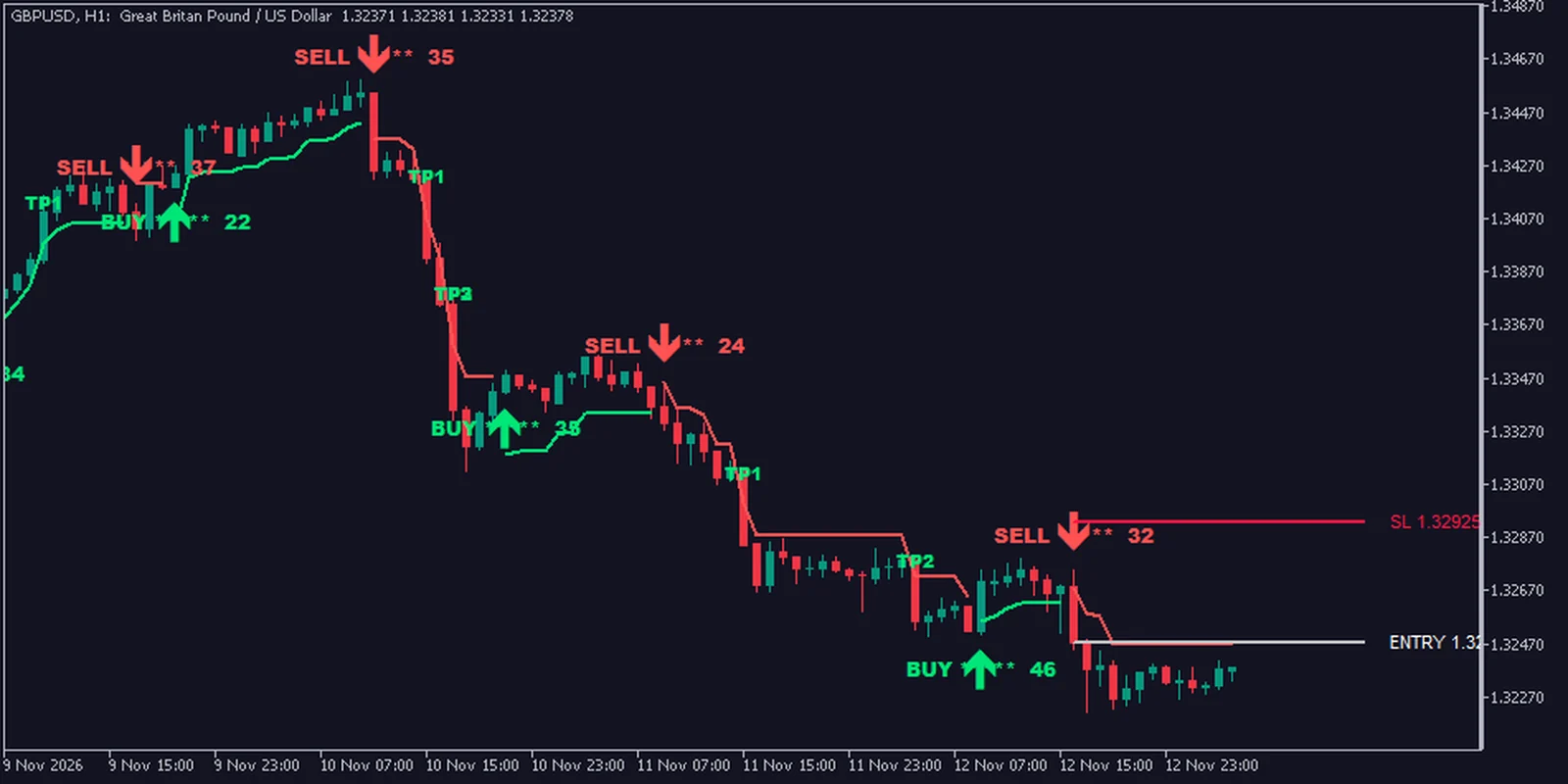
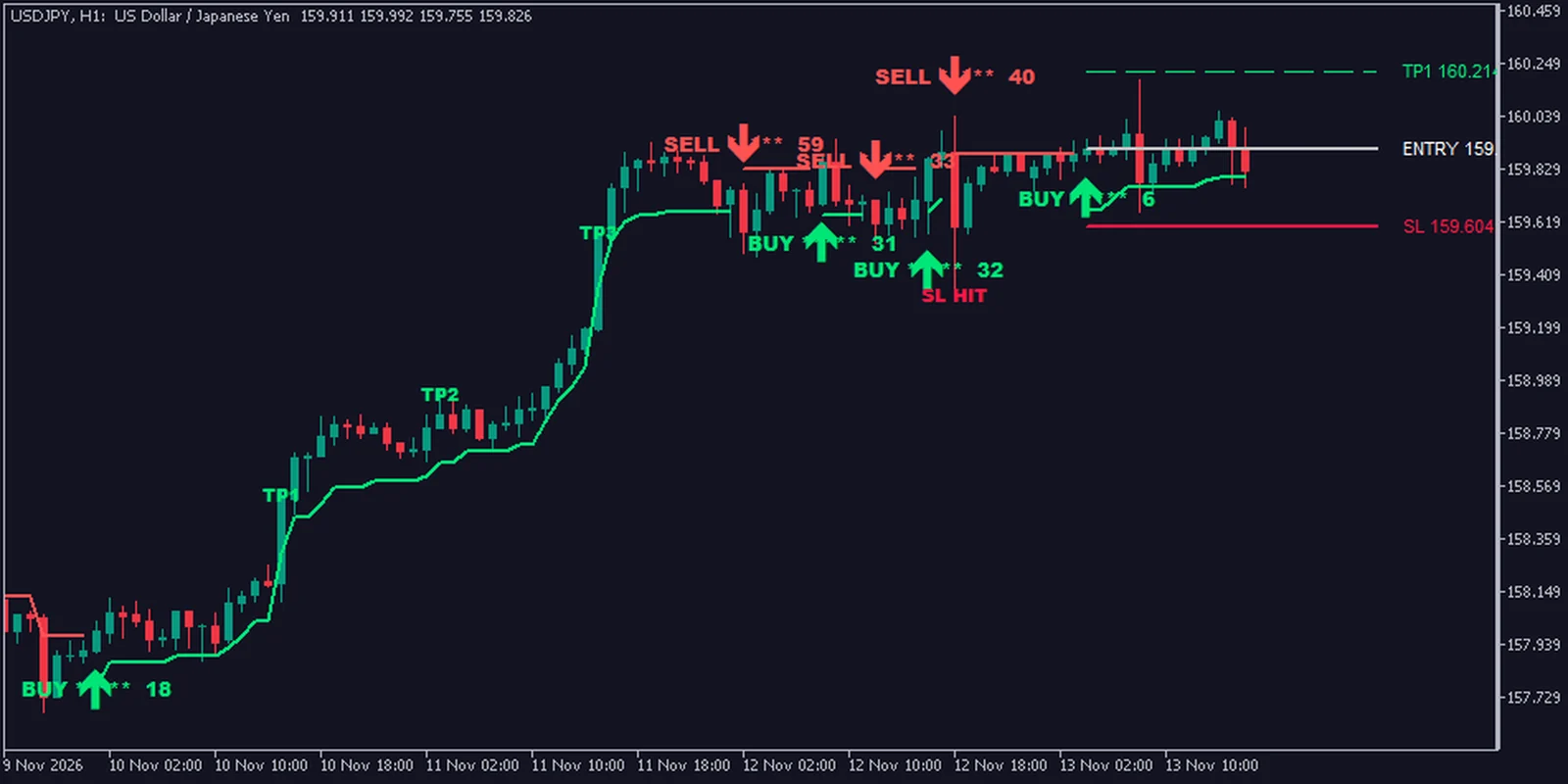
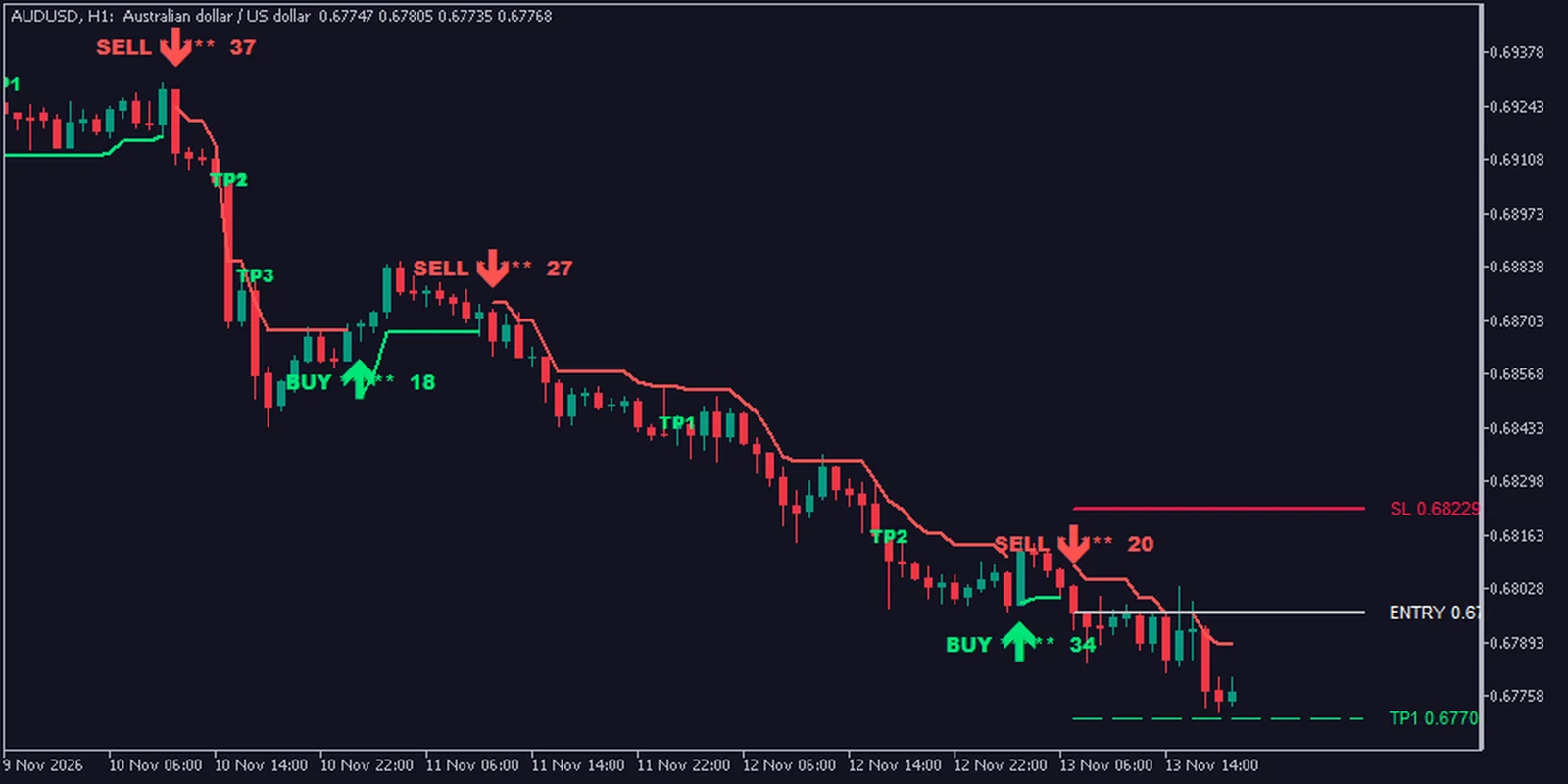
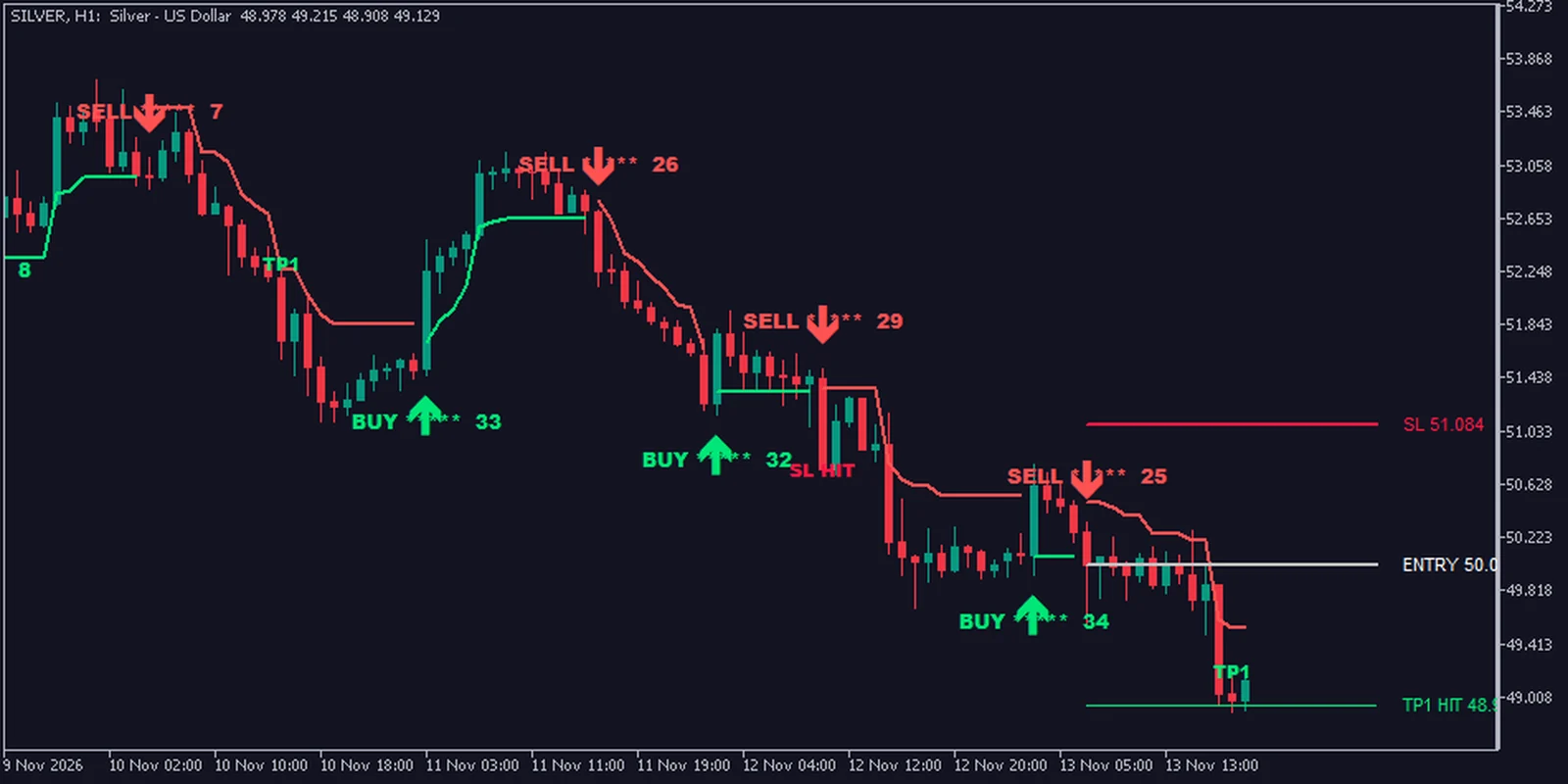
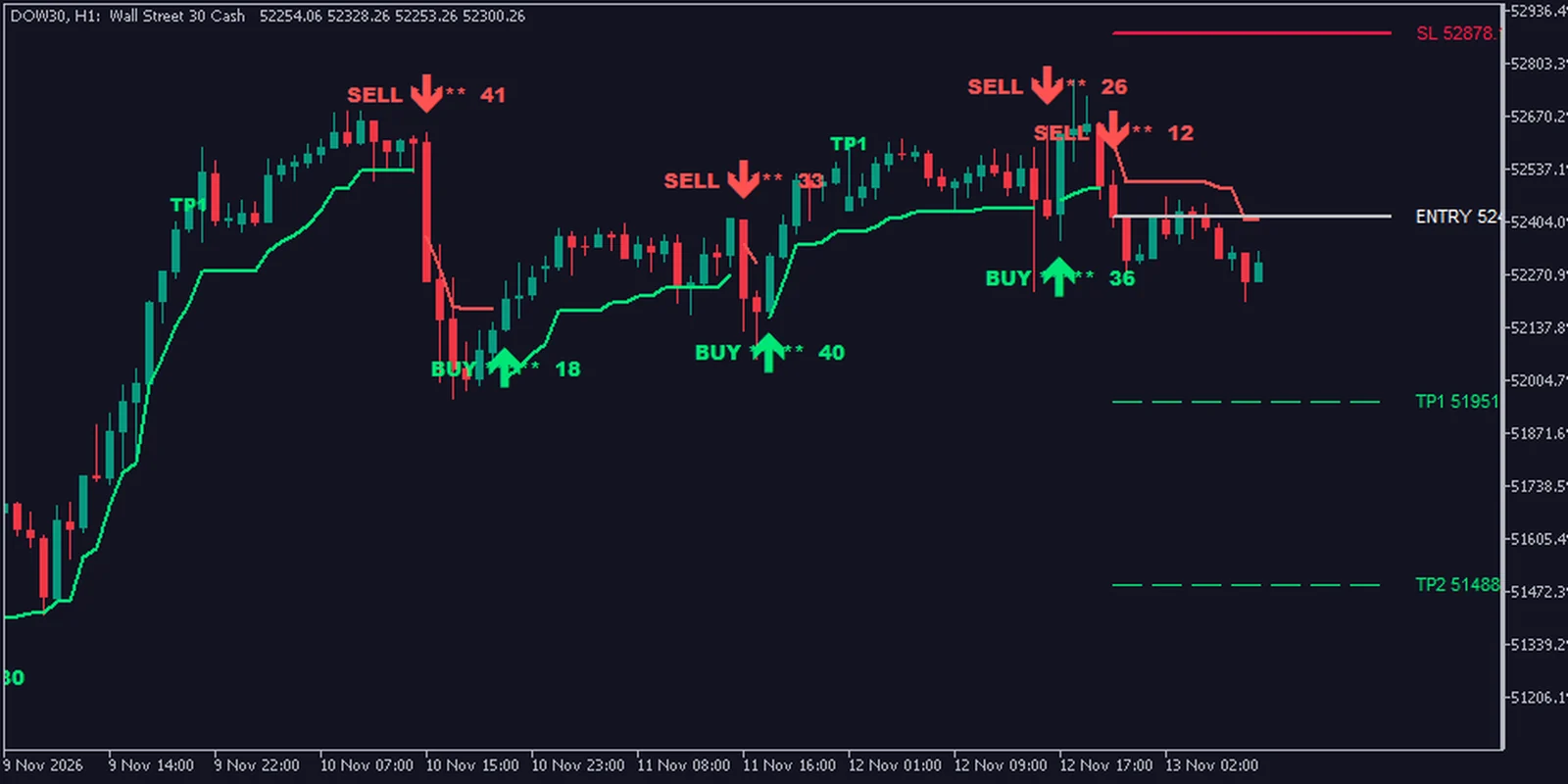
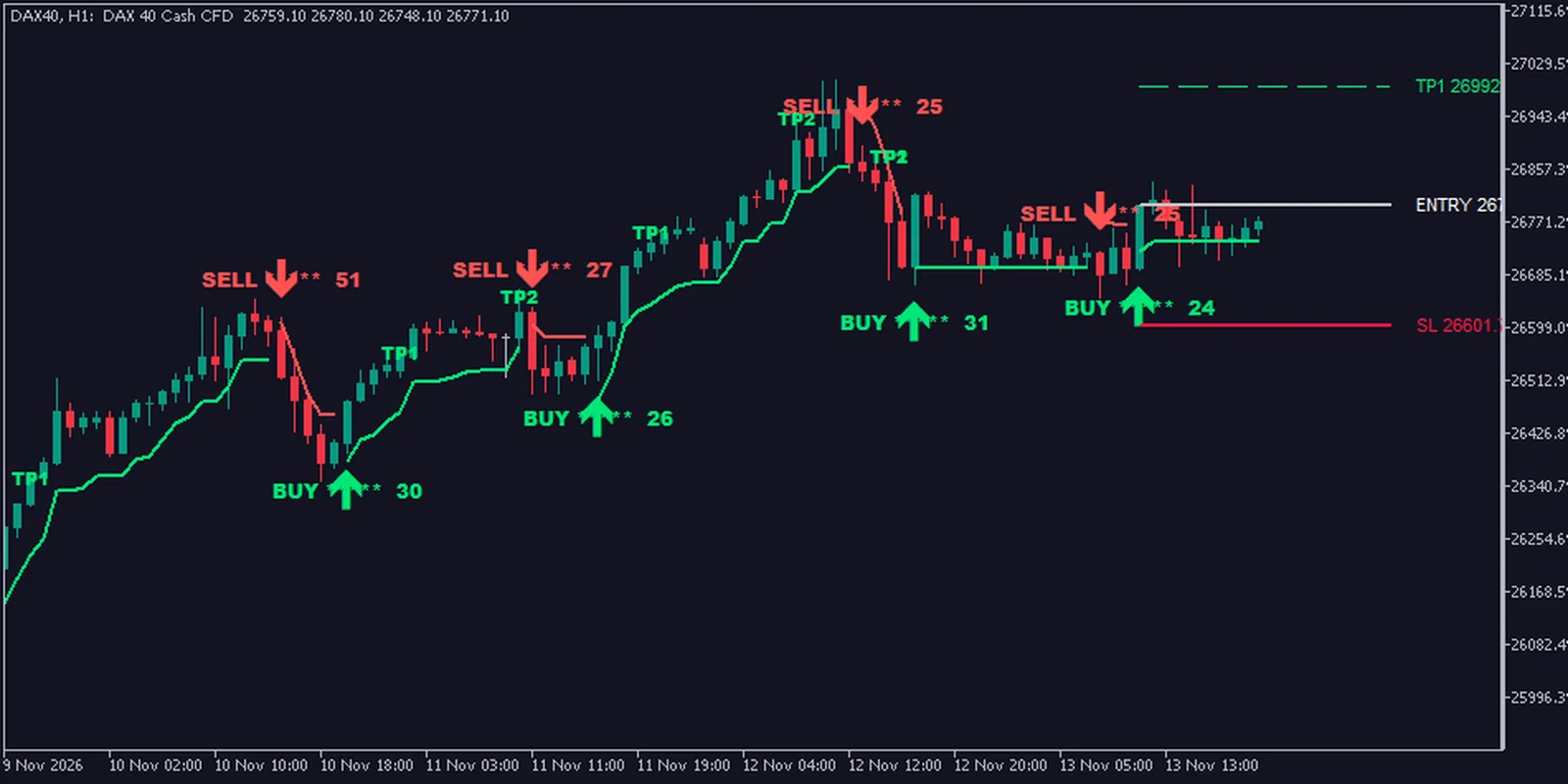
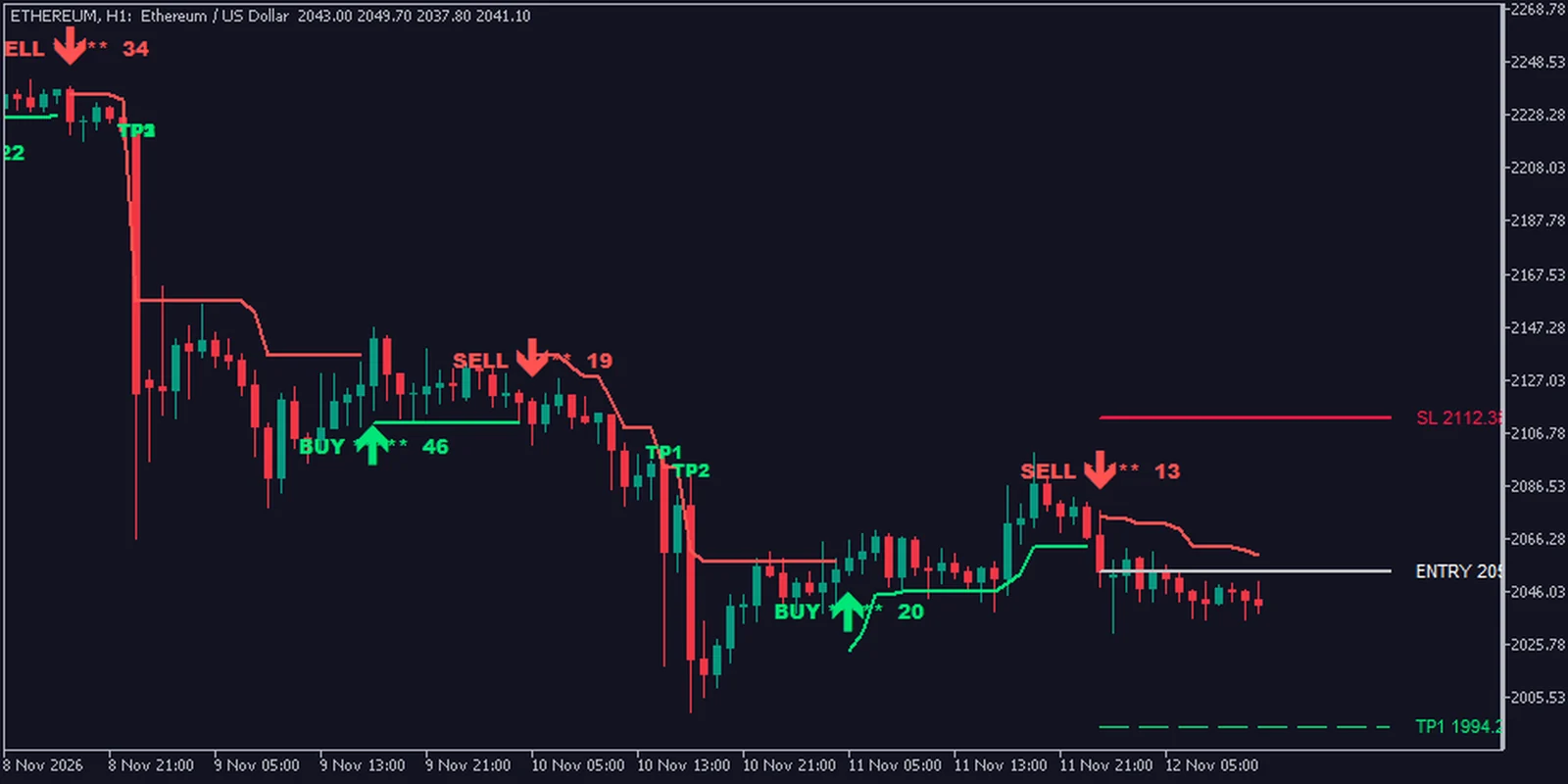
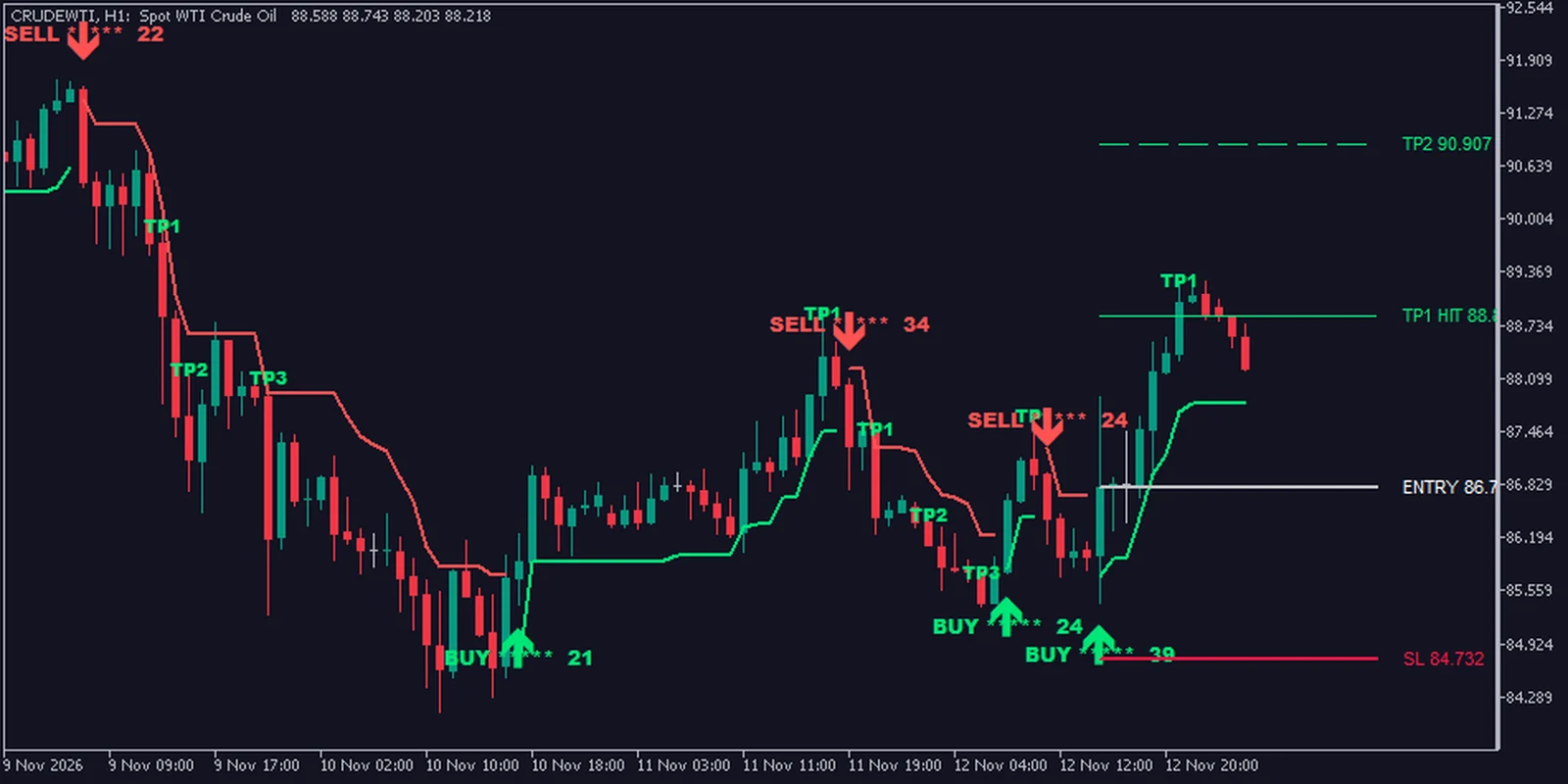
Every chart below is a screenshot of MetaTrader itself with the shipped Algo Shadow Matrix indicator attached at its default settings. Forex, metals, indices, energy and crypto, so you can see how it reads each kind of market. They show what the indicator draws; they are not trading results. Tap or click any chart to open it full size.
Watch Algo Shadow Matrix work on a real MetaTrader 5 chart
A screen recording and frames from the shipped indicator at its default settings, as the chart updates. Nothing is edited into the chart.
A step-by-step way to use it on your charts
The indicator decides when the line flips and where the levels are. Whether you take a signal, and with what size, stays your decision. A routine many traders start from:
- 1
Let it warm up and check the preset
Attach it, then look at the Preset row of the dashboard. It shows the active preset (Scalping on M1 to M5, Default from M15 to H4, Swing above H4 when Preset is Auto) and reads Ready once the warm-up is complete, 60 candles on the defaults. Until then it counts the candles still needed and nothing is drawn.
- 2
Wait for the closed-candle arrow
Do nothing while the trend line is simply following price. Act only when a candle closes and an arrow with its BUY or SELL label prints, or when the alert arrives. The alert already carries the price, the TQI, the score, the stop and all three targets, so you can plan from it before you even open the chart.
- 3
Read the context before the level
Check the dashboard. Regime / Vol shows Trending, Mixed or Choppy and Low, Norm or High Vol; the TQI Score is green above 0.6, yellow above 0.35 and red below. A personal filter worth testing on a demo account is to skip flips while the regime reads Choppy with Low Vol, or while the TQI is red. Compare the score with your recent signals and set your own minimum.
- 4
Size from the stop, skip if it is too wide
The Stop Loss row shows the distance from the entry in percent. Work out your position size from the entry-to-stop distance and your risk per trade. After a large impulse candle the last swing can sit far away and the stop gets wide; if the size this allows is too small for your account, skip the signal rather than moving the stop closer.
- 5
Place and manage your own order
The indicator places nothing. Put your stop at the SL price and your targets at TP1, TP2 and TP3, for example taking part off at TP1 and TP2. As price reaches a target, the line turns solid, its label changes to TP1 HIT with the price and a TP1 mark appears above the candle; a stop touch prints SL HIT below it.
- 6
Treat an opposite arrow as a decision point
If the line flips the other way while a plan is still open, the new signal replaces the old plan on the chart and the dashboard switches direction. Decide in advance what that means for you: close, tighten, or keep your original stop. Also note that a plan nobody closed by TP3 or the stop simply ends after 100 candles without an alert.
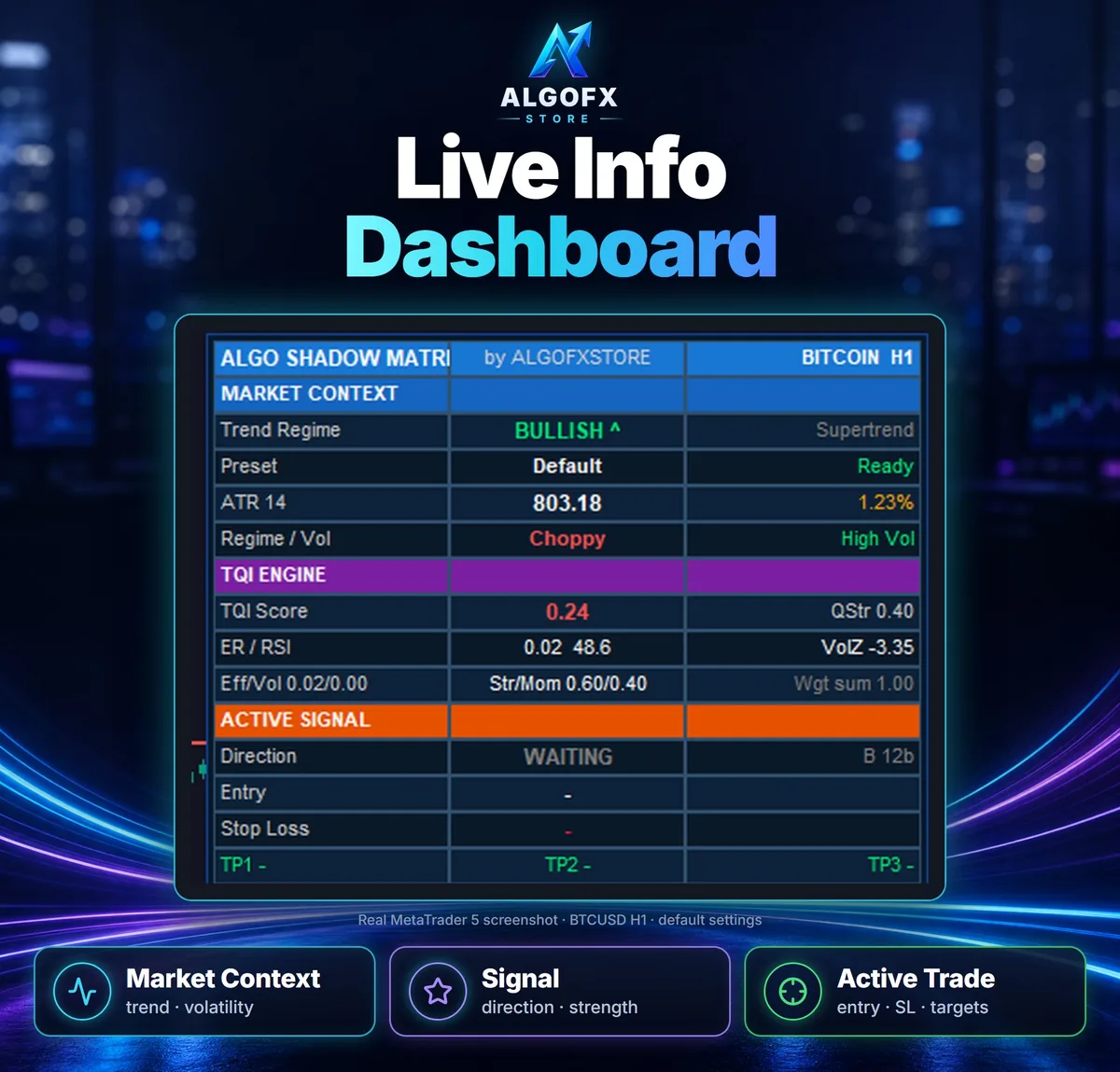
19 rows that read the market for you
- ALGO SHADOW MATRIX | by ALGOFXSTORE | the symbol and timeframe, for example EURUSD H1
- MARKET CONTEXT
- Trend Regime: BULLISH ^ or BEARISH v, Supertrend
- Preset: Scalping, Default, Swing, Crypto 24/7 or Custom, then Ready or the candles still needed for the warm-up
- ATR with its length: the ATR value and ATR as a percent of price
- Regime / Vol: Trending, Mixed or Choppy, and Low Vol, Norm Vol or High Vol
- TQI ENGINE
- TQI Score: 0.00 to 1.00 (green above 0.6, yellow above 0.35, red below) and the quality strength QStr
- ER / RSI: the efficiency ratio and RSI, and the volume z-score VolZ, or n/a without tick volume
- Eff/Vol and Str/Mom: the four TQI parts (with Show TQI Breakdown on)
- ACTIVE SIGNAL
- Direction: LONG, SHORT or WAITING, with the candles since the signal
- Entry: the entry price and the move since entry in percent
- Stop Loss: the stop price and its distance from the entry in percent
- TP1, TP2, TP3: the three target prices, each marked with a star once reached
- PERFORMANCE (with Show Performance on, the default): four rows of hypothetical bookkeeping of the indicator's own past plans on the loaded candles in R, with streaks, drawdown and a per-regime figure; hindsight, not a forecast, removed with Show Performance = false
Everything Algo Shadow Matrix does for you
Bands that adapt every candle
The band multiplier is recalculated on each candle from the preset base, the efficiency ratio and the Trend Quality Index, then smoothed. In clean trends the line stays close to price; in noise it backs off, so it flips less often there.
Tighter on the trend side
With Asymmetric Bands on (strength 0.5), the band that follows the trend tightens as quality rises and the band on the other side widens, so a pullback has more room before it counts as a break.
A ready plan on every flip
Each signal draws ENTRY, SL and TP1, TP2, TP3 lines with price labels. Lines start at the signal candle and, while the plan is open, keep reaching 10 candles past the current candle with the labels 2 candles further right.
Stops placed at structure
The stop uses the last swing point (3 candles each side by default) plus an ATR buffer that depends on the preset: 1.0 on Scalping, 1.5 on Default, 2.0 on Swing, 2.5 on Crypto 24/7, and never sits closer to the entry than one buffer.
Targets reached are marked on the candle
When a later candle's high or low reaches a target, the line becomes solid, the label reads TP1 HIT, TP2 HIT or TP3 HIT with the price, and a mark is drawn above that candle in the TP colour. A stop touch prints SL HIT in red.
Presets that follow the timeframe
On Auto the preset changes with the chart: Scalping on M1 to M5 (ATR 10, base 1.5), Default on M15 to H4 (ATR 14, base 2.0), Swing above H4 (ATR 21, base 2.5). Crypto 24/7 and Custom are chosen by hand.
A dashboard that explains the flip
Market context (trend regime, preset, ATR and ATR as a percent of price, efficiency regime and volatility), the TQI with its four parts and RSI, and the active signal with direction, entry, stop distance and targets. Six corner and side positions.
Alerts that carry the levels
BUY and SELL alerts include symbol, timeframe, price, TQI, score, SL, TP1, TP2 and TP3. TP1, TP2, TP3 and SL hits alert as well. Pop-up is on by default; push to the MetaTrader phone app and e-mail can be switched on.
One download, both platforms
The .ex4 for MetaTrader 4 and the .ex5 for MetaTrader 5 share the same 69 inputs in the same order and the same logic, so a setup you build on one carries over to the other.
Algo Shadow Matrix, feature by feature
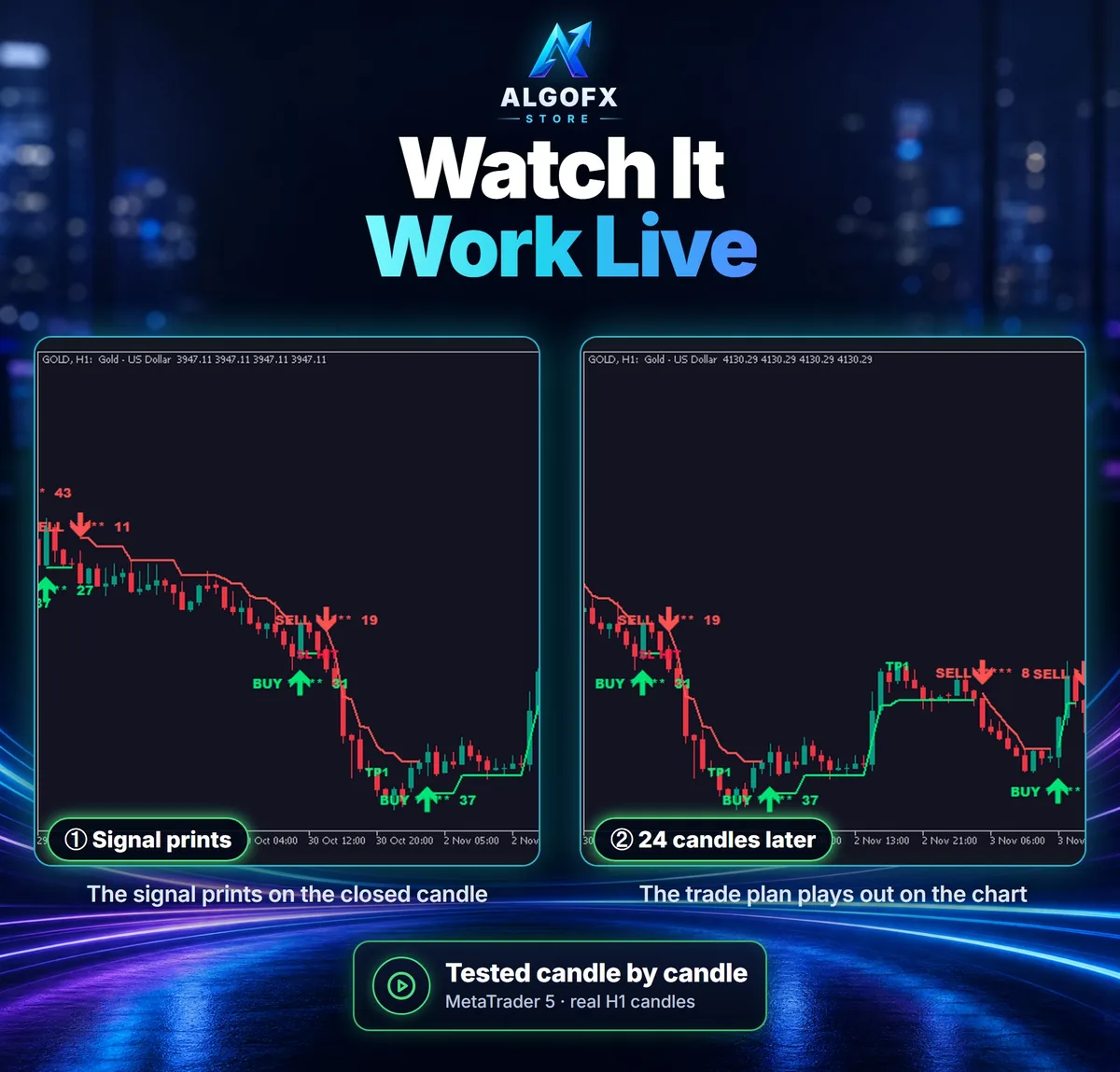
Each picture is built from real platform screenshots of the shipped indicator at its default settings, labelled so you can see what every part does. Tap any picture to open it full size.


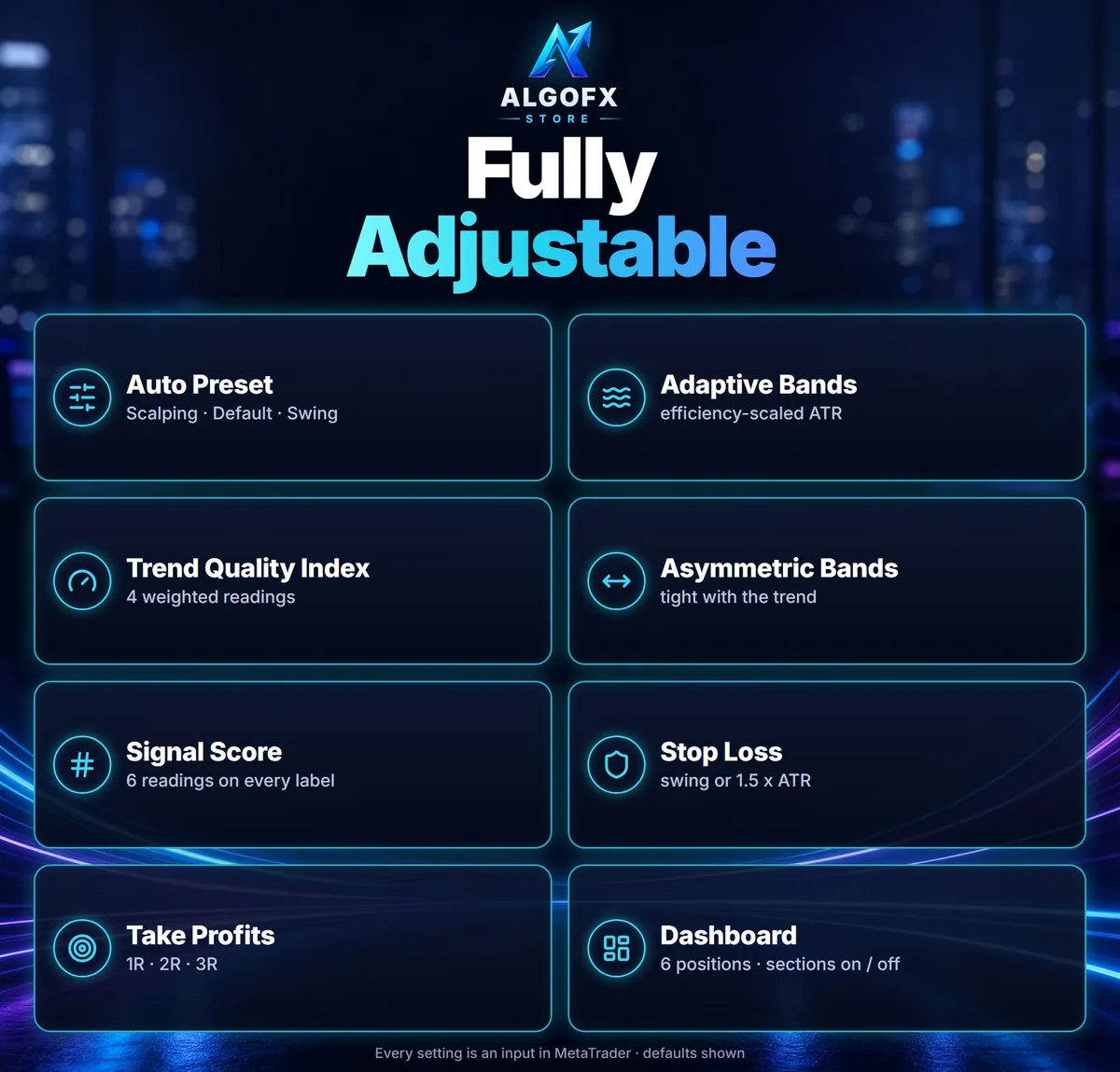
How traders put it to work
Intraday on M5 with the Scalping preset
On M1 to M5 the Auto preset switches to Scalping: ATR 10, base width 1.5, efficiency window 14, RSI 9 and a 1.0 x ATR stop buffer. Stops are tighter and flips come more often, so the dashboard regime and the score do more of the filtering. Expect several plans per session on active symbols and keep your own skip rules strict.
M15 to H4 on forex, gold and indices
From M15 to H4 Auto uses the Default preset: ATR 14, base width 2.0 and a 1.5 x ATR stop buffer. This is the middle setting the charts on this page use for symbols such as EURUSD, XAUUSD and NAS100. Gold and index CFDs can show wide swing-based stops after fast candles, so check the Stop Loss row before sizing.
Swing trading on H4 and above
Above H4 Auto selects Swing: ATR 21, base width 2.5, efficiency window 30, RSI 21 and a 2.0 x ATR stop buffer. The line sits further from price and flips less often, and the 100-candle plan timeout covers a long stretch of time on daily candles. Lower Trade Max Age if you want a stale plan to end sooner.
Crypto that trades all week
For symbols such as BTCUSD that trade through the weekend, you can pick Crypto 24/7 by hand: ATR 14, base width 2.8 and a 2.5 x ATR stop buffer, the widest of the presets. The dashboard Preset row confirms which one is active. Without tick volume the participation reading falls back to ATR against its 100-candle average.
Every setting, with its default
The names are the ones in the MetaTrader inputs dialog; the defaults are what every chart on this page uses.
| Setting | Default | What it does |
|---|---|---|
| Preset (PresetInput) | Auto | Auto by timeframe: M1-M5 Scalping, M15-H4 Default, above H4 Swing; or Scalping, Default, Swing, Crypto 24/7, Custom. |
| ATR Length / Base Multiplier (AtrLenInput / BaseMultInput) | 13 / 2.0 | Custom preset only (Default preset = ATR 14, 2.0). |
| Adaptive Engine (UseAdaptiveInput / ErLengthInput / AdaptStrengthInput) | true / 20 / 0.5 | Width follows the efficiency ratio. |
| Trend Quality Engine (UseTqiInput / QualityStrengthInput / QualityCurveInput) | true / 0.4 / 1.5 | TQI reshapes the band width. |
| Asymmetric Bands (UseAsymBandsInput / AsymStrengthInput) | true / 0.5 | Tighter on the trend side, wider on the other. |
| TQI weights (Er / Vol / Struct / Mom) | 0.35 / 0.20 / 0.25 / 0.20 | Mix of the four quality readings. |
| SL ATR Multiplier (SlAtrMultInput) | 1.5 | Custom preset only (Default = 1.5, Scalping 1.0, Swing 2.0, Crypto 2.5). |
| TP1 / TP2 / TP3 R (Tp1RInput / Tp2RInput / Tp3RInput) | 1.0 / 2.0 / 3.0 | Targets as multiples of the risk. |
| Trade Max Age (TradeMaxAgeInput) | 100 | Bars before an open trade times out. |
| Dashboard (ShowDashInput / DashPosInput / ShowPerfInput) | true / Top Right / true | Set Show Performance = false for images. |
6 alert events
You choose which alerts are on in the inputs. Alerts can go to a pop-up in MetaTrader's Alert window, a push notification to the MetaTrader app on your phone and an e-mail (MetaTrader's e-mail settings must be filled in).
- ASM BUY Signal
- ASM SELL Signal
- ASM TP1 Hit
- ASM TP2 Hit
- ASM TP3 Hit
- ASM SL Hit
Algo Shadow Matrix next to the usual options
Where it wins, and where it does not.
| Algo Shadow Matrix | Typical free supertrend indicator | Reading it by hand | |
|---|---|---|---|
| Band width | Recalculated every candle from efficiency and a four-part Trend Quality Index, asymmetric and smoothed | One fixed ATR multiplier in every market condition | Your judgement of whether the market is trending |
| After the flip | Entry, swing-based stop and TP1 to TP3 at 1R to 3R drawn with prices | Usually only the line or an arrow | You measure and draw every level yourself |
| Context for each signal | Six-part score on the label and a dashboard with regime, volatility and TQI | None | Your own checklist, applied the same way each time if you are disciplined |
| Alerts | BUY, SELL, TP1, TP2, TP3 and SL hit with the levels in the text | Often a basic flip alert or none | You watch the chart |
| Timeframe handling | Auto preset switches between Scalping, Default and Swing | Same settings on every timeframe unless you change them | You adjust your rules per timeframe |
| Simplicity | 69 inputs and a 19-row dashboard to learn, though the defaults work as shipped | A handful of inputs, nothing to learn | No software to learn at all |
| Cost | A one-time payment | Free | Free, paid for in screen time |
Honest about who this fits
A good fit if you
- You already trade trend flips or supertrend-style signals and want the stop and targets planned the moment the flip prints.
- You trade on MetaTrader 4 or MetaTrader 5, or both, and want one setup that behaves the same on each.
- You want a reason to skip a signal as much as a reason to take one, and you will read a regime row and a score before clicking.
- You size positions from the stop distance and like having that distance shown as a price and a percent.
- You trade forex, gold, indices or crypto on anything from M5 to daily and want presets that adjust with the timeframe.
- You prefer alerts that already contain the entry, stop and all three targets, so you can plan from your phone.
Not for you if you
- Traders who want the software to place, move or close orders: it is an indicator and never sends an order.
- Anyone looking for a filter that hides weak signals: every flip after the warm-up prints, and the score is for you to judge.
- Range and mean-reversion traders: a supertrend is built to follow trends, and in a long sideways market it will flip against you more than once.
- Traders who want a short list of settings: there are 69 inputs and a full dashboard, even if the defaults are meant to be used as they are.
Both builds, one guide, installed in a minute
- 2Indicator buildsAlgo Shadow Matrix indicator.ex4 for MetaTrader 4 and Algo Shadow Matrix indicator.ex5 for MetaTrader 5, in one 0.7 MB zip.
- 4Page PDF guideInstallation, every setting with its default and how to read the chart.
- 10Setting groupsEvery one explained above, with the defaults the charts use.
- 6Alert eventsYou choose which ones are on in the settings.
- 60Day money-back guaranteeIf it is not for you, request a full refund within 60 days through your Digistore24 order e-mail.
Install in four steps
- Download the zip from the page Digistore24 sends you to after checkout and unzip it.
- MetaTrader: File, Open Data Folder, then MQL4\Indicators (MetaTrader 4) or MQL5\Indicators (MetaTrader 5).
- Copy the .ex4 (MetaTrader 4) or the .ex5 (MetaTrader 5) there, refresh the Navigator and drag “Algo Shadow Matrix indicator” onto a chart.
- Read the guide; the defaults are the settings shown on this page.

Kestutis Balciunas
AlgoFXStore · chart indicators for MetaTrader, TradingView, cTrader and NinjaTrader
Kestutis Balciunas builds and publishes chart indicators under the AlgoFXStore name for MetaTrader 4 and 5, TradingView, cTrader and NinjaTrader 8. Every product page shows what the indicator draws on real charts, and every number on it comes from the shipped build.
The charts on this page were captured in MetaTrader from the shipped Algo Shadow Matrix indicator at its default settings and are shown unedited.
No get-rich claims and no quoted win rates. Every trade is uncertain, and no indicator changes that. If you want to know whether it suits the way you trade before you buy, e-mail [email protected] and you will get a straight answer.
One price, both platforms
- Both builds: .ex4 for MetaTrader 4 and .ex5 for MetaTrader 5, plus the 4-page PDF guide
- Delivered as a digital download: one zip with both builds and the PDF guide on your download page
- Return period: 60 days, with a full refund if it is not for you
- Free updates to the current version on the same download page
60-day money-back guarantee. Install it, run it on your own charts and read the guide. If Algo Shadow Matrix is not for you within 60 days of purchase, request a full refund from Digistore24, no questions asked: use the refund link in your Digistore24 order e-mail or Digistore24's order page digistore24.com/en/cancel-revoke-contract. Digistore24 refunds to your original payment method. It is a digital download: right after checkout you land on your download page, and the link to it is also in your Digistore24 order e-mail.
Also by Kestutis Balciunas: Algo Shadow Matrix for NinjaTrader 8.
About the signals
Does it repaint?
Signals are decided on closed candles: the forming candle never prints an arrow, a plan or an alert, and an arrow that has printed is not moved or deleted while the chart runs. The line's state is carried from candle to candle, and a full reload rebuilds it from the loaded history. In a candle-by-candle live replay on gold H1, 48 candles with four signals, every arrow matched what the same candles drew when loaded as history. That is one check on one chart, so this page does not use the word non-repainting for the MetaTrader build.
What do the stars and the number on a label mean?
The number is the signal score, the sum of six readings at the flip: recent move, efficiency, volume, RSI depth, distance to the last swing and break depth through the band. It runs roughly from 0 to 100, and higher means more readings agreed. On this build the star string almost always shows five stars, so read the number, not the stars.
Why did a signal print with a low score?
Because nothing is filtered out. The Signal Filters group (structure, RSI and volume switches) only changes how the score is calculated; every flip after the warm-up prints an arrow and a plan. That is deliberate: you see every flip and decide yourself which scores you trade. A low score simply tells you fewer of the six readings agreed.
What happens when an opposite signal prints while a plan is open?
The new flip replaces the open plan: the ENTRY, SL and TP lines move to the new signal and the dashboard switches to the new direction. The older arrow, label and any TP or SL marks stay where they printed. The indicator does not judge the old plan as won or lost at that point.
Why is the stop sometimes very wide?
The stop anchors to the last swing low or high, then adds the ATR buffer, and it is never closer than that buffer. After a large impulse candle the last swing can be far from the entry, so the stop is wide and the targets, being multiples of that risk, are far as well. That is often the kind of signal to skip or trade smaller.
Settings, markets and the dashboard
Which markets and timeframes does it work on?
Any symbol in your Market Watch and any chart timeframe, on MetaTrader 4 and MetaTrader 5. It reads only the chart's own candles. On Auto the preset follows the timeframe: Scalping on M1 to M5, Default on M15 to H4, Swing above H4. It needs the warm-up, 60 candles on the defaults, before it draws anything.
Should I keep the defaults or tune it?
Start with the defaults on Auto; the charts on this page use them. Note that ATR Length, Base Multiplier and SL ATR Multiplier only act when Preset is Custom, because every other preset sets its own values. The character-flip inputs are present but, in this build, the line flips only on a price break, so changing them has no effect.
What does the dashboard show and can I move it?
Market context (trend regime, preset and warm-up status, ATR and ATR in percent, Trending, Mixed or Choppy, and Low, Norm or High Vol), the TQI engine (score, efficiency ratio, RSI, volume z-score and the four parts) and the active signal (direction, bars since the signal, entry, stop distance, TP1 to TP3 with a star after each hit). Six positions, font size, offsets and column width are inputs.
What is the PERFORMANCE section of the dashboard?
With Show Performance on, four extra rows tally how the indicator's own plans ended on the loaded candles, in R. It is hindsight bookkeeping of the drawn levels with no spread, commission or slippage, it changes with how much history is loaded, and it is not a forecast. Set Show Performance to false to remove the section.
What does each colour and mark mean?
Green line or arrow: uptrend or BUY. Red line or arrow: downtrend or SELL. Silver line with a white ENTRY label: the entry. Red SL line: the stop. Green dashed lines: TP1 to TP3, turning solid when reached. TP1, TP2 and TP3 marks above a candle: a target was reached there. SL HIT below a candle: the stop was reached.
Alerts and running it
How do I get the alerts on my phone?
Install the MetaTrader app on your phone and copy its MetaQuotes ID. On the desktop, open Tools, Options, Notifications, enable push notifications with that ID, then switch the indicator's push input on. E-mail works the same way through Tools, Options, Email. The phone receives the alert text; the indicator itself keeps running in MetaTrader on your computer or a VPS.
Does MetaTrader need to stay open?
Yes. Alerts only fire while MetaTrader runs with the chart open, on your computer or on a VPS. Alerts are silent during the first full calculation when you attach it or reload, so you do not get a burst of old signals, and every alert is also written to the Experts log.
Is there any difference between the MT4 and MT5 builds?
The logic and the 69 inputs are the same. MetaTrader 5 redraws the dashboard on a half-second timer, MetaTrader 4 redraws it as ticks arrive. Both remove all of their chart objects when you remove the indicator.
Can I run it on several charts, or read it from an EA?
Yes, each chart runs its own copy with its own settings. After the first calculation it only recomputes the newest few candles on each tick. The two line buffers, ASM Bull and ASM Bear, show in the Data Window and can be read with iCustom; there is no signal buffer, because BUY and SELL are chart objects.
How it works
Will it place trades for me?
No. Algo Shadow Matrix is an indicator: it draws on the chart and can alert you. It never sends an order.
Do I get both MetaTrader 4 and MetaTrader 5?
Yes. The download holds the .ex4 for MetaTrader 4 and the .ex5 for MetaTrader 5.
After you buy
How do I get it after paying?
Digistore24 runs the checkout. Right after payment it takes you to your download page with one zip holding both builds and the PDF guide; the link to that page is also in your Digistore24 order e-mail, so you can download again at any time.
How do I install it?
In MetaTrader: File, Open Data Folder, then MQL4\Indicators (MetaTrader 4) or MQL5\Indicators (MetaTrader 5); copy the matching file there, refresh the Navigator and drag “Algo Shadow Matrix indicator” onto a chart. The guide walks through it step by step.
Who is Digistore24?
Digistore24 is the reseller that sells Algo Shadow Matrix for Kestutis Balciunas (AlgoFXStore): it runs the checkout, charges your card or PayPal, collects the VAT for your country and delivers the download. Its name is the one on your statement, and its order e-mail holds your download link and the refund link.
What is the refund policy?
A 60-day money-back guarantee, handled by Digistore24. If Algo Shadow Matrix is not for you within 60 days of purchase, use the refund link in your Digistore24 order e-mail or Digistore24's order page (digistore24.com/en/cancel-revoke-contract) for a full refund, no questions asked. Digistore24 makes the refund to your original payment method.
Do I get the source code?
No. The download holds the compiled .ex4 and .ex5 files and the PDF guide.
Algo Shadow Matrix for MetaTrader 4 and 5.
Put an adaptive supertrend with a planned stop and three targets on your MetaTrader 4 and MetaTrader 5 charts today. Both builds, the guide and every setting explained. Instant download for €47, one payment.
Get instant access